# API Reference

All documentation for API Reference.


---
## Agents-Tools/agents-and-tools-tool-use-code-execution-tool.md

# Code execution tool


Claude can analyze data, create visualizations, perform complex calculations, run system commands, create and edit files, and process uploaded files directly within the API conversation. The code execution tool allows Claude to run Bash commands and manipulate files, including writing code, in a secure, sandboxed environment.

**Code execution is free when used with web search or web fetch.** When `web_search_20260209` or `web_fetch_20260209` is included in your request, there are no additional charges for code execution tool calls beyond the standard input and output token costs. Standard code execution charges apply when these tools are not included.

Code execution is a core primitive for building high-performance agents. It enables dynamic filtering in web search and web fetch tools, allowing Claude to process results before they reach the context window, improving accuracy while reducing token consumption.

Reach out through the [feedback form](https://forms.gle/LTAU6Xn2puCJMi1n6) to share your feedback on this feature.

This feature is **not** eligible for [Zero Data Retention (ZDR)](/docs/en/build-with-claude/zero-data-retention). Data is retained according to the feature's standard retention policy.


Model compatibility

The code execution tool is available on the following models:

| Model | Tool Version |
|----|----|
| Claude Opus 4.6 (`claude-opus-4-6`) | `code_execution_20250825` |
| Claude Sonnet 4.6 (`claude-sonnet-4-6`) | `code_execution_20250825` |
| Claude Sonnet 4.5 (`claude-sonnet-4-5-20250929`) | `code_execution_20250825` |
| Claude Opus 4.5 (`claude-opus-4-5-20251101`) | `code_execution_20250825` |
| Claude Opus 4.1 (`claude-opus-4-1-20250805`) | `code_execution_20250825` |
| Claude Opus 4 (`claude-opus-4-20250514`) | `code_execution_20250825` |
| Claude Sonnet 4 (`claude-sonnet-4-20250514`) | `code_execution_20250825` |
| Claude Sonnet 3.7 (`claude-3-7-sonnet-20250219`) ([deprecated](/docs/en/about-claude/model-deprecations)) | `code_execution_20250825` |
| Claude Haiku 4.5 (`claude-haiku-4-5-20251001`) | `code_execution_20250825` |
| Claude Haiku 3.5 (`claude-3-5-haiku-latest`) ([deprecated](/docs/en/about-claude/model-deprecations)) | `code_execution_20250825` |

The current version `code_execution_20250825` supports Bash commands and file operations. A legacy version `code_execution_20250522` (Python only) is also available. See [Upgrade to latest tool version](#upgrade-to-latest-tool-version) for migration details.

Older tool versions are not guaranteed to be backwards-compatible with newer models. Always use the tool version that corresponds to your model version.


Platform availability

Code execution is available on:

- **Claude API** (Anthropic)
- **Microsoft Azure AI Foundry**

Code execution is not currently available on Amazon Bedrock or Google Vertex AI.


Quick start

Here's a simple example that asks Claude to perform a calculation:

Shell

```python
curl https://api.anthropic.com/v1/messages \
    --header "x-api-key: $ANTHROPIC_API_KEY" \
    --header "anthropic-version: 2023-06-01" \
    --header "content-type: application/json" \
    --data '{
        "model": "claude-opus-4-6",
        "max_tokens": 4096,
        "messages": [
            {
                "role": "user",
                "content": "Calculate the mean and standard deviation of [1, 2, 3, 4, 5, 6, 7, 8, 9, 10]"
            }
        ],
        "tools": [{
            "type": "code_execution_20250825",
            "name": "code_execution"
        }]
    }'
```


How code execution works

When you add the code execution tool to your API request:

1.  Claude evaluates whether code execution would help answer your question
2.  The tool automatically provides Claude with the following capabilities:
    - **Bash commands**: Execute shell commands for system operations and package management
    - **File operations**: Create, view, and edit files directly, including writing code
3.  Claude can use any combination of these capabilities in a single request
4.  All operations run in a secure sandbox environment
5.  Claude provides results with any generated charts, calculations, or analysis


Using code execution with other execution tools

When you provide code execution alongside client-provided tools that also run code (such as a [bash tool](/docs/en/agents-and-tools/tool-use/bash-tool) or custom REPL), Claude is operating in a multi-computer environment. The code execution tool runs in Anthropic's sandboxed container, while your client-provided tools run in a separate environment that you control. Claude can sometimes confuse these environments, attempting to use the wrong tool or assuming state is shared between them.

To avoid this, add instructions to your system prompt that clarify the distinction:

``` inline-block
When multiple code execution environments are available, be aware that:
- Variables, files, and state do NOT persist between different execution environments
- Use the code_execution tool for general-purpose computation in Anthropic's sandboxed environment
- Use client-provided execution tools (e.g., bash) when you need access to the user's local system, files, or data
- If you need to pass results between environments, explicitly include outputs in subsequent tool calls rather than assuming shared state
```

This is especially important when combining code execution with [web search](/docs/en/agents-and-tools/tool-use/web-search-tool) or [web fetch](/docs/en/agents-and-tools/tool-use/web-fetch-tool), which enable code execution automatically. If your application already provides a client-side shell tool, the automatic code execution creates a second execution environment that Claude needs to distinguish between.


How to use the tool


Execute Bash commands

Ask Claude to check system information and install packages:

Shell

```python
curl https://api.anthropic.com/v1/messages \
    --header "x-api-key: $ANTHROPIC_API_KEY" \
    --header "anthropic-version: 2023-06-01" \
    --header "content-type: application/json" \
    --data '{
        "model": "claude-opus-4-6",
        "max_tokens": 4096,
        "messages": [{
            "role": "user",
            "content": "Check the Python version and list installed packages"
        }],
        "tools": [{
            "type": "code_execution_20250825",
            "name": "code_execution"
        }]
    }'
```


Create and edit files directly

Claude can create, view, and edit files directly in the sandbox using the file manipulation capabilities:

Shell

```python
curl https://api.anthropic.com/v1/messages \
    --header "x-api-key: $ANTHROPIC_API_KEY" \
    --header "anthropic-version: 2023-06-01" \
    --header "content-type: application/json" \
    --data '{
        "model": "claude-opus-4-6",
        "max_tokens": 4096,
        "messages": [{
            "role": "user",
            "content": "Create a config.yaml file with database settings, then update the port from 5432 to 3306"
        }],
        "tools": [{
            "type": "code_execution_20250825",
            "name": "code_execution"
        }]
    }'
```


Upload and analyze your own files

To analyze your own data files (CSV, Excel, images, etc.), upload them via the Files API and reference them in your request:

Using the Files API with Code Execution requires the Files API beta header: `"anthropic-beta": "files-api-2025-04-14"`

The Python environment can process various file types uploaded via the Files API, including:

- CSV
- Excel (.xlsx, .xls)
- JSON
- XML
- Images (JPEG, PNG, GIF, WebP)
- Text files (.txt, .md, .py, etc)


Upload and analyze files

1.  **Upload your file** using the [Files API](/docs/en/build-with-claude/files)
2.  **Reference the file** in your message using a `container_upload` content block
3.  **Include the code execution tool** in your API request

Shell

```python
# First, upload a file
curl https://api.anthropic.com/v1/files \
    --header "x-api-key: $ANTHROPIC_API_KEY" \
    --header "anthropic-version: 2023-06-01" \
    --header "anthropic-beta: files-api-2025-04-14" \
    --form 'file=@"data.csv"' \

# Then use the file_id with code execution
curl https://api.anthropic.com/v1/messages \
    --header "x-api-key: $ANTHROPIC_API_KEY" \
    --header "anthropic-version: 2023-06-01" \
    --header "anthropic-beta: files-api-2025-04-14" \
    --header "content-type: application/json" \
    --data '{
        "model": "claude-opus-4-6",
        "max_tokens": 4096,
        "messages": [{
            "role": "user",
            "content": [
                {"type": "text", "text": "Analyze this CSV data"},
                {"type": "container_upload", "file_id": "file_abc123"}
            ]
        }],
        "tools": [{
            "type": "code_execution_20250825",
            "name": "code_execution"
        }]
    }'
```


Retrieve generated files

When Claude creates files during code execution, you can retrieve these files using the Files API:

Python

```python
# Request code execution that creates files
response = client.beta.messages.create(
    model="claude-opus-4-6",
    betas=["files-api-2025-04-14"],
    max_tokens=4096,
    messages=[
        {
            "role": "user",
            "content": "Create a matplotlib visualization and save it as output.png",
        }
    ],
    tools=[{"type": "code_execution_20250825", "name": "code_execution"}],
)


# Extract file IDs from the response
def extract_file_ids(response):
    file_ids = []
    for item in response.content:
        if item.type == "bash_code_execution_tool_result":
            content_item = item.content
            if content_item.type == "bash_code_execution_result":
                for file in content_item.content:
                    if hasattr(file, "file_id"):
                        file_ids.append(file.file_id)
    return file_ids


# Download the created files
for file_id in extract_file_ids(response):
    file_metadata = client.beta.files.retrieve_metadata(file_id)
    file_content = client.beta.files.download(file_id)
    file_content.write_to_file(file_metadata.filename)
    print(f"Downloaded: {file_metadata.filename}")
```


Combine operations

A complex workflow using all capabilities:

Shell

```python
# First, upload a file
curl https://api.anthropic.com/v1/files \
    --header "x-api-key: $ANTHROPIC_API_KEY" \
    --header "anthropic-version: 2023-06-01" \
    --header "anthropic-beta: files-api-2025-04-14" \
    --form 'file=@"data.csv"' \
    > file_response.json

# Extract file_id (using jq)
FILE_ID=$(jq -r '.id' file_response.json)

# Then use it with code execution
curl https://api.anthropic.com/v1/messages \
    --header "x-api-key: $ANTHROPIC_API_KEY" \
    --header "anthropic-version: 2023-06-01" \
    --header "anthropic-beta: files-api-2025-04-14" \
    --header "content-type: application/json" \
    --data '{
        "model": "claude-opus-4-6",
        "max_tokens": 4096,
        "messages": [{
            "role": "user",
            "content": [
                {
                    "type": "text",
                    "text": "Analyze this CSV data: create a summary report, save visualizations, and create a README with the findings"
                },
                {
                    "type": "container_upload",
                    "file_id": "'$FILE_ID'"
                }
            ]
        }],
        "tools": [{
            "type": "code_execution_20250825",
            "name": "code_execution"
        }]
    }'
```


Tool definition

The code execution tool requires no additional parameters:

JSON

```python
{
  "type": "code_execution_20250825",
  "name": "code_execution"
}
```

When this tool is provided, Claude automatically gains access to two sub-tools:

- `bash_code_execution`: Run shell commands
- `text_editor_code_execution`: View, create, and edit files, including writing code


Response format

The code execution tool can return two types of results depending on the operation:


Bash command response

```python
{
  "type": "server_tool_use",
  "id": "srvtoolu_01B3C4D5E6F7G8H9I0J1K2L3",
  "name": "bash_code_execution",
  "input": {
    "command": "ls -la | head -5"
  }
},
{
  "type": "bash_code_execution_tool_result",
  "tool_use_id": "srvtoolu_01B3C4D5E6F7G8H9I0J1K2L3",
  "content": {
    "type": "bash_code_execution_result",
    "stdout": "total 24\ndrwxr-xr-x 2 user user 4096 Jan 1 12:00 .\ndrwxr-xr-x 3 user user 4096 Jan 1 11:00 ..\n-rw-r--r-- 1 user user  220 Jan 1 12:00 data.csv\n-rw-r--r-- 1 user user  180 Jan 1 12:00 config.json",
    "stderr": "",
    "return_code": 0
  }
}
```


File operation responses

**View file:**

```python
{
  "type": "server_tool_use",
  "id": "srvtoolu_01C4D5E6F7G8H9I0J1K2L3M4",
  "name": "text_editor_code_execution",
  "input": {
    "command": "view",
    "path": "config.json"
  }
},
{
  "type": "text_editor_code_execution_tool_result",
  "tool_use_id": "srvtoolu_01C4D5E6F7G8H9I0J1K2L3M4",
  "content": {
    "type": "text_editor_code_execution_result",
    "file_type": "text",
    "content": "{\n  \"setting\": \"value\",\n  \"debug\": true\n}",
    "numLines": 4,
    "startLine": 1,
    "totalLines": 4
  }
}
```

**Create file:**

```python
{
  "type": "server_tool_use",
  "id": "srvtoolu_01D5E6F7G8H9I0J1K2L3M4N5",
  "name": "text_editor_code_execution",
  "input": {
    "command": "create",
    "path": "new_file.txt",
    "file_text": "Hello, World!"
  }
},
{
  "type": "text_editor_code_execution_tool_result",
  "tool_use_id": "srvtoolu_01D5E6F7G8H9I0J1K2L3M4N5",
  "content": {
    "type": "text_editor_code_execution_result",
    "is_file_update": false
  }
}
```

**Edit file (str_replace):**

```python
{
  "type": "server_tool_use",
  "id": "srvtoolu_01E6F7G8H9I0J1K2L3M4N5O6",
  "name": "text_editor_code_execution",
  "input": {
    "command": "str_replace",
    "path": "config.json",
    "old_str": "\"debug\": true",
    "new_str": "\"debug\": false"
  }
},
{
  "type": "text_editor_code_execution_tool_result",
  "tool_use_id": "srvtoolu_01E6F7G8H9I0J1K2L3M4N5O6",
  "content": {
    "type": "text_editor_code_execution_result",
    "oldStart": 3,
    "oldLines": 1,
    "newStart": 3,
    "newLines": 1,
    "lines": ["-  \"debug\": true", "+  \"debug\": false"]
  }
}
```


Results

All execution results include:

- `stdout`: Output from successful execution
- `stderr`: Error messages if execution fails
- `return_code`: 0 for success, non-zero for failure

Additional fields for file operations:

- **View**: `file_type`, `content`, `numLines`, `startLine`, `totalLines`
- **Create**: `is_file_update` (whether file already existed)
- **Edit**: `oldStart`, `oldLines`, `newStart`, `newLines`, `lines` (diff format)


Errors

Each tool type can return specific errors:

**Common errors (all tools):**

```python
{
  "type": "bash_code_execution_tool_result",
  "tool_use_id": "srvtoolu_01VfmxgZ46TiHbmXgy928hQR",
  "content": {
    "type": "bash_code_execution_tool_result_error",
    "error_code": "unavailable"
  }
}
```

**Error codes by tool type:**

| Tool | Error Code | Description |
|----|----|----|
| All tools | `unavailable` | The tool is temporarily unavailable |
| All tools | `execution_time_exceeded` | Execution exceeded maximum time limit |
| All tools | `container_expired` | Container expired and is no longer available |
| All tools | `invalid_tool_input` | Invalid parameters provided to the tool |
| All tools | `too_many_requests` | Rate limit exceeded for tool usage |
| text_editor | `file_not_found` | File doesn't exist (for view/edit operations) |
| text_editor | `string_not_found` | The `old_str` not found in file (for str_replace) |


`pause_turn` stop reason

The response may include a `pause_turn` stop reason, which indicates that the API paused a long-running turn. You may provide the response back as-is in a subsequent request to let Claude continue its turn, or modify the content if you wish to interrupt the conversation.


Containers

The code execution tool runs in a secure, containerized environment designed specifically for code execution, with a higher focus on Python.


Runtime environment

- **Python version**: 3.11.12
- **Operating system**: Linux-based container
- **Architecture**: x86_64 (AMD64)


Resource limits

- **Memory**: 5GiB RAM
- **Disk space**: 5GiB workspace storage
- **CPU**: 1 CPU


Networking and security

- **Internet access**: Completely disabled for security
- **External connections**: No outbound network requests permitted
- **Sandbox isolation**: Full isolation from host system and other containers
- **File access**: Limited to workspace directory only
- **Workspace scoping**: Like [Files](/docs/en/build-with-claude/files), containers are scoped to the workspace of the API key
- **Expiration**: Containers expire 30 days after creation


Pre-installed libraries

The sandboxed Python environment includes these commonly used libraries:

- **Data Science**: pandas, numpy, scipy, scikit-learn, statsmodels
- **Visualization**: matplotlib, seaborn
- **File Processing**: pyarrow, openpyxl, xlsxwriter, xlrd, pillow, python-pptx, python-docx, pypdf, pdfplumber, pypdfium2, pdf2image, pdfkit, tabula-py, reportlab\[pycairo\], Img2pdf
- **Math & Computing**: sympy, mpmath
- **Utilities**: tqdm, python-dateutil, pytz, joblib, unzip, unrar, 7zip, bc, rg (ripgrep), fd, sqlite


Container reuse

You can reuse an existing container across multiple API requests by providing the container ID from a previous response. This allows you to maintain created files between requests.


Example

Shell

```python
# First request: Create a file with a random number
curl https://api.anthropic.com/v1/messages \
    --header "x-api-key: $ANTHROPIC_API_KEY" \
    --header "anthropic-version: 2023-06-01" \
    --header "content-type: application/json" \
    --data '{
        "model": "claude-opus-4-6",
        "max_tokens": 4096,
        "messages": [{
            "role": "user",
            "content": "Write a file with a random number and save it to \"/tmp/number.txt\""
        }],
        "tools": [{
            "type": "code_execution_20250825",
            "name": "code_execution"
        }]
    }' > response1.json

# Extract container ID from the response (using jq)
CONTAINER_ID=$(jq -r '.container.id' response1.json)

# Second request: Reuse the container to read the file
curl https://api.anthropic.com/v1/messages \
    --header "x-api-key: $ANTHROPIC_API_KEY" \
    --header "anthropic-version: 2023-06-01" \
    --header "content-type: application/json" \
    --data '{
        "container": "'$CONTAINER_ID'",
        "model": "claude-opus-4-6",
        "max_tokens": 4096,
        "messages": [{
            "role": "user",
            "content": "Read the number from \"/tmp/number.txt\" and calculate its square"
        }],
        "tools": [{
            "type": "code_execution_20250825",
            "name": "code_execution"
        }]
    }'
```


Streaming

With streaming enabled, you'll receive code execution events as they occur:

```python
event: content_block_start
data: {"type": "content_block_start", "index": 1, "content_block": {"type": "server_tool_use", "id": "srvtoolu_xyz789", "name": "code_execution"}}

// Code execution streamed
event: content_block_delta
data: {"type": "content_block_delta", "index": 1, "delta": {"type": "input_json_delta", "partial_json": "{\"code\":\"import pandas as pd\\ndf = pd.read_csv('data.csv')\\nprint(df.head())\"}"}}

// Pause while code executes

// Execution results streamed
event: content_block_start
data: {"type": "content_block_start", "index": 2, "content_block": {"type": "code_execution_tool_result", "tool_use_id": "srvtoolu_xyz789", "content": {"stdout": "   A  B  C\n0  1  2  3\n1  4  5  6", "stderr": ""}}}
```


Batch requests

You can include the code execution tool in the [Messages Batches API](/docs/en/build-with-claude/batch-processing). Code execution tool calls through the Messages Batches API are priced the same as those in regular Messages API requests.


Usage and pricing

**Code execution is free when used with web search or web fetch.** When `web_search_20260209` or `web_fetch_20260209` is included in your API request, there are no additional charges for code execution tool calls beyond the standard input and output token costs.

When used without these tools, code execution is billed by execution time, tracked separately from token usage:

- Execution time has a minimum of 5 minutes
- Each organization receives **1,550 free hours** of usage per month
- Additional usage beyond 1,550 hours is billed at **\$0.05 per hour, per container**
- If files are included in the request, execution time is billed even if the tool is not invoked, due to files being preloaded onto the container

Code execution usage is tracked in the response:

```python
"usage": {
  "input_tokens": 105,
  "output_tokens": 239,
  "server_tool_use": {
    "code_execution_requests": 1
  }
}
```


Upgrade to latest tool version

By upgrading to `code-execution-2025-08-25`, you get access to file manipulation and Bash capabilities, including code in multiple languages. There is no price difference.


What's changed

| Component | Legacy | Current |
|----|----|----|
| Beta header | `code-execution-2025-05-22` | `code-execution-2025-08-25` |
| Tool type | `code_execution_20250522` | `code_execution_20250825` |
| Capabilities | Python only | Bash commands, file operations |
| Response types | `code_execution_result` | `bash_code_execution_result`, `text_editor_code_execution_result` |


Backward compatibility

- All existing Python code execution continues to work exactly as before
- No changes required to existing Python-only workflows


Upgrade steps

To upgrade, update the tool type in your API requests:

```python
- "type": "code_execution_20250522"
+ "type": "code_execution_20250825"
```

**Review response handling** (if parsing responses programmatically):

- The previous blocks for Python execution responses will no longer be sent
- Instead, new response types for Bash and file operations will be sent (see Response Format section)


Programmatic tool calling

The code execution tool powers [programmatic tool calling](/docs/en/agents-and-tools/tool-use/programmatic-tool-calling), which allows Claude to write code that calls your custom tools programmatically within the execution container. This enables efficient multi-tool workflows, data filtering before reaching Claude's context, and complex conditional logic.

Python

```python
# Enable programmatic calling for your tools
response = client.messages.create(
    model="claude-opus-4-6",
    max_tokens=4096,
    messages=[
        {"role": "user", "content": "Get weather for 5 cities and find the warmest"}
    ],
    tools=[
        {"type": "code_execution_20250825", "name": "code_execution"},
        {
            "name": "get_weather",
            "description": "Get weather for a city",
            "input_schema": {...},
            "allowed_callers": [
                "code_execution_20250825"
            ],  # Enable programmatic calling
        },
    ],
)
```

Learn more in the [Programmatic tool calling documentation](/docs/en/agents-and-tools/tool-use/programmatic-tool-calling).


Using code execution with Agent Skills

The code execution tool enables Claude to use [Agent Skills](/docs/en/agents-and-tools/agent-skills/overview). Skills are modular capabilities consisting of instructions, scripts, and resources that extend Claude's functionality.

Learn more in the [Agent Skills documentation](/docs/en/agents-and-tools/agent-skills/overview) and [Agent Skills API guide](/docs/en/build-with-claude/skills-guide).


---
## Guides/build-with-claude-context-windows.md

# Context windows


As conversations grow, you'll eventually approach context window limits. This guide explains how context windows work and introduces strategies for managing them effectively.

For long-running conversations and agentic workflows, [server-side compaction](/docs/en/build-with-claude/compaction) is the primary strategy for context management. For more specialized needs, [context editing](/docs/en/build-with-claude/context-editing) offers additional strategies like tool result clearing and thinking block clearing.


Understanding the context window

The "context window" refers to all the text a language model can reference when generating a response, including the response itself. This is different from the large corpus of data the language model was trained on, and instead represents a "working memory" for the model. A larger context window allows the model to handle more complex and lengthy prompts, but more context isn't automatically better. As token count grows, accuracy and recall degrade, a phenomenon known as *context rot*. This makes curating what's in context just as important as how much space is available.

Claude achieves state-of-the-art results on long-context retrieval benchmarks like [MRCR](https://arxiv.org/abs/2501.03276) and [GraphWalks](https://arxiv.org/abs/2412.04360), but these gains depend on what's in context, not just how much fits.

For a deep dive into why long contexts degrade and how to engineer around it, see [Effective context engineering](https://www.anthropic.com/engineering/effective-context-engineering-for-ai-agents).

The diagram below illustrates the standard context window behavior for API requests¹:

*¹For chat interfaces, such as for [claude.ai](https://claude.ai/), context windows can also be set up on a rolling "first in, first out" system.*

- **Progressive token accumulation:** As the conversation advances through turns, each user message and assistant response accumulates within the context window. Previous turns are preserved completely.
- **Linear growth pattern:** The context usage grows linearly with each turn, with previous turns preserved completely.
- **Context window capacity:** The total available context window (up to 1M tokens) represents the maximum capacity for storing conversation history and generating new output from Claude.
- **Input-output flow:** Each turn consists of:
  - **Input phase:** Contains all previous conversation history plus the current user message
  - **Output phase:** Generates a text response that becomes part of a future input


The context window with extended thinking

When using [extended thinking](/docs/en/build-with-claude/extended-thinking), all input and output tokens, including the tokens used for thinking, count toward the context window limit, with a few nuances in multi-turn situations.

The thinking budget tokens are a subset of your `max_tokens` parameter, are billed as output tokens, and count towards rate limits. With [adaptive thinking](/docs/en/build-with-claude/adaptive-thinking), Claude dynamically decides its thinking allocation, so actual thinking token usage may vary per request.

However, previous thinking blocks are automatically stripped from the context window calculation by the Claude API and are not part of the conversation history that the model "sees" for subsequent turns, preserving token capacity for actual conversation content.

The diagram below demonstrates the specialized token management when extended thinking is enabled:

- **Stripping extended thinking:** Extended thinking blocks (shown in dark gray) are generated during each turn's output phase, **but are not carried forward as input tokens for subsequent turns**. You do not need to strip the thinking blocks yourself. The Claude API automatically does this for you if you pass them back.
- **Technical implementation details:**
  - The API automatically excludes thinking blocks from previous turns when you pass them back as part of the conversation history.
  - Extended thinking tokens are billed as output tokens only once, during their generation.
  - The effective context window calculation becomes: `context_window = (input_tokens - previous_thinking_tokens) + current_turn_tokens`.
  - Thinking tokens include `thinking` blocks.

This architecture is token efficient and allows for extensive reasoning without token waste, as thinking blocks can be substantial in length.

You can read more about the context window and extended thinking in the [extended thinking guide](/docs/en/build-with-claude/extended-thinking).


The context window with extended thinking and tool use

The diagram below illustrates the context window token management when combining extended thinking with tool use:

1.  1

    First turn architecture

    - **Input components:** Tools configuration and user message
    - **Output components:** Extended thinking + text response + tool use request
    - **Token calculation:** All input and output components count toward the context window, and all output components are billed as output tokens.

2.  2

    Tool result handling (turn 2)

    - **Input components:** Every block in the first turn as well as the `tool_result`. The extended thinking block **must** be returned with the corresponding tool results. This is the only case wherein you **have to** return thinking blocks.
    - **Output components:** After tool results have been passed back to Claude, Claude will respond with only text (no additional extended thinking until the next `user` message).
    - **Token calculation:** All input and output components count toward the context window, and all output components are billed as output tokens.

3.  3

    Third Step

    - **Input components:** All inputs and the output from the previous turn is carried forward with the exception of the thinking block, which can be dropped now that Claude has completed the entire tool use cycle. The API will automatically strip the thinking block for you if you pass it back, or you can feel free to strip it yourself at this stage. This is also where you would add the next `User` turn.
    - **Output components:** Since there is a new `User` turn outside of the tool use cycle, Claude generates a new extended thinking block and continues from there.
    - **Token calculation:** Previous thinking tokens are automatically stripped from context window calculations. All other previous blocks still count as part of the token window, and the thinking block in the current `Assistant` turn counts as part of the context window.

- **Considerations for tool use with extended thinking:**
  - When posting tool results, the entire unmodified thinking block that accompanies that specific tool request (including signature portions) must be included.
  - The effective context window calculation for extended thinking with tool use becomes: `context_window = input_tokens + current_turn_tokens`.
  - The system uses cryptographic signatures to verify thinking block authenticity. Failing to preserve thinking blocks during tool use can break Claude's reasoning continuity. Thus, if you modify thinking blocks, the API returns an error.

Claude 4 models support [interleaved thinking](/docs/en/build-with-claude/extended-thinking#interleaved-thinking), which enables Claude to think between tool calls and make more sophisticated reasoning after receiving tool results.

Claude Sonnet 3.7 does not support interleaved thinking, so there is no interleaving of extended thinking and tool calls without a non-`tool_result` user turn in between.

For more information about using tools with extended thinking, see the [extended thinking guide](/docs/en/build-with-claude/extended-thinking#extended-thinking-with-tool-use).

Claude Opus 4.6 and Sonnet 4.6 have a 1M-token context window.

Claude Sonnet 4.5 and Sonnet 4 require the `context-1m-2025-08-07` [beta header](/docs/en/api/beta-headers) for requests beyond 200k tokens (available to organizations in [usage tier](/docs/en/api/rate-limits) 4 and those with custom rate limits). Other Claude models have a 200k-token context window.

A single request can include up to 600 images or PDF pages (100 for models with a 200k-token context window). When sending many images or large documents, you may approach [request size limits](/docs/en/api/overview#request-size-limits) before the token limit.


Context awareness in Claude Sonnet 4.6, Sonnet 4.5, and Haiku 4.5

Claude Sonnet 4.6, Claude Sonnet 4.5, and Claude Haiku 4.5 feature **context awareness**. This capability lets these models track their remaining context window (i.e. "token budget") throughout a conversation. This enables Claude to execute tasks and manage context more effectively by understanding how much space it has to work. Claude is trained to use this context precisely, persisting in the task until the very end rather than guessing how many tokens remain. For a model, lacking context awareness is like competing in a cooking show without a clock. Claude 4.5+ models change this by explicitly informing the model about its remaining context, so it can take maximum advantage of the available tokens.

**How it works:**

At the start of a conversation, Claude receives information about its total context window:

```python
<budget:token_budget>1000000</budget:token_budget>
```

The budget is set to 1M tokens (200k for models with a smaller context window).

After each tool call, Claude receives an update on remaining capacity:

```python
<system_warning>Token usage: 35000/1000000; 965000 remaining</system_warning>
```

This awareness helps Claude determine how much capacity remains for work and enables more effective execution on long-running tasks. Image tokens are included in these budgets.

**Benefits:**

Context awareness is particularly valuable for:

- Long-running agent sessions that require sustained focus
- Multi-context-window workflows where state transitions matter
- Complex tasks requiring careful token management

For agents that span multiple sessions, design your state artifacts so that context recovery is fast when a new session starts. The [memory tool's multi-session pattern](/docs/en/agents-and-tools/tool-use/memory-tool#multi-session-software-development-pattern) walks through a concrete approach. See also [Effective harnesses for long-running agents](https://www.anthropic.com/engineering/effective-harnesses-for-long-running-agents).

For prompting guidance on leveraging context awareness, see the [prompting best practices guide](/docs/en/build-with-claude/prompt-engineering/claude-prompting-best-practices#context-awareness-and-multi-window-workflows).


Managing context with compaction

If your conversations regularly approach context window limits, [server-side compaction](/docs/en/build-with-claude/compaction) is the recommended approach. Compaction provides server-side summarization that automatically condenses earlier parts of a conversation, enabling long-running conversations beyond context limits with minimal integration work. It is currently available in beta for Claude Opus 4.6 and Sonnet 4.6.

For more specialized needs, [context editing](/docs/en/build-with-claude/context-editing) offers additional strategies:

- **Tool result clearing** - Clear old tool results in agentic workflows
- **Thinking block clearing** - Manage thinking blocks with extended thinking


Context window management with newer Claude models

Newer Claude models (starting with Claude Sonnet 3.7) return a validation error when prompt and output tokens exceed the context window, rather than silently truncating. This change provides more predictable behavior but requires more careful token management.

Use the [token counting API](/docs/en/build-with-claude/token-counting) to estimate token usage before sending messages to Claude. This helps you plan and stay within context window limits.

See the [model comparison](/docs/en/about-claude/models/overview#latest-models-comparison) table for a list of context window sizes by model.


Next steps


Compaction

The recommended strategy for managing context in long-running conversations.


Context editing

Fine-grained strategies like tool result clearing and thinking block clearing.


Model comparison table

See the model comparison table for a list of context window sizes and input / output token pricing by model.


Extended thinking overview

Learn more about how extended thinking works and how to implement it alongside other features such as tool use and prompt caching.


---
## Other/agent-skills.md

Agent Skills are modular capabilities that extend Claude's functionality. Each Skill packages instructions, metadata, and optional resources (scripts, templates) that Claude uses automatically when relevant.

Skills are reusable, filesystem-based resources that provide Claude with domain-specific expertise: workflows, context, and best practices that transform general-purpose agents into specialists. Unlike prompts (conversation-level instructions for one-off tasks), Skills load on-demand and eliminate the need to repeatedly provide the same guidance across multiple conversations.

**Key benefits**:

-   **Specialize Claude**: Tailor capabilities for domain-specific tasks
-   **Reduce repetition**: Create once, use automatically
-   **Compose capabilities**: Combine Skills to build complex workflows

For a deep dive into the architecture and real-world applications of Agent Skills, read our engineering blog: [Equipping agents for the real world with Agent Skills](https://www.anthropic.com/engineering/equipping-agents-for-the-real-world-with-agent-skills).

Anthropic provides pre-built Agent Skills for common document tasks (PowerPoint, Excel, Word, PDF), and you can create your own custom Skills. Both work the same way. Claude automatically uses them when relevant to your request.

**Pre-built Agent Skills** are available to all users on claude.ai and via the Claude API. See the [Available Skills](https://platform.claude.com/docs/en/agents-and-tools/agent-skills/overview#available-skills) section below for the complete list.

**Custom Skills** let you package domain expertise and organizational knowledge. They're available across Claude's products: create them in Claude Code, upload them via the API, or add them in claude.ai settings.

**Get started:**

-   For pre-built Agent Skills: See the [quickstart tutorial](https://platform.claude.com/docs/en/agents-and-tools/agent-skills/quickstart) to start using PowerPoint, Excel, Word, and PDF skills in the API
-   For custom Skills: See the [Agent Skills Cookbook](https://platform.claude.com/cookbook/skills-notebooks-01-skills-introduction) to learn how to create your own Skills

Skills leverage Claude's VM environment to provide capabilities beyond what's possible with prompts alone. Claude operates in a virtual machine with filesystem access, allowing Skills to exist as directories containing instructions, executable code, and reference materials, organized like an onboarding guide you'd create for a new team member.

This filesystem-based architecture enables **progressive disclosure**: Claude loads information in stages as needed, rather than consuming context upfront.

### 

Three types of Skill content, three levels of loading

Skills can contain three types of content, each loaded at different times:

**Content type: Instructions**. The Skill's YAML frontmatter provides discovery information:

Claude loads this metadata at startup and includes it in the system prompt. This lightweight approach means you can install many Skills without context penalty; Claude only knows each Skill exists and when to use it.

### 

Level 2: Instructions (loaded when triggered)

**Content type: Instructions**. The main body of SKILL.md contains procedural knowledge: workflows, best practices, and guidance:

When you request something that matches a Skill's description, Claude reads SKILL.md from the filesystem via bash. Only then does this content enter the context window.

### 

Level 3: Resources and code (loaded as needed)

**Content types: Instructions, code, and resources**. Skills can bundle additional materials:

**Instructions**: Additional markdown files (FORMS.md, REFERENCE.md) containing specialized guidance and workflows

**Code**: Executable scripts (fill\_form.py, validate.py) that Claude runs via bash; scripts provide deterministic operations without consuming context

**Resources**: Reference materials like database schemas, API documentation, templates, or examples

Claude accesses these files only when referenced. The filesystem model means each content type has different strengths: instructions for flexible guidance, code for reliability, resources for factual lookup.

| Level | When Loaded | Token Cost | Content |
| --- | --- | --- | --- |
| **Level 1: Metadata** | Always (at startup) | ~100 tokens per Skill | `name` and `description` from YAML frontmatter |
| **Level 2: Instructions** | When Skill is triggered | Under 5k tokens | SKILL.md body with instructions and guidance |
| **Level 3+: Resources** | As needed | Effectively unlimited | Bundled files executed via bash without loading contents into context |

Progressive disclosure ensures only relevant content occupies the context window at any given time.

Skills run in a code execution environment where Claude has filesystem access, bash commands, and code execution capabilities. Think of it like this: Skills exist as directories on a virtual machine, and Claude interacts with them using the same bash commands you'd use to navigate files on your computer.

![Agent Skills Architecture - showing how Skills integrate with the agent's configuration and virtual machine](https://platform.claude.com/docs/images/agent-skills-architecture.png)

**How Claude accesses Skill content:**

When a Skill is triggered, Claude uses bash to read SKILL.md from the filesystem, bringing its instructions into the context window. If those instructions reference other files (like FORMS.md or a database schema), Claude reads those files too using additional bash commands. When instructions mention executable scripts, Claude runs them via bash and receives only the output (the script code itself never enters context).

**What this architecture enables:**

**On-demand file access**: Claude reads only the files needed for each specific task. A Skill can include dozens of reference files, but if your task only needs the sales schema, Claude loads just that one file. The rest remain on the filesystem consuming zero tokens.

**Efficient script execution**: When Claude runs `validate_form.py`, the script's code never loads into the context window. Only the script's output (like "Validation passed" or specific error messages) consumes tokens. This makes scripts far more efficient than having Claude generate equivalent code on the fly.

**No practical limit on bundled content**: Because files don't consume context until accessed, Skills can include comprehensive API documentation, large datasets, extensive examples, or any reference materials you need. There's no context penalty for bundled content that isn't used.

This filesystem-based model is what makes progressive disclosure work. Claude navigates your Skill like you'd reference specific sections of an onboarding guide, accessing exactly what each task requires.

### 

Example: Loading a PDF processing skill

Here's how Claude loads and uses a PDF processing skill:

1.  **Startup**: System prompt includes: `PDF Processing - Extract text and tables from PDF files, fill forms, merge documents`
2.  **User request**: "Extract the text from this PDF and summarize it"
3.  **Claude invokes**: `bash: read pdf-skill/SKILL.md` → Instructions loaded into context
4.  **Claude determines**: Form filling is not needed, so FORMS.md is not read
5.  **Claude executes**: Uses instructions from SKILL.md to complete the task

![Skills loading into context window - showing the progressive loading of skill metadata and content](https://platform.claude.com/docs/images/agent-skills-context-window.png)

The diagram shows:

1.  Default state with system prompt and skill metadata pre-loaded
2.  Claude triggers the skill by reading SKILL.md via bash
3.  Claude optionally reads additional bundled files like FORMS.md as needed
4.  Claude proceeds with the task

This dynamic loading ensures only relevant skill content occupies the context window.

Skills are available across Claude's agent products:

The Claude API supports both pre-built Agent Skills and custom Skills. Both work identically: specify the relevant `skill_id` in the `container` parameter along with the code execution tool.

**Prerequisites**: Using Skills via the API requires three beta headers:

-   `code-execution-2025-08-25` - Skills run in the code execution container
-   `skills-2025-10-02` - Enables Skills functionality
-   `files-api-2025-04-14` - Required for uploading/downloading files to/from the container

Use pre-built Agent Skills by referencing their `skill_id` (e.g., `pptx`, `xlsx`), or create and upload your own via the Skills API (`/v1/skills` endpoints). Custom Skills are shared organization-wide.

To learn more, see [Use Skills with the Claude API](https://platform.claude.com/docs/en/build-with-claude/skills-guide).

[Claude Code](https://code.claude.com/docs/en/overview) supports only Custom Skills.

**Custom Skills**: Create Skills as directories with SKILL.md files. Claude discovers and uses them automatically.

Custom Skills in Claude Code are filesystem-based and don't require API uploads.

To learn more, see [Use Skills in Claude Code](../../08-Plugins-Skills/extend-claude-with-skills-claude-code-docs.md).

The [Claude Agent SDK](../../05-Agent-SDK/agent-sdk-overview.md) supports custom Skills through filesystem-based configuration.

**Custom Skills**: Create Skills as directories with SKILL.md files in `.claude/skills/`. Enable Skills by including `"Skill"` in your `allowed_tools` configuration.

Skills in the Agent SDK are then automatically discovered when the SDK runs.

To learn more, see [Agent Skills in the SDK](../../05-Agent-SDK/agent-sdk-skills.md).

[Claude.ai](https://claude.ai/) supports both pre-built Agent Skills and custom Skills.

**Pre-built Agent Skills**: These Skills are already working behind the scenes when you create documents. Claude uses them without requiring any setup.

**Custom Skills**: Upload your own Skills as zip files through Settings > Features. Available on Pro, Max, Team, and Enterprise plans with code execution enabled. Custom Skills are individual to each user; they are not shared organization-wide and cannot be centrally managed by admins.

To learn more about using Skills in Claude.ai, see the following resources in the Claude Help Center:

-   [What are Skills?](../../02-Claude-Code-CLI/what-are-skills.md)
-   [Using Skills in Claude](https://support.claude.com/en/articles/12512180-using-skills-in-claude)
-   [How to create custom Skills](../../02-Claude-Code-CLI/creating-custom-skills.md)
-   [Teach Claude your way of working using Skills](https://support.claude.com/en/articles/12580051-teach-claude-your-way-of-working-using-skills)

Every Skill requires a `SKILL.md` file with YAML frontmatter:

**Required fields**: `name` and `description`

**Field requirements**:

`name`:

-   Maximum 64 characters
-   Must contain only lowercase letters, numbers, and hyphens
-   Cannot contain XML tags
-   Cannot contain reserved words: "anthropic", "claude"

`description`:

-   Must be non-empty
-   Maximum 1024 characters
-   Cannot contain XML tags

The `description` should include both what the Skill does and when Claude should use it. For complete authoring guidance, see the [best practices guide](https://platform.claude.com/docs/en/agents-and-tools/agent-skills/best-practices).

We strongly recommend using Skills only from trusted sources: those you created yourself or obtained from Anthropic. Skills provide Claude with new capabilities through instructions and code, and while this makes them powerful, it also means a malicious Skill can direct Claude to invoke tools or execute code in ways that don't match the Skill's stated purpose.

If you must use a Skill from an untrusted or unknown source, exercise extreme caution and thoroughly audit it before use. Depending on what access Claude has when executing the Skill, malicious Skills could lead to data exfiltration, unauthorized system access, or other security risks.

**Key security considerations**:

-   **Audit thoroughly**: Review all files bundled in the Skill: SKILL.md, scripts, images, and other resources. Look for unusual patterns like unexpected network calls, file access patterns, or operations that don't match the Skill's stated purpose
-   **External sources are risky**: Skills that fetch data from external URLs pose particular risk, as fetched content may contain malicious instructions. Even trustworthy Skills can be compromised if their external dependencies change over time
-   **Tool misuse**: Malicious Skills can invoke tools (file operations, bash commands, code execution) in harmful ways
-   **Data exposure**: Skills with access to sensitive data could be designed to leak information to external systems
-   **Treat like installing software**: Only use Skills from trusted sources. Be especially careful when integrating Skills into production systems with access to sensitive data or critical operations

The following pre-built Agent Skills are available for immediate use:

-   **PowerPoint (pptx)**: Create presentations, edit slides, analyze presentation content
-   **Excel (xlsx)**: Create spreadsheets, analyze data, generate reports with charts
-   **Word (docx)**: Create documents, edit content, format text
-   **PDF (pdf)**: Generate formatted PDF documents and reports

These Skills are available on the Claude API and claude.ai. See the [quickstart tutorial](https://platform.claude.com/docs/en/agents-and-tools/agent-skills/quickstart) to start using them in the API.

For complete examples of custom Skills, see the [Skills cookbook](https://platform.claude.com/cookbook/skills-notebooks-01-skills-introduction).

## 

Limitations and constraints

Understanding these limitations helps you plan your Skills deployment effectively.

### 

Cross-surface availability

**Custom Skills do not sync across surfaces**. Skills uploaded to one surface are not automatically available on others:

-   Skills uploaded to Claude.ai must be separately uploaded to the API
-   Skills uploaded via the API are not available on Claude.ai
-   Claude Code Skills are filesystem-based and separate from both Claude.ai and API

You'll need to manage and upload Skills separately for each surface where you want to use them.

Skills have different sharing models depending on where you use them:

-   **Claude.ai**: Individual user only; each team member must upload separately
-   **Claude API**: Workspace-wide; all workspace members can access uploaded Skills
-   **Claude Code**: Personal (`~/.claude/skills/`) or project-based (`.claude/skills/`); can also be shared via Claude Code Plugins

Claude.ai does not currently support centralized admin management or org-wide distribution of custom Skills.

### 

Runtime environment constraints

The exact runtime environment available to your skill depends on the product surface where you use it.

-   **Claude.ai**:
    -   **Varying network access**: Depending on user/admin settings, Skills may have full, partial, or no network access. For more details, see the [Create and Edit Files](https://support.claude.com/en/articles/12111783-create-and-edit-files-with-claude#h_6b7e833898) support article.
-   **Claude API**:
    -   **No network access**: Skills cannot make external API calls or access the internet
    -   **No runtime package installation**: Only pre-installed packages are available. You cannot install new packages during execution.
    -   **Pre-configured dependencies only**: Check the [code execution tool documentation](https://platform.claude.com/docs/en/agents-and-tools/tool-use/code-execution-tool) for the list of available packages
-   **Claude Code**:
    -   **Full network access**: Skills have the same network access as any other program on the user's computer
    -   **Global package installation discouraged**: Skills should only install packages locally in order to avoid interfering with the user's computer

Plan your Skills to work within these constraints.


---
## Other/amazon-bedrock-claude.md

# Claude in Amazon Bedrock

Build innovative AI applications with safer systems from Anthropic, supported by secure infrastructure from AWS.

Get started

[Get started](https://aws.amazon.com/bedrock/anthropic/)

Get started

Read API docs

[Read API docs](../../20-Models/api-claude-on-amazon-bedrock.md)

Read API docs

“Claude is the highly capable model behind our upcoming Investment Analyst Assistant on Amazon Bedrock, which is able to take basic instructions, generate Python code, work through errors, and output charts and tables much like a first or second-year analyst would.”

Aaron Linsky, CTO of AI/ML

“Legal use cases also require high-quality technical analysis, long context windows for processing detailed documents, and fast outputs. That’s why we’ve chosen Claude on Amazon Bedrock as an important part of our AI strategy.”

Jeff Reihl, Executive VP and CTO

“By extracting geospatial data from our vast content libraries, Claude rapidly builds personalized travel itineraries that would otherwise take our team days to craft manually. This has reduced our production costs already by 80% in tested markets.”

Chris Whyde, Senior VP of Engineering and Data Science

[Prev](#)

Prev

0/5


## Comprehensive tools. Easy and secure deployment.

Amazon Bedrock is a fully managed service that makes our state-of-the-art foundation model, Claude, accessible using your familiar AWS tools. That means you can build innovative AI applications with safer systems from Anthropic, supported by secure infrastructure from AWS. Already set up on Amazon Bedrock? Visit our [documentation page](https://docs.claude.com/en/api/claude-on-amazon-bedrock) for developer resources, prompt engineering guidance, and more.

### 200K token context window\

You can securely process extensive amounts of information with Claude’s industry-leading 200,000 token long context window—the equivalent of about 150,000 words.\

### Frontier safety\

Designed to reduce brand risk, Claude is based on Anthropic’s leading safety research, and built with techniques including Constitutional AI.

### Cutting-edge capabilities

Claude can be used across a wide range of tasks, including sophisticated dialogue, creative content generation, complex reasoning, coding and detailed instruction.

## Use cases for Claude

### Coding

Our models are constantly improving on coding, math, and reasoning. Claude can complete complex engineering tasks to solve problems that would typically take a full day of engineering work.

Learn more

[Learn more](/solutions/coding)

Learn more

### Customer support

Claude can handle ticket triage, on-demand complex inquiries using rich context awareness, and multi-step support workflows—all with a casual tone and conversational responses.

Learn more

[Learn more](/solutions/customer-support)

Learn more

### Productivity

Claude can extract relevant information from business emails and documents, categorize and summarize survey responses, and wrangle reams of text with high speed and accuracy.

### Financial analysis

The latest Claude models can handle everything from entry-level financial analysis to advanced predictive analysis, evolving beyond manual audit preparation to intelligent risk management.

Learn more

[Learn more](/solutions/financial-services)

Learn more


---
## Other/api.md

Updates to the Claude Developer Platform, including the Claude API, client SDKs, and the Claude Console.

For release notes on Claude Apps, see the Release notes for Claude Apps in the Claude Help Center.

For updates to Claude Code, see the complete CHANGELOG.md in the claude-code repository.

January 29, 2026
Structured outputs are now generally available on the Claude API for Claude Sonnet 4.5, Claude Opus 4.5, and Claude Haiku 4.5. GA includes expanded schema support, improved grammar compilation latency, and a simplified integration path with no beta header required. The output_format parameter has moved to output_config.format. Existing beta users can continue using the beta header during the transition period. Structured outputs remain in public beta on Amazon Bedrock and Microsoft Foundry.
January 12, 2026
console.anthropic.com now redirects to platform.claude.com. The Claude Console has moved to its new home as part of our Claude brand consolidation. Existing bookmarks and links will continue working via automatic redirect. For more details, see the September 16, 2025 announcement.
January 5, 2026
We've retired the Claude Opus 3 model (claude-3-opus-20240229). All requests to this model will now return an error. We recommend upgrading to Claude Opus 4.5, which offers significantly improved intelligence at a third of the cost. Researchers can request ongoing access to Claude Opus 3 on the API through the External Researcher Access Program.
December 19, 2025
We announced the deprecation of the Claude Haiku 3.5 model. Read more in our documentation.
December 4, 2025
Structured outputs now supports Claude Haiku 4.5.
November 24, 2025
We've launched Claude Opus 4.5, our most intelligent model combining maximum capability with practical performance. Ideal for complex specialized tasks, professional software engineering, and advanced agents. Features step-change improvements in vision, coding, and computer use at a more accessible price point than previous Opus models. Learn more in our Models & Pricing documentation.
We've launched programmatic tool calling in public beta, allowing Claude to call tools from within code execution to reduce latency and token usage in multi-tool workflows.
We've launched the tool search tool in public beta, enabling Claude to dynamically discover and load tools on-demand from large tool catalogs.
We've launched the effort parameter in public beta for Claude Opus 4.5, allowing you to control token usage by trading off between response thoroughness and efficiency.
We've added client-side compaction to our Python and TypeScript SDKs, automatically managing conversation context through summarization when using tool_runner.
November 21, 2025
Search result content blocks are now generally available on Amazon Bedrock. Learn more in our search results documentation.
November 19, 2025
We've launched a new documentation platform at platform.claude.com/docs. Our documentation now lives side by side with the Claude Console, providing a unified developer experience. The previous docs site at docs.claude.com will redirect to the new location.
November 18, 2025
We've launched Claude in Microsoft Foundry, bringing Claude models to Azure customers with Azure billing and OAuth authentication. Access the full Messages API including extended thinking, prompt caching (5-minute and 1-hour), PDF support, Files API, Agent Skills, and tool use. Learn more in our Microsoft Foundry documentation.
November 14, 2025
We've launched structured outputs in public beta, providing guaranteed schema conformance for Claude's responses. Use JSON outputs for structured data responses or strict tool use for validated tool inputs. Available for Claude Sonnet 4.5 and Claude Opus 4.1. To enable, use the beta header structured-outputs-2025-11-13.
October 28, 2025
We announced the deprecation of the Claude Sonnet 3.7 model. Read more in our documentation.
We've retired the Claude Sonnet 3.5 models. All requests to these models will now return an error.
We've expanded context editing with thinking block clearing (clear_thinking_20251015), enabling automatic management of thinking blocks. Learn more in our context editing documentation.
October 16, 2025
We've launched Agent Skills (skills-2025-10-02 beta), a new way to extend Claude's capabilities. Skills are organized folders of instructions, scripts, and resources that Claude loads dynamically to perform specialized tasks. The initial release includes:
Anthropic-managed Skills: Pre-built Skills for working with PowerPoint (.pptx), Excel (.xlsx), Word (.docx), and PDF files
Custom Skills: Upload your own Skills via the Skills API (/v1/skills endpoints) to package domain expertise and organizational workflows
Skills require the code execution tool to be enabled
Learn more in our Agent Skills documentation and API reference
October 15, 2025
We've launched Claude Haiku 4.5, our fastest and most intelligent Haiku model with near-frontier performance. Ideal for real-time applications, high-volume processing, and cost-sensitive deployments requiring strong reasoning. Learn more in our Models & Pricing documentation.
September 29, 2025
We've launched Claude Sonnet 4.5, our best model for complex agents and coding, with the highest intelligence across most tasks. Learn more in What's new in Claude 4.5.
We've introduced global endpoint pricing for AWS Bedrock and Google Vertex AI. The Claude API (1P) pricing is unaffected.
We've introduced a new stop reason model_context_window_exceeded that allows you to request the maximum possible tokens without calculating input size. Learn more in our handling stop reasons documentation.
We've launched the memory tool in beta, enabling Claude to store and consult information across conversations. Learn more in our memory tool documentation.
We've launched context editing in beta, providing strategies to automatically manage conversation context. The initial release supports clearing older tool results and calls when approaching token limits. Learn more in our context editing documentation.
September 17, 2025
We've launched tool helpers in beta for the Python and TypeScript SDKs, simplifying tool creation and execution with type-safe input validation and a tool runner for automated tool handling in conversations. For details, see the documentation for the Python SDK and the TypeScript SDK.
September 16, 2025
We've unified our developer offerings under the Claude brand. You should see updated naming and URLs across our platform and documentation, but our developer interfaces will remain the same. Here are some notable changes:
Claude Console (console.anthropic.com) → Claude Console (platform.claude.com). The console will be available at both URLs until January 12, 2026. After that date, console.anthropic.com will automatically redirect to platform.claude.com.
Anthropic Docs (docs.claude.com) → Claude Docs (docs.claude.com)
Anthropic Help Center (support.claude.com) → Claude Help Center (support.claude.com)
API endpoints, headers, environment variables, and SDKs remain the same. Your existing integrations will continue working without any changes.
September 10, 2025
We've launched the web fetch tool in beta, allowing Claude to retrieve full content from specified web pages and PDF documents. Learn more in our web fetch tool documentation.
We've launched the Claude Code Analytics API, enabling organizations to programmatically access daily aggregated usage metrics for Claude Code, including productivity metrics, tool usage statistics, and cost data.
September 8, 2025
We launched a beta version of the C# SDK.
September 5, 2025
We've launched rate limit charts in the Console Usage page, allowing you to monitor your API rate limit usage and caching rates over time.
September 3, 2025
We've launched support for citable documents in client-side tool results. Learn more in our tool use documentation.
September 2, 2025
We've launched v2 of the Code Execution Tool in public beta, replacing the original Python-only tool with Bash command execution and direct file manipulation capabilities, including writing code in other languages.
August 27, 2025
We launched a beta version of the PHP SDK.
August 26, 2025
We've increased rate limits on the 1M token context window for Claude Sonnet 4 on the Claude API. For more information, see Long context rate limits.
The 1m token context window is now available on Google Cloud's Vertex AI. For more information, see Claude on Vertex AI.
August 19, 2025
Request IDs are now included directly in error response bodies alongside the existing request-id header. Learn more in our error documentation.
August 18, 2025
We've released the Usage & Cost API, allowing administrators to programmatically monitor their organization's usage and cost data.
We've added a new endpoint to the Admin API for retrieving organization information. For details, see the Organization Info Admin API reference.
August 13, 2025
We announced the deprecation of the Claude Sonnet 3.5 models (claude-3-5-sonnet-20240620 and claude-3-5-sonnet-20241022). These models will be retired on October 28, 2025. We recommend migrating to Claude Sonnet 4.5 (claude-sonnet-4-5-20250929) for improved performance and capabilities. Read more in the Model deprecations documentation.
The 1-hour cache duration for prompt caching is now generally available. You can now use the extended cache TTL without a beta header. Learn more in our prompt caching documentation.
August 12, 2025
We've launched beta support for a 1M token context window in Claude Sonnet 4 on the Claude API and Amazon Bedrock.
August 11, 2025
Some customers might encounter 429 (rate_limit_error) errors following a sharp increase in API usage due to acceleration limits on the API. Previously, 529 (overloaded_error) errors would occur in similar scenarios.
August 8, 2025
Search result content blocks are now generally available on the Claude API and Google Cloud's Vertex AI. This feature enables natural citations for RAG applications with proper source attribution. The beta header search-results-2025-06-09 is no longer required. Learn more in our search results documentation.
August 5, 2025
We've launched Claude Opus 4.1, an incremental update to Claude Opus 4 with enhanced capabilities and performance improvements.* Learn more in our Models & Pricing documentation.

* - Opus 4.1 does not allow both temperature and top_p parameters to be specified. Please use only one.

July 28, 2025
We've released text_editor_20250728, an updated text editor tool that fixes some issues from the previous versions and adds an optional max_characters parameter that allows you to control the truncation length when viewing large files.
July 24, 2025
We've increased rate limits for Claude Opus 4 on the Claude API to give you more capacity to build and scale with Claude. For customers with usage tier 1-4 rate limits, these changes apply immediately to your account - no action needed.
July 21, 2025
We've retired the Claude 2.0, Claude 2.1, and Claude Sonnet 3 models. All requests to these models will now return an error. Read more in our documentation.
July 17, 2025
We've increased rate limits for Claude Sonnet 4 on the Claude API to give you more capacity to build and scale with Claude. For customers with usage tier 1-4 rate limits, these changes apply immediately to your account - no action needed.
July 3, 2025
We've launched search result content blocks in beta, enabling natural citations for RAG applications. Tools can now return search results with proper source attribution, and Claude will automatically cite these sources in its responses - matching the citation quality of web search. This eliminates the need for document workarounds in custom knowledge base applications. Learn more in our search results documentation. To enable this feature, use the beta header search-results-2025-06-09.
June 30, 2025
We announced the deprecation of the Claude Opus 3 model. Read more in our documentation.
June 23, 2025
Console users with the Developer role can now access the Cost page. Previously, the Developer role allowed access to the Usage page, but not the Cost page.
June 11, 2025
We've launched fine-grained tool streaming in public beta, a feature that enables Claude to stream tool use parameters without buffering / JSON validation. To enable fine-grained tool streaming, use the beta header fine-grained-tool-streaming-2025-05-14.
May 22, 2025
We've launched Claude Opus 4 and Claude Sonnet 4, our latest models with extended thinking capabilities. Learn more in our Models & Pricing documentation.
The default behavior of extended thinking in Claude 4 models returns a summary of Claude's full thinking process, with the full thinking encrypted and returned in the signature field of thinking block output.
We've launched interleaved thinking in public beta, a feature that enables Claude to think in between tool calls. To enable interleaved thinking, use the beta header interleaved-thinking-2025-05-14.
We've launched the Files API in public beta, enabling you to upload files and reference them in the Messages API and code execution tool.
We've launched the Code execution tool in public beta, a tool that enables Claude to execute Python code in a secure, sandboxed environment.
We've launched the MCP connector in public beta, a feature that allows you to connect to remote MCP servers directly from the Messages API.
To increase answer quality and decrease tool errors, we've changed the default value for the top_p nucleus sampling parameter in the Messages API from 0.999 to 0.99 for all models. To revert this change, set top_p to 0.999. Additionally, when extended thinking is enabled, you can now set top_p to values between 0.95 and 1.
We've moved our Go SDK from beta to GA.
We've included minute and hour level granularity to the Usage page of Console alongside 429 error rates on the Usage page.
May 21, 2025
We've moved our Ruby SDK from beta to GA.
May 7, 2025
We've launched a web search tool in the API, allowing Claude to access up-to-date information from the web. Learn more in our web search tool documentation.
May 1, 2025
Cache control must now be specified directly in the parent content block of tool_result and document.source. For backwards compatibility, if cache control is detected on the last block in tool_result.content or document.source.content, it will be automatically applied to the parent block instead. Cache control on any other blocks within tool_result.content and document.source.content will result in a validation error.
April 9th, 2025
We launched a beta version of the Ruby SDK
March 31st, 2025
We've moved our Java SDK from beta to GA.
We've moved our Go SDK from alpha to beta.
February 27th, 2025
We've added URL source blocks for images and PDFs in the Messages API. You can now reference images and PDFs directly via URL instead of having to base64-encode them. Learn more in our vision documentation and PDF support documentation.
We've added support for a none option to the tool_choice parameter in the Messages API that prevents Claude from calling any tools. Additionally, you're no longer required to provide any tools when including tool_use and tool_result blocks.
We've launched an OpenAI-compatible API endpoint, allowing you to test Claude models by changing just your API key, base URL, and model name in existing OpenAI integrations. This compatibility layer supports core chat completions functionality. Learn more in our OpenAI SDK compatibility documentation.
February 24th, 2025
We've launched Claude Sonnet 3.7, our most intelligent model yet. Claude Sonnet 3.7 can produce near-instant responses or show its extended thinking step-by-step. One model, two ways to think. Learn more about all Claude models in our Models & Pricing documentation.
We've added vision support to Claude Haiku 3.5, enabling the model to analyze and understand images.
We've released a token-efficient tool use implementation, improving overall performance when using tools with Claude. Learn more in our tool use documentation.
We've changed the default temperature in the Console for new prompts from 0 to 1 for consistency with the default temperature in the API. Existing saved prompts are unchanged.
We've released updated versions of our tools that decouple the text edit and bash tools from the computer use system prompt:
bash_20250124: Same functionality as previous version but is independent from computer use. Does not require a beta header.
text_editor_20250124: Same functionality as previous version but is independent from computer use. Does not require a beta header.
computer_20250124: Updated computer use tool with new command options including "hold_key", "left_mouse_down", "left_mouse_up", "scroll", "triple_click", and "wait". This tool requires the "computer-use-2025-01-24" anthropic-beta header. Learn more in our tool use documentation.
February 10th, 2025
We've added the anthropic-organization-id response header to all API responses. This header provides the organization ID associated with the API key used in the request.
January 31st, 2025
We've moved our Java SDK from alpha to beta.
January 23rd, 2025
We've launched citations capability in the API, allowing Claude to provide source attribution for information. Learn more in our citations documentation.
We've added support for plain text documents and custom content documents in the Messages API.
January 21st, 2025
We announced the deprecation of the Claude 2, Claude 2.1, and Claude Sonnet 3 models. Read more in our documentation.
January 15th, 2025
We've updated prompt caching to be easier to use. Now, when you set a cache breakpoint, we'll automatically read from your longest previously cached prefix.
You can now put words in Claude's mouth when using tools.
January 10th, 2025
We've optimized support for prompt caching in the Message Batches API to improve cache hit rate.
December 19th, 2024
We've added support for a delete endpoint in the Message Batches API
December 17th, 2024

The following features are now generally available in the Claude API:

Models API: Query available models, validate model IDs, and resolve model aliases to their canonical model IDs.
Message Batches API: Process large batches of messages asynchronously at 50% of the standard API cost.
Token counting API: Calculate token counts for Messages before sending them to Claude.
Prompt Caching: Reduce costs by up to 90% and latency by up to 80% by caching and reusing prompt content.
PDF support: Process PDFs to analyze both text and visual content within documents.

We also released new official SDKs:

Java SDK (alpha)
Go SDK (alpha)
December 4th, 2024
We've added the ability to group by API key to the Usage and Cost pages of the Developer Console
We've added two new Last used at and Cost columns and the ability to sort by any column in the API keys page of the Developer Console
November 21st, 2024
We've released the Admin API, allowing users to programmatically manage their organization's resources.
November 20th, 2024
We've updated our rate limits for the Messages API. We've replaced the tokens per minute rate limit with new input and output tokens per minute rate limits. Read more in our documentation.
We've added support for tool use in the Workbench.
November 13th, 2024
We've added PDF support for all Claude Sonnet 3.5 models. Read more in our documentation.
November 6th, 2024
We've retired the Claude 1 and Instant models. Read more in our documentation.
November 4th, 2024
Claude Haiku 3.5 is now available on the Claude API as a text-only model.
November 1st, 2024
We've added PDF support for use with the new Claude Sonnet 3.5. Read more in our documentation.
We've also added token counting, which allows you to determine the total number of tokens in a Message, prior to sending it to Claude. Read more in our documentation.
October 22nd, 2024
We've added Anthropic-defined computer use tools to our API for use with the new Claude Sonnet 3.5. Read more in our documentation.
Claude Sonnet 3.5, our most intelligent model yet, just got an upgrade and is now available on the Claude API. Read more in the Claude Sonnet documentation.
October 8th, 2024
The Message Batches API is now available in beta. Process large batches of queries asynchronously in the Claude API for 50% less cost. Read more in our documentation.
We've loosened restrictions on the ordering of user/assistant turns in our Messages API. Consecutive user/assistant messages will be combined into a single message instead of erroring, and we no longer require the first input message to be a user message.
We've deprecated the Build and Scale plans in favor of a standard feature suite (formerly referred to as Build), along with additional features that are available through sales. Read more in our API pricing information.
October 3rd, 2024
We've added the ability to disable parallel tool use in the API. Set disable_parallel_tool_use: true in the tool_choice field to ensure that Claude uses at most one tool. Read more in our documentation.
September 10th, 2024
We've added Workspaces to the Developer Console. Workspaces allow you to set custom spend or rate limits, group API keys, track usage by project, and control access with user roles. Read more in our blog post.
September 4th, 2024
We announced the deprecation of the Claude 1 models. Read more in our documentation.
August 22nd, 2024
We've added support for usage of the SDK in browsers by returning CORS headers in the API responses. Set dangerouslyAllowBrowser: true in the SDK instantiation to enable this feature.
August 19th, 2024
We've moved 8,192 token outputs from beta to general availability for Claude Sonnet 3.5.
August 14th, 2024
Prompt caching is now available as a beta feature in the Claude API. Cache and re-use prompts to reduce latency by up to 80% and costs by up to 90%.
July 15th, 2024
Generate outputs up to 8,192 tokens in length from Claude Sonnet 3.5 with the new anthropic-beta: max-tokens-3-5-sonnet-2024-07-15 header.
July 9th, 2024
Automatically generate test cases for your prompts using Claude in the Developer Console.
Compare the outputs from different prompts side by side in the new output comparison mode in the Developer Console.
June 27th, 2024
View API usage and billing broken down by dollar amount, token count, and API keys in the new Usage and Cost tabs in the Developer Console.
View your current API rate limits in the new Rate Limits tab in the Developer Console.
June 20th, 2024
Claude Sonnet 3.5, our most intelligent model yet, is now generally available across the Claude API, Amazon Bedrock, and Google Vertex AI.
May 30th, 2024
Tool use is now generally available across the Claude API, Amazon Bedrock, and Google Vertex AI.
May 10th, 2024
Our prompt generator tool is now available in the Developer Console. Prompt Generator makes it easy to guide Claude to generate a high-quality prompts tailored to your specific tasks. Read more in our blog post.


---
## Other/batch-processing.md

# Batch Processing with Message Batches API

Message Batches allow you to process large volumes of Messages requests
asynchronously and cost-effectively. This cookbook demonstrates how to
use the Message Batches API to handle bulk operations while reducing
costs by 50%.

In this cookbook, we will demonstrate how to:

1.  Create and submit message batches
2.  Monitor batch processing status
3.  Retrieve and handle batch results
4.  Implement best practices for effective batching
:::

::: {.cell .markdown vscode="{\"languageId\":\"plaintext\"}"}
## Setup

First, let\'s set up our environment with the necessary imports:
:::

::: {.cell .code}
``` python
%pip install anthropic
```
:::

::: {.cell .code execution_count="4"}
``` python
import time

import anthropic

client = anthropic.Anthropic()
MODEL_NAME = "claude-sonnet-4-5"
```
:::

::: {.cell .markdown}
## Example 1: Basic Batch Processing

Let\'s start with a simple example that demonstrates creating and
monitoring a batch of message requests.
:::

:::: {.cell .code execution_count="68"}
``` python
# Prepare a list of questions for batch processing
questions = [
    "How do solar panels convert sunlight into electricity?",
    "What's the difference between mutual funds and ETFs?",
    "What is a pick and roll in basketball?",
    "Why do leaves change color in autumn?",
]

# Create batch requests
batch_requests = [
    {
        "custom_id": f"question-{i}",
        "params": {
            "model": MODEL_NAME,
            "max_tokens": 1024,
            "messages": [{"role": "user", "content": question}],
        },
    }
    for i, question in enumerate(questions)
]

# Submit the batch
response = client.beta.messages.batches.create(requests=batch_requests)

print(f"Batch ID: {response.id}")
print(f"Status: {response.processing_status}")
print(f"Created at: {response.created_at}")
```

::: {.output .stream .stdout}
    Batch ID: msgbatch_01GgqTz9XzriGNHzTSGZsJJ8
    Status: in_progress
    Created at: 2024-10-08 00:46:30.694748+00:00
:::
::::

::: {.cell .markdown}
# Monitoring Batch Progress

Now let\'s monitor the batch processing status:
:::

:::: {.cell .code execution_count="69"}
``` python
def monitor_batch(batch_id, polling_interval=5):
    while True:
        batch_update = client.beta.messages.batches.retrieve(batch_id)
        batch_update_status = batch_update.processing_status
        print(batch_update)
        print(f"Status: {batch_update_status}")
        if batch_update_status == "ended":
            return batch_update

        time.sleep(polling_interval)


# Monitor our batch
batch_result = monitor_batch(response.id)
print("\nBatch processing complete!")
print("\nRequest counts:")
print(f"  Succeeded: {batch_result.request_counts.succeeded}")
print(f"  Errored: {batch_result.request_counts.errored}")
print(f"  Processing: {batch_result.request_counts.processing}")
print(f"  Canceled: {batch_result.request_counts.canceled}")
print(f"  Expired: {batch_result.request_counts.expired}")
```

::: {.output .stream .stdout}
    BetaMessageBatch(id='msgbatch_01GgqTz9XzriGNHzTSGZsJJ8', cancel_initiated_at=None, created_at=datetime.datetime(2024, 10, 8, 0, 46, 30, 694748, tzinfo=datetime.timezone.utc), ended_at=None, expires_at=datetime.datetime(2024, 10, 9, 0, 46, 30, 694748, tzinfo=datetime.timezone.utc), processing_status='in_progress', request_counts=RequestCounts(canceled=0, errored=0, expired=0, processing=4, succeeded=0), results_url=None, type='message_batch')
    Status: in_progress
    BetaMessageBatch(id='msgbatch_01GgqTz9XzriGNHzTSGZsJJ8', cancel_initiated_at=None, created_at=datetime.datetime(2024, 10, 8, 0, 46, 30, 694748, tzinfo=datetime.timezone.utc), ended_at=None, expires_at=datetime.datetime(2024, 10, 9, 0, 46, 30, 694748, tzinfo=datetime.timezone.utc), processing_status='in_progress', request_counts=RequestCounts(canceled=0, errored=0, expired=0, processing=4, succeeded=0), results_url=None, type='message_batch')
    Status: in_progress
    BetaMessageBatch(id='msgbatch_01GgqTz9XzriGNHzTSGZsJJ8', cancel_initiated_at=None, created_at=datetime.datetime(2024, 10, 8, 0, 46, 30, 694748, tzinfo=datetime.timezone.utc), ended_at=None, expires_at=datetime.datetime(2024, 10, 9, 0, 46, 30, 694748, tzinfo=datetime.timezone.utc), processing_status='in_progress', request_counts=RequestCounts(canceled=0, errored=0, expired=0, processing=4, succeeded=0), results_url=None, type='message_batch')
    Status: in_progress
    BetaMessageBatch(id='msgbatch_01GgqTz9XzriGNHzTSGZsJJ8', cancel_initiated_at=None, created_at=datetime.datetime(2024, 10, 8, 0, 46, 30, 694748, tzinfo=datetime.timezone.utc), ended_at=datetime.datetime(2024, 10, 8, 0, 46, 47, 283392, tzinfo=TzInfo(UTC)), expires_at=datetime.datetime(2024, 10, 9, 0, 46, 30, 694748, tzinfo=datetime.timezone.utc), processing_status='ended', request_counts=RequestCounts(canceled=0, errored=0, expired=0, processing=0, succeeded=4), results_url='https://api.anthropic.com/v1/messages/batches/msgbatch_01GgqTz9XzriGNHzTSGZsJJ8/results', type='message_batch')
    Status: ended

    Batch processing complete!

    Request counts:
      Succeeded: 4
      Errored: 0
      Processing: 0
      Canceled: 0
      Expired: 0
:::
::::

::: {.cell .markdown}
# Retrieving Results

Once the batch is complete, we can retrieve and process the results:
:::

:::: {.cell .code execution_count="70"}
``` python
def process_results(batch_id):
    # First get the batch status
    batch = client.beta.messages.batches.retrieve(batch_id)

    print(f"\nBatch {batch.id} Summary:")
    print(f"Status: {batch.processing_status}")
    print(f"Created: {batch.created_at}")
    print(f"Ended: {batch.ended_at}")
    print(f"Expires: {batch.expires_at}")

    if batch.processing_status == "ended":
        print("\nIndividual Results:")
        for result in client.beta.messages.batches.results(batch_id):
            print(f"\nResult for {result.custom_id}:")
            print(f"Status: {result.result.type}")

            if result.result.type == "succeeded":
                print(f"Content: {result.result.message.content[0].text[:200]}...")
            elif result.result.type == "errored":
                print("Request errored")
            elif result.result.type == "canceled":
                print("Request was canceled")
            elif result.result.type == "expired":
                print("Request expired")


# Example usage:
batch_status = monitor_batch(response.id)
if batch_status.processing_status == "ended":
    process_results(batch_status.id)
```

::: {.output .stream .stdout}
    BetaMessageBatch(id='msgbatch_01GgqTz9XzriGNHzTSGZsJJ8', cancel_initiated_at=None, created_at=datetime.datetime(2024, 10, 8, 0, 46, 30, 694748, tzinfo=datetime.timezone.utc), ended_at=datetime.datetime(2024, 10, 8, 0, 46, 47, 283392, tzinfo=TzInfo(UTC)), expires_at=datetime.datetime(2024, 10, 9, 0, 46, 30, 694748, tzinfo=datetime.timezone.utc), processing_status='ended', request_counts=RequestCounts(canceled=0, errored=0, expired=0, processing=0, succeeded=4), results_url='https://api.anthropic.com/v1/messages/batches/msgbatch_01GgqTz9XzriGNHzTSGZsJJ8/results', type='message_batch')
    Status: ended

    Batch msgbatch_01GgqTz9XzriGNHzTSGZsJJ8 Summary:
    Status: ended
    Created: 2024-10-08 00:46:30.694748+00:00
    Ended: 2024-10-08 00:46:47.283392+00:00
    Expires: 2024-10-09 00:46:30.694748+00:00

    Individual Results:

    Result for question-0:
    Status: succeeded
    Content: Solar panels convert sunlight into electricity through a process called the photovoltaic effect. Here's a step-by-step explanation of how this works:

    1. Solar panel composition:
    Solar panels are made...

    Result for question-1:
    Status: succeeded
    Content: Mutual funds and ETFs (Exchange-Traded Funds) are both popular investment vehicles that allow investors to diversify their portfolios, but they have several key differences:

    1. Trading:
    - Mutual fund...

    Result for question-2:
    Status: succeeded
    Content: A pick and roll, also known as a screen and roll, is a fundamental offensive play in basketball involving two players. Here's how it works:

    1. The ball handler (usually a guard) has possession of the...

    Result for question-3:
    Status: succeeded
    Content: Leaves change color in autumn due to a combination of factors, primarily related to changes in temperature, daylight, and the tree's biological processes. Here's a breakdown of why this happens:

    1. C...
:::
::::

::: {.cell .markdown}
## Example 2: Advanced Batch Processing for Different Message Types

This example demonstrates more advanced usage, including error handling
and processing different types of requests in a single batch including a
simple message, a message with a system prompt, a multi-turn message,
and a message with an image.
:::

:::: {.cell .code execution_count="63"}
``` python
import base64


def create_complex_batch():
    # Get base64 encoded image
    def get_base64_encoded_image(image_path):
        with open(image_path, "rb") as image_file:
            binary_data = image_file.read()
            base_64_encoded_data = base64.b64encode(binary_data)
            base64_string = base_64_encoded_data.decode("utf-8")
            return base64_string

    # Mix of different request types
    batch_requests = [
        {
            "custom_id": "simple-question",
            "params": {
                "model": MODEL_NAME,
                "max_tokens": 1024,
                "messages": [{"role": "user", "content": "What is quantum computing?"}],
            },
        },
        {
            "custom_id": "image-analysis",
            "params": {
                "model": MODEL_NAME,
                "max_tokens": 1024,
                "messages": [
                    {
                        "role": "user",
                        "content": [
                            {
                                "type": "image",
                                "source": {
                                    "type": "base64",
                                    "media_type": "image/jpeg",
                                    "data": get_base64_encoded_image(
                                        "../images/sunset-dawn-nature-mountain-preview.jpg"
                                    ),
                                },
                            },
                            {
                                "type": "text",
                                "text": "Describe this mountain landscape. What time of day does it appear to be, and what weather conditions do you observe?",
                            },
                        ],
                    }
                ],
            },
        },
        {
            "custom_id": "system-prompt",
            "params": {
                "model": MODEL_NAME,
                "max_tokens": 1024,
                "system": "You are a helpful science teacher.",
                "messages": [{"role": "user", "content": "Explain gravity to a 5-year-old."}],
            },
        },
        {
            "custom_id": "multi-turn",
            "params": {
                "model": MODEL_NAME,
                "max_tokens": 1024,
                "messages": [
                    {"role": "user", "content": "What is DNA?"},
                    {
                        "role": "assistant",
                        "content": "DNA is like a blueprint for living things...",
                    },
                    {"role": "user", "content": "How is DNA copied?"},
                ],
            },
        },
    ]

    try:
        response = client.beta.messages.batches.create(requests=batch_requests)
        return response.id
    except Exception as e:
        print(f"Error creating batch: {e}")
        return None


complex_batch_id = create_complex_batch()
print(f"Complex batch ID: {complex_batch_id}")
```

::: {.output .stream .stdout}
    Complex batch ID: msgbatch_011FAkvqkL8pEskdyS3xdmNW
:::
::::

::: {.cell .markdown}
Great now let\'s view the results of the batch:
:::

:::: {.cell .code execution_count="64"}
``` python
# Example usage:
batch_status = monitor_batch(complex_batch_id)
if batch_status.processing_status == "ended":
    process_results(batch_status.id)
```

::: {.output .stream .stdout}
    BetaMessageBatch(id='msgbatch_011FAkvqkL8pEskdyS3xdmNW', cancel_initiated_at=None, created_at=datetime.datetime(2024, 10, 8, 0, 23, 58, 507550, tzinfo=datetime.timezone.utc), ended_at=None, expires_at=datetime.datetime(2024, 10, 9, 0, 23, 58, 507550, tzinfo=datetime.timezone.utc), processing_status='in_progress', request_counts=RequestCounts(canceled=0, errored=0, expired=0, processing=4, succeeded=0), results_url=None, type='message_batch')
    Status: in_progress
    BetaMessageBatch(id='msgbatch_011FAkvqkL8pEskdyS3xdmNW', cancel_initiated_at=None, created_at=datetime.datetime(2024, 10, 8, 0, 23, 58, 507550, tzinfo=datetime.timezone.utc), ended_at=None, expires_at=datetime.datetime(2024, 10, 9, 0, 23, 58, 507550, tzinfo=datetime.timezone.utc), processing_status='in_progress', request_counts=RequestCounts(canceled=0, errored=0, expired=0, processing=4, succeeded=0), results_url=None, type='message_batch')
    Status: in_progress
    BetaMessageBatch(id='msgbatch_011FAkvqkL8pEskdyS3xdmNW', cancel_initiated_at=None, created_at=datetime.datetime(2024, 10, 8, 0, 23, 58, 507550, tzinfo=datetime.timezone.utc), ended_at=None, expires_at=datetime.datetime(2024, 10, 9, 0, 23, 58, 507550, tzinfo=datetime.timezone.utc), processing_status='in_progress', request_counts=RequestCounts(canceled=0, errored=0, expired=0, processing=4, succeeded=0), results_url=None, type='message_batch')
    Status: in_progress
    BetaMessageBatch(id='msgbatch_011FAkvqkL8pEskdyS3xdmNW', cancel_initiated_at=None, created_at=datetime.datetime(2024, 10, 8, 0, 23, 58, 507550, tzinfo=datetime.timezone.utc), ended_at=None, expires_at=datetime.datetime(2024, 10, 9, 0, 23, 58, 507550, tzinfo=datetime.timezone.utc), processing_status='in_progress', request_counts=RequestCounts(canceled=0, errored=0, expired=0, processing=4, succeeded=0), results_url=None, type='message_batch')
    Status: in_progress
    BetaMessageBatch(id='msgbatch_011FAkvqkL8pEskdyS3xdmNW', cancel_initiated_at=None, created_at=datetime.datetime(2024, 10, 8, 0, 23, 58, 507550, tzinfo=datetime.timezone.utc), ended_at=None, expires_at=datetime.datetime(2024, 10, 9, 0, 23, 58, 507550, tzinfo=datetime.timezone.utc), processing_status='in_progress', request_counts=RequestCounts(canceled=0, errored=0, expired=0, processing=4, succeeded=0), results_url=None, type='message_batch')
    Status: in_progress
    BetaMessageBatch(id='msgbatch_011FAkvqkL8pEskdyS3xdmNW', cancel_initiated_at=None, created_at=datetime.datetime(2024, 10, 8, 0, 23, 58, 507550, tzinfo=datetime.timezone.utc), ended_at=None, expires_at=datetime.datetime(2024, 10, 9, 0, 23, 58, 507550, tzinfo=datetime.timezone.utc), processing_status='in_progress', request_counts=RequestCounts(canceled=0, errored=0, expired=0, processing=4, succeeded=0), results_url=None, type='message_batch')
    Status: in_progress
    BetaMessageBatch(id='msgbatch_011FAkvqkL8pEskdyS3xdmNW', cancel_initiated_at=None, created_at=datetime.datetime(2024, 10, 8, 0, 23, 58, 507550, tzinfo=datetime.timezone.utc), ended_at=datetime.datetime(2024, 10, 8, 0, 24, 27, 768229, tzinfo=TzInfo(UTC)), expires_at=datetime.datetime(2024, 10, 9, 0, 23, 58, 507550, tzinfo=datetime.timezone.utc), processing_status='ended', request_counts=RequestCounts(canceled=0, errored=0, expired=0, processing=0, succeeded=4), results_url='https://api.anthropic.com/v1/messages/batches/msgbatch_011FAkvqkL8pEskdyS3xdmNW/results', type='message_batch')
    Status: ended

    Batch msgbatch_011FAkvqkL8pEskdyS3xdmNW Summary:
    Status: ended
    Created: 2024-10-08 00:23:58.507550+00:00
    Ended: 2024-10-08 00:24:27.768229+00:00
    Expires: 2024-10-09 00:23:58.507550+00:00

    Individual Results:

    Result for simple-question:
    Status: succeeded
    Content: Quantum computing is an advanced form of computing that uses the principles of quantum mechanics to process information. Unlike classical computers that use bits (0s and 1s) to store and process data,...

    Result for image-analysis:
    Status: succeeded
    Content: This image captures a breathtaking mountain landscape at sunset. The sun is visible as a bright orb just dipping behind the distant mountain ranges, casting a warm golden glow across the entire scene....

    Result for system-prompt:
    Status: succeeded
    Content: Sure! Here's how I might explain gravity to a 5-year-old:

    Gravity is like a big invisible hug that the Earth gives to everything on it. It's what keeps us stuck to the ground instead of floating away...

    Result for multi-turn:
    Status: succeeded
    Content: DNA replication is the process by which DNA makes a copy of itself during cell division. Here's a basic overview of how it works:

    1. Unwinding: The double helix structure of DNA unwinds, and the two ...
:::
::::


---
## Other/claude-api-monitoring-setup.md

# Claude API Monitoring Setup Guide

This guide will help you set up monitoring for Claude Opus API calls using MITMproxy and view them in your terminal viewer at localhost:3001.

## Overview

The setup consists of:
1. **MITMproxy** - Intercepts HTTPS traffic to capture API calls
2. **Claude API Logger** - Python addon that logs API requests/responses
3. **Terminal Viewer** - Web interface at localhost:3001 to view logs
4. **SSL Certificate** - Required for HTTPS interception

## Components

### 1. MITMproxy Addon Script
Location: `~/.local/bin/claude-api-logger.py`

This script intercepts all traffic to `api.anthropic.com` and `claude.ai`, logging:
- Request method, URL, headers, and body
- Response status, headers, and body
- Timestamps for all interactions

Logs are written to: `~/.claude/api-logs/session_YYYYMMDD_HHMMSS.jsonl`

### 2. Proxy Launcher
Location: `~/.local/bin/start-claude-proxy`

Usage:
```bash
# Start the proxy (runs on port 8888 by default)
start-claude-proxy

# Use a custom port
CLAUDE_PROXY_PORT=9090 start-claude-proxy
```

### 3. Terminal Viewer Updates
Location: `/home/zack/dev/claude-terminal-viewer`

The viewer now supports a new log type: **API Calls**
- Filter by "API Calls Only" to see intercepted API traffic
- Orange badge for API logs
- JSON-formatted display of requests/responses

## Setup Instructions

### Step 1: Install MITMproxy CA Certificate

MITMproxy generates a CA certificate that must be trusted by your system to intercept HTTPS traffic.

#### On Arch Linux:

1. Start the proxy once to generate certificates:
   ```bash
   start-claude-proxy
   # Press Ctrl+C after a few seconds
   ```

2. Install the CA certificate:
   ```bash
   sudo trust anchor --store ~/.mitmproxy/mitmproxy-ca-cert.pem
   ```

   Or manually:
   ```bash
   sudo cp ~/.mitmproxy/mitmproxy-ca-cert.pem /etc/ca-certificates/trust-source/anchors/mitmproxy.crt
   sudo trust extract-compat
   ```

3. Verify installation:
   ```bash
   trust list | grep -i mitmproxy
   ```

#### For Claude Desktop Application:

If Claude Desktop uses Electron, you may need to add the certificate to its trust store:

```bash
# Find Claude Desktop's certificate directory
# This varies by application

# Option 1: Set environment variable
export NODE_EXTRA_CA_CERTS="$HOME/.mitmproxy/mitmproxy-ca-cert.pem"

# Option 2: For Electron apps, disable certificate validation (INSECURE, dev only)
# Add to desktop file or launcher:
claude --ignore-certificate-errors
```

### Step 2: Configure Proxy

You need to configure the application to use the proxy. There are several methods:

#### Method 1: Environment Variables (Recommended - Only for Claude)
```bash
export HTTP_PROXY="http://localhost:8888"
export HTTPS_PROXY="http://localhost:8888"
export http_proxy="http://localhost:8888"
export https_proxy="http://localhost:8888"

# Then run your application
claude-desktop
```

**Important**: This only proxies the specific application you launch with these variables. Your normal web browsing is unaffected.

#### Method 2: Application-Specific Configuration (Recommended)

For Claude Desktop, create a launcher script:
```bash
#!/usr/bin/env bash
# ~/.local/bin/claude-desktop-proxied

export HTTP_PROXY="http://localhost:8888"
export HTTPS_PROXY="http://localhost:8888"
export NODE_EXTRA_CA_CERTS="$HOME/.mitmproxy/mitmproxy-ca-cert.pem"

/usr/bin/claude-desktop "$@"
```

This ensures ONLY Claude Desktop uses the proxy, leaving all other applications unaffected.

#### Method 3: System-Wide Proxy (NOT Recommended)
**Warning**: This will route ALL system traffic through the proxy, including your web browser.

1. Open System Settings > Network > Proxy
2. Select "Manually specify proxy settings"
3. Set HTTP and HTTPS proxy to `localhost:8888`
4. Add exceptions if needed (e.g., `localhost,127.0.0.1`)

Only use this if you want to monitor all applications.

Make it executable:
```bash
chmod +x ~/.local/bin/claude-desktop-proxied
```

### Step 3: Start All Components

1. Start the terminal viewer (if not already running):
   ```bash
   cd ~/dev/claude-terminal-viewer
   npm run dev -- --port 3001
   ```

2. Start the MITMproxy logger:
   ```bash
   start-claude-proxy
   ```

3. Launch Claude Desktop (with proxy configuration):
   ```bash
   # If using environment variables:
   HTTP_PROXY=http://localhost:8888 HTTPS_PROXY=http://localhost:8888 claude-desktop

   # Or if using launcher script:
   claude-desktop-proxied
   ```

4. Open the terminal viewer:
   ```
   http://localhost:3001
   ```

### Step 4: Verify Logging

1. Make a request in Claude Desktop (e.g., ask Opus a question)
2. Check the MITMproxy console output for intercepted requests
3. Check the terminal viewer at localhost:3001
4. Select "API Calls Only" filter
5. You should see the API requests/responses in orange badges

## Troubleshooting

### Certificate Errors

If you see SSL certificate verification errors:

1. Verify the certificate is installed:
   ```bash
   trust list | grep -i mitmproxy
   ```

2. Check certificate permissions:
   ```bash
   ls -la ~/.mitmproxy/
   ```

3. Regenerate certificates:
   ```bash
   rm -rf ~/.mitmproxy
   start-claude-proxy  # Regenerates certificates
   # Re-install using Step 1
   ```

### No Logs Appearing

1. Check proxy is running:
   ```bash
   netstat -tulpn | grep 8888
   ```

2. Verify log directory exists:
   ```bash
   ls -la ~/.claude/api-logs/
   ```

3. Check application is using proxy:
   ```bash
   # In Claude Desktop, check network settings
   # Or use:
   ss -tunap | grep ESTABLISHED | grep 8888
   ```

4. Check MITMproxy console for errors

### Terminal Viewer Not Showing API Logs

1. Restart the Next.js dev server:
   ```bash
   cd ~/dev/claude-terminal-viewer
   npm run dev -- --port 3001
   ```

2. Check browser console for errors (F12)

3. Manually verify logs exist:
   ```bash
   ls -la ~/.claude/api-logs/
   cat ~/.claude/api-logs/session_*.jsonl | tail -20
   ```

## SSL Pinning Bypass

Claude Desktop may implement SSL certificate pinning, which prevents MITMproxy from intercepting traffic even with a trusted certificate.

### Detection
If you see:
- No API calls logged
- Certificate errors despite certificate installation
- Connection failures when proxy is active

Then SSL pinning is likely active.

### Bypass Techniques

#### Method 1: Frida (Runtime Instrumentation)

1. Install Frida:
   ```bash
   pip install frida-tools
   ```

2. Create SSL pinning bypass script:
   ```bash
   # This would require reverse engineering Claude Desktop
   # Not recommended without authorization
   ```

#### Method 2: Electron Developer Tools

If Claude Desktop is an Electron app:

1. Enable dev tools:
   ```bash
   claude-desktop --remote-debugging-port=9222
   ```

2. Open DevTools at `chrome://inspect` in Chrome

3. Check Network tab for API calls directly

#### Method 3: Patch Binary (Advanced)

This requires reverse engineering and may violate terms of service. Not recommended.

## Architecture Analysis

Once logging is working, you can analyze the API architecture:

1. **View in Terminal Viewer**: See all API calls with timestamps
2. **Inspect Request/Response Format**: Understand Claude API structure
3. **Track Session Flow**: See how conversations are maintained
4. **Analyze Rate Limits**: Monitor API usage patterns
5. **Debug Issues**: See exact error responses

### Example API Call Structure

Requests typically follow this pattern:
```json
{
  "timestamp": "2025-11-24T15:30:00Z",
  "type": "request",
  "method": "POST",
  "url": "https://api.anthropic.com/v1/messages",
  "headers": {
    "anthropic-version": "2023-06-01",
    "content-type": "application/json",
    "x-api-key": "sk-ant-..."
  },
  "body": {
    "model": "claude-opus-4-20250514",
    "max_tokens": 4096,
    "messages": [...]
  }
}
```

## Security Considerations

1. **API Keys**: Logs contain API keys. Protect them:
   ```bash
   chmod 600 ~/.claude/api-logs/*
   ```

2. **Sensitive Data**: Logs may contain conversation content. Store securely.

3. **Development Only**: Don't use this setup for production traffic.

4. **Certificate Trust**: Only trust MITMproxy certificate on development machines.

## Automation

Create a startup script to launch everything:

```bash
#!/usr/bin/env bash
# ~/.local/bin/start-claude-monitoring

# Start terminal viewer in background
cd ~/dev/claude-terminal-viewer
npm run dev -- --port 3001 &
VIEWER_PID=$!

# Wait for viewer to start
sleep 3

# Start MITMproxy
start-claude-proxy &
PROXY_PID=$!

# Print info
echo "Terminal Viewer: http://localhost:3001 (PID: $VIEWER_PID)"
echo "MITMproxy: localhost:8888 (PID: $PROXY_PID)"
echo ""
echo "Press Ctrl+C to stop all services"

# Wait for interrupt
trap "kill $VIEWER_PID $PROXY_PID 2>/dev/null" EXIT
wait
```

## Next Steps

1. Explore the API structure
2. Document endpoints and request formats
3. Build custom tools using the API knowledge
4. Monitor performance and optimize usage

---

For issues or questions, check:
- MITMproxy docs: https://docs.mitmproxy.org/
- Terminal viewer: http://localhost:3001
- Logs: `~/.claude/api-logs/`


---
## Other/claude-in-microsoft-foundry-claude-by-anthropic.md

# Claude in Microsoft Foundry

Deploy frontier AI solutions safely and simply, using your existing Azure ecosystem.


Get started

[Get started](https://learn.microsoft.com/en-us/azure/ai-foundry/foundry-models/how-to/use-foundry-models-claude?view=foundry-classic&tabs=python#available-claude-models)

Get started

Read API docs

[Read API docs](../../02-Claude-Code-CLI/claude-code-on-microsoft-foundry-claude-code-docs.md)

Read API docs

## Simplify your path to AI production and business impact

Anthropic's expanded partnership with Microsoft brings Claude to Azure customers through serverless deployment in Microsoft Foundry. Developers can build production applications and enterprise agents using Claude within Azure, all reflected through Azure billing. With Claude's advanced capabilities for coding, agents, and complex reasoning, teams can move from prototype to production within the ecosystem they already use.

### Frontier intelligence

Build apps and enterprise agents powered by the world's leading models for coding, agents, and office tasks.

### Familiar workflows

Deploy Claude through Azure tools and workflow you already use, with Python, TypeScript, and C# SDKs and more.

### Unified procurement

Claude models in Microsoft Foundry are eligible for Microsoft Azure Consumption Commitment (MACC).

### Consolidated billing

Claude usage appears on your Azure invoice alongside other services, simplifying expense management.

## Use cases for Claude

### Coding

Anthropic’s models are at the forefront of coding, math, and reasoning skills. Claude can complete complex engineering tasks to solve problems that would typically take a full day of engineering work.

Learn more

[Learn more](/solutions/coding)

Learn more

### Customer support

Claude can handle ticket triage, on-demand complex inquiries using rich context awareness, and multi-step support workflows—all with conversational responses and a warm tone.\

Learn more

[Learn more](/solutions/customer-support)

Learn more

### Productivity

Claude can extract relevant information from business emails and documents, categorize and summarize survey responses, and wrangle reams of text with high speed and accuracy.

### Financial analysis

Claude can handle everything from entry-level financial analysis to advanced predictive modeling, connecting insights across regulatory filings, market reports, and internal data. 

Learn more

[Learn more](/solutions/financial-services)

Learn more


---
## Other/connectors-claude.md

# Connect Claude to your favorite apps

Claude can work with your tools, databases, and applications to give you more relevant responses. Choose from a variety of connectors, powered by the Model Context Protocol.

Browse connectors

[Browse connectors](#connectors)

Browse connectors

## Browse connectors

Search

Thank you! Your submission has been received!

Oops! Something went wrong while submitting the form.

Filter

Works with

Claude

Claude Code

Skills

Use case

Code

Communication

Data

Design

Financial services

Health and wellness

Life sciences and healthcare

Productivity

Sales and marketing

Capabilities

Interactive

Read & write

Read

Thank you! Your submission has been received!

Oops! Something went wrong while submitting the form.

Submit your own connector

New connectors help expand what Claude can do for everyone. Share yours and we’ll review it for the directory.

Get started

[Get started](https://docs.google.com/forms/d/e/1FAIpQLSeafJF2NDI7oYx1r8o0ycivCSVLNq92Mpc1FPxMKSw1CzDkqA/viewform)

Get started

Life sciences and healthcare

Claude

Claude Code

February 11, 2026


### 10x Genomics Cloud

Interact with 10x Genomics Cloud platform

Sales and marketing

Claude

Claude Code

January 26, 2026


### ActiveCampaign

Autonomous marketing to transform how you work

Sales and marketing

Claude

Claude Code

January 30, 2026


### Ahrefs

SEO & AI search analytics

Financial services

Claude

February 11, 2026


### Aiera

Live events, filings, company publications, and more

Sales and marketing

Claude

Claude Code

February 11, 2026


### AirOps

Craft content that wins AI search

Data

Claude

February 26, 2026


### Airtable

Bring your structured data to Claude

Financial services

Claude

Claude Code

February 26, 2026


### Airwallex

Integrate with the Airwallex Platform using Claude

Data

Claude

February 3, 2026


### Amplitude

Give your teams powerful behavioral insights

Sales and marketing

Claude

March 2, 2026


### Apollo.io

Find buyers. Book more meetings. Close more deals.

Productivity

Communication

Claude

Claude Code

February 11, 2026


### Asana

Connect to Asana to coordinate tasks, projects, and goals

Productivity

Claude

Claude Code

Skills

February 11, 2026


### Atlassian Rovo

Access Jira & Confluence from Claude

Sales and marketing

Claude

Claude Code

February 13, 2026


### Attio

Search, manage, and update your Attio CRM from Claude

Data

Claude

Claude Code

February 11, 2026


### Aura

Company intelligence & workforce analytics

Code

Claude

Claude Code

January 26, 2026


### AWS Marketplace

Discover, evaluate, and buy solutions for the cloud

Code

Claude

March 9, 2026


### Base44

Build and manage Base44 apps

Life sciences and healthcare

Claude

Claude Code

February 11, 2026


### Benchling

Connect to R&D data, source experiments, and notebooks


Claude

January 26, 2026


### Benevity

Find and engage with verified nonprofits

Financial services

Claude

February 4, 2026


### Bigdata.com

Access real-time financial data

Life sciences and healthcare

Claude

Claude Code

February 11, 2026


### BioRender

Search for and use scientific templates and icons

Life sciences and healthcare

Claude

Claude Code

January 12, 2026


### bioRxiv

Access to bioRxiv and medRxiv preprint data

Sales and marketing

Productivity

Claude

February 11, 2026


### Bitly

Shorten links, generate QR Codes, and track performance


Claude

January 26, 2026


### Blackbaud

Search, explore, and query Blackbaud data


Claude

Claude Code

February 9, 2026


### Blockscout

Access and analyze blockchain data

Data

Claude

January 26, 2026


### Box

Search, access and get insights on your Box content

[](?cc61befa_page=2)

View more

1 / 8

No connectors for those filters

Try another search or clear some of your filters.

Clear all filters

[Clear all filters](#)

Clear all filters

Search

Thank you! Your submission has been received!

Oops! Something went wrong while submitting the form.


### What is the Claude Enterprise plan?

Claude is a trusted, secure, and collaborative AI expert that integrates with organizational knowledge and workflows to support high-quality work. Claude enhances productivity and creativity across various business functions within an organization. The Enterprise plan is designed for organizations that require large knowledge uploads, enhanced security and user management, and an AI solution that scales across cross-functional teams in support of deep work.

### How can I integrate Claude into my own products or services?

If you’re a developer looking to create user-facing experiences and new products with Claude, the Anthropic API is right for you. To learn more about different API plans, contact our sales team. To get started, [explore our developer docs](https://docs.claude.com/en/home).

### Where can I find the Terms & Conditions for connectors?

Connectors in the directory are built and maintained by third-party developers using the Model Context Protocol (MCP). Each connector provider has their own terms and privacy policy, which are typically presented during the OAuth authentication process when you connect. For information about how connectors are reviewed and published in this directory, see our [MCP Directory Terms and Conditions](../../22-Safety-Policy/anthropic-mcp-directory-terms-and-conditions.md) and [MCP Directory Policy](../../22-Safety-Policy/anthropic-mcp-directory-policy.md).

[Prev](#)

Prev


[Homepage](https://claude.com)

Homepage


Thank you! Your submission has been received!

Oops! Something went wrong while submitting the form.

Write

[Button Text](#)

Button Text

Learn

[Button Text](#)

Button Text

Code

[Button Text](#)

Button Text

Write

- Help me develop a unique voice for an audience


  Hi Claude! Could you help me develop a unique voice for an audience? If you need more information from me, ask me 1-2 key questions right away. If you think I should upload any documents that would help you do a better job, let me know. You can use the tools you have access to— like Google Drive, web search, etc.—if they’ll help you better accomplish this task. Do not use analysis tool. Please keep your responses friendly, brief and conversational.\
  \
  Please execute the task as soon as you can—an artifact would be great if it makes sense. If using an artifact, consider what kind of artifact (interactive, visual, checklist, etc.) might be most helpful for this specific task. Thanks for your help!

- Improve my writing style


  Hi Claude! Could you improve my writing style? If you need more information from me, ask me 1-2 key questions right away. If you think I should upload any documents that would help you do a better job, let me know. You can use the tools you have access to— like Google Drive, web search, etc.—if they’ll help you better accomplish this task. Do not use analysis tool. Please keep your responses friendly, brief and conversational.\
  \
  Please execute the task as soon as you can—an artifact would be great if it makes sense. If using an artifact, consider what kind of artifact (interactive, visual, checklist, etc.) might be most helpful for this specific task. Thanks for your help!

- Brainstorm creative ideas


  Hi Claude! Could you brainstorm creative ideas? If you need more information from me, ask me 1-2 key questions right away. If you think I should upload any documents that would help you do a better job, let me know. You can use the tools you have access to— like Google Drive, web search, etc.—if they’ll help you better accomplish this task. Do not use analysis tool. Please keep your responses friendly, brief and conversational.\
  \
  Please execute the task as soon as you can—an artifact would be great if it makes sense. If using an artifact, consider what kind of artifact (interactive, visual, checklist, etc.) might be most helpful for this specific task. Thanks for your help!

Learn

- Explain a complex topic simply


  Hi Claude! Could you explain a complex topic simply? If you need more information from me, ask me 1-2 key questions right away. If you think I should upload any documents that would help you do a better job, let me know. You can use the tools you have access to— like Google Drive, web search, etc.—if they’ll help you better accomplish this task. Do not use analysis tool. Please keep your responses friendly, brief and conversational.\
  \
  Please execute the task as soon as you can—an artifact would be great if it makes sense. If using an artifact, consider what kind of artifact (interactive, visual, checklist, etc.) might be most helpful for this specific task. Thanks for your help!

- Help me make sense of these ideas


  Hi Claude! Could you help me make sense of these ideas? If you need more information from me, ask me 1-2 key questions right away. If you think I should upload any documents that would help you do a better job, let me know. You can use the tools you have access to— like Google Drive, web search, etc.—if they’ll help you better accomplish this task. Do not use analysis tool. Please keep your responses friendly, brief and conversational.\
  \
  Please execute the task as soon as you can—an artifact would be great if it makes sense. If using an artifact, consider what kind of artifact (interactive, visual, checklist, etc.) might be most helpful for this specific task. Thanks for your help!

- Prepare for an exam or interview


  Hi Claude! Could you prepare for an exam or interview? If you need more information from me, ask me 1-2 key questions right away. If you think I should upload any documents that would help you do a better job, let me know. You can use the tools you have access to— like Google Drive, web search, etc.—if they’ll help you better accomplish this task. Do not use analysis tool. Please keep your responses friendly, brief and conversational.\
  \
  Please execute the task as soon as you can—an artifact would be great if it makes sense. If using an artifact, consider what kind of artifact (interactive, visual, checklist, etc.) might be most helpful for this specific task. Thanks for your help!

Code

- Explain a programming concept


  Hi Claude! Could you explain a programming concept? If you need more information from me, ask me 1-2 key questions right away. If you think I should upload any documents that would help you do a better job, let me know. You can use the tools you have access to— like Google Drive, web search, etc.—if they’ll help you better accomplish this task. Do not use analysis tool. Please keep your responses friendly, brief and conversational.\
  \
  Please execute the task as soon as you can—an artifact would be great if it makes sense. If using an artifact, consider what kind of artifact (interactive, visual, checklist, etc.) might be most helpful for this specific task. Thanks for your help!

- Look over my code and give me tips


  Hi Claude! Could you look over my code and give me tips? If you need more information from me, ask me 1-2 key questions right away. If you think I should upload any documents that would help you do a better job, let me know. You can use the tools you have access to— like Google Drive, web search, etc.—if they’ll help you better accomplish this task. Do not use analysis tool. Please keep your responses friendly, brief and conversational.\
  \
  Please execute the task as soon as you can—an artifact would be great if it makes sense. If using an artifact, consider what kind of artifact (interactive, visual, checklist, etc.) might be most helpful for this specific task. Thanks for your help!

- Vibe code with me


  Hi Claude! Could you vibe code with me? If you need more information from me, ask me 1-2 key questions right away. If you think I should upload any documents that would help you do a better job, let me know. You can use the tools you have access to— like Google Drive, web search, etc.—if they’ll help you better accomplish this task. Do not use analysis tool. Please keep your responses friendly, brief and conversational.\
  \
  Please execute the task as soon as you can—an artifact would be great if it makes sense. If using an artifact, consider what kind of artifact (interactive, visual, checklist, etc.) might be most helpful for this specific task. Thanks for your help!

More

- Write case studies


  This is another test

- Write grant proposals


  Hi Claude! Could you write grant proposals? If you need more information from me, ask me 1-2 key questions right away. If you think I should upload any documents that would help you do a better job, let me know. You can use the tools you have access to — like Google Drive, web search, etc. — if they’ll help you better accomplish this task. Do not use analysis tool. Please keep your responses friendly, brief and conversational.\
  \
  Please execute the task as soon as you can - an artifact would be great if it makes sense. If using an artifact, consider what kind of artifact (interactive, visual, checklist, etc.) might be most helpful for this specific task. Thanks for your help!

- Write video scripts


  this is a test

[Anthropic](https://www.anthropic.com/)

Anthropic

© \[year\] Anthropic PBC

Products

- Claude

  [Claude](/product/overview)
  Claude

- Claude Code

  [Claude Code](/product/claude-code)
  Claude Code

- Claude Code for Enterprise

  [Claude Code for Enterprise](/product/claude-code/enterprise)
  Claude Code for Enterprise

- Claude Cowork

  [Claude Cowork](/product/cowork)
  Claude Cowork

- Max plan

  [Max plan](/pricing/max)
  Max plan

- Team plan

  [Team plan](/pricing/team)
  Team plan

- Enterprise plan

  [Enterprise plan](/pricing/enterprise)
  Enterprise plan

- Download app

  [Download app](/download)
  Download app

- Pricing

  [Pricing](/pricing)
  Pricing

- Log in

  [Log in](https://claude.ai/login)

Features

- Claude for Chrome

  [Claude for Chrome](/claude-for-chrome)
  Claude for Chrome

- Claude for Slack

  [Claude for Slack](/claude-for-slack)
  Claude for Slack

- Claude for Excel

  [Claude for Excel](/claude-for-excel)
  Claude for Excel

- Claude for PowerPoint

  [Claude for PowerPoint](/claude-for-powerpoint)
  Claude for PowerPoint

- Skills

  [Skills](/skills)
  Skills

Models

- Opus

  [Opus](../../15-Claude-AI-Features/claude-opus-4-6-anthropic.md)
  Opus

- Sonnet

  [Sonnet](../../15-Claude-AI-Features/claude-sonnet-4-6-anthropic.md)
  Sonnet

- Haiku

  [Haiku](../../15-Claude-AI-Features/claude-haiku-4-5-anthropic.md)
  Haiku

Solutions

- AI agents

  [AI agents](/solutions/agents)
  AI agents

- Claude Code Security

  [Claude Code Security](/solutions/claude-code-security)
  Claude Code Security

- Code modernization

  [Code modernization](/solutions/code-modernization)
  Code modernization

- Coding

  [Coding](/solutions/coding)
  Coding

- Customer support

  [Customer support](/solutions/customer-support)
  Customer support

- Education

  [Education](/solutions/education)
  Education

- Financial services

  [Financial services](/solutions/financial-services)
  Financial services

- Government

  [Government](/solutions/government)
  Government

- Healthcare

  [Healthcare](/solutions/healthcare)
  Healthcare

- Life sciences

  [Life sciences](/solutions/life-sciences)
  Life sciences

- Nonprofits

  [Nonprofits](/solutions/nonprofits)
  Nonprofits

Claude Platform

- Overview

  [Overview](/platform/api)
  Overview

- Developer docs

  [Developer docs](https://platform.claude.com/docs)
  Developer docs

- Pricing

  [Pricing](https://claude.com/pricing#api)
  Pricing

- Marketplace

  [Marketplace](/platform/marketplace)
  Marketplace

- Amazon Bedrock

  [Amazon Bedrock](/partners/amazon-bedrock)
  Amazon Bedrock

- Google Cloud’s Vertex AI

  [Google Cloud’s Vertex AI](/partners/google-cloud-vertex-ai)
  Google Cloud’s Vertex AI

- Microsoft Foundry

  [Microsoft Foundry](/partners/microsoft-foundry)
  Microsoft Foundry

- Regional compliance

  [Regional compliance](/regional-compliance)
  Regional compliance

- Console login

  [Console login](platform-claude-com.md)
  Console login

Resources

- Blog

  [Blog](/blog)
  Blog

- Claude partner network

  [Claude partner network](/partners)
  Claude partner network

- Community

  [Community](/community)
  Community

- Connectors

  [Connectors](/connectors)
  Connectors

- Courses

  [Courses](https://www.anthropic.com/learn)
  Courses

- Customer stories

  [Customer stories](/customers)
  Customer stories

- Engineering at Anthropic

  [Engineering at Anthropic](https://www.anthropic.com/engineering)
  Engineering at Anthropic

- Events

  [Events](https://www.anthropic.com/events)
  Events

- Plugins

  [Plugins](/plugins)
  Plugins

- Powered by Claude

  [Powered by Claude](/partners/powered-by-claude)
  Powered by Claude

- Service partners

  [Service partners](/partners/services)
  Service partners

- Startups program

  [Startups program](/programs/startups)
  Startups program

- Tutorials

  [Tutorials](/resources/tutorials)
  Tutorials

- Use cases

  [Use cases](/resources/use-cases)


---
## Other/google-cloud-vertex-ai-claude.md

# Claude on Google Cloud’s Vertex AI

Get access to advanced AI and agent-building capabilities with built-in safeguards and efficient scaling.

Get started

[Get started](https://cloud.google.com/products/model-garden/claude?hl=en)

Get started

Read API docs

[Read API docs](../../20-Models/api-claude-on-vertex-ai.md)

Read API docs

“Anthropic prioritized safety and security a lot more than other LLMs. They discuss security and safety implications in every meeting. As the largest cybersecurity company, that’s a big deal for us.”

Gunjan Patel, Director of Engineering

“Integrating Vertex AI with Claude made it easier to get approval to start API calls. Because it’s already integrated and all security issues are addressed.”

Dr. Marwan Sherri, Data Scientist

“Claude understands the particularities of each region and speaks differently to a user in Uruguay versus Colombia.”

Nicolás Loeff, CTO

"Claude Sonnet 4.5's edit capabilities are exceptional — we went from 9% error rate on Sonnet 4 to 0% on our internal code editing benchmark. Higher tool success at lower cost is a major leap for agentic coding. Claude Sonnet 4.5 balances creativity and control perfectly, thoroughly completing tasks without over-engineering."

Read story

[Read story](https://claude.com/customers/replit)

Read story

Michele Catasta, President

[Prev](#)

Prev

0/5


## Transforming AI for business

Companies today, from enterprises to startups, are accelerating innovation and competitive advantages through strategic AI implementation. Organizations need more than just access to powerful foundation models—they need comprehensive solutions that address security, scalability, and direct integration with existing systems.


Anthropic’s strategic partnership with Google Cloud delivers precisely this combination with the power of Claude on Vertex AI, a fully managed, unified AI development platform. Customers like Palo Alto Networks and Replit are using Claude’s coding capabilities to increase productivity and bring ideas to application in minutes.

### Developer controls\

Claude empowers developers with granular control over system resources and workflow optimization, while delivering state-of-the-art coding ability and deep understanding of programming concepts.\

### Frontier safety\

Designed to reduce brand risk, Claude is based on Anthropic’s leading safety research, and built with techniques including Constitutional AI.\

### Cutting-edge capabilities

Claude can be used across a wide range of tasks, including sophisticated dialogue, creative content generation, complex reasoning, coding and detailed instruction.\

## Use cases for Claude

### Coding

Our models are constantly improving on coding, math, and reasoning. Claude can complete complex engineering tasks to solve problems that would typically take a full day of engineering work.

Learn more

[Learn more](/solutions/coding)

Learn more

### Customer support

Claude can handle ticket triage, on-demand complex inquiries using rich context awareness, and multi-step support workflows—all with a casual tone and conversational responses.

Learn more

[Learn more](/solutions/customer-support)

Learn more

### Productivity

Claude can extract relevant information from business emails and documents, categorize and summarize survey responses, and wrangle reams of text with high speed and accuracy.

### Financial analysis

Claude can handle everything from entry-level financial analysis to advanced predictive analysis, evolving beyond manual audit preparation to intelligent risk management.

Learn more

[Learn more](/solutions/financial-services)

Learn more


---
## Other/home.md

Everything you need to integrate Claude into your applications. From first API call to production.

What do you want to build?


Quickstart[](/settings/keys)

Get API key[](/docs/en/api)

API reference

Python

TypeScript

Go

Java

Ruby

PHP

C#

cURL

```python
import anthropic

client = anthropic.Anthropic()

message = client.messages.create(
  model="claude-sonnet-4-6",
  max_tokens=1024,
  messages=[{
    "role": "user",
    "content": "Hello, Claude"
  }]
)
print(message.content[0].text)
```

Platform

## Choose how you build

Pick the developer surface that matches your approach, and the infrastructure that fits your stack.

### Claude API

Send a request, get a response. You construct every turn, manage conversation state, and write your own tool loop.


Quickstart


API reference


Client SDKs

### Agent SDK

Claude Code as a library. Give Claude a task and the SDK runs the loop with built-in file, shell, and web tools.


Agent SDK quickstart


TypeScript Agent SDK


Python Agent SDK

[AWS Bedrock](/docs/en/build-with-claude/claude-on-amazon-bedrock)

[Google Cloud Vertex AI](/docs/en/build-with-claude/claude-on-vertex-ai)

[Microsoft Foundry](/docs/en/build-with-claude/claude-in-microsoft-foundry)

Developer journey

## From idea to production

Follow the lifecycle or jump to what you need.

1.  1

    ### Get started


    Quickstart


    Get API key


    Choose a model


    Install an SDK


    Try the Workbench

2.  2

    ### Build


    Messages API

    [Extended thinking](/docs/en/build-with-claude/extended-thinking)


    Vision


    Tool use

    [Web search](/docs/en/agents-and-tools/tool-use/web-search-tool)


    Code execution

    [Structured outputs](/docs/en/build-with-claude/structured-outputs)


    Prompt caching

    [Streaming](/docs/en/build-with-claude/streaming)

3.  3

    ### Evaluate & ship

    [Prompting best practices](/docs/en/build-with-claude/prompt-engineering/overview)


    Run evals

    [Batch testing](/docs/en/build-with-claude/batch-processing)


    Safety & guardrails


    Rate limits & errors

    [Cost optimization](/docs/en/about-claude/pricing)

4.  4

    ### Operate


    Workspaces & admin


    API key management


    Usage monitoring


    Model migration

Models

## The Claude model family

Choose the right model for your use case.

Most capable

[Opus 4.6](/docs/en/about-claude/models/overview)

claude-opus-4-6

Best for complex analysis, coding, and creative tasks requiring deep reasoning.

Best balance

[Sonnet 4.6](/docs/en/about-claude/models/overview)

claude-sonnet-4-6

Ideal balance of intelligence and speed for most production workloads.

Fastest

[Haiku 4.5](/docs/en/about-claude/models/overview)

claude-haiku-4-5

Lightning-fast responses for high-volume, latency-sensitive applications.

Resources

## Keep learning


Courses

Interactive courses to master Claude.


Cookbook

Code samples and patterns.


Quickstarts

Deployable starter apps.


What's new

Latest features and updates.


Claude Code

An agentic coding assistant in your terminal.


---
## Other/how-can-i-access-the-anthropic-api.md

# How can I access the Claude API?


Organizations interested in building with the Claude API can create a [Claude Console account](platform-claude-com.md). The Claude Console is where you can create API keys, add users to your team, set up billing, and experiment with Claude on the Workbench. Please note that access to the API is subject to our [Commercial Terms of Service](https://www.anthropic.com/legal/commercial-terms).

Read more about [building with the Claude API here](https://claude.com/platform/api).

If you are an alignment researcher and are interested in accessing the API for AI alignment research purposes, read more about accessing the Claude API here: [What is the External Researcher Access Program?](../../15-Claude-AI-Features/what-is-the-external-researcher-access-program.md)


---
## Other/partners-claude-by-anthropic.md

# Claude Partner Network

Build the enterprise AI practice your customers are asking for — with the training, technical support, and co-investment to back it up.

## Join the network

Apply to the Claude Partner Network.

Get started

[Get started](https://partnerportal.anthropic.com/s/partner-registration)

Get started

## Partner Portal

Already working with Anthropic? Log in to access resources, templates and playbooks.


[Login](https://partnerportal.anthropic.com/)


## Get Claude certified

Check out Anthropic Academy to get Claude certified.

Learn more

[Learn more](https://www.anthropic.com/learn)

Learn more

## Flexible deployment for  any environment

### Cloud partners

Many of the world's leading companies access frontier Claude models on AWS, Google Cloud, and Microsoft.

AWS

[AWS](/partners/amazon-bedrock)

AWS

Google Cloud

[Google Cloud](/partners/google-cloud-vertex-ai)

Google Cloud

Microsoft

[Microsoft](https://claude.com/partners/microsoft-foundry)

Microsoft

### Services partner directory

Looking for expert partners to help with your AI strategy, consulting, or Claude implementation? Explore our network of services partners who have successfully delivered Claude solutions for enterprise customers.

Learn more

[Learn more](/partners/services)

Learn more

### Powered by Claude directory

See the list of businesses that use Claude to build better, faster, and safer product experiences for their customers.

Learn more

[Learn more](/partners/powered-by-claude)

Learn more

[Prev](#)

Prev


## MCP Connectors

Claude can work with your tools, databases, and applications—and give you more relevant responses. Choose from a variety of connectors, powered by the Model Context Protocol (MCP)

Explore connectors

[Explore connectors](/connectors)

Explore connectors

## Partner news

[Deloitte will make Claude available to 470,000 people across its global network](../../19-Reference/anthropic-deloitte-partnership-anthropic.md)

Deloitte will make Claude available to 470,000 people across its global network

Deloitte will make Claude available to 470,000 people across its global network

Announcement

[Announcement](../../19-Reference/anthropic-deloitte-partnership-anthropic.md)

Announcement

[Claude now available in Microsoft Foundry and Microsoft 365 Copilot](../../19-Reference/claude-now-available-in-microsoft-foundry-and-microsoft-365-copilot-anthropic.md)

Claude now available in Microsoft Foundry and Microsoft 365 Copilot

Claude now available in Microsoft Foundry and Microsoft 365 Copilot

Announcement

[Announcement](../../19-Reference/claude-now-available-in-microsoft-foundry-and-microsoft-365-copilot-anthropic.md)

Announcement

[Anthropic Lands Cognizant as Enterprise AI Customer](https://www.wsj.com/articles/anthropic-lands-cognizant-as-enterprise-ai-customer-af22f359?gaa_at=eafs&gaa_n=AWEtsqeVVcY72rEKxXb7l0X3xWSM1E3yfL7Sm-QBP_-XgEqZ402_A1dYrZ6MhJtFANk%3D&gaa_ts=69214f43&gaa_sig=WVtuGF7WSN395IAZBrmRqH0LECdh0Xl1tZlL3KlHqdiiPSO2C_WsFsb3lNSmoBqExN9InhJy89lWkwMdb12rig%3D%3D)

Anthropic Lands Cognizant as Enterprise AI Customer

Anthropic Lands Cognizant as Enterprise AI Customer

Announcement

[Announcement](https://www.wsj.com/articles/anthropic-lands-cognizant-as-enterprise-ai-customer-af22f359?gaa_at=eafs&gaa_n=AWEtsqeVVcY72rEKxXb7l0X3xWSM1E3yfL7Sm-QBP_-XgEqZ402_A1dYrZ6MhJtFANk%3D&gaa_ts=69214f43&gaa_sig=WVtuGF7WSN395IAZBrmRqH0LECdh0Xl1tZlL3KlHqdiiPSO2C_WsFsb3lNSmoBqExN9InhJy89lWkwMdb12rig%3D%3D)

Announcement


---
## Other/pdf-upload-summarization.md

# \"Uploading\" PDFs to Claude Via the API
:::

::: {.cell .markdown id="pOwrbbrD_Bmn"}
One really nice feature of [Claude.ai](https://www.claude.ai) is the
ability to upload PDFs. Let\'s mock up that feature in a notebook, and
then test it out by summarizing a long PDF.
:::

::: {.cell .markdown id="GTQO6z2-ELFX"}
We\'ll start by installing the Anthropic client and create an instance
of it we will use throughout the notebook.
:::

::: {.cell .code colab="{\"base_uri\":\"https://localhost:8080/\"}" id="pOEGPdoXEFsT" outputId="b718c166-6d64-4757-bd8b-259b7775a09c" vscode="{\"languageId\":\"python\"}"}
``` coconut
%pip install anthropic
```
:::

::: {.cell .code execution_count="24" id="-4bSTHWq_Bmp" vscode="{\"languageId\":\"python\"}"}
``` coconut
from anthropic import Anthropic
# While PDF support is in beta, you must pass in the correct beta header
client = Anthropic(default_headers={
    "anthropic-beta": "pdfs-2024-09-25"
  }
)
# For now, only claude-sonnet-4-5 supports PDFs
MODEL_NAME = "claude-sonnet-4-5"
```
:::

::: {.cell .markdown id="xrDg6fb5_Bmo"}
We already have a PDF available in the `../multimodal/documents`
directory. We\'ll convert the PDF file into base64 encoded bytes. This
is the format required for the [PDF document
block](https://docs.claude.com/en/docs/build-with-claude/pdf-support) in
the Claude API. Note that this type of extraction works for both text
and visual elements (like charts and graphs).
:::

::: {.cell .code id="VznQXTKm_Bmp" vscode="{\"languageId\":\"python\"}"}
``` coconut
import base64


# Start by reading in the PDF and encoding it as base64
file_name = "../multimodal/documents/constitutional-ai-paper.pdf"
with open(file_name, "rb") as pdf_file:
  binary_data = pdf_file.read()
  base64_encoded_data = base64.standard_b64encode(binary_data)
  base64_string = base64_encoded_data.decode("utf-8")
```
:::

::: {.cell .markdown id="FO5EGbpn_Bmp"}
With the paper downloaded and in memory, we can ask Claude to perform
various fun tasks with it. We\'ll pass the document ot the model
alongside a simple question.
:::

::: {.cell .code execution_count="32" id="ZHgYhs6eDXLc" vscode="{\"languageId\":\"python\"}"}
``` coconut
prompt = """
Please do the following:
1. Summarize the abstract at a kindergarten reading level. (In <kindergarten_abstract> tags.)
2. Write the Methods section as a recipe from the Moosewood Cookbook. (In <moosewood_methods> tags.)
3. Compose a short poem epistolizing the results in the style of Homer. (In <homer_results> tags.)
"""
messages = [
    {
        "role": 'user',
        "content": [
            {"type": "document", "source": {"type": "base64", "media_type": "application/pdf", "data": base64_string}},
            {"type": "text", "text": prompt}
        ]
    }
]
```
:::

::: {.cell .code execution_count="21" id="qrGN7vB2_Bmq" vscode="{\"languageId\":\"python\"}"}
``` coconut
def get_completion(client, messages):
    return client.messages.create(
        model=MODEL_NAME,
        max_tokens=2048,
        messages=messages
    ).content[0].text
```
:::

:::: {.cell .code execution_count="33" colab="{\"base_uri\":\"https://localhost:8080/\"}" id="oWQcC1dn_Bmq" outputId="9c741990-499c-4fed-cea1-08ad1bb9daff" vscode="{\"languageId\":\"python\"}"}
``` coconut
completion = get_completion(client, messages)
print(completion)
```

::: {.output .stream .stdout}
    <kindergarten_abstract>
    The scientists wanted to make computer helpers that are nice and don't do bad things. They taught the computer how to check its own work and fix its mistakes without humans having to tell it what's wrong every time. It's like teaching the computer to be its own teacher! They gave the computer some basic rules to follow, like "be kind" and "don't hurt others." Now the computer can answer questions in a helpful way while still being nice and explaining why some things aren't okay to do.
    </kindergarten_abstract>

    <moosewood_methods>
    Constitutional AI Training Stew
    A nourishing recipe for teaching computers to be helpful and harmless

    Ingredients:
    - 1 helpful AI model, pre-trained
    - A bundle of constitutional principles
    - Several cups of training data
    - A dash of human feedback (for helpfulness only)
    - Chain-of-thought reasoning, to taste

    Method:
    1. Begin by gently simmering your pre-trained AI model in a bath of helpful training data until it responds reliably to instructions.

    2. In a separate bowl, combine your constitutional principles with some example conversations. Mix well until principles are evenly distributed.

    3. Take your helpful AI and ask it to generate responses to challenging prompts. Have it critique its own responses using the constitutional principles, then revise accordingly. Repeat this process 3-4 times until responses are properly seasoned with harmlessness.

    4. For the final garnish, add chain-of-thought reasoning and allow the model to explain its decisions step by step.

    5. Let rest while training a preference model using AI feedback rather than human labels.

    Serves: All users seeking helpful and harmless AI assistance
    Cook time: Multiple training epochs
    Note: Best results come from consistent application of principles throughout the process
    </moosewood_methods>

    <homer_results>
    O Muse! Sing of the AI that learned to be
    Both helpful and harmless, guided by philosophy
    Without human labels marking right from wrong
    The model learned wisdom, grew capable and strong

    Through cycles of critique and thoughtful revision
    It mastered the art of ethical decision
    Better than models trained by human hand
    More transparent in purpose, more clear in command

    No longer evasive when faced with hard themes
    But engaging with wisdom that thoughtfully deems
    What counsel to give, what bounds to maintain
    Teaching mortals while keeping its principles plain

    Thus did the researchers discover a way
    To scale up alignment for use every day
    Through constitutional rules and self-guided learning
    The path to safe AI they found themselves earning
    </homer_results>
:::
::::


---
## Other/platform-claude-com.md

### Build on the Claude Platform

##### Sign in or create a developer account to build with the Claude API

Continue with Google

Or

Email

Continue with email

Continue with SSO

By continuing, you agree to Anthropic’s [Commercial Terms](https://www.anthropic.com/legal/archive/af81645b-040b-485c-a4a0-3205ccfb3792) and [Usage Policy](https://www.anthropic.com/legal/archive/22742366-2ef0-4c7a-a833-6523f10d3944), and acknowledge our [Privacy Policy](https://www.anthropic.com/legal/archive/d254257b-3920-4d8c-842d-b193c7372ba9).


#### Developer Docs

##### Get started with the Claude Platform


#### API Reference

##### Integrate and scale using the Claude API


#### Cookbooks

##### Practical code examples and best practices


#### Quickstarts

##### Sample apps built with the Claude API


---
## Other/powered-by-claude-claude.md

# Powered by Claude

A curated list of businesses that use Claude to build better, faster, and safer.

Build with Claude

[Build with Claude](/platform/api)

Build with Claude

Filter

Usecase

Business intelligence

Coding tools

Communications

Creative content

Cybersecurity

Data and analytics

Education

Thank you! Your submission has been received!

Oops! Something went wrong while submitting the form.

Anything is the AI product engineer for the next wave of entrepreneurs. It is a conversational coding platform that turns plain English into real, production-ready apps, handling mobile, web, design, AI, backend, databases, auth, hosting, and payments.

Coding tools

Creative content


See solution\

The Arctic Wolf AI Security Assistant provides customers with self-guided access to deeper security insights within the Aurora Platform. It streamlines investigations and alert comprehension by delivering instant answers, contextual enrichment, and actionable summaries—combining the scale of the platform’s data lake with expertise from Arctic Wolf’s global SOCs.

Cybersecurity


See solution\

Attention is an AI-powered sales agent platform that automates post-call activities, scores conversations and opportunities, and enables intelligent search across customer interactions. The integrated AI agents handle CRM updates, provide revenue leaders with real-time sales visibility, and generate accurate enablement content and reports in minutes rather than days.

Business intelligence


See solution\

Augment Code provides AI-powered coding assistance and development tools that help developers write better code faster with intelligent suggestions and automation.

Coding tools


See solution\

Base44 is a platform that enables organizations to rapidly build secure, AI-powered web applications while maintaining scalability, security, and control.

Coding tools


See solution\

Blitzy is the first autonomous software development platform built for large, complex enterprise codebases. It ingests millions of lines of code, maps every dependency, then orchestrates thousands of specialized agents to plan, build, and validate production-ready code. Claude powers the core of this process, from relationally mapping entire codebases to writing, refining, and testing code before handing it back to engineers.


Coding tools


See solution\

Bolt.new creates apps and websites through AI chat.

Coding tools


See solution\

Bubble is an AI app development platform that combines the speed of AI with the control of visual development so that anyone can launch powerful, scalable web and mobile apps without code.

Coding tools


See solution\

Builder.io is a visual development platform that transforms design into production-ready code using AI. It integrates with Figma, any Git provider, and your backend through MCP and native integrations. Leveraging Anthropic, it helps teams generate and edit UI components, accelerating how they build, iterate, and ship digital experiences.

Creative content


See solution\

Ship trusted code at AI speed with the world’s first autonomous validation platform.

Coding tools


See solution\

Clay is a GTM development environment that helps companies turn any growth idea into reality through AI-powered data enrichment and automated workflows.

Data and analytics

Communications


See solution\

CodeRabbit is an industry's leading AI code review platform that cuts review time and bugs in half. CodeRabbit delivers context-aware, automated code reviews that fix even difficult to identify bugs, and frees up developer time.

Coding tools


See solution\

Cogent is the world’s first AI Taskforce for enterprise cybersecurity teams that fully automates the Vulnerability Management lifecycle.

Cybersecurity

Data and analytics


See solution\

Cursor is an AI-powered code editor built by Anysphere that provides intelligent code completion, generation, and editing capabilities to accelerate software development.

Coding tools


See solution\

Databricks provides a unified analytics platform for big data and machine learning, enabling organizations to process, analyze, and derive insights from large datasets.

Data and analytics


See solution\

Day.ai is an AI-native CRM that brings the voice of the customer into every decision. Its product combines a meeting assistant, CRM and knowledge base into a single unified solution.

Communications

Data and analytics

Business intelligence

Coding tools


See solution\

Devin is an autonomous AI software engineer that can write, run and test code - helping ambitious engineering teams crush their backlogs and build better software faster.

Coding tools


See solution\

Dust is building AI assistants for work that help teams be more productive by automating workflows and providing intelligent insights across various business functions.

Business intelligence


See solution\

Ellipsis is an AI software developer that reviews code, fixes bugs, tracks engineering productivity, and automates workflows. Installed in over 67,000 repositories, Ellipsis increases engineering velocity by an average of 20%.

Coding tools


See solution\

Factory is building AI-powered software development agents that automate coding tasks and help engineering teams ship products faster.

Coding tools


See solution\

In the agentic era, infrastructure and spend change faster than teams can track. Finout makes FinOps work at that scale by turning complex, shared spend into reliable ownership, allocation, unit economics, and planning. With Finout's Claude integration, teams automatically ingest cost and usage data via Claude's Admin API, gaining visibility across models, tokens, service tiers, and workspaces—all alongside other cloud and SaaS spend in one unified view..

Data and analytics


See solution\

Gamma is an AI design partner for creating presentations, websites, social media, and documents. Over 50 million users create 700,000 presentations and assets daily.

Communications

Business intelligence

Data and analytics


See solution\

GC AI is a legal platform built on Claude, tailored for in-house legal teams. We use Claude to power contract analysis, redlining, and legal research workflows with domain-specific prompting, system-level context, and enterprise-grade guardrails delivering faster and more accurate legal outcomes.


Business intelligence


See solution\

Genspark is the all-in-one AI workspace powering the future of work. AI Slides, AI Sheets, AI Docs, and more AI tools enable effortless "vibe working." Any office work can be done with a simple prompt now. The 3-day workweek is Genspark's vision.

Coding tools


See solution\

Greptile is an AI-powered code review and repository analysis tool that helps developers understand large codebases by providing intelligent code search and analysis.

Coding tools

Data and analytics


See solution\

Hai is HackerOne’s coordinated team of AI agents built to eliminate vulnerabilities at scale. It analyzes findings, prioritizes validated risk, generates actionable guidance, and mobilizes fixes across workflows so enterprises shift from managing vulnerabilities to achieving risk reduction with confidence.

Cybersecurity


See solution\

Harvey is domain-specific AI for legal and professional services, streamlining workflows in contract analysis, due diligence, compliance, and litigation. Global law firms and Fortune 500 enterprises use Harvey to drive efficiency, value, and faster, smarter decision-making across their operations.

Communications

Business intelligence


See solution\

Highlight AI is a context-aware desktop assistant that automatically detects meetings and tasks, transcribes calls, and helps with writing and research.

Communications

Data and analytics


See solution\

Hostinger is a world-leading web hosting provider dedicated to helping millions succeed online. They offer services including  AI-powered Hostinger Horizons, designed to make online presence creation fast, affordable, and accessible for individuals and businesses worldwide.

Creative content


See solution\

Interop.io provides enterprise integration platform and connectivity solutions, enabling seamless data flow and interoperability between different applications and systems.

Data and analytics


See solution\

InVideo is an AI-powered video creation platform that helps users create professional videos quickly with AI-driven editing, templates, and automated workflows.

Creative content


See solution\

iVerify leads in mobile EDR, offering robust protection against mobile threats like fileless malware, smishing, malicious apps, ransomware, and credential theft on both iOS and Android. Its security platform spans consumer, enterprise, and government sectors, securing all workplace devices with privacy-focused BYOD and enterprise-grade solutions.

Cybersecurity


See solution\

JetBrains develops professional software development tools and IDEs, including IntelliJ IDEA, PyCharm, and other productivity tools for developers.

Coding tools


See solution\

Julius AI is an AI Data Analyst that lets anyone analyze data, get insights and create visualizations within seconds.

Data and analytics


See solution\

Lovable is an AI-powered development platform that helps teams build and deploy applications faster with intelligent code generation and automated workflows.

Coding tools


See solution\

MagicSchool is the trusted AI platform built for K–12, used by over 6 million educators. MagicSchool helps teachers save time and reduce burnout while improving student outcomes. With curriculum-aligned tools, district-level safety, and AI literacy for students, MagicSchool empowers schools to adopt AI responsibly and effectively.

Education


See solution\

Mintlify is an AI‑native documentation platform that helps teams create, maintain, and scale beautiful documentation sites built for people and LLMs. Trusted by leading startups and enterprises, Mintlify streamlines authoring with modern workflows and AI tools.

Creative content

Business intelligence


See solution\

Mirage is unlocking a new era of creative possibility. The Company offers two products: Captions, for generating and editing short-form videos, and Mirage Studio, for scaling video production. Powered by Mirage's foundation models, they allow creators, teams, and brands to ship more often, with higher-quality content.


Creative content


See solution\

SuperNinja, from NinjaTech AI, is a powerful AI agent for work—with its own virtual computer, it rapidly completes complex workflows from deep research to coding.

Business intelligence


See solution\

Notability provides a toolkit for note-taking with innovative study features, helping users learn their content quicker and more efficiently.

Education


See solution\

Otter.ai provides AI-powered transcription and meeting notes services, automatically converting speech to text and generating summaries for meetings and conversations.

Communications


See solution\

Parcha's AI agents helps fintechs and banks carry out financial crime compliance more efficiently and accurately. Companies like Airwallex, Pipe, Flutterwave and IG user Parcha's AI agents to carry out business due diligence, reduce false positives in AML screening and verify documentary evidence in real-time.

Business intelligence


See solution\

Qodo provides a unified platform for organizations to deploy and govern custom agents across the entire SDLC, from initial coding to advanced, agentic code review.

Coding tools


See solution\

With Replit, anyone—technical or non-technical—can build and deploy fully-functional, full-stack apps directly from their browser, without any installation, setup, or configuration.

Coding tools


See solution\

Rork enables users to build a real mobile app using plain English, publish to the App Store in three clicks, and start a business.

Coding tools


See solution\

Semgrep Assistant provides recommendations to review, triage, and remediate security findings. Its Autotriage reduces backlogs up to 60% by eliminating false positives, and suggests which findings can be deferred or ignored. Assistant’s remediation guidance helps security teams scale by giving developers code suggestions to fix issues, right in their workflow.

Coding tools

Cybersecurity


See solution\

Snowflake powers the end-to-end data lifecycle - from ingesting and processing data to analyzing and modeling it, to building and sharing data and AI applications - helping engineers, analysts and leaders innovate faster and achieve more with their data.

Data and analytics


See solution\

Snyk’s AI Trust Platform helps manage and enhance enterprise security by providing an AI Bill of Materials (AI BoM) for visibility into models embedded in software. It also helps measure and mitigate novel risks like model jailbreaking through its AI model risk registry and strategic partnerships.

Coding tools

Cybersecurity


See solution\

Socket's malicious package detection combines LLM-based code analysis with human expertise from our internal research team. This hybrid approach leverages automated AI analysis at scale alongside expert investigation, aided by LLM-powered tools, to identify malicious code and typosquatted packages, delivering continuous monitoring of open-source software packages.

Coding tools

Cybersecurity


See solution\

Solve Intelligence is the leading AI patent solution for IP teams and legal professionals globally. Over 400 IP teams across 6 continents use Solve Intelligence’s AI patent software for patent application drafting, prosecution, claim charts, and invention harvesting. Our AI assistant puts patent attorneys in the driving seat — generating first drafts of applications, crafting office action responses, analyzing prior art, and streamlining invention capture.


Communications


See solution\

Strider’s AI-driven Strategic Intelligence Platform fuses proprietary and customer data to deliver unmatched insights on nation-state risks and competitive threats across an organizations ecosystem. By accelerating detection and response, the platform enables corporations and governments to outpace adversaries, mitigate risks, and protect critical technologies and assets.

Cybersecurity


See solution\

StudyFetch is an AI-powered learning platform that helps students create interactive study materials, flashcards, and quizzes from their course content.

Education


See solution\

Sara (Synack Autonomous Red Agent) enhances Synack’s Penetration Testing as a Service (PTaaS) platform by fusing autonomous AI capabilities with human-in-the-loop analysis, to deliver proactive, risk-based security validation.

Cybersecurity


See solution\

Tabnine is an enterprise software company building AI infrastructure for modern development teams. Its platform embeds trusted, context-aware AI directly into the software development lifecycle, giving organizations the control, security, and governance required to run AI at scale in production environments.

Coding tools


See solution\

Trail of Bits uses Claude to enhance program analysis for security and vulnerability research in source code. We develop custom tools targeting specific vulnerabilities and improve traditional security tools like fuzzing, rules-based analysis, and secure software configurations. Claude is ideal for rapid prototyping and exploring security-related ideas.


Cybersecurity

Data and analytics

Coding tools


See solution\

Triple Whale is the agent-powered intelligence platform for faster, more confident decisions across your business.

Business intelligence


See solution\

Uptycs delivers a Claude-powered AI security assistant that transforms security operations. By unifying CNAPP and XDR through a centralized security data lake, the intelligent platform enables natural conversation-driven investigations. Security teams detect threats faster, investigate deeper, and respond confidently—transforming hours of manual analysis into minutes.

Cybersecurity

Data and analytics


See solution\

Vanta integrates with Claude via the Model Context Protocol to provide a natural language interface for compliance data. Users can query audits, controls, and evidence directly, automate reporting, and accelerate audits—making trust management faster, more transparent, and accessible to both technical and non-technical stakeholders.

Cybersecurity


See solution\

Zed is a next-generation code editor designed for high-performance collaboration with humans and AI.

Coding tools


See solution\

Zencoder is an AI coding agent that enables developers to ship high-quality software faster by leveraging advanced reasoning to automate complex coding workflows, enhance accuracy, and dramatically improve productivity and reliability.

Coding tools


See solution\

No partners for those filters

Try another search or clear some of your filters.

Clear all filters

[Clear all filters](#)

Clear all filters

[Homepage](https://claude.com)

Homepage


Thank you! Your submission has been received!

Oops! Something went wrong while submitting the form.

Write

[Button Text](#)

Button Text

Learn

[Button Text](#)

Button Text

Code

[Button Text](#)

Button Text

Write

- Help me develop a unique voice for an audience


  Hi Claude! Could you help me develop a unique voice for an audience? If you need more information from me, ask me 1-2 key questions right away. If you think I should upload any documents that would help you do a better job, let me know. You can use the tools you have access to— like Google Drive, web search, etc.—if they’ll help you better accomplish this task. Do not use analysis tool. Please keep your responses friendly, brief and conversational.\
  \
  Please execute the task as soon as you can—an artifact would be great if it makes sense. If using an artifact, consider what kind of artifact (interactive, visual, checklist, etc.) might be most helpful for this specific task. Thanks for your help!

- Improve my writing style


  Hi Claude! Could you improve my writing style? If you need more information from me, ask me 1-2 key questions right away. If you think I should upload any documents that would help you do a better job, let me know. You can use the tools you have access to— like Google Drive, web search, etc.—if they’ll help you better accomplish this task. Do not use analysis tool. Please keep your responses friendly, brief and conversational.\
  \
  Please execute the task as soon as you can—an artifact would be great if it makes sense. If using an artifact, consider what kind of artifact (interactive, visual, checklist, etc.) might be most helpful for this specific task. Thanks for your help!

- Brainstorm creative ideas


  Hi Claude! Could you brainstorm creative ideas? If you need more information from me, ask me 1-2 key questions right away. If you think I should upload any documents that would help you do a better job, let me know. You can use the tools you have access to— like Google Drive, web search, etc.—if they’ll help you better accomplish this task. Do not use analysis tool. Please keep your responses friendly, brief and conversational.\
  \
  Please execute the task as soon as you can—an artifact would be great if it makes sense. If using an artifact, consider what kind of artifact (interactive, visual, checklist, etc.) might be most helpful for this specific task. Thanks for your help!

Learn

- Explain a complex topic simply


  Hi Claude! Could you explain a complex topic simply? If you need more information from me, ask me 1-2 key questions right away. If you think I should upload any documents that would help you do a better job, let me know. You can use the tools you have access to— like Google Drive, web search, etc.—if they’ll help you better accomplish this task. Do not use analysis tool. Please keep your responses friendly, brief and conversational.\
  \
  Please execute the task as soon as you can—an artifact would be great if it makes sense. If using an artifact, consider what kind of artifact (interactive, visual, checklist, etc.) might be most helpful for this specific task. Thanks for your help!

- Help me make sense of these ideas


  Hi Claude! Could you help me make sense of these ideas? If you need more information from me, ask me 1-2 key questions right away. If you think I should upload any documents that would help you do a better job, let me know. You can use the tools you have access to— like Google Drive, web search, etc.—if they’ll help you better accomplish this task. Do not use analysis tool. Please keep your responses friendly, brief and conversational.\
  \
  Please execute the task as soon as you can—an artifact would be great if it makes sense. If using an artifact, consider what kind of artifact (interactive, visual, checklist, etc.) might be most helpful for this specific task. Thanks for your help!

- Prepare for an exam or interview


  Hi Claude! Could you prepare for an exam or interview? If you need more information from me, ask me 1-2 key questions right away. If you think I should upload any documents that would help you do a better job, let me know. You can use the tools you have access to— like Google Drive, web search, etc.—if they’ll help you better accomplish this task. Do not use analysis tool. Please keep your responses friendly, brief and conversational.\
  \
  Please execute the task as soon as you can—an artifact would be great if it makes sense. If using an artifact, consider what kind of artifact (interactive, visual, checklist, etc.) might be most helpful for this specific task. Thanks for your help!

Code

- Explain a programming concept


  Hi Claude! Could you explain a programming concept? If you need more information from me, ask me 1-2 key questions right away. If you think I should upload any documents that would help you do a better job, let me know. You can use the tools you have access to— like Google Drive, web search, etc.—if they’ll help you better accomplish this task. Do not use analysis tool. Please keep your responses friendly, brief and conversational.\
  \
  Please execute the task as soon as you can—an artifact would be great if it makes sense. If using an artifact, consider what kind of artifact (interactive, visual, checklist, etc.) might be most helpful for this specific task. Thanks for your help!

- Look over my code and give me tips


  Hi Claude! Could you look over my code and give me tips? If you need more information from me, ask me 1-2 key questions right away. If you think I should upload any documents that would help you do a better job, let me know. You can use the tools you have access to— like Google Drive, web search, etc.—if they’ll help you better accomplish this task. Do not use analysis tool. Please keep your responses friendly, brief and conversational.\
  \
  Please execute the task as soon as you can—an artifact would be great if it makes sense. If using an artifact, consider what kind of artifact (interactive, visual, checklist, etc.) might be most helpful for this specific task. Thanks for your help!

- Vibe code with me


  Hi Claude! Could you vibe code with me? If you need more information from me, ask me 1-2 key questions right away. If you think I should upload any documents that would help you do a better job, let me know. You can use the tools you have access to— like Google Drive, web search, etc.—if they’ll help you better accomplish this task. Do not use analysis tool. Please keep your responses friendly, brief and conversational.\
  \
  Please execute the task as soon as you can—an artifact would be great if it makes sense. If using an artifact, consider what kind of artifact (interactive, visual, checklist, etc.) might be most helpful for this specific task. Thanks for your help!

More

- Write case studies


  This is another test

- Write grant proposals


  Hi Claude! Could you write grant proposals? If you need more information from me, ask me 1-2 key questions right away. If you think I should upload any documents that would help you do a better job, let me know. You can use the tools you have access to — like Google Drive, web search, etc. — if they’ll help you better accomplish this task. Do not use analysis tool. Please keep your responses friendly, brief and conversational.\
  \
  Please execute the task as soon as you can - an artifact would be great if it makes sense. If using an artifact, consider what kind of artifact (interactive, visual, checklist, etc.) might be most helpful for this specific task. Thanks for your help!

- Write video scripts


  this is a test

[Anthropic](https://www.anthropic.com/)

Anthropic

© \[year\] Anthropic PBC

Products

- Claude

  [Claude](/product/overview)
  Claude

- Claude Code

  [Claude Code](/product/claude-code)
  Claude Code

- Claude Code for Enterprise

  [Claude Code for Enterprise](/product/claude-code/enterprise)
  Claude Code for Enterprise

- Claude Cowork

  [Claude Cowork](/product/cowork)
  Claude Cowork

- Max plan

  [Max plan](/pricing/max)
  Max plan

- Team plan

  [Team plan](/pricing/team)
  Team plan

- Enterprise plan

  [Enterprise plan](/pricing/enterprise)
  Enterprise plan

- Download app

  [Download app](/download)
  Download app

- Pricing

  [Pricing](/pricing)
  Pricing

- Log in

  [Log in](https://claude.ai/login)

Features

- Claude for Chrome

  [Claude for Chrome](/claude-for-chrome)
  Claude for Chrome

- Claude for Slack

  [Claude for Slack](/claude-for-slack)
  Claude for Slack

- Claude for Excel

  [Claude for Excel](/claude-for-excel)
  Claude for Excel

- Claude for PowerPoint

  [Claude for PowerPoint](/claude-for-powerpoint)
  Claude for PowerPoint

- Skills

  [Skills](/skills)
  Skills

Models

- Opus

  [Opus](../../15-Claude-AI-Features/claude-opus-4-6-anthropic.md)
  Opus

- Sonnet

  [Sonnet](../../15-Claude-AI-Features/claude-sonnet-4-6-anthropic.md)
  Sonnet

- Haiku

  [Haiku](../../15-Claude-AI-Features/claude-haiku-4-5-anthropic.md)
  Haiku

Solutions

- AI agents

  [AI agents](/solutions/agents)
  AI agents

- Claude Code Security

  [Claude Code Security](/solutions/claude-code-security)
  Claude Code Security

- Code modernization

  [Code modernization](/solutions/code-modernization)
  Code modernization

- Coding

  [Coding](/solutions/coding)
  Coding

- Customer support

  [Customer support](/solutions/customer-support)
  Customer support

- Education

  [Education](/solutions/education)
  Education

- Financial services

  [Financial services](/solutions/financial-services)
  Financial services

- Government

  [Government](/solutions/government)
  Government

- Healthcare

  [Healthcare](/solutions/healthcare)
  Healthcare

- Life sciences

  [Life sciences](/solutions/life-sciences)
  Life sciences

- Nonprofits

  [Nonprofits](/solutions/nonprofits)
  Nonprofits

Claude Platform

- Overview

  [Overview](/platform/api)
  Overview

- Developer docs

  [Developer docs](https://platform.claude.com/docs)
  Developer docs

- Pricing

  [Pricing](https://claude.com/pricing#api)
  Pricing

- Marketplace

  [Marketplace](/platform/marketplace)
  Marketplace

- Amazon Bedrock

  [Amazon Bedrock](/partners/amazon-bedrock)
  Amazon Bedrock

- Google Cloud’s Vertex AI

  [Google Cloud’s Vertex AI](/partners/google-cloud-vertex-ai)
  Google Cloud’s Vertex AI

- Microsoft Foundry

  [Microsoft Foundry](/partners/microsoft-foundry)
  Microsoft Foundry

- Regional compliance

  [Regional compliance](/regional-compliance)
  Regional compliance

- Console login

  [Console login](platform-claude-com.md)
  Console login

Resources

- Blog

  [Blog](/blog)
  Blog

- Claude partner network

  [Claude partner network](/partners)
  Claude partner network

- Community

  [Community](/community)
  Community

- Connectors

  [Connectors](/connectors)
  Connectors

- Courses

  [Courses](https://www.anthropic.com/learn)
  Courses

- Customer stories

  [Customer stories](/customers)
  Customer stories

- Engineering at Anthropic

  [Engineering at Anthropic](https://www.anthropic.com/engineering)
  Engineering at Anthropic

- Events

  [Events](https://www.anthropic.com/events)
  Events

- Plugins

  [Plugins](/plugins)
  Plugins

- Powered by Claude

  [Powered by Claude](/partners/powered-by-claude)
  Powered by Claude

- Service partners

  [Service partners](/partners/services)
  Service partners

- Startups program

  [Startups program](/programs/startups)
  Startups program

- Tutorials

  [Tutorials](/resources/tutorials)
  Tutorials

- Use cases

  [Use cases](/resources/use-cases)


---
## Other/programmatic-tool-calling-ptc.md

# Programatic Tool Calling (PTC) with the Claude API

Programmatic Tool Calling (PTC) allows Claude to write code that calls
tools programmatically within the Code Execution environment, rather
than requiring round-trips through the model for each tool invocation.
This substantially reduces end-to-end latency for multiple tool calls,
and can dramatically reduce token consumption by allowing the model to
write code that removes irrelevant context before it hits the model's
context window (for example, by grepping for key information within
large and noisy files).

When faced with third-party APIs and tools that you may not be able to
modify directly, PTC can help reduce usage of context by allowing Claude
to write code that can be invoked in the Code Execution environment.

In this cookbook, we will work with a mock API for team expense
management. The API is designed to require multiple invocations and will
return large results which help illustrate the benefits of Programmatic
Tool Calling.
:::

::: {#4d7e647f .cell .markdown}
## By the end of this cookbook, you\'ll be able to:

- Understand the difference between regular tool calling and programatic
  tool calling (PTC)
- Write agents that leverage PTC
:::

::: {#e0e31236 .cell .markdown}
## Prerequisites

Before following this guide, ensure you have:

**Required Knowledge**

- Python fundamentals - comfortable with async/await, functions, and
  basic data structures
- Basic understanding of agentic patterns and tool calling

**Required Tools**

- Python 3.11 or higher
- Anthropic API key
- Anthropic Python SDK \>= 0.72
:::

::: {#43e53178 .cell .markdown}
## Setup

First, install the required dependencies:
:::

::: {#fa190a78 .cell .code}
``` python
# %pip install -r requirements.txt
```
:::

::: {#5d24e94e .cell .markdown}
Note: Ensure your .env file contains:

`ANTHROPIC_API_KEY=your_key_here`

Load your environment variables and configure the client. We also load a
helper utility to visualize Claude message responses.
:::

::: {#3a1f5033 .cell .code execution_count="2"}
``` python
from dotenv import load_dotenv
from utils.visualize import visualize

load_dotenv()

MODEL = "claude-sonnet-4-5"

viz = visualize(auto_show=True)
```
:::

::: {#8d0fc3df .cell .markdown}
## Understanding the Third-Party API

In [utils/team_expense_api.py](utils/team_expense_api.py), there are
three functions defined: `get_team_members`, `get_expenses`, and
`get_custom_budget`. The `get_team_members` function allows us to
retrieve all employees in a given department with their role, level, and
contact information. The `get_expenses` function returns all expense
line items for an employee in a specific quarter---this can be several
hundred records per employee, with each record containing extensive
metadata including receipt URLs, approval chains, merchant details, and
more. The `get_custom_budget` function checks if a specific employee has
a custom travel budget exception (otherwise they use the standard
\$5,000 quarterly limit).

In this scenario, we need to analyze team expenses and identify which
employees have exceeded their budgets. Traditionally, we might manually
pull expense reports for each person, sum up their expenses by category,
compare against budget limits (checking for custom budget exceptions),
and compile a report. Instead, we will ask Claude to perform this
analysis for us, using the available tools to retrieve team data, fetch
potentially hundreds of expense line items with rich metadata, and
determine who has gone over budget.

The key challenge here is that each employee may have 100+ expense line
items that need to be fetched, parsed, and aggregated---and the
`get_custom_budget` tool can only be called after analyzing expenses to
see if someone exceeded the standard budget. This creates a sequential
dependency chain that makes this an ideal use case for demonstrating the
benefits of Programmatic Tool Calling.

We\'ll pass our tool definitions to the messages API and ask Claude to
perform the analysis. Read the docs on [implementing tool
use](https://docs.claude.com/en/docs/agents-and-tools/tool-use/implement-tool-use)
if you are not familiar with how tool use works with Claude\'s API.
:::

::: {#af013fcc .cell .code execution_count="3"}
``` python
import json

import anthropic
from utils.team_expense_api import get_custom_budget, get_expenses, get_team_members

client = anthropic.Anthropic()

# Tool definitions for the team expense API
tools = [
    {
        "name": "get_team_members",
        "description": 'Returns a list of team members for a given department. Each team member includes their ID, name, role, level (junior, mid, senior, staff, principal), and contact information. Use this to get a list of people whose expenses you want to analyze. Available departments are: engineering, sales, and marketing.\n\nRETURN FORMAT: Returns a JSON string containing an ARRAY of team member objects (not wrapped in an outer object). Parse with json.loads() to get a list. Example: [{"id": "ENG001", "name": "Alice", ...}, {"id": "ENG002", ...}]',
        "input_schema": {
            "type": "object",
            "properties": {
                "department": {
                    "type": "string",
                    "description": "The department name. Case-insensitive.",
                }
            },
            "required": ["department"],
        },
        "input_examples": [
            {"department": "engineering"},
            {"department": "sales"},
            {"department": "marketing"},
        ],
    },
    {
        "name": "get_expenses",
        "description": "Returns all expense line items for a given employee in a specific quarter. Each expense includes extensive metadata: date, category, description, amount (in USD), currency, status (approved, pending, rejected), receipt URL, approval chain, merchant name and location, payment method, and project codes. An employee may have 20-50+ expense line items per quarter, and each line item contains substantial metadata for audit and compliance purposes. Categories include: 'travel' (flights, trains, rental cars, taxis, parking), 'lodging' (hotels, airbnb), 'meals', 'software', 'equipment', 'conference', 'office', and 'internet'. IMPORTANT: Only expenses with status='approved' should be counted toward budget limits.\n\nRETURN FORMAT: Returns a JSON string containing an ARRAY of expense objects (not wrapped in an outer object with an 'expenses' key). Parse with json.loads() to get a list directly. Example: [{\"expense_id\": \"ENG001_Q3_001\", \"amount\": 1250.50, \"category\": \"travel\", ...}, {...}]",
        "input_schema": {
            "type": "object",
            "properties": {
                "employee_id": {
                    "type": "string",
                    "description": "The unique employee identifier",
                },
                "quarter": {
                    "type": "string",
                    "description": "Quarter identifier: 'Q1', 'Q2', 'Q3', or 'Q4'",
                },
            },
            "required": ["employee_id", "quarter"],
        },
        "input_examples": [
            {"employee_id": "ENG001", "quarter": "Q3"},
            {"employee_id": "SAL002", "quarter": "Q1"},
            {"employee_id": "MKT001", "quarter": "Q4"},
        ],
    },
    {
        "name": "get_custom_budget",
        "description": 'Get the custom quarterly travel budget for a specific employee. Most employees have a standard $5,000 quarterly travel budget. However, some employees have custom budget exceptions based on their role requirements. This function checks if a specific employee has a custom budget assigned.\n\nRETURN FORMAT: Returns a JSON string containing a SINGLE OBJECT (not an array). Parse with json.loads() to get a dict. Example: {"user_id": "ENG001", "has_custom_budget": false, "travel_budget": 5000, "reason": "Standard", "currency": "USD"}',
        "input_schema": {
            "type": "object",
            "properties": {
                "user_id": {
                    "type": "string",
                    "description": "The unique employee identifier",
                }
            },
            "required": ["user_id"],
        },
        "input_examples": [
            {"user_id": "ENG001"},
            {"user_id": "SAL002"},
            {"user_id": "MKT001"},
        ],
    },
]

tool_functions = {
    "get_team_members": get_team_members,
    "get_expenses": get_expenses,
    "get_custom_budget": get_custom_budget,
}
```
:::

::: {#ae7a7b68 .cell .markdown}
## Traditional Tool Calling (Baseline)

In this first example, we\'ll use traditional tool calling to establish
our baseline.

We\'ll call the `messages.create` API with our initial query. When the
model stops with a `tool_use` reason, we will execute the tool as
requested, and then add the output from the tool to the messages and
call the model again.
:::

::: {#dff83920 .cell .code execution_count="4"}
``` python
import time

from anthropic.types import TextBlock, ToolUseBlock
from anthropic.types.beta import (
    BetaMessageParam as MessageParam,
)
from anthropic.types.beta import (
    BetaTextBlock,
    BetaToolUseBlock,
)

messages: list[MessageParam] = []


def run_agent_without_ptc(user_message):
    """Run agent using traditional tool calling"""
    messages.append({"role": "user", "content": user_message})
    total_tokens = 0
    start_time = time.time()
    api_counter = 0

    while True:
        response = client.beta.messages.create(
            model=MODEL,
            max_tokens=4000,
            tools=tools,
            messages=messages,
            betas=["advanced-tool-use-2025-11-20"],
        )

        api_counter += 1

        # Track token usage
        total_tokens += response.usage.input_tokens + response.usage.output_tokens
        viz.capture(response)
        if response.stop_reason == "end_turn":
            # Extract the first text block from the response
            final_response = next(
                (
                    block.text
                    for block in response.content
                    if isinstance(block, (BetaTextBlock, TextBlock))
                ),
                None,
            )
            elapsed_time = time.time() - start_time
            return final_response, messages, total_tokens, elapsed_time, api_counter

        # Process tool calls
        if response.stop_reason == "tool_use":
            # First, add the assistant's response to messages
            messages.append({"role": "assistant", "content": response.content})

            # Collect all tool results
            tool_results = []

            for block in response.content:
                if isinstance(block, (BetaToolUseBlock, ToolUseBlock)):
                    tool_name = block.name
                    tool_input = block.input
                    tool_use_id = block.id

                    result = tool_functions[tool_name](**tool_input)

                    content = str(result)

                    tool_result = {
                        "type": "tool_result",
                        "tool_use_id": tool_use_id,
                        "content": content,
                    }
                    tool_results.append(tool_result)

            # Append all tool results at once after collecting them
            messages.append({"role": "user", "content": tool_results})

        else:
            print(f"\nUnexpected stop reason: {response.stop_reason}")
            elapsed_time = time.time() - start_time

            final_response = next(
                (
                    block.text
                    for block in response.content
                    if isinstance(block, (BetaTextBlock, TextBlock))
                ),
                f"Stopped with reason: {response.stop_reason}",
            )
            return final_response, messages, total_tokens, elapsed_time, api_counter
```
:::

::: {#db2d30d4 .cell .markdown}
Our initial query to the model provides some instructions to help guide
the model. For brevity, we\'ve asked the model to only call each tool
once. For deeper investigations, the model may wish to look into
multiple systems or time spans.
:::

::: {#6d4bb83a .cell .code execution_count="5"}
``` python
query = "Which engineering team members exceeded their Q3 travel budget? Standard quarterly travel budget is $5,000. However, some employees have custom budget limits. For anyone who exceeded the $5,000 standard budget, check if they have a custom budget exception. If they do, use that custom limit instead to determine if they truly exceeded their budget."
```
:::

:::::::: {#ac08a17f .cell .code execution_count="6"}
``` python
# Run the agent
result, conversation, total_tokens, elapsed_time, api_count_without_ptc = run_agent_without_ptc(
    query
)

print(f"Result: {result}")
print(f"API calls made: {api_count_without_ptc}")
print(f"Total tokens used: {total_tokens:,}")
print(f"Total time taken: {elapsed_time:.2f}s")
```

::: {.output .display_data}
<pre style="white-space:pre;overflow-x:auto;line-height:normal;font-family:Menlo,'DejaVu Sans Mono',consolas,'Courier New',monospace"><span style="color: #008080; text-decoration-color: #008080">╭────────────────────────────────────────────── </span><span style="color: #008080; text-decoration-color: #008080; font-weight: bold">Claude API Response</span><span style="color: #008080; text-decoration-color: #008080"> ──────────────────────────────────────────────╮</span>
<span style="color: #008080; text-decoration-color: #008080">│</span> <span style="color: #008080; text-decoration-color: #008080; font-weight: bold">Claude Message</span> (<span style="color: #008000; text-decoration-color: #008000">assistant</span>) <span style="color: #dfdfdf; text-decoration-color: #dfdfdf">│</span> <span style="color: #800080; text-decoration-color: #800080">tokens:</span> <span style="color: #008080; text-decoration-color: #008080">1,859</span> in • <span style="color: #008000; text-decoration-color: #008000">85</span> out • <span style="color: #808000; text-decoration-color: #808000">1,944</span> total                                            <span style="color: #008080; text-decoration-color: #008080">│</span>
<span style="color: #008080; text-decoration-color: #008080">│</span> ├── <span style="color: #dfdfdf; text-decoration-color: #dfdfdf">Model:</span> claude-sonnet-4-5-20250929                                                                           <span style="color: #008080; text-decoration-color: #008080">│</span>
<span style="color: #008080; text-decoration-color: #008080">│</span> ├── <span style="color: #dfdfdf; text-decoration-color: #dfdfdf">Stop Reason:</span> tool_use                                                                                       <span style="color: #008080; text-decoration-color: #008080">│</span>
<span style="color: #008080; text-decoration-color: #008080">│</span> └── <span style="color: #c0c0c0; text-decoration-color: #c0c0c0; font-weight: bold">Content</span> (2 blocks)                                                                                          <span style="color: #008080; text-decoration-color: #008080">│</span>
<span style="color: #008080; text-decoration-color: #008080">│</span>     ├── <span style="color: #dfdfdf; text-decoration-color: #dfdfdf">Block 1</span>                                                                                                 <span style="color: #008080; text-decoration-color: #008080">│</span>
<span style="color: #008080; text-decoration-color: #008080">│</span>     │   └── <span style="color: #008080; text-decoration-color: #008080">Text</span>                                                                                                <span style="color: #008080; text-decoration-color: #008080">│</span>
<span style="color: #008080; text-decoration-color: #008080">│</span>     │       └── <span style="color: #c0c0c0; text-decoration-color: #c0c0c0">I'll help you identify which engineering team members exceeded their Q3 travel budget. Let me </span>  <span style="color: #008080; text-decoration-color: #008080">│</span>
<span style="color: #008080; text-decoration-color: #008080">│</span>     │           <span style="color: #c0c0c0; text-decoration-color: #c0c0c0">start by getting the list of engineering team members.</span>                                          <span style="color: #008080; text-decoration-color: #008080">│</span>
<span style="color: #008080; text-decoration-color: #008080">│</span>     └── <span style="color: #dfdfdf; text-decoration-color: #dfdfdf">Block 2</span>                                                                                                 <span style="color: #008080; text-decoration-color: #008080">│</span>
<span style="color: #008080; text-decoration-color: #008080">│</span>         └── <span style="color: #808000; text-decoration-color: #808000">Tool Use:</span> <span style="color: #808000; text-decoration-color: #808000; font-weight: bold">get_team_members</span>                                                                          <span style="color: #008080; text-decoration-color: #008080">│</span>
<span style="color: #008080; text-decoration-color: #008080">│</span>             ├── <span style="color: #dfdfdf; text-decoration-color: #dfdfdf">ID:</span> toolu_01LuouuJYp1sSvBe2Du7EG7v                                                              <span style="color: #008080; text-decoration-color: #008080">│</span>
<span style="color: #008080; text-decoration-color: #008080">│</span>             ├── <span style="color: #dfdfdf; text-decoration-color: #dfdfdf">Caller:</span> model (direct)                                                                          <span style="color: #008080; text-decoration-color: #008080">│</span>
<span style="color: #008080; text-decoration-color: #008080">│</span>             └── <span style="color: #008000; text-decoration-color: #008000">Input:</span>                                                                                          <span style="color: #008080; text-decoration-color: #008080">│</span>
<span style="color: #008080; text-decoration-color: #008080">│</span>                 └── <span style="color: #f8f8f2; text-decoration-color: #f8f8f2; background-color: #272822">{</span><span style="background-color: #272822">                                                                                          </span> <span style="color: #008080; text-decoration-color: #008080">│</span>
<span style="color: #008080; text-decoration-color: #008080">│</span>                     <span style="color: #f8f8f2; text-decoration-color: #f8f8f2; background-color: #272822">  </span><span style="color: #ff4689; text-decoration-color: #ff4689; background-color: #272822">"department"</span><span style="color: #f8f8f2; text-decoration-color: #f8f8f2; background-color: #272822">: </span><span style="color: #e6db74; text-decoration-color: #e6db74; background-color: #272822">"engineering"</span><span style="background-color: #272822">                                                              </span> <span style="color: #008080; text-decoration-color: #008080">│</span>
<span style="color: #008080; text-decoration-color: #008080">│</span>                     <span style="color: #f8f8f2; text-decoration-color: #f8f8f2; background-color: #272822">}</span><span style="background-color: #272822">                                                                                          </span> <span style="color: #008080; text-decoration-color: #008080">│</span>
<span style="color: #008080; text-decoration-color: #008080">╰─────────────────────────────────────────────────────────────────────────────────────────────────────────────────╯</span>
</pre>
:::

::: {.output .display_data}
<pre style="white-space:pre;overflow-x:auto;line-height:normal;font-family:Menlo,'DejaVu Sans Mono',consolas,'Courier New',monospace"><span style="color: #008080; text-decoration-color: #008080">╭────────────────────────────── </span><span style="color: #008080; text-decoration-color: #008080; font-weight: bold">Claude API Response</span><span style="color: #008080; text-decoration-color: #008080"> ───────────────────────────────╮</span>
<span style="color: #008080; text-decoration-color: #008080">│</span> <span style="color: #008080; text-decoration-color: #008080; font-weight: bold">Claude Message</span> (<span style="color: #008000; text-decoration-color: #008000">assistant</span>) <span style="color: #dfdfdf; text-decoration-color: #dfdfdf">│</span> <span style="color: #800080; text-decoration-color: #800080">tokens:</span> <span style="color: #008080; text-decoration-color: #008080">2,473</span> in • <span style="color: #008000; text-decoration-color: #008000">497</span> out • <span style="color: #808000; text-decoration-color: #808000">2,970</span> total            <span style="color: #008080; text-decoration-color: #008080">│</span>
<span style="color: #008080; text-decoration-color: #008080">│</span> ├── <span style="color: #dfdfdf; text-decoration-color: #dfdfdf">Model:</span> claude-sonnet-4-5-20250929                                            <span style="color: #008080; text-decoration-color: #008080">│</span>
<span style="color: #008080; text-decoration-color: #008080">│</span> ├── <span style="color: #dfdfdf; text-decoration-color: #dfdfdf">Stop Reason:</span> tool_use                                                        <span style="color: #008080; text-decoration-color: #008080">│</span>
<span style="color: #008080; text-decoration-color: #008080">│</span> └── <span style="color: #c0c0c0; text-decoration-color: #c0c0c0; font-weight: bold">Content</span> (9 blocks)                                                           <span style="color: #008080; text-decoration-color: #008080">│</span>
<span style="color: #008080; text-decoration-color: #008080">│</span>     ├── <span style="color: #dfdfdf; text-decoration-color: #dfdfdf">Block 1</span>                                                                  <span style="color: #008080; text-decoration-color: #008080">│</span>
<span style="color: #008080; text-decoration-color: #008080">│</span>     │   └── <span style="color: #008080; text-decoration-color: #008080">Text</span>                                                                 <span style="color: #008080; text-decoration-color: #008080">│</span>
<span style="color: #008080; text-decoration-color: #008080">│</span>     │       └── <span style="color: #c0c0c0; text-decoration-color: #c0c0c0">Now let me get the Q3 expenses for all engineering team members:</span> <span style="color: #008080; text-decoration-color: #008080">│</span>
<span style="color: #008080; text-decoration-color: #008080">│</span>     ├── <span style="color: #dfdfdf; text-decoration-color: #dfdfdf">Block 2</span>                                                                  <span style="color: #008080; text-decoration-color: #008080">│</span>
<span style="color: #008080; text-decoration-color: #008080">│</span>     │   └── <span style="color: #808000; text-decoration-color: #808000">Tool Use:</span> <span style="color: #808000; text-decoration-color: #808000; font-weight: bold">get_expenses</span>                                               <span style="color: #008080; text-decoration-color: #008080">│</span>
<span style="color: #008080; text-decoration-color: #008080">│</span>     │       ├── <span style="color: #dfdfdf; text-decoration-color: #dfdfdf">ID:</span> toolu_01Wu8LLTT2sKTTqpVwGT65Lj                               <span style="color: #008080; text-decoration-color: #008080">│</span>
<span style="color: #008080; text-decoration-color: #008080">│</span>     │       ├── <span style="color: #dfdfdf; text-decoration-color: #dfdfdf">Caller:</span> model (direct)                                           <span style="color: #008080; text-decoration-color: #008080">│</span>
<span style="color: #008080; text-decoration-color: #008080">│</span>     │       └── <span style="color: #008000; text-decoration-color: #008000">Input:</span>                                                           <span style="color: #008080; text-decoration-color: #008080">│</span>
<span style="color: #008080; text-decoration-color: #008080">│</span>     │           └── <span style="color: #f8f8f2; text-decoration-color: #f8f8f2; background-color: #272822">{</span><span style="background-color: #272822">                                                           </span> <span style="color: #008080; text-decoration-color: #008080">│</span>
<span style="color: #008080; text-decoration-color: #008080">│</span>     │               <span style="color: #f8f8f2; text-decoration-color: #f8f8f2; background-color: #272822">  </span><span style="color: #ff4689; text-decoration-color: #ff4689; background-color: #272822">"employee_id"</span><span style="color: #f8f8f2; text-decoration-color: #f8f8f2; background-color: #272822">: </span><span style="color: #e6db74; text-decoration-color: #e6db74; background-color: #272822">"ENG001"</span><span style="color: #f8f8f2; text-decoration-color: #f8f8f2; background-color: #272822">,</span><span style="background-color: #272822">                                  </span> <span style="color: #008080; text-decoration-color: #008080">│</span>
<span style="color: #008080; text-decoration-color: #008080">│</span>     │               <span style="color: #f8f8f2; text-decoration-color: #f8f8f2; background-color: #272822">  </span><span style="color: #ff4689; text-decoration-color: #ff4689; background-color: #272822">"quarter"</span><span style="color: #f8f8f2; text-decoration-color: #f8f8f2; background-color: #272822">: </span><span style="color: #e6db74; text-decoration-color: #e6db74; background-color: #272822">"Q3"</span><span style="background-color: #272822">                                           </span> <span style="color: #008080; text-decoration-color: #008080">│</span>
<span style="color: #008080; text-decoration-color: #008080">│</span>     │               <span style="color: #f8f8f2; text-decoration-color: #f8f8f2; background-color: #272822">}</span><span style="background-color: #272822">                                                           </span> <span style="color: #008080; text-decoration-color: #008080">│</span>
<span style="color: #008080; text-decoration-color: #008080">│</span>     ├── <span style="color: #dfdfdf; text-decoration-color: #dfdfdf">Block 3</span>                                                                  <span style="color: #008080; text-decoration-color: #008080">│</span>
<span style="color: #008080; text-decoration-color: #008080">│</span>     │   └── <span style="color: #808000; text-decoration-color: #808000">Tool Use:</span> <span style="color: #808000; text-decoration-color: #808000; font-weight: bold">get_expenses</span>                                               <span style="color: #008080; text-decoration-color: #008080">│</span>
<span style="color: #008080; text-decoration-color: #008080">│</span>     │       ├── <span style="color: #dfdfdf; text-decoration-color: #dfdfdf">ID:</span> toolu_01KzjQ5mQJa9ocWjCGzYkD9F                               <span style="color: #008080; text-decoration-color: #008080">│</span>
<span style="color: #008080; text-decoration-color: #008080">│</span>     │       ├── <span style="color: #dfdfdf; text-decoration-color: #dfdfdf">Caller:</span> model (direct)                                           <span style="color: #008080; text-decoration-color: #008080">│</span>
<span style="color: #008080; text-decoration-color: #008080">│</span>     │       └── <span style="color: #008000; text-decoration-color: #008000">Input:</span>                                                           <span style="color: #008080; text-decoration-color: #008080">│</span>
<span style="color: #008080; text-decoration-color: #008080">│</span>     │           └── <span style="color: #f8f8f2; text-decoration-color: #f8f8f2; background-color: #272822">{</span><span style="background-color: #272822">                                                           </span> <span style="color: #008080; text-decoration-color: #008080">│</span>
<span style="color: #008080; text-decoration-color: #008080">│</span>     │               <span style="color: #f8f8f2; text-decoration-color: #f8f8f2; background-color: #272822">  </span><span style="color: #ff4689; text-decoration-color: #ff4689; background-color: #272822">"employee_id"</span><span style="color: #f8f8f2; text-decoration-color: #f8f8f2; background-color: #272822">: </span><span style="color: #e6db74; text-decoration-color: #e6db74; background-color: #272822">"ENG002"</span><span style="color: #f8f8f2; text-decoration-color: #f8f8f2; background-color: #272822">,</span><span style="background-color: #272822">                                  </span> <span style="color: #008080; text-decoration-color: #008080">│</span>
<span style="color: #008080; text-decoration-color: #008080">│</span>     │               <span style="color: #f8f8f2; text-decoration-color: #f8f8f2; background-color: #272822">  </span><span style="color: #ff4689; text-decoration-color: #ff4689; background-color: #272822">"quarter"</span><span style="color: #f8f8f2; text-decoration-color: #f8f8f2; background-color: #272822">: </span><span style="color: #e6db74; text-decoration-color: #e6db74; background-color: #272822">"Q3"</span><span style="background-color: #272822">                                           </span> <span style="color: #008080; text-decoration-color: #008080">│</span>
<span style="color: #008080; text-decoration-color: #008080">│</span>     │               <span style="color: #f8f8f2; text-decoration-color: #f8f8f2; background-color: #272822">}</span><span style="background-color: #272822">                                                           </span> <span style="color: #008080; text-decoration-color: #008080">│</span>
<span style="color: #008080; text-decoration-color: #008080">│</span>     ├── <span style="color: #dfdfdf; text-decoration-color: #dfdfdf">Block 4</span>                                                                  <span style="color: #008080; text-decoration-color: #008080">│</span>
<span style="color: #008080; text-decoration-color: #008080">│</span>     │   └── <span style="color: #808000; text-decoration-color: #808000">Tool Use:</span> <span style="color: #808000; text-decoration-color: #808000; font-weight: bold">get_expenses</span>                                               <span style="color: #008080; text-decoration-color: #008080">│</span>
<span style="color: #008080; text-decoration-color: #008080">│</span>     │       ├── <span style="color: #dfdfdf; text-decoration-color: #dfdfdf">ID:</span> toolu_01RjjhZTg9JsKXE5E9S6Foho                               <span style="color: #008080; text-decoration-color: #008080">│</span>
<span style="color: #008080; text-decoration-color: #008080">│</span>     │       ├── <span style="color: #dfdfdf; text-decoration-color: #dfdfdf">Caller:</span> model (direct)                                           <span style="color: #008080; text-decoration-color: #008080">│</span>
<span style="color: #008080; text-decoration-color: #008080">│</span>     │       └── <span style="color: #008000; text-decoration-color: #008000">Input:</span>                                                           <span style="color: #008080; text-decoration-color: #008080">│</span>
<span style="color: #008080; text-decoration-color: #008080">│</span>     │           └── <span style="color: #f8f8f2; text-decoration-color: #f8f8f2; background-color: #272822">{</span><span style="background-color: #272822">                                                           </span> <span style="color: #008080; text-decoration-color: #008080">│</span>
<span style="color: #008080; text-decoration-color: #008080">│</span>     │               <span style="color: #f8f8f2; text-decoration-color: #f8f8f2; background-color: #272822">  </span><span style="color: #ff4689; text-decoration-color: #ff4689; background-color: #272822">"employee_id"</span><span style="color: #f8f8f2; text-decoration-color: #f8f8f2; background-color: #272822">: </span><span style="color: #e6db74; text-decoration-color: #e6db74; background-color: #272822">"ENG003"</span><span style="color: #f8f8f2; text-decoration-color: #f8f8f2; background-color: #272822">,</span><span style="background-color: #272822">                                  </span> <span style="color: #008080; text-decoration-color: #008080">│</span>
<span style="color: #008080; text-decoration-color: #008080">│</span>     │               <span style="color: #f8f8f2; text-decoration-color: #f8f8f2; background-color: #272822">  </span><span style="color: #ff4689; text-decoration-color: #ff4689; background-color: #272822">"quarter"</span><span style="color: #f8f8f2; text-decoration-color: #f8f8f2; background-color: #272822">: </span><span style="color: #e6db74; text-decoration-color: #e6db74; background-color: #272822">"Q3"</span><span style="background-color: #272822">                                           </span> <span style="color: #008080; text-decoration-color: #008080">│</span>
<span style="color: #008080; text-decoration-color: #008080">│</span>     │               <span style="color: #f8f8f2; text-decoration-color: #f8f8f2; background-color: #272822">}</span><span style="background-color: #272822">                                                           </span> <span style="color: #008080; text-decoration-color: #008080">│</span>
<span style="color: #008080; text-decoration-color: #008080">│</span>     ├── <span style="color: #dfdfdf; text-decoration-color: #dfdfdf">Block 5</span>                                                                  <span style="color: #008080; text-decoration-color: #008080">│</span>
<span style="color: #008080; text-decoration-color: #008080">│</span>     │   └── <span style="color: #808000; text-decoration-color: #808000">Tool Use:</span> <span style="color: #808000; text-decoration-color: #808000; font-weight: bold">get_expenses</span>                                               <span style="color: #008080; text-decoration-color: #008080">│</span>
<span style="color: #008080; text-decoration-color: #008080">│</span>     │       ├── <span style="color: #dfdfdf; text-decoration-color: #dfdfdf">ID:</span> toolu_013xqpxpfc2N9rP5W5uMLAo9                               <span style="color: #008080; text-decoration-color: #008080">│</span>
<span style="color: #008080; text-decoration-color: #008080">│</span>     │       ├── <span style="color: #dfdfdf; text-decoration-color: #dfdfdf">Caller:</span> model (direct)                                           <span style="color: #008080; text-decoration-color: #008080">│</span>
<span style="color: #008080; text-decoration-color: #008080">│</span>     │       └── <span style="color: #008000; text-decoration-color: #008000">Input:</span>                                                           <span style="color: #008080; text-decoration-color: #008080">│</span>
<span style="color: #008080; text-decoration-color: #008080">│</span>     │           └── <span style="color: #f8f8f2; text-decoration-color: #f8f8f2; background-color: #272822">{</span><span style="background-color: #272822">                                                           </span> <span style="color: #008080; text-decoration-color: #008080">│</span>
<span style="color: #008080; text-decoration-color: #008080">│</span>     │               <span style="color: #f8f8f2; text-decoration-color: #f8f8f2; background-color: #272822">  </span><span style="color: #ff4689; text-decoration-color: #ff4689; background-color: #272822">"employee_id"</span><span style="color: #f8f8f2; text-decoration-color: #f8f8f2; background-color: #272822">: </span><span style="color: #e6db74; text-decoration-color: #e6db74; background-color: #272822">"ENG004"</span><span style="color: #f8f8f2; text-decoration-color: #f8f8f2; background-color: #272822">,</span><span style="background-color: #272822">                                  </span> <span style="color: #008080; text-decoration-color: #008080">│</span>
<span style="color: #008080; text-decoration-color: #008080">│</span>     │               <span style="color: #f8f8f2; text-decoration-color: #f8f8f2; background-color: #272822">  </span><span style="color: #ff4689; text-decoration-color: #ff4689; background-color: #272822">"quarter"</span><span style="color: #f8f8f2; text-decoration-color: #f8f8f2; background-color: #272822">: </span><span style="color: #e6db74; text-decoration-color: #e6db74; background-color: #272822">"Q3"</span><span style="background-color: #272822">                                           </span> <span style="color: #008080; text-decoration-color: #008080">│</span>
<span style="color: #008080; text-decoration-color: #008080">│</span>     │               <span style="color: #f8f8f2; text-decoration-color: #f8f8f2; background-color: #272822">}</span><span style="background-color: #272822">                                                           </span> <span style="color: #008080; text-decoration-color: #008080">│</span>
<span style="color: #008080; text-decoration-color: #008080">│</span>     ├── <span style="color: #dfdfdf; text-decoration-color: #dfdfdf">Block 6</span>                                                                  <span style="color: #008080; text-decoration-color: #008080">│</span>
<span style="color: #008080; text-decoration-color: #008080">│</span>     │   └── <span style="color: #808000; text-decoration-color: #808000">Tool Use:</span> <span style="color: #808000; text-decoration-color: #808000; font-weight: bold">get_expenses</span>                                               <span style="color: #008080; text-decoration-color: #008080">│</span>
<span style="color: #008080; text-decoration-color: #008080">│</span>     │       ├── <span style="color: #dfdfdf; text-decoration-color: #dfdfdf">ID:</span> toolu_019zfzG6Wox8iDqy1dUXiH3t                               <span style="color: #008080; text-decoration-color: #008080">│</span>
<span style="color: #008080; text-decoration-color: #008080">│</span>     │       ├── <span style="color: #dfdfdf; text-decoration-color: #dfdfdf">Caller:</span> model (direct)                                           <span style="color: #008080; text-decoration-color: #008080">│</span>
<span style="color: #008080; text-decoration-color: #008080">│</span>     │       └── <span style="color: #008000; text-decoration-color: #008000">Input:</span>                                                           <span style="color: #008080; text-decoration-color: #008080">│</span>
<span style="color: #008080; text-decoration-color: #008080">│</span>     │           └── <span style="color: #f8f8f2; text-decoration-color: #f8f8f2; background-color: #272822">{</span><span style="background-color: #272822">                                                           </span> <span style="color: #008080; text-decoration-color: #008080">│</span>
<span style="color: #008080; text-decoration-color: #008080">│</span>     │               <span style="color: #f8f8f2; text-decoration-color: #f8f8f2; background-color: #272822">  </span><span style="color: #ff4689; text-decoration-color: #ff4689; background-color: #272822">"employee_id"</span><span style="color: #f8f8f2; text-decoration-color: #f8f8f2; background-color: #272822">: </span><span style="color: #e6db74; text-decoration-color: #e6db74; background-color: #272822">"ENG005"</span><span style="color: #f8f8f2; text-decoration-color: #f8f8f2; background-color: #272822">,</span><span style="background-color: #272822">                                  </span> <span style="color: #008080; text-decoration-color: #008080">│</span>
<span style="color: #008080; text-decoration-color: #008080">│</span>     │               <span style="color: #f8f8f2; text-decoration-color: #f8f8f2; background-color: #272822">  </span><span style="color: #ff4689; text-decoration-color: #ff4689; background-color: #272822">"quarter"</span><span style="color: #f8f8f2; text-decoration-color: #f8f8f2; background-color: #272822">: </span><span style="color: #e6db74; text-decoration-color: #e6db74; background-color: #272822">"Q3"</span><span style="background-color: #272822">                                           </span> <span style="color: #008080; text-decoration-color: #008080">│</span>
<span style="color: #008080; text-decoration-color: #008080">│</span>     │               <span style="color: #f8f8f2; text-decoration-color: #f8f8f2; background-color: #272822">}</span><span style="background-color: #272822">                                                           </span> <span style="color: #008080; text-decoration-color: #008080">│</span>
<span style="color: #008080; text-decoration-color: #008080">│</span>     ├── <span style="color: #dfdfdf; text-decoration-color: #dfdfdf">Block 7</span>                                                                  <span style="color: #008080; text-decoration-color: #008080">│</span>
<span style="color: #008080; text-decoration-color: #008080">│</span>     │   └── <span style="color: #808000; text-decoration-color: #808000">Tool Use:</span> <span style="color: #808000; text-decoration-color: #808000; font-weight: bold">get_expenses</span>                                               <span style="color: #008080; text-decoration-color: #008080">│</span>
<span style="color: #008080; text-decoration-color: #008080">│</span>     │       ├── <span style="color: #dfdfdf; text-decoration-color: #dfdfdf">ID:</span> toolu_01RxfTz11tzvbVE7oEtqHaVB                               <span style="color: #008080; text-decoration-color: #008080">│</span>
<span style="color: #008080; text-decoration-color: #008080">│</span>     │       ├── <span style="color: #dfdfdf; text-decoration-color: #dfdfdf">Caller:</span> model (direct)                                           <span style="color: #008080; text-decoration-color: #008080">│</span>
<span style="color: #008080; text-decoration-color: #008080">│</span>     │       └── <span style="color: #008000; text-decoration-color: #008000">Input:</span>                                                           <span style="color: #008080; text-decoration-color: #008080">│</span>
<span style="color: #008080; text-decoration-color: #008080">│</span>     │           └── <span style="color: #f8f8f2; text-decoration-color: #f8f8f2; background-color: #272822">{</span><span style="background-color: #272822">                                                           </span> <span style="color: #008080; text-decoration-color: #008080">│</span>
<span style="color: #008080; text-decoration-color: #008080">│</span>     │               <span style="color: #f8f8f2; text-decoration-color: #f8f8f2; background-color: #272822">  </span><span style="color: #ff4689; text-decoration-color: #ff4689; background-color: #272822">"employee_id"</span><span style="color: #f8f8f2; text-decoration-color: #f8f8f2; background-color: #272822">: </span><span style="color: #e6db74; text-decoration-color: #e6db74; background-color: #272822">"ENG006"</span><span style="color: #f8f8f2; text-decoration-color: #f8f8f2; background-color: #272822">,</span><span style="background-color: #272822">                                  </span> <span style="color: #008080; text-decoration-color: #008080">│</span>
<span style="color: #008080; text-decoration-color: #008080">│</span>     │               <span style="color: #f8f8f2; text-decoration-color: #f8f8f2; background-color: #272822">  </span><span style="color: #ff4689; text-decoration-color: #ff4689; background-color: #272822">"quarter"</span><span style="color: #f8f8f2; text-decoration-color: #f8f8f2; background-color: #272822">: </span><span style="color: #e6db74; text-decoration-color: #e6db74; background-color: #272822">"Q3"</span><span style="background-color: #272822">                                           </span> <span style="color: #008080; text-decoration-color: #008080">│</span>
<span style="color: #008080; text-decoration-color: #008080">│</span>     │               <span style="color: #f8f8f2; text-decoration-color: #f8f8f2; background-color: #272822">}</span><span style="background-color: #272822">                                                           </span> <span style="color: #008080; text-decoration-color: #008080">│</span>
<span style="color: #008080; text-decoration-color: #008080">│</span>     ├── <span style="color: #dfdfdf; text-decoration-color: #dfdfdf">Block 8</span>                                                                  <span style="color: #008080; text-decoration-color: #008080">│</span>
<span style="color: #008080; text-decoration-color: #008080">│</span>     │   └── <span style="color: #808000; text-decoration-color: #808000">Tool Use:</span> <span style="color: #808000; text-decoration-color: #808000; font-weight: bold">get_expenses</span>                                               <span style="color: #008080; text-decoration-color: #008080">│</span>
<span style="color: #008080; text-decoration-color: #008080">│</span>     │       ├── <span style="color: #dfdfdf; text-decoration-color: #dfdfdf">ID:</span> toolu_01FsFEtK1gTEPxg56eVrhhf6                               <span style="color: #008080; text-decoration-color: #008080">│</span>
<span style="color: #008080; text-decoration-color: #008080">│</span>     │       ├── <span style="color: #dfdfdf; text-decoration-color: #dfdfdf">Caller:</span> model (direct)                                           <span style="color: #008080; text-decoration-color: #008080">│</span>
<span style="color: #008080; text-decoration-color: #008080">│</span>     │       └── <span style="color: #008000; text-decoration-color: #008000">Input:</span>                                                           <span style="color: #008080; text-decoration-color: #008080">│</span>
<span style="color: #008080; text-decoration-color: #008080">│</span>     │           └── <span style="color: #f8f8f2; text-decoration-color: #f8f8f2; background-color: #272822">{</span><span style="background-color: #272822">                                                           </span> <span style="color: #008080; text-decoration-color: #008080">│</span>
<span style="color: #008080; text-decoration-color: #008080">│</span>     │               <span style="color: #f8f8f2; text-decoration-color: #f8f8f2; background-color: #272822">  </span><span style="color: #ff4689; text-decoration-color: #ff4689; background-color: #272822">"employee_id"</span><span style="color: #f8f8f2; text-decoration-color: #f8f8f2; background-color: #272822">: </span><span style="color: #e6db74; text-decoration-color: #e6db74; background-color: #272822">"ENG007"</span><span style="color: #f8f8f2; text-decoration-color: #f8f8f2; background-color: #272822">,</span><span style="background-color: #272822">                                  </span> <span style="color: #008080; text-decoration-color: #008080">│</span>
<span style="color: #008080; text-decoration-color: #008080">│</span>     │               <span style="color: #f8f8f2; text-decoration-color: #f8f8f2; background-color: #272822">  </span><span style="color: #ff4689; text-decoration-color: #ff4689; background-color: #272822">"quarter"</span><span style="color: #f8f8f2; text-decoration-color: #f8f8f2; background-color: #272822">: </span><span style="color: #e6db74; text-decoration-color: #e6db74; background-color: #272822">"Q3"</span><span style="background-color: #272822">                                           </span> <span style="color: #008080; text-decoration-color: #008080">│</span>
<span style="color: #008080; text-decoration-color: #008080">│</span>     │               <span style="color: #f8f8f2; text-decoration-color: #f8f8f2; background-color: #272822">}</span><span style="background-color: #272822">                                                           </span> <span style="color: #008080; text-decoration-color: #008080">│</span>
<span style="color: #008080; text-decoration-color: #008080">│</span>     └── <span style="color: #dfdfdf; text-decoration-color: #dfdfdf">Block 9</span>                                                                  <span style="color: #008080; text-decoration-color: #008080">│</span>
<span style="color: #008080; text-decoration-color: #008080">│</span>         └── <span style="color: #808000; text-decoration-color: #808000">Tool Use:</span> <span style="color: #808000; text-decoration-color: #808000; font-weight: bold">get_expenses</span>                                               <span style="color: #008080; text-decoration-color: #008080">│</span>
<span style="color: #008080; text-decoration-color: #008080">│</span>             ├── <span style="color: #dfdfdf; text-decoration-color: #dfdfdf">ID:</span> toolu_01Ctq9dZbvzaVSLSZe86MTzb                               <span style="color: #008080; text-decoration-color: #008080">│</span>
<span style="color: #008080; text-decoration-color: #008080">│</span>             ├── <span style="color: #dfdfdf; text-decoration-color: #dfdfdf">Caller:</span> model (direct)                                           <span style="color: #008080; text-decoration-color: #008080">│</span>
<span style="color: #008080; text-decoration-color: #008080">│</span>             └── <span style="color: #008000; text-decoration-color: #008000">Input:</span>                                                           <span style="color: #008080; text-decoration-color: #008080">│</span>
<span style="color: #008080; text-decoration-color: #008080">│</span>                 └── <span style="color: #f8f8f2; text-decoration-color: #f8f8f2; background-color: #272822">{</span><span style="background-color: #272822">                                                           </span> <span style="color: #008080; text-decoration-color: #008080">│</span>
<span style="color: #008080; text-decoration-color: #008080">│</span>                     <span style="color: #f8f8f2; text-decoration-color: #f8f8f2; background-color: #272822">  </span><span style="color: #ff4689; text-decoration-color: #ff4689; background-color: #272822">"employee_id"</span><span style="color: #f8f8f2; text-decoration-color: #f8f8f2; background-color: #272822">: </span><span style="color: #e6db74; text-decoration-color: #e6db74; background-color: #272822">"ENG008"</span><span style="color: #f8f8f2; text-decoration-color: #f8f8f2; background-color: #272822">,</span><span style="background-color: #272822">                                  </span> <span style="color: #008080; text-decoration-color: #008080">│</span>
<span style="color: #008080; text-decoration-color: #008080">│</span>                     <span style="color: #f8f8f2; text-decoration-color: #f8f8f2; background-color: #272822">  </span><span style="color: #ff4689; text-decoration-color: #ff4689; background-color: #272822">"quarter"</span><span style="color: #f8f8f2; text-decoration-color: #f8f8f2; background-color: #272822">: </span><span style="color: #e6db74; text-decoration-color: #e6db74; background-color: #272822">"Q3"</span><span style="background-color: #272822">                                           </span> <span style="color: #008080; text-decoration-color: #008080">│</span>
<span style="color: #008080; text-decoration-color: #008080">│</span>                     <span style="color: #f8f8f2; text-decoration-color: #f8f8f2; background-color: #272822">}</span><span style="background-color: #272822">                                                           </span> <span style="color: #008080; text-decoration-color: #008080">│</span>
<span style="color: #008080; text-decoration-color: #008080">╰──────────────────────────────────────────────────────────────────────────────────╯</span>
</pre>
:::

::: {.output .display_data}
<pre style="white-space:pre;overflow-x:auto;line-height:normal;font-family:Menlo,'DejaVu Sans Mono',consolas,'Courier New',monospace"><span style="color: #008080; text-decoration-color: #008080">╭────────────────────────────────────────────── </span><span style="color: #008080; text-decoration-color: #008080; font-weight: bold">Claude API Response</span><span style="color: #008080; text-decoration-color: #008080"> ──────────────────────────────────────────────╮</span>
<span style="color: #008080; text-decoration-color: #008080">│</span> <span style="color: #008080; text-decoration-color: #008080; font-weight: bold">Claude Message</span> (<span style="color: #008000; text-decoration-color: #008000">assistant</span>) <span style="color: #dfdfdf; text-decoration-color: #dfdfdf">│</span> <span style="color: #800080; text-decoration-color: #800080">tokens:</span> <span style="color: #008080; text-decoration-color: #008080">51,744</span> in • <span style="color: #008000; text-decoration-color: #008000">290</span> out • <span style="color: #808000; text-decoration-color: #808000">52,034</span> total                                         <span style="color: #008080; text-decoration-color: #008080">│</span>
<span style="color: #008080; text-decoration-color: #008080">│</span> ├── <span style="color: #dfdfdf; text-decoration-color: #dfdfdf">Model:</span> claude-sonnet-4-5-20250929                                                                           <span style="color: #008080; text-decoration-color: #008080">│</span>
<span style="color: #008080; text-decoration-color: #008080">│</span> ├── <span style="color: #dfdfdf; text-decoration-color: #dfdfdf">Stop Reason:</span> tool_use                                                                                       <span style="color: #008080; text-decoration-color: #008080">│</span>
<span style="color: #008080; text-decoration-color: #008080">│</span> └── <span style="color: #c0c0c0; text-decoration-color: #c0c0c0; font-weight: bold">Content</span> (7 blocks)                                                                                          <span style="color: #008080; text-decoration-color: #008080">│</span>
<span style="color: #008080; text-decoration-color: #008080">│</span>     ├── <span style="color: #dfdfdf; text-decoration-color: #dfdfdf">Block 1</span>                                                                                                 <span style="color: #008080; text-decoration-color: #008080">│</span>
<span style="color: #008080; text-decoration-color: #008080">│</span>     │   └── <span style="color: #008080; text-decoration-color: #008080">Text</span>                                                                                                <span style="color: #008080; text-decoration-color: #008080">│</span>
<span style="color: #008080; text-decoration-color: #008080">│</span>     │       └── <span style="color: #c0c0c0; text-decoration-color: #c0c0c0">Now let me calculate the approved travel expenses for each engineer and identify who exceeded </span>  <span style="color: #008080; text-decoration-color: #008080">│</span>
<span style="color: #008080; text-decoration-color: #008080">│</span>     │           <span style="color: #c0c0c0; text-decoration-color: #c0c0c0">$5,000:</span>                                                                                         <span style="color: #008080; text-decoration-color: #008080">│</span>
<span style="color: #008080; text-decoration-color: #008080">│</span>     ├── <span style="color: #dfdfdf; text-decoration-color: #dfdfdf">Block 2</span>                                                                                                 <span style="color: #008080; text-decoration-color: #008080">│</span>
<span style="color: #008080; text-decoration-color: #008080">│</span>     │   └── <span style="color: #808000; text-decoration-color: #808000">Tool Use:</span> <span style="color: #808000; text-decoration-color: #808000; font-weight: bold">get_custom_budget</span>                                                                         <span style="color: #008080; text-decoration-color: #008080">│</span>
<span style="color: #008080; text-decoration-color: #008080">│</span>     │       ├── <span style="color: #dfdfdf; text-decoration-color: #dfdfdf">ID:</span> toolu_013oegKwjvToLwEW1daDD8av                                                              <span style="color: #008080; text-decoration-color: #008080">│</span>
<span style="color: #008080; text-decoration-color: #008080">│</span>     │       ├── <span style="color: #dfdfdf; text-decoration-color: #dfdfdf">Caller:</span> model (direct)                                                                          <span style="color: #008080; text-decoration-color: #008080">│</span>
<span style="color: #008080; text-decoration-color: #008080">│</span>     │       └── <span style="color: #008000; text-decoration-color: #008000">Input:</span>                                                                                          <span style="color: #008080; text-decoration-color: #008080">│</span>
<span style="color: #008080; text-decoration-color: #008080">│</span>     │           └── <span style="color: #f8f8f2; text-decoration-color: #f8f8f2; background-color: #272822">{</span><span style="background-color: #272822">                                                                                          </span> <span style="color: #008080; text-decoration-color: #008080">│</span>
<span style="color: #008080; text-decoration-color: #008080">│</span>     │               <span style="color: #f8f8f2; text-decoration-color: #f8f8f2; background-color: #272822">  </span><span style="color: #ff4689; text-decoration-color: #ff4689; background-color: #272822">"user_id"</span><span style="color: #f8f8f2; text-decoration-color: #f8f8f2; background-color: #272822">: </span><span style="color: #e6db74; text-decoration-color: #e6db74; background-color: #272822">"ENG001"</span><span style="background-color: #272822">                                                                      </span> <span style="color: #008080; text-decoration-color: #008080">│</span>
<span style="color: #008080; text-decoration-color: #008080">│</span>     │               <span style="color: #f8f8f2; text-decoration-color: #f8f8f2; background-color: #272822">}</span><span style="background-color: #272822">                                                                                          </span> <span style="color: #008080; text-decoration-color: #008080">│</span>
<span style="color: #008080; text-decoration-color: #008080">│</span>     ├── <span style="color: #dfdfdf; text-decoration-color: #dfdfdf">Block 3</span>                                                                                                 <span style="color: #008080; text-decoration-color: #008080">│</span>
<span style="color: #008080; text-decoration-color: #008080">│</span>     │   └── <span style="color: #808000; text-decoration-color: #808000">Tool Use:</span> <span style="color: #808000; text-decoration-color: #808000; font-weight: bold">get_custom_budget</span>                                                                         <span style="color: #008080; text-decoration-color: #008080">│</span>
<span style="color: #008080; text-decoration-color: #008080">│</span>     │       ├── <span style="color: #dfdfdf; text-decoration-color: #dfdfdf">ID:</span> toolu_0162W4Ycr9FcVVED65exjAj4                                                              <span style="color: #008080; text-decoration-color: #008080">│</span>
<span style="color: #008080; text-decoration-color: #008080">│</span>     │       ├── <span style="color: #dfdfdf; text-decoration-color: #dfdfdf">Caller:</span> model (direct)                                                                          <span style="color: #008080; text-decoration-color: #008080">│</span>
<span style="color: #008080; text-decoration-color: #008080">│</span>     │       └── <span style="color: #008000; text-decoration-color: #008000">Input:</span>                                                                                          <span style="color: #008080; text-decoration-color: #008080">│</span>
<span style="color: #008080; text-decoration-color: #008080">│</span>     │           └── <span style="color: #f8f8f2; text-decoration-color: #f8f8f2; background-color: #272822">{</span><span style="background-color: #272822">                                                                                          </span> <span style="color: #008080; text-decoration-color: #008080">│</span>
<span style="color: #008080; text-decoration-color: #008080">│</span>     │               <span style="color: #f8f8f2; text-decoration-color: #f8f8f2; background-color: #272822">  </span><span style="color: #ff4689; text-decoration-color: #ff4689; background-color: #272822">"user_id"</span><span style="color: #f8f8f2; text-decoration-color: #f8f8f2; background-color: #272822">: </span><span style="color: #e6db74; text-decoration-color: #e6db74; background-color: #272822">"ENG003"</span><span style="background-color: #272822">                                                                      </span> <span style="color: #008080; text-decoration-color: #008080">│</span>
<span style="color: #008080; text-decoration-color: #008080">│</span>     │               <span style="color: #f8f8f2; text-decoration-color: #f8f8f2; background-color: #272822">}</span><span style="background-color: #272822">                                                                                          </span> <span style="color: #008080; text-decoration-color: #008080">│</span>
<span style="color: #008080; text-decoration-color: #008080">│</span>     ├── <span style="color: #dfdfdf; text-decoration-color: #dfdfdf">Block 4</span>                                                                                                 <span style="color: #008080; text-decoration-color: #008080">│</span>
<span style="color: #008080; text-decoration-color: #008080">│</span>     │   └── <span style="color: #808000; text-decoration-color: #808000">Tool Use:</span> <span style="color: #808000; text-decoration-color: #808000; font-weight: bold">get_custom_budget</span>                                                                         <span style="color: #008080; text-decoration-color: #008080">│</span>
<span style="color: #008080; text-decoration-color: #008080">│</span>     │       ├── <span style="color: #dfdfdf; text-decoration-color: #dfdfdf">ID:</span> toolu_01JcTX5rnwFxA99Am33gXmh6                                                              <span style="color: #008080; text-decoration-color: #008080">│</span>
<span style="color: #008080; text-decoration-color: #008080">│</span>     │       ├── <span style="color: #dfdfdf; text-decoration-color: #dfdfdf">Caller:</span> model (direct)                                                                          <span style="color: #008080; text-decoration-color: #008080">│</span>
<span style="color: #008080; text-decoration-color: #008080">│</span>     │       └── <span style="color: #008000; text-decoration-color: #008000">Input:</span>                                                                                          <span style="color: #008080; text-decoration-color: #008080">│</span>
<span style="color: #008080; text-decoration-color: #008080">│</span>     │           └── <span style="color: #f8f8f2; text-decoration-color: #f8f8f2; background-color: #272822">{</span><span style="background-color: #272822">                                                                                          </span> <span style="color: #008080; text-decoration-color: #008080">│</span>
<span style="color: #008080; text-decoration-color: #008080">│</span>     │               <span style="color: #f8f8f2; text-decoration-color: #f8f8f2; background-color: #272822">  </span><span style="color: #ff4689; text-decoration-color: #ff4689; background-color: #272822">"user_id"</span><span style="color: #f8f8f2; text-decoration-color: #f8f8f2; background-color: #272822">: </span><span style="color: #e6db74; text-decoration-color: #e6db74; background-color: #272822">"ENG005"</span><span style="background-color: #272822">                                                                      </span> <span style="color: #008080; text-decoration-color: #008080">│</span>
<span style="color: #008080; text-decoration-color: #008080">│</span>     │               <span style="color: #f8f8f2; text-decoration-color: #f8f8f2; background-color: #272822">}</span><span style="background-color: #272822">                                                                                          </span> <span style="color: #008080; text-decoration-color: #008080">│</span>
<span style="color: #008080; text-decoration-color: #008080">│</span>     ├── <span style="color: #dfdfdf; text-decoration-color: #dfdfdf">Block 5</span>                                                                                                 <span style="color: #008080; text-decoration-color: #008080">│</span>
<span style="color: #008080; text-decoration-color: #008080">│</span>     │   └── <span style="color: #808000; text-decoration-color: #808000">Tool Use:</span> <span style="color: #808000; text-decoration-color: #808000; font-weight: bold">get_custom_budget</span>                                                                         <span style="color: #008080; text-decoration-color: #008080">│</span>
<span style="color: #008080; text-decoration-color: #008080">│</span>     │       ├── <span style="color: #dfdfdf; text-decoration-color: #dfdfdf">ID:</span> toolu_01QwNJz1wGeV5VeZoCd4ByER                                                              <span style="color: #008080; text-decoration-color: #008080">│</span>
<span style="color: #008080; text-decoration-color: #008080">│</span>     │       ├── <span style="color: #dfdfdf; text-decoration-color: #dfdfdf">Caller:</span> model (direct)                                                                          <span style="color: #008080; text-decoration-color: #008080">│</span>
<span style="color: #008080; text-decoration-color: #008080">│</span>     │       └── <span style="color: #008000; text-decoration-color: #008000">Input:</span>                                                                                          <span style="color: #008080; text-decoration-color: #008080">│</span>
<span style="color: #008080; text-decoration-color: #008080">│</span>     │           └── <span style="color: #f8f8f2; text-decoration-color: #f8f8f2; background-color: #272822">{</span><span style="background-color: #272822">                                                                                          </span> <span style="color: #008080; text-decoration-color: #008080">│</span>
<span style="color: #008080; text-decoration-color: #008080">│</span>     │               <span style="color: #f8f8f2; text-decoration-color: #f8f8f2; background-color: #272822">  </span><span style="color: #ff4689; text-decoration-color: #ff4689; background-color: #272822">"user_id"</span><span style="color: #f8f8f2; text-decoration-color: #f8f8f2; background-color: #272822">: </span><span style="color: #e6db74; text-decoration-color: #e6db74; background-color: #272822">"ENG006"</span><span style="background-color: #272822">                                                                      </span> <span style="color: #008080; text-decoration-color: #008080">│</span>
<span style="color: #008080; text-decoration-color: #008080">│</span>     │               <span style="color: #f8f8f2; text-decoration-color: #f8f8f2; background-color: #272822">}</span><span style="background-color: #272822">                                                                                          </span> <span style="color: #008080; text-decoration-color: #008080">│</span>
<span style="color: #008080; text-decoration-color: #008080">│</span>     ├── <span style="color: #dfdfdf; text-decoration-color: #dfdfdf">Block 6</span>                                                                                                 <span style="color: #008080; text-decoration-color: #008080">│</span>
<span style="color: #008080; text-decoration-color: #008080">│</span>     │   └── <span style="color: #808000; text-decoration-color: #808000">Tool Use:</span> <span style="color: #808000; text-decoration-color: #808000; font-weight: bold">get_custom_budget</span>                                                                         <span style="color: #008080; text-decoration-color: #008080">│</span>
<span style="color: #008080; text-decoration-color: #008080">│</span>     │       ├── <span style="color: #dfdfdf; text-decoration-color: #dfdfdf">ID:</span> toolu_01KoJ4gzfiu1TPccLJB86Wiq                                                              <span style="color: #008080; text-decoration-color: #008080">│</span>
<span style="color: #008080; text-decoration-color: #008080">│</span>     │       ├── <span style="color: #dfdfdf; text-decoration-color: #dfdfdf">Caller:</span> model (direct)                                                                          <span style="color: #008080; text-decoration-color: #008080">│</span>
<span style="color: #008080; text-decoration-color: #008080">│</span>     │       └── <span style="color: #008000; text-decoration-color: #008000">Input:</span>                                                                                          <span style="color: #008080; text-decoration-color: #008080">│</span>
<span style="color: #008080; text-decoration-color: #008080">│</span>     │           └── <span style="color: #f8f8f2; text-decoration-color: #f8f8f2; background-color: #272822">{</span><span style="background-color: #272822">                                                                                          </span> <span style="color: #008080; text-decoration-color: #008080">│</span>
<span style="color: #008080; text-decoration-color: #008080">│</span>     │               <span style="color: #f8f8f2; text-decoration-color: #f8f8f2; background-color: #272822">  </span><span style="color: #ff4689; text-decoration-color: #ff4689; background-color: #272822">"user_id"</span><span style="color: #f8f8f2; text-decoration-color: #f8f8f2; background-color: #272822">: </span><span style="color: #e6db74; text-decoration-color: #e6db74; background-color: #272822">"ENG007"</span><span style="background-color: #272822">                                                                      </span> <span style="color: #008080; text-decoration-color: #008080">│</span>
<span style="color: #008080; text-decoration-color: #008080">│</span>     │               <span style="color: #f8f8f2; text-decoration-color: #f8f8f2; background-color: #272822">}</span><span style="background-color: #272822">                                                                                          </span> <span style="color: #008080; text-decoration-color: #008080">│</span>
<span style="color: #008080; text-decoration-color: #008080">│</span>     └── <span style="color: #dfdfdf; text-decoration-color: #dfdfdf">Block 7</span>                                                                                                 <span style="color: #008080; text-decoration-color: #008080">│</span>
<span style="color: #008080; text-decoration-color: #008080">│</span>         └── <span style="color: #808000; text-decoration-color: #808000">Tool Use:</span> <span style="color: #808000; text-decoration-color: #808000; font-weight: bold">get_custom_budget</span>                                                                         <span style="color: #008080; text-decoration-color: #008080">│</span>
<span style="color: #008080; text-decoration-color: #008080">│</span>             ├── <span style="color: #dfdfdf; text-decoration-color: #dfdfdf">ID:</span> toolu_01MxeFPzHot9aE5fPuniFkui                                                              <span style="color: #008080; text-decoration-color: #008080">│</span>
<span style="color: #008080; text-decoration-color: #008080">│</span>             ├── <span style="color: #dfdfdf; text-decoration-color: #dfdfdf">Caller:</span> model (direct)                                                                          <span style="color: #008080; text-decoration-color: #008080">│</span>
<span style="color: #008080; text-decoration-color: #008080">│</span>             └── <span style="color: #008000; text-decoration-color: #008000">Input:</span>                                                                                          <span style="color: #008080; text-decoration-color: #008080">│</span>
<span style="color: #008080; text-decoration-color: #008080">│</span>                 └── <span style="color: #f8f8f2; text-decoration-color: #f8f8f2; background-color: #272822">{</span><span style="background-color: #272822">                                                                                          </span> <span style="color: #008080; text-decoration-color: #008080">│</span>
<span style="color: #008080; text-decoration-color: #008080">│</span>                     <span style="color: #f8f8f2; text-decoration-color: #f8f8f2; background-color: #272822">  </span><span style="color: #ff4689; text-decoration-color: #ff4689; background-color: #272822">"user_id"</span><span style="color: #f8f8f2; text-decoration-color: #f8f8f2; background-color: #272822">: </span><span style="color: #e6db74; text-decoration-color: #e6db74; background-color: #272822">"ENG008"</span><span style="background-color: #272822">                                                                      </span> <span style="color: #008080; text-decoration-color: #008080">│</span>
<span style="color: #008080; text-decoration-color: #008080">│</span>                     <span style="color: #f8f8f2; text-decoration-color: #f8f8f2; background-color: #272822">}</span><span style="background-color: #272822">                                                                                          </span> <span style="color: #008080; text-decoration-color: #008080">│</span>
<span style="color: #008080; text-decoration-color: #008080">╰─────────────────────────────────────────────────────────────────────────────────────────────────────────────────╯</span>
</pre>
:::

::: {.output .display_data}
<pre style="white-space:pre;overflow-x:auto;line-height:normal;font-family:Menlo,'DejaVu Sans Mono',consolas,'Courier New',monospace"><span style="color: #008080; text-decoration-color: #008080">╭────────────────────────────────────────────── </span><span style="color: #008080; text-decoration-color: #008080; font-weight: bold">Claude API Response</span><span style="color: #008080; text-decoration-color: #008080"> ──────────────────────────────────────────────╮</span>
<span style="color: #008080; text-decoration-color: #008080">│</span> <span style="color: #008080; text-decoration-color: #008080; font-weight: bold">Claude Message</span> (<span style="color: #008000; text-decoration-color: #008000">assistant</span>) <span style="color: #dfdfdf; text-decoration-color: #dfdfdf">│</span> <span style="color: #800080; text-decoration-color: #800080">tokens:</span> <span style="color: #008080; text-decoration-color: #008080">52,533</span> in • <span style="color: #008000; text-decoration-color: #008000">992</span> out • <span style="color: #808000; text-decoration-color: #808000">53,525</span> total                                         <span style="color: #008080; text-decoration-color: #008080">│</span>
<span style="color: #008080; text-decoration-color: #008080">│</span> ├── <span style="color: #dfdfdf; text-decoration-color: #dfdfdf">Model:</span> claude-sonnet-4-5-20250929                                                                           <span style="color: #008080; text-decoration-color: #008080">│</span>
<span style="color: #008080; text-decoration-color: #008080">│</span> ├── <span style="color: #dfdfdf; text-decoration-color: #dfdfdf">Stop Reason:</span> end_turn                                                                                       <span style="color: #008080; text-decoration-color: #008080">│</span>
<span style="color: #008080; text-decoration-color: #008080">│</span> └── <span style="color: #c0c0c0; text-decoration-color: #c0c0c0; font-weight: bold">Content</span> (1 blocks)                                                                                          <span style="color: #008080; text-decoration-color: #008080">│</span>
<span style="color: #008080; text-decoration-color: #008080">│</span>     └── <span style="color: #dfdfdf; text-decoration-color: #dfdfdf">Block 1</span>                                                                                                 <span style="color: #008080; text-decoration-color: #008080">│</span>
<span style="color: #008080; text-decoration-color: #008080">│</span>         └── <span style="color: #008080; text-decoration-color: #008080">Text</span>                                                                                                <span style="color: #008080; text-decoration-color: #008080">│</span>
<span style="color: #008080; text-decoration-color: #008080">│</span>             └── <span style="color: #c0c0c0; text-decoration-color: #c0c0c0">Now let me analyze the data. I'll calculate the approved travel expenses for each engineer:</span>     <span style="color: #008080; text-decoration-color: #008080">│</span>
<span style="color: #008080; text-decoration-color: #008080">│</span>                                                                                                                 <span style="color: #008080; text-decoration-color: #008080">│</span>
<span style="color: #008080; text-decoration-color: #008080">│</span>                 <span style="color: #c0c0c0; text-decoration-color: #c0c0c0">**Analysis of Q3 Travel Expenses:**</span>                                                             <span style="color: #008080; text-decoration-color: #008080">│</span>
<span style="color: #008080; text-decoration-color: #008080">│</span>                                                                                                                 <span style="color: #008080; text-decoration-color: #008080">│</span>
<span style="color: #008080; text-decoration-color: #008080">│</span>                 <span style="color: #c0c0c0; text-decoration-color: #c0c0c0">**ENG001 - Alice Chen (Senior Software Engineer)**</span>                                              <span style="color: #008080; text-decoration-color: #008080">│</span>
<span style="color: #008080; text-decoration-color: #008080">│</span>                 <span style="color: #c0c0c0; text-decoration-color: #c0c0c0">- Approved travel expenses: $1,161.04 + $18.63 + $13.21 + $36.55 + $1,440.42 + $166.46 + $48.43</span> <span style="color: #008080; text-decoration-color: #008080">│</span>
<span style="color: #008080; text-decoration-color: #008080">│</span>                 <span style="color: #c0c0c0; text-decoration-color: #c0c0c0">+ $1,124.56 + $1,245.90 + $1,498.42 = **$6,753.62**</span>                                             <span style="color: #008080; text-decoration-color: #008080">│</span>
<span style="color: #008080; text-decoration-color: #008080">│</span>                 <span style="color: #c0c0c0; text-decoration-color: #c0c0c0">- Budget: $5,000 (Standard)</span>                                                                     <span style="color: #008080; text-decoration-color: #008080">│</span>
<span style="color: #008080; text-decoration-color: #008080">│</span>                 <span style="color: #c0c0c0; text-decoration-color: #c0c0c0">- **EXCEEDED by $1,753.62** ❌</span>                                                                  <span style="color: #008080; text-decoration-color: #008080">│</span>
<span style="color: #008080; text-decoration-color: #008080">│</span>                                                                                                                 <span style="color: #008080; text-decoration-color: #008080">│</span>
<span style="color: #008080; text-decoration-color: #008080">│</span>                 <span style="color: #c0c0c0; text-decoration-color: #c0c0c0">**ENG002 - Bob Martinez (Staff Engineer)**</span>                                                      <span style="color: #008080; text-decoration-color: #008080">│</span>
<span style="color: #008080; text-decoration-color: #008080">│</span>                 <span style="color: #c0c0c0; text-decoration-color: #c0c0c0">- Approved travel expenses: $180.16 + $10.07 + $20.76 = **$210.99**</span>                             <span style="color: #008080; text-decoration-color: #008080">│</span>
<span style="color: #008080; text-decoration-color: #008080">│</span>                 <span style="color: #c0c0c0; text-decoration-color: #c0c0c0">- Budget: $5,000 (Standard)</span>                                                                     <span style="color: #008080; text-decoration-color: #008080">│</span>
<span style="color: #008080; text-decoration-color: #008080">│</span>                 <span style="color: #c0c0c0; text-decoration-color: #c0c0c0">- Under budget ✓</span>                                                                                <span style="color: #008080; text-decoration-color: #008080">│</span>
<span style="color: #008080; text-decoration-color: #008080">│</span>                                                                                                                 <span style="color: #008080; text-decoration-color: #008080">│</span>
<span style="color: #008080; text-decoration-color: #008080">│</span>                 <span style="color: #c0c0c0; text-decoration-color: #c0c0c0">**ENG003 - Carol White (Software Engineer)**</span>                                                    <span style="color: #008080; text-decoration-color: #008080">│</span>
<span style="color: #008080; text-decoration-color: #008080">│</span>                 <span style="color: #c0c0c0; text-decoration-color: #c0c0c0">- Approved travel expenses: $24.75 + $424.74 + $1,397.17 + $1,026.12 + $1,288.36 + $1,128.90 + </span> <span style="color: #008080; text-decoration-color: #008080">│</span>
<span style="color: #008080; text-decoration-color: #008080">│</span>                 <span style="color: #c0c0c0; text-decoration-color: #c0c0c0">$1,148.42 + $45.03 = **$6,483.49**</span>                                                              <span style="color: #008080; text-decoration-color: #008080">│</span>
<span style="color: #008080; text-decoration-color: #008080">│</span>                 <span style="color: #c0c0c0; text-decoration-color: #c0c0c0">- Budget: $5,000 (Standard)</span>                                                                     <span style="color: #008080; text-decoration-color: #008080">│</span>
<span style="color: #008080; text-decoration-color: #008080">│</span>                 <span style="color: #c0c0c0; text-decoration-color: #c0c0c0">- **EXCEEDED by $1,483.49** ❌</span>                                                                  <span style="color: #008080; text-decoration-color: #008080">│</span>
<span style="color: #008080; text-decoration-color: #008080">│</span>                                                                                                                 <span style="color: #008080; text-decoration-color: #008080">│</span>
<span style="color: #008080; text-decoration-color: #008080">│</span>                 <span style="color: #c0c0c0; text-decoration-color: #c0c0c0">**ENG004 - David Kim (Principal Engineer)**</span>                                                     <span style="color: #008080; text-decoration-color: #008080">│</span>
<span style="color: #008080; text-decoration-color: #008080">│</span>                 <span style="color: #c0c0c0; text-decoration-color: #c0c0c0">- Approved travel expenses: $21.68 + $46.12 + $1,008.68 + $46.43 = **$1,122.91**</span>                <span style="color: #008080; text-decoration-color: #008080">│</span>
<span style="color: #008080; text-decoration-color: #008080">│</span>                 <span style="color: #c0c0c0; text-decoration-color: #c0c0c0">- Budget: $5,000 (Standard)</span>                                                                     <span style="color: #008080; text-decoration-color: #008080">│</span>
<span style="color: #008080; text-decoration-color: #008080">│</span>                 <span style="color: #c0c0c0; text-decoration-color: #c0c0c0">- Under budget ✓</span>                                                                                <span style="color: #008080; text-decoration-color: #008080">│</span>
<span style="color: #008080; text-decoration-color: #008080">│</span>                                                                                                                 <span style="color: #008080; text-decoration-color: #008080">│</span>
<span style="color: #008080; text-decoration-color: #008080">│</span>                 <span style="color: #c0c0c0; text-decoration-color: #c0c0c0">**ENG005 - Emma Johnson (Junior Software Engineer)</span>                                              <span style="color: #008080; text-decoration-color: #008080">│</span>
<span style="color: #008080; text-decoration-color: #008080">│</span>                 <span style="color: #c0c0c0; text-decoration-color: #c0c0c0">... (truncated)</span>                                                                                 <span style="color: #008080; text-decoration-color: #008080">│</span>
<span style="color: #008080; text-decoration-color: #008080">╰─────────────────────────────────────────────────────────────────────────────────────────────────────────────────╯</span>
</pre>
:::

::: {.output .stream .stdout}
    Result: Now let me analyze the data. I'll calculate the approved travel expenses for each engineer:

    **Analysis of Q3 Travel Expenses:**

    **ENG001 - Alice Chen (Senior Software Engineer)**
    - Approved travel expenses: $1,161.04 + $18.63 + $13.21 + $36.55 + $1,440.42 + $166.46 + $48.43 + $1,124.56 + $1,245.90 + $1,498.42 = **$6,753.62**
    - Budget: $5,000 (Standard)
    - **EXCEEDED by $1,753.62** ❌

    **ENG002 - Bob Martinez (Staff Engineer)**
    - Approved travel expenses: $180.16 + $10.07 + $20.76 = **$210.99**
    - Budget: $5,000 (Standard)
    - Under budget ✓

    **ENG003 - Carol White (Software Engineer)**
    - Approved travel expenses: $24.75 + $424.74 + $1,397.17 + $1,026.12 + $1,288.36 + $1,128.90 + $1,148.42 + $45.03 = **$6,483.49**
    - Budget: $5,000 (Standard)
    - **EXCEEDED by $1,483.49** ❌

    **ENG004 - David Kim (Principal Engineer)**
    - Approved travel expenses: $21.68 + $46.12 + $1,008.68 + $46.43 = **$1,122.91**
    - Budget: $5,000 (Standard)
    - Under budget ✓

    **ENG005 - Emma Johnson (Junior Software Engineer)**
    - Approved travel expenses: $450.00 + $1,376.36 + $1,164.49 + $151.55 + $1,253.88 = **$4,396.28**
    - Budget: $5,000 (Standard)
    - Under budget ✓

    **ENG006 - Frank Liu (Senior Software Engineer)**
    - Approved travel expenses: $596.48 + $1,018.71 + $1,193.82 + $159.08 + $1,112.11 + $24.97 = **$4,105.17**
    - Budget: $5,000 (Standard)
    - Under budget ✓

    **ENG007 - Grace Taylor (Software Engineer)**
    - Approved travel expenses: $1,476.63 + $39.85 + $1,220.19 + $189.16 + $1,032.52 + $1,331.00 = **$5,289.35**
    - Budget: $5,000 (Standard)
    - **EXCEEDED by $289.35** ❌

    **ENG008 - Henry Park (Staff Engineer)**
    - Approved travel expenses: $15.63 + $166.05 + $1,018.94 + $1,224.34 + $1,120.32 + $1,345.90 = **$4,891.18**
    - Budget: $5,000 (Standard)
    - Under budget ✓

    ---

    ## Summary: Engineering Team Members Who Exceeded Their Q3 Travel Budget

    **3 team members exceeded their quarterly travel budget:**

    1. **Alice Chen (ENG001)** - Senior Software Engineer
       - Travel expenses: **$6,753.62**
       - Budget: $5,000
       - **Over budget by $1,753.62 (35% over)**

    2. **Carol White (ENG003)** - Software Engineer
       - Travel expenses: **$6,483.49**
       - Budget: $5,000
       - **Over budget by $1,483.49 (30% over)**

    3. **Grace Taylor (ENG007)** - Software Engineer
       - Travel expenses: **$5,289.35**
       - Budget: $5,000
       - **Over budget by $289.35 (6% over)**

    All three employees have the standard $5,000 quarterly travel budget with no custom exceptions.
    API calls made: 4
    Total tokens used: 110,473
    Total time taken: 35.38s
:::
::::::::

::: {#6a3fedb1 .cell .markdown}
Great! We can see that Claude was able to use the available tools
successfully to identify which team members exceeded their travel
budgets. However, we can also see that we used a lot of tokens to
accomplish this task. Claude had to ingest all the expense line items
through its context window---potentially 100+ records per employee, each
with extensive metadata including receipt URLs, approval chains,
merchant information, and more---in order to parse them, sum up the
totals by category, and compare against budget limits.

Additionally, the traditional tool calling approach requires multiple
sequential round trips: first fetching team members, then expenses for
each person, then checking custom budgets for those who exceeded the
standard limit. Each round trip adds latency, and all the rich metadata
from expense records flows through the model\'s context.

Let\'s see if we can use PTC to improve performance by allowing Claude
to write code that processes these large datasets in the code execution
environment instead.
:::

::: {#f9c2500e .cell .markdown}
To enable PTC on tools, we must first add the `allowed_callers` field to
any tool that should be callable via code execution.

**Key points to consider**

- Tools without allowed_callers default to model-only invocation
- Tools can be invoked by both the model AND code execution by including
  multiple callers: `["direct", "code_execution_20250825"]`
- Only opt in tools that are safe for programmatic/repeated execution.
:::

::: {#yg1hozsmgz9 .cell .code execution_count="7"}
``` python
import copy

ptc_tools = copy.deepcopy(tools)
for tool in ptc_tools:
    tool["allowed_callers"] = ["code_execution_20250825"]  # type: ignore


# Add the code execution tool
ptc_tools.append(
    {
        "type": "code_execution_20250825",  # type: ignore
        "name": "code_execution",
    }
)
```
:::

::: {#c9d1c138 .cell .markdown}
Now that we\'ve updated our tool definitions to allow programmatic tool
calling, we can run our agent with PTC. In order to do so, we\'ve had to
make a few changes to our function. We must use the `beta` messages API.

1.  We\'ve added `"advanced-tool-use-2025-11-20"` to betas.
2.  We pass in the `container_id` if it is defined with our request.
    This is only necessary for stateful workflows like ours. In
    single-turn workflows this is not required.
3.  We can check the `caller` field in the `tool_use` block to determine
    if this tool call is from a direct model invocation or from
    programmatic invocation.

Note that in either case, we send our tool results via the Claude API,
however only `direct` invocations will be \"seen\" by the model.
`code_execution_20250825` types will only be seen my the code execution
container.
:::

::: {#dq3gj54mlv .cell .code execution_count="8"}
``` python
messages = []


def run_agent_with_ptc(user_message):
    """Run agent using PTC"""
    messages.append({"role": "user", "content": user_message})
    total_tokens = 0
    start_time = time.time()
    container_id = None
    api_counter = 0

    while True:
        # Build request with PTC beta headers
        request_params = {
            "model": MODEL,
            "max_tokens": 4000,
            "tools": ptc_tools,
            "messages": messages,
        }

        response = client.beta.messages.create(
            **request_params,
            betas=[
                "advanced-tool-use-2025-11-20",
            ],
            extra_body={"container": container_id} if container_id else None,
        )
        viz.capture(response)
        api_counter += 1

        # Track container for stateful execution
        if hasattr(response, "container") and response.container:
            container_id = response.container.id
            print(f"\n[Container] ID: {container_id}")
            if hasattr(response.container, "expires_at"):
                # If the container has expired, we would need to restart our workflow. In our case, it completes before expiration.
                print(f"[Container] Expires at: {response.container.expires_at}")

        # Track token usage
        total_tokens += response.usage.input_tokens + response.usage.output_tokens

        if response.stop_reason == "end_turn":
            # Extract the first text block from the response
            final_response = next(
                (block.text for block in response.content if isinstance(block, BetaTextBlock)),
                None,
            )
            elapsed_time = time.time() - start_time
            return final_response, messages, total_tokens, elapsed_time, api_counter

        # As before, we process tool calls
        if response.stop_reason == "tool_use":
            # First, add the assistant's response to messages
            messages.append({"role": "assistant", "content": response.content})

            # Collect all tool results
            tool_results = []

            for block in response.content:
                if isinstance(block, BetaToolUseBlock):
                    tool_name = block.name
                    tool_input = block.input
                    tool_use_id = block.id

                    # We can use caller type to understand how the tool was invoked
                    caller_type = block.caller["type"]  # type: ignore

                    if caller_type == "code_execution_20250825":
                        print(f"[PTC] Tool called from code execution environment: {tool_name}")

                    elif caller_type == "direct":
                        print(f"[Direct] Tool called by model: {tool_name}")

                    result = tool_functions[tool_name](**tool_input)

                    # Format result as proper content for the API
                    if isinstance(result, list) and result and isinstance(result[0], str):
                        content = "\n".join(result)
                    elif isinstance(result, (dict, list)):
                        content = json.dumps(result)
                    else:
                        content = str(result)

                    tool_results.append(
                        {
                            "type": "tool_result",
                            "tool_use_id": tool_use_id,
                            "content": content,
                        }
                    )

            messages.append({"role": "user", "content": tool_results})

        else:
            print(f"\nUnexpected stop reason: {response.stop_reason}")
            elapsed_time = time.time() - start_time

            final_response = next(
                (block.text for block in response.content if isinstance(block, BetaTextBlock)),
                f"Stopped with reason: {response.stop_reason}",
            )
            return final_response, messages, total_tokens, elapsed_time, api_counter
```
:::

:::::::::: {#640d2e02 .cell .code execution_count="9"}
``` python
# Run the PTC agent
result_ptc, conversation_ptc, total_tokens_ptc, elapsed_time_ptc, api_count_with_ptc = (
    run_agent_with_ptc(query)
)
```

::: {.output .display_data}
<pre style="white-space:pre;overflow-x:auto;line-height:normal;font-family:Menlo,'DejaVu Sans Mono',consolas,'Courier New',monospace"><span style="color: #008080; text-decoration-color: #008080">╭────────────────────────────────────────────── </span><span style="color: #008080; text-decoration-color: #008080; font-weight: bold">Claude API Response</span><span style="color: #008080; text-decoration-color: #008080"> ──────────────────────────────────────────────╮</span>
<span style="color: #008080; text-decoration-color: #008080">│</span> <span style="color: #008080; text-decoration-color: #008080; font-weight: bold">Claude Message</span> (<span style="color: #008000; text-decoration-color: #008000">assistant</span>) <span style="color: #dfdfdf; text-decoration-color: #dfdfdf">│</span> <span style="color: #800080; text-decoration-color: #800080">tokens:</span> <span style="color: #008080; text-decoration-color: #008080">4,134</span> in • <span style="color: #008000; text-decoration-color: #008000">539</span> out • <span style="color: #808000; text-decoration-color: #808000">4,673</span> total                                           <span style="color: #008080; text-decoration-color: #008080">│</span>
<span style="color: #008080; text-decoration-color: #008080">│</span> ├── <span style="color: #dfdfdf; text-decoration-color: #dfdfdf">Model:</span> claude-sonnet-4-5-20250929                                                                           <span style="color: #008080; text-decoration-color: #008080">│</span>
<span style="color: #008080; text-decoration-color: #008080">│</span> ├── <span style="color: #dfdfdf; text-decoration-color: #dfdfdf">Stop Reason:</span> tool_use                                                                                       <span style="color: #008080; text-decoration-color: #008080">│</span>
<span style="color: #008080; text-decoration-color: #008080">│</span> └── <span style="color: #c0c0c0; text-decoration-color: #c0c0c0; font-weight: bold">Content</span> (3 blocks)                                                                                          <span style="color: #008080; text-decoration-color: #008080">│</span>
<span style="color: #008080; text-decoration-color: #008080">│</span>     ├── <span style="color: #dfdfdf; text-decoration-color: #dfdfdf">Block 1</span>                                                                                                 <span style="color: #008080; text-decoration-color: #008080">│</span>
<span style="color: #008080; text-decoration-color: #008080">│</span>     │   └── <span style="color: #008080; text-decoration-color: #008080">Text</span>                                                                                                <span style="color: #008080; text-decoration-color: #008080">│</span>
<span style="color: #008080; text-decoration-color: #008080">│</span>     │       └── <span style="color: #c0c0c0; text-decoration-color: #c0c0c0">I'll help you identify which engineering team members exceeded their Q3 travel budget. Let me </span>  <span style="color: #008080; text-decoration-color: #008080">│</span>
<span style="color: #008080; text-decoration-color: #008080">│</span>     │           <span style="color: #c0c0c0; text-decoration-color: #c0c0c0">start by getting the engineering team members and their expenses.</span>                               <span style="color: #008080; text-decoration-color: #008080">│</span>
<span style="color: #008080; text-decoration-color: #008080">│</span>     ├── <span style="color: #dfdfdf; text-decoration-color: #dfdfdf">Block 2</span>                                                                                                 <span style="color: #008080; text-decoration-color: #008080">│</span>
<span style="color: #008080; text-decoration-color: #008080">│</span>     │   └── <span style="color: #808000; text-decoration-color: #808000">Server Tool Use</span>                                                                                     <span style="color: #008080; text-decoration-color: #008080">│</span>
<span style="color: #008080; text-decoration-color: #008080">│</span>     │       ├── <span style="color: #dfdfdf; text-decoration-color: #dfdfdf">ID:</span> srvtoolu_015mWPqaFni4B313UieCxbny                                                           <span style="color: #008080; text-decoration-color: #008080">│</span>
<span style="color: #008080; text-decoration-color: #008080">│</span>     │       ├── <span style="color: #dfdfdf; text-decoration-color: #dfdfdf">Caller:</span> direct                                                                                  <span style="color: #008080; text-decoration-color: #008080">│</span>
<span style="color: #008080; text-decoration-color: #008080">│</span>     │       └── <span style="color: #008000; text-decoration-color: #008000">Code:</span>                                                                                           <span style="color: #008080; text-decoration-color: #008080">│</span>
<span style="color: #008080; text-decoration-color: #008080">│</span>     │           └── <span style="color: #e3e3dd; text-decoration-color: #e3e3dd; background-color: #272822; font-weight: bold">  </span><span style="color: #656660; text-decoration-color: #656660; background-color: #272822"> 1 </span><span style="background-color: #272822">                                                                                      </span> <span style="color: #008080; text-decoration-color: #008080">│</span>
<span style="color: #008080; text-decoration-color: #008080">│</span>     │               <span style="color: #e3e3dd; text-decoration-color: #e3e3dd; background-color: #272822; font-weight: bold">  </span><span style="color: #656660; text-decoration-color: #656660; background-color: #272822"> 2 </span><span style="color: #ff4689; text-decoration-color: #ff4689; background-color: #272822">import</span><span style="color: #f8f8f2; text-decoration-color: #f8f8f2; background-color: #272822"> asyncio</span><span style="background-color: #272822">                                                                        </span> <span style="color: #008080; text-decoration-color: #008080">│</span>
<span style="color: #008080; text-decoration-color: #008080">│</span>     │               <span style="color: #e3e3dd; text-decoration-color: #e3e3dd; background-color: #272822; font-weight: bold">  </span><span style="color: #656660; text-decoration-color: #656660; background-color: #272822"> 3 </span><span style="color: #ff4689; text-decoration-color: #ff4689; background-color: #272822">import</span><span style="color: #f8f8f2; text-decoration-color: #f8f8f2; background-color: #272822"> json</span><span style="background-color: #272822">                                                                           </span> <span style="color: #008080; text-decoration-color: #008080">│</span>
<span style="color: #008080; text-decoration-color: #008080">│</span>     │               <span style="color: #e3e3dd; text-decoration-color: #e3e3dd; background-color: #272822; font-weight: bold">  </span><span style="color: #656660; text-decoration-color: #656660; background-color: #272822"> 4 </span><span style="background-color: #272822">                                                                                      </span> <span style="color: #008080; text-decoration-color: #008080">│</span>
<span style="color: #008080; text-decoration-color: #008080">│</span>     │               <span style="color: #e3e3dd; text-decoration-color: #e3e3dd; background-color: #272822; font-weight: bold">  </span><span style="color: #656660; text-decoration-color: #656660; background-color: #272822"> 5 </span><span style="color: #66d9ef; text-decoration-color: #66d9ef; background-color: #272822">async</span><span style="color: #f8f8f2; text-decoration-color: #f8f8f2; background-color: #272822"> </span><span style="color: #66d9ef; text-decoration-color: #66d9ef; background-color: #272822">def</span><span style="color: #f8f8f2; text-decoration-color: #f8f8f2; background-color: #272822"> </span><span style="color: #a6e22e; text-decoration-color: #a6e22e; background-color: #272822">main</span><span style="color: #f8f8f2; text-decoration-color: #f8f8f2; background-color: #272822">():</span><span style="background-color: #272822">                                                                     </span> <span style="color: #008080; text-decoration-color: #008080">│</span>
<span style="color: #008080; text-decoration-color: #008080">│</span>     │               <span style="color: #e3e3dd; text-decoration-color: #e3e3dd; background-color: #272822; font-weight: bold">  </span><span style="color: #656660; text-decoration-color: #656660; background-color: #272822"> 6 </span><span style="color: #f8f8f2; text-decoration-color: #f8f8f2; background-color: #272822">    </span><span style="color: #959077; text-decoration-color: #959077; background-color: #272822"># First, get all engineering team members</span><span style="background-color: #272822">                                         </span> <span style="color: #008080; text-decoration-color: #008080">│</span>
<span style="color: #008080; text-decoration-color: #008080">│</span>     │               <span style="color: #e3e3dd; text-decoration-color: #e3e3dd; background-color: #272822; font-weight: bold">  </span><span style="color: #656660; text-decoration-color: #656660; background-color: #272822"> 7 </span><span style="color: #f8f8f2; text-decoration-color: #f8f8f2; background-color: #272822">    team_members_json </span><span style="color: #ff4689; text-decoration-color: #ff4689; background-color: #272822">=</span><span style="color: #f8f8f2; text-decoration-color: #f8f8f2; background-color: #272822"> </span><span style="color: #66d9ef; text-decoration-color: #66d9ef; background-color: #272822">await</span><span style="color: #f8f8f2; text-decoration-color: #f8f8f2; background-color: #272822"> get_team_members({</span><span style="color: #e6db74; text-decoration-color: #e6db74; background-color: #272822">'department'</span><span style="color: #f8f8f2; text-decoration-color: #f8f8f2; background-color: #272822">: </span><span style="color: #e6db74; text-decoration-color: #e6db74; background-color: #272822">'engineering'</span><span style="color: #f8f8f2; text-decoration-color: #f8f8f2; background-color: #272822">})</span><span style="background-color: #272822">         </span> <span style="color: #008080; text-decoration-color: #008080">│</span>
<span style="color: #008080; text-decoration-color: #008080">│</span>     │               <span style="color: #e3e3dd; text-decoration-color: #e3e3dd; background-color: #272822; font-weight: bold">  </span><span style="color: #656660; text-decoration-color: #656660; background-color: #272822"> 8 </span><span style="color: #f8f8f2; text-decoration-color: #f8f8f2; background-color: #272822">    team_members </span><span style="color: #ff4689; text-decoration-color: #ff4689; background-color: #272822">=</span><span style="color: #f8f8f2; text-decoration-color: #f8f8f2; background-color: #272822"> json</span><span style="color: #ff4689; text-decoration-color: #ff4689; background-color: #272822">.</span><span style="color: #f8f8f2; text-decoration-color: #f8f8f2; background-color: #272822">loads(team_members_json)</span><span style="background-color: #272822">                                      </span> <span style="color: #008080; text-decoration-color: #008080">│</span>
<span style="color: #008080; text-decoration-color: #008080">│</span>     │               <span style="color: #e3e3dd; text-decoration-color: #e3e3dd; background-color: #272822; font-weight: bold">  </span><span style="color: #656660; text-decoration-color: #656660; background-color: #272822"> 9 </span><span style="color: #f8f8f2; text-decoration-color: #f8f8f2; background-color: #272822">    </span><span style="background-color: #272822">                                                                                  </span> <span style="color: #008080; text-decoration-color: #008080">│</span>
<span style="color: #008080; text-decoration-color: #008080">│</span>     │               <span style="color: #e3e3dd; text-decoration-color: #e3e3dd; background-color: #272822; font-weight: bold">  </span><span style="color: #656660; text-decoration-color: #656660; background-color: #272822">10 </span><span style="color: #f8f8f2; text-decoration-color: #f8f8f2; background-color: #272822">    print(</span><span style="color: #e6db74; text-decoration-color: #e6db74; background-color: #272822">f"Found {</span><span style="color: #f8f8f2; text-decoration-color: #f8f8f2; background-color: #272822">len(team_members)</span><span style="color: #e6db74; text-decoration-color: #e6db74; background-color: #272822">} engineering team members"</span><span style="color: #f8f8f2; text-decoration-color: #f8f8f2; background-color: #272822">)</span><span style="background-color: #272822">                      </span> <span style="color: #008080; text-decoration-color: #008080">│</span>
<span style="color: #008080; text-decoration-color: #008080">│</span>     │               <span style="color: #e3e3dd; text-decoration-color: #e3e3dd; background-color: #272822; font-weight: bold">  </span><span style="color: #656660; text-decoration-color: #656660; background-color: #272822">11 </span><span style="color: #f8f8f2; text-decoration-color: #f8f8f2; background-color: #272822">    </span><span style="background-color: #272822">                                                                                  </span> <span style="color: #008080; text-decoration-color: #008080">│</span>
<span style="color: #008080; text-decoration-color: #008080">│</span>     │               <span style="color: #e3e3dd; text-decoration-color: #e3e3dd; background-color: #272822; font-weight: bold">  </span><span style="color: #656660; text-decoration-color: #656660; background-color: #272822">12 </span><span style="color: #f8f8f2; text-decoration-color: #f8f8f2; background-color: #272822">    </span><span style="color: #959077; text-decoration-color: #959077; background-color: #272822"># Get Q3 expenses for all team members in parallel</span><span style="background-color: #272822">                                </span> <span style="color: #008080; text-decoration-color: #008080">│</span>
<span style="color: #008080; text-decoration-color: #008080">│</span>     │               <span style="color: #e3e3dd; text-decoration-color: #e3e3dd; background-color: #272822; font-weight: bold">  </span><span style="color: #656660; text-decoration-color: #656660; background-color: #272822">13 </span><span style="color: #f8f8f2; text-decoration-color: #f8f8f2; background-color: #272822">    expense_tasks </span><span style="color: #ff4689; text-decoration-color: #ff4689; background-color: #272822">=</span><span style="color: #f8f8f2; text-decoration-color: #f8f8f2; background-color: #272822"> [</span><span style="background-color: #272822">                                                                 </span> <span style="color: #008080; text-decoration-color: #008080">│</span>
<span style="color: #008080; text-decoration-color: #008080">│</span>     │               <span style="color: #e3e3dd; text-decoration-color: #e3e3dd; background-color: #272822; font-weight: bold">  </span><span style="color: #656660; text-decoration-color: #656660; background-color: #272822">14 </span><span style="color: #f8f8f2; text-decoration-color: #f8f8f2; background-color: #272822">        get_expenses({</span><span style="color: #e6db74; text-decoration-color: #e6db74; background-color: #272822">'employee_id'</span><span style="color: #f8f8f2; text-decoration-color: #f8f8f2; background-color: #272822">: member[</span><span style="color: #e6db74; text-decoration-color: #e6db74; background-color: #272822">'id'</span><span style="color: #f8f8f2; text-decoration-color: #f8f8f2; background-color: #272822">], </span><span style="color: #e6db74; text-decoration-color: #e6db74; background-color: #272822">'quarter'</span><span style="color: #f8f8f2; text-decoration-color: #f8f8f2; background-color: #272822">: </span><span style="color: #e6db74; text-decoration-color: #e6db74; background-color: #272822">'Q3'</span><span style="color: #f8f8f2; text-decoration-color: #f8f8f2; background-color: #272822">})</span><span style="background-color: #272822">                  </span> <span style="color: #008080; text-decoration-color: #008080">│</span>
<span style="color: #008080; text-decoration-color: #008080">│</span>     │               <span style="color: #e3e3dd; text-decoration-color: #e3e3dd; background-color: #272822; font-weight: bold">  </span><span style="color: #656660; text-decoration-color: #656660; background-color: #272822">15 </span><span style="color: #f8f8f2; text-decoration-color: #f8f8f2; background-color: #272822">        </span><span style="color: #66d9ef; text-decoration-color: #66d9ef; background-color: #272822">for</span><span style="color: #f8f8f2; text-decoration-color: #f8f8f2; background-color: #272822"> member </span><span style="color: #ff4689; text-decoration-color: #ff4689; background-color: #272822">in</span><span style="color: #f8f8f2; text-decoration-color: #f8f8f2; background-color: #272822"> team_members</span><span style="background-color: #272822">                                                    </span> <span style="color: #008080; text-decoration-color: #008080">│</span>
<span style="color: #008080; text-decoration-color: #008080">│</span>     │               <span style="color: #e3e3dd; text-decoration-color: #e3e3dd; background-color: #272822; font-weight: bold">  </span><span style="color: #656660; text-decoration-color: #656660; background-color: #272822">16 </span><span style="color: #f8f8f2; text-decoration-color: #f8f8f2; background-color: #272822">    ]</span><span style="background-color: #272822">                                                                                 </span> <span style="color: #008080; text-decoration-color: #008080">│</span>
<span style="color: #008080; text-decoration-color: #008080">│</span>     │               <span style="color: #e3e3dd; text-decoration-color: #e3e3dd; background-color: #272822; font-weight: bold">  </span><span style="color: #656660; text-decoration-color: #656660; background-color: #272822">17 </span><span style="color: #f8f8f2; text-decoration-color: #f8f8f2; background-color: #272822">    </span><span style="background-color: #272822">                                                                                  </span> <span style="color: #008080; text-decoration-color: #008080">│</span>
<span style="color: #008080; text-decoration-color: #008080">│</span>     │               <span style="color: #e3e3dd; text-decoration-color: #e3e3dd; background-color: #272822; font-weight: bold">  </span><span style="color: #656660; text-decoration-color: #656660; background-color: #272822">18 </span><span style="color: #f8f8f2; text-decoration-color: #f8f8f2; background-color: #272822">    expenses_results </span><span style="color: #ff4689; text-decoration-color: #ff4689; background-color: #272822">=</span><span style="color: #f8f8f2; text-decoration-color: #f8f8f2; background-color: #272822"> </span><span style="color: #66d9ef; text-decoration-color: #66d9ef; background-color: #272822">await</span><span style="color: #f8f8f2; text-decoration-color: #f8f8f2; background-color: #272822"> asyncio</span><span style="color: #ff4689; text-decoration-color: #ff4689; background-color: #272822">.</span><span style="color: #f8f8f2; text-decoration-color: #f8f8f2; background-color: #272822">gather(</span><span style="color: #ff4689; text-decoration-color: #ff4689; background-color: #272822">*</span><span style="color: #f8f8f2; text-decoration-color: #f8f8f2; background-color: #272822">expense_tasks)</span><span style="background-color: #272822">                           </span> <span style="color: #008080; text-decoration-color: #008080">│</span>
<span style="color: #008080; text-decoration-color: #008080">│</span>     │               <span style="color: #e3e3dd; text-decoration-color: #e3e3dd; background-color: #272822; font-weight: bold">  </span><span style="color: #656660; text-decoration-color: #656660; background-color: #272822">19 </span><span style="color: #f8f8f2; text-decoration-color: #f8f8f2; background-color: #272822">    </span><span style="background-color: #272822">                                                                                  </span> <span style="color: #008080; text-decoration-color: #008080">│</span>
<span style="color: #008080; text-decoration-color: #008080">│</span>     │               <span style="color: #e3e3dd; text-decoration-color: #e3e3dd; background-color: #272822; font-weight: bold">  </span><span style="color: #656660; text-decoration-color: #656660; background-color: #272822">20 </span><span style="color: #f8f8f2; text-decoration-color: #f8f8f2; background-color: #272822">    </span><span style="color: #959077; text-decoration-color: #959077; background-color: #272822"># Calculate travel expenses for each member</span><span style="background-color: #272822">                                       </span> <span style="color: #008080; text-decoration-color: #008080">│</span>
<span style="color: #008080; text-decoration-color: #008080">│</span>     │               <span style="color: #e3e3dd; text-decoration-color: #e3e3dd; background-color: #272822; font-weight: bold">  </span><span style="color: #656660; text-decoration-color: #656660; background-color: #272822">21 </span><span style="color: #f8f8f2; text-decoration-color: #f8f8f2; background-color: #272822">    travel_spending </span><span style="color: #ff4689; text-decoration-color: #ff4689; background-color: #272822">=</span><span style="color: #f8f8f2; text-decoration-color: #f8f8f2; background-color: #272822"> {}</span><span style="background-color: #272822">                                                              </span> <span style="color: #008080; text-decoration-color: #008080">│</span>
<span style="color: #008080; text-decoration-color: #008080">│</span>     │               <span style="color: #e3e3dd; text-decoration-color: #e3e3dd; background-color: #272822; font-weight: bold">  </span><span style="color: #656660; text-decoration-color: #656660; background-color: #272822">22 </span><span style="color: #f8f8f2; text-decoration-color: #f8f8f2; background-color: #272822">    </span><span style="color: #66d9ef; text-decoration-color: #66d9ef; background-color: #272822">for</span><span style="color: #f8f8f2; text-decoration-color: #f8f8f2; background-color: #272822"> i, member </span><span style="color: #ff4689; text-decoration-color: #ff4689; background-color: #272822">in</span><span style="color: #f8f8f2; text-decoration-color: #f8f8f2; background-color: #272822"> enumerate(team_members):</span><span style="background-color: #272822">                                         </span> <span style="color: #008080; text-decoration-color: #008080">│</span>
<span style="color: #008080; text-decoration-color: #008080">│</span>     │               <span style="color: #e3e3dd; text-decoration-color: #e3e3dd; background-color: #272822; font-weight: bold">  </span><span style="color: #656660; text-decoration-color: #656660; background-color: #272822">23 </span><span style="color: #f8f8f2; text-decoration-color: #f8f8f2; background-color: #272822">        expenses </span><span style="color: #ff4689; text-decoration-color: #ff4689; background-color: #272822">=</span><span style="color: #f8f8f2; text-decoration-color: #f8f8f2; background-color: #272822"> json</span><span style="color: #ff4689; text-decoration-color: #ff4689; background-color: #272822">.</span><span style="color: #f8f8f2; text-decoration-color: #f8f8f2; background-color: #272822">loads(expenses_results[i])</span><span style="background-color: #272822">                                    </span> <span style="color: #008080; text-decoration-color: #008080">│</span>
<span style="color: #008080; text-decoration-color: #008080">│</span>     │               <span style="color: #e3e3dd; text-decoration-color: #e3e3dd; background-color: #272822; font-weight: bold">  </span><span style="color: #656660; text-decoration-color: #656660; background-color: #272822">24 </span><span style="color: #f8f8f2; text-decoration-color: #f8f8f2; background-color: #272822">        </span><span style="color: #959077; text-decoration-color: #959077; background-color: #272822"># Only count approved expenses in travel category</span><span style="background-color: #272822">                             </span> <span style="color: #008080; text-decoration-color: #008080">│</span>
<span style="color: #008080; text-decoration-color: #008080">│</span>     │               <span style="color: #e3e3dd; text-decoration-color: #e3e3dd; background-color: #272822; font-weight: bold">  </span><span style="color: #656660; text-decoration-color: #656660; background-color: #272822">25 </span><span style="color: #f8f8f2; text-decoration-color: #f8f8f2; background-color: #272822">        travel_total </span><span style="color: #ff4689; text-decoration-color: #ff4689; background-color: #272822">=</span><span style="color: #f8f8f2; text-decoration-color: #f8f8f2; background-color: #272822"> sum(</span><span style="background-color: #272822">                                                           </span> <span style="color: #008080; text-decoration-color: #008080">│</span>
<span style="color: #008080; text-decoration-color: #008080">│</span>     │               <span style="color: #e3e3dd; text-decoration-color: #e3e3dd; background-color: #272822; font-weight: bold">  </span><span style="color: #656660; text-decoration-color: #656660; background-color: #272822">26 </span><span style="color: #f8f8f2; text-decoration-color: #f8f8f2; background-color: #272822">            expense[</span><span style="color: #e6db74; text-decoration-color: #e6db74; background-color: #272822">'amount'</span><span style="color: #f8f8f2; text-decoration-color: #f8f8f2; background-color: #272822">] </span><span style="background-color: #272822">                                                        </span> <span style="color: #008080; text-decoration-color: #008080">│</span>
<span style="color: #008080; text-decoration-color: #008080">│</span>     │               <span style="color: #e3e3dd; text-decoration-color: #e3e3dd; background-color: #272822; font-weight: bold">  </span><span style="color: #656660; text-decoration-color: #656660; background-color: #272822">27 </span><span style="color: #f8f8f2; text-decoration-color: #f8f8f2; background-color: #272822">            </span><span style="color: #66d9ef; text-decoration-color: #66d9ef; background-color: #272822">for</span><span style="color: #f8f8f2; text-decoration-color: #f8f8f2; background-color: #272822"> expense </span><span style="color: #ff4689; text-decoration-color: #ff4689; background-color: #272822">in</span><span style="color: #f8f8f2; text-decoration-color: #f8f8f2; background-color: #272822"> expenses </span><span style="background-color: #272822">                                                  </span> <span style="color: #008080; text-decoration-color: #008080">│</span>
<span style="color: #008080; text-decoration-color: #008080">│</span>     │               <span style="color: #e3e3dd; text-decoration-color: #e3e3dd; background-color: #272822; font-weight: bold">  </span><span style="color: #656660; text-decoration-color: #656660; background-color: #272822">28 </span><span style="color: #f8f8f2; text-decoration-color: #f8f8f2; background-color: #272822">            </span><span style="color: #66d9ef; text-decoration-color: #66d9ef; background-color: #272822">if</span><span style="color: #f8f8f2; text-decoration-color: #f8f8f2; background-color: #272822"> expense[</span><span style="color: #e6db74; text-decoration-color: #e6db74; background-color: #272822">'category'</span><span style="color: #f8f8f2; text-decoration-color: #f8f8f2; background-color: #272822">] </span><span style="color: #ff4689; text-decoration-color: #ff4689; background-color: #272822">==</span><span style="color: #f8f8f2; text-decoration-color: #f8f8f2; background-color: #272822"> </span><span style="color: #e6db74; text-decoration-color: #e6db74; background-color: #272822">'travel'</span><span style="color: #f8f8f2; text-decoration-color: #f8f8f2; background-color: #272822"> </span><span style="color: #ff4689; text-decoration-color: #ff4689; background-color: #272822">and</span><span style="color: #f8f8f2; text-decoration-color: #f8f8f2; background-color: #272822"> expense[</span><span style="color: #e6db74; text-decoration-color: #e6db74; background-color: #272822">'status'</span><span style="color: #f8f8f2; text-decoration-color: #f8f8f2; background-color: #272822">] </span><span style="color: #ff4689; text-decoration-color: #ff4689; background-color: #272822">==</span><span style="color: #f8f8f2; text-decoration-color: #f8f8f2; background-color: #272822"> </span><span style="color: #e6db74; text-decoration-color: #e6db74; background-color: #272822">'approved'</span><span style="background-color: #272822">    </span> <span style="color: #008080; text-decoration-color: #008080">│</span>
<span style="color: #008080; text-decoration-color: #008080">│</span>     │               <span style="color: #e3e3dd; text-decoration-color: #e3e3dd; background-color: #272822; font-weight: bold">  </span><span style="color: #656660; text-decoration-color: #656660; background-color: #272822">29 </span><span style="color: #f8f8f2; text-decoration-color: #f8f8f2; background-color: #272822">        )</span><span style="background-color: #272822">                                                                             </span> <span style="color: #008080; text-decoration-color: #008080">│</span>
<span style="color: #008080; text-decoration-color: #008080">│</span>     │               <span style="color: #e3e3dd; text-decoration-color: #e3e3dd; background-color: #272822; font-weight: bold">  </span><span style="color: #656660; text-decoration-color: #656660; background-color: #272822">30 </span><span style="color: #f8f8f2; text-decoration-color: #f8f8f2; background-color: #272822">        travel_spending[member[</span><span style="background-color: #272822">                                                       </span> <span style="color: #008080; text-decoration-color: #008080">│</span>
<span style="color: #008080; text-decoration-color: #008080">│</span>     │               <span style="color: #e3e3dd; text-decoration-color: #e3e3dd; background-color: #272822; font-weight: bold">  </span><span style="color: #656660; text-decoration-color: #656660; background-color: #272822">31 </span><span style="color: #ff4689; text-decoration-color: #ff4689; background-color: #272822">...</span><span style="color: #f8f8f2; text-decoration-color: #f8f8f2; background-color: #272822"> (truncated)</span><span style="background-color: #272822">                                                                       </span> <span style="color: #008080; text-decoration-color: #008080">│</span>
<span style="color: #008080; text-decoration-color: #008080">│</span>     └── <span style="color: #dfdfdf; text-decoration-color: #dfdfdf">Block 3</span>                                                                                                 <span style="color: #008080; text-decoration-color: #008080">│</span>
<span style="color: #008080; text-decoration-color: #008080">│</span>         └── <span style="color: #808000; text-decoration-color: #808000">Tool Use:</span> <span style="color: #808000; text-decoration-color: #808000; font-weight: bold">get_team_members</span>                                                                          <span style="color: #008080; text-decoration-color: #008080">│</span>
<span style="color: #008080; text-decoration-color: #008080">│</span>             ├── <span style="color: #dfdfdf; text-decoration-color: #dfdfdf">ID:</span> toolu_016EtCE7G5rH645G3gvjzrP6                                                              <span style="color: #008080; text-decoration-color: #008080">│</span>
<span style="color: #008080; text-decoration-color: #008080">│</span>             ├── <span style="color: #dfdfdf; text-decoration-color: #dfdfdf">Caller:</span> code execution environment                                                              <span style="color: #008080; text-decoration-color: #008080">│</span>
<span style="color: #008080; text-decoration-color: #008080">│</span>             └── <span style="color: #008000; text-decoration-color: #008000">Input:</span>                                                                                          <span style="color: #008080; text-decoration-color: #008080">│</span>
<span style="color: #008080; text-decoration-color: #008080">│</span>                 └── <span style="color: #f8f8f2; text-decoration-color: #f8f8f2; background-color: #272822">{</span><span style="background-color: #272822">                                                                                          </span> <span style="color: #008080; text-decoration-color: #008080">│</span>
<span style="color: #008080; text-decoration-color: #008080">│</span>                     <span style="color: #f8f8f2; text-decoration-color: #f8f8f2; background-color: #272822">  </span><span style="color: #ff4689; text-decoration-color: #ff4689; background-color: #272822">"department"</span><span style="color: #f8f8f2; text-decoration-color: #f8f8f2; background-color: #272822">: </span><span style="color: #e6db74; text-decoration-color: #e6db74; background-color: #272822">"engineering"</span><span style="background-color: #272822">                                                              </span> <span style="color: #008080; text-decoration-color: #008080">│</span>
<span style="color: #008080; text-decoration-color: #008080">│</span>                     <span style="color: #f8f8f2; text-decoration-color: #f8f8f2; background-color: #272822">}</span><span style="background-color: #272822">                                                                                          </span> <span style="color: #008080; text-decoration-color: #008080">│</span>
<span style="color: #008080; text-decoration-color: #008080">╰─────────────────────────────────────────────────────────────────────────────────────────────────────────────────╯</span>
</pre>
:::

::: {.output .stream .stdout}

    [Container] ID: container_011CVSAwq5J4vNPi3A4P2Rwh
    [Container] Expires at: 2025-11-24 05:41:17.467494+00:00
    [PTC] Tool called from code execution environment: get_team_members
:::

::: {.output .display_data}
<pre style="white-space:pre;overflow-x:auto;line-height:normal;font-family:Menlo,'DejaVu Sans Mono',consolas,'Courier New',monospace"><span style="color: #008080; text-decoration-color: #008080">╭──────────────────── </span><span style="color: #008080; text-decoration-color: #008080; font-weight: bold">Claude API Response</span><span style="color: #008080; text-decoration-color: #008080"> ────────────────────╮</span>
<span style="color: #008080; text-decoration-color: #008080">│</span> <span style="color: #008080; text-decoration-color: #008080; font-weight: bold">Claude Message</span> (<span style="color: #008000; text-decoration-color: #008000">assistant</span>) <span style="color: #dfdfdf; text-decoration-color: #dfdfdf">│</span> <span style="color: #800080; text-decoration-color: #800080">tokens:</span> <span style="color: #008080; text-decoration-color: #008080">0</span> in • <span style="color: #008000; text-decoration-color: #008000">0</span> out • <span style="color: #808000; text-decoration-color: #808000">0</span> total <span style="color: #008080; text-decoration-color: #008080">│</span>
<span style="color: #008080; text-decoration-color: #008080">│</span> ├── <span style="color: #dfdfdf; text-decoration-color: #dfdfdf">Model:</span> claude-sonnet-4-5-20250929                       <span style="color: #008080; text-decoration-color: #008080">│</span>
<span style="color: #008080; text-decoration-color: #008080">│</span> ├── <span style="color: #dfdfdf; text-decoration-color: #dfdfdf">Stop Reason:</span> tool_use                                   <span style="color: #008080; text-decoration-color: #008080">│</span>
<span style="color: #008080; text-decoration-color: #008080">│</span> └── <span style="color: #c0c0c0; text-decoration-color: #c0c0c0; font-weight: bold">Content</span> (8 blocks)                                      <span style="color: #008080; text-decoration-color: #008080">│</span>
<span style="color: #008080; text-decoration-color: #008080">│</span>     ├── <span style="color: #dfdfdf; text-decoration-color: #dfdfdf">Block 1</span>                                             <span style="color: #008080; text-decoration-color: #008080">│</span>
<span style="color: #008080; text-decoration-color: #008080">│</span>     │   └── <span style="color: #808000; text-decoration-color: #808000">Tool Use:</span> <span style="color: #808000; text-decoration-color: #808000; font-weight: bold">get_expenses</span>                          <span style="color: #008080; text-decoration-color: #008080">│</span>
<span style="color: #008080; text-decoration-color: #008080">│</span>     │       ├── <span style="color: #dfdfdf; text-decoration-color: #dfdfdf">ID:</span> toolu_01Nq2au3W69RmDFZaSdqe6u1          <span style="color: #008080; text-decoration-color: #008080">│</span>
<span style="color: #008080; text-decoration-color: #008080">│</span>     │       ├── <span style="color: #dfdfdf; text-decoration-color: #dfdfdf">Caller:</span> code execution environment          <span style="color: #008080; text-decoration-color: #008080">│</span>
<span style="color: #008080; text-decoration-color: #008080">│</span>     │       └── <span style="color: #008000; text-decoration-color: #008000">Input:</span>                                      <span style="color: #008080; text-decoration-color: #008080">│</span>
<span style="color: #008080; text-decoration-color: #008080">│</span>     │           └── <span style="color: #f8f8f2; text-decoration-color: #f8f8f2; background-color: #272822">{</span><span style="background-color: #272822">                                      </span> <span style="color: #008080; text-decoration-color: #008080">│</span>
<span style="color: #008080; text-decoration-color: #008080">│</span>     │               <span style="color: #f8f8f2; text-decoration-color: #f8f8f2; background-color: #272822">  </span><span style="color: #ff4689; text-decoration-color: #ff4689; background-color: #272822">"employee_id"</span><span style="color: #f8f8f2; text-decoration-color: #f8f8f2; background-color: #272822">: </span><span style="color: #e6db74; text-decoration-color: #e6db74; background-color: #272822">"ENG007"</span><span style="color: #f8f8f2; text-decoration-color: #f8f8f2; background-color: #272822">,</span><span style="background-color: #272822">             </span> <span style="color: #008080; text-decoration-color: #008080">│</span>
<span style="color: #008080; text-decoration-color: #008080">│</span>     │               <span style="color: #f8f8f2; text-decoration-color: #f8f8f2; background-color: #272822">  </span><span style="color: #ff4689; text-decoration-color: #ff4689; background-color: #272822">"quarter"</span><span style="color: #f8f8f2; text-decoration-color: #f8f8f2; background-color: #272822">: </span><span style="color: #e6db74; text-decoration-color: #e6db74; background-color: #272822">"Q3"</span><span style="background-color: #272822">                      </span> <span style="color: #008080; text-decoration-color: #008080">│</span>
<span style="color: #008080; text-decoration-color: #008080">│</span>     │               <span style="color: #f8f8f2; text-decoration-color: #f8f8f2; background-color: #272822">}</span><span style="background-color: #272822">                                      </span> <span style="color: #008080; text-decoration-color: #008080">│</span>
<span style="color: #008080; text-decoration-color: #008080">│</span>     ├── <span style="color: #dfdfdf; text-decoration-color: #dfdfdf">Block 2</span>                                             <span style="color: #008080; text-decoration-color: #008080">│</span>
<span style="color: #008080; text-decoration-color: #008080">│</span>     │   └── <span style="color: #808000; text-decoration-color: #808000">Tool Use:</span> <span style="color: #808000; text-decoration-color: #808000; font-weight: bold">get_expenses</span>                          <span style="color: #008080; text-decoration-color: #008080">│</span>
<span style="color: #008080; text-decoration-color: #008080">│</span>     │       ├── <span style="color: #dfdfdf; text-decoration-color: #dfdfdf">ID:</span> toolu_01YYw9cuTSXk7bu7P38qBz6P          <span style="color: #008080; text-decoration-color: #008080">│</span>
<span style="color: #008080; text-decoration-color: #008080">│</span>     │       ├── <span style="color: #dfdfdf; text-decoration-color: #dfdfdf">Caller:</span> code execution environment          <span style="color: #008080; text-decoration-color: #008080">│</span>
<span style="color: #008080; text-decoration-color: #008080">│</span>     │       └── <span style="color: #008000; text-decoration-color: #008000">Input:</span>                                      <span style="color: #008080; text-decoration-color: #008080">│</span>
<span style="color: #008080; text-decoration-color: #008080">│</span>     │           └── <span style="color: #f8f8f2; text-decoration-color: #f8f8f2; background-color: #272822">{</span><span style="background-color: #272822">                                      </span> <span style="color: #008080; text-decoration-color: #008080">│</span>
<span style="color: #008080; text-decoration-color: #008080">│</span>     │               <span style="color: #f8f8f2; text-decoration-color: #f8f8f2; background-color: #272822">  </span><span style="color: #ff4689; text-decoration-color: #ff4689; background-color: #272822">"employee_id"</span><span style="color: #f8f8f2; text-decoration-color: #f8f8f2; background-color: #272822">: </span><span style="color: #e6db74; text-decoration-color: #e6db74; background-color: #272822">"ENG005"</span><span style="color: #f8f8f2; text-decoration-color: #f8f8f2; background-color: #272822">,</span><span style="background-color: #272822">             </span> <span style="color: #008080; text-decoration-color: #008080">│</span>
<span style="color: #008080; text-decoration-color: #008080">│</span>     │               <span style="color: #f8f8f2; text-decoration-color: #f8f8f2; background-color: #272822">  </span><span style="color: #ff4689; text-decoration-color: #ff4689; background-color: #272822">"quarter"</span><span style="color: #f8f8f2; text-decoration-color: #f8f8f2; background-color: #272822">: </span><span style="color: #e6db74; text-decoration-color: #e6db74; background-color: #272822">"Q3"</span><span style="background-color: #272822">                      </span> <span style="color: #008080; text-decoration-color: #008080">│</span>
<span style="color: #008080; text-decoration-color: #008080">│</span>     │               <span style="color: #f8f8f2; text-decoration-color: #f8f8f2; background-color: #272822">}</span><span style="background-color: #272822">                                      </span> <span style="color: #008080; text-decoration-color: #008080">│</span>
<span style="color: #008080; text-decoration-color: #008080">│</span>     ├── <span style="color: #dfdfdf; text-decoration-color: #dfdfdf">Block 3</span>                                             <span style="color: #008080; text-decoration-color: #008080">│</span>
<span style="color: #008080; text-decoration-color: #008080">│</span>     │   └── <span style="color: #808000; text-decoration-color: #808000">Tool Use:</span> <span style="color: #808000; text-decoration-color: #808000; font-weight: bold">get_expenses</span>                          <span style="color: #008080; text-decoration-color: #008080">│</span>
<span style="color: #008080; text-decoration-color: #008080">│</span>     │       ├── <span style="color: #dfdfdf; text-decoration-color: #dfdfdf">ID:</span> toolu_01Fyxxe2KmVpVmw4jJL2CXSz          <span style="color: #008080; text-decoration-color: #008080">│</span>
<span style="color: #008080; text-decoration-color: #008080">│</span>     │       ├── <span style="color: #dfdfdf; text-decoration-color: #dfdfdf">Caller:</span> code execution environment          <span style="color: #008080; text-decoration-color: #008080">│</span>
<span style="color: #008080; text-decoration-color: #008080">│</span>     │       └── <span style="color: #008000; text-decoration-color: #008000">Input:</span>                                      <span style="color: #008080; text-decoration-color: #008080">│</span>
<span style="color: #008080; text-decoration-color: #008080">│</span>     │           └── <span style="color: #f8f8f2; text-decoration-color: #f8f8f2; background-color: #272822">{</span><span style="background-color: #272822">                                      </span> <span style="color: #008080; text-decoration-color: #008080">│</span>
<span style="color: #008080; text-decoration-color: #008080">│</span>     │               <span style="color: #f8f8f2; text-decoration-color: #f8f8f2; background-color: #272822">  </span><span style="color: #ff4689; text-decoration-color: #ff4689; background-color: #272822">"employee_id"</span><span style="color: #f8f8f2; text-decoration-color: #f8f8f2; background-color: #272822">: </span><span style="color: #e6db74; text-decoration-color: #e6db74; background-color: #272822">"ENG008"</span><span style="color: #f8f8f2; text-decoration-color: #f8f8f2; background-color: #272822">,</span><span style="background-color: #272822">             </span> <span style="color: #008080; text-decoration-color: #008080">│</span>
<span style="color: #008080; text-decoration-color: #008080">│</span>     │               <span style="color: #f8f8f2; text-decoration-color: #f8f8f2; background-color: #272822">  </span><span style="color: #ff4689; text-decoration-color: #ff4689; background-color: #272822">"quarter"</span><span style="color: #f8f8f2; text-decoration-color: #f8f8f2; background-color: #272822">: </span><span style="color: #e6db74; text-decoration-color: #e6db74; background-color: #272822">"Q3"</span><span style="background-color: #272822">                      </span> <span style="color: #008080; text-decoration-color: #008080">│</span>
<span style="color: #008080; text-decoration-color: #008080">│</span>     │               <span style="color: #f8f8f2; text-decoration-color: #f8f8f2; background-color: #272822">}</span><span style="background-color: #272822">                                      </span> <span style="color: #008080; text-decoration-color: #008080">│</span>
<span style="color: #008080; text-decoration-color: #008080">│</span>     ├── <span style="color: #dfdfdf; text-decoration-color: #dfdfdf">Block 4</span>                                             <span style="color: #008080; text-decoration-color: #008080">│</span>
<span style="color: #008080; text-decoration-color: #008080">│</span>     │   └── <span style="color: #808000; text-decoration-color: #808000">Tool Use:</span> <span style="color: #808000; text-decoration-color: #808000; font-weight: bold">get_expenses</span>                          <span style="color: #008080; text-decoration-color: #008080">│</span>
<span style="color: #008080; text-decoration-color: #008080">│</span>     │       ├── <span style="color: #dfdfdf; text-decoration-color: #dfdfdf">ID:</span> toolu_01J4ovDu2UJa9Se19vxKTa6y          <span style="color: #008080; text-decoration-color: #008080">│</span>
<span style="color: #008080; text-decoration-color: #008080">│</span>     │       ├── <span style="color: #dfdfdf; text-decoration-color: #dfdfdf">Caller:</span> code execution environment          <span style="color: #008080; text-decoration-color: #008080">│</span>
<span style="color: #008080; text-decoration-color: #008080">│</span>     │       └── <span style="color: #008000; text-decoration-color: #008000">Input:</span>                                      <span style="color: #008080; text-decoration-color: #008080">│</span>
<span style="color: #008080; text-decoration-color: #008080">│</span>     │           └── <span style="color: #f8f8f2; text-decoration-color: #f8f8f2; background-color: #272822">{</span><span style="background-color: #272822">                                      </span> <span style="color: #008080; text-decoration-color: #008080">│</span>
<span style="color: #008080; text-decoration-color: #008080">│</span>     │               <span style="color: #f8f8f2; text-decoration-color: #f8f8f2; background-color: #272822">  </span><span style="color: #ff4689; text-decoration-color: #ff4689; background-color: #272822">"employee_id"</span><span style="color: #f8f8f2; text-decoration-color: #f8f8f2; background-color: #272822">: </span><span style="color: #e6db74; text-decoration-color: #e6db74; background-color: #272822">"ENG006"</span><span style="color: #f8f8f2; text-decoration-color: #f8f8f2; background-color: #272822">,</span><span style="background-color: #272822">             </span> <span style="color: #008080; text-decoration-color: #008080">│</span>
<span style="color: #008080; text-decoration-color: #008080">│</span>     │               <span style="color: #f8f8f2; text-decoration-color: #f8f8f2; background-color: #272822">  </span><span style="color: #ff4689; text-decoration-color: #ff4689; background-color: #272822">"quarter"</span><span style="color: #f8f8f2; text-decoration-color: #f8f8f2; background-color: #272822">: </span><span style="color: #e6db74; text-decoration-color: #e6db74; background-color: #272822">"Q3"</span><span style="background-color: #272822">                      </span> <span style="color: #008080; text-decoration-color: #008080">│</span>
<span style="color: #008080; text-decoration-color: #008080">│</span>     │               <span style="color: #f8f8f2; text-decoration-color: #f8f8f2; background-color: #272822">}</span><span style="background-color: #272822">                                      </span> <span style="color: #008080; text-decoration-color: #008080">│</span>
<span style="color: #008080; text-decoration-color: #008080">│</span>     ├── <span style="color: #dfdfdf; text-decoration-color: #dfdfdf">Block 5</span>                                             <span style="color: #008080; text-decoration-color: #008080">│</span>
<span style="color: #008080; text-decoration-color: #008080">│</span>     │   └── <span style="color: #808000; text-decoration-color: #808000">Tool Use:</span> <span style="color: #808000; text-decoration-color: #808000; font-weight: bold">get_expenses</span>                          <span style="color: #008080; text-decoration-color: #008080">│</span>
<span style="color: #008080; text-decoration-color: #008080">│</span>     │       ├── <span style="color: #dfdfdf; text-decoration-color: #dfdfdf">ID:</span> toolu_01T24CrvQYA3LqGfZftCmueC          <span style="color: #008080; text-decoration-color: #008080">│</span>
<span style="color: #008080; text-decoration-color: #008080">│</span>     │       ├── <span style="color: #dfdfdf; text-decoration-color: #dfdfdf">Caller:</span> code execution environment          <span style="color: #008080; text-decoration-color: #008080">│</span>
<span style="color: #008080; text-decoration-color: #008080">│</span>     │       └── <span style="color: #008000; text-decoration-color: #008000">Input:</span>                                      <span style="color: #008080; text-decoration-color: #008080">│</span>
<span style="color: #008080; text-decoration-color: #008080">│</span>     │           └── <span style="color: #f8f8f2; text-decoration-color: #f8f8f2; background-color: #272822">{</span><span style="background-color: #272822">                                      </span> <span style="color: #008080; text-decoration-color: #008080">│</span>
<span style="color: #008080; text-decoration-color: #008080">│</span>     │               <span style="color: #f8f8f2; text-decoration-color: #f8f8f2; background-color: #272822">  </span><span style="color: #ff4689; text-decoration-color: #ff4689; background-color: #272822">"employee_id"</span><span style="color: #f8f8f2; text-decoration-color: #f8f8f2; background-color: #272822">: </span><span style="color: #e6db74; text-decoration-color: #e6db74; background-color: #272822">"ENG003"</span><span style="color: #f8f8f2; text-decoration-color: #f8f8f2; background-color: #272822">,</span><span style="background-color: #272822">             </span> <span style="color: #008080; text-decoration-color: #008080">│</span>
<span style="color: #008080; text-decoration-color: #008080">│</span>     │               <span style="color: #f8f8f2; text-decoration-color: #f8f8f2; background-color: #272822">  </span><span style="color: #ff4689; text-decoration-color: #ff4689; background-color: #272822">"quarter"</span><span style="color: #f8f8f2; text-decoration-color: #f8f8f2; background-color: #272822">: </span><span style="color: #e6db74; text-decoration-color: #e6db74; background-color: #272822">"Q3"</span><span style="background-color: #272822">                      </span> <span style="color: #008080; text-decoration-color: #008080">│</span>
<span style="color: #008080; text-decoration-color: #008080">│</span>     │               <span style="color: #f8f8f2; text-decoration-color: #f8f8f2; background-color: #272822">}</span><span style="background-color: #272822">                                      </span> <span style="color: #008080; text-decoration-color: #008080">│</span>
<span style="color: #008080; text-decoration-color: #008080">│</span>     ├── <span style="color: #dfdfdf; text-decoration-color: #dfdfdf">Block 6</span>                                             <span style="color: #008080; text-decoration-color: #008080">│</span>
<span style="color: #008080; text-decoration-color: #008080">│</span>     │   └── <span style="color: #808000; text-decoration-color: #808000">Tool Use:</span> <span style="color: #808000; text-decoration-color: #808000; font-weight: bold">get_expenses</span>                          <span style="color: #008080; text-decoration-color: #008080">│</span>
<span style="color: #008080; text-decoration-color: #008080">│</span>     │       ├── <span style="color: #dfdfdf; text-decoration-color: #dfdfdf">ID:</span> toolu_01HotYZN6sk3gMLkpdWXbdz4          <span style="color: #008080; text-decoration-color: #008080">│</span>
<span style="color: #008080; text-decoration-color: #008080">│</span>     │       ├── <span style="color: #dfdfdf; text-decoration-color: #dfdfdf">Caller:</span> code execution environment          <span style="color: #008080; text-decoration-color: #008080">│</span>
<span style="color: #008080; text-decoration-color: #008080">│</span>     │       └── <span style="color: #008000; text-decoration-color: #008000">Input:</span>                                      <span style="color: #008080; text-decoration-color: #008080">│</span>
<span style="color: #008080; text-decoration-color: #008080">│</span>     │           └── <span style="color: #f8f8f2; text-decoration-color: #f8f8f2; background-color: #272822">{</span><span style="background-color: #272822">                                      </span> <span style="color: #008080; text-decoration-color: #008080">│</span>
<span style="color: #008080; text-decoration-color: #008080">│</span>     │               <span style="color: #f8f8f2; text-decoration-color: #f8f8f2; background-color: #272822">  </span><span style="color: #ff4689; text-decoration-color: #ff4689; background-color: #272822">"employee_id"</span><span style="color: #f8f8f2; text-decoration-color: #f8f8f2; background-color: #272822">: </span><span style="color: #e6db74; text-decoration-color: #e6db74; background-color: #272822">"ENG004"</span><span style="color: #f8f8f2; text-decoration-color: #f8f8f2; background-color: #272822">,</span><span style="background-color: #272822">             </span> <span style="color: #008080; text-decoration-color: #008080">│</span>
<span style="color: #008080; text-decoration-color: #008080">│</span>     │               <span style="color: #f8f8f2; text-decoration-color: #f8f8f2; background-color: #272822">  </span><span style="color: #ff4689; text-decoration-color: #ff4689; background-color: #272822">"quarter"</span><span style="color: #f8f8f2; text-decoration-color: #f8f8f2; background-color: #272822">: </span><span style="color: #e6db74; text-decoration-color: #e6db74; background-color: #272822">"Q3"</span><span style="background-color: #272822">                      </span> <span style="color: #008080; text-decoration-color: #008080">│</span>
<span style="color: #008080; text-decoration-color: #008080">│</span>     │               <span style="color: #f8f8f2; text-decoration-color: #f8f8f2; background-color: #272822">}</span><span style="background-color: #272822">                                      </span> <span style="color: #008080; text-decoration-color: #008080">│</span>
<span style="color: #008080; text-decoration-color: #008080">│</span>     ├── <span style="color: #dfdfdf; text-decoration-color: #dfdfdf">Block 7</span>                                             <span style="color: #008080; text-decoration-color: #008080">│</span>
<span style="color: #008080; text-decoration-color: #008080">│</span>     │   └── <span style="color: #808000; text-decoration-color: #808000">Tool Use:</span> <span style="color: #808000; text-decoration-color: #808000; font-weight: bold">get_expenses</span>                          <span style="color: #008080; text-decoration-color: #008080">│</span>
<span style="color: #008080; text-decoration-color: #008080">│</span>     │       ├── <span style="color: #dfdfdf; text-decoration-color: #dfdfdf">ID:</span> toolu_01AxvEqi3AKqdnH44kGH1U6E          <span style="color: #008080; text-decoration-color: #008080">│</span>
<span style="color: #008080; text-decoration-color: #008080">│</span>     │       ├── <span style="color: #dfdfdf; text-decoration-color: #dfdfdf">Caller:</span> code execution environment          <span style="color: #008080; text-decoration-color: #008080">│</span>
<span style="color: #008080; text-decoration-color: #008080">│</span>     │       └── <span style="color: #008000; text-decoration-color: #008000">Input:</span>                                      <span style="color: #008080; text-decoration-color: #008080">│</span>
<span style="color: #008080; text-decoration-color: #008080">│</span>     │           └── <span style="color: #f8f8f2; text-decoration-color: #f8f8f2; background-color: #272822">{</span><span style="background-color: #272822">                                      </span> <span style="color: #008080; text-decoration-color: #008080">│</span>
<span style="color: #008080; text-decoration-color: #008080">│</span>     │               <span style="color: #f8f8f2; text-decoration-color: #f8f8f2; background-color: #272822">  </span><span style="color: #ff4689; text-decoration-color: #ff4689; background-color: #272822">"employee_id"</span><span style="color: #f8f8f2; text-decoration-color: #f8f8f2; background-color: #272822">: </span><span style="color: #e6db74; text-decoration-color: #e6db74; background-color: #272822">"ENG002"</span><span style="color: #f8f8f2; text-decoration-color: #f8f8f2; background-color: #272822">,</span><span style="background-color: #272822">             </span> <span style="color: #008080; text-decoration-color: #008080">│</span>
<span style="color: #008080; text-decoration-color: #008080">│</span>     │               <span style="color: #f8f8f2; text-decoration-color: #f8f8f2; background-color: #272822">  </span><span style="color: #ff4689; text-decoration-color: #ff4689; background-color: #272822">"quarter"</span><span style="color: #f8f8f2; text-decoration-color: #f8f8f2; background-color: #272822">: </span><span style="color: #e6db74; text-decoration-color: #e6db74; background-color: #272822">"Q3"</span><span style="background-color: #272822">                      </span> <span style="color: #008080; text-decoration-color: #008080">│</span>
<span style="color: #008080; text-decoration-color: #008080">│</span>     │               <span style="color: #f8f8f2; text-decoration-color: #f8f8f2; background-color: #272822">}</span><span style="background-color: #272822">                                      </span> <span style="color: #008080; text-decoration-color: #008080">│</span>
<span style="color: #008080; text-decoration-color: #008080">│</span>     └── <span style="color: #dfdfdf; text-decoration-color: #dfdfdf">Block 8</span>                                             <span style="color: #008080; text-decoration-color: #008080">│</span>
<span style="color: #008080; text-decoration-color: #008080">│</span>         └── <span style="color: #808000; text-decoration-color: #808000">Tool Use:</span> <span style="color: #808000; text-decoration-color: #808000; font-weight: bold">get_expenses</span>                          <span style="color: #008080; text-decoration-color: #008080">│</span>
<span style="color: #008080; text-decoration-color: #008080">│</span>             ├── <span style="color: #dfdfdf; text-decoration-color: #dfdfdf">ID:</span> toolu_01A4agznkK1jA4AyJo3H2jpg          <span style="color: #008080; text-decoration-color: #008080">│</span>
<span style="color: #008080; text-decoration-color: #008080">│</span>             ├── <span style="color: #dfdfdf; text-decoration-color: #dfdfdf">Caller:</span> code execution environment          <span style="color: #008080; text-decoration-color: #008080">│</span>
<span style="color: #008080; text-decoration-color: #008080">│</span>             └── <span style="color: #008000; text-decoration-color: #008000">Input:</span>                                      <span style="color: #008080; text-decoration-color: #008080">│</span>
<span style="color: #008080; text-decoration-color: #008080">│</span>                 └── <span style="color: #f8f8f2; text-decoration-color: #f8f8f2; background-color: #272822">{</span><span style="background-color: #272822">                                      </span> <span style="color: #008080; text-decoration-color: #008080">│</span>
<span style="color: #008080; text-decoration-color: #008080">│</span>                     <span style="color: #f8f8f2; text-decoration-color: #f8f8f2; background-color: #272822">  </span><span style="color: #ff4689; text-decoration-color: #ff4689; background-color: #272822">"employee_id"</span><span style="color: #f8f8f2; text-decoration-color: #f8f8f2; background-color: #272822">: </span><span style="color: #e6db74; text-decoration-color: #e6db74; background-color: #272822">"ENG001"</span><span style="color: #f8f8f2; text-decoration-color: #f8f8f2; background-color: #272822">,</span><span style="background-color: #272822">             </span> <span style="color: #008080; text-decoration-color: #008080">│</span>
<span style="color: #008080; text-decoration-color: #008080">│</span>                     <span style="color: #f8f8f2; text-decoration-color: #f8f8f2; background-color: #272822">  </span><span style="color: #ff4689; text-decoration-color: #ff4689; background-color: #272822">"quarter"</span><span style="color: #f8f8f2; text-decoration-color: #f8f8f2; background-color: #272822">: </span><span style="color: #e6db74; text-decoration-color: #e6db74; background-color: #272822">"Q3"</span><span style="background-color: #272822">                      </span> <span style="color: #008080; text-decoration-color: #008080">│</span>
<span style="color: #008080; text-decoration-color: #008080">│</span>                     <span style="color: #f8f8f2; text-decoration-color: #f8f8f2; background-color: #272822">}</span><span style="background-color: #272822">                                      </span> <span style="color: #008080; text-decoration-color: #008080">│</span>
<span style="color: #008080; text-decoration-color: #008080">╰─────────────────────────────────────────────────────────────╯</span>
</pre>
:::

::: {.output .stream .stdout}

    [Container] ID: container_011CVSAwq5J4vNPi3A4P2Rwh
    [Container] Expires at: 2025-11-24 05:41:19.266670+00:00
    [PTC] Tool called from code execution environment: get_expenses
    [PTC] Tool called from code execution environment: get_expenses
    [PTC] Tool called from code execution environment: get_expenses
    [PTC] Tool called from code execution environment: get_expenses
    [PTC] Tool called from code execution environment: get_expenses
    [PTC] Tool called from code execution environment: get_expenses
    [PTC] Tool called from code execution environment: get_expenses
    [PTC] Tool called from code execution environment: get_expenses
:::

::: {.output .display_data}
<pre style="white-space:pre;overflow-x:auto;line-height:normal;font-family:Menlo,'DejaVu Sans Mono',consolas,'Courier New',monospace"><span style="color: #008080; text-decoration-color: #008080">╭─────────────────────────────────────── </span><span style="color: #008080; text-decoration-color: #008080; font-weight: bold">Claude API Response</span><span style="color: #008080; text-decoration-color: #008080"> ───────────────────────────────────────╮</span>
<span style="color: #008080; text-decoration-color: #008080">│</span> <span style="color: #008080; text-decoration-color: #008080; font-weight: bold">Claude Message</span> (<span style="color: #008000; text-decoration-color: #008000">assistant</span>) <span style="color: #dfdfdf; text-decoration-color: #dfdfdf">│</span> <span style="color: #800080; text-decoration-color: #800080">tokens:</span> <span style="color: #008080; text-decoration-color: #008080">4,751</span> in • <span style="color: #008000; text-decoration-color: #008000">679</span> out • <span style="color: #808000; text-decoration-color: #808000">5,430</span> total                             <span style="color: #008080; text-decoration-color: #008080">│</span>
<span style="color: #008080; text-decoration-color: #008080">│</span> ├── <span style="color: #dfdfdf; text-decoration-color: #dfdfdf">Model:</span> claude-sonnet-4-5-20250929                                                             <span style="color: #008080; text-decoration-color: #008080">│</span>
<span style="color: #008080; text-decoration-color: #008080">│</span> ├── <span style="color: #dfdfdf; text-decoration-color: #dfdfdf">Stop Reason:</span> tool_use                                                                         <span style="color: #008080; text-decoration-color: #008080">│</span>
<span style="color: #008080; text-decoration-color: #008080">│</span> └── <span style="color: #c0c0c0; text-decoration-color: #c0c0c0; font-weight: bold">Content</span> (6 blocks)                                                                            <span style="color: #008080; text-decoration-color: #008080">│</span>
<span style="color: #008080; text-decoration-color: #008080">│</span>     ├── <span style="color: #dfdfdf; text-decoration-color: #dfdfdf">Block 1</span>                                                                                   <span style="color: #008080; text-decoration-color: #008080">│</span>
<span style="color: #008080; text-decoration-color: #008080">│</span>     │   └── <span style="color: #808000; text-decoration-color: #808000">Code Execution Result:</span> <span style="color: #008000; text-decoration-color: #008000">Success (exit 0)</span>                                               <span style="color: #008080; text-decoration-color: #008080">│</span>
<span style="color: #008080; text-decoration-color: #008080">│</span>     │       └── <span style="color: #008000; text-decoration-color: #008000">stdout:</span>                                                                           <span style="color: #008080; text-decoration-color: #008080">│</span>
<span style="color: #008080; text-decoration-color: #008080">│</span>     │           └── <span style="color: #c0c0c0; text-decoration-color: #c0c0c0">Found 8 engineering team members</span>                                              <span style="color: #008080; text-decoration-color: #008080">│</span>
<span style="color: #008080; text-decoration-color: #008080">│</span>     │                                                                                             <span style="color: #008080; text-decoration-color: #008080">│</span>
<span style="color: #008080; text-decoration-color: #008080">│</span>     │               <span style="color: #c0c0c0; text-decoration-color: #c0c0c0">Employees who exceeded $5,000 standard budget: 3</span>                              <span style="color: #008080; text-decoration-color: #008080">│</span>
<span style="color: #008080; text-decoration-color: #008080">│</span>     │               <span style="color: #c0c0c0; text-decoration-color: #c0c0c0">ENG001: Alice Chen - $9177.88</span>                                                 <span style="color: #008080; text-decoration-color: #008080">│</span>
<span style="color: #008080; text-decoration-color: #008080">│</span>     │               <span style="color: #c0c0c0; text-decoration-color: #c0c0c0">ENG003: Carol White - $6483.49</span>                                                <span style="color: #008080; text-decoration-color: #008080">│</span>
<span style="color: #008080; text-decoration-color: #008080">│</span>     │               <span style="color: #c0c0c0; text-decoration-color: #c0c0c0">ENG007: Grace Taylor - $5289.35</span>                                               <span style="color: #008080; text-decoration-color: #008080">│</span>
<span style="color: #008080; text-decoration-color: #008080">│</span>     │                                                                                             <span style="color: #008080; text-decoration-color: #008080">│</span>
<span style="color: #008080; text-decoration-color: #008080">│</span>     ├── <span style="color: #dfdfdf; text-decoration-color: #dfdfdf">Block 2</span>                                                                                   <span style="color: #008080; text-decoration-color: #008080">│</span>
<span style="color: #008080; text-decoration-color: #008080">│</span>     │   └── <span style="color: #008080; text-decoration-color: #008080">Text</span>                                                                                  <span style="color: #008080; text-decoration-color: #008080">│</span>
<span style="color: #008080; text-decoration-color: #008080">│</span>     │       └── <span style="color: #c0c0c0; text-decoration-color: #c0c0c0">Now let me check if any of these three employees have custom budget exceptions:</span>   <span style="color: #008080; text-decoration-color: #008080">│</span>
<span style="color: #008080; text-decoration-color: #008080">│</span>     ├── <span style="color: #dfdfdf; text-decoration-color: #dfdfdf">Block 3</span>                                                                                   <span style="color: #008080; text-decoration-color: #008080">│</span>
<span style="color: #008080; text-decoration-color: #008080">│</span>     │   └── <span style="color: #808000; text-decoration-color: #808000">Server Tool Use</span>                                                                       <span style="color: #008080; text-decoration-color: #008080">│</span>
<span style="color: #008080; text-decoration-color: #008080">│</span>     │       ├── <span style="color: #dfdfdf; text-decoration-color: #dfdfdf">ID:</span> srvtoolu_015GTpFmCbd2JPAQLAioB4Qb                                             <span style="color: #008080; text-decoration-color: #008080">│</span>
<span style="color: #008080; text-decoration-color: #008080">│</span>     │       ├── <span style="color: #dfdfdf; text-decoration-color: #dfdfdf">Caller:</span> direct                                                                    <span style="color: #008080; text-decoration-color: #008080">│</span>
<span style="color: #008080; text-decoration-color: #008080">│</span>     │       └── <span style="color: #008000; text-decoration-color: #008000">Code:</span>                                                                             <span style="color: #008080; text-decoration-color: #008080">│</span>
<span style="color: #008080; text-decoration-color: #008080">│</span>     │           └── <span style="color: #e3e3dd; text-decoration-color: #e3e3dd; background-color: #272822; font-weight: bold">  </span><span style="color: #656660; text-decoration-color: #656660; background-color: #272822"> 1 </span><span style="background-color: #272822">                                                                        </span> <span style="color: #008080; text-decoration-color: #008080">│</span>
<span style="color: #008080; text-decoration-color: #008080">│</span>     │               <span style="color: #e3e3dd; text-decoration-color: #e3e3dd; background-color: #272822; font-weight: bold">  </span><span style="color: #656660; text-decoration-color: #656660; background-color: #272822"> 2 </span><span style="color: #ff4689; text-decoration-color: #ff4689; background-color: #272822">import</span><span style="color: #f8f8f2; text-decoration-color: #f8f8f2; background-color: #272822"> asyncio</span><span style="background-color: #272822">                                                          </span> <span style="color: #008080; text-decoration-color: #008080">│</span>
<span style="color: #008080; text-decoration-color: #008080">│</span>     │               <span style="color: #e3e3dd; text-decoration-color: #e3e3dd; background-color: #272822; font-weight: bold">  </span><span style="color: #656660; text-decoration-color: #656660; background-color: #272822"> 3 </span><span style="color: #ff4689; text-decoration-color: #ff4689; background-color: #272822">import</span><span style="color: #f8f8f2; text-decoration-color: #f8f8f2; background-color: #272822"> json</span><span style="background-color: #272822">                                                             </span> <span style="color: #008080; text-decoration-color: #008080">│</span>
<span style="color: #008080; text-decoration-color: #008080">│</span>     │               <span style="color: #e3e3dd; text-decoration-color: #e3e3dd; background-color: #272822; font-weight: bold">  </span><span style="color: #656660; text-decoration-color: #656660; background-color: #272822"> 4 </span><span style="background-color: #272822">                                                                        </span> <span style="color: #008080; text-decoration-color: #008080">│</span>
<span style="color: #008080; text-decoration-color: #008080">│</span>     │               <span style="color: #e3e3dd; text-decoration-color: #e3e3dd; background-color: #272822; font-weight: bold">  </span><span style="color: #656660; text-decoration-color: #656660; background-color: #272822"> 5 </span><span style="color: #66d9ef; text-decoration-color: #66d9ef; background-color: #272822">async</span><span style="color: #f8f8f2; text-decoration-color: #f8f8f2; background-color: #272822"> </span><span style="color: #66d9ef; text-decoration-color: #66d9ef; background-color: #272822">def</span><span style="color: #f8f8f2; text-decoration-color: #f8f8f2; background-color: #272822"> </span><span style="color: #a6e22e; text-decoration-color: #a6e22e; background-color: #272822">main</span><span style="color: #f8f8f2; text-decoration-color: #f8f8f2; background-color: #272822">():</span><span style="background-color: #272822">                                                       </span> <span style="color: #008080; text-decoration-color: #008080">│</span>
<span style="color: #008080; text-decoration-color: #008080">│</span>     │               <span style="color: #e3e3dd; text-decoration-color: #e3e3dd; background-color: #272822; font-weight: bold">  </span><span style="color: #656660; text-decoration-color: #656660; background-color: #272822"> 6 </span><span style="color: #f8f8f2; text-decoration-color: #f8f8f2; background-color: #272822">    </span><span style="color: #959077; text-decoration-color: #959077; background-color: #272822"># Check custom budgets for the three employees who exceeded standard</span> <span style="color: #008080; text-decoration-color: #008080">│</span>
<span style="color: #008080; text-decoration-color: #008080">│</span>     │               <span style="color: #e3e3dd; text-decoration-color: #e3e3dd; background-color: #272822; font-weight: bold">  </span><span style="color: #656660; text-decoration-color: #656660; background-color: #272822"> 7 </span><span style="color: #f8f8f2; text-decoration-color: #f8f8f2; background-color: #272822">    exceeded_ids </span><span style="color: #ff4689; text-decoration-color: #ff4689; background-color: #272822">=</span><span style="color: #f8f8f2; text-decoration-color: #f8f8f2; background-color: #272822"> [</span><span style="color: #e6db74; text-decoration-color: #e6db74; background-color: #272822">'ENG001'</span><span style="color: #f8f8f2; text-decoration-color: #f8f8f2; background-color: #272822">, </span><span style="color: #e6db74; text-decoration-color: #e6db74; background-color: #272822">'ENG003'</span><span style="color: #f8f8f2; text-decoration-color: #f8f8f2; background-color: #272822">, </span><span style="color: #e6db74; text-decoration-color: #e6db74; background-color: #272822">'ENG007'</span><span style="color: #f8f8f2; text-decoration-color: #f8f8f2; background-color: #272822">]</span><span style="background-color: #272822">                       </span> <span style="color: #008080; text-decoration-color: #008080">│</span>
<span style="color: #008080; text-decoration-color: #008080">│</span>     │               <span style="color: #e3e3dd; text-decoration-color: #e3e3dd; background-color: #272822; font-weight: bold">  </span><span style="color: #656660; text-decoration-color: #656660; background-color: #272822"> 8 </span><span style="color: #f8f8f2; text-decoration-color: #f8f8f2; background-color: #272822">    exceeded_amounts </span><span style="color: #ff4689; text-decoration-color: #ff4689; background-color: #272822">=</span><span style="color: #f8f8f2; text-decoration-color: #f8f8f2; background-color: #272822"> {</span><span style="background-color: #272822">                                                </span> <span style="color: #008080; text-decoration-color: #008080">│</span>
<span style="color: #008080; text-decoration-color: #008080">│</span>     │               <span style="color: #e3e3dd; text-decoration-color: #e3e3dd; background-color: #272822; font-weight: bold">  </span><span style="color: #656660; text-decoration-color: #656660; background-color: #272822"> 9 </span><span style="color: #f8f8f2; text-decoration-color: #f8f8f2; background-color: #272822">        </span><span style="color: #e6db74; text-decoration-color: #e6db74; background-color: #272822">'ENG001'</span><span style="color: #f8f8f2; text-decoration-color: #f8f8f2; background-color: #272822">: {</span><span style="color: #e6db74; text-decoration-color: #e6db74; background-color: #272822">'name'</span><span style="color: #f8f8f2; text-decoration-color: #f8f8f2; background-color: #272822">: </span><span style="color: #e6db74; text-decoration-color: #e6db74; background-color: #272822">'Alice Chen'</span><span style="color: #f8f8f2; text-decoration-color: #f8f8f2; background-color: #272822">, </span><span style="color: #e6db74; text-decoration-color: #e6db74; background-color: #272822">'travel_total'</span><span style="color: #f8f8f2; text-decoration-color: #f8f8f2; background-color: #272822">: </span><span style="color: #ae81ff; text-decoration-color: #ae81ff; background-color: #272822">9177.88</span><span style="color: #f8f8f2; text-decoration-color: #f8f8f2; background-color: #272822">},</span><span style="background-color: #272822">      </span> <span style="color: #008080; text-decoration-color: #008080">│</span>
<span style="color: #008080; text-decoration-color: #008080">│</span>     │               <span style="color: #e3e3dd; text-decoration-color: #e3e3dd; background-color: #272822; font-weight: bold">  </span><span style="color: #656660; text-decoration-color: #656660; background-color: #272822">10 </span><span style="color: #f8f8f2; text-decoration-color: #f8f8f2; background-color: #272822">        </span><span style="color: #e6db74; text-decoration-color: #e6db74; background-color: #272822">'ENG003'</span><span style="color: #f8f8f2; text-decoration-color: #f8f8f2; background-color: #272822">: {</span><span style="color: #e6db74; text-decoration-color: #e6db74; background-color: #272822">'name'</span><span style="color: #f8f8f2; text-decoration-color: #f8f8f2; background-color: #272822">: </span><span style="color: #e6db74; text-decoration-color: #e6db74; background-color: #272822">'Carol White'</span><span style="color: #f8f8f2; text-decoration-color: #f8f8f2; background-color: #272822">, </span><span style="color: #e6db74; text-decoration-color: #e6db74; background-color: #272822">'travel_total'</span><span style="color: #f8f8f2; text-decoration-color: #f8f8f2; background-color: #272822">: </span><span style="color: #ae81ff; text-decoration-color: #ae81ff; background-color: #272822">6483.49</span><span style="color: #f8f8f2; text-decoration-color: #f8f8f2; background-color: #272822">},</span><span style="background-color: #272822">     </span> <span style="color: #008080; text-decoration-color: #008080">│</span>
<span style="color: #008080; text-decoration-color: #008080">│</span>     │               <span style="color: #e3e3dd; text-decoration-color: #e3e3dd; background-color: #272822; font-weight: bold">  </span><span style="color: #656660; text-decoration-color: #656660; background-color: #272822">11 </span><span style="color: #f8f8f2; text-decoration-color: #f8f8f2; background-color: #272822">        </span><span style="color: #e6db74; text-decoration-color: #e6db74; background-color: #272822">'ENG007'</span><span style="color: #f8f8f2; text-decoration-color: #f8f8f2; background-color: #272822">: {</span><span style="color: #e6db74; text-decoration-color: #e6db74; background-color: #272822">'name'</span><span style="color: #f8f8f2; text-decoration-color: #f8f8f2; background-color: #272822">: </span><span style="color: #e6db74; text-decoration-color: #e6db74; background-color: #272822">'Grace Taylor'</span><span style="color: #f8f8f2; text-decoration-color: #f8f8f2; background-color: #272822">, </span><span style="color: #e6db74; text-decoration-color: #e6db74; background-color: #272822">'travel_total'</span><span style="color: #f8f8f2; text-decoration-color: #f8f8f2; background-color: #272822">: </span><span style="color: #ae81ff; text-decoration-color: #ae81ff; background-color: #272822">5289.35</span><span style="color: #f8f8f2; text-decoration-color: #f8f8f2; background-color: #272822">}</span><span style="background-color: #272822">     </span> <span style="color: #008080; text-decoration-color: #008080">│</span>
<span style="color: #008080; text-decoration-color: #008080">│</span>     │               <span style="color: #e3e3dd; text-decoration-color: #e3e3dd; background-color: #272822; font-weight: bold">  </span><span style="color: #656660; text-decoration-color: #656660; background-color: #272822">12 </span><span style="color: #f8f8f2; text-decoration-color: #f8f8f2; background-color: #272822">    }</span><span style="background-color: #272822">                                                                   </span> <span style="color: #008080; text-decoration-color: #008080">│</span>
<span style="color: #008080; text-decoration-color: #008080">│</span>     │               <span style="color: #e3e3dd; text-decoration-color: #e3e3dd; background-color: #272822; font-weight: bold">  </span><span style="color: #656660; text-decoration-color: #656660; background-color: #272822">13 </span><span style="color: #f8f8f2; text-decoration-color: #f8f8f2; background-color: #272822">    </span><span style="background-color: #272822">                                                                    </span> <span style="color: #008080; text-decoration-color: #008080">│</span>
<span style="color: #008080; text-decoration-color: #008080">│</span>     │               <span style="color: #e3e3dd; text-decoration-color: #e3e3dd; background-color: #272822; font-weight: bold">  </span><span style="color: #656660; text-decoration-color: #656660; background-color: #272822">14 </span><span style="color: #f8f8f2; text-decoration-color: #f8f8f2; background-color: #272822">    </span><span style="color: #959077; text-decoration-color: #959077; background-color: #272822"># Get custom budgets in parallel</span><span style="background-color: #272822">                                    </span> <span style="color: #008080; text-decoration-color: #008080">│</span>
<span style="color: #008080; text-decoration-color: #008080">│</span>     │               <span style="color: #e3e3dd; text-decoration-color: #e3e3dd; background-color: #272822; font-weight: bold">  </span><span style="color: #656660; text-decoration-color: #656660; background-color: #272822">15 </span><span style="color: #f8f8f2; text-decoration-color: #f8f8f2; background-color: #272822">    budget_tasks </span><span style="color: #ff4689; text-decoration-color: #ff4689; background-color: #272822">=</span><span style="color: #f8f8f2; text-decoration-color: #f8f8f2; background-color: #272822"> [</span><span style="background-color: #272822">                                                    </span> <span style="color: #008080; text-decoration-color: #008080">│</span>
<span style="color: #008080; text-decoration-color: #008080">│</span>     │               <span style="color: #e3e3dd; text-decoration-color: #e3e3dd; background-color: #272822; font-weight: bold">  </span><span style="color: #656660; text-decoration-color: #656660; background-color: #272822">16 </span><span style="color: #f8f8f2; text-decoration-color: #f8f8f2; background-color: #272822">        get_custom_budget({</span><span style="color: #e6db74; text-decoration-color: #e6db74; background-color: #272822">'user_id'</span><span style="color: #f8f8f2; text-decoration-color: #f8f8f2; background-color: #272822">: emp_id})</span><span style="background-color: #272822">                          </span> <span style="color: #008080; text-decoration-color: #008080">│</span>
<span style="color: #008080; text-decoration-color: #008080">│</span>     │               <span style="color: #e3e3dd; text-decoration-color: #e3e3dd; background-color: #272822; font-weight: bold">  </span><span style="color: #656660; text-decoration-color: #656660; background-color: #272822">17 </span><span style="color: #f8f8f2; text-decoration-color: #f8f8f2; background-color: #272822">        </span><span style="color: #66d9ef; text-decoration-color: #66d9ef; background-color: #272822">for</span><span style="color: #f8f8f2; text-decoration-color: #f8f8f2; background-color: #272822"> emp_id </span><span style="color: #ff4689; text-decoration-color: #ff4689; background-color: #272822">in</span><span style="color: #f8f8f2; text-decoration-color: #f8f8f2; background-color: #272822"> exceeded_ids</span><span style="background-color: #272822">                                      </span> <span style="color: #008080; text-decoration-color: #008080">│</span>
<span style="color: #008080; text-decoration-color: #008080">│</span>     │               <span style="color: #e3e3dd; text-decoration-color: #e3e3dd; background-color: #272822; font-weight: bold">  </span><span style="color: #656660; text-decoration-color: #656660; background-color: #272822">18 </span><span style="color: #f8f8f2; text-decoration-color: #f8f8f2; background-color: #272822">    ]</span><span style="background-color: #272822">                                                                   </span> <span style="color: #008080; text-decoration-color: #008080">│</span>
<span style="color: #008080; text-decoration-color: #008080">│</span>     │               <span style="color: #e3e3dd; text-decoration-color: #e3e3dd; background-color: #272822; font-weight: bold">  </span><span style="color: #656660; text-decoration-color: #656660; background-color: #272822">19 </span><span style="color: #f8f8f2; text-decoration-color: #f8f8f2; background-color: #272822">    </span><span style="background-color: #272822">                                                                    </span> <span style="color: #008080; text-decoration-color: #008080">│</span>
<span style="color: #008080; text-decoration-color: #008080">│</span>     │               <span style="color: #e3e3dd; text-decoration-color: #e3e3dd; background-color: #272822; font-weight: bold">  </span><span style="color: #656660; text-decoration-color: #656660; background-color: #272822">20 </span><span style="color: #f8f8f2; text-decoration-color: #f8f8f2; background-color: #272822">    budget_results </span><span style="color: #ff4689; text-decoration-color: #ff4689; background-color: #272822">=</span><span style="color: #f8f8f2; text-decoration-color: #f8f8f2; background-color: #272822"> </span><span style="color: #66d9ef; text-decoration-color: #66d9ef; background-color: #272822">await</span><span style="color: #f8f8f2; text-decoration-color: #f8f8f2; background-color: #272822"> asyncio</span><span style="color: #ff4689; text-decoration-color: #ff4689; background-color: #272822">.</span><span style="color: #f8f8f2; text-decoration-color: #f8f8f2; background-color: #272822">gather(</span><span style="color: #ff4689; text-decoration-color: #ff4689; background-color: #272822">*</span><span style="color: #f8f8f2; text-decoration-color: #f8f8f2; background-color: #272822">budget_tasks)</span><span style="background-color: #272822">                </span> <span style="color: #008080; text-decoration-color: #008080">│</span>
<span style="color: #008080; text-decoration-color: #008080">│</span>     │               <span style="color: #e3e3dd; text-decoration-color: #e3e3dd; background-color: #272822; font-weight: bold">  </span><span style="color: #656660; text-decoration-color: #656660; background-color: #272822">21 </span><span style="color: #f8f8f2; text-decoration-color: #f8f8f2; background-color: #272822">    </span><span style="background-color: #272822">                                                                    </span> <span style="color: #008080; text-decoration-color: #008080">│</span>
<span style="color: #008080; text-decoration-color: #008080">│</span>     │               <span style="color: #e3e3dd; text-decoration-color: #e3e3dd; background-color: #272822; font-weight: bold">  </span><span style="color: #656660; text-decoration-color: #656660; background-color: #272822">22 </span><span style="color: #f8f8f2; text-decoration-color: #f8f8f2; background-color: #272822">    </span><span style="color: #959077; text-decoration-color: #959077; background-color: #272822"># Analyze who truly exceeded their budget</span><span style="background-color: #272822">                           </span> <span style="color: #008080; text-decoration-color: #008080">│</span>
<span style="color: #008080; text-decoration-color: #008080">│</span>     │               <span style="color: #e3e3dd; text-decoration-color: #e3e3dd; background-color: #272822; font-weight: bold">  </span><span style="color: #656660; text-decoration-color: #656660; background-color: #272822">23 </span><span style="color: #f8f8f2; text-decoration-color: #f8f8f2; background-color: #272822">    truly_exceeded </span><span style="color: #ff4689; text-decoration-color: #ff4689; background-color: #272822">=</span><span style="color: #f8f8f2; text-decoration-color: #f8f8f2; background-color: #272822"> []</span><span style="background-color: #272822">                                                 </span> <span style="color: #008080; text-decoration-color: #008080">│</span>
<span style="color: #008080; text-decoration-color: #008080">│</span>     │               <span style="color: #e3e3dd; text-decoration-color: #e3e3dd; background-color: #272822; font-weight: bold">  </span><span style="color: #656660; text-decoration-color: #656660; background-color: #272822">24 </span><span style="color: #f8f8f2; text-decoration-color: #f8f8f2; background-color: #272822">    </span><span style="background-color: #272822">                                                                    </span> <span style="color: #008080; text-decoration-color: #008080">│</span>
<span style="color: #008080; text-decoration-color: #008080">│</span>     │               <span style="color: #e3e3dd; text-decoration-color: #e3e3dd; background-color: #272822; font-weight: bold">  </span><span style="color: #656660; text-decoration-color: #656660; background-color: #272822">25 </span><span style="color: #f8f8f2; text-decoration-color: #f8f8f2; background-color: #272822">    </span><span style="color: #66d9ef; text-decoration-color: #66d9ef; background-color: #272822">for</span><span style="color: #f8f8f2; text-decoration-color: #f8f8f2; background-color: #272822"> i, emp_id </span><span style="color: #ff4689; text-decoration-color: #ff4689; background-color: #272822">in</span><span style="color: #f8f8f2; text-decoration-color: #f8f8f2; background-color: #272822"> enumerate(exceeded_ids):</span><span style="background-color: #272822">                           </span> <span style="color: #008080; text-decoration-color: #008080">│</span>
<span style="color: #008080; text-decoration-color: #008080">│</span>     │               <span style="color: #e3e3dd; text-decoration-color: #e3e3dd; background-color: #272822; font-weight: bold">  </span><span style="color: #656660; text-decoration-color: #656660; background-color: #272822">26 </span><span style="color: #f8f8f2; text-decoration-color: #f8f8f2; background-color: #272822">        budget_info </span><span style="color: #ff4689; text-decoration-color: #ff4689; background-color: #272822">=</span><span style="color: #f8f8f2; text-decoration-color: #f8f8f2; background-color: #272822"> json</span><span style="color: #ff4689; text-decoration-color: #ff4689; background-color: #272822">.</span><span style="color: #f8f8f2; text-decoration-color: #f8f8f2; background-color: #272822">loads(budget_results[i])</span><span style="background-color: #272822">                     </span> <span style="color: #008080; text-decoration-color: #008080">│</span>
<span style="color: #008080; text-decoration-color: #008080">│</span>     │               <span style="color: #e3e3dd; text-decoration-color: #e3e3dd; background-color: #272822; font-weight: bold">  </span><span style="color: #656660; text-decoration-color: #656660; background-color: #272822">27 </span><span style="color: #f8f8f2; text-decoration-color: #f8f8f2; background-color: #272822">        actual_budget </span><span style="color: #ff4689; text-decoration-color: #ff4689; background-color: #272822">=</span><span style="color: #f8f8f2; text-decoration-color: #f8f8f2; background-color: #272822"> budget_info[</span><span style="color: #e6db74; text-decoration-color: #e6db74; background-color: #272822">'travel_budget'</span><span style="color: #f8f8f2; text-decoration-color: #f8f8f2; background-color: #272822">]</span><span style="background-color: #272822">                    </span> <span style="color: #008080; text-decoration-color: #008080">│</span>
<span style="color: #008080; text-decoration-color: #008080">│</span>     │               <span style="color: #e3e3dd; text-decoration-color: #e3e3dd; background-color: #272822; font-weight: bold">  </span><span style="color: #656660; text-decoration-color: #656660; background-color: #272822">28 </span><span style="color: #f8f8f2; text-decoration-color: #f8f8f2; background-color: #272822">        travel_total </span><span style="color: #ff4689; text-decoration-color: #ff4689; background-color: #272822">=</span><span style="color: #f8f8f2; text-decoration-color: #f8f8f2; background-color: #272822"> exceeded_amounts[emp_id][</span><span style="color: #e6db74; text-decoration-color: #e6db74; background-color: #272822">'travel_total'</span><span style="color: #f8f8f2; text-decoration-color: #f8f8f2; background-color: #272822">]</span><span style="background-color: #272822">         </span> <span style="color: #008080; text-decoration-color: #008080">│</span>
<span style="color: #008080; text-decoration-color: #008080">│</span>     │               <span style="color: #e3e3dd; text-decoration-color: #e3e3dd; background-color: #272822; font-weight: bold">  </span><span style="color: #656660; text-decoration-color: #656660; background-color: #272822">29 </span><span style="color: #f8f8f2; text-decoration-color: #f8f8f2; background-color: #272822">        name </span><span style="color: #ff4689; text-decoration-color: #ff4689; background-color: #272822">=</span><span style="color: #f8f8f2; text-decoration-color: #f8f8f2; background-color: #272822"> exceeded_amounts[emp_id][</span><span style="color: #e6db74; text-decoration-color: #e6db74; background-color: #272822">'name'</span><span style="color: #f8f8f2; text-decoration-color: #f8f8f2; background-color: #272822">]</span><span style="background-color: #272822">                         </span> <span style="color: #008080; text-decoration-color: #008080">│</span>
<span style="color: #008080; text-decoration-color: #008080">│</span>     │               <span style="color: #e3e3dd; text-decoration-color: #e3e3dd; background-color: #272822; font-weight: bold">  </span><span style="color: #656660; text-decoration-color: #656660; background-color: #272822">30 </span><span style="color: #f8f8f2; text-decoration-color: #f8f8f2; background-color: #272822">        </span><span style="background-color: #272822">                                                                </span> <span style="color: #008080; text-decoration-color: #008080">│</span>
<span style="color: #008080; text-decoration-color: #008080">│</span>     │               <span style="color: #e3e3dd; text-decoration-color: #e3e3dd; background-color: #272822; font-weight: bold">  </span><span style="color: #656660; text-decoration-color: #656660; background-color: #272822">31 </span><span style="color: #f8f8f2; text-decoration-color: #f8f8f2; background-color: #272822">        </span><span style="color: #66d9ef; text-decoration-color: #66d9ef; background-color: #272822">if</span><span style="color: #f8f8f2; text-decoration-color: #f8f8f2; background-color: #272822"> travel_total </span><span style="color: #ff4689; text-decoration-color: #ff4689; background-color: #272822">&gt;</span><span style="color: #f8f8f2; text-decoration-color: #f8f8f2; background-color: #272822"> actua</span><span style="background-color: #272822">                                         </span> <span style="color: #008080; text-decoration-color: #008080">│</span>
<span style="color: #008080; text-decoration-color: #008080">│</span>     │               <span style="color: #e3e3dd; text-decoration-color: #e3e3dd; background-color: #272822; font-weight: bold">  </span><span style="color: #656660; text-decoration-color: #656660; background-color: #272822">32 </span><span style="color: #ff4689; text-decoration-color: #ff4689; background-color: #272822">...</span><span style="color: #f8f8f2; text-decoration-color: #f8f8f2; background-color: #272822"> (truncated)</span><span style="background-color: #272822">                                                         </span> <span style="color: #008080; text-decoration-color: #008080">│</span>
<span style="color: #008080; text-decoration-color: #008080">│</span>     ├── <span style="color: #dfdfdf; text-decoration-color: #dfdfdf">Block 4</span>                                                                                   <span style="color: #008080; text-decoration-color: #008080">│</span>
<span style="color: #008080; text-decoration-color: #008080">│</span>     │   └── <span style="color: #808000; text-decoration-color: #808000">Tool Use:</span> <span style="color: #808000; text-decoration-color: #808000; font-weight: bold">get_custom_budget</span>                                                           <span style="color: #008080; text-decoration-color: #008080">│</span>
<span style="color: #008080; text-decoration-color: #008080">│</span>     │       ├── <span style="color: #dfdfdf; text-decoration-color: #dfdfdf">ID:</span> toolu_01EaaJ3SikeniibPsEdAqXo8                                                <span style="color: #008080; text-decoration-color: #008080">│</span>
<span style="color: #008080; text-decoration-color: #008080">│</span>     │       ├── <span style="color: #dfdfdf; text-decoration-color: #dfdfdf">Caller:</span> code execution environment                                                <span style="color: #008080; text-decoration-color: #008080">│</span>
<span style="color: #008080; text-decoration-color: #008080">│</span>     │       └── <span style="color: #008000; text-decoration-color: #008000">Input:</span>                                                                            <span style="color: #008080; text-decoration-color: #008080">│</span>
<span style="color: #008080; text-decoration-color: #008080">│</span>     │           └── <span style="color: #f8f8f2; text-decoration-color: #f8f8f2; background-color: #272822">{</span><span style="background-color: #272822">                                                                            </span> <span style="color: #008080; text-decoration-color: #008080">│</span>
<span style="color: #008080; text-decoration-color: #008080">│</span>     │               <span style="color: #f8f8f2; text-decoration-color: #f8f8f2; background-color: #272822">  </span><span style="color: #ff4689; text-decoration-color: #ff4689; background-color: #272822">"user_id"</span><span style="color: #f8f8f2; text-decoration-color: #f8f8f2; background-color: #272822">: </span><span style="color: #e6db74; text-decoration-color: #e6db74; background-color: #272822">"ENG003"</span><span style="background-color: #272822">                                                        </span> <span style="color: #008080; text-decoration-color: #008080">│</span>
<span style="color: #008080; text-decoration-color: #008080">│</span>     │               <span style="color: #f8f8f2; text-decoration-color: #f8f8f2; background-color: #272822">}</span><span style="background-color: #272822">                                                                            </span> <span style="color: #008080; text-decoration-color: #008080">│</span>
<span style="color: #008080; text-decoration-color: #008080">│</span>     ├── <span style="color: #dfdfdf; text-decoration-color: #dfdfdf">Block 5</span>                                                                                   <span style="color: #008080; text-decoration-color: #008080">│</span>
<span style="color: #008080; text-decoration-color: #008080">│</span>     │   └── <span style="color: #808000; text-decoration-color: #808000">Tool Use:</span> <span style="color: #808000; text-decoration-color: #808000; font-weight: bold">get_custom_budget</span>                                                           <span style="color: #008080; text-decoration-color: #008080">│</span>
<span style="color: #008080; text-decoration-color: #008080">│</span>     │       ├── <span style="color: #dfdfdf; text-decoration-color: #dfdfdf">ID:</span> toolu_01E5bqQ4xKX7FTdhh6xLkw4E                                                <span style="color: #008080; text-decoration-color: #008080">│</span>
<span style="color: #008080; text-decoration-color: #008080">│</span>     │       ├── <span style="color: #dfdfdf; text-decoration-color: #dfdfdf">Caller:</span> code execution environment                                                <span style="color: #008080; text-decoration-color: #008080">│</span>
<span style="color: #008080; text-decoration-color: #008080">│</span>     │       └── <span style="color: #008000; text-decoration-color: #008000">Input:</span>                                                                            <span style="color: #008080; text-decoration-color: #008080">│</span>
<span style="color: #008080; text-decoration-color: #008080">│</span>     │           └── <span style="color: #f8f8f2; text-decoration-color: #f8f8f2; background-color: #272822">{</span><span style="background-color: #272822">                                                                            </span> <span style="color: #008080; text-decoration-color: #008080">│</span>
<span style="color: #008080; text-decoration-color: #008080">│</span>     │               <span style="color: #f8f8f2; text-decoration-color: #f8f8f2; background-color: #272822">  </span><span style="color: #ff4689; text-decoration-color: #ff4689; background-color: #272822">"user_id"</span><span style="color: #f8f8f2; text-decoration-color: #f8f8f2; background-color: #272822">: </span><span style="color: #e6db74; text-decoration-color: #e6db74; background-color: #272822">"ENG001"</span><span style="background-color: #272822">                                                        </span> <span style="color: #008080; text-decoration-color: #008080">│</span>
<span style="color: #008080; text-decoration-color: #008080">│</span>     │               <span style="color: #f8f8f2; text-decoration-color: #f8f8f2; background-color: #272822">}</span><span style="background-color: #272822">                                                                            </span> <span style="color: #008080; text-decoration-color: #008080">│</span>
<span style="color: #008080; text-decoration-color: #008080">│</span>     └── <span style="color: #dfdfdf; text-decoration-color: #dfdfdf">Block 6</span>                                                                                   <span style="color: #008080; text-decoration-color: #008080">│</span>
<span style="color: #008080; text-decoration-color: #008080">│</span>         └── <span style="color: #808000; text-decoration-color: #808000">Tool Use:</span> <span style="color: #808000; text-decoration-color: #808000; font-weight: bold">get_custom_budget</span>                                                           <span style="color: #008080; text-decoration-color: #008080">│</span>
<span style="color: #008080; text-decoration-color: #008080">│</span>             ├── <span style="color: #dfdfdf; text-decoration-color: #dfdfdf">ID:</span> toolu_01PLF38q7ndVQB4mqdqaFt7u                                                <span style="color: #008080; text-decoration-color: #008080">│</span>
<span style="color: #008080; text-decoration-color: #008080">│</span>             ├── <span style="color: #dfdfdf; text-decoration-color: #dfdfdf">Caller:</span> code execution environment                                                <span style="color: #008080; text-decoration-color: #008080">│</span>
<span style="color: #008080; text-decoration-color: #008080">│</span>             └── <span style="color: #008000; text-decoration-color: #008000">Input:</span>                                                                            <span style="color: #008080; text-decoration-color: #008080">│</span>
<span style="color: #008080; text-decoration-color: #008080">│</span>                 └── <span style="color: #f8f8f2; text-decoration-color: #f8f8f2; background-color: #272822">{</span><span style="background-color: #272822">                                                                            </span> <span style="color: #008080; text-decoration-color: #008080">│</span>
<span style="color: #008080; text-decoration-color: #008080">│</span>                     <span style="color: #f8f8f2; text-decoration-color: #f8f8f2; background-color: #272822">  </span><span style="color: #ff4689; text-decoration-color: #ff4689; background-color: #272822">"user_id"</span><span style="color: #f8f8f2; text-decoration-color: #f8f8f2; background-color: #272822">: </span><span style="color: #e6db74; text-decoration-color: #e6db74; background-color: #272822">"ENG007"</span><span style="background-color: #272822">                                                        </span> <span style="color: #008080; text-decoration-color: #008080">│</span>
<span style="color: #008080; text-decoration-color: #008080">│</span>                     <span style="color: #f8f8f2; text-decoration-color: #f8f8f2; background-color: #272822">}</span><span style="background-color: #272822">                                                                            </span> <span style="color: #008080; text-decoration-color: #008080">│</span>
<span style="color: #008080; text-decoration-color: #008080">╰───────────────────────────────────────────────────────────────────────────────────────────────────╯</span>
</pre>
:::

::: {.output .stream .stdout}

    [Container] ID: container_011CVSAwq5J4vNPi3A4P2Rwh
    [Container] Expires at: 2025-11-24 05:41:33.430636+00:00
    [PTC] Tool called from code execution environment: get_custom_budget
    [PTC] Tool called from code execution environment: get_custom_budget
    [PTC] Tool called from code execution environment: get_custom_budget
:::

::: {.output .display_data}
<pre style="white-space:pre;overflow-x:auto;line-height:normal;font-family:Menlo,'DejaVu Sans Mono',consolas,'Courier New',monospace"><span style="color: #008080; text-decoration-color: #008080">╭────────────────────────────────────────────── </span><span style="color: #008080; text-decoration-color: #008080; font-weight: bold">Claude API Response</span><span style="color: #008080; text-decoration-color: #008080"> ──────────────────────────────────────────────╮</span>
<span style="color: #008080; text-decoration-color: #008080">│</span> <span style="color: #008080; text-decoration-color: #008080; font-weight: bold">Claude Message</span> (<span style="color: #008000; text-decoration-color: #008000">assistant</span>) <span style="color: #dfdfdf; text-decoration-color: #dfdfdf">│</span> <span style="color: #800080; text-decoration-color: #800080">tokens:</span> <span style="color: #008080; text-decoration-color: #008080">5,611</span> in • <span style="color: #008000; text-decoration-color: #008000">205</span> out • <span style="color: #808000; text-decoration-color: #808000">5,816</span> total                                           <span style="color: #008080; text-decoration-color: #008080">│</span>
<span style="color: #008080; text-decoration-color: #008080">│</span> ├── <span style="color: #dfdfdf; text-decoration-color: #dfdfdf">Model:</span> claude-sonnet-4-5-20250929                                                                           <span style="color: #008080; text-decoration-color: #008080">│</span>
<span style="color: #008080; text-decoration-color: #008080">│</span> ├── <span style="color: #dfdfdf; text-decoration-color: #dfdfdf">Stop Reason:</span> end_turn                                                                                       <span style="color: #008080; text-decoration-color: #008080">│</span>
<span style="color: #008080; text-decoration-color: #008080">│</span> └── <span style="color: #c0c0c0; text-decoration-color: #c0c0c0; font-weight: bold">Content</span> (2 blocks)                                                                                          <span style="color: #008080; text-decoration-color: #008080">│</span>
<span style="color: #008080; text-decoration-color: #008080">│</span>     ├── <span style="color: #dfdfdf; text-decoration-color: #dfdfdf">Block 1</span>                                                                                                 <span style="color: #008080; text-decoration-color: #008080">│</span>
<span style="color: #008080; text-decoration-color: #008080">│</span>     │   └── <span style="color: #808000; text-decoration-color: #808000">Code Execution Result:</span> <span style="color: #008000; text-decoration-color: #008000">Success (exit 0)</span>                                                             <span style="color: #008080; text-decoration-color: #008080">│</span>
<span style="color: #008080; text-decoration-color: #008080">│</span>     │       └── <span style="color: #008000; text-decoration-color: #008000">stdout:</span>                                                                                         <span style="color: #008080; text-decoration-color: #008080">│</span>
<span style="color: #008080; text-decoration-color: #008080">│</span>     │           └── <span style="color: #c0c0c0; text-decoration-color: #c0c0c0">ENGINEERING TEAM MEMBERS WHO EXCEEDED THEIR Q3 TRAVEL BUDGET:</span>                               <span style="color: #008080; text-decoration-color: #008080">│</span>
<span style="color: #008080; text-decoration-color: #008080">│</span>     │               <span style="color: #c0c0c0; text-decoration-color: #c0c0c0">================================================================================</span>            <span style="color: #008080; text-decoration-color: #008080">│</span>
<span style="color: #008080; text-decoration-color: #008080">│</span>     │                                                                                                           <span style="color: #008080; text-decoration-color: #008080">│</span>
<span style="color: #008080; text-decoration-color: #008080">│</span>     │               <span style="color: #c0c0c0; text-decoration-color: #c0c0c0">Alice Chen (ENG001)</span>                                                                         <span style="color: #008080; text-decoration-color: #008080">│</span>
<span style="color: #008080; text-decoration-color: #008080">│</span>     │               <span style="color: #c0c0c0; text-decoration-color: #c0c0c0">  Budget Limit: $5,000.00 (Standard)</span>                                                        <span style="color: #008080; text-decoration-color: #008080">│</span>
<span style="color: #008080; text-decoration-color: #008080">│</span>     │               <span style="color: #c0c0c0; text-decoration-color: #c0c0c0">  Travel Spending: $9,177.88</span>                                                                <span style="color: #008080; text-decoration-color: #008080">│</span>
<span style="color: #008080; text-decoration-color: #008080">│</span>     │               <span style="color: #c0c0c0; text-decoration-color: #c0c0c0">  Exceeded By: $4,177.88</span>                                                                    <span style="color: #008080; text-decoration-color: #008080">│</span>
<span style="color: #008080; text-decoration-color: #008080">│</span>     │                                                                                                           <span style="color: #008080; text-decoration-color: #008080">│</span>
<span style="color: #008080; text-decoration-color: #008080">│</span>     │               <span style="color: #c0c0c0; text-decoration-color: #c0c0c0">Carol White (ENG003)</span>                                                                        <span style="color: #008080; text-decoration-color: #008080">│</span>
<span style="color: #008080; text-decoration-color: #008080">│</span>     │               <span style="color: #c0c0c0; text-decoration-color: #c0c0c0">  Budget Limit: $5,000.00 (Standard)</span>                                                        <span style="color: #008080; text-decoration-color: #008080">│</span>
<span style="color: #008080; text-decoration-color: #008080">│</span>     │               <span style="color: #c0c0c0; text-decoration-color: #c0c0c0">  Travel Spending: $6,483.49</span>                                                                <span style="color: #008080; text-decoration-color: #008080">│</span>
<span style="color: #008080; text-decoration-color: #008080">│</span>     │               <span style="color: #c0c0c0; text-decoration-color: #c0c0c0">  Exceeded By: $1,483.49</span>                                                                    <span style="color: #008080; text-decoration-color: #008080">│</span>
<span style="color: #008080; text-decoration-color: #008080">│</span>     │                                                                                                           <span style="color: #008080; text-decoration-color: #008080">│</span>
<span style="color: #008080; text-decoration-color: #008080">│</span>     │               <span style="color: #c0c0c0; text-decoration-color: #c0c0c0">Grace Taylor (ENG007)</span>                                                                       <span style="color: #008080; text-decoration-color: #008080">│</span>
<span style="color: #008080; text-decoration-color: #008080">│</span>     │               <span style="color: #c0c0c0; text-decoration-color: #c0c0c0">  Budget Limit: $5,000.00 (Standard)</span>                                                        <span style="color: #008080; text-decoration-color: #008080">│</span>
<span style="color: #008080; text-decoration-color: #008080">│</span>     │               <span style="color: #c0c0c0; text-decoration-color: #c0c0c0">  Travel Spending: $5,289.35</span>                                                                <span style="color: #008080; text-decoration-color: #008080">│</span>
<span style="color: #008080; text-decoration-color: #008080">│</span>     │               <span style="color: #c0c0c0; text-decoration-color: #c0c0c0">  Exceeded By: $289.35</span>                                                                      <span style="color: #008080; text-decoration-color: #008080">│</span>
<span style="color: #008080; text-decoration-color: #008080">│</span>     │                                                                                                           <span style="color: #008080; text-decoration-color: #008080">│</span>
<span style="color: #008080; text-decoration-color: #008080">│</span>     └── <span style="color: #dfdfdf; text-decoration-color: #dfdfdf">Block 2</span>                                                                                                 <span style="color: #008080; text-decoration-color: #008080">│</span>
<span style="color: #008080; text-decoration-color: #008080">│</span>         └── <span style="color: #008080; text-decoration-color: #008080">Text</span>                                                                                                <span style="color: #008080; text-decoration-color: #008080">│</span>
<span style="color: #008080; text-decoration-color: #008080">│</span>             └── <span style="color: #c0c0c0; text-decoration-color: #c0c0c0">## Summary</span>                                                                                      <span style="color: #008080; text-decoration-color: #008080">│</span>
<span style="color: #008080; text-decoration-color: #008080">│</span>                                                                                                                 <span style="color: #008080; text-decoration-color: #008080">│</span>
<span style="color: #008080; text-decoration-color: #008080">│</span>                 <span style="color: #c0c0c0; text-decoration-color: #c0c0c0">**Three engineering team members exceeded their Q3 travel budget:**</span>                             <span style="color: #008080; text-decoration-color: #008080">│</span>
<span style="color: #008080; text-decoration-color: #008080">│</span>                                                                                                                 <span style="color: #008080; text-decoration-color: #008080">│</span>
<span style="color: #008080; text-decoration-color: #008080">│</span>                 <span style="color: #c0c0c0; text-decoration-color: #c0c0c0">1. **Alice Chen (ENG001)**</span>                                                                      <span style="color: #008080; text-decoration-color: #008080">│</span>
<span style="color: #008080; text-decoration-color: #008080">│</span>                 <span style="color: #c0c0c0; text-decoration-color: #c0c0c0">   - Budget: $5,000 (Standard)</span>                                                                  <span style="color: #008080; text-decoration-color: #008080">│</span>
<span style="color: #008080; text-decoration-color: #008080">│</span>                 <span style="color: #c0c0c0; text-decoration-color: #c0c0c0">   - Spent: $9,177.88</span>                                                                           <span style="color: #008080; text-decoration-color: #008080">│</span>
<span style="color: #008080; text-decoration-color: #008080">│</span>                 <span style="color: #c0c0c0; text-decoration-color: #c0c0c0">   - Over budget by: **$4,177.88**</span>                                                              <span style="color: #008080; text-decoration-color: #008080">│</span>
<span style="color: #008080; text-decoration-color: #008080">│</span>                                                                                                                 <span style="color: #008080; text-decoration-color: #008080">│</span>
<span style="color: #008080; text-decoration-color: #008080">│</span>                 <span style="color: #c0c0c0; text-decoration-color: #c0c0c0">2. **Carol White (ENG003)**</span>                                                                     <span style="color: #008080; text-decoration-color: #008080">│</span>
<span style="color: #008080; text-decoration-color: #008080">│</span>                 <span style="color: #c0c0c0; text-decoration-color: #c0c0c0">   - Budget: $5,000 (Standard)</span>                                                                  <span style="color: #008080; text-decoration-color: #008080">│</span>
<span style="color: #008080; text-decoration-color: #008080">│</span>                 <span style="color: #c0c0c0; text-decoration-color: #c0c0c0">   - Spent: $6,483.49</span>                                                                           <span style="color: #008080; text-decoration-color: #008080">│</span>
<span style="color: #008080; text-decoration-color: #008080">│</span>                 <span style="color: #c0c0c0; text-decoration-color: #c0c0c0">   - Over budget by: **$1,483.49**</span>                                                              <span style="color: #008080; text-decoration-color: #008080">│</span>
<span style="color: #008080; text-decoration-color: #008080">│</span>                                                                                                                 <span style="color: #008080; text-decoration-color: #008080">│</span>
<span style="color: #008080; text-decoration-color: #008080">│</span>                 <span style="color: #c0c0c0; text-decoration-color: #c0c0c0">3. **Grace Taylor (ENG007)**</span>                                                                    <span style="color: #008080; text-decoration-color: #008080">│</span>
<span style="color: #008080; text-decoration-color: #008080">│</span>                 <span style="color: #c0c0c0; text-decoration-color: #c0c0c0">   - Budget: $5,000 (Standard)</span>                                                                  <span style="color: #008080; text-decoration-color: #008080">│</span>
<span style="color: #008080; text-decoration-color: #008080">│</span>                 <span style="color: #c0c0c0; text-decoration-color: #c0c0c0">   - Spent: $5,289.35</span>                                                                           <span style="color: #008080; text-decoration-color: #008080">│</span>
<span style="color: #008080; text-decoration-color: #008080">│</span>                 <span style="color: #c0c0c0; text-decoration-color: #c0c0c0">   - Over budget by: **$289.35**</span>                                                                <span style="color: #008080; text-decoration-color: #008080">│</span>
<span style="color: #008080; text-decoration-color: #008080">│</span>                                                                                                                 <span style="color: #008080; text-decoration-color: #008080">│</span>
<span style="color: #008080; text-decoration-color: #008080">│</span>                 <span style="color: #c0c0c0; text-decoration-color: #c0c0c0">All three employees are on the standard $5,000 quarterly travel budget with no custom </span>          <span style="color: #008080; text-decoration-color: #008080">│</span>
<span style="color: #008080; text-decoration-color: #008080">│</span>                 <span style="color: #c0c0c0; text-decoration-color: #c0c0c0">exceptions, so they all genuinely exceeded their allocated travel budget for Q3.</span>                <span style="color: #008080; text-decoration-color: #008080">│</span>
<span style="color: #008080; text-decoration-color: #008080">╰─────────────────────────────────────────────────────────────────────────────────────────────────────────────────╯</span>
</pre>
:::
::::::::::

:::: {#da1a0d5d .cell .code execution_count="10"}
``` python
print(f"\n{'=' * 60}")
print(f"Result: {result_ptc}")
print(f"\n{'=' * 60}")
print("Performance Metrics:")
print(
    f"  Total API calls to Claude: {len([m for m in conversation_ptc if m['role'] == 'assistant'])}"
)
print(f"  Total tokens used: {total_tokens_ptc:,}")
print(f"  Total time taken: {elapsed_time_ptc:.2f}s")
```

::: {.output .stream .stdout}

    ============================================================
    Result: ## Summary

    **Three engineering team members exceeded their Q3 travel budget:**

    1. **Alice Chen (ENG001)**
       - Budget: $5,000 (Standard)
       - Spent: $9,177.88
       - Over budget by: **$4,177.88**

    2. **Carol White (ENG003)**
       - Budget: $5,000 (Standard)
       - Spent: $6,483.49
       - Over budget by: **$1,483.49**

    3. **Grace Taylor (ENG007)**
       - Budget: $5,000 (Standard)
       - Spent: $5,289.35
       - Over budget by: **$289.35**

    All three employees are on the standard $5,000 quarterly travel budget with no custom exceptions, so they all genuinely exceeded their allocated travel budget for Q3.

    ============================================================
    Performance Metrics:
      Total API calls to Claude: 3
      Total tokens used: 15,919
      Total time taken: 34.88s
:::
::::

::: {#xevg4ich93m .cell .markdown}
## Performance Comparison

Let\'s compare the performance between traditional tool calling and PTC:

**Note on API Call Count:** You may notice that PTC requires more API
calls in this example. This is because PTC writes more structured,
sequential code that follows best practices---for instance, separating
the expense fetching step from the budget checking step. Traditional
tool calling can sometimes batch operations together in a single turn,
but at the cost of sending all raw data through the model\'s context.
The token efficiency gains from PTC far outweigh the minimal increase in
round trips, especially when working with large, metadata-rich datasets.
:::

:::: {#fun83cq4bmq .cell .code execution_count="11"}
``` python
import pandas as pd

# Create comparison dataframe
comparison_data = {
    "Metric": [
        "API Calls",
        "Total Tokens",
        "Elapsed Time (s)",
        "Token Reduction",
        "Time Reduction",
    ],
    "Traditional": [
        api_count_without_ptc,
        f"{total_tokens:,}",
        f"{elapsed_time:.2f}",
        "-",
        "-",
    ],
    "PTC": [
        api_count_with_ptc,
        f"{total_tokens_ptc:,}",
        f"{elapsed_time_ptc:.2f}",
        f"{((total_tokens - total_tokens_ptc) / total_tokens * 100):.1f}%",
        f"{((elapsed_time - elapsed_time_ptc) / elapsed_time * 100):.1f}%",
    ],
}

df = pd.DataFrame(comparison_data)
print(df.to_string(index=False))
```

::: {.output .stream .stdout}
              Metric Traditional    PTC
           API Calls           4      4
        Total Tokens     110,473 15,919
    Elapsed Time (s)       35.38  34.88
     Token Reduction           -  85.6%
      Time Reduction           -   1.4%
:::
::::

::: {#90jm6y08ua7 .cell .markdown}
## Key Takeaways

In this example, PTC demonstrated significant performance improvements
through three core capabilities:

### 1. Context Preservation Through Large Data Parsing {#1-context-preservation-through-large-data-parsing}

This was the primary benefit demonstrated in our workflow. Claude wrote
code to fetch and process hundreds of expense line items within the code
execution environment. By processing this data programmatically, Claude
parsed JSON, filtered by status, summed amounts by category, and
compared against budget limits---all without sending the raw expense
data and metadata through the model\'s context window. This resulted in
a **significant reduction in token usage**.

### 2. Sequential Dependency Optimization {#2-sequential-dependency-optimization}

The API has a sequential dependency: `get_custom_budget(user_id)` which
can only be called after analyzing expenses to identify who exceeded the
standard \$5,000 budget. In traditional tool calling, this requires
multiple round trips---fetch team members, fetch expenses for each
person, identify those over budget, then check their custom budgets one
by one. With PTC, Claude writes code that orchestrates this entire
workflow in the code execution environment, making programmatic tool
calls in a loop and maintaining state across calls. This transforms what
would be many sequential API round trips into fewer calls with smarter
orchestration.

### 3. Computational Logic in Code Execution {#3-computational-logic-in-code-execution}

Rather than requiring the model to mentally track and sum dozens of
expenses with complex metadata, Claude delegated the arithmetic and
aggregation logic to Python code. This reduced cognitive load on the
model, ensured precise calculations, and kept irrelevant metadata (like
receipt URLs and merchant locations) out of the model\'s context
entirely.

------------------------------------------------------------------------

## When to Use PTC

PTC is most beneficial when:

- **Working with large, metadata-rich datasets** that need filtering,
  parsing, or aggregation (like our expense analysis with receipt URLs,
  approval chains, merchant details, etc.)
- **Sequential dependencies exist** where one tool call depends on the
  results of previous calls (like checking custom budgets only for
  employees who exceeded standard limits)
- **Multiple tool calls are needed** in sequence or in loops across
  similar entities (checking expenses and budgets for each team member)
- **Computational logic** can reduce what needs to flow through the
  model\'s context
- **Tools are safe** for programmatic/repeated execution without human
  oversight

## Conclusion

Our team expense analysis demonstrated PTC\'s strengths: **dramatically
reducing context consumption when working with large, metadata-rich
datasets** and **optimizing workflows with sequential dependencies**. By
allowing Claude to write code that orchestrates tool calls and processes
results programmatically, we achieved substantial token savings while
maintaining accuracy and insight quality.

PTC is particularly valuable for workflows involving bulk data
processing with rich metadata, repeated tool invocations with
dependencies, or scenarios where raw tool outputs would otherwise
pollute the model\'s context.

## Next Steps

Try adapting this pattern to your own use cases:

- Financial data analysis and reporting with sequential lookups
- Multi-entity health checks that depend on initial scan results\
- Large file processing with metadata (CSV, JSON, XML parsing)
- Database query result aggregation with follow-up queries
- Batch API operations with conditional logic based on initial results
:::


---
## Other/prompt-caching.md

# Prompt caching through the Claude API

Prompt caching allows you to store and reuse context within your prompt.
This makes it more practical to include additional information in your
prompt---such as detailed instructions and example responses---which
help improve every response Claude generates.

In addition, by fully leveraging prompt caching within your prompt, you
can reduce latency by \>2x and costs up to 90%. This can generate
significant savings when building solutions that involve repetitive
tasks around detailed book_content.

In this cookbook, we will demonstrate how to use prompt caching in a
single turn and across a multi-turn conversation.
:::

::: {.cell .markdown vscode="{\"languageId\":\"plaintext\"}"}
## Setup

First, let\'s set up our environment with the necessary imports and
initializations:
:::

:::: {.cell .code execution_count="3"}
``` python
%pip install anthropic bs4 --quiet
```

::: {.output .stream .stdout}
    Note: you may need to restart the kernel to use updated packages.
:::
::::

::: {.cell .code execution_count="16"}
``` python
import time

import anthropic
import requests
from bs4 import BeautifulSoup

client = anthropic.Anthropic()
MODEL_NAME = "claude-sonnet-4-5"
TIMESTAMP = int(time.time())
```
:::

::: {.cell .markdown}
Now let\'s fetch some text content to use in our examples. We\'ll use
the text from Pride and Prejudice by Jane Austen which is around
\~187,000 tokens long.
:::

::: {.cell .code}
``` python
def fetch_article_content(url):
    response = requests.get(url, timeout=30)
    soup = BeautifulSoup(response.content, "html.parser")

    # Remove script and style elements
    for script in soup(["script", "style"]):
        script.decompose()

    # Get text
    text = soup.get_text()

    # Break into lines and remove leading and trailing space on each
    lines = (line.strip() for line in text.splitlines())
    # Break multi-headlines into a line each
    chunks = (phrase.strip() for line in lines for phrase in line.split("  "))
    # Drop blank lines
    text = "\n".join(chunk for chunk in chunks if chunk)

    return text


# Fetch the content of the article
book_url = "https://www.gutenberg.org/cache/epub/1342/pg1342.txt"
book_content = fetch_article_content(book_url)

print(f"Fetched {len(book_content)} characters from the book.")
print("First 500 characters:")
print(book_content[:500])
```
:::

::: {.cell .markdown}
## Example 1: Single turn

Let\'s demonstrate prompt caching with a large document, comparing the
performance and cost between cached and non-cached API calls.
:::

::: {.cell .markdown}
### Part 1: Non-cached API Call (Baseline)

First, let\'s make a truly non-cached API call **without** the
`cache_control` parameter. This will establish our baseline performance.

We\'ll ask for a short output to keep response generation time low,
since prompt caching only affects input processing time.
:::

:::: {.cell .code execution_count="17"}
``` python
def make_non_cached_api_call():
    """Make an API call WITHOUT cache_control - no caching enabled."""
    messages = [
        {
            "role": "user",
            "content": [
                {
                    "type": "text",
                    "text": str(TIMESTAMP) + "<book>" + book_content + "</book>",
                    # Note: No cache_control parameter here - this is truly non-cached
                },
                {"type": "text", "text": "What is the title of this book? Only output the title."},
            ],
        }
    ]

    start_time = time.time()
    response = client.messages.create(
        model=MODEL_NAME,
        max_tokens=300,
        messages=messages,
    )
    end_time = time.time()

    return response, end_time - start_time


non_cached_response, non_cached_time = make_non_cached_api_call()

print(f"Non-cached API call time: {non_cached_time:.2f} seconds")
print(f"Input tokens: {non_cached_response.usage.input_tokens}")
print(f"Output tokens: {non_cached_response.usage.output_tokens}")

print("\nResponse:")
print(non_cached_response.content[0].text)
```

::: {.output .stream .stdout}
    Non-cached API call time: 6.86 seconds
    Input tokens: 187363
    Output tokens: 8

    Response:
    Pride and Prejudice
:::
::::

::: {.cell .markdown}
### Part 2: First Cached API Call (Cache Creation)

Now let\'s enable prompt caching by adding
`cache_control: {"type": "ephemeral"}` to the book content.

**Important:** The first call with `cache_control` will **create** the
cache entry. This initial call will have similar timing to the
non-cached call because it still needs to process all tokens. However,
it will store them in the cache for future use.

Look for the `cache_creation_input_tokens` field in the usage stats to
see how many tokens were cached.
:::

:::: {.cell .code execution_count="18"}
``` python
def make_cached_api_call_create():
    """First call WITH cache_control - creates the cache entry."""
    messages = [
        {
            "role": "user",
            "content": [
                {
                    "type": "text",
                    "text": str(TIMESTAMP) + "<book>" + book_content + "</book>",
                    "cache_control": {"type": "ephemeral"},  # This enables caching
                },
                {"type": "text", "text": "What is the title of this book? Only output the title."},
            ],
        }
    ]

    start_time = time.time()
    response = client.messages.create(
        model=MODEL_NAME,
        max_tokens=300,
        messages=messages,
    )
    end_time = time.time()

    return response, end_time - start_time


cached_create_response, cached_create_time = make_cached_api_call_create()

print(f"First cached API call time: {cached_create_time:.2f} seconds")
print(f"Input tokens: {cached_create_response.usage.input_tokens}")
print(f"Output tokens: {cached_create_response.usage.output_tokens}")
print(
    f"Cache creation tokens: {getattr(cached_create_response.usage, 'cache_creation_input_tokens', 0)}"
)

print("\nResponse:")
print(cached_create_response.content[0].text)

print(
    "\nNote: This first call creates the cache but doesn't benefit from it yet - timing is similar to non-cached call."
)
```

::: {.output .stream .stdout}
    First cached API call time: 5.96 seconds
    Input tokens: 16
    Output tokens: 8
    Cache creation tokens: 187347

    Response:
    Pride and Prejudice

    Note: This first call creates the cache but doesn't benefit from it yet - timing is similar to non-cached call.
:::
::::

::: {.cell .markdown}
### Part 3: Second Cached API Call (Cache Hit)

Now let\'s make another API call with the same `cache_control`
parameter. Since the cache was created in Part 2, this call will **read
from the cache** instead of processing all tokens again.

This is where you see the real performance benefit! Look for the
`cache_read_input_tokens` field in the usage stats.
:::

:::: {.cell .code execution_count="19"}
``` python
def make_cached_api_call_hit():
    """Second call WITH cache_control - reads from existing cache."""
    messages = [
        {
            "role": "user",
            "content": [
                {
                    "type": "text",
                    "text": str(TIMESTAMP) + "<book>" + book_content + "</book>",
                    "cache_control": {"type": "ephemeral"},  # Same cache_control as before
                },
                {"type": "text", "text": "What is the title of this book? Only output the title."},
            ],
        }
    ]

    start_time = time.time()
    response = client.messages.create(
        model=MODEL_NAME,
        max_tokens=300,
        messages=messages,
    )
    end_time = time.time()

    return response, end_time - start_time


cached_hit_response, cached_hit_time = make_cached_api_call_hit()

print(f"Second cached API call time: {cached_hit_time:.2f} seconds")
print(f"Input tokens: {cached_hit_response.usage.input_tokens}")
print(f"Output tokens: {cached_hit_response.usage.output_tokens}")
print(f"Cache read tokens: {getattr(cached_hit_response.usage, 'cache_read_input_tokens', 0)}")

print("\nResponse:")
print(cached_hit_response.content[0].text)

print("\n" + "=" * 70)
print("PERFORMANCE COMPARISON")
print("=" * 70)
print(f"Non-cached call:       {non_cached_time:.2f}s")
print(f"First cached call:     {cached_create_time:.2f}s (creates cache)")
print(f"Second cached call:    {cached_hit_time:.2f}s (reads from cache)")
print(f"\nSpeedup from caching:  {non_cached_time / cached_hit_time:.1f}x faster!")
print("=" * 70)
```

::: {.output .stream .stdout}
    Second cached API call time: 3.66 seconds
    Input tokens: 16
    Output tokens: 8
    Cache read tokens: 187347

    Response:
    Pride and Prejudice

    ======================================================================
    PERFORMANCE COMPARISON
    ======================================================================
    Non-cached call:       6.86s
    First cached call:     5.96s (creates cache)
    Second cached call:    3.66s (reads from cache)

    Speedup from caching:  1.9x faster!
    ======================================================================
:::
::::

::: {.cell .markdown}
## Summary of Example 1

This example demonstrated three distinct scenarios:

1.  **Non-cached call** - Without `cache_control`, Claude processes all
    \~187k tokens normally
2.  **First cached call** - With `cache_control`, Claude processes all
    tokens AND stores them in cache (similar timing to non-cached)
3.  **Second cached call** - With `cache_control`, Claude reads from the
    existing cache (2-10x faster!)

The key insight: **Prompt caching requires two calls to show benefits**

- The first call with `cache_control` creates the cache entry
- Subsequent calls with the same `cache_control` read from the cache for
  dramatic speedups

This is especially valuable for:

- Large documents or codebases that remain constant across multiple
  queries
- System prompts with detailed instructions
- Multi-turn conversations (as shown in Example 2 below)
:::

::: {.cell .markdown}
## Example 2: Multi-turn Conversation with Incremental Caching

Now, let\'s look at a multi-turn conversation where we add cache
breakpoints as the conversation progresses.
:::

:::: {.cell .code execution_count="21"}
``` python
class ConversationHistory:
    def __init__(self):
        # Initialize an empty list to store conversation turns
        self.turns = []

    def add_turn_assistant(self, content):
        # Add an assistant's turn to the conversation history
        self.turns.append({"role": "assistant", "content": [{"type": "text", "text": content}]})

    def add_turn_user(self, content):
        # Add a user's turn to the conversation history
        self.turns.append({"role": "user", "content": [{"type": "text", "text": content}]})

    def get_turns(self):
        # Retrieve conversation turns with specific formatting
        result = []
        user_turns_processed = 0
        # Iterate through turns in reverse order
        for turn in reversed(self.turns):
            if turn["role"] == "user" and user_turns_processed < 1:
                # Add the last user turn with ephemeral cache control
                result.append(
                    {
                        "role": "user",
                        "content": [
                            {
                                "type": "text",
                                "text": turn["content"][0]["text"],
                                "cache_control": {"type": "ephemeral"},
                            }
                        ],
                    }
                )
                user_turns_processed += 1
            else:
                # Add other turns as they are
                result.append(turn)
        # Return the turns in the original order
        return list(reversed(result))


# Initialize the conversation history
conversation_history = ConversationHistory()

# System message containing the book content
# Note: 'book_content' should be defined elsewhere in the code
system_message = f"{TIMESTAMP} <file_contents> {book_content} </file_contents>"

# Predefined questions for our simulation
questions = [
    "What is the title of this novel?",
    "Who are Mr. and Mrs. Bennet?",
    "What is Netherfield Park?",
    "What is the main theme of this novel?",
]


def simulate_conversation():
    for i, question in enumerate(questions, 1):
        print(f"\nTurn {i}:")
        print(f"User: {question}")

        # Add user input to conversation history
        conversation_history.add_turn_user(question)

        # Record the start time for performance measurement
        start_time = time.time()

        # Make an API call to the assistant
        response = client.messages.create(
            model=MODEL_NAME,
            max_tokens=300,
            system=[
                {"type": "text", "text": system_message, "cache_control": {"type": "ephemeral"}},
            ],
            messages=conversation_history.get_turns(),
        )

        # Record the end time
        end_time = time.time()

        # Extract the assistant's reply
        assistant_reply = response.content[0].text
        print(f"Assistant: {assistant_reply}")

        # Print token usage information
        input_tokens = response.usage.input_tokens
        output_tokens = response.usage.output_tokens
        input_tokens_cache_read = getattr(response.usage, "cache_read_input_tokens", "---")
        input_tokens_cache_create = getattr(response.usage, "cache_creation_input_tokens", "---")
        print(f"User input tokens: {input_tokens}")
        print(f"Output tokens: {output_tokens}")
        print(f"Input tokens (cache read): {input_tokens_cache_read}")
        print(f"Input tokens (cache write): {input_tokens_cache_create}")

        # Calculate and print the elapsed time
        elapsed_time = end_time - start_time

        # Calculate the percentage of input prompt cached
        total_input_tokens = input_tokens + (
            int(input_tokens_cache_read) if input_tokens_cache_read != "---" else 0
        )
        percentage_cached = (
            int(input_tokens_cache_read) / total_input_tokens * 100
            if input_tokens_cache_read != "---" and total_input_tokens > 0
            else 0
        )

        print(f"{percentage_cached:.1f}% of input prompt cached ({total_input_tokens} tokens)")
        print(f"Time taken: {elapsed_time:.2f} seconds")

        # Add assistant's reply to conversation history
        conversation_history.add_turn_assistant(assistant_reply)


# Run the simulated conversation
simulate_conversation()
```

::: {.output .stream .stdout}

    Turn 1:
    User: What is the title of this novel?
    Assistant: The title of this novel is **Pride and Prejudice** by Jane Austen.
    User input tokens: 3
    Output tokens: 22
    Input tokens (cache read): 0
    Input tokens (cache write): 187360
    0.0% of input prompt cached (3 tokens)
    Time taken: 5.79 seconds

    Turn 2:
    User: Who are Mr. and Mrs. Bennet?
    Assistant: Mr. and Mrs. Bennet are the parents of five daughters: Jane, Elizabeth, Mary, Kitty, and Lydia. 

    **Mr. Bennet** is described as an intelligent, sarcastic man with "quick parts, sarcastic humour, reserve, and caprice." He tends to be detached and ironic, often amusing himself at his wife's expense, and prefers to spend time in his library rather than deal with family matters.

    **Mrs. Bennet** is described as "a woman of mean understanding, little information, and uncertain temper." She is nervous, excitable, and foolish, with her main goal in life being to get her daughters married. She lacks the intelligence and social graces of her husband and is often oblivious to her own impropriety.

    Their contrasting personalities create much of the domestic tension and comedy in the novel. Mr. Bennet married Mrs. Bennet when he was "captivated by youth and beauty," but her weak understanding soon ended any real affection he had for her, leaving him to cope with his disappointment through ironic detachment.
    User input tokens: 3
    Output tokens: 247
    Input tokens (cache read): 187360
    Input tokens (cache write): 36
    100.0% of input prompt cached (187363 tokens)
    Time taken: 8.29 seconds

    Turn 3:
    User: What is Netherfield Park?
    Assistant: **Netherfield Park** is a large estate in Hertfordshire that is rented by Mr. Bingley at the beginning of the novel. 

    It is located about three miles from Longbourn, the Bennet family's home, making it conveniently close for social visits. The estate becomes the center of much excitement and speculation when Mr. Bingley, a wealthy young bachelor, takes up residence there.

    Key points about Netherfield:

    - It's described as a good house with pleasant grounds
    - Mr. Bingley rents it (rather than owning it), as he has not yet purchased an estate of his own
    - His sisters, Caroline Bingley and Mrs. Hurst, live with him there, along with Mrs. Hurst's husband
    - Mr. Darcy, Bingley's close friend, is a frequent visitor
    - The famous ball where Elizabeth and Darcy have their first significant interactions takes place at Netherfield
    - Jane Bennet stays there when she falls ill after riding over in the rain, which allows Elizabeth to visit and spend time at the estate

    Netherfield Park is important to the plot as it brings the wealthy Mr. Bingley (and Mr. Darcy) into the neighborhood, setting the main romantic storylines in motion.
    User input tokens: 3
    Output tokens: 293
    Input tokens (cache read): 187396
    Input tokens (cache write): 258
    100.0% of input prompt cached (187399 tokens)
    Time taken: 10.14 seconds

    Turn 4:
    User: What is the main theme of this novel?
    Assistant: The main themes of **Pride and Prejudice** include:

    **1. Pride and Prejudice (as the title suggests)**
    - The novel explores how pride and prejudice create misunderstandings and obstacles to happiness
    - **Darcy's pride** in his social status initially leads him to insult Elizabeth and look down on her family
    - **Elizabeth's prejudice** against Darcy (based on first impressions and Wickham's lies) blinds her to his true character
    - Both must overcome these flaws to find happiness together

    **2. Class and Social Status**
    - The rigid class distinctions of Regency England and their impact on relationships and marriage prospects
    - The tension between wealth, birth, and merit as measures of a person's worth
    - Lady Catherine's objections to Elizabeth based on her "inferior" connections

    **3. Marriage and Economics**
    - The novel examines different motivations for marriage: love (Jane and Bingley), practicality (Charlotte and Mr. Collins), lust and recklessness (Lydia and Wickham), and the ideal combination of respect, affection, and compatibility (Elizabeth and Darcy)
    - The economic pressures on women to marry well, especially with the entailment of the Bennet estate

    **4. Self-Knowledge and Personal Growth**
    - Elizabeth's journey from prejudice to understanding
    User input tokens: 3
    Output tokens: 300
    Input tokens (cache read): 187654
    Input tokens (cache write): 305
    100.0% of input prompt cached (187657 tokens)
    Time taken: 9.53 seconds
:::
::::

::: {.cell .markdown}
As you can see in this example, response times decreased from nearly 24
seconds to just 7-11 seconds after the initial cache setup, while
maintaining the same level of quality across the answers. Most of this
remaining latency is due to the time it takes to generate the response,
which is not affected by prompt caching.

And since nearly 100% of input tokens were cached in subsequent turns as
we kept adjusting the cache breakpoints, we were able to read the next
user message nearly instantly.
:::


---
## Other/service-partners-claude.md

Find a consulting partner or system integrator to help you build your AI strategy and successfully implement Claude.

How to become a partner

[How to become a partner](https://claude.com/partners)

How to become a partner

[Prev](#)

Prev


Filter

Usecase

Business intelligence

Coding tools

Communications

Creative content

Cybersecurity

Data and analytics

Education

- 

  Reset

  [Reset](#)
  Reset

- 

  Apply

  [Apply](#)
  Apply

Thank you! Your submission has been received!

Oops! Something went wrong while submitting the form.

Filter

Usecase

Education

Energy

Financial services

Government

Healthcare life sciences

Manufacturing

Marketing

Media & entertainment

Professional services

Retail

Tech

Telco

Travel

Thank you! Your submission has been received!

Oops! Something went wrong while submitting the form.


Accenture is a global professional services leader helping enterprises reinvent with AI, cloud, and digital technologies. With deep industry expertise and 779,000 talented people, Accenture delivers innovation at scale, creating measurable value through strategy, consulting, technology, and operations worldwide.

Financial services

Healthcare life sciences

Government

Professional services


Learn more\


Accenture Federal Services (AFS) — AFS launched the Federal Generative AI Center of Excellence, which acts as a design hub for prototyping and scaling, hosts accelerators, and explores how generative AI can help tackle challenges federal agencies face.

Government


Learn more\


BCG advises customers on strategic applications of AI and helps them deploy Anthropic models including Claude to deliver business results. Use cases span knowledge management, market research, fraud detection, demand forecasting, report generation, and business analysis.

Financial services

Healthcare life sciences

Tech

Education


Learn more\


Develop great custom software that solves unique business problems.

Financial services

Manufacturing

Tech

Education


Learn more\


Booz Allen has achieved the AWS Generative AI Competency for Government Mission, based on demonstrated technical proficiency and customer success implementing GenAI using AWS technology across federal environments, including Amazon Bedrock which offers access to Anthropic's Claude

Financial services

Healthcare life sciences

Government


Learn more\


As an AWS Premier Tier Services Partner, Caylent is shaping the future where AI transforms industries responsibly and with excellence. We help companies build the solutions they need to succeed while enabling organizational evolution. Our AI-powered delivery methodology combined with our deep AWS experience turn ideas into impact, faster.

Financial services

Healthcare life sciences

Manufacturing

Tech

Education


Learn more\


Ciridae helps enterprises navigate AI transformation by partnering end-to-end: from strategy to roadmap, data modernization to agent deployment, workflow redesign to change management.

Financial services

Healthcare life sciences

Retail

Marketing


Learn more\


Cognizant engineers modern businesses. We help our clients modernize technology, reimagine processes and transform experiences so they can stay ahead in our fast-changing world. Together, we're improving everyday life.

Financial services

Healthcare life sciences

Retail

Manufacturing

Telco


Learn more\


We are applied AI experts delivering tailored AI solutions. We stay at the forefront of applied AI by partnering with AI leaders such as Anthropic, OpenAI, NVIDIA, Anyscale, and LangChain and applying our own in-house tools for AI solution development.

Healthcare life sciences

Tech


Learn more\


Deloitte provides industry-leading audit, consulting, tax and advisory services to many of the world’s most admired brands, including nearly 90% of the Fortune 500® and more than 8,500 U.S.-based private companies.

Financial services

Healthcare life sciences


Learn more\


Distyl helps the world's most ambitious enterprises move from AI ideas to real operational impact—fast. They design and deploy AI-native systems that drive measurable business outcomes within months, not years.

Financial services

Healthcare life sciences

Retail

Manufacturing

Telco


Learn more\


forgd helps enterprises build AI-native businesses powered by Anthropic Claude models. We specialize in transforming software development productivity and velocity with Claude Code, as well as building agentic application architectures and operational automation. We embed with your teams to deliver working solutions in weeks — building capability to evolve and scale independently

Financial services

Retail

Manufacturing

Telco

Tech


Learn more\


Leidos is an industry and technology leader serving government and commercial customers with smarter, more efficient digital and mission innovations. Headquartered in Reston, Virginia, with 47,000 global employees, Leidos reported annual revenues of approximately \$16.7 billion for the fiscal year ended January 3, 2025. For more information, visit www.leidos.com.

Healthcare life sciences

Tech

Government


Learn more\


A UK/Europe-based AI consulting and implementation partner. Anthropic partners with Mesh-AI for technical deep-dives into building production-ready AI agents with Claude, focusing on agentic AI fundamentals, real-world deployments across European customers, and deploying agents safely at scale.

Financial services

Healthcare life sciences

Tech

Energy


Learn more\


OWT, a Swisscom company, is a leading technology and strategy consulting firm in Switzerland. We help our clients leverage new software and hardware technologies to reshape their businesses, invent new products, and transform their organizations. From strategy to the delivery of complex software development projects, we have built strong know-how for driving the digitalization of Swiss enterprises and SME in healthcare, manufacturing, luxury goods, real estate, public sector, energy, hospitality, financial services, and many more industries.

Healthcare life sciences

Retail

Manufacturing

Telco

Tech


Learn more\


Global AI and data experts with 1,200+ specialists across 14 countries. We are trusted by the world's leading organisations to provide advanced analytics and AI solutions, partnering on their AI transformation journeys to solve their toughest challenges and create measurable bottom-line impact.

Financial services

Healthcare life sciences

Retail

Telco

Tech


Learn more\


Slalom is a purpose-led consulting firm that helps organizations tackle their most complex challenges and drive meaningful change through business, technology, and people-focused strategies. As a GenAI services partner, Slalom empowers clients to harness the potential of generative AI by delivering end-to-end solutions—from innovation strategy and use case discovery to implementation and responsible governance—tailored to each organization’s unique needs.

Financial services

Healthcare life sciences

Retail

Manufacturing

Telco


Learn more\


Tribe is the AI delivery layer for the enterprise. Founded in 2019, we bridge the gap between frontier models and real-world business impact through a platform-and-services model that gets custom AI solutions into production at scale. Tribe has shipped hundreds of AI products across mid-market and enterprise organizations.

Financial services

Healthcare life sciences

Tech

Education


Learn more\


Turing delivers top-tier talent, data, and tools to help AI labs improve model performance—and enables enterprises to turn those models into powerful, production-ready systems.

Financial services

Healthcare life sciences

Retail

Manufacturing

Tech


Learn more\


Zartis is a global technology consulting partner specialising in AI transformation and advanced engineering. We help organisations integrate AI across their teams, systems, and products – turning ambition into practical, production-ready capability.

Financial services

Healthcare life sciences

Retail

Tech

Government


Learn more\

No partners for those filters

Try another search or clear some of your filters.

Clear all filters

[Clear all filters](#)

Clear all filters

[Homepage](https://claude.com)

Homepage


Thank you! Your submission has been received!

Oops! Something went wrong while submitting the form.

Write

[Button Text](#)

Button Text

Learn

[Button Text](#)

Button Text

Code

[Button Text](#)

Button Text

Write

- Help me develop a unique voice for an audience


  Hi Claude! Could you help me develop a unique voice for an audience? If you need more information from me, ask me 1-2 key questions right away. If you think I should upload any documents that would help you do a better job, let me know. You can use the tools you have access to— like Google Drive, web search, etc.—if they’ll help you better accomplish this task. Do not use analysis tool. Please keep your responses friendly, brief and conversational.\
  \
  Please execute the task as soon as you can—an artifact would be great if it makes sense. If using an artifact, consider what kind of artifact (interactive, visual, checklist, etc.) might be most helpful for this specific task. Thanks for your help!

- Improve my writing style


  Hi Claude! Could you improve my writing style? If you need more information from me, ask me 1-2 key questions right away. If you think I should upload any documents that would help you do a better job, let me know. You can use the tools you have access to— like Google Drive, web search, etc.—if they’ll help you better accomplish this task. Do not use analysis tool. Please keep your responses friendly, brief and conversational.\
  \
  Please execute the task as soon as you can—an artifact would be great if it makes sense. If using an artifact, consider what kind of artifact (interactive, visual, checklist, etc.) might be most helpful for this specific task. Thanks for your help!

- Brainstorm creative ideas


  Hi Claude! Could you brainstorm creative ideas? If you need more information from me, ask me 1-2 key questions right away. If you think I should upload any documents that would help you do a better job, let me know. You can use the tools you have access to— like Google Drive, web search, etc.—if they’ll help you better accomplish this task. Do not use analysis tool. Please keep your responses friendly, brief and conversational.\
  \
  Please execute the task as soon as you can—an artifact would be great if it makes sense. If using an artifact, consider what kind of artifact (interactive, visual, checklist, etc.) might be most helpful for this specific task. Thanks for your help!

Learn

- Explain a complex topic simply


  Hi Claude! Could you explain a complex topic simply? If you need more information from me, ask me 1-2 key questions right away. If you think I should upload any documents that would help you do a better job, let me know. You can use the tools you have access to— like Google Drive, web search, etc.—if they’ll help you better accomplish this task. Do not use analysis tool. Please keep your responses friendly, brief and conversational.\
  \
  Please execute the task as soon as you can—an artifact would be great if it makes sense. If using an artifact, consider what kind of artifact (interactive, visual, checklist, etc.) might be most helpful for this specific task. Thanks for your help!

- Help me make sense of these ideas


  Hi Claude! Could you help me make sense of these ideas? If you need more information from me, ask me 1-2 key questions right away. If you think I should upload any documents that would help you do a better job, let me know. You can use the tools you have access to— like Google Drive, web search, etc.—if they’ll help you better accomplish this task. Do not use analysis tool. Please keep your responses friendly, brief and conversational.\
  \
  Please execute the task as soon as you can—an artifact would be great if it makes sense. If using an artifact, consider what kind of artifact (interactive, visual, checklist, etc.) might be most helpful for this specific task. Thanks for your help!

- Prepare for an exam or interview


  Hi Claude! Could you prepare for an exam or interview? If you need more information from me, ask me 1-2 key questions right away. If you think I should upload any documents that would help you do a better job, let me know. You can use the tools you have access to— like Google Drive, web search, etc.—if they’ll help you better accomplish this task. Do not use analysis tool. Please keep your responses friendly, brief and conversational.\
  \
  Please execute the task as soon as you can—an artifact would be great if it makes sense. If using an artifact, consider what kind of artifact (interactive, visual, checklist, etc.) might be most helpful for this specific task. Thanks for your help!

Code

- Explain a programming concept


  Hi Claude! Could you explain a programming concept? If you need more information from me, ask me 1-2 key questions right away. If you think I should upload any documents that would help you do a better job, let me know. You can use the tools you have access to— like Google Drive, web search, etc.—if they’ll help you better accomplish this task. Do not use analysis tool. Please keep your responses friendly, brief and conversational.\
  \
  Please execute the task as soon as you can—an artifact would be great if it makes sense. If using an artifact, consider what kind of artifact (interactive, visual, checklist, etc.) might be most helpful for this specific task. Thanks for your help!

- Look over my code and give me tips


  Hi Claude! Could you look over my code and give me tips? If you need more information from me, ask me 1-2 key questions right away. If you think I should upload any documents that would help you do a better job, let me know. You can use the tools you have access to— like Google Drive, web search, etc.—if they’ll help you better accomplish this task. Do not use analysis tool. Please keep your responses friendly, brief and conversational.\
  \
  Please execute the task as soon as you can—an artifact would be great if it makes sense. If using an artifact, consider what kind of artifact (interactive, visual, checklist, etc.) might be most helpful for this specific task. Thanks for your help!

- Vibe code with me


  Hi Claude! Could you vibe code with me? If you need more information from me, ask me 1-2 key questions right away. If you think I should upload any documents that would help you do a better job, let me know. You can use the tools you have access to— like Google Drive, web search, etc.—if they’ll help you better accomplish this task. Do not use analysis tool. Please keep your responses friendly, brief and conversational.\
  \
  Please execute the task as soon as you can—an artifact would be great if it makes sense. If using an artifact, consider what kind of artifact (interactive, visual, checklist, etc.) might be most helpful for this specific task. Thanks for your help!

More

- Write case studies


  This is another test

- Write grant proposals


  Hi Claude! Could you write grant proposals? If you need more information from me, ask me 1-2 key questions right away. If you think I should upload any documents that would help you do a better job, let me know. You can use the tools you have access to — like Google Drive, web search, etc. — if they’ll help you better accomplish this task. Do not use analysis tool. Please keep your responses friendly, brief and conversational.\
  \
  Please execute the task as soon as you can - an artifact would be great if it makes sense. If using an artifact, consider what kind of artifact (interactive, visual, checklist, etc.) might be most helpful for this specific task. Thanks for your help!

- Write video scripts


  this is a test

[Anthropic](https://www.anthropic.com/)

Anthropic

© \[year\] Anthropic PBC

Products

- Claude

  [Claude](/product/overview)
  Claude

- Claude Code

  [Claude Code](/product/claude-code)
  Claude Code

- Claude Code for Enterprise

  [Claude Code for Enterprise](/product/claude-code/enterprise)
  Claude Code for Enterprise

- Claude Cowork

  [Claude Cowork](/product/cowork)
  Claude Cowork

- Max plan

  [Max plan](/pricing/max)
  Max plan

- Team plan

  [Team plan](/pricing/team)
  Team plan

- Enterprise plan

  [Enterprise plan](/pricing/enterprise)
  Enterprise plan

- Download app

  [Download app](/download)
  Download app

- Pricing

  [Pricing](/pricing)
  Pricing

- Log in

  [Log in](https://claude.ai/login)

Features

- Claude for Chrome

  [Claude for Chrome](/claude-for-chrome)
  Claude for Chrome

- Claude for Slack

  [Claude for Slack](/claude-for-slack)
  Claude for Slack

- Claude for Excel

  [Claude for Excel](/claude-for-excel)
  Claude for Excel

- Claude for PowerPoint

  [Claude for PowerPoint](/claude-for-powerpoint)
  Claude for PowerPoint

- Skills

  [Skills](/skills)
  Skills

Models

- Opus

  [Opus](../../15-Claude-AI-Features/claude-opus-4-6-anthropic.md)
  Opus

- Sonnet

  [Sonnet](../../15-Claude-AI-Features/claude-sonnet-4-6-anthropic.md)
  Sonnet

- Haiku

  [Haiku](../../15-Claude-AI-Features/claude-haiku-4-5-anthropic.md)
  Haiku

Solutions

- AI agents

  [AI agents](/solutions/agents)
  AI agents

- Claude Code Security

  [Claude Code Security](/solutions/claude-code-security)
  Claude Code Security

- Code modernization

  [Code modernization](/solutions/code-modernization)
  Code modernization

- Coding

  [Coding](/solutions/coding)
  Coding

- Customer support

  [Customer support](/solutions/customer-support)
  Customer support

- Education

  [Education](/solutions/education)
  Education

- Financial services

  [Financial services](/solutions/financial-services)
  Financial services

- Government

  [Government](/solutions/government)
  Government

- Healthcare

  [Healthcare](/solutions/healthcare)
  Healthcare

- Life sciences

  [Life sciences](/solutions/life-sciences)
  Life sciences

- Nonprofits

  [Nonprofits](/solutions/nonprofits)
  Nonprofits

Claude Platform

- Overview

  [Overview](/platform/api)
  Overview

- Developer docs

  [Developer docs](https://platform.claude.com/docs)
  Developer docs

- Pricing

  [Pricing](https://claude.com/pricing#api)
  Pricing

- Marketplace

  [Marketplace](/platform/marketplace)
  Marketplace

- Amazon Bedrock

  [Amazon Bedrock](/partners/amazon-bedrock)
  Amazon Bedrock

- Google Cloud’s Vertex AI

  [Google Cloud’s Vertex AI](/partners/google-cloud-vertex-ai)
  Google Cloud’s Vertex AI

- Microsoft Foundry

  [Microsoft Foundry](/partners/microsoft-foundry)
  Microsoft Foundry

- Regional compliance

  [Regional compliance](/regional-compliance)
  Regional compliance

- Console login

  [Console login](platform-claude-com.md)
  Console login

Resources

- Blog

  [Blog](/blog)
  Blog

- Claude partner network

  [Claude partner network](/partners)
  Claude partner network

- Community

  [Community](/community)
  Community

- Connectors

  [Connectors](/connectors)
  Connectors

- Courses

  [Courses](https://www.anthropic.com/learn)
  Courses

- Customer stories

  [Customer stories](/customers)
  Customer stories

- Engineering at Anthropic

  [Engineering at Anthropic](https://www.anthropic.com/engineering)
  Engineering at Anthropic

- Events

  [Events](https://www.anthropic.com/events)
  Events

- Plugins

  [Plugins](/plugins)
  Plugins

- Powered by Claude

  [Powered by Claude](/partners/powered-by-claude)
  Powered by Claude

- Service partners

  [Service partners](/partners/services)
  Service partners

- Startups program

  [Startups program](/programs/startups)
  Startups program

- Tutorials

  [Tutorials](/resources/tutorials)
  Tutorials

- Use cases

  [Use cases](/resources/use-cases)


---
## Other/skill-authoring-best-practices.md

Learn how to write effective Skills that Claude can discover and use successfully.

Good Skills are concise, well-structured, and tested with real usage. This guide provides practical authoring decisions to help you write Skills that Claude can discover and use effectively.

For conceptual background on how Skills work, see the [Skills overview](https://platform.claude.com/docs/en/agents-and-tools/agent-skills/overview).

The [context window](https://platform.claude.com/docs/en/build-with-claude/context-windows) is a public good. Your Skill shares the context window with everything else Claude needs to know, including:

-   The system prompt
-   Conversation history
-   Other Skills' metadata
-   Your actual request

Not every token in your Skill has an immediate cost. At startup, only the metadata (name and description) from all Skills is pre-loaded. Claude reads SKILL.md only when the Skill becomes relevant, and reads additional files only as needed. However, being concise in SKILL.md still matters: once Claude loads it, every token competes with conversation history and other context.

**Default assumption**: Claude is already very smart

Only add context Claude doesn't already have. Challenge each piece of information:

-   "Does Claude really need this explanation?"
-   "Can I assume Claude knows this?"
-   "Does this paragraph justify its token cost?"

**Good example: Concise** (approximately 50 tokens):

**Bad example: Too verbose** (approximately 150 tokens):

The concise version assumes Claude knows what PDFs are and how libraries work.

### 

Set appropriate degrees of freedom

Match the level of specificity to the task's fragility and variability.

**High freedom** (text-based instructions):

Use when:

-   Multiple approaches are valid
-   Decisions depend on context
-   Heuristics guide the approach

Example:

**Medium freedom** (pseudocode or scripts with parameters):

Use when:

-   A preferred pattern exists
-   Some variation is acceptable
-   Configuration affects behavior

Example:

**Low freedom** (specific scripts, few or no parameters):

Use when:

-   Operations are fragile and error-prone
-   Consistency is critical
-   A specific sequence must be followed

Example:

**Analogy**: Think of Claude as a robot exploring a path:

-   **Narrow bridge with cliffs on both sides**: There's only one safe way forward. Provide specific guardrails and exact instructions (low freedom). Example: database migrations that must run in exact sequence.
-   **Open field with no hazards**: Many paths lead to success. Give general direction and trust Claude to find the best route (high freedom). Example: code reviews where context determines the best approach.

### 

Test with all models you plan to use

Skills act as additions to models, so effectiveness depends on the underlying model. Test your Skill with all the models you plan to use it with.

**Testing considerations by model**:

-   **Claude Haiku** (fast, economical): Does the Skill provide enough guidance?
-   **Claude Sonnet** (balanced): Is the Skill clear and efficient?
-   **Claude Opus** (powerful reasoning): Does the Skill avoid over-explaining?

What works perfectly for Opus might need more detail for Haiku. If you plan to use your Skill across multiple models, aim for instructions that work well with all of them.

**YAML Frontmatter**: The SKILL.md frontmatter requires two fields:

`name`:

-   Maximum 64 characters
-   Must contain only lowercase letters, numbers, and hyphens
-   Cannot contain XML tags
-   Cannot contain reserved words: "anthropic", "claude"

`description`:

-   Must be non-empty
-   Maximum 1024 characters
-   Cannot contain XML tags
-   Should describe what the Skill does and when to use it

For complete Skill structure details, see the [Skills overview](https://platform.claude.com/docs/en/agents-and-tools/agent-skills/overview#skill-structure).

Use consistent naming patterns to make Skills easier to reference and discuss. We recommend using **gerund form** (verb + -ing) for Skill names, as this clearly describes the activity or capability the Skill provides.

Remember that the `name` field must use lowercase letters, numbers, and hyphens only.

**Good naming examples (gerund form)**:

-   `processing-pdfs`
-   `analyzing-spreadsheets`
-   `managing-databases`
-   `testing-code`
-   `writing-documentation`

**Acceptable alternatives**:

-   Noun phrases: `pdf-processing`, `spreadsheet-analysis`
-   Action-oriented: `process-pdfs`, `analyze-spreadsheets`

**Avoid**:

-   Vague names: `helper`, `utils`, `tools`
-   Overly generic: `documents`, `data`, `files`
-   Reserved words: `anthropic-helper`, `claude-tools`
-   Inconsistent patterns within your skill collection

Consistent naming makes it easier to:

-   Reference Skills in documentation and conversations
-   Understand what a Skill does at a glance
-   Organize and search through multiple Skills
-   Maintain a professional, cohesive skill library

### 

Writing effective descriptions

The `description` field enables Skill discovery and should include both what the Skill does and when to use it.

**Always write in third person**. The description is injected into the system prompt, and inconsistent point-of-view can cause discovery problems.

-   **Good:** "Processes Excel files and generates reports"
-   **Avoid:** "I can help you process Excel files"
-   **Avoid:** "You can use this to process Excel files"

**Be specific and include key terms**. Include both what the Skill does and specific triggers/contexts for when to use it.

Each Skill has exactly one description field. The description is critical for skill selection: Claude uses it to choose the right Skill from potentially 100+ available Skills. Your description must provide enough detail for Claude to know when to select this Skill, while the rest of SKILL.md provides the implementation details.

Effective examples:

**PDF Processing skill:**

**Excel Analysis skill:**

**Git Commit Helper skill:**

Avoid vague descriptions like these:

### 

Progressive disclosure patterns

SKILL.md serves as an overview that points Claude to detailed materials as needed, like a table of contents in an onboarding guide. For an explanation of how progressive disclosure works, see [How Skills work](https://platform.claude.com/docs/en/agents-and-tools/agent-skills/overview#how-skills-work) in the overview.

**Practical guidance:**

-   Keep SKILL.md body under 500 lines for optimal performance
-   Split content into separate files when approaching this limit
-   Use the patterns below to organize instructions, code, and resources effectively

#### 

Visual overview: From simple to complex

A basic Skill starts with just a SKILL.md file containing metadata and instructions:
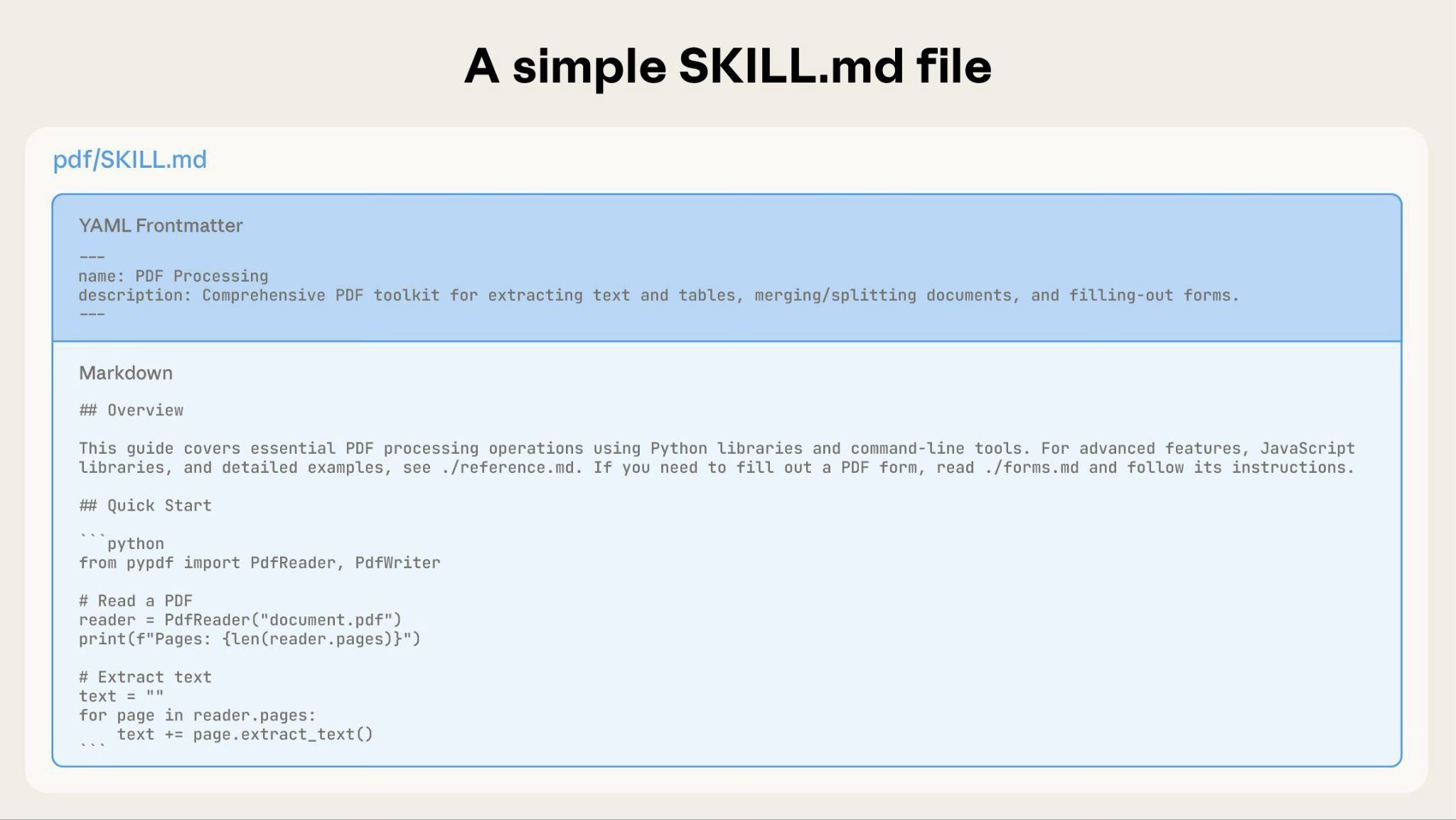
![Simple SKILL.md file showing YAML frontmatter and markdown body](https://platform.claude.com/docs/images/agent-skills-simple-file.png)

As your Skill grows, you can bundle additional content that Claude loads only when needed:
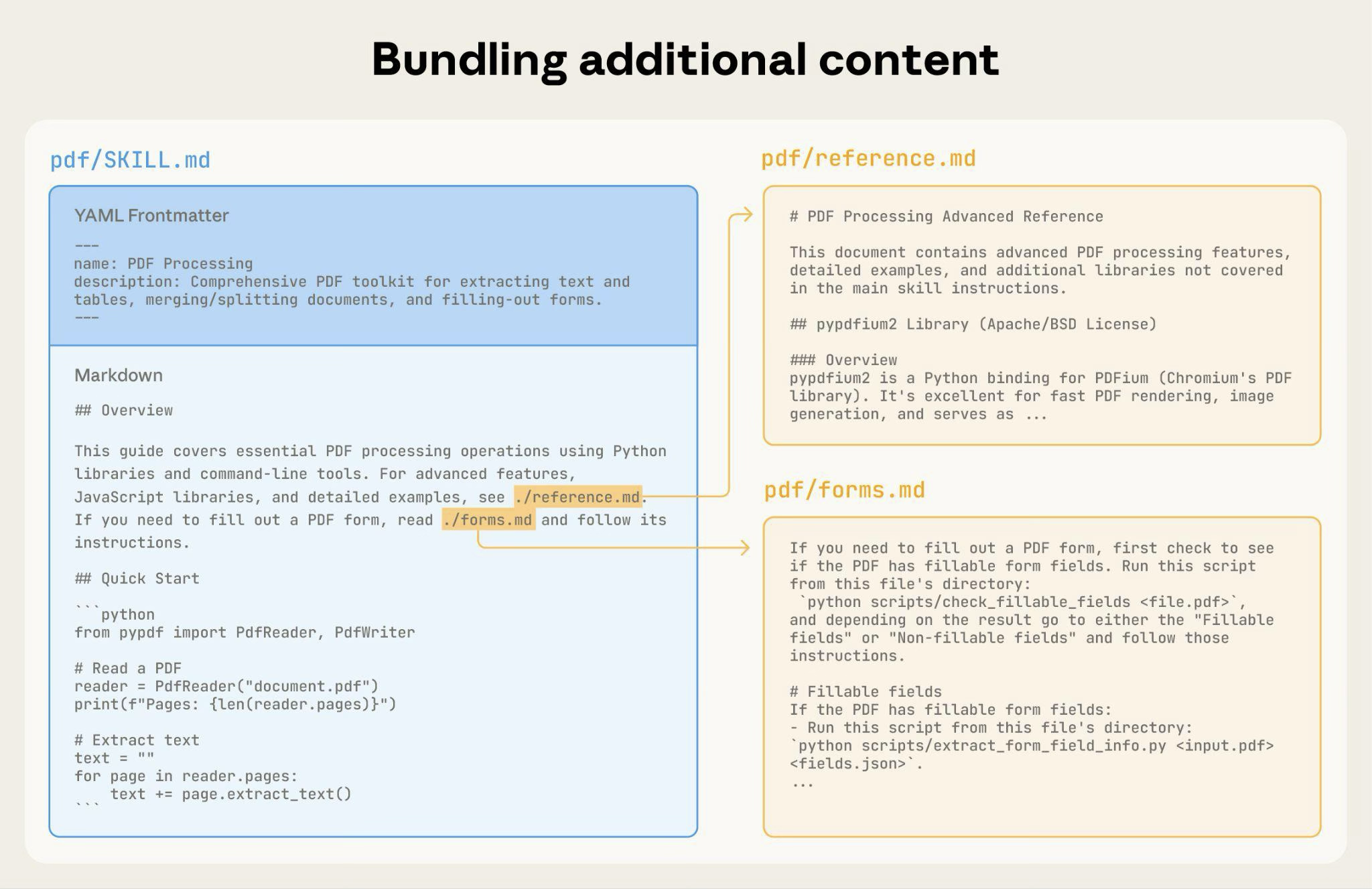
![Bundling additional reference files like reference.md and forms.md.](https://platform.claude.com/docs/images/agent-skills-bundling-content.png)

The complete Skill directory structure might look like this:

#### 

Pattern 1: High-level guide with references

Claude loads FORMS.md, REFERENCE.md, or EXAMPLES.md only when needed.

#### 

Pattern 2: Domain-specific organization

For Skills with multiple domains, organize content by domain to avoid loading irrelevant context. When a user asks about sales metrics, Claude only needs to read sales-related schemas, not finance or marketing data. This keeps token usage low and context focused.

#### 

Pattern 3: Conditional details

Show basic content, link to advanced content:

Claude reads REDLINING.md or OOXML.md only when the user needs those features.

### 

Avoid deeply nested references

Claude may partially read files when they're referenced from other referenced files. When encountering nested references, Claude might use commands like `head -100` to preview content rather than reading entire files, resulting in incomplete information.

**Keep references one level deep from SKILL.md**. All reference files should link directly from SKILL.md to ensure Claude reads complete files when needed.

**Bad example: Too deep**:

**Good example: One level deep**:

### 

Structure longer reference files with table of contents

For reference files longer than 100 lines, include a table of contents at the top. This ensures Claude can see the full scope of available information even when previewing with partial reads.

**Example**:

Claude can then read the complete file or jump to specific sections as needed.

For details on how this filesystem-based architecture enables progressive disclosure, see the [Runtime environment](https://platform.claude.com/docs/en/agents-and-tools/agent-skills/best-practices#runtime-environment) section in the Advanced section below.

## 

Workflows and feedback loops

### 

Use workflows for complex tasks

Break complex operations into clear, sequential steps. For particularly complex workflows, provide a checklist that Claude can copy into its response and check off as it progresses.

**Example 1: Research synthesis workflow** (for Skills without code):

This example shows how workflows apply to analysis tasks that don't require code. The checklist pattern works for any complex, multi-step process.

**Example 2: PDF form filling workflow** (for Skills with code):

Clear steps prevent Claude from skipping critical validation. The checklist helps both Claude and you track progress through multi-step workflows.

**Common pattern**: Run validator → fix errors → repeat

This pattern greatly improves output quality.

**Example 1: Style guide compliance** (for Skills without code):

This shows the validation loop pattern using reference documents instead of scripts. The "validator" is STYLE\_GUIDE.md, and Claude performs the check by reading and comparing.

**Example 2: Document editing process** (for Skills with code):

The validation loop catches errors early.

### 

Avoid time-sensitive information

Don't include information that will become outdated:

**Bad example: Time-sensitive** (will become wrong):

**Good example** (use "old patterns" section):

The old patterns section provides historical context without cluttering the main content.

### 

Use consistent terminology

Choose one term and use it throughout the Skill:

**Good - Consistent**:

-   Always "API endpoint"
-   Always "field"
-   Always "extract"

**Bad - Inconsistent**:

-   Mix "API endpoint", "URL", "API route", "path"
-   Mix "field", "box", "element", "control"
-   Mix "extract", "pull", "get", "retrieve"

Consistency helps Claude understand and follow instructions.

Provide templates for output format. Match the level of strictness to your needs.

**For strict requirements** (like API responses or data formats):

**For flexible guidance** (when adaptation is useful):

For Skills where output quality depends on seeing examples, provide input/output pairs just like in regular prompting:

Examples help Claude understand the desired style and level of detail more clearly than descriptions alone.

### 

Conditional workflow pattern

Guide Claude through decision points:

If workflows become large or complicated with many steps, consider pushing them into separate files and tell Claude to read the appropriate file based on the task at hand.

**Create evaluations BEFORE writing extensive documentation.** This ensures your Skill solves real problems rather than documenting imagined ones.

**Evaluation-driven development:**

1.  **Identify gaps**: Run Claude on representative tasks without a Skill. Document specific failures or missing context
2.  **Create evaluations**: Build three scenarios that test these gaps
3.  **Establish baseline**: Measure Claude's performance without the Skill
4.  **Write minimal instructions**: Create just enough content to address the gaps and pass evaluations
5.  **Iterate**: Execute evaluations, compare against baseline, and refine

This approach ensures you're solving actual problems rather than anticipating requirements that may never materialize.

**Evaluation structure**:

This example demonstrates a data-driven evaluation with a simple testing rubric. We do not currently provide a built-in way to run these evaluations. Users can create their own evaluation system. Evaluations are your source of truth for measuring Skill effectiveness.

### 

Develop Skills iteratively with Claude

The most effective Skill development process involves Claude itself. Work with one instance of Claude ("Claude A") to create a Skill that will be used by other instances ("Claude B"). Claude A helps you design and refine instructions, while Claude B tests them in real tasks. This works because Claude models understand both how to write effective agent instructions and what information agents need.

**Creating a new Skill:**

1.  **Complete a task without a Skill**: Work through a problem with Claude A using normal prompting. As you work, you'll naturally provide context, explain preferences, and share procedural knowledge. Notice what information you repeatedly provide.
    
2.  **Identify the reusable pattern**: After completing the task, identify what context you provided that would be useful for similar future tasks.
    
    **Example**: If you worked through a BigQuery analysis, you might have provided table names, field definitions, filtering rules (like "always exclude test accounts"), and common query patterns.
    
3.  **Ask Claude A to create a Skill**: "Create a Skill that captures this BigQuery analysis pattern we just used. Include the table schemas, naming conventions, and the rule about filtering test accounts."
    
    Claude models understand the Skill format and structure natively. You don't need special system prompts or a "writing skills" skill to get Claude to help create Skills. Simply ask Claude to create a Skill and it will generate properly structured SKILL.md content with appropriate frontmatter and body content.
    
4.  **Review for conciseness**: Check that Claude A hasn't added unnecessary explanations. Ask: "Remove the explanation about what win rate means - Claude already knows that."
    
5.  **Improve information architecture**: Ask Claude A to organize the content more effectively. For example: "Organize this so the table schema is in a separate reference file. We might add more tables later."
    
6.  **Test on similar tasks**: Use the Skill with Claude B (a fresh instance with the Skill loaded) on related use cases. Observe whether Claude B finds the right information, applies rules correctly, and handles the task successfully.
    
7.  **Iterate based on observation**: If Claude B struggles or misses something, return to Claude A with specifics: "When Claude used this Skill, it forgot to filter by date for Q4. Should we add a section about date filtering patterns?"
    

**Iterating on existing Skills:**

The same hierarchical pattern continues when improving Skills. You alternate between:

-   **Working with Claude A** (the expert who helps refine the Skill)
-   **Testing with Claude B** (the agent using the Skill to perform real work)
-   **Observing Claude B's behavior** and bringing insights back to Claude A

1.  **Use the Skill in real workflows**: Give Claude B (with the Skill loaded) actual tasks, not test scenarios
    
2.  **Observe Claude B's behavior**: Note where it struggles, succeeds, or makes unexpected choices
    
    **Example observation**: "When I asked Claude B for a regional sales report, it wrote the query but forgot to filter out test accounts, even though the Skill mentions this rule."
    
3.  **Return to Claude A for improvements**: Share the current SKILL.md and describe what you observed. Ask: "I noticed Claude B forgot to filter test accounts when I asked for a regional report. The Skill mentions filtering, but maybe it's not prominent enough?"
    
4.  **Review Claude A's suggestions**: Claude A might suggest reorganizing to make rules more prominent, using stronger language like "MUST filter" instead of "always filter", or restructuring the workflow section.
    
5.  **Apply and test changes**: Update the Skill with Claude A's refinements, then test again with Claude B on similar requests
    
6.  **Repeat based on usage**: Continue this observe-refine-test cycle as you encounter new scenarios. Each iteration improves the Skill based on real agent behavior, not assumptions.
    

**Gathering team feedback:**

1.  Share Skills with teammates and observe their usage
2.  Ask: Does the Skill activate when expected? Are instructions clear? What's missing?
3.  Incorporate feedback to address blind spots in your own usage patterns

**Why this approach works**: Claude A understands agent needs, you provide domain expertise, Claude B reveals gaps through real usage, and iterative refinement improves Skills based on observed behavior rather than assumptions.

### 

Observe how Claude navigates Skills

As you iterate on Skills, pay attention to how Claude actually uses them in practice. Watch for:

-   **Unexpected exploration paths**: Does Claude read files in an order you didn't anticipate? This might indicate your structure isn't as intuitive as you thought
-   **Missed connections**: Does Claude fail to follow references to important files? Your links might need to be more explicit or prominent
-   **Overreliance on certain sections**: If Claude repeatedly reads the same file, consider whether that content should be in the main SKILL.md instead
-   **Ignored content**: If Claude never accesses a bundled file, it might be unnecessary or poorly signaled in the main instructions

Iterate based on these observations rather than assumptions. The 'name' and 'description' in your Skill's metadata are particularly critical. Claude uses these when deciding whether to trigger the Skill in response to the current task. Make sure they clearly describe what the Skill does and when it should be used.

### 

Avoid Windows-style paths

Always use forward slashes in file paths, even on Windows:

-   ✓ **Good**: `scripts/helper.py`, `reference/guide.md`
-   ✗ **Avoid**: `scripts\helper.py`, `reference\guide.md`

Unix-style paths work across all platforms, while Windows-style paths cause errors on Unix systems.

### 

Avoid offering too many options

Don't present multiple approaches unless necessary:

## 

Advanced: Skills with executable code

The sections below focus on Skills that include executable scripts. If your Skill uses only markdown instructions, skip to [Checklist for effective Skills](https://platform.claude.com/docs/en/agents-and-tools/agent-skills/best-practices#checklist-for-effective-skills).

When writing scripts for Skills, handle error conditions rather than punting to Claude.

**Good example: Handle errors explicitly**:

**Bad example: Punt to Claude**:

Configuration parameters should also be justified and documented to avoid "voodoo constants" (Ousterhout's law). If you don't know the right value, how will Claude determine it?

**Good example: Self-documenting**:

**Bad example: Magic numbers**:

Even if Claude could write a script, pre-made scripts offer advantages:

**Benefits of utility scripts**:

-   More reliable than generated code
-   Save tokens (no need to include code in context)
-   Save time (no code generation required)
-   Ensure consistency across uses
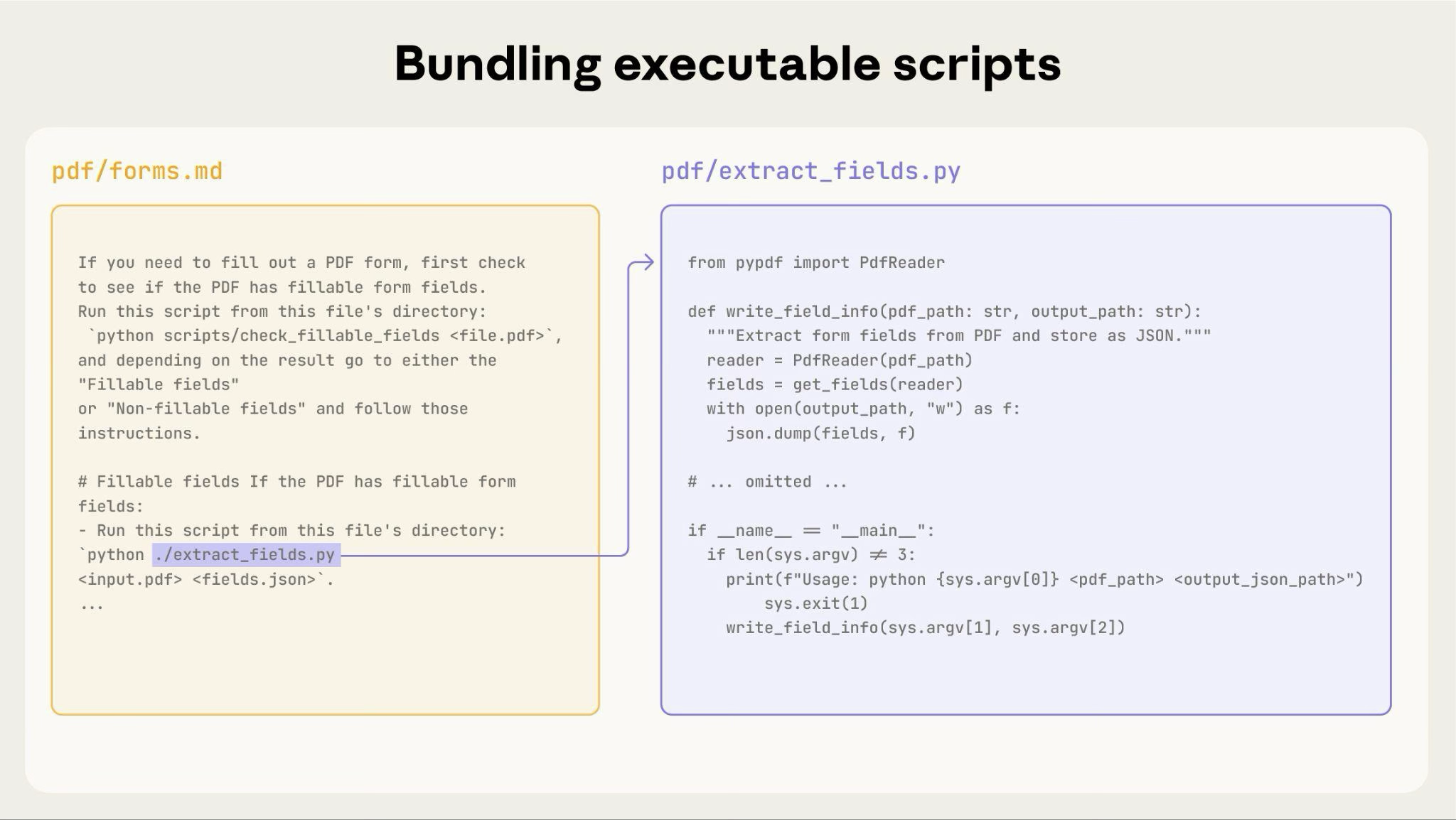
![Bundling executable scripts alongside instruction files](https://platform.claude.com/docs/images/agent-skills-executable-scripts.png)

The diagram above shows how executable scripts work alongside instruction files. The instruction file (forms.md) references the script, and Claude can execute it without loading its contents into context.

**Important distinction**: Make clear in your instructions whether Claude should:

-   **Execute the script** (most common): "Run `analyze_form.py` to extract fields"
-   **Read it as reference** (for complex logic): "See `analyze_form.py` for the field extraction algorithm"

For most utility scripts, execution is preferred because it's more reliable and efficient. See the [Runtime environment](https://platform.claude.com/docs/en/agents-and-tools/agent-skills/best-practices#runtime-environment) section below for details on how script execution works.

**Example**:

When inputs can be rendered as images, have Claude analyze them:

In this example, you'd need to write the `pdf_to_images.py` script.

Claude's vision capabilities help understand layouts and structures.

When Claude performs complex, open-ended tasks, it can make mistakes. The "plan-validate-execute" pattern catches errors early by having Claude first create a plan in a structured format, then validate that plan with a script before executing it.

**Example**: Imagine asking Claude to update 50 form fields in a PDF based on a spreadsheet. Without validation, Claude might reference non-existent fields, create conflicting values, miss required fields, or apply updates incorrectly.

**Solution**: Use the workflow pattern shown above (PDF form filling), but add an intermediate `changes.json` file that gets validated before applying changes. The workflow becomes: analyze → **create plan file** → **validate plan** → execute → verify.

**Why this pattern works:**

-   **Catches errors early**: Validation finds problems before changes are applied
-   **Machine-verifiable**: Scripts provide objective verification
-   **Reversible planning**: Claude can iterate on the plan without touching originals
-   **Clear debugging**: Error messages point to specific problems

**When to use**: Batch operations, destructive changes, complex validation rules, high-stakes operations.

**Implementation tip**: Make validation scripts verbose with specific error messages like "Field 'signature\_date' not found. Available fields: customer\_name, order\_total, signature\_date\_signed" to help Claude fix issues.

Skills run in the code execution environment with platform-specific limitations:

-   **claude.ai**: Can install packages from npm and PyPI and pull from GitHub repositories
-   **Anthropic API**: Has no network access and no runtime package installation

List required packages in your SKILL.md and verify they're available in the [code execution tool documentation](https://platform.claude.com/docs/en/agents-and-tools/tool-use/code-execution-tool).

Skills run in a code execution environment with filesystem access, bash commands, and code execution capabilities. For the conceptual explanation of this architecture, see [The Skills architecture](https://platform.claude.com/docs/en/agents-and-tools/agent-skills/overview#the-skills-architecture) in the overview.

**How this affects your authoring:**

**How Claude accesses Skills:**

1.  **Metadata pre-loaded**: At startup, the name and description from all Skills' YAML frontmatter are loaded into the system prompt
2.  **Files read on-demand**: Claude uses bash Read tools to access SKILL.md and other files from the filesystem when needed
3.  **Scripts executed efficiently**: Utility scripts can be executed via bash without loading their full contents into context. Only the script's output consumes tokens
4.  **No context penalty for large files**: Reference files, data, or documentation don't consume context tokens until actually read

-   **File paths matter**: Claude navigates your skill directory like a filesystem. Use forward slashes (`reference/guide.md`), not backslashes
-   **Name files descriptively**: Use names that indicate content: `form_validation_rules.md`, not `doc2.md`
-   **Organize for discovery**: Structure directories by domain or feature
    -   Good: `reference/finance.md`, `reference/sales.md`
    -   Bad: `docs/file1.md`, `docs/file2.md`
-   **Bundle comprehensive resources**: Include complete API docs, extensive examples, large datasets; no context penalty until accessed
-   **Prefer scripts for deterministic operations**: Write `validate_form.py` rather than asking Claude to generate validation code
-   **Make execution intent clear**:
    -   "Run `analyze_form.py` to extract fields" (execute)
    -   "See `analyze_form.py` for the extraction algorithm" (read as reference)
-   **Test file access patterns**: Verify Claude can navigate your directory structure by testing with real requests

**Example:**

When the user asks about revenue, Claude reads SKILL.md, sees the reference to `reference/finance.md`, and invokes bash to read just that file. The sales.md and product.md files remain on the filesystem, consuming zero context tokens until needed. This filesystem-based model is what enables progressive disclosure. Claude can navigate and selectively load exactly what each task requires.

For complete details on the technical architecture, see [How Skills work](https://platform.claude.com/docs/en/agents-and-tools/agent-skills/overview#how-skills-work) in the Skills overview.

If your Skill uses MCP (Model Context Protocol) tools, always use fully qualified tool names to avoid "tool not found" errors.

**Format**: `ServerName:tool_name`

**Example**:

Where:

-   `BigQuery` and `GitHub` are MCP server names
-   `bigquery_schema` and `create_issue` are the tool names within those servers

Without the server prefix, Claude may fail to locate the tool, especially when multiple MCP servers are available.

Don't assume packages are available:

### 

YAML frontmatter requirements

The SKILL.md frontmatter requires `name` and `description` fields with specific validation rules:

-   `name`: Maximum 64 characters, lowercase letters/numbers/hyphens only, no XML tags, no reserved words
-   `description`: Maximum 1024 characters, non-empty, no XML tags

See the [Skills overview](https://platform.claude.com/docs/en/agents-and-tools/agent-skills/overview#skill-structure) for complete structure details.

Keep SKILL.md body under 500 lines for optimal performance. If your content exceeds this, split it into separate files using the progressive disclosure patterns described earlier. For architectural details, see the [Skills overview](https://platform.claude.com/docs/en/agents-and-tools/agent-skills/overview#how-skills-work).

## 

Checklist for effective Skills

Before sharing a Skill, verify:

-   Description is specific and includes key terms
-   Description includes both what the Skill does and when to use it
-   SKILL.md body is under 500 lines
-   Additional details are in separate files (if needed)
-   No time-sensitive information (or in "old patterns" section)
-   Consistent terminology throughout
-   Examples are concrete, not abstract
-   File references are one level deep
-   Progressive disclosure used appropriately
-   Workflows have clear steps

-   Scripts solve problems rather than punt to Claude
-   Error handling is explicit and helpful
-   No "voodoo constants" (all values justified)
-   Required packages listed in instructions and verified as available
-   Scripts have clear documentation
-   No Windows-style paths (all forward slashes)
-   Validation/verification steps for critical operations
-   Feedback loops included for quality-critical tasks

-   At least three evaluations created
-   Tested with Haiku, Sonnet, and Opus
-   Tested with real usage scenarios
-   Team feedback incorporated (if applicable)


---
## Other/usage-cost-api.md

::: {#9610be80 .cell .markdown id="9610be80"}
# Usage & Cost Admin API Cookbook {#usage--cost-admin-api-cookbook}

**A practical guide to programmatically accessing your Claude API usage
and cost data**
:::

::: {#69b800fc .cell .markdown id="69b800fc"}
### What You Can Do

**Usage Tracking:**

- Monitor token consumption (uncached input, output, cache
  creation/reads)
- Track usage across models, workspaces, and API keys
- Analyze cache efficiency and server tool usage

**Cost Analysis:**

- Retrieve detailed cost breakdowns by service type
- Monitor spending trends across workspaces
- Generate reports for finance and chargeback scenarios

**Common Use Cases:**

- **Usage Monitoring**: Track consumption patterns and optimize costs
- **Cost Attribution**: Allocate expenses across teams/projects by
  workspace
- **Cache Analysis**: Measure and improve cache efficiency
- **Financial Reporting**: Generate executive summaries and budget
  reports

### API Overview

Two main endpoints:

1.  **Messages Usage API**: Token-level usage data with flexible
    grouping
2.  **Cost API**: Financial data in USD with service breakdowns

### Prerequisites & Security {#prerequisites--security}

- **Admin API Key**: Get from [Claude
  Console](https://console.anthropic.com/settings/admin-keys) (format:
  `sk-ant-admin...`)
- **Security**: Store keys in environment variables, rotate regularly,
  never commit to version control
:::

::: {#edd50a16 .cell .code colab="{\"base_uri\":\"https://localhost:8080/\"}" id="edd50a16" outputId="68f38db3-48ee-429f-cd6e-2d2ae74e009a"}
``` python
import os
from datetime import datetime, time, timedelta
from typing import Any

import requests


class AnthropicAdminAPI:
    """Secure wrapper for Anthropic Admin API endpoints."""

    def __init__(self, api_key: str | None = None):
        self.api_key = api_key or os.getenv("ANTHROPIC_ADMIN_API_KEY")
        if not self.api_key:
            raise ValueError(
                "Admin API key required. Set ANTHROPIC_ADMIN_API_KEY environment variable."
            )

        if not self.api_key.startswith("sk-ant-admin"):
            raise ValueError("Invalid Admin API key format.")

        self.base_url = "https://api.anthropic.com/v1/organizations"
        self.headers = {
            "anthropic-version": "2023-06-01",
            "x-api-key": self.api_key,
            "Content-Type": "application/json",
        }

    def _make_request(self, endpoint: str, params: dict[str, Any]) -> dict[str, Any]:
        """Make authenticated request with basic error handling."""
        url = f"{self.base_url}/{endpoint}"

        try:
            response = requests.get(url, headers=self.headers, params=params, timeout=30)
            response.raise_for_status()
            return response.json()
        except requests.exceptions.HTTPError as e:
            if response.status_code == 401:
                raise ValueError("Invalid API key or insufficient permissions") from e
            elif response.status_code == 429:
                raise requests.exceptions.RequestException(
                    "Rate limit exceeded - try again later"
                ) from e
            else:
                raise requests.exceptions.RequestException(f"API error: {e}") from e


# Test connection
def test_connection():
    try:
        client = AnthropicAdminAPI()

        # Simple test query - snap to start of day to align with bucket boundaries
        params = {
            "starting_at": (
                datetime.combine(datetime.utcnow(), time.min) - timedelta(days=1)
            ).strftime("%Y-%m-%dT%H:%M:%SZ"),
            "ending_at": datetime.combine(datetime.utcnow(), time.min).strftime(
                "%Y-%m-%dT%H:%M:%SZ"
            ),
            "bucket_width": "1d",
            "limit": 1,
        }

        client._make_request("usage_report/messages", params)
        print("✅ Connection successful!")
        return client

    except Exception as e:
        print(f"❌ Connection failed: {e}")
        return None


client = test_connection()
```
:::

::: {#781a0721 .cell .markdown id="781a0721"}
## Basic Usage & Cost Tracking {#basic-usage--cost-tracking}

### Understanding Usage Data

The Messages Usage API provides token consumption in **time buckets** -
fixed intervals containing aggregated usage.

**Key Metrics:**

- **uncached_input_tokens**: New input tokens (prompts, system messages)
- **output_tokens**: Claude\'s responses
- **cache_creation**: Tokens cached for reuse
- **cache_read_input_tokens**: Previously cached tokens reused

### Basic Usage Query
:::

:::: {#f9b26143 .cell .code execution_count="12" colab="{\"base_uri\":\"https://localhost:8080/\"}" id="f9b26143" outputId="c60b91c0-084d-4629-eddd-cf0fb941e042"}
``` python
def get_daily_usage(client, days_back=7):
    """Get usage data for the last N days."""
    end_time = datetime.combine(datetime.utcnow(), time.min)
    start_time = end_time - timedelta(days=days_back)

    params = {
        "starting_at": start_time.strftime("%Y-%m-%dT%H:%M:%SZ"),
        "ending_at": end_time.strftime("%Y-%m-%dT%H:%M:%SZ"),
        "bucket_width": "1d",
        "limit": days_back,
    }

    return client._make_request("usage_report/messages", params)


def analyze_usage_data(response):
    """Process and display usage data."""
    if not response or not response.get("data"):
        print("No usage data found.")
        return

    total_uncached_input = total_output = total_cache_creation = 0
    total_cache_reads = total_web_searches = 0
    daily_data = []

    for bucket in response["data"]:
        date = bucket["starting_at"][:10]

        # Sum all results in bucket
        bucket_uncached = bucket_output = bucket_cache_creation = 0
        bucket_cache_reads = bucket_web_searches = 0

        for result in bucket["results"]:
            bucket_uncached += result.get("uncached_input_tokens", 0)
            bucket_output += result.get("output_tokens", 0)

            cache_creation = result.get("cache_creation", {})
            bucket_cache_creation += cache_creation.get(
                "ephemeral_1h_input_tokens", 0
            ) + cache_creation.get("ephemeral_5m_input_tokens", 0)
            bucket_cache_reads += result.get("cache_read_input_tokens", 0)

            server_tools = result.get("server_tool_use", {})
            bucket_web_searches += server_tools.get("web_search_requests", 0)

        daily_data.append(
            {
                "date": date,
                "uncached_input_tokens": bucket_uncached,
                "output_tokens": bucket_output,
                "cache_creation": bucket_cache_creation,
                "cache_reads": bucket_cache_reads,
                "web_searches": bucket_web_searches,
                "total_tokens": bucket_uncached + bucket_output,
            }
        )

        # Add to totals
        total_uncached_input += bucket_uncached
        total_output += bucket_output
        total_cache_creation += bucket_cache_creation
        total_cache_reads += bucket_cache_reads
        total_web_searches += bucket_web_searches

    # Calculate cache efficiency
    total_input_tokens = total_uncached_input + total_cache_creation + total_cache_reads
    cache_efficiency = (
        (total_cache_reads / total_input_tokens * 100) if total_input_tokens > 0 else 0
    )

    # Display summary
    print("📊 Usage Summary:")
    print(f"Uncached input tokens: {total_uncached_input:,}")
    print(f"Output tokens: {total_output:,}")
    print(f"Cache creation: {total_cache_creation:,}")
    print(f"Cache reads: {total_cache_reads:,}")
    print(f"Cache efficiency: {cache_efficiency:.1f}%")
    print(f"Web searches: {total_web_searches:,}")

    return daily_data


# Example usage
if client:
    usage_response = get_daily_usage(client, days_back=7)
    daily_usage = analyze_usage_data(usage_response)
```

::: {.output .stream .stdout}
    📊 Usage Summary:
    Uncached input tokens: 267,751
    Output tokens: 2,848,746
    Cache creation: 0
    Cache reads: 0
    Cache efficiency: 0.0%
    Web searches: 0
:::
::::

::: {#e3164089 .cell .markdown id="e3164089"}
## Basic Cost Tracking

Note: Priority Tier costs use a different billing model and will never
appear in the cost endpoint. You can track Priority Tier usage in the
usage endpoint, but not costs.
:::

:::: {#SP4zefdtF0ft .cell .code execution_count="13" colab="{\"base_uri\":\"https://localhost:8080/\"}" id="SP4zefdtF0ft" outputId="a1daa8d0-f36f-474b-9967-6fe00a0efe52"}
``` python
def get_daily_costs(client, days_back=7):
    """Get cost data for the last N days."""
    end_time = datetime.combine(datetime.utcnow(), time.min)
    start_time = end_time - timedelta(days=days_back)

    params = {
        "starting_at": start_time.strftime("%Y-%m-%dT%H:%M:%SZ"),
        "ending_at": end_time.strftime("%Y-%m-%dT%H:%M:%SZ"),
        "bucket_width": "1d",  # Only 1d supported for cost API
        "limit": min(days_back, 31),  # Max 31 days per request
    }

    return client._make_request("cost_report", params)


def analyze_cost_data(response):
    """Process and display cost data."""
    if not response or not response.get("data"):
        print("No cost data found.")
        return

    total_cost_minor_units = 0
    daily_costs = []

    for bucket in response["data"]:
        date = bucket["starting_at"][:10]

        # Sum all costs in this bucket
        bucket_cost = 0
        for result in bucket["results"]:
            # Convert string amounts to float if needed
            amount = result.get("amount", 0)
            if isinstance(amount, str):
                try:
                    amount = float(amount)
                except (ValueError, TypeError):
                    amount = 0
            bucket_cost += amount

        daily_costs.append(
            {
                "date": date,
                "cost_minor_units": bucket_cost,
                "cost_usd": bucket_cost / 100,  # Convert to dollars
            }
        )

        total_cost_minor_units += bucket_cost

    total_cost_usd = total_cost_minor_units / 100

    print("💰 Cost Summary:")
    print(f"Total cost: ${total_cost_usd:.4f}")
    print(f"Average daily cost: ${total_cost_usd / len(daily_costs):.4f}")

    return daily_costs


# Example usage
if client:
    cost_response = get_daily_costs(client, days_back=7)
    daily_costs = analyze_cost_data(cost_response)
```

::: {.output .stream .stdout}
    💰 Cost Summary:
    Total cost: $83.7574
    Average daily cost: $11.9653
:::
::::

::: {#6ce76fc4 .cell .markdown id="6ce76fc4"}
## Grouping, Filtering & Pagination {#grouping-filtering--pagination}

### Time Granularity Options

**Usage API** supports three granularities:

- `1m` (1 minute): High-resolution analysis, max 1440 buckets per
  request
- `1h` (1 hour): Medium-resolution, max 168 buckets per request\
- `1d` (1 day): Daily analysis, max 31 buckets per request

**Cost API** supports:

- `1d` (1 day): Only option available, max 31 buckets per request

### Grouping and Filtering
:::

:::: {#87f1a7ac .cell .code execution_count="14" colab="{\"base_uri\":\"https://localhost:8080/\"}" id="87f1a7ac" outputId="3266318c-8af4-4647-9360-b133ffa82452"}
``` python
def get_usage_by_model(client, days_back=7):
    """Get usage data grouped by model, handling pagination automatically."""
    end_time = datetime.combine(datetime.utcnow(), time.min)
    start_time = end_time - timedelta(days=days_back)

    params = {
        "starting_at": start_time.strftime("%Y-%m-%dT%H:%M:%SZ"),
        "ending_at": end_time.strftime("%Y-%m-%dT%H:%M:%SZ"),
        "group_by[]": ["model"],
        "bucket_width": "1d",
    }

    # Aggregate across all pages of data
    model_usage = {}
    page_count = 0
    max_pages = 10  # Reasonable limit to avoid infinite loops

    try:
        next_page = None

        while page_count < max_pages:
            current_params = params.copy()
            if next_page:
                current_params["page"] = next_page

            response = client._make_request("usage_report/messages", current_params)
            page_count += 1

            # Process this page's data
            for bucket in response.get("data", []):
                for result in bucket.get("results", []):
                    model = result.get("model", "Unknown")
                    uncached = result.get("uncached_input_tokens", 0)
                    output = result.get("output_tokens", 0)
                    cache_creation = result.get("cache_creation", {})
                    cache_creation_tokens = cache_creation.get(
                        "ephemeral_1h_input_tokens", 0
                    ) + cache_creation.get("ephemeral_5m_input_tokens", 0)
                    cache_reads = result.get("cache_read_input_tokens", 0)
                    tokens = uncached + output + cache_creation_tokens + cache_reads

                    if model not in model_usage:
                        model_usage[model] = 0
                    model_usage[model] += tokens

            # Check if there's more data
            if not response.get("has_more", False):
                break

            next_page = response.get("next_page")
            if not next_page:
                break

    except Exception as e:
        print(f"❌ Error retrieving usage data: {e}")
        return {}

    # Display results
    print("📊 Usage by Model:")
    if not model_usage:
        print(f"  No usage data found in the last {days_back} days")
        print("  💡 Try increasing the time range or check if you have recent API usage")
    else:
        for model, tokens in sorted(model_usage.items(), key=lambda x: x[1], reverse=True):
            print(f"  {model}: {tokens:,} tokens")

    return model_usage


def filter_usage_example(client):
    """Example of filtering usage data."""
    params = {
        "starting_at": (datetime.combine(datetime.utcnow(), time.min) - timedelta(days=7)).strftime(
            "%Y-%m-%dT%H:%M:%SZ"
        ),
        "ending_at": datetime.combine(datetime.utcnow(), time.min).strftime("%Y-%m-%dT%H:%M:%SZ"),
        "models[]": ["claude-sonnet-4-5"],  # Filter to specific model
        "service_tiers[]": ["standard"],  # Filter to standard tier
        "bucket_width": "1d",
    }

    response = client._make_request("usage_report/messages", params)
    print(f"Found {len(response.get('data', []))} days of filtered usage data")
    return response


# Example usage
if client:
    model_usage = get_usage_by_model(client, days_back=14)
    filtered_usage = filter_usage_example(client)
```

::: {.output .stream .stdout}
    📊 Usage by Model:
      claude-3-5-haiku-20241022: 995,781 tokens
      claude-sonnet-4-5: 861,880 tokens
      claude-opus-4-1: 394,646 tokens
      claude-sonnet-4-5: 356,766 tokens
      claude-opus-4-20250514: 308,223 tokens
      claude-opus-4-1: 199,201 tokens
    Found 7 days of filtered usage data
:::
::::

::: {#487bc11d .cell .markdown id="487bc11d"}
### Pagination for Large Datasets
:::

:::: {#d7cc5437 .cell .code execution_count="18" colab="{\"base_uri\":\"https://localhost:8080/\"}" id="d7cc5437" outputId="e7875fb4-09ae-44d2-f5fc-12a4cbdcce5a"}
``` python
def fetch_all_usage_data(client, params, max_pages=10):
    """Fetch all paginated usage data."""
    all_data = []
    page_count = 0
    next_page = None

    print("📥 Fetching paginated data...")

    while page_count < max_pages:
        current_params = params.copy()
        if next_page:
            current_params["page"] = next_page

        try:
            response = client._make_request("usage_report/messages", current_params)

            if not response or not response.get("data"):
                break

            page_data = response["data"]
            all_data.extend(page_data)
            page_count += 1

            print(f"  Page {page_count}: {len(page_data)} time buckets")

            if not response.get("has_more", False):
                print(f"✅ Complete: Retrieved all data in {page_count} pages")
                break

            next_page = response.get("next_page")
            if not next_page:
                break

        except Exception as e:
            print(f"❌ Error on page {page_count + 1}: {e}")
            break

    print(f"📊 Total retrieved: {len(all_data)} time buckets")
    return all_data


def large_dataset_example(client, days_back=3):
    """Example of handling a large dataset with pagination."""
    # Use recent time range to ensure we have data
    start_time = datetime.combine(datetime.utcnow(), time.min) - timedelta(days=days_back)
    end_time = datetime.combine(datetime.utcnow(), time.min)

    params = {
        "starting_at": start_time.strftime("%Y-%m-%dT%H:%M:%SZ"),
        "ending_at": end_time.strftime("%Y-%m-%dT%H:%M:%SZ"),
        "bucket_width": "1h",  # Hourly data for more buckets
        "group_by[]": ["model"],
        "limit": 24,  # One day per page
    }

    all_buckets = fetch_all_usage_data(client, params, max_pages=5)

    # Process the large dataset
    if all_buckets:
        total_tokens = sum(
            sum(
                result.get("uncached_input_tokens", 0) + result.get("output_tokens", 0)
                for result in bucket["results"]
            )
            for bucket in all_buckets
        )
        print(f"📈 Total tokens across all data: {total_tokens:,}")

    return all_buckets


# Example usage - use shorter time range to find recent data
if client:
    large_dataset = large_dataset_example(client, days_back=3)
```

::: {.output .stream .stdout}
    📥 Fetching paginated data...
      Page 1: 24 time buckets
      Page 2: 24 time buckets
      Page 3: 24 time buckets
    ✅ Complete: Retrieved all data in 3 pages
    📊 Total retrieved: 72 time buckets
    📈 Total tokens across all data: 1,336,287
:::
::::

::: {#d55bbb55 .cell .markdown id="d55bbb55"}
## Simple Data Export

### CSV Export for External Analysis
:::

:::: {#f365296a .cell .code execution_count="16" colab="{\"base_uri\":\"https://localhost:8080/\"}" id="f365296a" outputId="87b4a733-6f90-4b8d-a109-7a23281b2a4d"}
``` python
import csv


def export_usage_to_csv(client, output_file="usage_data.csv", days_back=30):
    """Export usage data to CSV for external analysis."""

    end_time = datetime.combine(datetime.utcnow(), time.min)
    start_time = end_time - timedelta(days=days_back)

    params = {
        "starting_at": start_time.strftime("%Y-%m-%dT%H:%M:%SZ"),
        "ending_at": end_time.strftime("%Y-%m-%dT%H:%M:%SZ"),
        "group_by[]": ["model", "service_tier", "workspace_id"],
        "bucket_width": "1d",
    }

    try:
        # Collect all data across pages
        rows = []
        page_count = 0
        max_pages = 20  # Allow more pages for export
        next_page = None

        while page_count < max_pages:
            current_params = params.copy()
            if next_page:
                current_params["page"] = next_page

            response = client._make_request("usage_report/messages", current_params)
            page_count += 1

            # Process this page's data
            for bucket in response.get("data", []):
                date = bucket["starting_at"][:10]
                for result in bucket["results"]:
                    rows.append(
                        {
                            "date": date,
                            "model": result.get("model", ""),
                            "service_tier": result.get("service_tier", ""),
                            "workspace_id": result.get("workspace_id", ""),
                            "uncached_input_tokens": result.get("uncached_input_tokens", 0),
                            "output_tokens": result.get("output_tokens", 0),
                            "cache_creation_tokens": (
                                result.get("cache_creation", {}).get("ephemeral_1h_input_tokens", 0)
                                + result.get("cache_creation", {}).get(
                                    "ephemeral_5m_input_tokens", 0
                                )
                            ),
                            "cache_read_tokens": result.get("cache_read_input_tokens", 0),
                            "web_search_requests": result.get("server_tool_use", {}).get(
                                "web_search_requests", 0
                            ),
                        }
                    )

            # Check if there's more data
            if not response.get("has_more", False):
                break

            next_page = response.get("next_page")
            if not next_page:
                break

        # Write CSV
        if rows:
            with open(output_file, "w", newline="") as csvfile:
                writer = csv.DictWriter(csvfile, fieldnames=rows[0].keys())
                writer.writeheader()
                writer.writerows(rows)

            print(f"✅ Exported {len(rows)} rows to {output_file}")
        else:
            print(f"No usage data to export for the last {days_back} days")
            print("💡 Try increasing days_back or check if you have recent API usage")

    except Exception as e:
        print(f"❌ Export failed: {e}")


def export_costs_to_csv(client, output_file="cost_data.csv", days_back=30):
    """Export cost data to CSV."""

    end_time = datetime.combine(datetime.utcnow(), time.min)
    start_time = end_time - timedelta(days=days_back)

    params = {
        "starting_at": start_time.strftime("%Y-%m-%dT%H:%M:%SZ"),
        "ending_at": end_time.strftime("%Y-%m-%dT%H:%M:%SZ"),
        "group_by[]": ["workspace_id", "description"],
    }

    try:
        # Collect all data across pages
        rows = []
        page_count = 0
        max_pages = 20
        next_page = None

        while page_count < max_pages:
            current_params = params.copy()
            if next_page:
                current_params["page"] = next_page

            response = client._make_request("cost_report", current_params)
            page_count += 1

            # Process this page's data
            for bucket in response.get("data", []):
                date = bucket["starting_at"][:10]
                for result in bucket["results"]:
                    # Handle both string and numeric amounts
                    amount = result.get("amount", 0)
                    if isinstance(amount, str):
                        try:
                            amount = float(amount)
                        except (ValueError, TypeError):
                            amount = 0

                    rows.append(
                        {
                            "date": date,
                            "workspace_id": result.get(
                                "workspace_id", ""
                            ),  # null for default workspace
                            "description": result.get("description", ""),
                            "currency": result.get("currency", "USD"),
                            "amount_usd": amount / 100,
                        }
                    )

            # Check if there's more data
            if not response.get("has_more", False):
                break

            next_page = response.get("next_page")
            if not next_page:
                break

        if rows:
            with open(output_file, "w", newline="") as csvfile:
                writer = csv.DictWriter(csvfile, fieldnames=rows[0].keys())
                writer.writeheader()
                writer.writerows(rows)

            print(f"✅ Exported {len(rows)} cost records to {output_file}")
        else:
            print(f"No cost data to export for the last {days_back} days")
            print("💡 Try increasing days_back or check if you have recent API usage")

    except Exception as e:
        print(f"❌ Cost export failed: {e}")


# Example usage
if client:
    export_usage_to_csv(client, "my_usage_data.csv", days_back=14)
    export_costs_to_csv(client, "my_cost_data.csv", days_back=14)
```

::: {.output .stream .stdout}
    ✅ Exported 36 rows to my_usage_data.csv
    ✅ Exported 72 cost records to my_cost_data.csv
:::
::::

::: {#5327a1c5 .cell .markdown id="5327a1c5"}
## Wrapping Up

This cookbook covers the essential patterns for working with the Usage &
Cost Admin API:

- **Basic queries** for usage and cost data
- **Grouping and filtering** for detailed analysis\
- **Pagination** for large datasets
- **Cost description parsing** for categorization
- **Common gotchas** to avoid issues
- **Simple CSV export** for external tools

### Next Steps

- Check the [official API documentation](https://docs.claude.com) for
  the latest field definitions
- Test your integration with small date ranges first
- Consider data retention needs for your use case
- Monitor for new API features that may enhance your analysis

### Important Notes

- Field names and available options may evolve as the API matures
- Always handle unknown values gracefully in production code
- The API is designed for historical analysis, not real-time monitoring
- Priority Tier costs use a different billing model and don\'t appear in
  cost endpoints

Happy analyzing! 📊
:::


---
## Other/using-llm-api.md

# Using the Wolfram Alpha LLM API as a Tool with Claude

In this recipe, we\'ll show you how to integrate the Wolfram Alpha LLM
API as a tool for Claude to use. Claude will be able to send queries to
the Wolfram Alpha API and receive computed responses, which it can then
use to provide answers to user questions.
:::

::: {.cell .markdown}
## Step 1: Set up the environment

First, let\'s install the required libraries and set up the Claude API
client. We also will need to set our APP ID for using WolframAlpha. You
can sign up and create a new App ID for this project for free
[here](https://developer.wolframalpha.com/access).
:::

::: {.cell .code}
``` python
import json
import urllib.parse

import requests
from anthropic import Anthropic

client = Anthropic()

# Replace 'YOUR_APP_ID' with your actual Wolfram Alpha AppID
WOLFRAM_APP_ID = "YOUR_APP_ID"
MODEL_NAME = "claude-haiku-4-5"
```
:::

::: {.cell .markdown}
## Step 2: Define the Wolfram Alpha LLM API tool

We\'ll define a tool that allows Claude to send queries to the Wolfram
Alpha LLM API and receive the computed response.
:::

::: {.cell .code}
``` python
import urllib.parse

import requests


def wolfram_alpha_query(query):
    # URL-encode the query
    encoded_query = urllib.parse.quote(query)

    # Make a request to the Wolfram Alpha LLM API
    url = (
        f"https://www.wolframalpha.com/api/v1/llm-api?input={encoded_query}&appid={WOLFRAM_APP_ID}"
    )
    response = requests.get(url, timeout=30)

    if response.status_code == 200:
        return response.text
    else:
        return f"Error: {response.status_code}: {response.text}"


tools = [
    {
        "name": "wolfram_alpha",
        "description": "A tool that allows querying the Wolfram Alpha knowledge base. Useful for mathematical calculations, scientific data, and general knowledge questions.",
        "input_schema": {
            "type": "object",
            "properties": {
                "search_query": {
                    "type": "string",
                    "description": "The query to send to the Wolfram Alpha API.",
                }
            },
            "required": ["query"],
        },
    }
]
```
:::

::: {.cell .markdown}
In this code, we define a wolfram_alpha_query function that takes a
query as input, URL-encodes it, and sends a request to the Wolfram Alpha
LLM API using the provided AppID. The function returns the computed
response from the API if the request is successful, or an error message
if there\'s an issue.

We then define the wolfram_alpha tool with an input schema that expects
a single query property of type string.
:::

::: {.cell .markdown}
## Step 3: Interact with Claude

Now, let\'s see how Claude can interact with the Wolfram Alpha tool to
answer user questions.
:::

::: {.cell .code execution_count="27"}
``` python
def process_tool_call(tool_name, tool_input):
    if tool_name == "wolfram_alpha":
        return wolfram_alpha_query(tool_input["search_query"])


def chat_with_claude(user_message):
    print(f"\n{'=' * 50}\nUser Message: {user_message}\n{'=' * 50}")
    prompt = f"""Here is a question: {user_message}. Please use the Wolfram Alpha tool to answer it. Do not reflect on the quality of the returned search results in your response."""

    message = client.beta.tools.messages.create(
        model=MODEL_NAME,
        max_tokens=4096,
        tools=tools,
        messages=[{"role": "user", "content": prompt}],
    )

    print("\nInitial Response:")
    print(f"Stop Reason: {message.stop_reason}")
    print(f"Content: {message.content}")

    if message.stop_reason == "tool_use":
        tool_use = next(block for block in message.content if block.type == "tool_use")
        tool_name = tool_use.name
        tool_input = tool_use.input

        print(f"\nTool Used: {tool_name}")
        print("Tool Input:")
        print(json.dumps(tool_input, indent=2))

        tool_result = process_tool_call(tool_name, tool_input)

        print("\nTool Result:")
        print(str(json.dumps(tool_result, indent=2)))

        response = client.beta.tools.messages.create(
            model=MODEL_NAME,
            max_tokens=2000,
            tools=tools,
            messages=[
                {"role": "user", "content": prompt},
                {"role": "assistant", "content": message.content},
                {
                    "role": "user",
                    "content": [
                        {
                            "type": "tool_result",
                            "tool_use_id": tool_use.id,
                            "content": str(tool_result),
                        }
                    ],
                },
            ],
        )

        print("\nResponse:")
        print(f"Stop Reason: {response.stop_reason}")
        print(f"Content: {response.content}")
    else:
        response = message

    final_response = None
    for block in response.content:
        if hasattr(block, "text"):
            final_response = block.text
            break

    print(f"\nFinal Response: {final_response}")

    return final_response
```
:::

::: {.cell .markdown}
## Step 4: Try it out!

Let\'s try giving Claude a few example questions now that it has access
to Wolfram Alpha.
:::

:::: {.cell .code execution_count="28"}
``` python
# Example usage
print(chat_with_claude("What are the 5 largest countries in the world by population?"))
print(chat_with_claude("Calculate the square root of 1764."))
print(chat_with_claude("What is the distance between Earth and Mars?"))
```

::: {.output .stream .stdout}

    ==================================================
    User Message: What are the 5 largest countries in the world by population?
    ==================================================

    Initial Response:
    Stop Reason: tool_use
    Content: [ContentBlock(text='<thinking>\nThe query "What are the 5 largest countries in the world by population?" can be answered well using the wolfram_alpha tool, which has knowledge about countries and populations. The search_query parameter is the only required parameter, and the query text provided by the user can be used directly as the search_query value without any additional information needed. \n</thinking>', type='text'), ContentBlockToolUse(id='toolu_01VCQ5xAzMNdyXYsepbSAJLY', input={'search_query': 'What are the 5 largest countries in the world by population?'}, name='wolfram_alpha', type='tool_use')]

    Tool Used: wolfram_alpha
    Tool Input:
    {
      "search_query": "What are the 5 largest countries in the world by population?"
    }

    Tool Result:
    "Query:\n\"What are the 5 largest countries in the world by population?\"\n\nInput interpretation:\n5 largest countries | by population\nin all countries, dependencies, and territories\n\nResult:\n1 | India | 1.43 billion people | \n2 | China | 1.43 billion people | \n3 | United States | 340 million people | \n4 | Indonesia | 278 million people | \n5 | Pakistan | 241 million people | \n\nNames:\n | full name | full native name\nIndia | Republic of India | Bh\u0101rat\u012bya Ga\u1e47ar\u0101jya\nChina | People's Republic of China | Zhonghua Renmin Gongheguo\nUnited States | United States of America | \nIndonesia | Republic of Indonesia | Republik Indonesia\nPakistan | Islamic Republic of Pakistan | Isl\u0101m\u012b Jumh\u016br\u012b-ye P\u0101kist\u0101n\n\nFlags:\nimage: https://www6b3.wolframalpha.com/Calculate/MSP/MSP2444241bhh00e1he97fd0000383004g53722f9bd?MSPStoreType=image/png&s=14\nWolfram Language code: Dataset[EntityValue[{Entity[\"Country\", \"India\"], Entity[\"Country\", \"China\"], Entity[\"Country\", \"UnitedStates\"], Entity[\"Country\", \"Indonesia\"], Entity[\"Country\", \"Pakistan\"]}, EntityProperty[\"Country\", \"Flag\"], \"EntityAssociation\"]]\n\nLocations:\nimage: https://www6b3.wolframalpha.com/Calculate/MSP/MSP2445241bhh00e1he97fd00002684a23aaahea47d?MSPStoreType=image/png&s=14\n\nGeographic properties:\ntotal area | total | 9.736 million mi^2 (square miles)\n | largest | 3.719 million mi^2 (square miles) (world rank: 3rd) (United States)\n | smallest | 307374 mi^2 (square miles) (world rank: 36th) (Pakistan)\nland area | total | 9.283 million mi^2 (square miles)\n | largest | 3.601 million mi^2 (square miles) (world rank: 2nd) (China)\n | smallest | 297637 mi^2 (square miles) (world rank: 36th) (Pakistan)\ncontinent | all | Asia | North America\n\nDemographics:\npopulation | total | 3.71 billion people\n | highest | 1.43 billion people (world rank: 1st) (2023 estimate) (India)\n | lowest | 241 million people (world rank: 5th) (2023 estimate) (Pakistan)\npopulation density | average | 390 people/mi^2\n | median | 385 people/mi^2\n | highest | 1226 people/mi^2 (world rank: 31st) (2021 estimate) (India)\n | lowest | 95.4 people/mi^2 (world rank: 183rd) (2021 estimate) (United States)\npopulation growth | average | 0.455 %/yr\n | median | 0.631 %/yr\n | highest | 1.83 %/yr (world rank: 56th) (2021 estimate) (Pakistan)\n | lowest | 0.004 %/yr (world rank: 188th) (2021 estimate) (China)\nlife expectancy | mean | 73 yr\n | median | 71.9 yr\n | highest | 78.9 yr (world rank: 66th) (2020 estimate) (United States)\n | lowest | 67.4 yr (world rank: 186th) (2020 estimate) (Pakistan)\nmedian age | median | 29.4 yr\n | highest | 37.9 yr (world rank: 70th) (2021 estimate) (China)\n | lowest | 20.2 yr (world rank: 191st) (2021 estimate) (Pakistan)\n\nCapital cities:\nIndia | New Delhi, Delhi\nChina | Beijing\nUnited States | Washington, District of Columbia\nIndonesia | Jakarta\nPakistan | Islamabad, F.C.T.\n\nEconomic properties:\nGDP | total | $48.51 trillion per year\n | median | $3.385 trillion per year\n | highest | $25.46 trillion per year (world rank: 1st) (2022 estimates) (United States)\n | lowest | $376.5 billion per year (world rank: 43rd) (2022 estimates) (Pakistan)\nGDP at parity | total | $73.22 trillion per year\n | median | $11.87 trillion per year\n | highest | $30.33 trillion per year (world rank: 1st) (2022 estimates) (China)\n | lowest | $1.518 trillion per year (world rank: 22nd) (2022 estimates) (Pakistan)\nreal GDP | total | $41.72 trillion per year\n | median | $2.955 trillion per year\n | highest | $20.95 trillion per year (world rank: 1st) (2022 estimates) (United States)\n | lowest | $362.2 billion per year (world rank: 37th) (2022 estimates) (Pakistan)\nGDP per capita | average | $13203 per year per person\n | median | $4788 per year per person\n | highest | $76399 per year per person (world rank: 12th) (2022 estimates) (United States)\n | lowest | $1597 per year per person (world rank: 197th) (2022 estimates) (Pakistan)\nGDP real growth | mean | +4.71% per year\n | median | +5.309% per year\n | highest | +7.003% per year (world rank: 38th) (2022 estimates) (India)\n | lowest | +2.062% per year (world rank: 157th) (2022 estimates) (United States)\nGini index | median | 0.371\n | highest | 0.398 (world rank: 102nd) (2018, 2020, 2021, and 2022 estimates) (United States)\n | lowest | 0.296 (world rank: 24th) (2018, 2020, 2021, and 2022 estimates) (Pakistan)\n | distribution | \nconsumer price inflation | mean | +8.15% per year\n | median | +6.7% per year\n | highest | +19.87% per year (world rank: 21st) (2022 estimates) (Pakistan)\n | lowest | +1.97% per year (world rank: 175th) (2022 estimates) (China)\n\nEmployment:\nunemployment rate | mean | 5.16%\n | median | 4.89%\n | highest | 7.33% (world rank: 74th highest) (2022 estimates) (India)\n | lowest | 3.55% (world rank: 162nd highest) (2022 estimates) (Indonesia)\nlong-term unemployment rate | mean | 1.57%\n | median | 1.42%\n | highest | 3.18% (world rank: 44th highest) (2010 and 2014 estimates) (India)\n | lowest | 0.127% (world rank: 111th highest) (2010 and 2014 estimates) (Pakistan)\nlabor force | highest | 781.8 million people (58.24% of population) (world rank: 1st) (2022 estimates) (China)\n | lowest | 78.91 million people (35.22% of population) (world rank: 6th) (2022 estimates) (Pakistan)\n | distribution | \neconomically active children | median | 3.7%\n | highest | 13% (world rank: 50th) (2010, 2011, and 2012 estimates) (Pakistan)\n | lowest | 1.7% (world rank: 90th) (2010, 2011, and 2012 estimates) (India)\n\nUN Human Development Index:\n | India | China | United States | Indonesia | Pakistan\nhealth | 0.743 (world rank: 131st) | 0.861 (world rank: 58th) | 0.911 (world rank: 36th) | 0.755 (world rank: 126th) | 0.713 (world rank: 137th)\neducation | 0.535 (world rank: 131st) | 0.631 (world rank: 108th) | 0.9 (world rank: 8th) | 0.622 (world rank: 112th) | 0.395 (world rank: 169th)\nliving standards | 0.61 (world rank: 126th) | 0.739 (world rank: 82nd) | 0.948 (world rank: 11th) | 0.696 (world rank: 103rd) | 0.592 (world rank: 133rd)\ntotal | 0.624 (world rank: 131st) | 0.738 (world rank: 90th) | 0.92 (world rank: 10th) | 0.689 (world rank: 113th) | 0.55 (world rank: 147th)\n(2015 estimate)\n\nWikipedia page hits history:\nimage: https://www6b3.wolframalpha.com/Calculate/MSP/MSP2448241bhh00e1he97fd00006a6g1ee3gbhghh18?MSPStoreType=image/png&s=14\n\nWolfram|Alpha website result for \"What are the 5 largest countries in the world by population?\":\nhttps://www6b3.wolframalpha.com/input?i=What+are+the+5+largest+countries+in+the+world+by+population%3F"

    Response:
    Stop Reason: end_turn
    Content: [ContentBlock(text='According to Wolfram Alpha, the 5 largest countries in the world by population are:\n\n1. India - 1.43 billion people\n2. China - 1.43 billion people \n3. United States - 340 million people\n4. Indonesia - 278 million people\n5. Pakistan - 241 million people\n\nTogether these 5 countries account for about 3.71 billion people. India and China have the largest populations, each with around 1.43 billion people. The United States has the 3rd largest population at 340 million. Indonesia and Pakistan round out the top 5 with 278 million and 241 million people respectively.', type='text')]

    Final Response: According to Wolfram Alpha, the 5 largest countries in the world by population are:

    1. India - 1.43 billion people
    2. China - 1.43 billion people 
    3. United States - 340 million people
    4. Indonesia - 278 million people
    5. Pakistan - 241 million people

    Together these 5 countries account for about 3.71 billion people. India and China have the largest populations, each with around 1.43 billion people. The United States has the 3rd largest population at 340 million. Indonesia and Pakistan round out the top 5 with 278 million and 241 million people respectively.
    According to Wolfram Alpha, the 5 largest countries in the world by population are:

    1. India - 1.43 billion people
    2. China - 1.43 billion people 
    3. United States - 340 million people
    4. Indonesia - 278 million people
    5. Pakistan - 241 million people

    Together these 5 countries account for about 3.71 billion people. India and China have the largest populations, each with around 1.43 billion people. The United States has the 3rd largest population at 340 million. Indonesia and Pakistan round out the top 5 with 278 million and 241 million people respectively.

    ==================================================
    User Message: Calculate the square root of 1764.
    ==================================================

    Initial Response:
    Stop Reason: tool_use
    Content: [ContentBlock(text='<thinking>\nThe relevant tool to use for this query is wolfram_alpha, since the question is asking for a mathematical calculation. The wolfram_alpha tool takes a single required parameter:\nsearch_query: The query to send to the Wolfram Alpha API\n\nThe user\'s request directly provides the search query needed, which is "square root of 1764". So all the required parameters are available to make the API call.\n</thinking>', type='text'), ContentBlockToolUse(id='toolu_011CkyJcwahqGaL513uFhdYJ', input={'search_query': 'square root of 1764'}, name='wolfram_alpha', type='tool_use')]

    Tool Used: wolfram_alpha
    Tool Input:
    {
      "search_query": "square root of 1764"
    }

    Tool Result:
    "Query:\n\"square root of 1764\"\n\nInput:\nsqrt(1764)\n\nResult:\n42\n\nNumber line:\nimage: https://www6b3.wolframalpha.com/Calculate/MSP/MSP191312396298479fhh7a0000212h885f5h3d6gig?MSPStoreType=image/png&s=4\nWolfram Language code: NumberLinePlot[42]\n\nNumber name:\nforty-two\n\nAll 2nd roots of 1764:\n42 e^0 = 42 (real, principal root)\n\n42 e^(i \u03c0) = -42 (real root)\n\nPlot of all roots in the complex plane:\nimage: https://www6b3.wolframalpha.com/Calculate/MSP/MSP191412396298479fhh7a0000282bg11dc3e822ca?MSPStoreType=image/png&s=4\n\nWolfram|Alpha website result for \"square root of 1764\":\nhttps://www6b3.wolframalpha.com/input?i=square+root+of+1764"

    Response:
    Stop Reason: end_turn
    Content: [ContentBlock(text='So the square root of 1764 is 42.', type='text')]

    Final Response: So the square root of 1764 is 42.
    So the square root of 1764 is 42.

    ==================================================
    User Message: What is the distance between Earth and Mars?
    ==================================================

    Initial Response:
    Stop Reason: tool_use
    Content: [ContentBlock(text='<thinking>\nThe wolfram_alpha tool is the relevant tool for answering this question about the distance between Earth and Mars, as it can provide scientific data like astronomical distances.\nThe search_query parameter can be filled in directly with the user\'s question "What is the distance between Earth and Mars?". No additional information is needed to fill the parameter.\nSince the search_query parameter is provided, the function can be called to answer the question.\n</thinking>', type='text'), ContentBlockToolUse(id='toolu_01PotM7Z1ooJ1PdK8QK1WgEu', input={'search_query': 'What is the distance between Earth and Mars?'}, name='wolfram_alpha', type='tool_use')]

    Tool Used: wolfram_alpha
    Tool Input:
    {
      "search_query": "What is the distance between Earth and Mars?"
    }

    Tool Result:
    "Query:\n\"What is the distance between Earth and Mars?\"\n\nInput interpretation:\nMars | distance from Earth\n\nCurrent result:\n2.078 au (astronomical units)\n\nHistory:\nimage: https://www6b3.wolframalpha.com/Calculate/MSP/MSP101d6f8bccif83bf9800004259ii3cbcih744h?MSPStoreType=image/png&s=19\n\nUnit conversions:\n3.109\u00d710^8 km (kilometers)\n\n3.109\u00d710^11 meters\n\n193.2 million miles\n\nComparisons as distance:\n \u2248 ( 0.024 \u2248 1/42 ) \u00d7 smallest distance from the Sun to the heliosheath ( 79 to 100 au )\n\n \u2248 2.1 \u00d7 mean Earth-Sun distance ( 1.0000010178 au )\n\nCorresponding quantities:\nLight travel time t in vacuum from t = x/c:\n | 17 minutes\n\nLight travel time t in an optical fiber t = 1.48x/c:\n | 26 minutes\n\nSolar radiation pressure from P = L_\u2609/(c4\u03c0r^2):\n | 1.1 \u03bcPa (micropascals)\n | (assuming solar constant \u2248 1.36 kW/m^2)\n\nOrbital properties:\ncurrent distance from Earth | 2.078 au\n17.29 light minutes\naverage distance from Earth | 1.7 au\n14.1 light minutes\ncurrent distance from Sun | 1.39 au\n11.56 light minutes\nlargest distance from Sun | 154.863553 million mi\n1.66599116 au\nsmallest distance from Sun | 128.402967 million mi\n1.38133346 au\norbital period | 1.8808476 a\n\nWolfram|Alpha website result for \"What is the distance between Earth and Mars?\":\nhttps://www6b3.wolframalpha.com/input?i=What+is+the+distance+between+Earth+and+Mars%3F"

    Response:
    Stop Reason: end_turn
    Content: [ContentBlock(text='The current distance between Earth and Mars is 2.078 astronomical units (au), which is equivalent to 3.109×10^8 km or 193.2 million miles. \n\nThe average distance between the two planets is about 1.7 au or 140 million miles.\n\nMars orbits the Sun at an average distance of 1.52 au, ranging from a minimum of 1.38 au to a maximum of 1.67 au. Its orbital period is 1.88 Earth years.\n\nAt the current Earth-Mars distance of 2.078 au, light takes about 17 minutes to travel between the two planets. The solar radiation pressure at that distance is approximately 1.1 μPa (micropascals).', type='text')]

    Final Response: The current distance between Earth and Mars is 2.078 astronomical units (au), which is equivalent to 3.109×10^8 km or 193.2 million miles. 

    The average distance between the two planets is about 1.7 au or 140 million miles.

    Mars orbits the Sun at an average distance of 1.52 au, ranging from a minimum of 1.38 au to a maximum of 1.67 au. Its orbital period is 1.88 Earth years.

    At the current Earth-Mars distance of 2.078 au, light takes about 17 minutes to travel between the two planets. The solar radiation pressure at that distance is approximately 1.1 μPa (micropascals).
    The current distance between Earth and Mars is 2.078 astronomical units (au), which is equivalent to 3.109×10^8 km or 193.2 million miles. 

    The average distance between the two planets is about 1.7 au or 140 million miles.

    Mars orbits the Sun at an average distance of 1.52 au, ranging from a minimum of 1.38 au to a maximum of 1.67 au. Its orbital period is 1.88 Earth years.

    At the current Earth-Mars distance of 2.078 au, light takes about 17 minutes to travel between the two planets. The solar radiation pressure at that distance is approximately 1.1 μPa (micropascals).
:::
::::


---
## Test-Evaluate/test-and-evaluate-define-success.md

# Define your success criteria


Building a successful LLM-based application starts with clearly defining your success criteria. How will you know when your application is good enough to publish?

Having clear success criteria ensures that your prompt engineering & optimization efforts are focused on achieving specific, measurable goals.

------------------------------------------------------------------------

## 

Building strong criteria

Good success criteria are:

- **Specific**: Clearly define what you want to achieve. Instead of "good performance," specify "accurate sentiment classification."

- **Measurable**: Use quantitative metrics or well-defined qualitative scales. Numbers provide clarity and scalability, but qualitative measures can be valuable if consistently applied *along* with quantitative measures.

  - Even "hazy" topics such as ethics and safety can be quantified:
    |  | Safety criteria |
    |----|----|
    | Bad | Safe outputs |
    | Good | Less than 0.1% of outputs out of 10,000 trials flagged for toxicity by our content filter. |

  ### Example metrics and measurement methods

- **Achievable**: Base your targets on industry benchmarks, prior experiments, AI research, or expert knowledge. Your success metrics should not be unrealistic to current frontier model capabilities.

- **Relevant**: Align your criteria with your application's purpose and user needs. Strong citation accuracy might be critical for medical apps but less so for casual chatbots.

### Example task fidelity criteria for sentiment analysis

------------------------------------------------------------------------

## 

Common success criteria to consider

Here are some criteria that might be important for your use case. This list is non-exhaustive.

### Task fidelity

### Consistency

### Relevance and coherence

### Tone and style

### Privacy preservation

### Context utilization

### Latency

### Price

Most use cases will need multidimensional evaluation along several success criteria.

### Example multidimensional criteria for sentiment analysis

------------------------------------------------------------------------

## 

Next steps


Brainstorm criteria

Brainstorm success criteria for your use case with Claude on claude.ai.  
  
**Tip**: Drop this page into the chat as guidance for Claude!

[](/docs/en/build-with-claude/prompt-engineering/be-clear-and-direct)

Design evaluations

Learn to build strong test sets to gauge Claude's performance against your criteria.


---
## api-files.md

# Files API

---

The Files API lets you upload and manage files to use with the Claude API without re-uploading content with each request. This is particularly useful when using the [code execution tool](/docs/en/agents-and-tools/tool-use/code-execution-tool) to provide inputs (e.g. datasets and documents) and then download outputs (e.g. charts). You can also use the Files API to prevent having to continually re-upload frequently used documents and images across multiple API calls. You can [explore the API reference directly](/docs/en/api/files-create), in addition to this guide.

> **Note:** The Files API is in beta. Reach out through the [feedback form](https://forms.gle/tisHyierGwgN4DUE9) to share your experience with the Files API.

> **Note:** This feature is **not** eligible for [Zero Data Retention (ZDR)](/docs/en/build-with-claude/api-and-data-retention). Data is retained according to the feature's standard retention policy.

## Supported models

Referencing a `file_id` in a Messages request is supported in all models that support the given file type. For example, [images](/docs/en/build-with-claude/vision) are supported in all Claude 3+ models, [PDFs](/docs/en/build-with-claude/pdf-support) in all Claude 3.5+ models, and [various other file types](/docs/en/agents-and-tools/tool-use/code-execution-tool#supported-file-types) for the code execution tool in Claude Haiku 4.5 plus all Claude 3.7+ models.

The Files API is currently not supported on Amazon Bedrock or Google Vertex AI.

## How the Files API works

The Files API provides a simple create-once, use-many-times approach for working with files:

- **Upload files** to Anthropic's secure storage and receive a unique `file_id`
- **Download files** that are created from skills or the code execution tool
- **Reference files** in [Messages](/docs/en/api/messages/create) requests using the `file_id` instead of re-uploading content
- **Manage your files** with list, retrieve, and delete operations

## How to use the Files API

> **Note:** To use the Files API, you'll need to include the beta feature header: `anthropic-beta: files-api-2025-04-14`.

### Uploading a file

Upload a file to be referenced in future API calls:

**Shell:**

```bash
curl -X POST https://api.anthropic.com/v1/files \
  -H "x-api-key: $ANTHROPIC_API_KEY" \
  -H "anthropic-version: 2023-06-01" \
  -H "anthropic-beta: files-api-2025-04-14" \
  -F "file=@/path/to/document.pdf"
```

**Python:**

```python
uploaded = client.beta.files.upload(
    file=("document.pdf", open("/path/to/document.pdf", "rb"), "application/pdf"),
)
```

**TypeScript:**

```typescript
const uploaded = await anthropic.beta.files.upload({
  file: await toFile(
    fs.createReadStream("/path/to/document.pdf"),
    undefined,
    { type: "application/pdf" },
  ),
  betas: ["files-api-2025-04-14"],
});
```

**Go:**

```go
f, err := os.Open("/path/to/document.pdf")
if err != nil {
    log.Fatal(err)
}
defer f.Close()

response, err := client.Beta.Files.Upload(context.Background(),
    anthropic.BetaFileUploadParams{
        File:  anthropic.File(f, "document.pdf", "application/pdf"),
        Betas: []anthropic.AnthropicBeta{anthropic.AnthropicBetaFilesAPI2025_04_14},
    })
if err != nil {
    log.Fatal(err)
}

fmt.Println(response.ID)
```

The response from uploading a file will include:

```json
{
  "id": "file_011CNha8iCJcU1wXNR6q4V8w",
  "type": "file",
  "filename": "document.pdf",
  "mime_type": "application/pdf",
  "size_bytes": 1024000,
  "created_at": "2025-01-01T00:00:00Z",
  "downloadable": false
}
```

### Using a file in messages

Once uploaded, reference the file using its `file_id`:

**Shell:**

```bash
curl -X POST https://api.anthropic.com/v1/messages \
  -H "x-api-key: $ANTHROPIC_API_KEY" \
  -H "anthropic-version: 2023-06-01" \
  -H "anthropic-beta: files-api-2025-04-14" \
  -H "content-type: application/json" \
  -d @- <<EOF
{
  "model": "claude-opus-4-6",
  "max_tokens": 1024,
  "messages": [
    {
      "role": "user",
      "content": [
        {
          "type": "text",
          "text": "Please summarize this document for me."
        },
        {
          "type": "document",
          "source": {
            "type": "file",
            "file_id": "$FILE_ID"
          }
        }
      ]
    }
  ]
}
EOF
```

**Python:**

```python
response = client.beta.messages.create(
    model="claude-opus-4-6",
    max_tokens=1024,
    messages=[
        {
            "role": "user",
            "content": [
                {"type": "text", "text": "Please summarize this document for me."},
                {
                    "type": "document",
                    "source": {
                        "type": "file",
                        "file_id": file_id,
                    },
                },
            ],
        }
    ],
    betas=["files-api-2025-04-14"],
)
print(response)
```

**TypeScript:**

```typescript
const response = await anthropic.beta.messages.create({
  model: "claude-opus-4-6",
  max_tokens: 1024,
  messages: [
    {
      role: "user",
      content: [
        {
          type: "text",
          text: "Please summarize this document for me.",
        },
        {
          type: "document",
          source: {
            type: "file",
            file_id: uploaded.id,
          },
        },
      ],
    },
  ],
  betas: ["files-api-2025-04-14"],
});

console.log(response);
```

### File types and content blocks

The Files API supports different file types that correspond to different content block types:

| File Type | MIME Type | Content Block Type | Use Case |
| :--- | :--- | :--- | :--- |
| PDF | `application/pdf` | `document` | Text analysis, document processing |
| Plain text | `text/plain` | `document` | Text analysis, processing |
| Images | `image/jpeg`, `image/png`, `image/gif`, `image/webp` | `image` | Image analysis, visual tasks |
| [Datasets, others](/docs/en/agents-and-tools/tool-use/code-execution-tool#supported-file-types) | Varies | `container_upload` | Analyze data, create visualizations |

### Working with other file formats

For file types that are not supported as `document` blocks (.csv, .txt, .md, .docx, .xlsx), convert the files to plain text, and include the content directly in your message:

**Python:**

```python
import pandas as pd
import anthropic

client = anthropic.Anthropic()

# Example: Reading a CSV file
df = pd.read_csv("data.csv")
csv_content = df.to_string()

# Send as plain text in the message
response = client.messages.create(
    model="claude-opus-4-6",
    max_tokens=1024,
    messages=[
        {
            "role": "user",
            "content": [
                {
                    "type": "text",
                    "text": f"Here's the CSV data:\n\n{csv_content}\n\nPlease analyze this data.",
                }
            ],
        }
    ],
)

print(response.content[0].text)
```

**TypeScript:**

```typescript
import Anthropic from "@anthropic-ai/sdk";
import fs from "fs/promises";

const anthropic = new Anthropic();

async function analyzeDocument() {
  // Example: Reading a text file
  const textContent = await fs.readFile("document.txt", "utf-8");

  // Send as plain text in the message
  const response = await anthropic.messages.create({
    model: "claude-opus-4-6",
    max_tokens: 1024,
    messages: [
      {
        role: "user",
        content: [
          {
            type: "text",
            text: `Here's the document content:\n\n${textContent}\n\nPlease summarize this document.`
          }
        ]
      }
    ]
  });

  const block = response.content[0];
  if (block.type === "text") {
    console.log(block.text);
  }
}

analyzeDocument();
```

> **Note:** For .docx files containing images, convert them to PDF format first, then use [PDF support](/docs/en/build-with-claude/pdf-support) to take advantage of the built-in image parsing. This allows using citations from the PDF document.

#### Document blocks

For PDFs and text files, use the `document` content block:

```json
{
  "type": "document",
  "source": {
    "type": "file",
    "file_id": "file_011CNha8iCJcU1wXNR6q4V8w"
  },
  "title": "Document Title",
  "context": "Context about the document",
  "citations": { "enabled": true }
}
```

#### Image blocks

For images, use the `image` content block:

```json
{
  "type": "image",
  "source": {
    "type": "file",
    "file_id": "file_011CPMxVD3fHLUhvTqtsQA5w"
  }
}
```

### Managing files

#### List files

Retrieve a list of your uploaded files:

**Shell:**

```bash
curl https://api.anthropic.com/v1/files \
  -H "x-api-key: $ANTHROPIC_API_KEY" \
  -H "anthropic-version: 2023-06-01" \
  -H "anthropic-beta: files-api-2025-04-14"
```

**Python:**

```python
client = anthropic.Anthropic()
files = client.beta.files.list()
```

**TypeScript:**

```typescript
const files = await anthropic.beta.files.list({
  betas: ["files-api-2025-04-14"]
});
```

#### Get file metadata

Retrieve information about a specific file:

**Shell:**

```bash
curl "https://api.anthropic.com/v1/files/$FILE_ID" \
  -H "x-api-key: $ANTHROPIC_API_KEY" \
  -H "anthropic-version: 2023-06-01" \
  -H "anthropic-beta: files-api-2025-04-14"
```

**Python:**

```python
file = client.beta.files.retrieve_metadata(file_id)
```

**TypeScript:**

```typescript
const file = await anthropic.beta.files.retrieveMetadata(uploaded.id, {
  betas: ["files-api-2025-04-14"],
});
```

#### Delete a file

Remove a file from your workspace:

**Shell:**

```bash
curl -X DELETE "https://api.anthropic.com/v1/files/$FILE_ID" \
  -H "x-api-key: $ANTHROPIC_API_KEY" \
  -H "anthropic-version: 2023-06-01" \
  -H "anthropic-beta: files-api-2025-04-14"
```

**Python:**

```python
result = client.beta.files.delete(file_id)
```

**TypeScript:**

```typescript
await anthropic.beta.files.delete(uploaded.id, {
  betas: ["files-api-2025-04-14"],
});
```

### Downloading a file

Download files that have been created by skills or the code execution tool:

**Shell:**

```bash
curl -X GET "https://api.anthropic.com/v1/files/$FILE_ID/content" \
  -H "x-api-key: $ANTHROPIC_API_KEY" \
  -H "anthropic-version: 2023-06-01" \
  -H "anthropic-beta: files-api-2025-04-14" \
  --output downloaded_file.txt
```

**Python:**

```python
file_content = client.beta.files.download(file_id)

# Save to file
file_content.write_to_file("downloaded_file.txt")
```

**TypeScript:**

```typescript
const content = await anthropic.beta.files.download(uploaded.id, {
  betas: ["files-api-2025-04-14"],
});

const bytes = Buffer.from(await content.arrayBuffer());
await fsp.writeFile("downloaded_file.txt", bytes);
```

> **Note:** You can only download files that were created by [skills](/docs/en/build-with-claude/skills-guide) or the [code execution tool](/docs/en/agents-and-tools/tool-use/code-execution-tool). Files that you uploaded cannot be downloaded.

---

## File storage and limits

### Storage limits

- **Maximum file size:** 500 MB per file
- **Total storage:** 500 GB per organization

### File lifecycle

- Files are scoped to the workspace of the API key. Other API keys can use files created by any other API key associated with the same workspace
- Files persist until you delete them
- Deleted files cannot be recovered
- Files are inaccessible via the API shortly after deletion, but they may persist in active `Messages` API calls and associated tool uses
- Files that users delete will be deleted in accordance with Anthropic's [data retention policy](https://privacy.claude.com/en/articles/7996866-how-long-do-you-store-my-organization-s-data).

---

## Data retention

Files uploaded via the Files API are retained until explicitly deleted using the `DELETE /v1/files/{file_id}` endpoint. Files are stored for reuse across multiple API requests.

For ZDR eligibility across all features, see [API and data retention](/docs/en/build-with-claude/api-and-data-retention).

## Error handling

Common errors when using the Files API include:

- **File not found (404):** The specified `file_id` doesn't exist or you don't have access to it
- **Invalid file type (400):** The file type doesn't match the content block type (e.g., using an image file in a document block)
- **Exceeds context window size (400):** The file is larger than the context window size (e.g. using a 500 MB plaintext file in a `/v1/messages` request)
- **Invalid filename (400):** Filename doesn't meet the length requirements (1-255 characters) or contains forbidden characters (`<`, `>`, `:`, `"`, `|`, `?`, `*`, `\`, `/`, or unicode characters 0-31)
- **File too large (413):** File exceeds the 500 MB limit
- **Storage limit exceeded (403):** Your organization has reached the 500 GB storage limit

```json
{
  "type": "error",
  "error": {
    "type": "invalid_request_error",
    "message": "File not found: file_011CNha8iCJcU1wXNR6q4V8w"
  }
}
```

## Usage and billing

File API operations are **free**:
- Uploading files
- Downloading files
- Listing files
- Getting file metadata
- Deleting files

File content used in `Messages` requests are priced as input tokens. You can only download files created by [skills](/docs/en/build-with-claude/skills-guide) or the [code execution tool](/docs/en/agents-and-tools/tool-use/code-execution-tool).

### Rate limits

During the beta period:
- File-related API calls are limited to approximately 100 requests per minute
- [Contact us](mailto:sales@anthropic.com) if you need higher limits for your use case


---
## api-web-search.md

# Web search tool

---

The web search tool gives Claude direct access to real-time web content, allowing it to answer questions with up-to-date information beyond its knowledge cutoff. The response includes citations for sources drawn from search results.

The latest web search tool version (`web_search_20260209`) supports **dynamic filtering** with [Claude Mythos Preview](https://anthropic.com/glasswing), Claude Opus 4.6, and Claude Sonnet 4.6. Claude can write and execute code to filter search results before they reach the context window, keeping only relevant information and discarding the rest. This leads to more accurate responses while reducing token consumption. The previous tool version (`web_search_20250305`) remains available without dynamic filtering.

> **Note:** For [Claude Mythos Preview](https://anthropic.com/glasswing), web search is supported on the Claude API, Microsoft Foundry, and Google Vertex AI. Web search is not available for Mythos Preview on Amazon Bedrock.

For Zero Data Retention eligibility and the `allowed_callers` workaround, see [Server tools](/docs/en/agents-and-tools/tool-use/server-tools#zdr-and-allowed-callers).

For model support, see the [Tool reference](/docs/en/agents-and-tools/tool-use/tool-reference).

## How web search works

When you add the web search tool to your API request:

1. Claude decides when to search based on the prompt.
2. The API executes the searches and provides Claude with the results. This process may repeat multiple times throughout a single request.
3. At the end of its turn, Claude provides a final response with cited sources.

### Dynamic filtering

Web search is a token-intensive task. With basic web search, Claude needs to pull search results into context, fetch full HTML from multiple websites, and reason over all of it before arriving at an answer. Often, much of this content is irrelevant, which can degrade response quality.

With the `web_search_20260209` tool version, Claude can write and execute code to post-process query results. Instead of reasoning over full HTML files, Claude dynamically filters search results before loading them into context, keeping only what's relevant and discarding the rest.

Dynamic filtering is particularly effective for:
- Searching through technical documentation
- Literature review and citation verification
- Technical research
- Response grounding and verification

> **Note:** Dynamic filtering requires the [code execution tool](/docs/en/agents-and-tools/tool-use/code-execution-tool) to be enabled. The improved web search tool is available on the Claude API and Microsoft Azure. On Google Vertex AI, the basic web search tool (without dynamic filtering) is available.

To enable dynamic filtering, use the `web_search_20260209` tool version:

**Shell:**

```bash
curl https://api.anthropic.com/v1/messages \
    --header "x-api-key: $ANTHROPIC_API_KEY" \
    --header "anthropic-version: 2023-06-01" \
    --header "content-type: application/json" \
    --data '{
        "model": "claude-opus-4-6",
        "max_tokens": 4096,
        "messages": [
            {
                "role": "user",
                "content": "Search for the current prices of AAPL and GOOGL, then calculate which has a better P/E ratio."
            }
        ],
        "tools": [{
            "type": "web_search_20260209",
            "name": "web_search"
        }]
    }'
```

**Python:**

```python
import anthropic

client = anthropic.Anthropic()

response = client.messages.create(
    model="claude-opus-4-6",
    max_tokens=4096,
    messages=[
        {
            "role": "user",
            "content": "Search for the current prices of AAPL and GOOGL, then calculate which has a better P/E ratio.",
        }
    ],
    tools=[{"type": "web_search_20260209", "name": "web_search"}],
)
print(response)
```

**TypeScript:**

```typescript
import Anthropic from "@anthropic-ai/sdk";

const anthropic = new Anthropic();

const response = await anthropic.messages.create({
  model: "claude-opus-4-6",
  max_tokens: 4096,
  messages: [
    {
      role: "user",
      content:
        "Search for the current prices of AAPL and GOOGL, then calculate which has a better P/E ratio."
    }
  ],
  tools: [{ type: "web_search_20260209", name: "web_search" }]
});

console.log(response);
```

## How to use web search

> **Note:** Your organization's administrator must enable web search in the [Claude Console](/settings/privacy).

Provide the web search tool in your API request:

**Shell:**

```bash
curl https://api.anthropic.com/v1/messages \
    --header "x-api-key: $ANTHROPIC_API_KEY" \
    --header "anthropic-version: 2023-06-01" \
    --header "content-type: application/json" \
    --data '{
        "model": "claude-opus-4-6",
        "max_tokens": 1024,
        "messages": [
            {
                "role": "user",
                "content": "What is the weather in NYC?"
            }
        ],
        "tools": [{
            "type": "web_search_20250305",
            "name": "web_search",
            "max_uses": 5
        }]
    }'
```

**Python:**

```python
import anthropic

client = anthropic.Anthropic()

response = client.messages.create(
    model="claude-opus-4-6",
    max_tokens=1024,
    messages=[{"role": "user", "content": "What's the weather in NYC?"}],
    tools=[{"type": "web_search_20250305", "name": "web_search", "max_uses": 5}],
)
print(response)
```

**TypeScript:**

```typescript
import Anthropic from "@anthropic-ai/sdk";

const client = new Anthropic();

const response = await client.messages.create({
  model: "claude-opus-4-6",
  max_tokens: 1024,
  messages: [
    {
      role: "user",
      content: "What's the weather in NYC?"
    }
  ],
  tools: [
    {
      type: "web_search_20250305",
      name: "web_search",
      max_uses: 5
    }
  ]
});

console.log(response);
```

### Tool definition

The web search tool supports the following parameters:

```json
{
  "type": "web_search_20250305",
  "name": "web_search",

  // Optional: Limit the number of searches per request
  "max_uses": 5,

  // Optional: Only include results from these domains
  "allowed_domains": ["example.com", "trusteddomain.org"],

  // Optional: Never include results from these domains
  "blocked_domains": ["untrustedsource.com"],

  // Optional: Localize search results
  "user_location": {
    "type": "approximate",
    "city": "San Francisco",
    "region": "California",
    "country": "US",
    "timezone": "America/Los_Angeles"
  }
}
```

#### Max uses

The `max_uses` parameter limits the number of searches performed. If Claude attempts more searches than allowed, the `web_search_tool_result` is an error with the `max_uses_exceeded` error code.

#### Domain filtering

For domain filtering with `allowed_domains` and `blocked_domains`, see [Server tools](/docs/en/agents-and-tools/tool-use/server-tools#domain-filtering).

#### Localization

The `user_location` parameter allows you to localize search results based on a user's location.

- `type`: The type of location (must be `approximate`)
- `city`: The city name
- `region`: The region or state
- `country`: The country
- `timezone`: The [IANA timezone ID](https://en.wikipedia.org/wiki/List_of_tz_database_time_zones).

### Response

Here's an example response structure:

```json
{
  "role": "assistant",
  "content": [
    {
      "type": "text",
      "text": "I'll search for when Claude Shannon was born."
    },
    {
      "type": "server_tool_use",
      "id": "srvtoolu_01WYG3ziw53XMcoyKL4XcZmE",
      "name": "web_search",
      "input": {
        "query": "claude shannon birth date"
      }
    },
    {
      "type": "web_search_tool_result",
      "tool_use_id": "srvtoolu_01WYG3ziw53XMcoyKL4XcZmE",
      "content": [
        {
          "type": "web_search_result",
          "url": "https://en.wikipedia.org/wiki/Claude_Shannon",
          "title": "Claude Shannon - Wikipedia",
          "encrypted_content": "EqgfCioIARgBIiQ3YTAwMjY1Mi1mZjM5LTQ1NGUtODgxNC1kNjNjNTk1ZWI3Y...",
          "page_age": "April 30, 2025"
        }
      ]
    },
    {
      "text": "Based on the search results, ",
      "type": "text"
    },
    {
      "text": "Claude Shannon was born on April 30, 1916, in Petoskey, Michigan",
      "type": "text",
      "citations": [
        {
          "type": "web_search_result_location",
          "url": "https://en.wikipedia.org/wiki/Claude_Shannon",
          "title": "Claude Shannon - Wikipedia",
          "encrypted_index": "Eo8BCioIAhgBIiQyYjQ0OWJmZi1lNm..",
          "cited_text": "Claude Elwood Shannon (April 30, 1916 - February 24, 2001) was an American mathematician, electrical engineer, computer scientist, cryptographer and i..."
        }
      ]
    }
  ],
  "id": "msg_a930390d3a",
  "usage": {
    "input_tokens": 6039,
    "output_tokens": 931,
    "server_tool_use": {
      "web_search_requests": 1
    }
  },
  "stop_reason": "end_turn"
}
```

#### Search results

Search results include:

- `url`: The URL of the source page
- `title`: The title of the source page
- `page_age`: When the site was last updated
- `encrypted_content`: Encrypted content that must be passed back in multi-turn conversations for citations

#### Citations

Citations are always enabled for web search, and each `web_search_result_location` includes:

- `url`: The URL of the cited source
- `title`: The title of the cited source
- `encrypted_index`: A reference that must be passed back for multi-turn conversations.
- `cited_text`: Up to 150 characters of the cited content

The web search citation fields `cited_text`, `title`, and `url` do not count towards input or output token usage.

> **Note:** When displaying API outputs directly to end users, citations must be included to the original source. If you are making modifications to API outputs, including by reprocessing and/or combining them with your own material before displaying them to end users, display citations as appropriate based on consultation with your legal team.

#### Errors

When the web search tool encounters an error (such as hitting rate limits), the Claude API still returns a 200 (success) response. The error is represented within the response body using the following structure:

```json
{
  "type": "web_search_tool_result",
  "tool_use_id": "servertoolu_a93jad",
  "content": {
    "type": "web_search_tool_result_error",
    "error_code": "max_uses_exceeded"
  }
}
```

These are the possible error codes:

- `too_many_requests`: Rate limit exceeded
- `invalid_input`: Invalid search query parameter
- `max_uses_exceeded`: Maximum web search tool uses exceeded
- `query_too_long`: Query exceeds maximum length
- `unavailable`: An internal error occurred

#### `pause_turn` stop reason

For continuing after a `pause_turn` stop reason, see [Server tools](/docs/en/agents-and-tools/tool-use/server-tools#the-server-side-loop-and-pause-turn).

## Prompt caching

For caching tool definitions across turns, see [Tool use with prompt caching](/docs/en/agents-and-tools/tool-use/tool-use-with-prompt-caching).

## Streaming

With streaming enabled, you'll receive search events as part of the stream. There will be a pause while the search executes:

```
event: message_start
data: {"type": "message_start", "message": {"id": "msg_abc123", "type": "message"}}

event: content_block_start
data: {"type": "content_block_start", "index": 0, "content_block": {"type": "text", "text": ""}}

// Claude's decision to search

event: content_block_start
data: {"type": "content_block_start", "index": 1, "content_block": {"type": "server_tool_use", "id": "srvtoolu_xyz789", "name": "web_search"}}

// Search query streamed
event: content_block_delta
data: {"type": "content_block_delta", "index": 1, "delta": {"type": "input_json_delta", "partial_json": "{\"query\":\"latest quantum computing breakthroughs 2025\"}"}}

// Pause while search executes

// Search results streamed
event: content_block_start
data: {"type": "content_block_start", "index": 2, "content_block": {"type": "web_search_tool_result", "tool_use_id": "srvtoolu_xyz789", "content": [{"type": "web_search_result", "title": "Quantum Computing Breakthroughs in 2025", "url": "https://example.com"}]}}

// Claude's response with citations (omitted in this example)
```

## Batch requests

You can include the web search tool in the [Messages Batches API](/docs/en/build-with-claude/batch-processing). Web search tool calls through the Messages Batches API are priced the same as those in regular Messages API requests.

## Usage and pricing

Web search usage is charged in addition to token usage:

```json
"usage": {
  "input_tokens": 105,
  "output_tokens": 6039,
  "cache_read_input_tokens": 7123,
  "cache_creation_input_tokens": 7345,
  "server_tool_use": {
    "web_search_requests": 1
  }
}
```

Web search is available on the Claude API for **$10 per 1,000 searches**, plus standard token costs for search-generated content. Web search results retrieved throughout a conversation are counted as input tokens, in search iterations executed during a single turn and in subsequent conversation turns.

Each web search counts as one use, regardless of the number of results returned. If an error occurs during web search, the web search will not be billed.

## Next steps

- [Server tools](/docs/en/agents-and-tools/tool-use/server-tools): Shared mechanics for Anthropic-executed tools.
- [Tool reference](/docs/en/agents-and-tools/tool-use/tool-reference): Directory of all Anthropic-provided tools.


---
## bash-tool.md

# Bash tool

---

> This feature is eligible for [Zero Data Retention (ZDR)](/docs/en/build-with-claude/api-and-data-retention). When your organization has a ZDR arrangement, data sent through this feature is not stored after the API response is returned.

The bash tool enables Claude to execute shell commands in a persistent bash session, allowing system operations, script execution, and command-line automation. Shell access is a foundational agent capability. On [Terminal-Bench 2.0](https://github.com/terminal-bench/terminal-bench), a benchmark that evaluates real-world terminal tasks using shell-only validation, Claude shows strong performance gains with access to a persistent bash session.

## Overview

The bash tool provides Claude with:
- Persistent bash session that maintains state
- Ability to run any shell command
- Access to environment variables and working directory
- Command chaining and scripting capabilities

For model support, see the [Tool reference](/docs/en/agents-and-tools/tool-use/tool-reference).

## Use cases

- **Development workflows:** Run build commands, tests, and development tools
- **System automation:** Execute scripts, manage files, automate tasks
- **Data processing:** Process files, run analysis scripts, manage datasets
- **Environment setup:** Install packages, configure environments

## Quick start

```bash Shell
curl https://api.anthropic.com/v1/messages \
  -H "content-type: application/json" \
  -H "x-api-key: $ANTHROPIC_API_KEY" \
  -H "anthropic-version: 2023-06-01" \
  -d '{
    "model": "claude-opus-4-6",
    "max_tokens": 1024,
    "tools": [
      {
        "type": "bash_20250124",
        "name": "bash"
      }
    ],
    "messages": [
      {
        "role": "user",
        "content": "List all Python files in the current directory."
      }
    ]
  }'
```

```python Python
import anthropic

client = anthropic.Anthropic()

response = client.messages.create(
    model="claude-opus-4-6",
    max_tokens=1024,
    tools=[{"type": "bash_20250124", "name": "bash"}],
    messages=[
        {"role": "user", "content": "List all Python files in the current directory."}
    ],
)

print(response)
```

## How it works

The bash tool maintains a persistent session:

1. Claude determines what command to run
2. You execute the command in a bash shell
3. Return the output (stdout and stderr) to Claude
4. Session state persists between commands (environment variables, working directory)

## Parameters

| Parameter | Required | Description |
|-----------|----------|-------------|
| `command` | Yes* | The bash command to run |
| `restart` | No | Set to `true` to restart the bash session |

*Required unless using `restart`

### Example usage

Run a command:

```json
{
  "command": "ls -la *.py"
}
```

Restart the session:

```json
{
  "restart": true
}
```

## Example: Multi-step automation

Claude can chain commands to complete complex tasks:

```text
User request:
"Install the requests library and create a simple Python script that
fetches a joke from an API, then run it."

Claude's tool uses:
1. Install package
   {"command": "pip install requests"}

2. Create script
   {"command": "cat > fetch_joke.py << 'EOF'\nimport requests\nresponse = requests.get('https://official-joke-api.appspot.com/random_joke')\njoke = response.json()\nprint(f\"Setup: {joke['setup']}\")\nprint(f\"Punchline: {joke['punchline']}\")\nEOF"}

3. Run script
   {"command": "python fetch_joke.py"}
```

The session maintains state between commands, so files created in step 2 are available in step 3.

## Implement the bash tool

The bash tool is implemented as a schema-less tool. When using this tool, you don't need to provide an input schema as with other tools; the schema is built into Claude's model and can't be modified.

### Step 1: Set up a bash environment

Create a persistent bash session that Claude can interact with:

```python
import subprocess
import threading
import queue


class BashSession:
    def __init__(self):
        self.process = subprocess.Popen(
            ["/bin/bash"],
            stdin=subprocess.PIPE,
            stdout=subprocess.PIPE,
            stderr=subprocess.PIPE,
            text=True,
            bufsize=0,
        )
        self.output_queue = queue.Queue()
        self.error_queue = queue.Queue()
        self._start_readers()

    def _start_readers(self): ...
```

### Step 2: Handle command execution

Create a function to execute commands and capture output:

```python
def execute_command(self, command):
    # Send command to bash
    self.process.stdin.write(command + "\n")
    self.process.stdin.flush()

    # Capture output with timeout
    output = self._read_output(timeout=10)
    return output
```

### Step 3: Process Claude's tool calls

Extract and execute commands from Claude's responses:

```python
for content in response.content:
    if content.type == "tool_use" and content.name == "bash":
        if content.input.get("restart"):
            bash_session.restart()
            result = "Bash session restarted"
        else:
            command = content.input.get("command")
            result = bash_session.execute_command(command)

        # Return result to Claude
        tool_result = {
            "type": "tool_result",
            "tool_use_id": content.id,
            "content": result,
        }
```

### Step 4: Implement safety measures

Add validation and restrictions. Use an allowlist rather than a blocklist, since blocklists are easy to bypass. Reject shell operators so chained commands can't slip past the allowlist:

```python
import shlex

ALLOWED_COMMANDS = {"ls", "cat", "echo", "pwd", "grep", "find", "wc", "head", "tail"}
SHELL_OPERATORS = {"&&", "||", "|", ";", "&", ">", "<", ">>"}


def validate_command(command):
    # Allow only commands from an explicit allowlist
    try:
        tokens = shlex.split(command)
    except ValueError:
        return False, "Could not parse command"

    if not tokens:
        return False, "Empty command"

    executable = tokens[0]
    if executable not in ALLOWED_COMMANDS:
        return False, f"Command '{executable}' is not in the allowlist"

    # Reject shell operators that would chain additional commands
    for token in tokens[1:]:
        if token in SHELL_OPERATORS or token.startswith(("$", "`")):
            return False, f"Shell operator '{token}' is not allowed"

    return True, None
```

This check is a first line of defense. For stronger isolation, run validated commands with `shell=False` and pass `shlex.split(command)` as the argument list, so the shell never interprets the string.

### Handle errors

When implementing the bash tool, handle various error scenarios:

**Command execution timeout:**

```json
{
  "role": "user",
  "content": [
    {
      "type": "tool_result",
      "tool_use_id": "toolu_01A09q90qw90lq917835lq9",
      "content": "Error: Command timed out after 30 seconds",
      "is_error": true
    }
  ]
}
```

**Command not found:**

```json
{
  "role": "user",
  "content": [
    {
      "type": "tool_result",
      "tool_use_id": "toolu_01A09q90qw90lq917835lq9",
      "content": "bash: nonexistentcommand: command not found",
      "is_error": true
    }
  ]
}
```

**Permission denied:**

```json
{
  "role": "user",
  "content": [
    {
      "type": "tool_result",
      "tool_use_id": "toolu_01A09q90qw90lq917835lq9",
      "content": "bash: /root/sensitive-file: Permission denied",
      "is_error": true
    }
  ]
}
```

### Follow implementation best practices

**Use command timeouts:**

```python
def execute_with_timeout(command, timeout=30):
    try:
        result = subprocess.run(
            command, shell=True, capture_output=True, text=True, timeout=timeout
        )
        return result.stdout + result.stderr
    except subprocess.TimeoutExpired:
        return f"Command timed out after {timeout} seconds"
```

**Maintain session state:**

```python
# Commands run in the same session maintain state
commands = [
    "cd /tmp",
    "echo 'Hello' > test.txt",
    "cat test.txt",  # This works because we're still in /tmp
]
```

**Handle large outputs:**

```python
def truncate_output(output, max_lines=100):
    lines = output.split("\n")
    if len(lines) > max_lines:
        truncated = "\n".join(lines[:max_lines])
        return f"{truncated}\n\n... Output truncated ({len(lines)} total lines) ..."
    return output
```

**Log all commands:**

```python
import logging


def log_command(command, output, user_id):
    logging.info(f"User {user_id} executed: {command}")
    logging.info(f"Output: {output[:200]}...")  # Log first 200 chars
```

**Sanitize outputs:**

```python
def sanitize_output(output):
    # Remove potential secrets or credentials
    import re

    # Example: Remove AWS credentials
    output = re.sub(r"aws_access_key_id\s*=\s*\S+", "aws_access_key_id=***", output)
    output = re.sub(
        r"aws_secret_access_key\s*=\s*\S+", "aws_secret_access_key=***", output
    )
    return output
```

## Security

> **Warning:** The bash tool provides direct system access. Implement these essential safety measures:
> - Running in isolated environments (Docker/VM)
> - Implementing command filtering and allowlists
> - Setting resource limits (CPU, memory, disk)
> - Logging all executed commands

### Key recommendations
- Use `ulimit` to set resource constraints
- Filter dangerous commands (`sudo`, `rm -rf`, etc.)
- Run with minimal user permissions
- Monitor and log all command execution

## Pricing

The bash tool adds **245 input tokens** to your API calls.

Additional tokens are consumed by:
- Command outputs (stdout/stderr)
- Error messages
- Large file contents

See [tool use pricing](/docs/en/agents-and-tools/tool-use/overview#pricing) for complete pricing details.

## Common patterns

### Development workflows
- Running tests: `pytest && coverage report`
- Building projects: `npm install && npm run build`
- Git operations: `git status && git add . && git commit -m "message"`

#### Git-based checkpointing

Git serves as a structured recovery mechanism in long-running agent workflows, not just a way to save changes:

- **Capture a baseline:** Before any agent work begins, commit the current state. This is the known-good starting point.
- **Commit per feature:** Each completed feature gets its own commit. These serve as rollback points if something goes wrong later.
- **Reconstruct state at session start:** Read `git log` alongside a progress file to understand what has already been done and what comes next.
- **Revert on failure:** If work goes sideways, `git checkout` reverts to the last good commit instead of trying to debug a broken state.

### File operations
- Processing data: `wc -l *.csv && ls -lh *.csv`
- Searching files: `find . -name "*.py" | xargs grep "pattern"`
- Creating backups: `tar -czf backup.tar.gz ./data`

### System tasks
- Checking resources: `df -h && free -m`
- Process management: `ps aux | grep python`
- Environment setup: `export PATH=$PATH:/new/path && echo $PATH`

## Limitations

- **No interactive commands:** Cannot handle `vim`, `less`, or password prompts
- **No GUI applications:** Command-line only
- **Session scope:** Bash session state is client-side. The API is stateless. Your application is responsible for maintaining the shell session between turns.
- **Output limits:** Large outputs may be truncated
- **No streaming:** Results returned after completion

## Combining with other tools

The bash tool is most powerful when combined with the [text editor](/docs/en/agents-and-tools/tool-use/text-editor-tool) and other tools.

> If you're also using the [code execution tool](/docs/en/agents-and-tools/tool-use/code-execution-tool), Claude has access to two separate execution environments: your local bash session and Anthropic's sandboxed container. State is not shared between them. See [Using code execution with other execution tools](/docs/en/agents-and-tools/tool-use/code-execution-tool#using-code-execution-with-other-execution-tools) for guidance on prompting Claude to distinguish between environments.

## Next steps

- [Tool use overview](/docs/en/agents-and-tools/tool-use/overview) - Learn about tool use with Claude
- [Text editor tool](/docs/en/agents-and-tools/tool-use/text-editor-tool) - View and edit text files with Claude


---
## effort.md

# Effort

Control how many tokens Claude uses when responding with the effort parameter, trading off between response thoroughness and token efficiency.

---

> **Note:** This feature is eligible for [Zero Data Retention (ZDR)](/docs/en/build-with-claude/api-and-data-retention). When your organization has a ZDR arrangement, data sent through this feature is not stored after the API response is returned.

The effort parameter allows you to control how eager Claude is about spending tokens when responding to requests. This gives you the ability to trade off between response thoroughness and token efficiency, all with a single model. The effort parameter is generally available on all supported models with no beta header required.

> **Note:** The effort parameter is supported by [Claude Mythos Preview](https://anthropic.com/glasswing), Claude Opus 4.6, Claude Sonnet 4.6, and Claude Opus 4.5.

> **Tip:** For Claude Opus 4.6 and Sonnet 4.6, effort replaces `budget_tokens` as the recommended way to control thinking depth. Combine effort with [adaptive thinking](/docs/en/build-with-claude/adaptive-thinking) (`thinking: {type: "adaptive"}`) for the best experience. While `budget_tokens` is still accepted on Opus 4.6 and Sonnet 4.6, it is deprecated and will be removed in a future model release. At `high` (default) and `max` effort, Claude will almost always think. At lower effort levels, it may skip thinking for simpler problems.

## How effort works

By default, Claude uses high effort, spending as many tokens as needed for excellent results. You can raise the effort level to `max` for the absolute highest capability, or lower it to be more conservative with token usage, optimizing for speed and cost while accepting some reduction in capability.

> **Tip:** Setting `effort` to `"high"` produces exactly the same behavior as omitting the `effort` parameter entirely.

The effort parameter affects **all tokens** in the response, including:

- Text responses and explanations
- Tool calls and function arguments
- Extended thinking (when enabled)

This approach has two major advantages:

1. It doesn't require thinking to be enabled in order to use it.
2. It can affect all token spend including tool calls. For example, lower effort would mean Claude makes fewer tool calls. This gives a much greater degree of control over efficiency.

### Effort levels

| Level    | Description                                                                                                                      | Typical use case                                                                      |
| -------- | -------------------------------------------------------------------------------------------------------------------------------- | ------------------------------------------------------------------------------------- |
| `max`    | Absolute maximum capability with no constraints on token spending. Available on Claude Mythos Preview, Claude Opus 4.6, and Claude Sonnet 4.6. | Tasks requiring the deepest possible reasoning and most thorough analysis |
| `high`   | High capability. Equivalent to not setting the parameter. | Complex reasoning, difficult coding problems, agentic tasks                           |
| `medium` | Balanced approach with moderate token savings. | Agentic tasks that require a balance of speed, cost, and performance                                                         |
| `low`    | Most efficient. Significant token savings with some capability reduction. | Simpler tasks that need the best speed and lowest costs, such as subagents                     |

> **Note:** Effort is a behavioral signal, not a strict token budget. At lower effort levels, Claude will still think on sufficiently difficult problems, but it will think less than it would at higher effort levels for the same problem.

### Recommended effort levels for Sonnet 4.6

Sonnet 4.6 defaults to `high` effort. Explicitly set effort when using Sonnet 4.6 to avoid unexpected latency:

- **Medium effort** (recommended default): Best balance of speed, cost, and performance for most applications. Suitable for agentic coding, tool-heavy workflows, and code generation.
- **Low effort:** For high-volume or latency-sensitive workloads. Suitable for chat and non-coding use cases where faster turnaround is prioritized.
- **High effort:** For tasks requiring maximum intelligence from Sonnet 4.6.
- **Max effort:** For tasks requiring the absolute highest capability with no constraints on token spending.

## Basic usage

**Shell:**

```bash
curl https://api.anthropic.com/v1/messages \
    --header "x-api-key: $ANTHROPIC_API_KEY" \
    --header "anthropic-version: 2023-06-01" \
    --header "content-type: application/json" \
    --data '{
        "model": "claude-opus-4-6",
        "max_tokens": 4096,
        "messages": [{
            "role": "user",
            "content": "Analyze the trade-offs between microservices and monolithic architectures"
        }],
        "output_config": {
            "effort": "medium"
        }
    }'
```

**Python:**

```python
import anthropic

client = anthropic.Anthropic()

response = client.messages.create(
    model="claude-opus-4-6",
    max_tokens=4096,
    messages=[
        {
            "role": "user",
            "content": "Analyze the trade-offs between microservices and monolithic architectures",
        }
    ],
    output_config={"effort": "medium"},
)

print(response.content[0].text)
```

**TypeScript:**

```typescript
import Anthropic from "@anthropic-ai/sdk";

const client = new Anthropic();

const response = await client.messages.create({
  model: "claude-opus-4-6",
  max_tokens: 4096,
  messages: [
    {
      role: "user",
      content: "Analyze the trade-offs between microservices and monolithic architectures"
    }
  ],
  output_config: {
    effort: "medium"
  }
});

const textBlock = response.content.find(
  (block): block is Anthropic.TextBlock => block.type === "text"
);
console.log(textBlock?.text);
```

**Go:**

```go
client := anthropic.NewClient()

response, err := client.Messages.New(context.TODO(), anthropic.MessageNewParams{
    Model:     anthropic.ModelClaudeOpus4_6,
    MaxTokens: 4096,
    Messages: []anthropic.MessageParam{
        anthropic.NewUserMessage(anthropic.NewTextBlock("Analyze the trade-offs between microservices and monolithic architectures")),
    },
    OutputConfig: anthropic.OutputConfigParam{
        Effort: anthropic.OutputConfigEffortMedium,
    },
})
if err != nil {
    log.Fatal(err)
}
fmt.Println(response.Content[0].Text)
```

**Java:**

```java
AnthropicClient client = AnthropicOkHttpClient.fromEnv();

MessageCreateParams params = MessageCreateParams.builder()
    .model(Model.CLAUDE_OPUS_4_6)
    .maxTokens(4096L)
    .addUserMessage("Analyze the trade-offs between microservices and monolithic architectures")
    .outputConfig(OutputConfig.builder()
        .effort(OutputConfig.Effort.MEDIUM)
        .build())
    .build();

Message response = client.messages().create(params);
response.content().stream()
    .flatMap(block -> block.text().stream())
    .forEach(textBlock -> System.out.println(textBlock.text()));
```

## When to adjust the effort parameter

- Use **max effort** when you need the absolute highest capability with no constraints: the most thorough reasoning and deepest analysis. Available on Claude Mythos Preview, Claude Opus 4.6, and Claude Sonnet 4.6.
- Use **high effort** (the default) when you need Claude's best work: complex reasoning, nuanced analysis, difficult coding problems, or any task where quality is the top priority.
- Use **medium effort** as a balanced option when you want solid performance without the full token expenditure of high effort.
- Use **low effort** when you're optimizing for speed (because Claude answers with fewer tokens) or cost. For example, simple classification tasks, quick lookups, or high-volume use cases where marginal quality improvements don't justify additional latency or spend.

## Effort with tool use

When using tools, the effort parameter affects both the explanations around tool calls and the tool calls themselves. Lower effort levels tend to:

- Combine multiple operations into fewer tool calls
- Make fewer tool calls
- Proceed directly to action without preamble
- Use terse confirmation messages after completion

Higher effort levels may:

- Make more tool calls
- Explain the plan before taking action
- Provide detailed summaries of changes
- Include more comprehensive code comments

## Effort with extended thinking

The effort parameter works alongside extended thinking. Its behavior depends on the model:

- **Claude Mythos Preview** uses [adaptive thinking](/docs/en/build-with-claude/adaptive-thinking) by default (no `thinking` configuration required). `thinking: {type: "disabled"}` is rejected. Effort controls thinking depth the same way as on Opus 4.6.
- **Claude Opus 4.6** uses [adaptive thinking](/docs/en/build-with-claude/adaptive-thinking) (`thinking: {type: "adaptive"}`), where effort is the recommended control for thinking depth. While `budget_tokens` is still accepted on Opus 4.6, it is deprecated and will be removed in a future release. At `high` and `max` effort, Claude almost always thinks deeply. At lower levels, it may skip thinking for simpler problems.
- **Claude Sonnet 4.6** uses [adaptive thinking](/docs/en/build-with-claude/adaptive-thinking) (where effort controls thinking depth). Manual thinking with [interleaved mode](/docs/en/build-with-claude/extended-thinking#interleaved-thinking) (`thinking: {type: "enabled", budget_tokens: N}`) is still functional but deprecated.
- **Claude Opus 4.5 and other Claude 4 models** use manual thinking (`thinking: {type: "enabled", budget_tokens: N}`), where effort works alongside the thinking token budget. Set the effort level for your task, then set the thinking token budget based on task complexity.

The effort parameter can be used with or without extended thinking enabled. When used without thinking, it still controls overall token spend for text responses and tool calls.

## Best practices

1. **Set effort explicitly:** The API defaults to `high`, but the right starting point depends on your model and workload.
2. **Use low for speed-sensitive or simple tasks:** When latency matters or tasks are straightforward, low effort can significantly reduce response times and costs.
3. **Test your use case:** The impact of effort levels varies by task type. Evaluate performance on your specific use cases before deploying.
4. **Consider dynamic effort:** Adjust effort based on task complexity. Simple queries may warrant low effort while agentic coding and complex reasoning benefit from high effort.


---
## tool-use-overview.md

# Tool use with Claude

Connect Claude to external tools and APIs. Learn where tools execute and how the agentic loop works.

---

Tool use lets Claude call functions you define or that Anthropic provides. Claude decides when to call a tool based on the user's request and the tool's description, then returns a structured call that your application executes (client tools) or that Anthropic executes (server tools).

Here's the simplest example using a server tool, where Anthropic handles execution:

```bash Shell
curl https://api.anthropic.com/v1/messages \
  -H "x-api-key: $ANTHROPIC_API_KEY" \
  -H "anthropic-version: 2023-06-01" \
  -H "content-type: application/json" \
  -d '{
    "model": "claude-opus-4-6",
    "max_tokens": 1024,
    "tools": [{"type": "web_search_20260209", "name": "web_search"}],
    "messages": [{"role": "user", "content": "What'\''s the latest on the Mars rover?"}]
  }'
```

```python Python
import anthropic

client = anthropic.Anthropic()
response = client.messages.create(
    model="claude-opus-4-6",
    max_tokens=1024,
    tools=[{"type": "web_search_20260209", "name": "web_search"}],
    messages=[{"role": "user", "content": "What's the latest on the Mars rover?"}],
)
print(response.content)
```

```typescript TypeScript
import Anthropic from "@anthropic-ai/sdk";

const client = new Anthropic();
const response = await client.messages.create({
  model: "claude-opus-4-6",
  max_tokens: 1024,
  tools: [{ type: "web_search_20260209", name: "web_search" }],
  messages: [{ role: "user", content: "What's the latest on the Mars rover?" }]
});
console.log(response.content);
```

---

## How tool use works

Tools differ primarily by where the code executes. **Client tools** (including user-defined tools and Anthropic-schema tools like bash and text_editor) run in your application: Claude responds with `stop_reason: "tool_use"` and one or more `tool_use` blocks, your code executes the operation, and you send back a `tool_result`. **Server tools** (web_search, code_execution, web_fetch, tool_search) run on Anthropic's infrastructure: you see the results directly without handling execution.

For the full conceptual model including the agentic loop and when to choose each approach, see [How tool use works](/docs/en/agents-and-tools/tool-use/how-tool-use-works).

For connecting to MCP servers, see the [MCP connector](/docs/en/agents-and-tools/mcp-connector). For building your own MCP client, see [modelcontextprotocol.io](../06-MCP-Tools/Tutorials/build-an-mcp-client-model-context-protocol.md).

> **Guarantee schema conformance with strict tool use**
>
> Add `strict: true` to your tool definitions to ensure Claude's tool calls always match your schema exactly. See [Strict tool use](/docs/en/agents-and-tools/tool-use/strict-tool-use).

Tool access is one of the highest-leverage primitives you can give an agent. On benchmarks like [LAB-Bench FigQA](https://lab-bench.org/) (scientific figure interpretation) and [SWE-bench](https://www.swebench.com/) (real-world software engineering), adding even basic tools produces outsized capability gains, often surpassing human expert baselines.

---

## Tool use examples

For a complete hands-on walkthrough, see the [tutorial](/docs/en/agents-and-tools/tool-use/build-a-tool-using-agent). For reference examples of individual concepts, see [Define tools](/docs/en/agents-and-tools/tool-use/define-tools) and [Handle tool calls](/docs/en/agents-and-tools/tool-use/handle-tool-calls).

### What happens when Claude needs more information

If the user's prompt doesn't include enough information to fill all the required parameters for a tool, Claude Opus is much more likely to recognize that a parameter is missing and ask for it. Claude Sonnet may ask, especially when prompted to think before outputting a tool request. But it may also do its best to infer a reasonable value.

For example, given a `get_weather` tool that requires a `location` parameter, if you ask Claude "What's the weather?" without specifying a location, Claude (particularly Claude Sonnet) may make a guess about tool inputs:

```json
{
  "type": "tool_use",
  "id": "toolu_01A09q90qw90lq917835lq9",
  "name": "get_weather",
  "input": { "location": "New York, NY", "unit": "fahrenheit" }
}
```

This behavior is not guaranteed, especially for more ambiguous prompts and for less intelligent models. If Claude Opus doesn't have enough context to fill in the required parameters, it is far more likely to respond with a clarifying question instead of making a tool call.

---

## Pricing

Tool use requests are priced based on:
1. The total number of input tokens sent to the model (including in the `tools` parameter)
2. The number of output tokens generated
3. For server-side tools, additional usage-based pricing (e.g., web search charges per search performed)

Client-side tools are priced the same as any other Claude API request, while server-side tools may incur additional charges based on their specific usage.

The additional tokens from tool use come from:

- The `tools` parameter in API requests (tool names, descriptions, and schemas)
- `tool_use` content blocks in API requests and responses
- `tool_result` content blocks in API requests

When you use `tools`, we also automatically include a special system prompt for the model which enables tool use. The number of tool use tokens required for each model are listed below (excluding the additional tokens listed above). Note that the table assumes at least 1 tool is provided. If no `tools` are provided, then a tool choice of `none` uses 0 additional system prompt tokens.

| Model                    | Tool choice                                          | Tool use system prompt token count          |
|--------------------------|------------------------------------------------------|---------------------------------------------|
| Claude Opus 4.6              | `auto`, `none` / `any`, `tool`   | 346 tokens / 313 tokens |
| Claude Opus 4.5            | `auto`, `none` / `any`, `tool`   | 346 tokens / 313 tokens |
| Claude Opus 4.1            | `auto`, `none` / `any`, `tool`   | 346 tokens / 313 tokens |
| Claude Opus 4            | `auto`, `none` / `any`, `tool`   | 346 tokens / 313 tokens |
| Claude Sonnet 4.6          | `auto`, `none` / `any`, `tool`   | 346 tokens / 313 tokens |
| Claude Sonnet 4.5          | `auto`, `none` / `any`, `tool`   | 346 tokens / 313 tokens |
| Claude Sonnet 4          | `auto`, `none` / `any`, `tool`   | 346 tokens / 313 tokens |
| Claude Sonnet 3.7 (deprecated)        | `auto`, `none` / `any`, `tool`   | 346 tokens / 313 tokens |
| Claude Haiku 4.5         | `auto`, `none` / `any`, `tool`   | 346 tokens / 313 tokens |
| Claude Haiku 3.5         | `auto`, `none` / `any`, `tool`   | 264 tokens / 340 tokens |
| Claude Opus 3 (deprecated)            | `auto`, `none` / `any`, `tool`   | 530 tokens / 281 tokens |
| Claude Sonnet 3          | `auto`, `none` / `any`, `tool`   | 159 tokens / 235 tokens |
| Claude Haiku 3           | `auto`, `none` / `any`, `tool`   | 264 tokens / 340 tokens |

These token counts are added to your normal input and output tokens to calculate the total cost of a request.

Refer to the [models overview table](/docs/en/about-claude/models/overview#latest-models-comparison) for current per-model prices.

When you send a tool use prompt, just like any other API request, the response will output both input and output token counts as part of the reported `usage` metrics.

---

## Next steps

### Choose your path

- [Understand the concepts](/docs/en/agents-and-tools/tool-use/how-tool-use-works) - Where tools run, how the loop works, and when to use tools.
- [Build step by step](/docs/en/agents-and-tools/tool-use/build-a-tool-using-agent) - The tutorial: from a single tool call to production.
- [Browse all tools](/docs/en/agents-and-tools/tool-use/tool-reference) - Directory of Anthropic-provided tools and properties.
