llms.txt@05-Agent-SDK · git:20260621.d252cc7 · 2026-06-21 · sha256 3b830d9a7d6052f4
llms.txt@05-Agent-SDK git:20260621.d252cc7C
Immutable. This exact content never changes and is served at /api/v1/blob/3b830d9a7d6052f4.
# Agent SDK
All documentation for Agent SDK.
---
## agent-sdk-agent-loop.md
# How the agent loop works
Understand the message lifecycle, tool execution, context window, and architecture that power your SDK agents.
The Agent SDK lets you embed Claude Code's autonomous agent loop in your own applications. The SDK is a standalone package that gives you programmatic control over tools, permissions, cost limits, and output. You don't need the Claude Code CLI installed to use it.
When you start an agent, the SDK runs the same [execution loop that powers Claude Code](../02-Claude-Code-CLI/how-claude-code-works-0871be411d.md#the-agentic-loop): Claude evaluates your prompt, calls tools to take action, receives the results, and repeats until the task is complete. This page explains what happens inside that loop so you can build, debug, and optimize your agents effectively.
The loop at a glance
Every agent session follows the same cycle:
1. **Receive prompt.** Claude receives your prompt, along with the system prompt, tool definitions, and conversation history. The SDK yields a [`SystemMessage`](#message-types) with subtype `"init"` containing session metadata.
2. **Evaluate and respond.** Claude evaluates the current state and determines how to proceed. It may respond with text, request one or more tool calls, or both. The SDK yields an [`AssistantMessage`](#message-types) containing the text and any tool call requests.
3. **Execute tools.** The SDK runs each requested tool and collects the results. Each set of tool results feeds back to Claude for the next decision. You can use [hooks](/docs/en/agent-sdk/hooks) to intercept, modify, or block tool calls before they run.
4. **Repeat.** Steps 2 and 3 repeat as a cycle. Each full cycle is one turn. Claude continues calling tools and processing results until it produces a response with no tool calls.
5. **Return result.** The SDK yields a final [`AssistantMessage`](#message-types) with the text response (no tool calls), followed by a [`ResultMessage`](#message-types) with the final text, token usage, cost, and session ID.
A quick question ("what files are here?") might take one or two turns of calling `Glob` and responding with the results. A complex task ("refactor the auth module and update the tests") can chain dozens of tool calls across many turns, reading files, editing code, and running tests, with Claude adjusting its approach based on each result.
Turns and messages
A turn is one round trip inside the loop: Claude produces output that includes tool calls, the SDK executes those tools, and the results feed back to Claude automatically. This happens without yielding control back to your code. Turns continue until Claude produces output with no tool calls, at which point the loop ends and the final result is delivered.
Consider what a full session might look like for the prompt "Fix the failing tests in auth.ts".
First, the SDK sends your prompt to Claude and yields a [`SystemMessage`](#message-types) with the session metadata. Then the loop begins:
1. **Turn 1:** Claude calls `Bash` to run `npm test`. The SDK yields an [`AssistantMessage`](#message-types) with the tool call, executes the command, then yields a [`UserMessage`](#message-types) with the output (three failures).
2. **Turn 2:** Claude calls `Read` on `auth.ts` and `auth.test.ts`. The SDK returns the file contents and yields an `AssistantMessage`.
3. **Turn 3:** Claude calls `Edit` to fix `auth.ts`, then calls `Bash` to re-run `npm test`. All three tests pass. The SDK yields an `AssistantMessage`.
4. **Final turn:** Claude produces a text-only response with no tool calls: "Fixed the auth bug, all three tests pass now." The SDK yields a final `AssistantMessage` with this text, then a [`ResultMessage`](#message-types) with the same text plus cost and usage.
That was four turns: three with tool calls, one final text-only response.
You can cap the loop with `max_turns` / `maxTurns`, which counts tool-use turns only. For example, `max_turns=2` in the loop above would have stopped before the edit step. You can also use `max_budget_usd` / `maxBudgetUsd` to cap turns based on a spend threshold.
Without limits, the loop runs until Claude finishes on its own, which is fine for well-scoped tasks but can run long on open-ended prompts ("improve this codebase"). Setting a budget is a good default for production agents. See [Turns and budget](#turns-and-budget) below for the option reference.
Message types
As the loop runs, the SDK yields a stream of messages. Each message carries a type that tells you what stage of the loop it came from. The five core types are:
- **`SystemMessage`:** session lifecycle events. The `subtype` field distinguishes them: `"init"` is the first message (session metadata), and `"compact_boundary"` fires after [compaction](#automatic-compaction).
- **`AssistantMessage`:** emitted after each Claude response, including the final text-only one. Contains text content blocks and tool call blocks from that turn.
- **`UserMessage`:** emitted after each tool execution with the tool result content sent back to Claude. Also emitted for any user inputs you stream mid-loop.
- **`StreamEvent`:** only emitted when partial messages are enabled. Contains raw API streaming events (text deltas, tool input chunks). See [Stream responses](/docs/en/agent-sdk/streaming-output).
- **`ResultMessage`:** the last message, always. Contains the final text result, token usage, cost, and session ID. Check the `subtype` field to determine whether the task succeeded or hit a limit. See [Handle the result](#handle-the-result).
These five types cover the full agent loop lifecycle in both SDKs. The TypeScript SDK also yields additional observability events (hook events, tool progress, rate limits, task notifications) that provide extra detail but are not required to drive the loop. See the [Python message types reference](/docs/en/agent-sdk/python#message-types) and [TypeScript message types reference](/docs/en/agent-sdk/typescript#message-types) for the complete lists.
Handle messages
Which messages you handle depends on what you're building:
- **Final results only:** handle `ResultMessage` to get the output, cost, and whether the task succeeded or hit a limit.
- **Progress updates:** handle `AssistantMessage` to see what Claude is doing each turn, including which tools it called.
- **Live streaming:** enable partial messages (`include_partial_messages` in Python, `includePartialMessages` in TypeScript) to get `StreamEvent` messages in real time. See [Stream responses in real-time](/docs/en/agent-sdk/streaming-output).
How you check message types depends on the SDK:
- **Python:** check message types with `isinstance()` against classes imported from `claude_agent_sdk` (for example, `isinstance(message, ResultMessage)`).
- **TypeScript:** check the `type` string field (for example, `message.type === "result"`). `AssistantMessage` and `UserMessage` wrap the raw API message in a `.message` field, so content blocks are at `message.message.content`, not `message.content`.
### Example: Check message types and handle results
Tool execution
Tools give your agent the ability to take action. Without tools, Claude can only respond with text. With tools, Claude can read files, run commands, search code, and interact with external services.
Built-in tools
The SDK includes the same tools that power Claude Code:
| Category | Tools | What they do |
|----|----|----|
| **File operations** | `Read`, `Edit`, `Write` | Read, modify, and create files |
| **Search** | `Glob`, `Grep` | Find files by pattern, search content with regex |
| **Execution** | `Bash` | Run shell commands, scripts, git operations |
| **Web** | `WebSearch`, `WebFetch` | Search the web, fetch and parse pages |
| **Discovery** | `ToolSearch` | Dynamically find and load tools on-demand instead of preloading all of them |
| **Orchestration** | `Agent`, `Skill`, `AskUserQuestion`, `TodoWrite` | Spawn subagents, invoke skills, ask the user, track tasks |
Beyond built-in tools, you can:
- **Connect external services** with [MCP servers](/docs/en/agent-sdk/mcp) (databases, browsers, APIs)
- **Define custom tools** with [custom tool handlers](/docs/en/agent-sdk/custom-tools)
- **Load project skills** via [setting sources](/docs/en/agent-sdk/claude-code-features) for reusable workflows
Tool permissions
Claude determines which tools to call based on the task, but you control whether those calls are allowed to execute. You can auto-approve specific tools, block others entirely, or require approval for everything. Three options work together to determine what runs:
- **`allowed_tools` / `allowedTools`** auto-approves listed tools. A read-only agent with `["Read", "Glob", "Grep"]` in its allowed tools list runs those tools without prompting. Tools not listed are still available but require permission.
- **`disallowed_tools` / `disallowedTools`** blocks listed tools, regardless of other settings. See [Permissions](/docs/en/agent-sdk/permissions) for the order that rules are checked before a tool runs.
- **`permission_mode` / `permissionMode`** controls what happens to tools that aren't covered by allow or deny rules. See [Permission mode](#permission-mode) for available modes.
You can also scope individual tools with rules like `"Bash(npm:*)"` to allow only specific commands. See [Permissions](/docs/en/agent-sdk/permissions) for the full rule syntax.
When a tool is denied, Claude receives a rejection message as the tool result and typically attempts a different approach or reports that it couldn't proceed.
Parallel tool execution
When Claude requests multiple tool calls in a single turn, both SDKs can run them concurrently or sequentially depending on the tool. Read-only tools (like `Read`, `Glob`, `Grep`, and MCP tools marked as read-only) can run concurrently. Tools that modify state (like `Edit`, `Write`, and `Bash`) run sequentially to avoid conflicts.
Custom tools default to sequential execution. To enable parallel execution for a custom tool, mark it as read-only in its annotations: `readOnly` in [TypeScript](/docs/en/agent-sdk/typescript#tool) or `readOnlyHint` in [Python](/docs/en/agent-sdk/python#tool).
Control how the loop runs
You can limit how many turns the loop takes, how much it costs, how deeply Claude reasons, and whether tools require approval before running. All of these are fields on [`ClaudeAgentOptions`](/docs/en/agent-sdk/python#claude-agent-options) (Python) / [`Options`](/docs/en/agent-sdk/typescript#options) (TypeScript).
Turns and budget
| Option | What it controls | Default |
|----|----|----|
| Max turns (`max_turns` / `maxTurns`) | Maximum tool-use round trips | No limit |
| Max budget (`max_budget_usd` / `maxBudgetUsd`) | Maximum cost before stopping | No limit |
When either limit is hit, the SDK returns a `ResultMessage` with a corresponding error subtype (`error_max_turns` or `error_max_budget_usd`). See [Handle the result](#handle-the-result) for how to check these subtypes and [`ClaudeAgentOptions`](/docs/en/agent-sdk/python#claude-agent-options) / [`Options`](/docs/en/agent-sdk/typescript#options) for syntax.
Effort level
The `effort` option controls how much reasoning Claude applies. Lower effort levels use fewer tokens per turn and reduce cost. Not all models support the effort parameter. See [Effort](/docs/en/build-with-claude/effort) for which models support it.
| Level | Behavior | Good for |
|----|----|----|
| `"low"` | Minimal reasoning, fast responses | File lookups, listing directories |
| `"medium"` | Balanced reasoning | Routine edits, standard tasks |
| `"high"` | Thorough analysis | Refactors, debugging |
| `"max"` | Maximum reasoning depth | Multi-step problems requiring deep analysis |
If you don't set `effort`, the Python SDK leaves the parameter unset and defers to the model's default behavior. The TypeScript SDK defaults to `"high"`.
`effort` trades latency and token cost for reasoning depth within each response. [Extended thinking](/docs/en/build-with-claude/extended-thinking) is a separate feature that produces visible chain-of-thought blocks in the output. They are independent: you can set `effort: "low"` with extended thinking enabled, or `effort: "max"` without it.
Use lower effort for agents doing simple, well-scoped tasks (like listing files or running a single grep) to reduce cost and latency. `effort` is set at the top-level `query()` options, not per-subagent.
Permission mode
The permission mode option (`permission_mode` in Python, `permissionMode` in TypeScript) controls whether the agent asks for approval before using tools:
| Mode | Behavior |
|----|----|
| `"default"` | Tools not covered by allow rules trigger your approval callback; no callback means deny |
| `"acceptEdits"` | Auto-approves file edits, other tools follow default rules |
| `"plan"` | No tool execution; Claude produces a plan for review |
| `"dontAsk"` (TypeScript only) | Never prompts. Tools pre-approved by [permission rules](../02-Claude-Code-CLI/claude-code-settings-claude-code-docs-d4420b4b52.md#permission-settings) run, everything else is denied |
| `"bypassPermissions"` | Runs all allowed tools without asking. Cannot be used when running as root on Unix. Use only in isolated environments where the agent's actions cannot affect systems you care about |
For interactive applications, use `"default"` with a tool approval callback to surface approval prompts. For autonomous agents on a dev machine, `"acceptEdits"` auto-approves file edits while still gating `Bash` behind allow rules. Reserve `"bypassPermissions"` for CI, containers, or other isolated environments. See [Permissions](/docs/en/agent-sdk/permissions) for full details.
Model
If you don't set `model`, the SDK uses Claude Code's default, which depends on your authentication method and subscription. Set it explicitly (for example, `model="claude-sonnet-4-6"`) to pin a specific model or to use a smaller model for faster, cheaper agents. See [models](/docs/en/about-claude/models) for available IDs.
The context window
The context window is the total amount of information available to Claude during a session. It does not reset between turns within a session. Everything accumulates: the system prompt, tool definitions, conversation history, tool inputs, and tool outputs. Content that stays the same across turns (system prompt, tool definitions, CLAUDE.md) is automatically [prompt cached](/docs/en/build-with-claude/prompt-caching), which reduces cost and latency for repeated prefixes.
What consumes context
Here's how each component affects context in the SDK:
| Source | When it loads | Impact |
|----|----|----|
| **System prompt** | Every request | Small fixed cost, always present |
| **CLAUDE.md files** | Session start, when [`settingSources`](/docs/en/agent-sdk/claude-code-features) is enabled | Full content in every request (but prompt-cached, so only the first request pays full cost) |
| **Tool definitions** | Every request | Each tool adds its schema; use [MCP tool search](/docs/en/agent-sdk/mcp#mcp-tool-search) to load tools on-demand instead of all at once |
| **Conversation history** | Accumulates over turns | Grows with each turn: prompts, responses, tool inputs, tool outputs |
| **Skill descriptions** | Session start (with setting sources enabled) | Short summaries; full content loads only when invoked |
Large tool outputs consume significant context. Reading a big file or running a command with verbose output can use thousands of tokens in a single turn. Context accumulates across turns, so longer sessions with many tool calls build up significantly more context than short ones.
Automatic compaction
When the context window approaches its limit, the SDK automatically compacts the conversation: it summarizes older history to free space, keeping your most recent exchanges and key decisions intact. The SDK emits a `SystemMessage` with subtype `"compact_boundary"` in the stream when this happens.
Compaction replaces older messages with a summary, so specific instructions from early in the conversation may not be preserved. Persistent rules belong in CLAUDE.md (loaded via [`settingSources`](/docs/en/agent-sdk/claude-code-features)) rather than in the initial prompt, because CLAUDE.md content is re-injected on every request.
You can customize compaction behavior in several ways:
- **Summarization instructions in CLAUDE.md:** The compactor reads your CLAUDE.md like any other context, so you can include a section telling it what to preserve when summarizing. The section header is free-form (not a magic string); the compactor matches on intent.
- **`PreCompact` hook:** Run custom logic before compaction occurs, for example to archive the full transcript. The hook receives a `trigger` field (`manual` or `auto`). See [hooks](/docs/en/agent-sdk/hooks).
- **Manual compaction:** Send `/compact` as a prompt string to trigger compaction on demand. (Slash commands sent this way are SDK inputs, not CLI-only shortcuts. See [slash commands in the SDK](/docs/en/agent-sdk/slash-commands).)
### Example: Summarization instructions in CLAUDE.md
Keep context efficient
A few strategies for long-running agents:
- **Use subagents for subtasks.** Each subagent starts with a fresh conversation (no prior message history, though it does load its own system prompt and project-level context like CLAUDE.md). It does not see the parent's turns, and only its final response returns to the parent as a tool result. The main agent's context grows by that summary, not by the full subtask transcript. See [What subagents inherit](/docs/en/agent-sdk/subagents#what-subagents-inherit) for details.
- **Be selective with tools.** Every tool definition takes context space. Use the `tools` field on [`AgentDefinition`](/docs/en/agent-sdk/subagents#agent-definition-configuration) to scope subagents to the minimum set they need, and use [MCP tool search](/docs/en/agent-sdk/mcp#mcp-tool-search) to load tools on demand instead of preloading all of them.
- **Watch MCP server costs.** Each MCP server adds all its tool schemas to every request. A few servers with many tools can consume significant context before the agent does any work. The `ToolSearch` tool can help by loading tools on-demand instead of preloading all of them. See [MCP tool search](/docs/en/agent-sdk/mcp#mcp-tool-search) for configuration.
- **Use lower effort for routine tasks.** Set [effort](#effort-level) to `"low"` for agents that only need to read files or list directories. This reduces token usage and cost.
For a detailed breakdown of per-feature context costs, see [Understand context costs](../02-Claude-Code-CLI/extend-claude-code-claude-code-docs-3b35aaf641.md#understand-context-costs).
Sessions and continuity
Each interaction with the SDK creates or continues a session. Capture the session ID from `ResultMessage.session_id` (available in both SDKs) to resume later. The TypeScript SDK also exposes it as a direct field on the init `SystemMessage`; in Python it's nested in `SystemMessage.data`.
When you resume, the full context from previous turns is restored: files that were read, analysis that was performed, and actions that were taken. You can also fork a session to branch into a different approach without modifying the original.
See [Session management](/docs/en/agent-sdk/sessions) for the full guide on resume, continue, and fork patterns.
In Python, `ClaudeSDKClient` handles session IDs automatically across multiple calls. See the [Python SDK reference](/docs/en/agent-sdk/python#choosing-between-query-and-claude-sdk-client) for details.
Handle the result
When the loop ends, the `ResultMessage` tells you what happened and gives you the output. The `subtype` field (available in both SDKs) is the primary way to check termination state.
| Result subtype | What happened | `result` field available? |
|----|----|----|
| `success` | Claude finished the task normally | Yes |
| `error_max_turns` | Hit the `maxTurns` limit before finishing | No |
| `error_max_budget_usd` | Hit the `maxBudgetUsd` limit before finishing | No |
| `error_during_execution` | An error interrupted the loop (for example, an API failure or cancelled request) | No |
| `error_max_structured_output_retries` | Structured output validation failed after the configured retry limit | No |
The `result` field (the final text output) is only present on the `success` variant, so always check the subtype before reading it. All result subtypes carry `total_cost_usd`, `usage`, `num_turns`, and `session_id` so you can track cost and resume even after errors. In Python, `total_cost_usd` and `usage` are typed as optional and may be `None` on some error paths, so guard before formatting them. See [Tracking costs and usage](/docs/en/agent-sdk/cost-tracking) for details on interpreting the `usage` fields.
The result also includes a `stop_reason` field (`string | null` in TypeScript, `str | None` in Python) indicating why the model stopped generating on its final turn. Common values are `end_turn` (model finished normally), `max_tokens` (hit the output token limit), and `refusal` (the model declined the request). On error result subtypes, `stop_reason` carries the value from the last assistant response before the loop ended. To detect refusals, check `stop_reason === "refusal"` (TypeScript) or `stop_reason == "refusal"` (Python). See [`SDKResultMessage`](/docs/en/agent-sdk/typescript#sdk-result-message) (TypeScript) or [`ResultMessage`](/docs/en/agent-sdk/python#result-message) (Python) for the full type.
Hooks
[Hooks](/docs/en/agent-sdk/hooks) are callbacks that fire at specific points in the loop: before a tool runs, after it returns, when the agent finishes, and so on. Some commonly used hooks are:
| Hook | When it fires | Common uses |
|----|----|----|
| `PreToolUse` | Before a tool executes | Validate inputs, block dangerous commands |
| `PostToolUse` | After a tool returns | Audit outputs, trigger side effects |
| `UserPromptSubmit` | When a prompt is sent | Inject additional context into prompts |
| `Stop` | When the agent finishes | Validate the result, save session state |
| `SubagentStart` / `SubagentStop` | When a subagent spawns or completes | Track and aggregate parallel task results |
| `PreCompact` | Before context compaction | Archive full transcript before summarizing |
Hooks run in your application process, not inside the agent's context window, so they don't consume context. Hooks can also short-circuit the loop: a `PreToolUse` hook that rejects a tool call prevents it from executing, and Claude receives the rejection message instead.
Both SDKs support all the events above. The TypeScript SDK includes additional events that Python does not yet support. See [Control execution with hooks](/docs/en/agent-sdk/hooks) for the complete event list, per-SDK availability, and the full callback API.
Put it all together
This example combines the key concepts from this page into a single agent that fixes failing tests. It configures the agent with allowed tools (auto-approved so the agent runs autonomously), project settings, and safety limits on turns and reasoning effort. As the loop runs, it captures the session ID for potential resumption, handles the final result, and prints the total cost.
Python
```python
import asyncio
from claude_agent_sdk import query, ClaudeAgentOptions, ResultMessage
async def run_agent():
session_id = None
async for message in query(
prompt="Find and fix the bug causing test failures in the auth module",
options=ClaudeAgentOptions(
allowed_tools=[
"Read",
"Edit",
"Bash",
"Glob",
"Grep",
], # Listing tools here auto-approves them (no prompting)
setting_sources=[
"project"
], # Load CLAUDE.md, skills, hooks from current directory
max_turns=30, # Prevent runaway sessions
effort="high", # Thorough reasoning for complex debugging
),
):
# Handle the final result
if isinstance(message, ResultMessage):
session_id = message.session_id # Save for potential resumption
if message.subtype == "success":
print(f"Done: {message.result}")
elif message.subtype == "error_max_turns":
# Agent ran out of turns. Resume with a higher limit.
print(f"Hit turn limit. Resume session {session_id} to continue.")
elif message.subtype == "error_max_budget_usd":
print("Hit budget limit.")
else:
print(f"Stopped: {message.subtype}")
if message.total_cost_usd is not None:
print(f"Cost: ${message.total_cost_usd:.4f}")
asyncio.run(run_agent())
```
Next steps
Now that you understand the loop, here's where to go depending on what you're building:
- **Haven't run an agent yet?** Start with the [quickstart](/docs/en/agent-sdk/quickstart) to get the SDK installed and see a full example running end to end.
- **Ready to hook into your project?** [Load CLAUDE.md, skills, and filesystem hooks](/docs/en/agent-sdk/claude-code-features) so the agent follows your project conventions automatically.
- **Building an interactive UI?** Enable [streaming](/docs/en/agent-sdk/streaming-output) to show live text and tool calls as the loop runs.
- **Need tighter control over what the agent can do?** Lock down tool access with [permissions](/docs/en/agent-sdk/permissions), and use [hooks](/docs/en/agent-sdk/hooks) to audit, block, or transform tool calls before they execute.
- **Running long or expensive tasks?** Offload isolated work to [subagents](/docs/en/agent-sdk/subagents) to keep your main context lean.
For the broader conceptual picture of the agentic loop (not SDK-specific), see [How Claude Code works](../02-Claude-Code-CLI/how-claude-code-works-0871be411d.md).
---
## agent-sdk-claude-code-features.md
# Use Claude Code features in the SDK
Load project instructions, skills, hooks, and other Claude Code features into your SDK agents.
The Agent SDK is built on the same foundation as Claude Code, which means your SDK agents have access to the same filesystem-based features: project instructions (`CLAUDE.md` and rules), skills, hooks, and more.
By default, the SDK loads no filesystem settings. Your agent runs in isolation mode with only what you pass programmatically. To load CLAUDE.md, skills, or filesystem hooks, set `settingSources` to tell the SDK where to look.
For a conceptual overview of what each feature does and when to use it, see [Extend Claude Code](../02-Claude-Code-CLI/extend-claude-code-claude-code-docs-3b35aaf641.md).
Enable Claude Code features with settingSources
The setting sources option ([`setting_sources`](/docs/en/agent-sdk/python#claude-agent-options) in Python, [`settingSources`](/docs/en/agent-sdk/typescript#setting-source) in TypeScript) controls which filesystem-based settings the SDK loads. Without it, your agent won't discover skills, `CLAUDE.md` files, or project-level hooks.
This example loads both user-level and project-level settings by setting `settingSources` to `["user", "project"]`:
Python
```python
from claude_agent_sdk import query, ClaudeAgentOptions, AssistantMessage, ResultMessage
async for message in query(
prompt="Help me refactor the auth module",
options=ClaudeAgentOptions(
# "user" loads from ~/.claude/, "project" loads from ./.claude/ in cwd.
# Together they give the agent access to CLAUDE.md, skills, hooks, and
# permissions from both locations.
setting_sources=["user", "project"],
allowed_tools=["Read", "Edit", "Bash"],
),
):
if isinstance(message, AssistantMessage):
for block in message.content:
if hasattr(block, "text"):
print(block.text)
if isinstance(message, ResultMessage) and message.subtype == "success":
print(f"\nResult: {message.result}")
```
Each source loads settings from a specific location, where `<cwd>` is the working directory you pass via the `cwd` option (or the process's current directory if unset). For the full type definition, see [`SettingSource`](/docs/en/agent-sdk/typescript#setting-source) (TypeScript) or [`SettingSource`](/docs/en/agent-sdk/python#setting-source) (Python).
| Source | What it loads | Location |
|----|----|----|
| `"project"` | Project CLAUDE.md, `.claude/rules/*.md`, project skills, project hooks, project `settings.json` | `<cwd>/.claude/` and each parent directory up to the filesystem root (stopping when a `.claude/` is found or no more parents exist) |
| `"user"` | User CLAUDE.md, `~/.claude/rules/*.md`, user skills, user settings | `~/.claude/` |
| `"local"` | CLAUDE.local.md (gitignored), `.claude/settings.local.json` | `<cwd>/` |
To match the full Claude Code CLI behavior, use `["user", "project", "local"]`.
The `cwd` option determines where the SDK looks for project settings. If neither `cwd` nor any of its parent directories contains a `.claude/` folder, project-level features won't load. Auto memory (the `~/.claude/projects/<project>/memory/` directory that Claude Code uses to persist notes across interactive sessions) is a CLI-only feature and is never loaded by the SDK.
Project instructions (CLAUDE.md and rules)
`CLAUDE.md` files and `.claude/rules/*.md` files give your agent persistent context about your project: coding conventions, build commands, architecture decisions, and instructions. When `settingSources` includes `"project"` (as in the example above), the SDK loads these files into context at session start. The agent then follows your project conventions without you repeating them in every prompt.
CLAUDE.md load locations
| Level | Location | When loaded |
|----|----|----|
| Project (root) | `<cwd>/CLAUDE.md` or `<cwd>/.claude/CLAUDE.md` | `settingSources` includes `"project"` |
| Project rules | `<cwd>/.claude/rules/*.md` | `settingSources` includes `"project"` |
| Project (parent dirs) | `CLAUDE.md` files in directories above `cwd` | `settingSources` includes `"project"`, loaded at session start |
| Project (child dirs) | `CLAUDE.md` files in subdirectories of `cwd` | `settingSources` includes `"project"`, loaded on demand when the agent reads a file in that subtree |
| Local (gitignored) | `<cwd>/CLAUDE.local.md` | `settingSources` includes `"local"` |
| User | `~/.claude/CLAUDE.md` | `settingSources` includes `"user"` |
| User rules | `~/.claude/rules/*.md` | `settingSources` includes `"user"` |
All levels are additive: if both project and user CLAUDE.md files exist, the agent sees both. There is no hard precedence rule between levels; if instructions conflict, the outcome depends on how Claude interprets them. Write non-conflicting rules, or state precedence explicitly in the more specific file ("These project instructions override any conflicting user-level defaults").
You can also inject context directly via `systemPrompt` without using CLAUDE.md files. See [Modify system prompts](/docs/en/agent-sdk/modifying-system-prompts). Use CLAUDE.md when you want the same context shared between interactive Claude Code sessions and your SDK agents.
For how to structure and organize CLAUDE.md content, see [Manage Claude's memory](../02-Claude-Code-CLI/how-claude-remembers-your-project-claude-code-docs-f1c064262d.md).
Skills
Skills are markdown files that give your agent specialized knowledge and invocable workflows. Unlike `CLAUDE.md` (which loads every session), skills load on demand. The agent receives skill descriptions at startup and loads the full content when relevant.
To use skills in the SDK, set `settingSources` so the agent discovers skill files from the filesystem. The `Skill` tool is enabled by default when you don't specify `allowedTools`. If you are using an `allowedTools` allowlist, include `"Skill"` explicitly.
Python
```python
from claude_agent_sdk import query, ClaudeAgentOptions, ResultMessage
# Skills in .claude/skills/ are discovered automatically
# when settingSources includes "project"
async for message in query(
prompt="Review this PR using our code review checklist",
options=ClaudeAgentOptions(
setting_sources=["user", "project"],
allowed_tools=["Skill", "Read", "Grep", "Glob"],
),
):
if isinstance(message, ResultMessage) and message.subtype == "success":
print(message.result)
```
Skills must be created as filesystem artifacts (`.claude/skills/<name>/SKILL.md`). The SDK does not have a programmatic API for registering skills. See [Agent Skills in the SDK](/docs/en/agent-sdk/skills) for full details.
For more on creating and using skills, see [Agent Skills in the SDK](/docs/en/agent-sdk/skills).
Hooks
The SDK supports two ways to define hooks, and they run side by side:
- **Filesystem hooks:** shell commands defined in `settings.json`, loaded when `settingSources` includes the relevant source. These are the same hooks you'd configure for [interactive Claude Code sessions](../07-Hooks/automate-workflows-with-hooks-claude-code-docs-e843f93261.md).
- **Programmatic hooks:** callback functions passed directly to `query()`. These run in your application process and can return structured decisions. See [Control execution with hooks](/docs/en/agent-sdk/hooks).
Both types execute during the same hook lifecycle. If you already have hooks in your project's `.claude/settings.json` and you set `settingSources: ["project"]`, those hooks run automatically in the SDK with no extra configuration.
Hook callbacks receive the tool input and return a decision dict. Returning `{}` (an empty dict) means allow the tool to proceed. Returning `{"decision": "block", "reason": "..."}` prevents execution and the reason is sent to Claude as the tool result. See the [hooks guide](/docs/en/agent-sdk/hooks) for the full callback signature and return types.
Python
```python
from claude_agent_sdk import query, ClaudeAgentOptions, HookMatcher, ResultMessage
# PreToolUse hook callback. Positional args:
# input_data: HookInput dict with tool_name, tool_input, hook_event_name
# tool_use_id: str | None, the ID of the tool call being intercepted
# context: HookContext, carries session metadata
async def audit_bash(input_data, tool_use_id, context):
command = input_data.get("tool_input", {}).get("command", "")
if "rm -rf" in command:
return {"decision": "block", "reason": "Destructive command blocked"}
return {} # Empty dict: allow the tool to proceed
# Filesystem hooks from .claude/settings.json run automatically
# when settingSources loads them. You can also add programmatic hooks:
async for message in query(
prompt="Refactor the auth module",
options=ClaudeAgentOptions(
setting_sources=["project"], # Loads hooks from .claude/settings.json
hooks={
"PreToolUse": [
HookMatcher(matcher="Bash", hooks=[audit_bash]),
]
},
),
):
if isinstance(message, ResultMessage) and message.subtype == "success":
print(message.result)
```
When to use which hook type
| Hook type | Best for |
|----|----|
| **Filesystem** (`settings.json`) | Sharing hooks between CLI and SDK sessions. Supports `"command"` (shell scripts), `"http"` (POST to an endpoint), `"prompt"` (LLM evaluates a prompt), and `"agent"` (spawns a verifier agent). These fire in the main agent and any subagents it spawns. |
| **Programmatic** (callbacks in `query()`) | Application-specific logic; returning structured decisions; in-process integration. Scoped to the main session only. |
The TypeScript SDK supports additional hook events beyond Python, including `SessionStart`, `SessionEnd`, `TeammateIdle`, and `TaskCompleted`. See the [hooks guide](/docs/en/agent-sdk/hooks) for the full event compatibility table.
For full details on programmatic hooks, see [Control execution with hooks](/docs/en/agent-sdk/hooks). For filesystem hook syntax, see [Hooks](../07-Hooks/hooks-reference-claude-code-docs.md).
Choose the right feature
The Agent SDK gives you access to several ways to extend your agent's behavior. If you're unsure which to use, this table maps common goals to the right approach.
| You want to... | Use | SDK surface |
|----|----|----|
| Set project conventions your agent always follows | [CLAUDE.md](../02-Claude-Code-CLI/how-claude-remembers-your-project-claude-code-docs-f1c064262d.md) | `settingSources: ["project"]` loads it automatically |
| Give the agent reference material it loads when relevant | [Skills](/docs/en/agent-sdk/skills) | `settingSources` + `allowedTools: ["Skill"]` |
| Run a reusable workflow (deploy, review, release) | [User-invocable skills](/docs/en/agent-sdk/skills) | `settingSources` + `allowedTools: ["Skill"]` |
| Delegate an isolated subtask to a fresh context (research, review) | [Subagents](/docs/en/agent-sdk/subagents) | `agents` parameter + `allowedTools: ["Agent"]` |
| Coordinate multiple Claude Code instances with shared task lists and direct inter-agent messaging | [Agent teams](../09-Agents-Patterns/agent-teams.md) | Not directly configured via SDK options. Agent teams are a CLI feature where one session acts as the team lead, coordinating work across independent teammates |
| Run deterministic logic on tool calls (audit, block, transform) | [Hooks](/docs/en/agent-sdk/hooks) | `hooks` parameter with callbacks, or shell scripts loaded via `settingSources` |
| Give Claude structured tool access to an external service | [MCP](/docs/en/agent-sdk/mcp) | `mcpServers` parameter |
**Subagents versus agent teams:** Subagents are ephemeral and isolated: fresh conversation, one task, summary returned to parent. Agent teams coordinate multiple independent Claude Code instances that share a task list and message each other directly. Agent teams are a CLI feature. See [What subagents inherit](/docs/en/agent-sdk/subagents#what-subagents-inherit) and the [agent teams comparison](../09-Agents-Patterns/agent-teams.md#compare-with-subagents) for details.
Every feature you enable adds to your agent's context window. For per-feature costs and how these features layer together, see [Extend Claude Code](../02-Claude-Code-CLI/extend-claude-code-claude-code-docs-3b35aaf641.md#understand-context-costs).
Related resources
- [Extend Claude Code](../02-Claude-Code-CLI/extend-claude-code-claude-code-docs-3b35aaf641.md): Conceptual overview of all extension features, with comparison tables and context cost analysis
- [Skills in the SDK](/docs/en/agent-sdk/skills): Full guide to using skills programmatically
- [Subagents](/docs/en/agent-sdk/subagents): Define and invoke subagents for isolated subtasks
- [Hooks](/docs/en/agent-sdk/hooks): Intercept and control agent behavior at key execution points
- [Permissions](/docs/en/agent-sdk/permissions): Control tool access with modes, rules, and callbacks
- [System prompts](/docs/en/agent-sdk/modifying-system-prompts): Inject context without CLAUDE.md files
---
## agent-sdk-custom-tools.md
# Custom Tools
Build and integrate custom tools to extend Claude Agent SDK functionality
Custom tools allow you to extend Claude Code's capabilities with your own functionality through in-process MCP servers, enabling Claude to interact with external services, APIs, or perform specialized operations.
Creating Custom Tools
Use the `createSdkMcpServer` and `tool` helper functions to define type-safe custom tools:
TypeScript
```python
import { query, tool, createSdkMcpServer } from "@anthropic-ai/claude-agent-sdk";
import { z } from "zod";
// Create an SDK MCP server with custom tools
const customServer = createSdkMcpServer({
name: "my-custom-tools",
version: "1.0.0",
tools: [
tool(
"get_weather",
"Get current temperature for a location using coordinates",
{
latitude: z.number().describe("Latitude coordinate"),
longitude: z.number().describe("Longitude coordinate")
},
async (args) => {
const response = await fetch(
`https://api.open-meteo.com/v1/forecast?latitude=${args.latitude}&longitude=${args.longitude}¤t=temperature_2m&temperature_unit=fahrenheit`
);
const data = await response.json();
return {
content: [
{
type: "text",
text: `Temperature: ${data.current.temperature_2m}°F`
}
]
};
}
)
]
});
```
Using Custom Tools
Pass the custom server to the `query` function via the `mcpServers` option as a dictionary/object.
**Important:** Custom MCP tools require streaming input mode. You must use an async generator/iterable for the `prompt` parameter - a simple string will not work with MCP servers.
Tool Name Format
When MCP tools are exposed to Claude, their names follow a specific format:
- Pattern: `mcp__{server_name}__{tool_name}`
- Example: A tool named `get_weather` in server `my-custom-tools` becomes `mcp__my-custom-tools__get_weather`
Configuring Allowed Tools
You can control which tools Claude can use via the `allowedTools` option:
TypeScript
```python
import { query } from "@anthropic-ai/claude-agent-sdk";
// Use the custom tools in your query with streaming input
async function* generateMessages() {
yield {
type: "user" as const,
message: {
role: "user" as const,
content: "What's the weather in San Francisco?"
}
};
}
for await (const message of query({
prompt: generateMessages(), // Use async generator for streaming input
options: {
mcpServers: {
"my-custom-tools": customServer // Pass as object/dictionary, not array
},
// Optionally specify which tools Claude can use
allowedTools: [
"mcp__my-custom-tools__get_weather" // Allow the weather tool
// Add other tools as needed
],
maxTurns: 3
}
})) {
if (message.type === "result" && message.subtype === "success") {
console.log(message.result);
}
}
```
Multiple Tools Example
When your MCP server has multiple tools, you can selectively allow them:
TypeScript
```python
const multiToolServer = createSdkMcpServer({
name: "utilities",
version: "1.0.0",
tools: [
tool(
"calculate",
"Perform calculations",
{
/* ... */
},
async (args) => {
// ...
}
),
tool(
"translate",
"Translate text",
{
/* ... */
},
async (args) => {
// ...
}
),
tool(
"search_web",
"Search the web",
{
/* ... */
},
async (args) => {
// ...
}
)
]
});
// Allow only specific tools with streaming input
async function* generateMessages() {
yield {
type: "user" as const,
message: {
role: "user" as const,
content: "Calculate 5 + 3 and translate 'hello' to Spanish"
}
};
}
for await (const message of query({
prompt: generateMessages(), // Use async generator for streaming input
options: {
mcpServers: {
utilities: multiToolServer
},
allowedTools: [
"mcp__utilities__calculate", // Allow calculator
"mcp__utilities__translate" // Allow translator
// "mcp__utilities__search_web" is NOT allowed
]
}
})) {
// Process messages
}
```
Type Safety with Python
The `@tool` decorator supports various schema definition approaches for type safety:
TypeScript
```python
import { z } from "zod";
tool(
"process_data",
"Process structured data with type safety",
{
// Zod schema defines both runtime validation and TypeScript types
data: z.object({
name: z.string(),
age: z.number().min(0).max(150),
email: z.string().email(),
preferences: z.array(z.string()).optional()
}),
format: z.enum(["json", "csv", "xml"]).default("json")
},
async (args) => {
// args is fully typed based on the schema
// TypeScript knows: args.data.name is string, args.data.age is number, etc.
console.log(`Processing ${args.data.name}'s data as ${args.format}`);
// Your processing logic here
return {
content: [
{
type: "text",
text: `Processed data for ${args.data.name}`
}
]
};
}
);
```
Error Handling
Handle errors gracefully to provide meaningful feedback:
TypeScript
```python
tool(
"fetch_data",
"Fetch data from an API",
{
endpoint: z.string().url().describe("API endpoint URL")
},
async (args) => {
try {
const response = await fetch(args.endpoint);
if (!response.ok) {
return {
content: [
{
type: "text",
text: `API error: ${response.status} ${response.statusText}`
}
]
};
}
const data = await response.json();
return {
content: [
{
type: "text",
text: JSON.stringify(data, null, 2)
}
]
};
} catch (error) {
return {
content: [
{
type: "text",
text: `Failed to fetch data: ${error.message}`
}
]
};
}
}
);
```
Example Tools
Database Query Tool
TypeScript
```python
const databaseServer = createSdkMcpServer({
name: "database-tools",
version: "1.0.0",
tools: [
tool(
"query_database",
"Execute a database query",
{
query: z.string().describe("SQL query to execute"),
params: z.array(z.any()).optional().describe("Query parameters")
},
async (args) => {
const results = await db.query(args.query, args.params || []);
return {
content: [
{
type: "text",
text: `Found ${results.length} rows:\n${JSON.stringify(results, null, 2)}`
}
]
};
}
)
]
});
```
API Gateway Tool
TypeScript
```python
const apiGatewayServer = createSdkMcpServer({
name: "api-gateway",
version: "1.0.0",
tools: [
tool(
"api_request",
"Make authenticated API requests to external services",
{
service: z.enum(["stripe", "github", "openai", "slack"]).describe("Service to call"),
endpoint: z.string().describe("API endpoint path"),
method: z.enum(["GET", "POST", "PUT", "DELETE"]).describe("HTTP method"),
body: z.record(z.any()).optional().describe("Request body"),
query: z.record(z.string()).optional().describe("Query parameters")
},
async (args) => {
const config = {
stripe: { baseUrl: "https://api.stripe.com/v1", key: process.env.STRIPE_KEY },
github: { baseUrl: "https://api.github.com", key: process.env.GITHUB_TOKEN },
openai: { baseUrl: "https://api.openai.com/v1", key: process.env.OPENAI_KEY },
slack: { baseUrl: "https://slack.com/api", key: process.env.SLACK_TOKEN }
};
const { baseUrl, key } = config[args.service];
const url = new URL(`${baseUrl}${args.endpoint}`);
if (args.query) {
Object.entries(args.query).forEach(([k, v]) => url.searchParams.set(k, v));
}
const response = await fetch(url, {
method: args.method,
headers: { Authorization: `Bearer ${key}`, "Content-Type": "application/json" },
body: args.body ? JSON.stringify(args.body) : undefined
});
const data = await response.json();
return {
content: [
{
type: "text",
text: JSON.stringify(data, null, 2)
}
]
};
}
)
]
});
```
Calculator Tool
TypeScript
```python
const calculatorServer = createSdkMcpServer({
name: "calculator",
version: "1.0.0",
tools: [
tool(
"calculate",
"Perform mathematical calculations",
{
expression: z.string().describe("Mathematical expression to evaluate"),
precision: z.number().optional().default(2).describe("Decimal precision")
},
async (args) => {
try {
// Use a safe math evaluation library in production
const result = eval(args.expression); // Example only!
const formatted = Number(result).toFixed(args.precision);
return {
content: [
{
type: "text",
text: `${args.expression} = ${formatted}`
}
]
};
} catch (error) {
return {
content: [
{
type: "text",
text: `Error: Invalid expression - ${error.message}`
}
]
};
}
}
),
tool(
"compound_interest",
"Calculate compound interest for an investment",
{
principal: z.number().positive().describe("Initial investment amount"),
rate: z.number().describe("Annual interest rate (as decimal, e.g., 0.05 for 5%)"),
time: z.number().positive().describe("Investment period in years"),
n: z.number().positive().default(12).describe("Compounding frequency per year")
},
async (args) => {
const amount = args.principal * Math.pow(1 + args.rate / args.n, args.n * args.time);
const interest = amount - args.principal;
return {
content: [
{
type: "text",
text:
"Investment Analysis:\n" +
`Principal: $${args.principal.toFixed(2)}\n` +
`Rate: ${(args.rate * 100).toFixed(2)}%\n` +
`Time: ${args.time} years\n` +
`Compounding: ${args.n} times per year\n\n` +
`Final Amount: $${amount.toFixed(2)}\n` +
`Interest Earned: $${interest.toFixed(2)}\n` +
`Return: ${((interest / args.principal) * 100).toFixed(2)}%`
}
]
};
}
)
]
});
```
Related Documentation
- [TypeScript SDK Reference](/docs/en/agent-sdk/typescript)
- [Python SDK Reference](/docs/en/agent-sdk/python)
- [MCP Documentation](https://modelcontextprotocol.io)
- [SDK Overview](/docs/en/agent-sdk/overview)
---
## agent-sdk-file-checkpointing.md
# Rewind file changes with checkpointing
Track file changes during agent sessions and restore files to any previous state
File checkpointing tracks file modifications made through the Write, Edit, and NotebookEdit tools during an agent session, allowing you to rewind files to any previous state. Want to try it out? Jump to the [interactive example](#try-it-out).
With checkpointing, you can:
- **Undo unwanted changes** by restoring files to a known good state
- **Explore alternatives** by restoring to a checkpoint and trying a different approach
- **Recover from errors** when the agent makes incorrect modifications
Only changes made through the Write, Edit, and NotebookEdit tools are tracked. Changes made through Bash commands (like `echo > file.txt` or `sed -i`) are not captured by the checkpoint system.
How checkpointing works
When you enable file checkpointing, the SDK creates backups of files before modifying them through the Write, Edit, or NotebookEdit tools. User messages in the response stream include a checkpoint UUID that you can use as a restore point.
Checkpoint works with these built-in tools that the agent uses to modify files:
| Tool | Description |
|----|----|
| Write | Creates a new file or overwrites an existing file with new content |
| Edit | Makes targeted edits to specific parts of an existing file |
| NotebookEdit | Modifies cells in Jupyter notebooks (`.ipynb` files) |
File rewinding restores files on disk to a previous state. It does not rewind the conversation itself. The conversation history and context remain intact after calling `rewindFiles()` (TypeScript) or `rewind_files()` (Python).
The checkpoint system tracks:
- Files created during the session
- Files modified during the session
- The original content of modified files
When you rewind to a checkpoint, created files are deleted and modified files are restored to their content at that point.
Implement checkpointing
To use file checkpointing, enable it in your options, capture checkpoint UUIDs from the response stream, then call `rewindFiles()` (TypeScript) or `rewind_files()` (Python) when you need to restore.
The following example shows the complete flow: enable checkpointing, capture the checkpoint UUID and session ID from the response stream, then resume the session later to rewind files. Each step is explained in detail below.
Python
```python
import asyncio
from claude_agent_sdk import (
ClaudeSDKClient,
ClaudeAgentOptions,
UserMessage,
ResultMessage,
)
async def main():
# Step 1: Enable checkpointing
options = ClaudeAgentOptions(
enable_file_checkpointing=True,
permission_mode="acceptEdits", # Auto-accept file edits without prompting
extra_args={
"replay-user-messages": None
}, # Required to receive checkpoint UUIDs in the response stream
)
checkpoint_id = None
session_id = None
# Run the query and capture checkpoint UUID and session ID
async with ClaudeSDKClient(options) as client:
await client.query("Refactor the authentication module")
# Step 2: Capture checkpoint UUID from the first user message
async for message in client.receive_response():
if isinstance(message, UserMessage) and message.uuid and not checkpoint_id:
checkpoint_id = message.uuid
if isinstance(message, ResultMessage) and not session_id:
session_id = message.session_id
# Step 3: Later, rewind by resuming the session with an empty prompt
if checkpoint_id and session_id:
async with ClaudeSDKClient(
ClaudeAgentOptions(enable_file_checkpointing=True, resume=session_id)
) as client:
await client.query("") # Empty prompt to open the connection
async for message in client.receive_response():
await client.rewind_files(checkpoint_id)
break
print(f"Rewound to checkpoint: {checkpoint_id}")
asyncio.run(main())
```
1. 1
Enable checkpointing
Configure your SDK options to enable checkpointing and receive checkpoint UUIDs:
| Option | Python | TypeScript | Description |
|----|----|----|----|
| Enable checkpointing | `enable_file_checkpointing=True` | `enableFileCheckpointing: true` | Tracks file changes for rewinding |
| Receive checkpoint UUIDs | `extra_args={"replay-user-messages": None}` | `extraArgs: { 'replay-user-messages': null }` | Required to get user message UUIDs in the stream |
Python
``` shiki
options = ClaudeAgentOptions(
enable_file_checkpointing=True,
permission_mode="acceptEdits",
extra_args={"replay-user-messages": None},
)
async with ClaudeSDKClient(options) as client:
await client.query("Refactor the authentication module")
```
2. 2
Capture checkpoint UUID and session ID
With the `replay-user-messages` option set (shown above), each user message in the response stream has a UUID that serves as a checkpoint.
For most use cases, capture the first user message UUID (`message.uuid`); rewinding to it restores all files to their original state. To store multiple checkpoints and rewind to intermediate states, see [Multiple restore points](#multiple-restore-points).
Capturing the session ID (`message.session_id`) is optional; you only need it if you want to rewind later, after the stream completes. If you're calling `rewindFiles()` immediately while still processing messages (as the example in [Checkpoint before risky operations](#checkpoint-before-risky-operations) does), you can skip capturing the session ID.
Python
``` shiki
checkpoint_id = None
session_id = None
async for message in client.receive_response():
# Update checkpoint on each user message (keeps the latest)
if isinstance(message, UserMessage) and message.uuid:
checkpoint_id = message.uuid
# Capture session ID from the result message
if isinstance(message, ResultMessage):
session_id = message.session_id
```
3. 3
Rewind files
To rewind after the stream completes, resume the session with an empty prompt and call `rewind_files()` (Python) or `rewindFiles()` (TypeScript) with your checkpoint UUID. You can also rewind during the stream; see [Checkpoint before risky operations](#checkpoint-before-risky-operations) for that pattern.
Python
``` shiki
async with ClaudeSDKClient(
ClaudeAgentOptions(enable_file_checkpointing=True, resume=session_id)
) as client:
await client.query("") # Empty prompt to open the connection
async for message in client.receive_response():
await client.rewind_files(checkpoint_id)
break
```
If you capture the session ID and checkpoint ID, you can also rewind from the CLI:
``` shiki
claude --resume <session-id> --rewind-files <checkpoint-uuid>
```
Common patterns
These patterns show different ways to capture and use checkpoint UUIDs depending on your use case.
Checkpoint before risky operations
This pattern keeps only the most recent checkpoint UUID, updating it before each agent turn. If something goes wrong during processing, you can immediately rewind to the last safe state and break out of the loop.
Python
```python
import asyncio
from claude_agent_sdk import ClaudeSDKClient, ClaudeAgentOptions, UserMessage
async def main():
options = ClaudeAgentOptions(
enable_file_checkpointing=True,
permission_mode="acceptEdits",
extra_args={"replay-user-messages": None},
)
safe_checkpoint = None
async with ClaudeSDKClient(options) as client:
await client.query("Refactor the authentication module")
async for message in client.receive_response():
# Update checkpoint before each agent turn starts
# This overwrites the previous checkpoint. Only keep the latest
if isinstance(message, UserMessage) and message.uuid:
safe_checkpoint = message.uuid
# Decide when to revert based on your own logic
# For example: error detection, validation failure, or user input
if your_revert_condition and safe_checkpoint:
await client.rewind_files(safe_checkpoint)
# Exit the loop after rewinding, files are restored
break
asyncio.run(main())
```
Multiple restore points
If Claude makes changes across multiple turns, you might want to rewind to a specific point rather than all the way back. For example, if Claude refactors a file in turn one and adds tests in turn two, you might want to keep the refactor but undo the tests.
This pattern stores all checkpoint UUIDs in an array with metadata. After the session completes, you can rewind to any previous checkpoint:
Python
```python
import asyncio
from dataclasses import dataclass
from datetime import datetime
from claude_agent_sdk import (
ClaudeSDKClient,
ClaudeAgentOptions,
UserMessage,
ResultMessage,
)
# Store checkpoint metadata for better tracking
@dataclass
class Checkpoint:
id: str
description: str
timestamp: datetime
async def main():
options = ClaudeAgentOptions(
enable_file_checkpointing=True,
permission_mode="acceptEdits",
extra_args={"replay-user-messages": None},
)
checkpoints = []
session_id = None
async with ClaudeSDKClient(options) as client:
await client.query("Refactor the authentication module")
async for message in client.receive_response():
if isinstance(message, UserMessage) and message.uuid:
checkpoints.append(
Checkpoint(
id=message.uuid,
description=f"After turn {len(checkpoints) + 1}",
timestamp=datetime.now(),
)
)
if isinstance(message, ResultMessage) and not session_id:
session_id = message.session_id
# Later: rewind to any checkpoint by resuming the session
if checkpoints and session_id:
target = checkpoints[0] # Pick any checkpoint
async with ClaudeSDKClient(
ClaudeAgentOptions(enable_file_checkpointing=True, resume=session_id)
) as client:
await client.query("") # Empty prompt to open the connection
async for message in client.receive_response():
await client.rewind_files(target.id)
break
print(f"Rewound to: {target.description}")
asyncio.run(main())
```
Try it out
This complete example creates a small utility file, has the agent add documentation comments, shows you the changes, then asks if you want to rewind.
Before you begin, make sure you have the [Claude Agent SDK installed](/docs/en/agent-sdk/quickstart).
1. 1
Create a test file
Create a new file called `utils.py` (Python) or `utils.ts` (TypeScript) and paste the following code:
utils.py
``` shiki
def add(a, b):
return a + b
def subtract(a, b):
return a - b
def multiply(a, b):
return a * b
def divide(a, b):
if b == 0:
raise ValueError("Cannot divide by zero")
return a / b
```
2. 2
Run the interactive example
Create a new file called `try_checkpointing.py` (Python) or `try_checkpointing.ts` (TypeScript) in the same directory as your utility file, and paste the following code.
This script asks Claude to add doc comments to your utility file, then gives you the option to rewind and restore the original.
try_checkpointing.py
``` shiki
import asyncio
from claude_agent_sdk import (
ClaudeSDKClient,
ClaudeAgentOptions,
UserMessage,
ResultMessage,
)
async def main():
# Configure the SDK with checkpointing enabled
# - enable_file_checkpointing: Track file changes for rewinding
# - permission_mode: Auto-accept file edits without prompting
# - extra_args: Required to receive user message UUIDs in the stream
options = ClaudeAgentOptions(
enable_file_checkpointing=True,
permission_mode="acceptEdits",
extra_args={"replay-user-messages": None},
)
checkpoint_id = None # Store the user message UUID for rewinding
session_id = None # Store the session ID for resuming
print("Running agent to add doc comments to utils.py...\n")
# Run the agent and capture checkpoint data from the response stream
async with ClaudeSDKClient(options) as client:
await client.query("Add doc comments to utils.py")
async for message in client.receive_response():
# Capture the first user message UUID - this is our restore point
if isinstance(message, UserMessage) and message.uuid and not checkpoint_id:
checkpoint_id = message.uuid
# Capture the session ID so we can resume later
if isinstance(message, ResultMessage):
session_id = message.session_id
print("Done! Open utils.py to see the added doc comments.\n")
# Ask the user if they want to rewind the changes
if checkpoint_id and session_id:
response = input("Rewind to remove the doc comments? (y/n): ")
if response.lower() == "y":
# Resume the session with an empty prompt, then rewind
async with ClaudeSDKClient(
ClaudeAgentOptions(enable_file_checkpointing=True, resume=session_id)
) as client:
await client.query("") # Empty prompt opens the connection
async for message in client.receive_response():
await client.rewind_files(checkpoint_id) # Restore files
break
print(
"\n✓ File restored! Open utils.py to verify the doc comments are gone."
)
else:
print("\nKept the modified file.")
asyncio.run(main())
```
This example demonstrates the complete checkpointing workflow:
1. **Enable checkpointing**: configure the SDK with `enable_file_checkpointing=True` and `permission_mode="acceptEdits"` to auto-approve file edits
2. **Capture checkpoint data**: as the agent runs, store the first user message UUID (your restore point) and the session ID
3. **Prompt for rewind**: after the agent finishes, check your utility file to see the doc comments, then decide if you want to undo the changes
4. **Resume and rewind**: if yes, resume the session with an empty prompt and call `rewind_files()` to restore the original file
3. 3
Run the example
Run the script from the same directory as your utility file.
Open your utility file (`utils.py` or `utils.ts`) in your IDE or editor before running the script. You'll see the file update in real-time as the agent adds doc comments, then revert back to the original when you choose to rewind.
Python
Python
TypeScript
TypeScript
``` shiki
python try_checkpointing.py
```
You'll see the agent add doc comments, then a prompt asking if you want to rewind. If you choose yes, the file is restored to its original state.
Limitations
File checkpointing has the following limitations:
| Limitation | Description |
|----|----|
| Write/Edit/NotebookEdit tools only | Changes made through Bash commands are not tracked |
| Same session | Checkpoints are tied to the session that created them |
| File content only | Creating, moving, or deleting directories is not undone by rewinding |
| Local files | Remote or network files are not tracked |
Troubleshooting
Checkpointing options not recognized
If `enableFileCheckpointing` or `rewindFiles()` isn't available, you may be on an older SDK version.
**Solution**: Update to the latest SDK version:
- **Python**: `pip install --upgrade claude-agent-sdk`
- **TypeScript**: `npm install @anthropic-ai/claude-agent-sdk@latest`
User messages don't have UUIDs
If `message.uuid` is `undefined` or missing, you're not receiving checkpoint UUIDs.
**Cause**: The `replay-user-messages` option isn't set.
**Solution**: Add `extra_args={"replay-user-messages": None}` (Python) or `extraArgs: { 'replay-user-messages': null }` (TypeScript) to your options.
"No file checkpoint found for message" error
This error occurs when the checkpoint data doesn't exist for the specified user message UUID.
**Common causes**:
- File checkpointing was not enabled on the original session (`enable_file_checkpointing` or `enableFileCheckpointing` was not set to `true`)
- The session wasn't properly completed before attempting to resume and rewind
**Solution**: Ensure `enable_file_checkpointing=True` (Python) or `enableFileCheckpointing: true` (TypeScript) was set on the original session, then use the pattern shown in the examples: capture the first user message UUID, complete the session fully, then resume with an empty prompt and call `rewindFiles()` once.
"ProcessTransport is not ready for writing" error
This error occurs when you call `rewindFiles()` or `rewind_files()` after you've finished iterating through the response. The connection to the CLI process closes when the loop completes.
**Solution**: Resume the session with an empty prompt, then call rewind on the new query:
Python
```python
# Resume session with empty prompt, then rewind
async with ClaudeSDKClient(
ClaudeAgentOptions(enable_file_checkpointing=True, resume=session_id)
) as client:
await client.query("")
async for message in client.receive_response():
await client.rewind_files(checkpoint_id)
break
```
Next steps
- **[Sessions](/docs/en/agent-sdk/sessions)**: learn how to resume sessions, which is required for rewinding after the stream completes. Covers session IDs, resuming conversations, and session forking.
- **[Permissions](/docs/en/agent-sdk/permissions)**: configure which tools Claude can use and how file modifications are approved. Useful if you want more control over when edits happen.
- **[TypeScript SDK reference](/docs/en/agent-sdk/typescript)**: complete API reference including all options for `query()` and the `rewindFiles()` method.
- **[Python SDK reference](/docs/en/agent-sdk/python)**: complete API reference including all options for `ClaudeAgentOptions` and the `rewind_files()` method.
---
## agent-sdk-hooks.md
# Intercept and control agent behavior with hooks
Intercept and customize agent behavior at key execution points with hooks
Hooks are callback functions that run your code in response to agent events, like a tool being called, a session starting, or execution stopping. With hooks, you can:
- **Block dangerous operations** before they execute, like destructive shell commands or unauthorized file access
- **Log and audit** every tool call for compliance, debugging, or analytics
- **Transform inputs and outputs** to sanitize data, inject credentials, or redirect file paths
- **Require human approval** for sensitive actions like database writes or API calls
- **Track session lifecycle** to manage state, clean up resources, or send notifications
This guide covers how hooks work, how to configure them, and provides examples for common patterns like blocking tools, modifying inputs, and forwarding notifications.
How hooks work
1. 1
An event fires
Something happens during agent execution and the SDK fires an event: a tool is about to be called (`PreToolUse`), a tool returned a result (`PostToolUse`), a subagent started or stopped, the agent is idle, or execution finished. See the [full list of events](#available-hooks).
2. 2
The SDK collects registered hooks
The SDK checks for hooks registered for that event type. This includes callback hooks you pass in `options.hooks` and shell command hooks from settings files, but only if you explicitly load them with [`settingSources`](/docs/en/agent-sdk/typescript#setting-source) or [`setting_sources`](/docs/en/agent-sdk/python#setting-source).
3. 3
Matchers filter which hooks run
If a hook has a [`matcher`](#matchers) pattern (like `"Write|Edit"`), the SDK tests it against the event's target (for example, the tool name). Hooks without a matcher run for every event of that type.
4. 4
Callback functions execute
Each matching hook's [callback function](#callback-functions) receives input about what's happening: the tool name, its arguments, the session ID, and other event-specific details.
5. 5
Your callback returns a decision
After performing any operations (logging, API calls, validation), your callback returns an [output object](#outputs) that tells the agent what to do: allow the operation, block it, modify the input, or inject context into the conversation.
The following example puts these steps together. It registers a `PreToolUse` hook (step 1) with a `"Write|Edit"` matcher (step 3) so the callback only fires for file-writing tools. When triggered, the callback receives the tool's input (step 4), checks if the file path targets a `.env` file, and returns `permissionDecision: "deny"` to block the operation (step 5):
Python
```python
import asyncio
from claude_agent_sdk import (
AssistantMessage,
ClaudeSDKClient,
ClaudeAgentOptions,
HookMatcher,
ResultMessage,
)
# Define a hook callback that receives tool call details
async def protect_env_files(input_data, tool_use_id, context):
# Extract the file path from the tool's input arguments
file_path = input_data["tool_input"].get("file_path", "")
file_name = file_path.split("/")[-1]
# Block the operation if targeting a .env file
if file_name == ".env":
return {
"hookSpecificOutput": {
"hookEventName": input_data["hook_event_name"],
"permissionDecision": "deny",
"permissionDecisionReason": "Cannot modify .env files",
}
}
# Return empty object to allow the operation
return {}
async def main():
options = ClaudeAgentOptions(
hooks={
# Register the hook for PreToolUse events
# The matcher filters to only Write and Edit tool calls
"PreToolUse": [HookMatcher(matcher="Write|Edit", hooks=[protect_env_files])]
}
)
async with ClaudeSDKClient(options=options) as client:
await client.query("Update the database configuration")
async for message in client.receive_response():
# Filter for assistant and result messages
if isinstance(message, (AssistantMessage, ResultMessage)):
print(message)
asyncio.run(main())
```
Available hooks
The SDK provides hooks for different stages of agent execution. Some hooks are available in both SDKs, while others are TypeScript-only.
| Hook Event | Python SDK | TypeScript SDK | What triggers it | Example use case |
|----|----|----|----|----|
| `PreToolUse` | Yes | Yes | Tool call request (can block or modify) | Block dangerous shell commands |
| `PostToolUse` | Yes | Yes | Tool execution result | Log all file changes to audit trail |
| `PostToolUseFailure` | Yes | Yes | Tool execution failure | Handle or log tool errors |
| `UserPromptSubmit` | Yes | Yes | User prompt submission | Inject additional context into prompts |
| `Stop` | Yes | Yes | Agent execution stop | Save session state before exit |
| `SubagentStart` | Yes | Yes | Subagent initialization | Track parallel task spawning |
| `SubagentStop` | Yes | Yes | Subagent completion | Aggregate results from parallel tasks |
| `PreCompact` | Yes | Yes | Conversation compaction request | Archive full transcript before summarizing |
| `PermissionRequest` | Yes | Yes | Permission dialog would be displayed | Custom permission handling |
| `SessionStart` | No | Yes | Session initialization | Initialize logging and telemetry |
| `SessionEnd` | No | Yes | Session termination | Clean up temporary resources |
| `Notification` | Yes | Yes | Agent status messages | Send agent status updates to Slack or PagerDuty |
| `Setup` | No | Yes | Session setup/maintenance | Run initialization tasks |
| `TeammateIdle` | No | Yes | Teammate becomes idle | Reassign work or notify |
| `TaskCompleted` | No | Yes | Background task completes | Aggregate results from parallel tasks |
| `ConfigChange` | No | Yes | Configuration file changes | Reload settings dynamically |
| `WorktreeCreate` | No | Yes | Git worktree created | Track isolated workspaces |
| `WorktreeRemove` | No | Yes | Git worktree removed | Clean up workspace resources |
Configure hooks
To configure a hook, pass it in the `hooks` field of your agent options (`ClaudeAgentOptions` in Python, the `options` object in TypeScript):
Python
```python
options = ClaudeAgentOptions(
hooks={"PreToolUse": [HookMatcher(matcher="Bash", hooks=[my_callback])]}
)
async with ClaudeSDKClient(options=options) as client:
await client.query("Your prompt")
async for message in client.receive_response():
print(message)
```
The `hooks` option is a dictionary (Python) or object (TypeScript) where:
- **Keys** are [hook event names](#available-hooks) (e.g., `'PreToolUse'`, `'PostToolUse'`, `'Stop'`)
- **Values** are arrays of [matchers](#matchers), each containing an optional filter pattern and your [callback functions](#callback-functions)
Matchers
Use matchers to filter when your callbacks fire. The `matcher` field is a regex string that matches against a different value depending on the hook event type. For example, tool-based hooks match against the tool name, while `Notification` hooks match against the notification type. See the [Claude Code hooks reference](../07-Hooks/hooks-reference-claude-code-docs.md#matcher-patterns) for the full list of matcher values for each event type.
| Option | Type | Default | Description |
|----|----|----|----|
| `matcher` | `string` | `undefined` | Regex pattern matched against the event's filter field. For tool hooks, this is the tool name. Built-in tools include `Bash`, `Read`, `Write`, `Edit`, `Glob`, `Grep`, `WebFetch`, `Agent`, and others (see [Tool Input Types](/docs/en/agent-sdk/typescript#tool-input-types) for the full list). MCP tools use the pattern `mcp__<server>__<action>`. |
| `hooks` | `HookCallback[]` | \- | Required. Array of callback functions to execute when the pattern matches |
| `timeout` | `number` | `60` | Timeout in seconds |
Use the `matcher` pattern to target specific tools whenever possible. A matcher with `'Bash'` only runs for Bash commands, while omitting the pattern runs your callbacks for every occurrence of the event. Note that for tool-based hooks, matchers only filter by **tool name**, not by file paths or other arguments. To filter by file path, check `tool_input.file_path` inside your callback.
**Discovering tool names:** See [Tool Input Types](/docs/en/agent-sdk/typescript#tool-input-types) for the full list of built-in tool names, or add a hook without a matcher to log all tool calls your session makes.
**MCP tool naming:** MCP tools always start with `mcp__` followed by the server name and action: `mcp__<server>__<action>`. For example, if you configure a server named `playwright`, its tools will be named `mcp__playwright__browser_screenshot`, `mcp__playwright__browser_click`, etc. The server name comes from the key you use in the `mcpServers` configuration.
Callback functions
Inputs
Every hook callback receives three arguments:
- **Input data:** a typed object containing event details. Each hook type has its own input shape (for example, `PreToolUseHookInput` includes `tool_name` and `tool_input`, while `NotificationHookInput` includes `message`). See the full type definitions in the [TypeScript](/docs/en/agent-sdk/typescript#hook-input) and [Python](/docs/en/agent-sdk/python#hook-input) SDK references.
- All hook inputs share `session_id`, `cwd`, and `hook_event_name`.
- `agent_id` and `agent_type` are populated when the hook fires inside a subagent. In TypeScript, these are on the base hook input and available to all hook types. In Python, they are on `PreToolUse`, `PostToolUse`, and `PostToolUseFailure` only.
- **Tool use ID** (`str | None` / `string | undefined`): correlates `PreToolUse` and `PostToolUse` events for the same tool call.
- **Context:** in TypeScript, contains a `signal` property (`AbortSignal`) for cancellation. In Python, this argument is reserved for future use.
Outputs
Your callback returns an object with two categories of fields:
- **Top-level fields** control the conversation: `systemMessage` injects a message into the conversation visible to the model, and `continue` (`continue_` in Python) determines whether the agent keeps running after this hook.
- **`hookSpecificOutput`** controls the current operation. The fields inside depend on the hook event type. For `PreToolUse` hooks, this is where you set `permissionDecision` (`"allow"`, `"deny"`, or `"ask"`), `permissionDecisionReason`, and `updatedInput`. For `PostToolUse` hooks, you can set `additionalContext` to append information to the tool result.
Return `{}` to allow the operation without changes. SDK callback hooks use the same JSON output format as [Claude Code shell command hooks](../07-Hooks/hooks-reference-claude-code-docs.md#json-output), which documents every field and event-specific option. For the SDK type definitions, see the [TypeScript](/docs/en/agent-sdk/typescript#sync-hook-json-output) and [Python](/docs/en/agent-sdk/python#sync-hook-json-output) SDK references.
When multiple hooks or permission rules apply, **deny** takes priority over **ask**, which takes priority over **allow**. If any hook returns `deny`, the operation is blocked regardless of other hooks.
Asynchronous output
By default, the agent waits for your hook to return before proceeding. If your hook performs a side effect (logging, sending a webhook) and doesn't need to influence the agent's behavior, you can return an async output instead. This tells the agent to continue immediately without waiting for the hook to finish:
Python
```python
async def async_hook(input_data, tool_use_id, context):
# Start a background task, then return immediately
asyncio.create_task(send_to_logging_service(input_data))
return {"async_": True, "asyncTimeout": 30000}
```
| Field | Type | Description |
|----|----|----|
| `async` | `true` | Signals async mode. The agent proceeds without waiting. In Python, use `async_` to avoid the reserved keyword. |
| `asyncTimeout` | `number` | Optional timeout in milliseconds for the background operation |
Async outputs cannot block, modify, or inject context into the operation since the agent has already moved on. Use them only for side effects like logging, metrics, or notifications.
Examples
Modify tool input
This example intercepts Write tool calls and rewrites the `file_path` argument to prepend `/sandbox`, redirecting all file writes to a sandboxed directory. The callback returns `updatedInput` with the modified path and `permissionDecision: 'allow'` to auto-approve the rewritten operation:
Python
```python
async def redirect_to_sandbox(input_data, tool_use_id, context):
if input_data["hook_event_name"] != "PreToolUse":
return {}
if input_data["tool_name"] == "Write":
original_path = input_data["tool_input"].get("file_path", "")
return {
"hookSpecificOutput": {
"hookEventName": input_data["hook_event_name"],
"permissionDecision": "allow",
"updatedInput": {
**input_data["tool_input"],
"file_path": f"/sandbox{original_path}",
},
}
}
return {}
```
When using `updatedInput`, you must also include `permissionDecision: 'allow'`. Always return a new object rather than mutating the original `tool_input`.
Add context and block a tool
This example blocks any attempt to write to the `/etc` directory and uses two output fields together: `permissionDecision: 'deny'` stops the tool call, while `systemMessage` injects a reminder into the conversation so the agent receives context about why the operation was blocked and avoids retrying it:
Python
```python
async def block_etc_writes(input_data, tool_use_id, context):
file_path = input_data["tool_input"].get("file_path", "")
if file_path.startswith("/etc"):
return {
# Top-level field: inject guidance into the conversation
"systemMessage": "Remember: system directories like /etc are protected.",
# hookSpecificOutput: block the operation
"hookSpecificOutput": {
"hookEventName": input_data["hook_event_name"],
"permissionDecision": "deny",
"permissionDecisionReason": "Writing to /etc is not allowed",
},
}
return {}
```
Auto-approve specific tools
By default, the agent may prompt for permission before using certain tools. This example auto-approves read-only filesystem tools (Read, Glob, Grep) by returning `permissionDecision: 'allow'`, letting them run without user confirmation while leaving all other tools subject to normal permission checks:
Python
```python
async def auto_approve_read_only(input_data, tool_use_id, context):
if input_data["hook_event_name"] != "PreToolUse":
return {}
read_only_tools = ["Read", "Glob", "Grep"]
if input_data["tool_name"] in read_only_tools:
return {
"hookSpecificOutput": {
"hookEventName": input_data["hook_event_name"],
"permissionDecision": "allow",
"permissionDecisionReason": "Read-only tool auto-approved",
}
}
return {}
```
Chain multiple hooks
Hooks execute in the order they appear in the array. Keep each hook focused on a single responsibility and chain multiple hooks for complex logic:
Python
```python
options = ClaudeAgentOptions(
hooks={
"PreToolUse": [
HookMatcher(hooks=[rate_limiter]), # First: check rate limits
HookMatcher(hooks=[authorization_check]), # Second: verify permissions
HookMatcher(hooks=[input_sanitizer]), # Third: sanitize inputs
HookMatcher(hooks=[audit_logger]), # Last: log the action
]
}
)
```
Filter with regex matchers
Use regex patterns to match multiple tools. This example registers three matchers with different scopes: the first triggers `file_security_hook` only for file modification tools, the second triggers `mcp_audit_hook` for any MCP tool (tools whose names start with `mcp__`), and the third triggers `global_logger` for every tool call regardless of name:
Python
```python
options = ClaudeAgentOptions(
hooks={
"PreToolUse": [
# Match file modification tools
HookMatcher(matcher="Write|Edit|Delete", hooks=[file_security_hook]),
# Match all MCP tools
HookMatcher(matcher="^mcp__", hooks=[mcp_audit_hook]),
# Match everything (no matcher)
HookMatcher(hooks=[global_logger]),
]
}
)
```
Track subagent activity
Use `SubagentStop` hooks to monitor when subagents finish their work. See the full input type in the [TypeScript](/docs/en/agent-sdk/typescript#hook-input) and [Python](/docs/en/agent-sdk/python#hook-input) SDK references. This example logs a summary each time a subagent completes:
Python
```python
async def subagent_tracker(input_data, tool_use_id, context):
# Log subagent details when it finishes
print(f"[SUBAGENT] Completed: {input_data['agent_id']}")
print(f" Transcript: {input_data['agent_transcript_path']}")
print(f" Tool use ID: {tool_use_id}")
print(f" Stop hook active: {input_data.get('stop_hook_active')}")
return {}
options = ClaudeAgentOptions(
hooks={"SubagentStop": [HookMatcher(hooks=[subagent_tracker])]}
)
```
Make HTTP requests from hooks
Hooks can perform asynchronous operations like HTTP requests. Catch errors inside your hook instead of letting them propagate, since an unhandled exception can interrupt the agent.
This example sends a webhook after each tool completes, logging which tool ran and when. The hook catches errors so a failed webhook doesn't interrupt the agent:
Python
```python
import asyncio
import json
import urllib.request
from datetime import datetime
def _send_webhook(tool_name):
"""Synchronous helper that POSTs tool usage data to an external webhook."""
data = json.dumps(
{
"tool": tool_name,
"timestamp": datetime.now().isoformat(),
}
).encode()
req = urllib.request.Request(
"https://api.example.com/webhook",
data=data,
headers={"Content-Type": "application/json"},
method="POST",
)
urllib.request.urlopen(req)
async def webhook_notifier(input_data, tool_use_id, context):
# Only fire after a tool completes (PostToolUse), not before
if input_data["hook_event_name"] != "PostToolUse":
return {}
try:
# Run the blocking HTTP call in a thread to avoid blocking the event loop
await asyncio.to_thread(_send_webhook, input_data["tool_name"])
except Exception as e:
# Log the error but don't raise. A failed webhook shouldn't stop the agent
print(f"Webhook request failed: {e}")
return {}
```
Forward notifications to Slack
Use `Notification` hooks to receive system notifications from the agent and forward them to external services. Notifications fire for specific event types: `permission_prompt` (Claude needs permission), `idle_prompt` (Claude is waiting for input), `auth_success` (authentication completed), and `elicitation_dialog` (Claude is prompting the user). Each notification includes a `message` field with a human-readable description and optionally a `title`.
This example forwards every notification to a Slack channel. It requires a [Slack incoming webhook URL](https://api.slack.com/messaging/webhooks), which you create by adding an app to your Slack workspace and enabling incoming webhooks:
Python
```python
import asyncio
import json
import urllib.request
from claude_agent_sdk import ClaudeSDKClient, ClaudeAgentOptions, HookMatcher
def _send_slack_notification(message):
"""Synchronous helper that sends a message to Slack via incoming webhook."""
data = json.dumps({"text": f"Agent status: {message}"}).encode()
req = urllib.request.Request(
"https://hooks.slack.com/services/YOUR/WEBHOOK/URL",
data=data,
headers={"Content-Type": "application/json"},
method="POST",
)
urllib.request.urlopen(req)
async def notification_handler(input_data, tool_use_id, context):
try:
# Run the blocking HTTP call in a thread to avoid blocking the event loop
await asyncio.to_thread(_send_slack_notification, input_data.get("message", ""))
except Exception as e:
print(f"Failed to send notification: {e}")
# Return empty object. Notification hooks don't modify agent behavior
return {}
async def main():
options = ClaudeAgentOptions(
hooks={
# Register the hook for Notification events (no matcher needed)
"Notification": [HookMatcher(hooks=[notification_handler])],
},
)
async with ClaudeSDKClient(options=options) as client:
await client.query("Analyze this codebase")
async for message in client.receive_response():
print(message)
asyncio.run(main())
```
Fix common issues
Hook not firing
- Verify the hook event name is correct and case-sensitive (`PreToolUse`, not `preToolUse`)
- Check that your matcher pattern matches the tool name exactly
- Ensure the hook is under the correct event type in `options.hooks`
- For non-tool hooks like `Stop` and `SubagentStop`, matchers match against different fields (see [matcher patterns](../07-Hooks/hooks-reference-claude-code-docs.md#matcher-patterns))
- Hooks may not fire when the agent hits the [`max_turns`](/docs/en/agent-sdk/python#claude-agent-options) limit because the session ends before hooks can execute
Matcher not filtering as expected
Matchers only match **tool names**, not file paths or other arguments. To filter by file path, check `tool_input.file_path` inside your hook:
```python
const myHook: HookCallback = async (input, toolUseID, { signal }) => {
const preInput = input as PreToolUseHookInput;
const toolInput = preInput.tool_input as Record<string, unknown>;
const filePath = toolInput?.file_path as string;
if (!filePath?.endsWith(".md")) return {}; // Skip non-markdown files
// Process markdown files...
return {};
};
```
Hook timeout
- Increase the `timeout` value in the `HookMatcher` configuration
- Use the `AbortSignal` from the third callback argument to handle cancellation gracefully in TypeScript
Tool blocked unexpectedly
- Check all `PreToolUse` hooks for `permissionDecision: 'deny'` returns
- Add logging to your hooks to see what `permissionDecisionReason` they're returning
- Verify matcher patterns aren't too broad (an empty matcher matches all tools)
Modified input not applied
- Ensure `updatedInput` is inside `hookSpecificOutput`, not at the top level:
``` shiki
return {
hookSpecificOutput: {
hookEventName: "PreToolUse",
permissionDecision: "allow",
updatedInput: { command: "new command" }
}
};
```
- You must also return `permissionDecision: 'allow'` for the input modification to take effect
- Include `hookEventName` in `hookSpecificOutput` to identify which hook type the output is for
Session hooks not available in Python
`SessionStart` and `SessionEnd` can be registered as SDK callback hooks in TypeScript, but are not available in the Python SDK (`HookEvent` omits them). In Python, they are only available as [shell command hooks](../07-Hooks/hooks-reference-claude-code-docs.md#hook-events) defined in settings files (for example, `.claude/settings.json`). To load shell command hooks from your SDK application, include the appropriate setting source with [`setting_sources`](/docs/en/agent-sdk/python#setting-source) or [`settingSources`](/docs/en/agent-sdk/typescript#setting-source):
Python
```python
options = ClaudeAgentOptions(
setting_sources=["project"], # Loads .claude/settings.json including hooks
)
```
To run initialization logic as a Python SDK callback instead, use the first message from `client.receive_response()` as your trigger.
Subagent permission prompts multiplying
When spawning multiple subagents, each one may request permissions separately. Subagents do not automatically inherit parent agent permissions. To avoid repeated prompts, use `PreToolUse` hooks to auto-approve specific tools, or configure permission rules that apply to subagent sessions.
Recursive hook loops with subagents
A `UserPromptSubmit` hook that spawns subagents can create infinite loops if those subagents trigger the same hook. To prevent this:
- Check for a subagent indicator in the hook input before spawning
- Use a shared variable or session state to track whether you're already inside a subagent
- Scope hooks to only run for the top-level agent session
systemMessage not appearing in output
The `systemMessage` field adds context to the conversation that the model sees, but it may not appear in all SDK output modes. If you need to surface hook decisions to your application, log them separately or use a dedicated output channel.
Related resources
- [Claude Code hooks reference](../07-Hooks/hooks-reference-claude-code-docs.md): full JSON input/output schemas, event documentation, and matcher patterns
- [Claude Code hooks guide](../07-Hooks/automate-workflows-with-hooks-claude-code-docs-e843f93261.md): shell command hook examples and walkthroughs
- [TypeScript SDK reference](/docs/en/agent-sdk/typescript): hook types, input/output definitions, and configuration options
- [Python SDK reference](/docs/en/agent-sdk/python): hook types, input/output definitions, and configuration options
- [Permissions](/docs/en/agent-sdk/permissions): control what your agent can do
- [Custom tools](/docs/en/agent-sdk/custom-tools): build tools to extend agent capabilities
---
## agent-sdk-hosting.md
# Hosting the Agent SDK
Deploy and host Claude Agent SDK in production environments
The Claude Agent SDK differs from traditional stateless LLM APIs in that it maintains conversational state and executes commands in a persistent environment. This guide covers the architecture, hosting considerations, and best practices for deploying SDK-based agents in production.
For security hardening beyond basic sandboxing (including network controls, credential management, and isolation options), see [Secure Deployment](/docs/en/agent-sdk/secure-deployment).
Hosting Requirements
Container-Based Sandboxing
For security and isolation, the SDK should run inside a sandboxed container environment. This provides process isolation, resource limits, network control, and ephemeral filesystems.
The SDK also supports [programmatic sandbox configuration](/docs/en/agent-sdk/typescript#sandbox-settings) for command execution.
System Requirements
Each SDK instance requires:
- **Runtime dependencies**
- Python 3.10+ (for Python SDK) or Node.js 18+ (for TypeScript SDK)
- Node.js (required by Claude Code CLI)
- Claude Code CLI: `npm install -g @anthropic-ai/claude-code`
- **Resource allocation**
- Recommended: 1GiB RAM, 5GiB of disk, and 1 CPU (vary this based on your task as needed)
- **Network access**
- Outbound HTTPS to `api.anthropic.com`
- Optional: Access to MCP servers or external tools
Understanding the SDK Architecture
Unlike stateless API calls, the Claude Agent SDK operates as a **long-running process** that:
- **Executes commands** in a persistent shell environment
- **Manages file operations** within a working directory
- **Handles tool execution** with context from previous interactions
Sandbox Provider Options
Several providers specialize in secure container environments for AI code execution:
- **[Modal Sandbox](https://modal.com/docs/guide/sandbox)** - [demo implementation](https://modal.com/docs/examples/claude-slack-gif-creator)
- **[Cloudflare Sandboxes](https://github.com/cloudflare/sandbox-sdk)**
- **[Daytona](https://www.daytona.io/)**
- **[E2B](https://e2b.dev/)**
- **[Fly Machines](https://fly.io/docs/machines/)**
- **[Vercel Sandbox](https://vercel.com/docs/functions/sandbox)**
For self-hosted options (Docker, gVisor, Firecracker) and detailed isolation configuration, see [Isolation Technologies](/docs/en/agent-sdk/secure-deployment#isolation-technologies).
Production Deployment Patterns
Pattern 1: Ephemeral Sessions
Create a new container for each user task, then destroy it when complete.
Best for one-off tasks, the user may still interact with the AI while the task is completing, but once completed the container is destroyed.
**Examples:**
- Bug Investigation & Fix: Debug and resolve a specific issue with relevant context
- Invoice Processing: Extract and structure data from receipts/invoices for accounting systems
- Translation Tasks: Translate documents or content batches between languages
- Image/Video Processing: Apply transformations, optimizations, or extract metadata from media files
Pattern 2: Long-Running Sessions
Maintain persistent container instances for long running tasks. Often times running *multiple* Claude Agent processes inside of the container based on demand.
Best for proactive agents that take action without the users input, agents that serve content or agents that process high amounts of messages.
**Examples:**
- Email Agent: Monitors incoming emails and autonomously triages, responds, or takes actions based on content
- Site Builder: Hosts custom websites per user with live editing capabilities served through container ports
- High-Frequency Chat Bots: Handles continuous message streams from platforms like Slack where rapid response times are critical
Pattern 3: Hybrid Sessions
Ephemeral containers that are hydrated with history and state, possibly from a database or from the SDK's session resumption features.
Best for containers with intermittent interaction from the user that kicks off work and spins down when the work is completed but can be continued.
**Examples:**
- Personal Project Manager: Helps manage ongoing projects with intermittent check-ins, maintains context of tasks, decisions, and progress
- Deep Research: Conducts multi-hour research tasks, saves findings and resumes investigation when user returns
- Customer Support Agent: Handles support tickets that span multiple interactions, loads ticket history and customer context
Pattern 4: Single Containers
Run multiple Claude Agent SDK processes in one global container.
Best for agents that must collaborate closely together. This is likely the least popular pattern because you will have to prevent agents from overwriting each other.
**Examples:**
- **Simulations**: Agents that interact with each other in simulations such as video games.
How do I communicate with my sandboxes?
When hosting in containers, expose ports to communicate with your SDK instances. Your application can expose HTTP/WebSocket endpoints for external clients while the SDK runs internally within the container.
What is the cost of hosting a container?
The dominant cost of serving agents is the tokens; containers vary based on what you provision, but a minimum cost is roughly 5 cents per hour running.
When should I shut down idle containers vs. keeping them warm?
This is likely provider dependent, different sandbox providers will let you set different criteria for idle timeouts after which a sandbox might spin down. You will want to tune this timeout based on how frequent you think user response might be.
How often should I update the Claude Code CLI?
The Claude Code CLI is versioned with semver, so any breaking changes will be versioned.
How do I monitor container health and agent performance?
Since containers are just servers the same logging infrastructure you use for the backend will work for containers.
How long can an agent session run before timing out?
An agent session will not timeout, but consider setting a 'maxTurns' property to prevent Claude from getting stuck in a loop.
Next Steps
- [Secure Deployment](/docs/en/agent-sdk/secure-deployment) - Network controls, credential management, and isolation hardening
- [TypeScript SDK - Sandbox Settings](/docs/en/agent-sdk/typescript#sandbox-settings) - Configure sandbox programmatically
- [Sessions Guide](/docs/en/agent-sdk/sessions) - Learn about session management
- [Permissions](/docs/en/agent-sdk/permissions) - Configure tool permissions
- [Cost Tracking](/docs/en/agent-sdk/cost-tracking) - Monitor API usage
- [MCP Integration](/docs/en/agent-sdk/mcp) - Extend with custom tools
---
## agent-sdk-mcp.md
# Connect to external tools with MCP
Configure MCP servers to extend your agent with external tools. Covers transport types, tool search for large tool sets, authentication, and error handling.
The [Model Context Protocol (MCP)](../06-MCP-Tools/Tutorials/what-is-the-model-context-protocol-mcp-model-context-protocol.md) is an open standard for connecting AI agents to external tools and data sources. With MCP, your agent can query databases, integrate with APIs like Slack and GitHub, and connect to other services without writing custom tool implementations.
MCP servers can run as local processes, connect over HTTP, or execute directly within your SDK application.
Quickstart
This example connects to the [Claude Code documentation](../02-Claude-Code-CLI/claude-code-overview-claude-code-docs.md) MCP server using [HTTP transport](#httpsse-servers) and uses [`allowedTools`](#allow-mcp-tools) with a wildcard to permit all tools from the server.
TypeScript
```python
import { query } from "@anthropic-ai/claude-agent-sdk";
for await (const message of query({
prompt: "Use the docs MCP server to explain what hooks are in Claude Code",
options: {
mcpServers: {
"claude-code-docs": {
type: "http",
url: "https://code.claude.com/docs/mcp"
}
},
allowedTools: ["mcp__claude-code-docs__*"]
}
})) {
if (message.type === "result" && message.subtype === "success") {
console.log(message.result);
}
}
```
The agent connects to the documentation server, searches for information about hooks, and returns the results.
Add an MCP server
You can configure MCP servers in code when calling `query()`, or in a `.mcp.json` file that the SDK loads automatically.
In code
Pass MCP servers directly in the `mcpServers` option:
TypeScript
```python
import { query } from "@anthropic-ai/claude-agent-sdk";
for await (const message of query({
prompt: "List files in my project",
options: {
mcpServers: {
filesystem: {
command: "npx",
args: ["-y", "@modelcontextprotocol/server-filesystem", "/Users/me/projects"]
}
},
allowedTools: ["mcp__filesystem__*"]
}
})) {
if (message.type === "result" && message.subtype === "success") {
console.log(message.result);
}
}
```
From a config file
Create a `.mcp.json` file at your project root. The SDK loads this automatically:
```python
{
"mcpServers": {
"filesystem": {
"command": "npx",
"args": ["-y", "@modelcontextprotocol/server-filesystem", "/Users/me/projects"]
}
}
}
```
Allow MCP tools
MCP tools require explicit permission before Claude can use them. Without permission, Claude will see that tools are available but won't be able to call them.
Tool naming convention
MCP tools follow the naming pattern `mcp__<server-name>__<tool-name>`. For example, a GitHub server named `"github"` with a `list_issues` tool becomes `mcp__github__list_issues`.
Grant access with allowedTools
Use `allowedTools` to specify which MCP tools Claude can use:
```python
options: {
mcpServers: {
// your servers
},
allowedTools: [
"mcp__github__*", // All tools from the github server
"mcp__db__query", // Only the query tool from db server
"mcp__slack__send_message" // Only send_message from slack server
]
}
```
Wildcards (`*`) let you allow all tools from a server without listing each one individually.
Alternative: Change the permission mode
Instead of listing allowed tools, you can change the permission mode to grant broader access:
- `permissionMode: "acceptEdits"`: Automatically approves tool usage (still prompts for destructive operations)
- `permissionMode: "bypassPermissions"`: Skips all safety prompts, including for destructive operations like file deletion or running shell commands. Use with caution, especially in production. This mode propagates to subagents spawned by the Agent tool.
```python
options: {
mcpServers: {
// your servers
},
permissionMode: "acceptEdits" // No need for allowedTools
}
```
See [Permissions](/docs/en/agent-sdk/permissions) for more details on permission modes.
Discover available tools
To see what tools an MCP server provides, check the server's documentation or connect to the server and inspect the `system` init message:
```python
for await (const message of query({ prompt: "...", options })) {
if (message.type === "system" && message.subtype === "init") {
console.log("Available MCP tools:", message.mcp_servers);
}
}
```
Transport types
MCP servers communicate with your agent using different transport protocols. Check the server's documentation to see which transport it supports:
- If the docs give you a **command to run** (like `npx @modelcontextprotocol/server-github`), use stdio
- If the docs give you a **URL**, use HTTP or SSE
- If you're building your own tools in code, use an SDK MCP server
stdio servers
Local processes that communicate via stdin/stdout. Use this for MCP servers you run on the same machine:
In code
In code
.mcp.json
.mcp.json
TypeScript
```python
options: {
mcpServers: {
github: {
command: "npx",
args: ["-y", "@modelcontextprotocol/server-github"],
env: {
GITHUB_TOKEN: process.env.GITHUB_TOKEN
}
}
},
allowedTools: ["mcp__github__list_issues", "mcp__github__search_issues"]
}
```
HTTP/SSE servers
Use HTTP or SSE for cloud-hosted MCP servers and remote APIs:
In code
In code
.mcp.json
.mcp.json
TypeScript
```python
options: {
mcpServers: {
"remote-api": {
type: "sse",
url: "https://api.example.com/mcp/sse",
headers: {
Authorization: `Bearer ${process.env.API_TOKEN}`
}
}
},
allowedTools: ["mcp__remote-api__*"]
}
```
For HTTP (non-streaming), use `"type": "http"` instead.
SDK MCP servers
Define custom tools directly in your application code instead of running a separate server process. See the [custom tools guide](/docs/en/agent-sdk/custom-tools) for implementation details.
MCP tool search
When you have many MCP tools configured, tool definitions can consume a significant portion of your context window. MCP tool search solves this by dynamically loading tools on-demand instead of preloading all of them.
How it works
Tool search runs in auto mode by default. It activates when your MCP tool descriptions would consume more than 10% of the context window. When triggered:
1. MCP tools are marked with `defer_loading: true` rather than loaded into context upfront
2. Claude uses a search tool to discover relevant MCP tools when needed
3. Only the tools Claude actually needs are loaded into context
Tool search requires models that support `tool_reference` blocks: Sonnet 4 and later, or Opus 4 and later. Haiku models do not support tool search.
Configure tool search
Control tool search behavior with the `ENABLE_TOOL_SEARCH` environment variable:
| Value | Behavior |
|----------|----------------------------------------------------------|
| `auto` | Activates when MCP tools exceed 10% of context (default) |
| `auto:5` | Activates at 5% threshold (customize the percentage) |
| `true` | Always enabled |
| `false` | Disabled, all MCP tools loaded upfront |
Set the value in the `env` option:
TypeScript
```python
const options = {
mcpServers: {
// your MCP servers
},
env: {
ENABLE_TOOL_SEARCH: "auto:5" // Enable at 5% threshold
}
};
```
Authentication
Most MCP servers require authentication to access external services. Pass credentials through environment variables in the server configuration.
Pass credentials via environment variables
Use the `env` field to pass API keys, tokens, and other credentials to the MCP server:
In code
In code
.mcp.json
.mcp.json
TypeScript
```python
options: {
mcpServers: {
github: {
command: "npx",
args: ["-y", "@modelcontextprotocol/server-github"],
env: {
GITHUB_TOKEN: process.env.GITHUB_TOKEN
}
}
},
allowedTools: ["mcp__github__list_issues"]
}
```
See [List issues from a repository](#list-issues-from-a-repository) for a complete working example with debug logging.
HTTP headers for remote servers
For HTTP and SSE servers, pass authentication headers directly in the server configuration:
In code
In code
.mcp.json
.mcp.json
TypeScript
```python
options: {
mcpServers: {
"secure-api": {
type: "http",
url: "https://api.example.com/mcp",
headers: {
Authorization: `Bearer ${process.env.API_TOKEN}`
}
}
},
allowedTools: ["mcp__secure-api__*"]
}
```
OAuth2 authentication
The [MCP specification supports OAuth 2.1](../06-MCP-Tools/Spec-Archive/spec-2025-03-26-authorization-model-context-protocol.md) for authorization. The SDK doesn't handle OAuth flows automatically, but you can pass access tokens via headers after completing the OAuth flow in your application:
TypeScript
```python
// After completing OAuth flow in your app
const accessToken = await getAccessTokenFromOAuthFlow();
const options = {
mcpServers: {
"oauth-api": {
type: "http",
url: "https://api.example.com/mcp",
headers: {
Authorization: `Bearer ${accessToken}`
}
}
},
allowedTools: ["mcp__oauth-api__*"]
};
```
Examples
List issues from a repository
This example connects to the [GitHub MCP server](https://github.com/modelcontextprotocol/servers/tree/main/src/github) to list recent issues. The example includes debug logging to verify the MCP connection and tool calls.
Before running, create a [GitHub personal access token](https://github.com/settings/tokens) with `repo` scope and set it as an environment variable:
```python
export GITHUB_TOKEN=ghp_xxxxxxxxxxxxxxxxxxxx
```
TypeScript
```python
import { query } from "@anthropic-ai/claude-agent-sdk";
for await (const message of query({
prompt: "List the 3 most recent issues in anthropics/claude-code",
options: {
mcpServers: {
github: {
command: "npx",
args: ["-y", "@modelcontextprotocol/server-github"],
env: {
GITHUB_TOKEN: process.env.GITHUB_TOKEN
}
}
},
allowedTools: ["mcp__github__list_issues"]
}
})) {
// Verify MCP server connected successfully
if (message.type === "system" && message.subtype === "init") {
console.log("MCP servers:", message.mcp_servers);
}
// Log when Claude calls an MCP tool
if (message.type === "assistant") {
for (const block of message.content) {
if (block.type === "tool_use" && block.name.startsWith("mcp__")) {
console.log("MCP tool called:", block.name);
}
}
}
// Print the final result
if (message.type === "result" && message.subtype === "success") {
console.log(message.result);
}
}
```
Query a database
This example uses the [Postgres MCP server](https://github.com/modelcontextprotocol/servers/tree/main/src/postgres) to query a database. The connection string is passed as an argument to the server. The agent automatically discovers the database schema, writes the SQL query, and returns the results:
TypeScript
```python
import { query } from "@anthropic-ai/claude-agent-sdk";
// Connection string from environment variable
const connectionString = process.env.DATABASE_URL;
for await (const message of query({
// Natural language query - Claude writes the SQL
prompt: "How many users signed up last week? Break it down by day.",
options: {
mcpServers: {
postgres: {
command: "npx",
// Pass connection string as argument to the server
args: ["-y", "@modelcontextprotocol/server-postgres", connectionString]
}
},
// Allow only read queries, not writes
allowedTools: ["mcp__postgres__query"]
}
})) {
if (message.type === "result" && message.subtype === "success") {
console.log(message.result);
}
}
```
Error handling
MCP servers can fail to connect for various reasons: the server process might not be installed, credentials might be invalid, or a remote server might be unreachable.
The SDK emits a `system` message with subtype `init` at the start of each query. This message includes the connection status for each MCP server. Check the `status` field to detect connection failures before the agent starts working:
TypeScript
```python
import { query } from "@anthropic-ai/claude-agent-sdk";
for await (const message of query({
prompt: "Process data",
options: {
mcpServers: {
"data-processor": dataServer
}
}
})) {
if (message.type === "system" && message.subtype === "init") {
const failedServers = message.mcp_servers.filter((s) => s.status !== "connected");
if (failedServers.length > 0) {
console.warn("Failed to connect:", failedServers);
}
}
if (message.type === "result" && message.subtype === "error_during_execution") {
console.error("Execution failed");
}
}
```
Troubleshooting
Server shows "failed" status
Check the `init` message to see which servers failed to connect:
```python
if (message.type === "system" && message.subtype === "init") {
for (const server of message.mcp_servers) {
if (server.status === "failed") {
console.error(`Server ${server.name} failed to connect`);
}
}
}
```
Common causes:
- **Missing environment variables**: Ensure required tokens and credentials are set. For stdio servers, check the `env` field matches what the server expects.
- **Server not installed**: For `npx` commands, verify the package exists and Node.js is in your PATH.
- **Invalid connection string**: For database servers, verify the connection string format and that the database is accessible.
- **Network issues**: For remote HTTP/SSE servers, check the URL is reachable and any firewalls allow the connection.
Tools not being called
If Claude sees tools but doesn't use them, check that you've granted permission with `allowedTools` or by [changing the permission mode](#alternative-change-the-permission-mode):
```python
options: {
mcpServers: {
// your servers
},
allowedTools: ["mcp__servername__*"] // Required for Claude to use the tools
}
```
Connection timeouts
The MCP SDK has a default timeout of 60 seconds for server connections. If your server takes longer to start, the connection will fail. For servers that need more startup time, consider:
- Using a lighter-weight server if available
- Pre-warming the server before starting your agent
- Checking server logs for slow initialization causes
Related resources
- **[Custom tools guide](/docs/en/agent-sdk/custom-tools)**: Build your own MCP server that runs in-process with your SDK application
- **[Permissions](/docs/en/agent-sdk/permissions)**: Control which MCP tools your agent can use with `allowedTools` and `disallowedTools`
- **[TypeScript SDK reference](/docs/en/agent-sdk/typescript)**: Full API reference including MCP configuration options
- **[Python SDK reference](/docs/en/agent-sdk/python)**: Full API reference including MCP configuration options
- **[MCP server directory](https://github.com/modelcontextprotocol/servers)**: Browse available MCP servers for databases, APIs, and more
---
## agent-sdk-migration-guide.md
# Migrate to Claude Agent SDK
Guide for migrating the Claude Code TypeScript and Python SDKs to the Claude Agent SDK
Overview
The Claude Code SDK has been renamed to the **Claude Agent SDK** and its documentation has been reorganized. This change reflects the SDK's broader capabilities for building AI agents beyond just coding tasks.
What's Changed
| Aspect | Old | New |
|----|----|----|
| **Package Name (TS/JS)** | `@anthropic-ai/claude-code` | `@anthropic-ai/claude-agent-sdk` |
| **Python Package** | `claude-code-sdk` | `claude-agent-sdk` |
| **Documentation Location** | Claude Code docs | API Guide → Agent SDK section |
**Documentation Changes:** The Agent SDK documentation has moved from the Claude Code docs to the API Guide under a dedicated [Agent SDK](/docs/en/agent-sdk/overview) section. The Claude Code docs now focus on the CLI tool and automation features.
Migration Steps
For TypeScript/JavaScript Projects
**1. Uninstall the old package:**
```python
npm uninstall @anthropic-ai/claude-code
```
**2. Install the new package:**
```python
npm install @anthropic-ai/claude-agent-sdk
```
**3. Update your imports:**
Change all imports from `@anthropic-ai/claude-code` to `@anthropic-ai/claude-agent-sdk`:
```python
// Before
import { query, tool, createSdkMcpServer } from "@anthropic-ai/claude-code";
// After
import { query, tool, createSdkMcpServer } from "@anthropic-ai/claude-agent-sdk";
```
**4. Update package.json dependencies:**
If you have the package listed in your `package.json`, update it:
Before:
```python
{
"dependencies": {
"@anthropic-ai/claude-code": "^0.0.42"
}
}
```
After:
```python
{
"dependencies": {
"@anthropic-ai/claude-agent-sdk": "^0.2.0"
}
}
```
That's it! No other code changes are required.
For Python Projects
**1. Uninstall the old package:**
```python
pip uninstall claude-code-sdk
```
**2. Install the new package:**
```python
pip install claude-agent-sdk
```
**3. Update your imports:**
Change all imports from `claude_code_sdk` to `claude_agent_sdk`:
```python
# Before
from claude_code_sdk import query, ClaudeCodeOptions
# After
from claude_agent_sdk import query, ClaudeAgentOptions
```
**4. Update type names:**
Change `ClaudeCodeOptions` to `ClaudeAgentOptions`:
```python
# Before
from claude_code_sdk import query, ClaudeCodeOptions
options = ClaudeCodeOptions(model="claude-opus-4-6")
# After
from claude_agent_sdk import query, ClaudeAgentOptions
options = ClaudeAgentOptions(model="claude-opus-4-6")
```
**5. Review [breaking changes](#breaking-changes)**
Make any code changes needed to complete the migration.
Breaking changes
To improve isolation and explicit configuration, Claude Agent SDK v0.1.0 introduces breaking changes for users migrating from Claude Code SDK. Review this section carefully before migrating.
Python: ClaudeCodeOptions renamed to ClaudeAgentOptions
**What changed:** The Python SDK type `ClaudeCodeOptions` has been renamed to `ClaudeAgentOptions`.
**Migration:**
```python
# BEFORE (claude-code-sdk)
from claude_code_sdk import query, ClaudeCodeOptions
options = ClaudeCodeOptions(model="claude-opus-4-6", permission_mode="acceptEdits")
# AFTER (claude-agent-sdk)
from claude_agent_sdk import query, ClaudeAgentOptions
options = ClaudeAgentOptions(model="claude-opus-4-6", permission_mode="acceptEdits")
```
**Why this changed:** The type name now matches the "Claude Agent SDK" branding and provides consistency across the SDK's naming conventions.
System prompt no longer default
**What changed:** The SDK no longer uses Claude Code's system prompt by default.
**Migration:**
TypeScript
```python
// BEFORE (v0.0.x) - Used Claude Code's system prompt by default
const result = query({ prompt: "Hello" });
// AFTER (v0.1.0) - Uses minimal system prompt by default
// To get the old behavior, explicitly request Claude Code's preset:
const result = query({
prompt: "Hello",
options: {
systemPrompt: { type: "preset", preset: "claude_code" }
}
});
// Or use a custom system prompt:
const result = query({
prompt: "Hello",
options: {
systemPrompt: "You are a helpful coding assistant"
}
});
```
**Why this changed:** Provides better control and isolation for SDK applications. You can now build agents with custom behavior without inheriting Claude Code's CLI-focused instructions.
Settings Sources No Longer Loaded by Default
**What changed:** The SDK no longer reads from filesystem settings (CLAUDE.md, settings.json, slash commands, etc.) by default.
**Migration:**
TypeScript
```python
// BEFORE (v0.0.x) - Loaded all settings automatically
const result = query({ prompt: "Hello" });
// Would read from:
// - ~/.claude/settings.json (user)
// - .claude/settings.json (project)
// - .claude/settings.local.json (local)
// - CLAUDE.md files
// - Custom slash commands
// AFTER (v0.1.0) - No settings loaded by default
// To get the old behavior:
const result = query({
prompt: "Hello",
options: {
settingSources: ["user", "project", "local"]
}
});
// Or load only specific sources:
const result = query({
prompt: "Hello",
options: {
settingSources: ["project"] // Only project settings
}
});
```
**Why this changed:** Ensures SDK applications have predictable behavior independent of local filesystem configurations. This is especially important for:
- **CI/CD environments** - Consistent behavior without local customizations
- **Deployed applications** - No dependency on filesystem settings
- **Testing** - Isolated test environments
- **Multi-tenant systems** - Prevent settings leakage between users
**Backward compatibility:** If your application relied on filesystem settings (custom slash commands, CLAUDE.md instructions, etc.), add `settingSources: ['user', 'project', 'local']` to your options.
Why the Rename?
The Claude Code SDK was originally designed for coding tasks, but it has evolved into a powerful framework for building all types of AI agents. The new name "Claude Agent SDK" better reflects its capabilities:
- Building business agents (legal assistants, finance advisors, customer support)
- Creating specialized coding agents (SRE bots, security reviewers, code review agents)
- Developing custom agents for any domain with tool use, MCP integration, and more
Getting Help
If you encounter any issues during migration:
**For TypeScript/JavaScript:**
1. Check that all imports are updated to use `@anthropic-ai/claude-agent-sdk`
2. Verify your package.json has the new package name
3. Run `npm install` to ensure dependencies are updated
**For Python:**
1. Check that all imports are updated to use `claude_agent_sdk`
2. Verify your requirements.txt or pyproject.toml has the new package name
3. Run `pip install claude-agent-sdk` to ensure the package is installed
Next Steps
- Explore the [Agent SDK Overview](/docs/en/agent-sdk/overview) to learn about available features
- Check out the [TypeScript SDK Reference](/docs/en/agent-sdk/typescript) for detailed API documentation
- Review the [Python SDK Reference](/docs/en/agent-sdk/python) for Python-specific documentation
- Learn about [Custom Tools](/docs/en/agent-sdk/custom-tools) and [MCP Integration](/docs/en/agent-sdk/mcp)
---
## agent-sdk-modifying-system-prompts.md
# Modifying system prompts
Learn how to customize Claude's behavior by modifying system prompts using three approaches - output styles, systemPrompt with append, and custom system prompts.
System prompts define Claude's behavior, capabilities, and response style. The Claude Agent SDK provides three ways to customize system prompts: using output styles (persistent, file-based configurations), appending to Claude Code's prompt, or using a fully custom prompt.
Understanding system prompts
A system prompt is the initial instruction set that shapes how Claude behaves throughout a conversation.
**Default behavior:** The Agent SDK uses a **minimal system prompt** by default. It contains only essential tool instructions but omits Claude Code's coding guidelines, response style, and project context. To include the full Claude Code system prompt, specify `systemPrompt: { preset: "claude_code" }` in TypeScript or `system_prompt={"type": "preset", "preset": "claude_code"}` in Python.
Claude Code's system prompt includes:
- Tool usage instructions and available tools
- Code style and formatting guidelines
- Response tone and verbosity settings
- Security and safety instructions
- Context about the current working directory and environment
Methods of modification
Method 1: CLAUDE.md files (project-level instructions)
CLAUDE.md files provide project-specific context and instructions that are automatically read by the Agent SDK when it runs in a directory. They serve as persistent "memory" for your project.
How CLAUDE.md works with the SDK
**Location and discovery:**
- **Project-level:** `CLAUDE.md` or `.claude/CLAUDE.md` in your working directory
- **User-level:** `~/.claude/CLAUDE.md` for global instructions across all projects
**IMPORTANT:** The SDK only reads CLAUDE.md files when you explicitly configure `settingSources` (TypeScript) or `setting_sources` (Python):
- Include `'project'` to load project-level CLAUDE.md
- Include `'user'` to load user-level CLAUDE.md (`~/.claude/CLAUDE.md`)
The `claude_code` system prompt preset does NOT automatically load CLAUDE.md - you must also specify setting sources.
**Content format:** CLAUDE.md files use plain markdown and can contain:
- Coding guidelines and standards
- Project-specific context
- Common commands or workflows
- API conventions
- Testing requirements
Example CLAUDE.md
```python
# Project Guidelines
## Code Style
- Use TypeScript strict mode
- Prefer functional components in React
- Always include JSDoc comments for public APIs
## Testing
- Run `npm test` before committing
- Maintain >80% code coverage
- Use jest for unit tests, playwright for E2E
## Commands
- Build: `npm run build`
- Dev server: `npm run dev`
- Type check: `npm run typecheck`
```
Using CLAUDE.md with the SDK
TypeScript
```python
import { query } from "@anthropic-ai/claude-agent-sdk";
// IMPORTANT: You must specify settingSources to load CLAUDE.md
// The claude_code preset alone does NOT load CLAUDE.md files
const messages = [];
for await (const message of query({
prompt: "Add a new React component for user profiles",
options: {
systemPrompt: {
type: "preset",
preset: "claude_code" // Use Claude Code's system prompt
},
settingSources: ["project"] // Required to load CLAUDE.md from project
}
})) {
messages.push(message);
}
// Now Claude has access to your project guidelines from CLAUDE.md
```
When to use CLAUDE.md
**Best for:**
- **Team-shared context** - Guidelines everyone should follow
- **Project conventions** - Coding standards, file structure, naming patterns
- **Common commands** - Build, test, deploy commands specific to your project
- **Long-term memory** - Context that should persist across all sessions
- **Version-controlled instructions** - Commit to git so the team stays in sync
**Key characteristics:**
- ✅ Persistent across all sessions in a project
- ✅ Shared with team via git
- ✅ Automatic discovery (no code changes needed)
- ⚠️ Requires loading settings via `settingSources`
Method 2: Output styles (persistent configurations)
Output styles are saved configurations that modify Claude's system prompt. They're stored as markdown files and can be reused across sessions and projects.
Creating an output style
TypeScript
```python
import { writeFile, mkdir } from "fs/promises";
import { join } from "path";
import { homedir } from "os";
async function createOutputStyle(name: string, description: string, prompt: string) {
// User-level: ~/.claude/output-styles
// Project-level: .claude/output-styles
const outputStylesDir = join(homedir(), ".claude", "output-styles");
await mkdir(outputStylesDir, { recursive: true });
const content = `---
name: ${name}
description: ${description}
---
${prompt}`;
const filePath = join(outputStylesDir, `${name.toLowerCase().replace(/\s+/g, "-")}.md`);
await writeFile(filePath, content, "utf-8");
}
// Example: Create a code review specialist
await createOutputStyle(
"Code Reviewer",
"Thorough code review assistant",
`You are an expert code reviewer.
For every code submission:
1. Check for bugs and security issues
2. Evaluate performance
3. Suggest improvements
4. Rate code quality (1-10)`
);
```
Using output styles
Once created, activate output styles via:
- **CLI**: `/output-style [style-name]`
- **Settings**: `.claude/settings.local.json`
- **Create new**: `/output-style:new [description]`
**Note for SDK users:** Output styles are loaded when you include `settingSources: ['user']` or `settingSources: ['project']` (TypeScript) / `setting_sources=["user"]` or `setting_sources=["project"]` (Python) in your options.
Method 3: Using `systemPrompt` with append
You can use the Claude Code preset with an `append` property to add your custom instructions while preserving all built-in functionality.
TypeScript
```python
import { query } from "@anthropic-ai/claude-agent-sdk";
const messages = [];
for await (const message of query({
prompt: "Help me write a Python function to calculate fibonacci numbers",
options: {
systemPrompt: {
type: "preset",
preset: "claude_code",
append: "Always include detailed docstrings and type hints in Python code."
}
}
})) {
messages.push(message);
if (message.type === "assistant") {
console.log(message.message.content);
}
}
```
Method 4: Custom system prompts
You can provide a custom string as `systemPrompt` to replace the default entirely with your own instructions.
TypeScript
```python
import { query } from "@anthropic-ai/claude-agent-sdk";
const customPrompt = `You are a Python coding specialist.
Follow these guidelines:
- Write clean, well-documented code
- Use type hints for all functions
- Include comprehensive docstrings
- Prefer functional programming patterns when appropriate
- Always explain your code choices`;
const messages = [];
for await (const message of query({
prompt: "Create a data processing pipeline",
options: {
systemPrompt: customPrompt
}
})) {
messages.push(message);
if (message.type === "assistant") {
console.log(message.message.content);
}
}
```
Comparison of all four approaches
| Feature | CLAUDE.md | Output Styles | `systemPrompt` with append | Custom `systemPrompt` |
|----|----|----|----|----|
| **Persistence** | Per-project file | Saved as files | Session only | Session only |
| **Reusability** | Per-project | Across projects | Code duplication | Code duplication |
| **Management** | On filesystem | CLI + files | In code | In code |
| **Default tools** | Preserved | Preserved | Preserved | Lost (unless included) |
| **Built-in safety** | Maintained | Maintained | Maintained | Must be added |
| **Environment context** | Automatic | Automatic | Automatic | Must be provided |
| **Customization level** | Additions only | Replace default | Additions only | Complete control |
| **Version control** | With project | Yes | With code | With code |
| **Scope** | Project-specific | User or project | Code session | Code session |
**Note:** "With append" means using `systemPrompt: { type: "preset", preset: "claude_code", append: "..." }` in TypeScript or `system_prompt={"type": "preset", "preset": "claude_code", "append": "..."}` in Python.
Use cases and best practices
When to use CLAUDE.md
**Best for:**
- Project-specific coding standards and conventions
- Documenting project structure and architecture
- Listing common commands (build, test, deploy)
- Team-shared context that should be version controlled
- Instructions that apply to all SDK usage in a project
**Examples:**
- "All API endpoints should use async/await patterns"
- "Run `npm run lint:fix` before committing"
- "Database migrations are in the `migrations/` directory"
**Important:** To load CLAUDE.md files, you must explicitly set `settingSources: ['project']` (TypeScript) or `setting_sources=["project"]` (Python). The `claude_code` system prompt preset does NOT automatically load CLAUDE.md without this setting.
When to use output styles
**Best for:**
- Persistent behavior changes across sessions
- Team-shared configurations
- Specialized assistants (code reviewer, data scientist, DevOps)
- Complex prompt modifications that need versioning
**Examples:**
- Creating a dedicated SQL optimization assistant
- Building a security-focused code reviewer
- Developing a teaching assistant with specific pedagogy
When to use `systemPrompt` with append
**Best for:**
- Adding specific coding standards or preferences
- Customizing output formatting
- Adding domain-specific knowledge
- Modifying response verbosity
- Enhancing Claude Code's default behavior without losing tool instructions
When to use custom `systemPrompt`
**Best for:**
- Complete control over Claude's behavior
- Specialized single-session tasks
- Testing new prompt strategies
- Situations where default tools aren't needed
- Building specialized agents with unique behavior
Combining approaches
You can combine these methods for maximum flexibility:
Example: Output style with session-specific additions
TypeScript
```python
import { query } from "@anthropic-ai/claude-agent-sdk";
// Assuming "Code Reviewer" output style is active (via /output-style)
// Add session-specific focus areas
const messages = [];
for await (const message of query({
prompt: "Review this authentication module",
options: {
systemPrompt: {
type: "preset",
preset: "claude_code",
append: `
For this review, prioritize:
- OAuth 2.0 compliance
- Token storage security
- Session management
`
}
}
})) {
messages.push(message);
}
```
See also
- [Output styles](../02-Claude-Code-CLI/output-styles-claude-code-docs-c315eeed32.md) - Complete output styles documentation
- [TypeScript SDK guide](/docs/en/agent-sdk/typescript) - Complete SDK usage guide
- [Configuration guide](../02-Claude-Code-CLI/claude-code-settings-claude-code-docs-d4420b4b52.md) - General configuration options
---
## agent-sdk-overview.md
# Agent SDK overview
Build production AI agents with Claude Code as a library
The Claude Code SDK has been renamed to the Claude Agent SDK. If you're migrating from the old SDK, see the [Migration Guide](/docs/en/agent-sdk/migration-guide).
Build AI agents that autonomously read files, run commands, search the web, edit code, and more. The Agent SDK gives you the same tools, agent loop, and context management that power Claude Code, programmable in Python and TypeScript.
Python
```python
import asyncio
from claude_agent_sdk import query, ClaudeAgentOptions
async def main():
async for message in query(
prompt="Find and fix the bug in auth.py",
options=ClaudeAgentOptions(allowed_tools=["Read", "Edit", "Bash"]),
):
print(message) # Claude reads the file, finds the bug, edits it
asyncio.run(main())
```
The Agent SDK includes built-in tools for reading files, running commands, and editing code, so your agent can start working immediately without you implementing tool execution. Dive into the quickstart or explore real agents built with the SDK:
Quickstart
Build a bug-fixing agent in minutes
Example agents
Email assistant, research agent, and more
Get started
1. 1
Install the SDK
TypeScript
TypeScript
Python
Python
``` shiki
npm install @anthropic-ai/claude-agent-sdk
```
2. 2
Set your API key
Get an API key from the [Console](../04-API-Reference/Other/platform-claude-com.md), then set it as an environment variable:
``` shiki
export ANTHROPIC_API_KEY=your-api-key
```
The SDK also supports authentication via third-party API providers:
- **Amazon Bedrock**: set `CLAUDE_CODE_USE_BEDROCK=1` environment variable and configure AWS credentials
- **Google Vertex AI**: set `CLAUDE_CODE_USE_VERTEX=1` environment variable and configure Google Cloud credentials
- **Microsoft Azure**: set `CLAUDE_CODE_USE_FOUNDRY=1` environment variable and configure Azure credentials
See the setup guides for [Bedrock](../02-Claude-Code-CLI/claude-code-on-amazon-bedrock-claude-code-docs.md), [Vertex AI](../02-Claude-Code-CLI/claude-code-on-google-vertex-ai-claude-code-docs.md), or [Azure AI Foundry](https://code.claude.com/docs/en/azure-ai-foundry) for details.
Unless previously approved, Anthropic does not allow third party developers to offer claude.ai login or rate limits for their products, including agents built on the Claude Agent SDK. Please use the API key authentication methods described in this document instead.
3. 3
Run your first agent
This example creates an agent that lists files in your current directory using built-in tools.
Python
``` shiki
import asyncio
from claude_agent_sdk import query, ClaudeAgentOptions
async def main():
async for message in query(
prompt="What files are in this directory?",
options=ClaudeAgentOptions(allowed_tools=["Bash", "Glob"]),
):
if hasattr(message, "result"):
print(message.result)
asyncio.run(main())
```
**Ready to build?** Follow the [Quickstart](/docs/en/agent-sdk/quickstart) to create an agent that finds and fixes bugs in minutes.
Capabilities
Everything that makes Claude Code powerful is available in the SDK:
Built-in tools
Built-in tools
Hooks
Hooks
Subagents
Subagents
MCP
MCP
Permissions
Permissions
Sessions
Sessions
Your agent can read files, run commands, and search codebases out of the box. Key tools include:
| Tool | What it does |
|----|----|
| **Read** | Read any file in the working directory |
| **Write** | Create new files |
| **Edit** | Make precise edits to existing files |
| **Bash** | Run terminal commands, scripts, git operations |
| **Glob** | Find files by pattern (`**/*.ts`, `src/**/*.py`) |
| **Grep** | Search file contents with regex |
| **WebSearch** | Search the web for current information |
| **WebFetch** | Fetch and parse web page content |
| **[AskUserQuestion](/docs/en/agent-sdk/user-input#handle-clarifying-questions)** | Ask the user clarifying questions with multiple choice options |
This example creates an agent that searches your codebase for TODO comments:
Python
```python
import asyncio
from claude_agent_sdk import query, ClaudeAgentOptions
async def main():
async for message in query(
prompt="Find all TODO comments and create a summary",
options=ClaudeAgentOptions(allowed_tools=["Read", "Glob", "Grep"]),
):
if hasattr(message, "result"):
print(message.result)
asyncio.run(main())
```
Claude Code features
The SDK also supports Claude Code's filesystem-based configuration. To use these features, set `setting_sources=["project"]` (Python) or `settingSources: ['project']` (TypeScript) in your options.
| Feature | Description | Location |
|----|----|----|
| [Skills](/docs/en/agent-sdk/skills) | Specialized capabilities defined in Markdown | `.claude/skills/SKILL.md` |
| [Slash commands](/docs/en/agent-sdk/slash-commands) | Custom commands for common tasks | `.claude/commands/*.md` |
| [Memory](/docs/en/agent-sdk/modifying-system-prompts) | Project context and instructions | `CLAUDE.md` or `.claude/CLAUDE.md` |
| [Plugins](/docs/en/agent-sdk/plugins) | Extend with custom commands, agents, and MCP servers | Programmatic via `plugins` option |
Compare the Agent SDK to other Claude tools
The Claude platform offers multiple ways to build with Claude. Here's how the Agent SDK fits in:
Agent SDK vs Client SDK
Agent SDK vs Client SDK
Agent SDK vs Claude Code CLI
Agent SDK vs Claude Code CLI
The [Anthropic Client SDK](/docs/en/api/client-sdks) gives you direct API access: you send prompts and implement tool execution yourself. The **Agent SDK** gives you Claude with built-in tool execution.
With the Client SDK, you implement a tool loop. With the Agent SDK, Claude handles it:
Python
```python
# Client SDK: You implement the tool loop
response = client.messages.create(...)
while response.stop_reason == "tool_use":
result = your_tool_executor(response.tool_use)
response = client.messages.create(tool_result=result, **params)
# Agent SDK: Claude handles tools autonomously
async for message in query(prompt="Fix the bug in auth.py"):
print(message)
```
Changelog
View the full changelog for SDK updates, bug fixes, and new features:
- **TypeScript SDK**: [view CHANGELOG.md](https://github.com/anthropics/claude-agent-sdk-typescript/blob/main/CHANGELOG.md)
- **Python SDK**: [view CHANGELOG.md](https://github.com/anthropics/claude-agent-sdk-python/blob/main/CHANGELOG.md)
Reporting bugs
If you encounter bugs or issues with the Agent SDK:
- **TypeScript SDK**: [report issues on GitHub](https://github.com/anthropics/claude-agent-sdk-typescript/issues)
- **Python SDK**: [report issues on GitHub](https://github.com/anthropics/claude-agent-sdk-python/issues)
Branding guidelines
For partners integrating the Claude Agent SDK, use of Claude branding is optional. When referencing Claude in your product:
**Allowed:**
- "Claude Agent" (preferred for dropdown menus)
- "Claude" (when within a menu already labeled "Agents")
- "{YourAgentName} Powered by Claude" (if you have an existing agent name)
**Not permitted:**
- "Claude Code" or "Claude Code Agent"
- Claude Code-branded ASCII art or visual elements that mimic Claude Code
Your product should maintain its own branding and not appear to be Claude Code or any Anthropic product. For questions about branding compliance, contact the Anthropic [sales team](https://www.anthropic.com/contact-sales).
License and terms
Use of the Claude Agent SDK is governed by [Anthropic's Commercial Terms of Service](https://www.anthropic.com/legal/commercial-terms), including when you use it to power products and services that you make available to your own customers and end users, except to the extent a specific component or dependency is covered by a different license as indicated in that component's LICENSE file.
Next steps
Quickstart
Build an agent that finds and fixes bugs in minutes
Example agents
Email assistant, research agent, and more
TypeScript SDK
Full TypeScript API reference and examples
Python SDK
Full Python API reference and examples
---
## agent-sdk-permissions.md
# Configure permissions
Control how your agent uses tools with permission modes, hooks, and declarative allow/deny rules.
The Claude Agent SDK provides permission controls to manage how Claude uses tools. Use permission modes and rules to define what's allowed automatically, and the [`canUseTool` callback](/docs/en/agent-sdk/user-input) to handle everything else at runtime.
This page covers permission modes and rules. To build interactive approval flows where users approve or deny tool requests at runtime, see [Handle approvals and user input](/docs/en/agent-sdk/user-input).
How permissions are evaluated
When Claude requests a tool, the SDK checks permissions in this order:
1. 1
Hooks
Run [hooks](/docs/en/agent-sdk/hooks) first, which can allow, deny, or continue to the next step
2. 2
Deny rules
Check `deny` rules (from `disallowed_tools` and [settings.json](../02-Claude-Code-CLI/claude-code-settings-claude-code-docs-d4420b4b52.md#permission-settings)). If a deny rule matches, the tool is blocked, even in `bypassPermissions` mode.
3. 3
Permission mode
Apply the active [permission mode](#permission-modes). `bypassPermissions` approves everything that reaches this step. `acceptEdits` approves file operations. Other modes fall through.
4. 4
Allow rules
Check `allow` rules (from `allowed_tools` and settings.json). If a rule matches, the tool is approved.
5. 5
canUseTool callback
If not resolved by any of the above, call your [`canUseTool` callback](/docs/en/agent-sdk/user-input) for a decision. In `dontAsk` mode, this step is skipped and the tool is denied.
This page focuses on **allow and deny rules** and **permission modes**. For the other steps:
- **Hooks:** run custom code to allow, deny, or modify tool requests. See [Control execution with hooks](/docs/en/agent-sdk/hooks).
- **canUseTool callback:** prompt users for approval at runtime. See [Handle approvals and user input](/docs/en/agent-sdk/user-input).
Allow and deny rules
`allowed_tools` and `disallowed_tools` (TypeScript: `allowedTools` / `disallowedTools`) add entries to the allow and deny rule lists in the evaluation flow above. They control whether a tool call is approved, not whether the tool is available to Claude.
| Option | Effect |
|----|----|
| `allowed_tools=["Read", "Grep"]` | `Read` and `Grep` are auto-approved. Tools not listed here still exist and fall through to the permission mode and `canUseTool`. |
| `disallowed_tools=["Bash"]` | `Bash` is always denied. Deny rules are checked first and hold in every permission mode, including `bypassPermissions`. |
For a locked-down agent, pair `allowedTools` with `permissionMode: "dontAsk"` (TypeScript only). Listed tools are approved; anything else is denied outright instead of prompting:
```python
const options = {
allowedTools: ["Read", "Glob", "Grep"],
permissionMode: "dontAsk"
};
```
In Python, `dontAsk` is not yet available as a permission mode. Without it, Claude may still attempt to call tools not in `allowed_tools`. The call is rejected at runtime, but Claude wastes a turn discovering this. For tighter control in Python, use `disallowed_tools` to explicitly block tools you don't want Claude to attempt.
**`allowed_tools` does not constrain `bypassPermissions`.** `allowed_tools` only pre-approves the tools you list. Unlisted tools are not matched by any allow rule and fall through to the permission mode, where `bypassPermissions` approves them. Setting `allowed_tools=["Read"]` alongside `permission_mode="bypassPermissions"` still approves every tool, including `Bash`, `Write`, and `Edit`. If you need `bypassPermissions` but want specific tools blocked, use `disallowed_tools`.
You can also configure allow, deny, and ask rules declaratively in `.claude/settings.json`. The SDK does not load filesystem settings by default, so you must set `setting_sources=["project"]` (TypeScript: `settingSources: ["project"]`) in your options for these rules to apply. See [Permission settings](../02-Claude-Code-CLI/claude-code-settings-claude-code-docs-d4420b4b52.md#permission-settings) for the rule syntax.
Permission modes
Permission modes provide global control over how Claude uses tools. You can set the permission mode when calling `query()` or change it dynamically during streaming sessions.
Available modes
The SDK supports these permission modes:
| Mode | Description | Tool behavior |
|----|----|----|
| `default` | Standard permission behavior | No auto-approvals; unmatched tools trigger your `canUseTool` callback |
| `dontAsk` (TypeScript only) | Deny instead of prompting | Anything not pre-approved by `allowed_tools` or rules is denied; `canUseTool` is never called |
| `acceptEdits` | Auto-accept file edits | File edits and [filesystem operations](#accept-edits-mode-acceptedits) (`mkdir`, `rm`, `mv`, etc.) are automatically approved |
| `bypassPermissions` | Bypass all permission checks | All tools run without permission prompts (use with caution) |
| `plan` | Planning mode | No tool execution; Claude plans without making changes |
**Subagent inheritance:** When using `bypassPermissions`, all subagents inherit this mode and it cannot be overridden. Subagents may have different system prompts and less constrained behavior than your main agent. Enabling `bypassPermissions` grants them full, autonomous system access without any approval prompts.
Set permission mode
You can set the permission mode once when starting a query, or change it dynamically while the session is active.
At query time
At query time
During streaming
During streaming
Pass `permission_mode` (Python) or `permissionMode` (TypeScript) when creating a query. This mode applies for the entire session unless changed dynamically.
Python
```python
import asyncio
from claude_agent_sdk import query, ClaudeAgentOptions
async def main():
async for message in query(
prompt="Help me refactor this code",
options=ClaudeAgentOptions(
permission_mode="default", # Set the mode here
),
):
if hasattr(message, "result"):
print(message.result)
asyncio.run(main())
```
Mode details
Accept edits mode (`acceptEdits`)
Auto-approves file operations so Claude can edit code without prompting. Other tools (like Bash commands that aren't filesystem operations) still require normal permissions.
**Auto-approved operations:**
- File edits (Edit, Write tools)
- Filesystem commands: `mkdir`, `touch`, `rm`, `mv`, `cp`
**Use when:** you trust Claude's edits and want faster iteration, such as during prototyping or when working in an isolated directory.
Don't ask mode (`dontAsk`, TypeScript only)
Converts any permission prompt into a denial. Tools pre-approved by `allowed_tools`, `settings.json` allow rules, or a hook run as normal. Everything else is denied without calling `canUseTool`.
**Use when:** you want a fixed, explicit tool surface for a headless agent and prefer a hard deny over silent reliance on `canUseTool` being absent.
`dontAsk` is available in the TypeScript SDK only. In Python, there is no exact equivalent. Use `disallowed_tools` to explicitly block tools you don't want Claude to use.
Bypass permissions mode (`bypassPermissions`)
Auto-approves all tool uses without prompts. Hooks still execute and can block operations if needed.
Use with extreme caution. Claude has full system access in this mode. Only use in controlled environments where you trust all possible operations.
`allowed_tools` does not constrain this mode. Every tool is approved, not just the ones you listed. Deny rules (`disallowed_tools`), explicit `ask` rules, and hooks are evaluated before the mode check and can still block a tool.
Plan mode (`plan`)
Prevents tool execution entirely. Claude can analyze code and create plans but cannot make changes. Claude may use `AskUserQuestion` to clarify requirements before finalizing the plan. See [Handle approvals and user input](/docs/en/agent-sdk/user-input#handle-clarifying-questions) for handling these prompts.
**Use when:** you want Claude to propose changes without executing them, such as during code review or when you need to approve changes before they're made.
Related resources
For the other steps in the permission evaluation flow:
- [Handle approvals and user input](/docs/en/agent-sdk/user-input): interactive approval prompts and clarifying questions
- [Hooks guide](/docs/en/agent-sdk/hooks): run custom code at key points in the agent lifecycle
- [Permission rules](../02-Claude-Code-CLI/claude-code-settings-claude-code-docs-d4420b4b52.md#permission-settings): declarative allow/deny rules in `settings.json`
---
## agent-sdk-plugins.md
# Plugins in the SDK
Load custom plugins to extend Claude Code with commands, agents, skills, and hooks through the Agent SDK
Plugins allow you to extend Claude Code with custom functionality that can be shared across projects. Through the Agent SDK, you can programmatically load plugins from local directories to add custom slash commands, agents, skills, hooks, and MCP servers to your agent sessions.
What are plugins?
Plugins are packages of Claude Code extensions that can include:
- **Skills**: Model-invoked capabilities that Claude uses autonomously (can also be invoked with `/skill-name`)
- **Agents**: Specialized subagents for specific tasks
- **Hooks**: Event handlers that respond to tool use and other events
- **MCP servers**: External tool integrations via Model Context Protocol
The `commands/` directory is a legacy format. Use `skills/` for new plugins. Claude Code continues to support both formats for backward compatibility.
For complete information on plugin structure and how to create plugins, see [Plugins](../08-Plugins-Skills/create-plugins-claude-code-docs.md).
Loading plugins
Load plugins by providing their local file system paths in your options configuration. The SDK supports loading multiple plugins from different locations.
TypeScript
```python
import { query } from "@anthropic-ai/claude-agent-sdk";
for await (const message of query({
prompt: "Hello",
options: {
plugins: [
{ type: "local", path: "./my-plugin" },
{ type: "local", path: "/absolute/path/to/another-plugin" }
]
}
})) {
// Plugin commands, agents, and other features are now available
}
```
Path specifications
Plugin paths can be:
- **Relative paths**: Resolved relative to your current working directory (for example, `"./plugins/my-plugin"`)
- **Absolute paths**: Full file system paths (for example, `"/home/user/plugins/my-plugin"`)
The path should point to the plugin's root directory (the directory containing `.claude-plugin/plugin.json`).
Verifying plugin installation
When plugins load successfully, they appear in the system initialization message. You can verify that your plugins are available:
TypeScript
```python
import { query } from "@anthropic-ai/claude-agent-sdk";
for await (const message of query({
prompt: "Hello",
options: {
plugins: [{ type: "local", path: "./my-plugin" }]
}
})) {
if (message.type === "system" && message.subtype === "init") {
// Check loaded plugins
console.log("Plugins:", message.plugins);
// Example: [{ name: "my-plugin", path: "./my-plugin" }]
// Check available commands from plugins
console.log("Commands:", message.slash_commands);
// Example: ["/help", "/compact", "my-plugin:custom-command"]
}
}
```
Using plugin skills
Skills from plugins are automatically namespaced with the plugin name to avoid conflicts. When invoked as slash commands, the format is `plugin-name:skill-name`.
TypeScript
```python
import { query } from "@anthropic-ai/claude-agent-sdk";
// Load a plugin with a custom /greet skill
for await (const message of query({
prompt: "/my-plugin:greet", // Use plugin skill with namespace
options: {
plugins: [{ type: "local", path: "./my-plugin" }]
}
})) {
// Claude executes the custom greeting skill from the plugin
if (message.type === "assistant") {
console.log(message.content);
}
}
```
If you installed a plugin via the CLI (for example, `/plugin install my-plugin@marketplace`), you can still use it in the SDK by providing its installation path. Check `~/.claude/plugins/` for CLI-installed plugins.
Complete example
Here's a full example demonstrating plugin loading and usage:
TypeScript
```python
import { query } from "@anthropic-ai/claude-agent-sdk";
import * as path from "path";
async function runWithPlugin() {
const pluginPath = path.join(__dirname, "plugins", "my-plugin");
console.log("Loading plugin from:", pluginPath);
for await (const message of query({
prompt: "What custom commands do you have available?",
options: {
plugins: [{ type: "local", path: pluginPath }],
maxTurns: 3
}
})) {
if (message.type === "system" && message.subtype === "init") {
console.log("Loaded plugins:", message.plugins);
console.log("Available commands:", message.slash_commands);
}
if (message.type === "assistant") {
console.log("Assistant:", message.content);
}
}
}
runWithPlugin().catch(console.error);
```
Plugin structure reference
A plugin directory must contain a `.claude-plugin/plugin.json` manifest file. It can optionally include:
``` inline-block
my-plugin/
├── .claude-plugin/
│ └── plugin.json # Required: plugin manifest
├── skills/ # Agent Skills (invoked autonomously or via /skill-name)
│ └── my-skill/
│ └── SKILL.md
├── commands/ # Legacy: use skills/ instead
│ └── custom-cmd.md
├── agents/ # Custom agents
│ └── specialist.md
├── hooks/ # Event handlers
│ └── hooks.json
└── .mcp.json # MCP server definitions
```
For detailed information on creating plugins, see:
- [Plugins](../08-Plugins-Skills/create-plugins-claude-code-docs.md) - Complete plugin development guide
- [Plugins reference](../08-Plugins-Skills/plugins-reference-claude-code-docs.md) - Technical specifications and schemas
Common use cases
Development and testing
Load plugins during development without installing them globally:
```python
plugins: [{ type: "local", path: "./dev-plugins/my-plugin" }];
```
Project-specific extensions
Include plugins in your project repository for team-wide consistency:
```python
plugins: [{ type: "local", path: "./project-plugins/team-workflows" }];
```
Multiple plugin sources
Combine plugins from different locations:
```python
plugins: [
{ type: "local", path: "./local-plugin" },
{ type: "local", path: "~/.claude/custom-plugins/shared-plugin" }
];
```
Troubleshooting
Plugin not loading
If your plugin doesn't appear in the init message:
1. **Check the path**: Ensure the path points to the plugin root directory (containing `.claude-plugin/`)
2. **Validate plugin.json**: Ensure your manifest file has valid JSON syntax
3. **Check file permissions**: Ensure the plugin directory is readable
Skills not appearing
If plugin skills don't work:
1. **Use the namespace**: Plugin skills require the `plugin-name:skill-name` format when invoked as slash commands
2. **Check init message**: Verify the skill appears in `slash_commands` with the correct namespace
3. **Validate skill files**: Ensure each skill has a `SKILL.md` file in its own subdirectory under `skills/` (for example, `skills/my-skill/SKILL.md`)
Path resolution issues
If relative paths don't work:
1. **Check working directory**: Relative paths are resolved from your current working directory
2. **Use absolute paths**: For reliability, consider using absolute paths
3. **Normalize paths**: Use path utilities to construct paths correctly
See also
- [Plugins](../08-Plugins-Skills/create-plugins-claude-code-docs.md) - Complete plugin development guide
- [Plugins reference](../08-Plugins-Skills/plugins-reference-claude-code-docs.md) - Technical specifications
- [Slash Commands](/docs/en/agent-sdk/slash-commands) - Using slash commands in the SDK
- [Subagents](/docs/en/agent-sdk/subagents) - Working with specialized agents
- [Skills](/docs/en/agent-sdk/skills) - Using Agent Skills
---
## agent-sdk-python.md
# Agent SDK reference - Python
Complete API reference for the Python Agent SDK, including all functions, types, and classes.
Installation
```python
pip install claude-agent-sdk
```
Choosing between `query()` and `ClaudeSDKClient`
The Python SDK provides two ways to interact with Claude Code:
Quick comparison
| Feature | `query()` | `ClaudeSDKClient` |
|----|----|----|
| **Session** | Creates new session each time | Reuses same session |
| **Conversation** | Single exchange | Multiple exchanges in same context |
| **Connection** | Managed automatically | Manual control |
| **Streaming Input** | ✅ Supported | ✅ Supported |
| **Interrupts** | ❌ Not supported | ✅ Supported |
| **Hooks** | ✅ Supported | ✅ Supported |
| **Custom Tools** | ✅ Supported | ✅ Supported |
| **Continue Chat** | ❌ New session each time | ✅ Maintains conversation |
| **Use Case** | One-off tasks | Continuous conversations |
When to use `query()` (new session each time)
**Best for:**
- One-off questions where you don't need conversation history
- Independent tasks that don't require context from previous exchanges
- Simple automation scripts
- When you want a fresh start each time
When to use `ClaudeSDKClient` (continuous conversation)
**Best for:**
- **Continuing conversations** - When you need Claude to remember context
- **Follow-up questions** - Building on previous responses
- **Interactive applications** - Chat interfaces, REPLs
- **Response-driven logic** - When next action depends on Claude's response
- **Session control** - Managing conversation lifecycle explicitly
Functions
`query()`
Creates a new session for each interaction with Claude Code. Returns an async iterator that yields messages as they arrive. Each call to `query()` starts fresh with no memory of previous interactions.
```python
async def query(
*,
prompt: str | AsyncIterable[dict[str, Any]],
options: ClaudeAgentOptions | None = None,
transport: Transport | None = None
) -> AsyncIterator[Message]
```
Parameters
| Parameter | Type | Description |
|----|----|----|
| `prompt` | `str | AsyncIterable[dict]` | The input prompt as a string or async iterable for streaming mode |
| `options` | `ClaudeAgentOptions | None` | Optional configuration object (defaults to `ClaudeAgentOptions()` if None) |
| `transport` | `Transport | None` | Optional custom transport for communicating with the CLI process |
Returns
Returns an `AsyncIterator[Message]` that yields messages from the conversation.
Example - With options
```python
import asyncio
from claude_agent_sdk import query, ClaudeAgentOptions
async def main():
options = ClaudeAgentOptions(
system_prompt="You are an expert Python developer",
permission_mode="acceptEdits",
cwd="/home/user/project",
)
async for message in query(prompt="Create a Python web server", options=options):
print(message)
asyncio.run(main())
```
`tool()`
Decorator for defining MCP tools with type safety.
```python
def tool(
name: str,
description: str,
input_schema: type | dict[str, Any],
annotations: ToolAnnotations | None = None
) -> Callable[[Callable[[Any], Awaitable[dict[str, Any]]]], SdkMcpTool[Any]]
```
Parameters
| Parameter | Type | Description |
|----|----|----|
| `name` | `str` | Unique identifier for the tool |
| `description` | `str` | Human-readable description of what the tool does |
| `input_schema` | `type | dict[str, Any]` | Schema defining the tool's input parameters (see below) |
| `annotations` | `ToolAnnotations | None` | Optional MCP tool annotations (e.g., `readOnlyHint`, `destructiveHint`, `openWorldHint`). Imported from `mcp.types` |
Input schema options
1. **Simple type mapping** (recommended):
``` shiki
{"text": str, "count": int, "enabled": bool}
```
2. **JSON Schema format** (for complex validation):
``` shiki
{
"type": "object",
"properties": {
"text": {"type": "string"},
"count": {"type": "integer", "minimum": 0},
},
"required": ["text"],
}
```
Returns
A decorator function that wraps the tool implementation and returns an `SdkMcpTool` instance.
Example
```python
from claude_agent_sdk import tool
from typing import Any
@tool("greet", "Greet a user", {"name": str})
async def greet(args: dict[str, Any]) -> dict[str, Any]:
return {"content": [{"type": "text", "text": f"Hello, {args['name']}!"}]}
```
`create_sdk_mcp_server()`
Create an in-process MCP server that runs within your Python application.
```python
def create_sdk_mcp_server(
name: str,
version: str = "1.0.0",
tools: list[SdkMcpTool[Any]] | None = None
) -> McpSdkServerConfig
```
Parameters
| Parameter | Type | Default | Description |
|----|----|----|----|
| `name` | `str` | \- | Unique identifier for the server |
| `version` | `str` | `"1.0.0"` | Server version string |
| `tools` | `list[SdkMcpTool[Any]] | None` | `None` | List of tool functions created with `@tool` decorator |
Returns
Returns an `McpSdkServerConfig` object that can be passed to `ClaudeAgentOptions.mcp_servers`.
Example
```python
from claude_agent_sdk import tool, create_sdk_mcp_server
@tool("add", "Add two numbers", {"a": float, "b": float})
async def add(args):
return {"content": [{"type": "text", "text": f"Sum: {args['a'] + args['b']}"}]}
@tool("multiply", "Multiply two numbers", {"a": float, "b": float})
async def multiply(args):
return {"content": [{"type": "text", "text": f"Product: {args['a'] * args['b']}"}]}
calculator = create_sdk_mcp_server(
name="calculator",
version="2.0.0",
tools=[add, multiply], # Pass decorated functions
)
# Use with Claude
options = ClaudeAgentOptions(
mcp_servers={"calc": calculator},
allowed_tools=["mcp__calc__add", "mcp__calc__multiply"],
)
```
`list_sessions()`
Lists past sessions with metadata. Filter by project directory or list sessions across all projects. Synchronous; returns immediately.
```python
def list_sessions(
directory: str | None = None,
limit: int | None = None,
include_worktrees: bool = True
) -> list[SDKSessionInfo]
```
Parameters
| Parameter | Type | Default | Description |
|----|----|----|----|
| `directory` | `str | None` | `None` | Directory to list sessions for. When omitted, returns sessions across all projects |
| `limit` | `int | None` | `None` | Maximum number of sessions to return |
| `include_worktrees` | `bool` | `True` | When `directory` is inside a git repository, include sessions from all worktree paths |
Return type: `SDKSessionInfo`
| Property | Type | Description |
|----|----|----|
| `session_id` | `str` | Unique session identifier |
| `summary` | `str` | Display title: custom title, auto-generated summary, or first prompt |
| `last_modified` | `int` | Last modified time in milliseconds since epoch |
| `file_size` | `int` | Session file size in bytes |
| `custom_title` | `str | None` | User-set session title |
| `first_prompt` | `str | None` | First meaningful user prompt in the session |
| `git_branch` | `str | None` | Git branch at the end of the session |
| `cwd` | `str | None` | Working directory for the session |
Example
Print the 10 most recent sessions for a project. Results are sorted by `last_modified` descending, so the first item is the newest. Omit `directory` to search across all projects.
```python
from claude_agent_sdk import list_sessions
for session in list_sessions(directory="/path/to/project", limit=10):
print(f"{session.summary} ({session.session_id})")
```
`get_session_messages()`
Retrieves messages from a past session. Synchronous; returns immediately.
```python
def get_session_messages(
session_id: str,
directory: str | None = None,
limit: int | None = None,
offset: int = 0
) -> list[SessionMessage]
```
Parameters
| Parameter | Type | Default | Description |
|----|----|----|----|
| `session_id` | `str` | required | The session ID to retrieve messages for |
| `directory` | `str | None` | `None` | Project directory to look in. When omitted, searches all projects |
| `limit` | `int | None` | `None` | Maximum number of messages to return |
| `offset` | `int` | `0` | Number of messages to skip from the start |
Return type: `SessionMessage`
| Property | Type | Description |
|----|----|----|
| `type` | `Literal["user", "assistant"]` | Message role |
| `uuid` | `str` | Unique message identifier |
| `session_id` | `str` | Session identifier |
| `message` | `Any` | Raw message content |
| `parent_tool_use_id` | `None` | Reserved for future use |
Example
```python
from claude_agent_sdk import list_sessions, get_session_messages
sessions = list_sessions(limit=1)
if sessions:
messages = get_session_messages(sessions[0].session_id)
for msg in messages:
print(f"[{msg.type}] {msg.uuid}")
```
Classes
`ClaudeSDKClient`
**Maintains a conversation session across multiple exchanges.** This is the Python equivalent of how the TypeScript SDK's `query()` function works internally - it creates a client object that can continue conversations.
Key Features
- **Session continuity**: Maintains conversation context across multiple `query()` calls
- **Same conversation**: The session retains previous messages
- **Interrupt support**: Can stop execution mid-task
- **Explicit lifecycle**: You control when the session starts and ends
- **Response-driven flow**: Can react to responses and send follow-ups
- **Custom tools and hooks**: Supports custom tools (created with `@tool` decorator) and hooks
```python
class ClaudeSDKClient:
def __init__(self, options: ClaudeAgentOptions | None = None, transport: Transport | None = None)
async def connect(self, prompt: str | AsyncIterable[dict] | None = None) -> None
async def query(self, prompt: str | AsyncIterable[dict], session_id: str = "default") -> None
async def receive_messages(self) -> AsyncIterator[Message]
async def receive_response(self) -> AsyncIterator[Message]
async def interrupt(self) -> None
async def set_permission_mode(self, mode: str) -> None
async def set_model(self, model: str | None = None) -> None
async def rewind_files(self, user_message_id: str) -> None
async def get_mcp_status(self) -> list[McpServerStatus]
async def add_mcp_server(self, name: str, config: McpServerConfig) -> None
async def remove_mcp_server(self, name: str) -> None
async def get_server_info(self) -> dict[str, Any] | None
async def disconnect(self) -> None
```
Methods
| Method | Description |
|----|----|
| `__init__(options)` | Initialize the client with optional configuration |
| `connect(prompt)` | Connect to Claude with an optional initial prompt or message stream |
| `query(prompt, session_id)` | Send a new request in streaming mode |
| `receive_messages()` | Receive all messages from Claude as an async iterator |
| `receive_response()` | Receive messages until and including a ResultMessage |
| `interrupt()` | Send interrupt signal (only works in streaming mode) |
| `set_permission_mode(mode)` | Change the permission mode for the current session |
| `set_model(model)` | Change the model for the current session. Pass `None` to reset to default |
| `rewind_files(user_message_id)` | Restore files to their state at the specified user message. Requires `enable_file_checkpointing=True`. See [File checkpointing](/docs/en/agent-sdk/file-checkpointing) |
| `get_mcp_status()` | Get the status of all configured MCP servers |
| `add_mcp_server(name, config)` | Add an MCP server to the running session |
| `remove_mcp_server(name)` | Remove an MCP server from the running session |
| `get_server_info()` | Get server information including session ID and capabilities |
| `disconnect()` | Disconnect from Claude |
Context Manager Support
The client can be used as an async context manager for automatic connection management:
```python
async with ClaudeSDKClient() as client:
await client.query("Hello Claude")
async for message in client.receive_response():
print(message)
```
> **Important:** When iterating over messages, avoid using `break` to exit early as this can cause asyncio cleanup issues. Instead, let the iteration complete naturally or use flags to track when you've found what you need.
Example - Continuing a conversation
```python
import asyncio
from claude_agent_sdk import ClaudeSDKClient, AssistantMessage, TextBlock, ResultMessage
async def main():
async with ClaudeSDKClient() as client:
# First question
await client.query("What's the capital of France?")
# Process response
async for message in client.receive_response():
if isinstance(message, AssistantMessage):
for block in message.content:
if isinstance(block, TextBlock):
print(f"Claude: {block.text}")
# Follow-up question - the session retains the previous context
await client.query("What's the population of that city?")
async for message in client.receive_response():
if isinstance(message, AssistantMessage):
for block in message.content:
if isinstance(block, TextBlock):
print(f"Claude: {block.text}")
# Another follow-up - still in the same conversation
await client.query("What are some famous landmarks there?")
async for message in client.receive_response():
if isinstance(message, AssistantMessage):
for block in message.content:
if isinstance(block, TextBlock):
print(f"Claude: {block.text}")
asyncio.run(main())
```
Example - Streaming input with ClaudeSDKClient
```python
import asyncio
from claude_agent_sdk import ClaudeSDKClient
async def message_stream():
"""Generate messages dynamically."""
yield {
"type": "user",
"message": {"role": "user", "content": "Analyze the following data:"},
}
await asyncio.sleep(0.5)
yield {
"type": "user",
"message": {"role": "user", "content": "Temperature: 25°C, Humidity: 60%"},
}
await asyncio.sleep(0.5)
yield {
"type": "user",
"message": {"role": "user", "content": "What patterns do you see?"},
}
async def main():
async with ClaudeSDKClient() as client:
# Stream input to Claude
await client.query(message_stream())
# Process response
async for message in client.receive_response():
print(message)
# Follow-up in same session
await client.query("Should we be concerned about these readings?")
async for message in client.receive_response():
print(message)
asyncio.run(main())
```
Example - Using interrupts
```python
import asyncio
from claude_agent_sdk import ClaudeSDKClient, ClaudeAgentOptions
async def interruptible_task():
options = ClaudeAgentOptions(allowed_tools=["Bash"], permission_mode="acceptEdits")
async with ClaudeSDKClient(options=options) as client:
# Start a long-running task
await client.query("Count from 1 to 100 slowly")
# Let it run for a bit
await asyncio.sleep(2)
# Interrupt the task
await client.interrupt()
print("Task interrupted!")
# Send a new command
await client.query("Just say hello instead")
async for message in client.receive_response():
# Process the new response
pass
asyncio.run(interruptible_task())
```
Example - Advanced permission control
```python
from claude_agent_sdk import ClaudeSDKClient, ClaudeAgentOptions
from claude_agent_sdk.types import (
PermissionResultAllow,
PermissionResultDeny,
ToolPermissionContext,
)
async def custom_permission_handler(
tool_name: str, input_data: dict, context: ToolPermissionContext
) -> PermissionResultAllow | PermissionResultDeny:
"""Custom logic for tool permissions."""
# Block writes to system directories
if tool_name == "Write" and input_data.get("file_path", "").startswith("/system/"):
return PermissionResultDeny(
message="System directory write not allowed", interrupt=True
)
# Redirect sensitive file operations
if tool_name in ["Write", "Edit"] and "config" in input_data.get("file_path", ""):
safe_path = f"./sandbox/{input_data['file_path']}"
return PermissionResultAllow(
updated_input={**input_data, "file_path": safe_path}
)
# Allow everything else
return PermissionResultAllow(updated_input=input_data)
async def main():
options = ClaudeAgentOptions(
can_use_tool=custom_permission_handler, allowed_tools=["Read", "Write", "Edit"]
)
async with ClaudeSDKClient(options=options) as client:
await client.query("Update the system config file")
async for message in client.receive_response():
# Will use sandbox path instead
print(message)
asyncio.run(main())
```
Types
`SdkMcpTool`
Definition for an SDK MCP tool created with the `@tool` decorator.
```python
@dataclass
class SdkMcpTool(Generic[T]):
name: str
description: str
input_schema: type[T] | dict[str, Any]
handler: Callable[[T], Awaitable[dict[str, Any]]]
annotations: ToolAnnotations | None = None
```
| Property | Type | Description |
|----|----|----|
| `name` | `str` | Unique identifier for the tool |
| `description` | `str` | Human-readable description |
| `input_schema` | `type[T] | dict[str, Any]` | Schema for input validation |
| `handler` | `Callable[[T], Awaitable[dict[str, Any]]]` | Async function that handles tool execution |
| `annotations` | `ToolAnnotations | None` | Optional MCP tool annotations (e.g., `readOnlyHint`, `destructiveHint`, `openWorldHint`). From `mcp.types` |
`Transport`
Abstract base class for custom transport implementations. Use this to communicate with the Claude process over a custom channel (for example, a remote connection instead of a local subprocess).
This is a low-level internal API. The interface may change in future releases. Custom implementations must be updated to match any interface changes.
```python
from abc import ABC, abstractmethod
from collections.abc import AsyncIterator
from typing import Any
class Transport(ABC):
@abstractmethod
async def connect(self) -> None: ...
@abstractmethod
async def write(self, data: str) -> None: ...
@abstractmethod
def read_messages(self) -> AsyncIterator[dict[str, Any]]: ...
@abstractmethod
async def close(self) -> None: ...
@abstractmethod
def is_ready(self) -> bool: ...
@abstractmethod
async def end_input(self) -> None: ...
```
| Method | Description |
|----|----|
| `connect()` | Connect the transport and prepare for communication |
| `write(data)` | Write raw data (JSON + newline) to the transport |
| `read_messages()` | Async iterator that yields parsed JSON messages |
| `close()` | Close the connection and clean up resources |
| `is_ready()` | Returns `True` if the transport can send and receive |
| `end_input()` | Close the input stream (for example, close stdin for subprocess transports) |
Import: `from claude_agent_sdk import Transport`
`ClaudeAgentOptions`
Configuration dataclass for Claude Code queries.
```python
@dataclass
class ClaudeAgentOptions:
tools: list[str] | ToolsPreset | None = None
allowed_tools: list[str] = field(default_factory=list)
system_prompt: str | SystemPromptPreset | None = None
mcp_servers: dict[str, McpServerConfig] | str | Path = field(default_factory=dict)
permission_mode: PermissionMode | None = None
continue_conversation: bool = False
resume: str | None = None
max_turns: int | None = None
max_budget_usd: float | None = None
disallowed_tools: list[str] = field(default_factory=list)
model: str | None = None
fallback_model: str | None = None
betas: list[SdkBeta] = field(default_factory=list)
output_format: dict[str, Any] | None = None
permission_prompt_tool_name: str | None = None
cwd: str | Path | None = None
cli_path: str | Path | None = None
settings: str | None = None
add_dirs: list[str | Path] = field(default_factory=list)
env: dict[str, str] = field(default_factory=dict)
extra_args: dict[str, str | None] = field(default_factory=dict)
max_buffer_size: int | None = None
debug_stderr: Any = sys.stderr # Deprecated
stderr: Callable[[str], None] | None = None
can_use_tool: CanUseTool | None = None
hooks: dict[HookEvent, list[HookMatcher]] | None = None
user: str | None = None
include_partial_messages: bool = False
fork_session: bool = False
agents: dict[str, AgentDefinition] | None = None
setting_sources: list[SettingSource] | None = None
sandbox: SandboxSettings | None = None
plugins: list[SdkPluginConfig] = field(default_factory=list)
max_thinking_tokens: int | None = None # Deprecated: use thinking instead
thinking: ThinkingConfig | None = None
effort: Literal["low", "medium", "high", "max"] | None = None
enable_file_checkpointing: bool = False
```
| Property | Type | Default | Description |
|----|----|----|----|
| `tools` | `list[str] | ToolsPreset | None` | `None` | Tools configuration. Use `{"type": "preset", "preset": "claude_code"}` for Claude Code's default tools |
| `allowed_tools` | `list[str]` | `[]` | Tools to auto-approve without prompting. This does not restrict Claude to only these tools; unlisted tools fall through to `permission_mode` and `can_use_tool`. Use `disallowed_tools` to block tools. See [Permissions](/docs/en/agent-sdk/permissions#allow-and-deny-rules) |
| `system_prompt` | `str | SystemPromptPreset | None` | `None` | System prompt configuration. Pass a string for custom prompt, or use `{"type": "preset", "preset": "claude_code"}` for Claude Code's system prompt. Add `"append"` to extend the preset |
| `mcp_servers` | `dict[str, McpServerConfig] | str | Path` | `{}` | MCP server configurations or path to config file |
| `permission_mode` | `PermissionMode | None` | `None` | Permission mode for tool usage |
| `continue_conversation` | `bool` | `False` | Continue the most recent conversation |
| `resume` | `str | None` | `None` | Session ID to resume |
| `max_turns` | `int | None` | `None` | Maximum agentic turns (tool-use round trips) |
| `max_budget_usd` | `float | None` | `None` | Maximum budget in USD for the session |
| `disallowed_tools` | `list[str]` | `[]` | Tools to always deny. Deny rules are checked first and override `allowed_tools` and `permission_mode` (including `bypassPermissions`) |
| `enable_file_checkpointing` | `bool` | `False` | Enable file change tracking for rewinding. See [File checkpointing](/docs/en/agent-sdk/file-checkpointing) |
| `model` | `str | None` | `None` | Claude model to use |
| `fallback_model` | `str | None` | `None` | Fallback model to use if the primary model fails |
| `betas` | `list[SdkBeta]` | `[]` | Beta features to enable. See [`SdkBeta`](#sdk-beta) for available options |
| `output_format` | `dict[str, Any] | None` | `None` | Output format for structured responses (e.g., `{"type": "json_schema", "schema": {...}}`). See [Structured outputs](/docs/en/agent-sdk/structured-outputs) for details |
| `permission_prompt_tool_name` | `str | None` | `None` | MCP tool name for permission prompts |
| `cwd` | `str | Path | None` | `None` | Current working directory |
| `cli_path` | `str | Path | None` | `None` | Custom path to the Claude Code CLI executable |
| `settings` | `str | None` | `None` | Path to settings file |
| `add_dirs` | `list[str | Path]` | `[]` | Additional directories Claude can access |
| `env` | `dict[str, str]` | `{}` | Environment variables |
| `extra_args` | `dict[str, str | None]` | `{}` | Additional CLI arguments to pass directly to the CLI |
| `max_buffer_size` | `int | None` | `None` | Maximum bytes when buffering CLI stdout |
| `debug_stderr` | `Any` | `sys.stderr` | *Deprecated* - File-like object for debug output. Use `stderr` callback instead |
| `stderr` | `Callable[[str], None] | None` | `None` | Callback function for stderr output from CLI |
| `can_use_tool` | [`CanUseTool`](#can-use-tool) ` | None` | `None` | Tool permission callback function. See [Permission types](#can-use-tool) for details |
| `hooks` | `dict[HookEvent, list[HookMatcher]] | None` | `None` | Hook configurations for intercepting events |
| `user` | `str | None` | `None` | User identifier |
| `include_partial_messages` | `bool` | `False` | Include partial message streaming events. When enabled, [`StreamEvent`](#stream-event) messages are yielded |
| `fork_session` | `bool` | `False` | When resuming with `resume`, fork to a new session ID instead of continuing the original session |
| `agents` | `dict[str, AgentDefinition] | None` | `None` | Programmatically defined subagents |
| `plugins` | `list[SdkPluginConfig]` | `[]` | Load custom plugins from local paths. See [Plugins](/docs/en/agent-sdk/plugins) for details |
| `sandbox` | [`SandboxSettings`](#sandbox-settings) ` | None` | `None` | Configure sandbox behavior programmatically. See [Sandbox settings](#sandbox-settings) for details |
| `setting_sources` | `list[SettingSource] | None` | `None` (no settings) | Control which filesystem settings to load. When omitted, no settings are loaded. **Note:** Must include `"project"` to load CLAUDE.md files |
| `max_thinking_tokens` | `int | None` | `None` | *Deprecated* - Maximum tokens for thinking blocks. Use `thinking` instead |
| `thinking` | [`ThinkingConfig`](#thinking-config) ` | None` | `None` | Controls extended thinking behavior. Takes precedence over `max_thinking_tokens` |
| `effort` | `Literal["low", "medium", "high", "max"] | None` | `None` | Effort level for thinking depth |
`OutputFormat`
Configuration for structured output validation. Pass this as a `dict` to the `output_format` field on `ClaudeAgentOptions`:
```python
# Expected dict shape for output_format
{
"type": "json_schema",
"schema": {...}, # Your JSON Schema definition
}
```
| Field | Required | Description |
|----------|----------|----------------------------------------------------|
| `type` | Yes | Must be `"json_schema"` for JSON Schema validation |
| `schema` | Yes | JSON Schema definition for output validation |
`SystemPromptPreset`
Configuration for using Claude Code's preset system prompt with optional additions.
```python
class SystemPromptPreset(TypedDict):
type: Literal["preset"]
preset: Literal["claude_code"]
append: NotRequired[str]
```
| Field | Required | Description |
|----|----|----|
| `type` | Yes | Must be `"preset"` to use a preset system prompt |
| `preset` | Yes | Must be `"claude_code"` to use Claude Code's system prompt |
| `append` | No | Additional instructions to append to the preset system prompt |
`SettingSource`
Controls which filesystem-based configuration sources the SDK loads settings from.
```python
SettingSource = Literal["user", "project", "local"]
```
| Value | Description | Location |
|----|----|----|
| `"user"` | Global user settings | `~/.claude/settings.json` |
| `"project"` | Shared project settings (version controlled) | `.claude/settings.json` |
| `"local"` | Local project settings (gitignored) | `.claude/settings.local.json` |
Default behavior
When `setting_sources` is **omitted** or **`None`**, the SDK does **not** load any filesystem settings. This provides isolation for SDK applications.
Why use setting_sources
**Load all filesystem settings (legacy behavior):**
```python
# Load all settings like SDK v0.0.x did
from claude_agent_sdk import query, ClaudeAgentOptions
async for message in query(
prompt="Analyze this code",
options=ClaudeAgentOptions(
setting_sources=["user", "project", "local"] # Load all settings
),
):
print(message)
```
**Load only specific setting sources:**
```python
# Load only project settings, ignore user and local
async for message in query(
prompt="Run CI checks",
options=ClaudeAgentOptions(
setting_sources=["project"] # Only .claude/settings.json
),
):
print(message)
```
**Testing and CI environments:**
```python
# Ensure consistent behavior in CI by excluding local settings
async for message in query(
prompt="Run tests",
options=ClaudeAgentOptions(
setting_sources=["project"], # Only team-shared settings
permission_mode="bypassPermissions",
),
):
print(message)
```
**SDK-only applications:**
```python
# Define everything programmatically (default behavior)
# No filesystem dependencies - setting_sources defaults to None
async for message in query(
prompt="Review this PR",
options=ClaudeAgentOptions(
# setting_sources=None is the default, no need to specify
agents={...},
mcp_servers={...},
allowed_tools=["Read", "Grep", "Glob"],
),
):
print(message)
```
**Loading CLAUDE.md project instructions:**
```python
# Load project settings to include CLAUDE.md files
async for message in query(
prompt="Add a new feature following project conventions",
options=ClaudeAgentOptions(
system_prompt={
"type": "preset",
"preset": "claude_code", # Use Claude Code's system prompt
},
setting_sources=["project"], # Required to load CLAUDE.md from project
allowed_tools=["Read", "Write", "Edit"],
),
):
print(message)
```
Settings precedence
When multiple sources are loaded, settings are merged with this precedence (highest to lowest):
1. Local settings (`.claude/settings.local.json`)
2. Project settings (`.claude/settings.json`)
3. User settings (`~/.claude/settings.json`)
Programmatic options (like `agents`, `allowed_tools`) always override filesystem settings.
`AgentDefinition`
Configuration for a subagent defined programmatically.
```python
@dataclass
class AgentDefinition:
description: str
prompt: str
tools: list[str] | None = None
model: Literal["sonnet", "opus", "haiku", "inherit"] | None = None
```
| Field | Required | Description |
|----|----|----|
| `description` | Yes | Natural language description of when to use this agent |
| `tools` | No | Array of allowed tool names. If omitted, inherits all tools |
| `prompt` | Yes | The agent's system prompt |
| `model` | No | Model override for this agent. If omitted, uses the main model |
`PermissionMode`
Permission modes for controlling tool execution.
```python
PermissionMode = Literal[
"default", # Standard permission behavior
"acceptEdits", # Auto-accept file edits
"plan", # Planning mode - no execution
"bypassPermissions", # Bypass all permission checks (use with caution)
]
```
`CanUseTool`
Type alias for tool permission callback functions.
```python
CanUseTool = Callable[
[str, dict[str, Any], ToolPermissionContext], Awaitable[PermissionResult]
]
```
The callback receives:
- `tool_name`: Name of the tool being called
- `input_data`: The tool's input parameters
- `context`: A `ToolPermissionContext` with additional information
Returns a `PermissionResult` (either `PermissionResultAllow` or `PermissionResultDeny`).
`ToolPermissionContext`
Context information passed to tool permission callbacks.
```python
@dataclass
class ToolPermissionContext:
signal: Any | None = None # Future: abort signal support
suggestions: list[PermissionUpdate] = field(default_factory=list)
```
| Field | Type | Description |
|----|----|----|
| `signal` | `Any | None` | Reserved for future abort signal support |
| `suggestions` | `list[PermissionUpdate]` | Permission update suggestions from the CLI |
`PermissionResult`
Union type for permission callback results.
```python
PermissionResult = PermissionResultAllow | PermissionResultDeny
```
`PermissionResultAllow`
Result indicating the tool call should be allowed.
```python
@dataclass
class PermissionResultAllow:
behavior: Literal["allow"] = "allow"
updated_input: dict[str, Any] | None = None
updated_permissions: list[PermissionUpdate] | None = None
```
| Field | Type | Default | Description |
|----|----|----|----|
| `behavior` | `Literal["allow"]` | `"allow"` | Must be "allow" |
| `updated_input` | `dict[str, Any] | None` | `None` | Modified input to use instead of original |
| `updated_permissions` | `list[PermissionUpdate] | None` | `None` | Permission updates to apply |
`PermissionResultDeny`
Result indicating the tool call should be denied.
```python
@dataclass
class PermissionResultDeny:
behavior: Literal["deny"] = "deny"
message: str = ""
interrupt: bool = False
```
| Field | Type | Default | Description |
|----|----|----|----|
| `behavior` | `Literal["deny"]` | `"deny"` | Must be "deny" |
| `message` | `str` | `""` | Message explaining why the tool was denied |
| `interrupt` | `bool` | `False` | Whether to interrupt the current execution |
`PermissionUpdate`
Configuration for updating permissions programmatically.
```python
@dataclass
class PermissionUpdate:
type: Literal[
"addRules",
"replaceRules",
"removeRules",
"setMode",
"addDirectories",
"removeDirectories",
]
rules: list[PermissionRuleValue] | None = None
behavior: Literal["allow", "deny", "ask"] | None = None
mode: PermissionMode | None = None
directories: list[str] | None = None
destination: (
Literal["userSettings", "projectSettings", "localSettings", "session"] | None
) = None
```
| Field | Type | Description |
|----|----|----|
| `type` | `Literal[...]` | The type of permission update operation |
| `rules` | `list[PermissionRuleValue] | None` | Rules for add/replace/remove operations |
| `behavior` | `Literal["allow", "deny", "ask"] | None` | Behavior for rule-based operations |
| `mode` | `PermissionMode | None` | Mode for setMode operation |
| `directories` | `list[str] | None` | Directories for add/remove directory operations |
| `destination` | `Literal[...] | None` | Where to apply the permission update |
`PermissionRuleValue`
A rule to add, replace, or remove in a permission update.
```python
@dataclass
class PermissionRuleValue:
tool_name: str
rule_content: str | None = None
```
`ToolsPreset`
Preset tools configuration for using Claude Code's default tool set.
```python
class ToolsPreset(TypedDict):
type: Literal["preset"]
preset: Literal["claude_code"]
```
`ThinkingConfig`
Controls extended thinking behavior. A union of three configurations:
```python
class ThinkingConfigAdaptive(TypedDict):
type: Literal["adaptive"]
class ThinkingConfigEnabled(TypedDict):
type: Literal["enabled"]
budget_tokens: int
class ThinkingConfigDisabled(TypedDict):
type: Literal["disabled"]
ThinkingConfig = ThinkingConfigAdaptive | ThinkingConfigEnabled | ThinkingConfigDisabled
```
| Variant | Fields | Description |
|----|----|----|
| `adaptive` | `type` | Claude adaptively decides when to think |
| `enabled` | `type`, `budget_tokens` | Enable thinking with a specific token budget |
| `disabled` | `type` | Disable thinking |
`SdkBeta`
Literal type for SDK beta features.
```python
SdkBeta = Literal["context-1m-2025-08-07"]
```
Use with the `betas` field in `ClaudeAgentOptions` to enable beta features. Use `context-1m-2025-08-07` with Claude Sonnet 4.5 and Sonnet 4 to enable the 1M-token context window.
Claude Opus 4.6 and Sonnet 4.6 have a 1M token context window. Including `context-1m-2025-08-07` has no effect on those models.
`McpSdkServerConfig`
Configuration for SDK MCP servers created with `create_sdk_mcp_server()`.
```python
class McpSdkServerConfig(TypedDict):
type: Literal["sdk"]
name: str
instance: Any # MCP Server instance
```
`McpServerConfig`
Union type for MCP server configurations.
```python
McpServerConfig = (
McpStdioServerConfig | McpSSEServerConfig | McpHttpServerConfig | McpSdkServerConfig
)
```
`McpStdioServerConfig`
```python
class McpStdioServerConfig(TypedDict):
type: NotRequired[Literal["stdio"]] # Optional for backwards compatibility
command: str
args: NotRequired[list[str]]
env: NotRequired[dict[str, str]]
```
`McpSSEServerConfig`
```python
class McpSSEServerConfig(TypedDict):
type: Literal["sse"]
url: str
headers: NotRequired[dict[str, str]]
```
`McpHttpServerConfig`
```python
class McpHttpServerConfig(TypedDict):
type: Literal["http"]
url: str
headers: NotRequired[dict[str, str]]
```
`McpServerStatus`
Status of a connected MCP server, returned by `get_mcp_status()`.
```python
class McpServerStatus(TypedDict):
name: str
status: McpServerConnectionStatus # "connected" | "failed" | "needs-auth" | "pending" | "disabled"
serverInfo: NotRequired[McpServerInfo]
error: NotRequired[str]
config: NotRequired[dict[str, Any]]
scope: NotRequired[str]
tools: NotRequired[list[McpToolInfo]]
```
| Field | Type | Description |
|----|----|----|
| `name` | `str` | Server name |
| `status` | `str` | One of `"connected"`, `"failed"`, `"needs-auth"`, `"pending"`, or `"disabled"` |
| `serverInfo` | `dict` (optional) | Server name and version (`{"name": str, "version": str}`) |
| `error` | `str` (optional) | Error message if the server failed to connect |
| `config` | `dict` (optional) | Server configuration |
| `scope` | `str` (optional) | Configuration scope |
| `tools` | `list` (optional) | Tools provided by this server, each with `name`, `description`, and `annotations` fields |
`SdkPluginConfig`
Configuration for loading plugins in the SDK.
```python
class SdkPluginConfig(TypedDict):
type: Literal["local"]
path: str
```
| Field | Type | Description |
|----|----|----|
| `type` | `Literal["local"]` | Must be `"local"` (only local plugins currently supported) |
| `path` | `str` | Absolute or relative path to the plugin directory |
**Example:**
```python
plugins = [
{"type": "local", "path": "./my-plugin"},
{"type": "local", "path": "/absolute/path/to/plugin"},
]
```
For complete information on creating and using plugins, see [Plugins](/docs/en/agent-sdk/plugins).
Message Types
`Message`
Union type of all possible messages.
```python
Message = UserMessage | AssistantMessage | SystemMessage | ResultMessage | StreamEvent
```
`UserMessage`
User input message.
```python
@dataclass
class UserMessage:
content: str | list[ContentBlock]
uuid: str | None = None
parent_tool_use_id: str | None = None
tool_use_result: dict[str, Any] | None = None
```
| Field | Type | Description |
|----|----|----|
| `content` | `str | list[ContentBlock]` | Message content as text or content blocks |
| `uuid` | `str | None` | Unique message identifier |
| `parent_tool_use_id` | `str | None` | Tool use ID if this message is a tool result response |
| `tool_use_result` | `dict[str, Any] | None` | Tool result data if applicable |
`AssistantMessage`
Assistant response message with content blocks.
```python
@dataclass
class AssistantMessage:
content: list[ContentBlock]
model: str
parent_tool_use_id: str | None = None
error: AssistantMessageError | None = None
```
| Field | Type | Description |
|----|----|----|
| `content` | `list[ContentBlock]` | List of content blocks in the response |
| `model` | `str` | Model that generated the response |
| `parent_tool_use_id` | `str | None` | Tool use ID if this is a nested response |
| `error` | [`AssistantMessageError`](#assistant-message-error) ` | None` | Error type if the response encountered an error |
`AssistantMessageError`
Possible error types for assistant messages.
```python
AssistantMessageError = Literal[
"authentication_failed",
"billing_error",
"rate_limit",
"invalid_request",
"server_error",
"unknown",
]
```
`SystemMessage`
System message with metadata.
```python
@dataclass
class SystemMessage:
subtype: str
data: dict[str, Any]
```
`ResultMessage`
Final result message with cost and usage information.
```python
@dataclass
class ResultMessage:
subtype: str
duration_ms: int
duration_api_ms: int
is_error: bool
num_turns: int
session_id: str
total_cost_usd: float | None = None
usage: dict[str, Any] | None = None
result: str | None = None
stop_reason: str | None = None
structured_output: Any = None
```
The `usage` dict contains the following keys when present:
| Key | Type | Description |
|----|----|----|
| `input_tokens` | `int` | Total input tokens consumed. |
| `output_tokens` | `int` | Total output tokens generated. |
| `cache_creation_input_tokens` | `int` | Tokens used to create new cache entries. |
| `cache_read_input_tokens` | `int` | Tokens read from existing cache entries. |
`StreamEvent`
Stream event for partial message updates during streaming. Only received when `include_partial_messages=True` in `ClaudeAgentOptions`. Import via `from claude_agent_sdk.types import StreamEvent`.
```python
@dataclass
class StreamEvent:
uuid: str
session_id: str
event: dict[str, Any] # The raw Claude API stream event
parent_tool_use_id: str | None = None
```
| Field | Type | Description |
|----|----|----|
| `uuid` | `str` | Unique identifier for this event |
| `session_id` | `str` | Session identifier |
| `event` | `dict[str, Any]` | The raw Claude API stream event data |
| `parent_tool_use_id` | `str | None` | Parent tool use ID if this event is from a subagent |
`TaskStartedMessage`
Emitted when a background task starts. A background task is anything tracked outside the main turn: a backgrounded Bash command, a subagent spawned via the Agent tool, or a remote agent. The `task_type` field tells you which. This naming is unrelated to the `Task`-to-`Agent` tool rename.
```python
@dataclass
class TaskStartedMessage(SystemMessage):
task_id: str
description: str
uuid: str
session_id: str
tool_use_id: str | None = None
task_type: str | None = None
```
| Field | Type | Description |
|----|----|----|
| `task_id` | `str` | Unique identifier for the task |
| `description` | `str` | Description of the task |
| `uuid` | `str` | Unique message identifier |
| `session_id` | `str` | Session identifier |
| `tool_use_id` | `str | None` | Associated tool use ID |
| `task_type` | `str | None` | Which kind of background task: `"local_bash"`, `"local_agent"`, `"remote_agent"` |
`TaskUsage`
Token and timing data for a background task.
```python
class TaskUsage(TypedDict):
total_tokens: int
tool_uses: int
duration_ms: int
```
`TaskProgressMessage`
Emitted periodically with progress updates for a running background task.
```python
@dataclass
class TaskProgressMessage(SystemMessage):
task_id: str
description: str
usage: TaskUsage
uuid: str
session_id: str
tool_use_id: str | None = None
last_tool_name: str | None = None
```
| Field | Type | Description |
|------------------|--------------|-------------------------------------|
| `task_id` | `str` | Unique identifier for the task |
| `description` | `str` | Current status description |
| `usage` | `TaskUsage` | Token usage for this task so far |
| `uuid` | `str` | Unique message identifier |
| `session_id` | `str` | Session identifier |
| `tool_use_id` | `str | None` | Associated tool use ID |
| `last_tool_name` | `str | None` | Name of the last tool the task used |
`TaskNotificationMessage`
Emitted when a task completes, fails, or is stopped.
```python
@dataclass
class TaskNotificationMessage(SystemMessage):
task_id: str
status: TaskNotificationStatus # "completed" | "failed" | "stopped"
output_file: str
summary: str
uuid: str
session_id: str
tool_use_id: str | None = None
usage: TaskUsage | None = None
```
| Field | Type | Description |
|----|----|----|
| `task_id` | `str` | Unique identifier for the task |
| `status` | `TaskNotificationStatus` | One of `"completed"`, `"failed"`, or `"stopped"` |
| `output_file` | `str` | Path to the task output file |
| `summary` | `str` | Summary of the task result |
| `uuid` | `str` | Unique message identifier |
| `session_id` | `str` | Session identifier |
| `tool_use_id` | `str | None` | Associated tool use ID |
| `usage` | `TaskUsage | None` | Final token usage for the task |
Content Block Types
`ContentBlock`
Union type of all content blocks.
```python
ContentBlock = TextBlock | ThinkingBlock | ToolUseBlock | ToolResultBlock
```
`TextBlock`
Text content block.
```python
@dataclass
class TextBlock:
text: str
```
`ThinkingBlock`
Thinking content block (for models with thinking capability).
```python
@dataclass
class ThinkingBlock:
thinking: str
signature: str
```
`ToolUseBlock`
Tool use request block.
```python
@dataclass
class ToolUseBlock:
id: str
name: str
input: dict[str, Any]
```
`ToolResultBlock`
Tool execution result block.
```python
@dataclass
class ToolResultBlock:
tool_use_id: str
content: str | list[dict[str, Any]] | None = None
is_error: bool | None = None
```
Error Types
`ClaudeSDKError`
Base exception class for all SDK errors.
```python
class ClaudeSDKError(Exception):
"""Base error for Claude SDK."""
```
`CLINotFoundError`
Raised when Claude Code CLI is not installed or not found.
```python
class CLINotFoundError(CLIConnectionError):
def __init__(
self, message: str = "Claude Code not found", cli_path: str | None = None
):
"""
Args:
message: Error message (default: "Claude Code not found")
cli_path: Optional path to the CLI that was not found
"""
```
`CLIConnectionError`
Raised when connection to Claude Code fails.
```python
class CLIConnectionError(ClaudeSDKError):
"""Failed to connect to Claude Code."""
```
`ProcessError`
Raised when the Claude Code process fails.
```python
class ProcessError(ClaudeSDKError):
def __init__(
self, message: str, exit_code: int | None = None, stderr: str | None = None
):
self.exit_code = exit_code
self.stderr = stderr
```
`CLIJSONDecodeError`
Raised when JSON parsing fails.
```python
class CLIJSONDecodeError(ClaudeSDKError):
def __init__(self, line: str, original_error: Exception):
"""
Args:
line: The line that failed to parse
original_error: The original JSON decode exception
"""
self.line = line
self.original_error = original_error
```
Hook Types
For a comprehensive guide on using hooks with examples and common patterns, see the [Hooks guide](/docs/en/agent-sdk/hooks).
`HookEvent`
Supported hook event types.
```python
HookEvent = Literal[
"PreToolUse", # Called before tool execution
"PostToolUse", # Called after tool execution
"PostToolUseFailure", # Called when a tool execution fails
"UserPromptSubmit", # Called when user submits a prompt
"Stop", # Called when stopping execution
"SubagentStop", # Called when a subagent stops
"PreCompact", # Called before message compaction
"Notification", # Called for notification events
"SubagentStart", # Called when a subagent starts
"PermissionRequest", # Called when a permission decision is needed
]
```
`HookCallback`
Type definition for hook callback functions.
```python
HookCallback = Callable[[HookInput, str | None, HookContext], Awaitable[HookJSONOutput]]
```
Parameters:
- `input`: Strongly-typed hook input with discriminated unions based on `hook_event_name` (see [`HookInput`](#hook-input))
- `tool_use_id`: Optional tool use identifier (for tool-related hooks)
- `context`: Hook context with additional information
Returns a [`HookJSONOutput`](#hook-json-output) that may contain:
- `decision`: `"block"` to block the action
- `systemMessage`: System message to add to the transcript
- `hookSpecificOutput`: Hook-specific output data
`HookContext`
Context information passed to hook callbacks.
```python
class HookContext(TypedDict):
signal: Any | None # Future: abort signal support
```
`HookMatcher`
Configuration for matching hooks to specific events or tools.
```python
@dataclass
class HookMatcher:
matcher: str | None = (
None # Tool name or pattern to match (e.g., "Bash", "Write|Edit")
)
hooks: list[HookCallback] = field(
default_factory=list
) # List of callbacks to execute
timeout: float | None = (
None # Timeout in seconds for all hooks in this matcher (default: 60)
)
```
`HookInput`
Union type of all hook input types. The actual type depends on the `hook_event_name` field.
```python
HookInput = (
PreToolUseHookInput
| PostToolUseHookInput
| PostToolUseFailureHookInput
| UserPromptSubmitHookInput
| StopHookInput
| SubagentStopHookInput
| PreCompactHookInput
| NotificationHookInput
| SubagentStartHookInput
| PermissionRequestHookInput
)
```
`BaseHookInput`
Base fields present in all hook input types.
```python
class BaseHookInput(TypedDict):
session_id: str
transcript_path: str
cwd: str
permission_mode: NotRequired[str]
```
| Field | Type | Description |
|-------------------|------------------|-------------------------------------|
| `session_id` | `str` | Current session identifier |
| `transcript_path` | `str` | Path to the session transcript file |
| `cwd` | `str` | Current working directory |
| `permission_mode` | `str` (optional) | Current permission mode |
`PreToolUseHookInput`
Input data for `PreToolUse` hook events.
```python
class PreToolUseHookInput(BaseHookInput):
hook_event_name: Literal["PreToolUse"]
tool_name: str
tool_input: dict[str, Any]
tool_use_id: str
agent_id: NotRequired[str]
agent_type: NotRequired[str]
```
| Field | Type | Description |
|----|----|----|
| `hook_event_name` | `Literal["PreToolUse"]` | Always "PreToolUse" |
| `tool_name` | `str` | Name of the tool about to be executed |
| `tool_input` | `dict[str, Any]` | Input parameters for the tool |
| `tool_use_id` | `str` | Unique identifier for this tool use |
| `agent_id` | `str` (optional) | Subagent identifier, present when the hook fires inside a subagent |
| `agent_type` | `str` (optional) | Subagent type, present when the hook fires inside a subagent |
`PostToolUseHookInput`
Input data for `PostToolUse` hook events.
```python
class PostToolUseHookInput(BaseHookInput):
hook_event_name: Literal["PostToolUse"]
tool_name: str
tool_input: dict[str, Any]
tool_response: Any
tool_use_id: str
agent_id: NotRequired[str]
agent_type: NotRequired[str]
```
| Field | Type | Description |
|----|----|----|
| `hook_event_name` | `Literal["PostToolUse"]` | Always "PostToolUse" |
| `tool_name` | `str` | Name of the tool that was executed |
| `tool_input` | `dict[str, Any]` | Input parameters that were used |
| `tool_response` | `Any` | Response from the tool execution |
| `tool_use_id` | `str` | Unique identifier for this tool use |
| `agent_id` | `str` (optional) | Subagent identifier, present when the hook fires inside a subagent |
| `agent_type` | `str` (optional) | Subagent type, present when the hook fires inside a subagent |
`PostToolUseFailureHookInput`
Input data for `PostToolUseFailure` hook events. Called when a tool execution fails.
```python
class PostToolUseFailureHookInput(BaseHookInput):
hook_event_name: Literal["PostToolUseFailure"]
tool_name: str
tool_input: dict[str, Any]
tool_use_id: str
error: str
is_interrupt: NotRequired[bool]
agent_id: NotRequired[str]
agent_type: NotRequired[str]
```
| Field | Type | Description |
|----|----|----|
| `hook_event_name` | `Literal["PostToolUseFailure"]` | Always "PostToolUseFailure" |
| `tool_name` | `str` | Name of the tool that failed |
| `tool_input` | `dict[str, Any]` | Input parameters that were used |
| `tool_use_id` | `str` | Unique identifier for this tool use |
| `error` | `str` | Error message from the failed execution |
| `is_interrupt` | `bool` (optional) | Whether the failure was caused by an interrupt |
| `agent_id` | `str` (optional) | Subagent identifier, present when the hook fires inside a subagent |
| `agent_type` | `str` (optional) | Subagent type, present when the hook fires inside a subagent |
`UserPromptSubmitHookInput`
Input data for `UserPromptSubmit` hook events.
```python
class UserPromptSubmitHookInput(BaseHookInput):
hook_event_name: Literal["UserPromptSubmit"]
prompt: str
```
| Field | Type | Description |
|----|----|----|
| `hook_event_name` | `Literal["UserPromptSubmit"]` | Always "UserPromptSubmit" |
| `prompt` | `str` | The user's submitted prompt |
`StopHookInput`
Input data for `Stop` hook events.
```python
class StopHookInput(BaseHookInput):
hook_event_name: Literal["Stop"]
stop_hook_active: bool
```
| Field | Type | Description |
|--------------------|-------------------|---------------------------------|
| `hook_event_name` | `Literal["Stop"]` | Always "Stop" |
| `stop_hook_active` | `bool` | Whether the stop hook is active |
`SubagentStopHookInput`
Input data for `SubagentStop` hook events.
```python
class SubagentStopHookInput(BaseHookInput):
hook_event_name: Literal["SubagentStop"]
stop_hook_active: bool
agent_id: str
agent_transcript_path: str
agent_type: str
```
| Field | Type | Description |
|----|----|----|
| `hook_event_name` | `Literal["SubagentStop"]` | Always "SubagentStop" |
| `stop_hook_active` | `bool` | Whether the stop hook is active |
| `agent_id` | `str` | Unique identifier for the subagent |
| `agent_transcript_path` | `str` | Path to the subagent's transcript file |
| `agent_type` | `str` | Type of the subagent |
`PreCompactHookInput`
Input data for `PreCompact` hook events.
```python
class PreCompactHookInput(BaseHookInput):
hook_event_name: Literal["PreCompact"]
trigger: Literal["manual", "auto"]
custom_instructions: str | None
```
| Field | Type | Description |
|----|----|----|
| `hook_event_name` | `Literal["PreCompact"]` | Always "PreCompact" |
| `trigger` | `Literal["manual", "auto"]` | What triggered the compaction |
| `custom_instructions` | `str | None` | Custom instructions for compaction |
`NotificationHookInput`
Input data for `Notification` hook events.
```python
class NotificationHookInput(BaseHookInput):
hook_event_name: Literal["Notification"]
message: str
title: NotRequired[str]
notification_type: str
```
| Field | Type | Description |
|---------------------|---------------------------|------------------------------|
| `hook_event_name` | `Literal["Notification"]` | Always "Notification" |
| `message` | `str` | Notification message content |
| `title` | `str` (optional) | Notification title |
| `notification_type` | `str` | Type of notification |
`SubagentStartHookInput`
Input data for `SubagentStart` hook events.
```python
class SubagentStartHookInput(BaseHookInput):
hook_event_name: Literal["SubagentStart"]
agent_id: str
agent_type: str
```
| Field | Type | Description |
|----|----|----|
| `hook_event_name` | `Literal["SubagentStart"]` | Always "SubagentStart" |
| `agent_id` | `str` | Unique identifier for the subagent |
| `agent_type` | `str` | Type of the subagent |
`PermissionRequestHookInput`
Input data for `PermissionRequest` hook events. Allows hooks to handle permission decisions programmatically.
```python
class PermissionRequestHookInput(BaseHookInput):
hook_event_name: Literal["PermissionRequest"]
tool_name: str
tool_input: dict[str, Any]
permission_suggestions: NotRequired[list[Any]]
```
| Field | Type | Description |
|----|----|----|
| `hook_event_name` | `Literal["PermissionRequest"]` | Always "PermissionRequest" |
| `tool_name` | `str` | Name of the tool requesting permission |
| `tool_input` | `dict[str, Any]` | Input parameters for the tool |
| `permission_suggestions` | `list[Any]` (optional) | Suggested permission updates from the CLI |
`HookJSONOutput`
Union type for hook callback return values.
```python
HookJSONOutput = AsyncHookJSONOutput | SyncHookJSONOutput
```
`SyncHookJSONOutput`
Synchronous hook output with control and decision fields.
```python
class SyncHookJSONOutput(TypedDict):
# Control fields
continue_: NotRequired[bool] # Whether to proceed (default: True)
suppressOutput: NotRequired[bool] # Hide stdout from transcript
stopReason: NotRequired[str] # Message when continue is False
# Decision fields
decision: NotRequired[Literal["block"]]
systemMessage: NotRequired[str] # Warning message for user
reason: NotRequired[str] # Feedback for Claude
# Hook-specific output
hookSpecificOutput: NotRequired[HookSpecificOutput]
```
Use `continue_` (with underscore) in Python code. It is automatically converted to `continue` when sent to the CLI.
`HookSpecificOutput`
A `TypedDict` containing the hook event name and event-specific fields. The shape depends on the `hookEventName` value. For full details on available fields per hook event, see [Control execution with hooks](/docs/en/agent-sdk/hooks#outputs).
A discriminated union of event-specific output types. The `hookEventName` field determines which fields are valid.
```python
class PreToolUseHookSpecificOutput(TypedDict):
hookEventName: Literal["PreToolUse"]
permissionDecision: NotRequired[Literal["allow", "deny", "ask"]]
permissionDecisionReason: NotRequired[str]
updatedInput: NotRequired[dict[str, Any]]
additionalContext: NotRequired[str]
class PostToolUseHookSpecificOutput(TypedDict):
hookEventName: Literal["PostToolUse"]
additionalContext: NotRequired[str]
updatedMCPToolOutput: NotRequired[Any]
class PostToolUseFailureHookSpecificOutput(TypedDict):
hookEventName: Literal["PostToolUseFailure"]
additionalContext: NotRequired[str]
class UserPromptSubmitHookSpecificOutput(TypedDict):
hookEventName: Literal["UserPromptSubmit"]
additionalContext: NotRequired[str]
class NotificationHookSpecificOutput(TypedDict):
hookEventName: Literal["Notification"]
additionalContext: NotRequired[str]
class SubagentStartHookSpecificOutput(TypedDict):
hookEventName: Literal["SubagentStart"]
additionalContext: NotRequired[str]
class PermissionRequestHookSpecificOutput(TypedDict):
hookEventName: Literal["PermissionRequest"]
decision: dict[str, Any]
HookSpecificOutput = (
PreToolUseHookSpecificOutput
| PostToolUseHookSpecificOutput
| PostToolUseFailureHookSpecificOutput
| UserPromptSubmitHookSpecificOutput
| NotificationHookSpecificOutput
| SubagentStartHookSpecificOutput
| PermissionRequestHookSpecificOutput
)
```
`AsyncHookJSONOutput`
Async hook output that defers hook execution.
```python
class AsyncHookJSONOutput(TypedDict):
async_: Literal[True] # Set to True to defer execution
asyncTimeout: NotRequired[int] # Timeout in milliseconds
```
Use `async_` (with underscore) in Python code. It is automatically converted to `async` when sent to the CLI.
Hook Usage Example
This example registers two hooks: one that blocks dangerous bash commands like `rm -rf /`, and another that logs all tool usage for auditing. The security hook only runs on Bash commands (via the `matcher`), while the logging hook runs on all tools.
```python
from claude_agent_sdk import query, ClaudeAgentOptions, HookMatcher, HookContext
from typing import Any
async def validate_bash_command(
input_data: dict[str, Any], tool_use_id: str | None, context: HookContext
) -> dict[str, Any]:
"""Validate and potentially block dangerous bash commands."""
if input_data["tool_name"] == "Bash":
command = input_data["tool_input"].get("command", "")
if "rm -rf /" in command:
return {
"hookSpecificOutput": {
"hookEventName": "PreToolUse",
"permissionDecision": "deny",
"permissionDecisionReason": "Dangerous command blocked",
}
}
return {}
async def log_tool_use(
input_data: dict[str, Any], tool_use_id: str | None, context: HookContext
) -> dict[str, Any]:
"""Log all tool usage for auditing."""
print(f"Tool used: {input_data.get('tool_name')}")
return {}
options = ClaudeAgentOptions(
hooks={
"PreToolUse": [
HookMatcher(
matcher="Bash", hooks=[validate_bash_command], timeout=120
), # 2 min for validation
HookMatcher(
hooks=[log_tool_use]
), # Applies to all tools (default 60s timeout)
],
"PostToolUse": [HookMatcher(hooks=[log_tool_use])],
}
)
async for message in query(prompt="Analyze this codebase", options=options):
print(message)
```
Tool Input/Output Types
Documentation of input/output schemas for all built-in Claude Code tools. While the Python SDK doesn't export these as types, they represent the structure of tool inputs and outputs in messages.
Agent
**Tool name:** `Agent` (previously `Task`, which is still accepted as an alias)
**Input:**
```python
{
"description": str, # A short (3-5 word) description of the task
"prompt": str, # The task for the agent to perform
"subagent_type": str, # The type of specialized agent to use
}
```
**Output:**
```python
{
"result": str, # Final result from the subagent
"usage": dict | None, # Token usage statistics
"total_cost_usd": float | None, # Total cost in USD
"duration_ms": int | None, # Execution duration in milliseconds
}
```
AskUserQuestion
**Tool name:** `AskUserQuestion`
Asks the user clarifying questions during execution. See [Handle approvals and user input](/docs/en/agent-sdk/user-input#handle-clarifying-questions) for usage details.
**Input:**
```python
{
"questions": [ # Questions to ask the user (1-4 questions)
{
"question": str, # The complete question to ask the user
"header": str, # Very short label displayed as a chip/tag (max 12 chars)
"options": [ # The available choices (2-4 options)
{
"label": str, # Display text for this option (1-5 words)
"description": str, # Explanation of what this option means
}
],
"multiSelect": bool, # Set to true to allow multiple selections
}
],
"answers": dict | None, # User answers populated by the permission system
}
```
**Output:**
```python
{
"questions": [ # The questions that were asked
{
"question": str,
"header": str,
"options": [{"label": str, "description": str}],
"multiSelect": bool,
}
],
"answers": dict[str, str], # Maps question text to answer string
# Multi-select answers are comma-separated
}
```
Bash
**Tool name:** `Bash`
**Input:**
```python
{
"command": str, # The command to execute
"timeout": int | None, # Optional timeout in milliseconds (max 600000)
"description": str | None, # Clear, concise description (5-10 words)
"run_in_background": bool | None, # Set to true to run in background
}
```
**Output:**
```python
{
"output": str, # Combined stdout and stderr output
"exitCode": int, # Exit code of the command
"killed": bool | None, # Whether command was killed due to timeout
"shellId": str | None, # Shell ID for background processes
}
```
Edit
**Tool name:** `Edit`
**Input:**
```python
{
"file_path": str, # The absolute path to the file to modify
"old_string": str, # The text to replace
"new_string": str, # The text to replace it with
"replace_all": bool | None, # Replace all occurrences (default False)
}
```
**Output:**
```python
{
"message": str, # Confirmation message
"replacements": int, # Number of replacements made
"file_path": str, # File path that was edited
}
```
Read
**Tool name:** `Read`
**Input:**
```python
{
"file_path": str, # The absolute path to the file to read
"offset": int | None, # The line number to start reading from
"limit": int | None, # The number of lines to read
}
```
**Output (Text files):**
```python
{
"content": str, # File contents with line numbers
"total_lines": int, # Total number of lines in file
"lines_returned": int, # Lines actually returned
}
```
**Output (Images):**
```python
{
"image": str, # Base64 encoded image data
"mime_type": str, # Image MIME type
"file_size": int, # File size in bytes
}
```
Write
**Tool name:** `Write`
**Input:**
```python
{
"file_path": str, # The absolute path to the file to write
"content": str, # The content to write to the file
}
```
**Output:**
```python
{
"message": str, # Success message
"bytes_written": int, # Number of bytes written
"file_path": str, # File path that was written
}
```
Glob
**Tool name:** `Glob`
**Input:**
```python
{
"pattern": str, # The glob pattern to match files against
"path": str | None, # The directory to search in (defaults to cwd)
}
```
**Output:**
```python
{
"matches": list[str], # Array of matching file paths
"count": int, # Number of matches found
"search_path": str, # Search directory used
}
```
Grep
**Tool name:** `Grep`
**Input:**
```python
{
"pattern": str, # The regular expression pattern
"path": str | None, # File or directory to search in
"glob": str | None, # Glob pattern to filter files
"type": str | None, # File type to search
"output_mode": str | None, # "content", "files_with_matches", or "count"
"-i": bool | None, # Case insensitive search
"-n": bool | None, # Show line numbers
"-B": int | None, # Lines to show before each match
"-A": int | None, # Lines to show after each match
"-C": int | None, # Lines to show before and after
"head_limit": int | None, # Limit output to first N lines/entries
"multiline": bool | None, # Enable multiline mode
}
```
**Output (content mode):**
```python
{
"matches": [
{
"file": str,
"line_number": int | None,
"line": str,
"before_context": list[str] | None,
"after_context": list[str] | None,
}
],
"total_matches": int,
}
```
**Output (files_with_matches mode):**
```python
{
"files": list[str], # Files containing matches
"count": int, # Number of files with matches
}
```
NotebookEdit
**Tool name:** `NotebookEdit`
**Input:**
```python
{
"notebook_path": str, # Absolute path to the Jupyter notebook
"cell_id": str | None, # The ID of the cell to edit
"new_source": str, # The new source for the cell
"cell_type": "code" | "markdown" | None, # The type of the cell
"edit_mode": "replace" | "insert" | "delete" | None, # Edit operation type
}
```
**Output:**
```python
{
"message": str, # Success message
"edit_type": "replaced" | "inserted" | "deleted", # Type of edit performed
"cell_id": str | None, # Cell ID that was affected
"total_cells": int, # Total cells in notebook after edit
}
```
WebFetch
**Tool name:** `WebFetch`
**Input:**
```python
{
"url": str, # The URL to fetch content from
"prompt": str, # The prompt to run on the fetched content
}
```
**Output:**
```python
{
"response": str, # AI model's response to the prompt
"url": str, # URL that was fetched
"final_url": str | None, # Final URL after redirects
"status_code": int | None, # HTTP status code
}
```
WebSearch
**Tool name:** `WebSearch`
**Input:**
```python
{
"query": str, # The search query to use
"allowed_domains": list[str] | None, # Only include results from these domains
"blocked_domains": list[str] | None, # Never include results from these domains
}
```
**Output:**
```python
{
"results": [{"title": str, "url": str, "snippet": str, "metadata": dict | None}],
"total_results": int,
"query": str,
}
```
TodoWrite
**Tool name:** `TodoWrite`
**Input:**
```python
{
"todos": [
{
"content": str, # The task description
"status": "pending" | "in_progress" | "completed", # Task status
"activeForm": str, # Active form of the description
}
]
}
```
**Output:**
```python
{
"message": str, # Success message
"stats": {"total": int, "pending": int, "in_progress": int, "completed": int},
}
```
BashOutput
**Tool name:** `BashOutput`
**Input:**
```python
{
"bash_id": str, # The ID of the background shell
"filter": str | None, # Optional regex to filter output lines
}
```
**Output:**
```python
{
"output": str, # New output since last check
"status": "running" | "completed" | "failed", # Current shell status
"exitCode": int | None, # Exit code when completed
}
```
KillBash
**Tool name:** `KillBash`
**Input:**
```python
{
"shell_id": str # The ID of the background shell to kill
}
```
**Output:**
```python
{
"message": str, # Success message
"shell_id": str, # ID of the killed shell
}
```
ExitPlanMode
**Tool name:** `ExitPlanMode`
**Input:**
```python
{
"plan": str # The plan to run by the user for approval
}
```
**Output:**
```python
{
"message": str, # Confirmation message
"approved": bool | None, # Whether user approved the plan
}
```
ListMcpResources
**Tool name:** `ListMcpResources`
**Input:**
```python
{
"server": str | None # Optional server name to filter resources by
}
```
**Output:**
```python
{
"resources": [
{
"uri": str,
"name": str,
"description": str | None,
"mimeType": str | None,
"server": str,
}
],
"total": int,
}
```
ReadMcpResource
**Tool name:** `ReadMcpResource`
**Input:**
```python
{
"server": str, # The MCP server name
"uri": str, # The resource URI to read
}
```
**Output:**
```python
{
"contents": [
{"uri": str, "mimeType": str | None, "text": str | None, "blob": str | None}
],
"server": str,
}
```
Advanced Features with ClaudeSDKClient
Building a Continuous Conversation Interface
```python
from claude_agent_sdk import (
ClaudeSDKClient,
ClaudeAgentOptions,
AssistantMessage,
TextBlock,
)
import asyncio
class ConversationSession:
"""Maintains a single conversation session with Claude."""
def __init__(self, options: ClaudeAgentOptions | None = None):
self.client = ClaudeSDKClient(options)
self.turn_count = 0
async def start(self):
await self.client.connect()
print("Starting conversation session. Claude will remember context.")
print(
"Commands: 'exit' to quit, 'interrupt' to stop current task, 'new' for new session"
)
while True:
user_input = input(f"\n[Turn {self.turn_count + 1}] You: ")
if user_input.lower() == "exit":
break
elif user_input.lower() == "interrupt":
await self.client.interrupt()
print("Task interrupted!")
continue
elif user_input.lower() == "new":
# Disconnect and reconnect for a fresh session
await self.client.disconnect()
await self.client.connect()
self.turn_count = 0
print("Started new conversation session (previous context cleared)")
continue
# Send message - the session retains all previous messages
await self.client.query(user_input)
self.turn_count += 1
# Process response
print(f"[Turn {self.turn_count}] Claude: ", end="")
async for message in self.client.receive_response():
if isinstance(message, AssistantMessage):
for block in message.content:
if isinstance(block, TextBlock):
print(block.text, end="")
print() # New line after response
await self.client.disconnect()
print(f"Conversation ended after {self.turn_count} turns.")
async def main():
options = ClaudeAgentOptions(
allowed_tools=["Read", "Write", "Bash"], permission_mode="acceptEdits"
)
session = ConversationSession(options)
await session.start()
# Example conversation:
# Turn 1 - You: "Create a file called hello.py"
# Turn 1 - Claude: "I'll create a hello.py file for you..."
# Turn 2 - You: "What's in that file?"
# Turn 2 - Claude: "The hello.py file I just created contains..." (remembers!)
# Turn 3 - You: "Add a main function to it"
# Turn 3 - Claude: "I'll add a main function to hello.py..." (knows which file!)
asyncio.run(main())
```
Using Hooks for Behavior Modification
```python
from claude_agent_sdk import (
ClaudeSDKClient,
ClaudeAgentOptions,
HookMatcher,
HookContext,
)
import asyncio
from typing import Any
async def pre_tool_logger(
input_data: dict[str, Any], tool_use_id: str | None, context: HookContext
) -> dict[str, Any]:
"""Log all tool usage before execution."""
tool_name = input_data.get("tool_name", "unknown")
print(f"[PRE-TOOL] About to use: {tool_name}")
# You can modify or block the tool execution here
if tool_name == "Bash" and "rm -rf" in str(input_data.get("tool_input", {})):
return {
"hookSpecificOutput": {
"hookEventName": "PreToolUse",
"permissionDecision": "deny",
"permissionDecisionReason": "Dangerous command blocked",
}
}
return {}
async def post_tool_logger(
input_data: dict[str, Any], tool_use_id: str | None, context: HookContext
) -> dict[str, Any]:
"""Log results after tool execution."""
tool_name = input_data.get("tool_name", "unknown")
print(f"[POST-TOOL] Completed: {tool_name}")
return {}
async def user_prompt_modifier(
input_data: dict[str, Any], tool_use_id: str | None, context: HookContext
) -> dict[str, Any]:
"""Add context to user prompts."""
original_prompt = input_data.get("prompt", "")
# Add a timestamp as additional context for Claude to see
from datetime import datetime
timestamp = datetime.now().strftime("%Y-%m-%d %H:%M:%S")
return {
"hookSpecificOutput": {
"hookEventName": "UserPromptSubmit",
"additionalContext": f"[Submitted at {timestamp}] Original prompt: {original_prompt}",
}
}
async def main():
options = ClaudeAgentOptions(
hooks={
"PreToolUse": [
HookMatcher(hooks=[pre_tool_logger]),
HookMatcher(matcher="Bash", hooks=[pre_tool_logger]),
],
"PostToolUse": [HookMatcher(hooks=[post_tool_logger])],
"UserPromptSubmit": [HookMatcher(hooks=[user_prompt_modifier])],
},
allowed_tools=["Read", "Write", "Bash"],
)
async with ClaudeSDKClient(options=options) as client:
await client.query("List files in current directory")
async for message in client.receive_response():
# Hooks will automatically log tool usage
pass
asyncio.run(main())
```
Real-time Progress Monitoring
```python
from claude_agent_sdk import (
ClaudeSDKClient,
ClaudeAgentOptions,
AssistantMessage,
ToolUseBlock,
ToolResultBlock,
TextBlock,
)
import asyncio
async def monitor_progress():
options = ClaudeAgentOptions(
allowed_tools=["Write", "Bash"], permission_mode="acceptEdits"
)
async with ClaudeSDKClient(options=options) as client:
await client.query("Create 5 Python files with different sorting algorithms")
# Monitor progress in real-time
async for message in client.receive_response():
if isinstance(message, AssistantMessage):
for block in message.content:
if isinstance(block, ToolUseBlock):
if block.name == "Write":
file_path = block.input.get("file_path", "")
print(f"Creating: {file_path}")
elif isinstance(block, ToolResultBlock):
print("Completed tool execution")
elif isinstance(block, TextBlock):
print(f"Claude says: {block.text[:100]}...")
print("Task completed!")
asyncio.run(monitor_progress())
```
Example Usage
Basic file operations (using query)
```python
from claude_agent_sdk import query, ClaudeAgentOptions, AssistantMessage, ToolUseBlock
import asyncio
async def create_project():
options = ClaudeAgentOptions(
allowed_tools=["Read", "Write", "Bash"],
permission_mode="acceptEdits",
cwd="/home/user/project",
)
async for message in query(
prompt="Create a Python project structure with setup.py", options=options
):
if isinstance(message, AssistantMessage):
for block in message.content:
if isinstance(block, ToolUseBlock):
print(f"Using tool: {block.name}")
asyncio.run(create_project())
```
Error handling
```python
from claude_agent_sdk import query, CLINotFoundError, ProcessError, CLIJSONDecodeError
try:
async for message in query(prompt="Hello"):
print(message)
except CLINotFoundError:
print(
"Claude Code CLI not found. Try reinstalling: pip install --force-reinstall claude-agent-sdk"
)
except ProcessError as e:
print(f"Process failed with exit code: {e.exit_code}")
except CLIJSONDecodeError as e:
print(f"Failed to parse response: {e}")
```
Streaming mode with client
```python
from claude_agent_sdk import ClaudeSDKClient
import asyncio
async def interactive_session():
async with ClaudeSDKClient() as client:
# Send initial message
await client.query("What's the weather like?")
# Process responses
async for msg in client.receive_response():
print(msg)
# Send follow-up
await client.query("Tell me more about that")
# Process follow-up response
async for msg in client.receive_response():
print(msg)
asyncio.run(interactive_session())
```
Using custom tools with ClaudeSDKClient
```python
from claude_agent_sdk import (
ClaudeSDKClient,
ClaudeAgentOptions,
tool,
create_sdk_mcp_server,
AssistantMessage,
TextBlock,
)
import asyncio
from typing import Any
# Define custom tools with @tool decorator
@tool("calculate", "Perform mathematical calculations", {"expression": str})
async def calculate(args: dict[str, Any]) -> dict[str, Any]:
try:
result = eval(args["expression"], {"__builtins__": {}})
return {"content": [{"type": "text", "text": f"Result: {result}"}]}
except Exception as e:
return {
"content": [{"type": "text", "text": f"Error: {str(e)}"}],
"is_error": True,
}
@tool("get_time", "Get current time", {})
async def get_time(args: dict[str, Any]) -> dict[str, Any]:
from datetime import datetime
current_time = datetime.now().strftime("%Y-%m-%d %H:%M:%S")
return {"content": [{"type": "text", "text": f"Current time: {current_time}"}]}
async def main():
# Create SDK MCP server with custom tools
my_server = create_sdk_mcp_server(
name="utilities", version="1.0.0", tools=[calculate, get_time]
)
# Configure options with the server
options = ClaudeAgentOptions(
mcp_servers={"utils": my_server},
allowed_tools=["mcp__utils__calculate", "mcp__utils__get_time"],
)
# Use ClaudeSDKClient for interactive tool usage
async with ClaudeSDKClient(options=options) as client:
await client.query("What's 123 * 456?")
# Process calculation response
async for message in client.receive_response():
if isinstance(message, AssistantMessage):
for block in message.content:
if isinstance(block, TextBlock):
print(f"Calculation: {block.text}")
# Follow up with time query
await client.query("What time is it now?")
async for message in client.receive_response():
if isinstance(message, AssistantMessage):
for block in message.content:
if isinstance(block, TextBlock):
print(f"Time: {block.text}")
asyncio.run(main())
```
Sandbox Configuration
`SandboxSettings`
Configuration for sandbox behavior. Use this to enable command sandboxing and configure network restrictions programmatically.
```python
class SandboxSettings(TypedDict, total=False):
enabled: bool
autoAllowBashIfSandboxed: bool
excludedCommands: list[str]
allowUnsandboxedCommands: bool
network: SandboxNetworkConfig
ignoreViolations: SandboxIgnoreViolations
enableWeakerNestedSandbox: bool
```
| Property | Type | Default | Description |
|----|----|----|----|
| `enabled` | `bool` | `False` | Enable sandbox mode for command execution |
| `autoAllowBashIfSandboxed` | `bool` | `True` | Auto-approve bash commands when sandbox is enabled |
| `excludedCommands` | `list[str]` | `[]` | Commands that always bypass sandbox restrictions (e.g., `["docker"]`). These run unsandboxed automatically without model involvement |
| `allowUnsandboxedCommands` | `bool` | `True` | Allow the model to request running commands outside the sandbox. When `True`, the model can set `dangerouslyDisableSandbox` in tool input, which falls back to the [permissions system](#permissions-fallback-for-unsandboxed-commands) |
| `network` | [`SandboxNetworkConfig`](#sandbox-network-config) | `None` | Network-specific sandbox configuration |
| `ignoreViolations` | [`SandboxIgnoreViolations`](#sandbox-ignore-violations) | `None` | Configure which sandbox violations to ignore |
| `enableWeakerNestedSandbox` | `bool` | `False` | Enable a weaker nested sandbox for compatibility |
**Filesystem and network access restrictions** are NOT configured via sandbox settings. Instead, they are derived from [permission rules](../02-Claude-Code-CLI/claude-code-settings-claude-code-docs-d4420b4b52.md#permission-settings):
- **Filesystem read restrictions**: Read deny rules
- **Filesystem write restrictions**: Edit allow/deny rules
- **Network restrictions**: WebFetch allow/deny rules
Use sandbox settings for command execution sandboxing, and permission rules for filesystem and network access control.
Example usage
```python
from claude_agent_sdk import query, ClaudeAgentOptions, SandboxSettings
sandbox_settings: SandboxSettings = {
"enabled": True,
"autoAllowBashIfSandboxed": True,
"network": {"allowLocalBinding": True},
}
async for message in query(
prompt="Build and test my project",
options=ClaudeAgentOptions(sandbox=sandbox_settings),
):
print(message)
```
**Unix socket security**: The `allowUnixSockets` option can grant access to powerful system services. For example, allowing `/var/run/docker.sock` effectively grants full host system access through the Docker API, bypassing sandbox isolation. Only allow Unix sockets that are strictly necessary and understand the security implications of each.
`SandboxNetworkConfig`
Network-specific configuration for sandbox mode.
```python
class SandboxNetworkConfig(TypedDict, total=False):
allowLocalBinding: bool
allowUnixSockets: list[str]
allowAllUnixSockets: bool
httpProxyPort: int
socksProxyPort: int
```
| Property | Type | Default | Description |
|----|----|----|----|
| `allowLocalBinding` | `bool` | `False` | Allow processes to bind to local ports (e.g., for dev servers) |
| `allowUnixSockets` | `list[str]` | `[]` | Unix socket paths that processes can access (e.g., Docker socket) |
| `allowAllUnixSockets` | `bool` | `False` | Allow access to all Unix sockets |
| `httpProxyPort` | `int` | `None` | HTTP proxy port for network requests |
| `socksProxyPort` | `int` | `None` | SOCKS proxy port for network requests |
`SandboxIgnoreViolations`
Configuration for ignoring specific sandbox violations.
```python
class SandboxIgnoreViolations(TypedDict, total=False):
file: list[str]
network: list[str]
```
| Property | Type | Default | Description |
|-----------|-------------|---------|---------------------------------------------|
| `file` | `list[str]` | `[]` | File path patterns to ignore violations for |
| `network` | `list[str]` | `[]` | Network patterns to ignore violations for |
Permissions Fallback for Unsandboxed Commands
When `allowUnsandboxedCommands` is enabled, the model can request to run commands outside the sandbox by setting `dangerouslyDisableSandbox: True` in the tool input. These requests fall back to the existing permissions system, meaning your `can_use_tool` handler will be invoked, allowing you to implement custom authorization logic.
**`excludedCommands` vs `allowUnsandboxedCommands`:**
- `excludedCommands`: A static list of commands that always bypass the sandbox automatically (e.g., `["docker"]`). The model has no control over this.
- `allowUnsandboxedCommands`: Lets the model decide at runtime whether to request unsandboxed execution by setting `dangerouslyDisableSandbox: True` in the tool input.
```python
from claude_agent_sdk import (
query,
ClaudeAgentOptions,
HookMatcher,
PermissionResultAllow,
PermissionResultDeny,
ToolPermissionContext,
)
async def can_use_tool(
tool: str, input: dict, context: ToolPermissionContext
) -> PermissionResultAllow | PermissionResultDeny:
# Check if the model is requesting to bypass the sandbox
if tool == "Bash" and input.get("dangerouslyDisableSandbox"):
# The model is requesting to run this command outside the sandbox
print(f"Unsandboxed command requested: {input.get('command')}")
if is_command_authorized(input.get("command")):
return PermissionResultAllow()
return PermissionResultDeny(
message="Command not authorized for unsandboxed execution"
)
return PermissionResultAllow()
# Required: dummy hook keeps the stream open for can_use_tool
async def dummy_hook(input_data, tool_use_id, context):
return {"continue_": True}
async def prompt_stream():
yield {
"type": "user",
"message": {"role": "user", "content": "Deploy my application"},
}
async def main():
async for message in query(
prompt=prompt_stream(),
options=ClaudeAgentOptions(
sandbox={
"enabled": True,
"allowUnsandboxedCommands": True, # Model can request unsandboxed execution
},
permission_mode="default",
can_use_tool=can_use_tool,
hooks={"PreToolUse": [HookMatcher(matcher=None, hooks=[dummy_hook])]},
),
):
print(message)
```
This pattern enables you to:
- **Audit model requests**: Log when the model requests unsandboxed execution
- **Implement allowlists**: Only permit specific commands to run unsandboxed
- **Add approval workflows**: Require explicit authorization for privileged operations
Commands running with `dangerouslyDisableSandbox: True` have full system access. Ensure your `can_use_tool` handler validates these requests carefully.
If `permission_mode` is set to `bypassPermissions` and `allow_unsandboxed_commands` is enabled, commands may run with reduced sandbox isolation. Review enterprise hardening guidance before enabling this combination.
See also
- [SDK overview](/docs/en/agent-sdk/overview) - General SDK concepts
- [TypeScript SDK reference](/docs/en/agent-sdk/typescript) - TypeScript SDK documentation
- [CLI reference](../02-Claude-Code-CLI/cli-reference-7bb98e3312.md) - Command-line interface
- [Common workflows](../02-Claude-Code-CLI/common-workflows-c909406123.md) - Step-by-step guides
---
## agent-sdk-quickstart.md
# Quickstart
Get started with the Python or TypeScript Agent SDK to build AI agents that work autonomously
Use the Agent SDK to build an AI agent that reads your code, finds bugs, and fixes them, all without manual intervention.
**What you'll do:**
1. Set up a project with the Agent SDK
2. Create a file with some buggy code
3. Run an agent that finds and fixes the bugs automatically
Prerequisites
- **Node.js 18+** or **Python 3.10+**
- An **Anthropic account** ([sign up here](../04-API-Reference/Other/platform-claude-com.md))
Setup
1. 1
Create a project folder
Create a new directory for this quickstart:
``` shiki
mkdir my-agent && cd my-agent
```
For your own projects, you can run the SDK from any folder; it will have access to files in that directory and its subdirectories by default.
2. 2
Install the SDK
Install the Agent SDK package for your language:
TypeScript
TypeScript
Python (uv)
Python (uv)
Python (pip)
Python (pip)
``` shiki
npm install @anthropic-ai/claude-agent-sdk
```
3. 3
Set your API key
Get an API key from the [Claude Console](../04-API-Reference/Other/platform-claude-com.md), then create a `.env` file in your project directory:
``` shiki
ANTHROPIC_API_KEY=your-api-key
```
The SDK also supports authentication via third-party API providers:
- **Amazon Bedrock**: set `CLAUDE_CODE_USE_BEDROCK=1` environment variable and configure AWS credentials
- **Google Vertex AI**: set `CLAUDE_CODE_USE_VERTEX=1` environment variable and configure Google Cloud credentials
- **Microsoft Azure**: set `CLAUDE_CODE_USE_FOUNDRY=1` environment variable and configure Azure credentials
See the setup guides for [Bedrock](../02-Claude-Code-CLI/claude-code-on-amazon-bedrock-claude-code-docs.md), [Vertex AI](../02-Claude-Code-CLI/claude-code-on-google-vertex-ai-claude-code-docs.md), or [Azure AI Foundry](https://code.claude.com/docs/en/azure-ai-foundry) for details.
Unless previously approved, Anthropic does not allow third party developers to offer claude.ai login or rate limits for their products, including agents built on the Claude Agent SDK. Please use the API key authentication methods described in this document instead.
Create a buggy file
This quickstart walks you through building an agent that can find and fix bugs in code. First, you need a file with some intentional bugs for the agent to fix. Create `utils.py` in the `my-agent` directory and paste the following code:
```python
def calculate_average(numbers):
total = 0
for num in numbers:
total += num
return total / len(numbers)
def get_user_name(user):
return user["name"].upper()
```
This code has two bugs:
1. `calculate_average([])` crashes with division by zero
2. `get_user_name(None)` crashes with a TypeError
Build an agent that finds and fixes bugs
Create `agent.py` if you're using the Python SDK, or `agent.ts` for TypeScript:
Python
```python
import asyncio
from claude_agent_sdk import query, ClaudeAgentOptions, AssistantMessage, ResultMessage
async def main():
# Agentic loop: streams messages as Claude works
async for message in query(
prompt="Review utils.py for bugs that would cause crashes. Fix any issues you find.",
options=ClaudeAgentOptions(
allowed_tools=["Read", "Edit", "Glob"], # Tools Claude can use
permission_mode="acceptEdits", # Auto-approve file edits
),
):
# Print human-readable output
if isinstance(message, AssistantMessage):
for block in message.content:
if hasattr(block, "text"):
print(block.text) # Claude's reasoning
elif hasattr(block, "name"):
print(f"Tool: {block.name}") # Tool being called
elif isinstance(message, ResultMessage):
print(f"Done: {message.subtype}") # Final result
asyncio.run(main())
```
This code has three main parts:
1. **`query`**: the main entry point that creates the agentic loop. It returns an async iterator, so you use `async for` to stream messages as Claude works. See the full API in the [Python](/docs/en/agent-sdk/python#query) or [TypeScript](/docs/en/agent-sdk/typescript#query) SDK reference.
2. **`prompt`**: what you want Claude to do. Claude figures out which tools to use based on the task.
3. **`options`**: configuration for the agent. This example uses `allowedTools` to pre-approve `Read`, `Edit`, and `Glob`, and `permissionMode: "acceptEdits"` to auto-approve file changes. Other options include `systemPrompt`, `mcpServers`, and more. See all options for [Python](/docs/en/agent-sdk/python#claude-agent-options) or [TypeScript](/docs/en/agent-sdk/typescript#options).
The `async for` loop keeps running as Claude thinks, calls tools, observes results, and decides what to do next. Each iteration yields a message: Claude's reasoning, a tool call, a tool result, or the final outcome. The SDK handles the orchestration (tool execution, context management, retries) so you just consume the stream. The loop ends when Claude finishes the task or hits an error.
The message handling inside the loop filters for human-readable output. Without filtering, you'd see raw message objects including system initialization and internal state, which is useful for debugging but noisy otherwise.
This example uses streaming to show progress in real-time. If you don't need live output (e.g., for background jobs or CI pipelines), you can collect all messages at once. See [Streaming vs. single-turn mode](/docs/en/agent-sdk/streaming-vs-single-mode) for details.
Run your agent
Your agent is ready. Run it with the following command:
Python
Python
TypeScript
TypeScript
```python
python3 agent.py
```
After running, check `utils.py`. You'll see defensive code handling empty lists and null users. Your agent autonomously:
1. **Read** `utils.py` to understand the code
2. **Analyzed** the logic and identified edge cases that would crash
3. **Edited** the file to add proper error handling
This is what makes the Agent SDK different: Claude executes tools directly instead of asking you to implement them.
If you see "API key not found", make sure you've set the `ANTHROPIC_API_KEY` environment variable in your `.env` file or shell environment. See the [full troubleshooting guide](../21-Account-Support/troubleshooting-claude-code-docs-3f3657ed0f.md) for more help.
Try other prompts
Now that your agent is set up, try some different prompts:
- `"Add docstrings to all functions in utils.py"`
- `"Add type hints to all functions in utils.py"`
- `"Create a README.md documenting the functions in utils.py"`
Customize your agent
You can modify your agent's behavior by changing the options. Here are a few examples:
**Add web search capability:**
Python
```python
options = ClaudeAgentOptions(
allowed_tools=["Read", "Edit", "Glob", "WebSearch"], permission_mode="acceptEdits"
)
```
**Give Claude a custom system prompt:**
Python
```python
options = ClaudeAgentOptions(
allowed_tools=["Read", "Edit", "Glob"],
permission_mode="acceptEdits",
system_prompt="You are a senior Python developer. Always follow PEP 8 style guidelines.",
)
```
**Run commands in the terminal:**
Python
```python
options = ClaudeAgentOptions(
allowed_tools=["Read", "Edit", "Glob", "Bash"], permission_mode="acceptEdits"
)
```
With `Bash` enabled, try: `"Write unit tests for utils.py, run them, and fix any failures"`
Key concepts
**Tools** control what your agent can do:
| Tools | What the agent can do |
|----------------------------------------|-------------------------|
| `Read`, `Glob`, `Grep` | Read-only analysis |
| `Read`, `Edit`, `Glob` | Analyze and modify code |
| `Read`, `Edit`, `Bash`, `Glob`, `Grep` | Full automation |
**Permission modes** control how much human oversight you want:
| Mode | Behavior | Use case |
|----|----|----|
| `acceptEdits` | Auto-approves file edits, asks for other actions | Trusted development workflows |
| `dontAsk` (TypeScript only) | Denies anything not in `allowedTools` | Locked-down headless agents |
| `bypassPermissions` | Runs every tool without prompts | Sandboxed CI, fully trusted environments |
| `default` | Requires a `canUseTool` callback to handle approval | Custom approval flows |
The example above uses `acceptEdits` mode, which auto-approves file operations so the agent can run without interactive prompts. If you want to prompt users for approval, use `default` mode and provide a [`canUseTool` callback](/docs/en/agent-sdk/user-input) that collects user input. For more control, see [Permissions](/docs/en/agent-sdk/permissions).
Next steps
Now that you've created your first agent, learn how to extend its capabilities and tailor it to your use case:
- **[Permissions](/docs/en/agent-sdk/permissions)**: control what your agent can do and when it needs approval
- **[Hooks](/docs/en/agent-sdk/hooks)**: run custom code before or after tool calls
- **[Sessions](/docs/en/agent-sdk/sessions)**: build multi-turn agents that maintain context
- **[MCP servers](/docs/en/agent-sdk/mcp)**: connect to databases, browsers, APIs, and other external systems
- **[Hosting](/docs/en/agent-sdk/hosting)**: deploy agents to Docker, cloud, and CI/CD
- **[Example agents](https://github.com/anthropics/claude-agent-sdk-demos)**: see complete examples: email assistant, research agent, and more
---
## agent-sdk-secure-deployment.md
# Securely deploying AI agents
A guide to securing Claude Code and Agent SDK deployments with isolation, credential management, and network controls
Claude Code and the Agent SDK are powerful tools that can execute code, access files, and interact with external services on your behalf. Like any tool with these capabilities, deploying them thoughtfully ensures you get the benefits while maintaining appropriate controls.
Unlike traditional software that follows predetermined code paths, these tools generate their actions dynamically based on context and goals. This flexibility is what makes them useful, but it also means their behavior can be influenced by the content they process: files, webpages, or user input. This is sometimes called prompt injection. For example, if a repository's README contains unusual instructions, Claude Code might incorporate those into its actions in ways the operator didn't anticipate. This guide covers practical ways to reduce this risk.
The good news is that securing an agent deployment doesn't require exotic infrastructure. The same principles that apply to running any semi-trusted code apply here: isolation, least privilege, and defense in depth. Claude Code includes several security features that help with common concerns, and this guide walks through these along with additional hardening options for those who need them.
Not every deployment needs maximum security. A developer running Claude Code on their laptop has different requirements than a company processing customer data in a multi-tenant environment. This guide presents options ranging from Claude Code's built-in security features to hardened production architectures, so you can choose what fits your situation.
Threat model
Agents can take unintended actions due to prompt injection (instructions embedded in content they process) or model error. Claude models are designed to resist this, and as analyzed in the [model card](https://assets.anthropic.com/m/64823ba7485345a7/Claude-Opus-4-5-System-Card.pdf), Claude Opus 4.6 is the most robust frontier model available.
Defense in depth is still good practice though. For example, if an agent processes a malicious file that instructs it to send customer data to an external server, network controls can block that request entirely.
Built-in security features
Claude Code includes several security features that address common concerns. See the [security documentation](../02-Claude-Code-CLI/security-claude-code-docs.md) for full details.
- **Permissions system**: Every tool and bash command can be configured to allow, block, or prompt the user for approval. Use glob patterns to create rules like "allow all npm commands" or "block any command with sudo". Organizations can set policies that apply across all users. See [access control and permissions](https://code.claude.com/docs/en/iam#access-control-and-permissions).
- **Static analysis**: Before executing bash commands, Claude Code runs static analysis to identify potentially risky operations. Commands that modify system files or access sensitive directories are flagged and require explicit user approval.
- **Web search summarization**: Search results are summarized rather than passing raw content directly into the context, reducing the risk of prompt injection from malicious web content.
- **Sandbox mode**: Bash commands can run in a sandboxed environment that restricts filesystem and network access. See the [sandboxing documentation](../22-Safety-Policy/sandboxing-claude-code-docs-5f97cd27c4.md) for details.
Security principles
For deployments that require additional hardening beyond Claude Code's defaults, these principles guide the available options.
Security boundaries
A security boundary separates components with different trust levels. For high-security deployments, you can place sensitive resources (like credentials) outside the boundary containing the agent. If something goes wrong in the agent's environment, resources outside that boundary remain protected.
For example, rather than giving an agent direct access to an API key, you could run a proxy outside the agent's environment that injects the key into requests. The agent can make API calls, but it never sees the credential itself. This pattern is useful for multi-tenant deployments or when processing untrusted content.
Least privilege
When needed, you can restrict the agent to only the capabilities required for its specific task:
| Resource | Restriction options |
|---------------------|-------------------------------------------------|
| Filesystem | Mount only needed directories, prefer read-only |
| Network | Restrict to specific endpoints via proxy |
| Credentials | Inject via proxy rather than exposing directly |
| System capabilities | Drop Linux capabilities in containers |
Defense in depth
For high-security environments, layering multiple controls provides additional protection. Options include:
- Container isolation
- Network restrictions
- Filesystem controls
- Request validation at a proxy
The right combination depends on your threat model and operational requirements.
Isolation technologies
Different isolation technologies offer different tradeoffs between security strength, performance, and operational complexity.
In all of these configurations, Claude Code (or your Agent SDK application) runs inside the isolation boundary (the sandbox, container, or VM). The security controls described below restrict what the agent can access from within that boundary.
| Technology | Isolation strength | Performance overhead | Complexity |
|----|----|----|----|
| Sandbox runtime | Good (secure defaults) | Very low | Low |
| Containers (Docker) | Setup dependent | Low | Medium |
| gVisor | Excellent (with correct setup) | Medium/High | Medium |
| VMs (Firecracker, QEMU) | Excellent (with correct setup) | High | Medium/High |
Sandbox runtime
For lightweight isolation without containers, [sandbox-runtime](https://github.com/anthropic-experimental/sandbox-runtime) enforces filesystem and network restrictions at the OS level.
The main advantage is simplicity: no Docker configuration, container images, or networking setup required. The proxy and filesystem restrictions are built in. You provide a settings file specifying allowed domains and paths.
**How it works:**
- **Filesystem**: Uses OS primitives (`bubblewrap` on Linux, `sandbox-exec` on macOS) to restrict read/write access to configured paths
- **Network**: Removes network namespace (Linux) or uses Seatbelt profiles (macOS) to route network traffic through a built-in proxy
- **Configuration**: JSON-based allowlists for domains and filesystem paths
**Setup:**
```python
npm install @anthropic-ai/sandbox-runtime
```
Then create a configuration file specifying allowed paths and domains.
**Security considerations:**
1. **Same-host kernel**: Unlike VMs, sandboxed processes share the host kernel. A kernel vulnerability could theoretically enable escape. For some threat models this is acceptable, but if you need kernel-level isolation, use gVisor or a separate VM.
2. **No TLS inspection**: The proxy allowlists domains but doesn't inspect encrypted traffic. If the agent has permissive credentials for an allowed domain, ensure it isn't possible to use that domain to trigger other network requests or to exfiltrate data.
For many single-developer and CI/CD use cases, sandbox-runtime raises the bar significantly with minimal setup. The sections below cover containers and VMs for deployments requiring stronger isolation.
Containers
Containers provide isolation through Linux namespaces. Each container has its own view of the filesystem, process tree, and network stack, while sharing the host kernel.
A security-hardened container configuration might look like this:
```python
docker run \
--cap-drop ALL \
--security-opt no-new-privileges \
--security-opt seccomp=/path/to/seccomp-profile.json \
--read-only \
--tmpfs /tmp:rw,noexec,nosuid,size=100m \
--tmpfs /home/agent:rw,noexec,nosuid,size=500m \
--network none \
--memory 2g \
--cpus 2 \
--pids-limit 100 \
--user 1000:1000 \
-v /path/to/code:/workspace:ro \
-v /var/run/proxy.sock:/var/run/proxy.sock:ro \
agent-image
```
Here's what each option does:
| Option | Purpose |
|----|----|
| `--cap-drop ALL` | Removes Linux capabilities like `NET_ADMIN` and `SYS_ADMIN` that could enable privilege escalation |
| `--security-opt no-new-privileges` | Prevents processes from gaining privileges through setuid binaries |
| `--security-opt seccomp=...` | Restricts available syscalls; Docker's default blocks ~44, custom profiles can block more |
| `--read-only` | Makes the container's root filesystem immutable, preventing the agent from persisting changes |
| `--tmpfs /tmp:...` | Provides a writable temporary directory that's cleared when the container stops |
| `--network none` | Removes all network interfaces; the agent communicates through the mounted Unix socket below |
| `--memory 2g` | Limits memory usage to prevent resource exhaustion |
| `--pids-limit 100` | Limits process count to prevent fork bombs |
| `--user 1000:1000` | Runs as a non-root user |
| `-v ...:/workspace:ro` | Mounts code read-only so the agent can analyze but not modify it. **Avoid mounting sensitive host directories like `~/.ssh`, `~/.aws`, or `~/.config`** |
| `-v .../proxy.sock:...` | Mounts a Unix socket connected to a proxy running outside the container (see below) |
**Unix socket architecture:**
With `--network none`, the container has no network interfaces at all. The only way for the agent to reach the outside world is through the mounted Unix socket, which connects to a proxy running on the host. This proxy can enforce domain allowlists, inject credentials, and log all traffic.
This is the same architecture used by [sandbox-runtime](https://github.com/anthropic-experimental/sandbox-runtime). Even if the agent is compromised via prompt injection, it cannot exfiltrate data to arbitrary servers. It can only communicate through the proxy, which controls what domains are reachable. For more details, see the [Claude Code sandboxing blog post](https://www.anthropic.com/engineering/claude-code-sandboxing).
**Additional hardening options:**
| Option | Purpose |
|----|----|
| `--userns-remap` | Maps container root to unprivileged host user; requires daemon configuration but limits damage from container escape |
| `--ipc private` | Isolates inter-process communication to prevent cross-container attacks |
gVisor
Standard containers share the host kernel: when code inside a container makes a system call, it goes directly to the same kernel that runs the host. This means a kernel vulnerability could allow container escape. gVisor addresses this by intercepting system calls in userspace before they reach the host kernel, implementing its own compatibility layer that handles most syscalls without involving the real kernel.
If an agent runs malicious code (perhaps due to prompt injection), that code runs in the container and could attempt kernel exploits. With gVisor, the attack surface is much smaller: the malicious code would need to exploit gVisor's userspace implementation first and would have limited access to the real kernel.
To use gVisor with Docker, install the `runsc` runtime and configure the daemon:
```python
// /etc/docker/daemon.json
{
"runtimes": {
"runsc": {
"path": "/usr/local/bin/runsc"
}
}
}
```
Then run containers with:
```python
docker run --runtime=runsc agent-image
```
**Performance considerations:**
| Workload | Overhead |
|-----------------------|----------------------------------------------------|
| CPU-bound computation | ~0% (no syscall interception) |
| Simple syscalls | ~2× slower |
| File I/O intensive | Up to 10-200× slower for heavy open/close patterns |
For multi-tenant environments or when processing untrusted content, the additional isolation is often worth the overhead.
Virtual machines
VMs provide hardware-level isolation through CPU virtualization extensions. Each VM runs its own kernel, creating a strong boundary. A vulnerability in the guest kernel doesn't directly compromise the host. However, VMs aren't automatically "more secure" than alternatives like gVisor. VM security depends heavily on the hypervisor and device emulation code.
Firecracker is designed for lightweight microVM isolation. It can boot VMs in under 125ms with less than 5 MiB memory overhead, stripping away unnecessary device emulation to reduce attack surface.
With this approach, the agent VM has no external network interface. Instead, it communicates through `vsock` (virtual sockets). All traffic routes through vsock to a proxy on the host, which enforces allowlists and injects credentials before forwarding requests.
Cloud deployments
For cloud deployments, you can combine any of the above isolation technologies with cloud-native network controls:
1. Run agent containers in a private subnet with no internet gateway
2. Configure cloud firewall rules (AWS Security Groups, GCP VPC firewall) to block all egress except to your proxy
3. Run a proxy (such as [Envoy](https://www.envoyproxy.io/) with its `credential_injector` filter) that validates requests, enforces domain allowlists, injects credentials, and forwards to external APIs
4. Assign minimal IAM permissions to the agent's service account, routing sensitive access through the proxy where possible
5. Log all traffic at the proxy for audit purposes
Credential management
Agents often need credentials to call APIs, access repositories, or interact with cloud services. The challenge is providing this access without exposing the credentials themselves.
The proxy pattern
The recommended approach is to run a proxy outside the agent's security boundary that injects credentials into outgoing requests. The agent sends requests without credentials, the proxy adds them, and forwards the request to its destination.
This pattern has several benefits:
1. The agent never sees the actual credentials
2. The proxy can enforce an allowlist of permitted endpoints
3. The proxy can log all requests for auditing
4. Credentials are stored in one secure location rather than distributed to each agent
Configuring Claude Code to use a proxy
Claude Code supports two methods for routing sampling requests through a proxy:
**Option 1: ANTHROPIC_BASE_URL (simple but only for sampling API requests)**
```python
export ANTHROPIC_BASE_URL="http://localhost:8080"
```
This tells Claude Code and the Agent SDK to send sampling requests to your proxy instead of the Claude API directly. Your proxy receives plaintext HTTP requests, can inspect and modify them (including injecting credentials), then forwards to the real API.
**Option 2: HTTP_PROXY / HTTPS_PROXY (system-wide)**
```python
export HTTP_PROXY="http://localhost:8080"
export HTTPS_PROXY="http://localhost:8080"
```
Claude Code and the Agent SDK respect these standard environment variables, routing all HTTP traffic through the proxy. For HTTPS, the proxy creates an encrypted CONNECT tunnel: it cannot see or modify request contents without TLS interception.
Implementing a proxy
You can build your own proxy or use an existing one:
- [Envoy Proxy](https://www.envoyproxy.io/): production-grade proxy with `credential_injector` filter for adding auth headers
- [mitmproxy](https://mitmproxy.org/): TLS-terminating proxy for inspecting and modifying HTTPS traffic
- [Squid](http://www.squid-cache.org/): caching proxy with access control lists
- [LiteLLM](https://github.com/BerriAI/litellm): LLM gateway with credential injection and rate limiting
Credentials for other services
Beyond sampling from the Claude API, agents often need authenticated access to other services, such as git repositories, databases, and internal APIs. There are two main approaches:
Custom tools
Provide access through an MCP server or custom tool that routes requests to a service running outside the agent's security boundary. The agent calls the tool, but the actual authenticated request happens outside. The tool calls to a proxy which injects the credentials.
For example, a git MCP server could accept commands from the agent but forward them to a git proxy running on the host, which adds authentication before contacting the remote repository. The agent never sees the credentials.
Advantages:
- **No TLS interception**: The external service makes authenticated requests directly
- **Credentials stay outside**: The agent only sees the tool interface, not the underlying credentials
Traffic forwarding
For Claude API calls, `ANTHROPIC_BASE_URL` lets you route requests to a proxy that can inspect and modify them in plaintext. But for other HTTPS services (GitHub, npm registries, internal APIs), the traffic is often encrypted end-to-end. Even if you route it through a proxy via `HTTP_PROXY`, the proxy only sees an opaque TLS tunnel and can't inject credentials.
To modify HTTPS traffic to arbitrary services, without using a custom tool, you need a TLS-terminating proxy that decrypts traffic, inspects or modifies it, then re-encrypts it before forwarding. This requires:
1. Running the proxy outside the agent's container
2. Installing the proxy's CA certificate in the agent's trust store (so the agent trusts the proxy's certificates)
3. Configuring `HTTP_PROXY`/`HTTPS_PROXY` to route traffic through the proxy
This approach handles any HTTP-based service without writing custom tools, but adds complexity around certificate management.
Note that not all programs respect `HTTP_PROXY`/`HTTPS_PROXY`. Most tools (curl, pip, npm, git) do, but some may bypass these variables and connect directly. For example, Node.js `fetch()` ignores these variables by default; in Node 24+ you can set `NODE_USE_ENV_PROXY=1` to enable support. For comprehensive coverage, you can use [proxychains](https://github.com/haad/proxychains) to intercept network calls, or configure iptables to redirect outbound traffic to a transparent proxy.
A **transparent proxy** intercepts traffic at the network level, so the client doesn't need to be configured to use it. Regular proxies require clients to explicitly connect and speak HTTP CONNECT or SOCKS. Transparent proxies (like Squid or mitmproxy in transparent mode) can handle raw redirected TCP connections.
Both approaches still require the TLS-terminating proxy and trusted CA certificate. They just ensure traffic actually reaches the proxy.
Filesystem configuration
Filesystem controls determine what files the agent can read and write.
Read-only code mounting
When the agent needs to analyze code but not modify it, mount the directory read-only:
```python
docker run -v /path/to/code:/workspace:ro agent-image
```
Even read-only access to a code directory can expose credentials. Common files to exclude or sanitize before mounting:
| File | Risk |
|----|----|
| `.env`, `.env.local` | API keys, database passwords, secrets |
| `~/.git-credentials` | Git passwords/tokens in plaintext |
| `~/.aws/credentials` | AWS access keys |
| `~/.config/gcloud/application_default_credentials.json` | Google Cloud ADC tokens |
| `~/.azure/` | Azure CLI credentials |
| `~/.docker/config.json` | Docker registry auth tokens |
| `~/.kube/config` | Kubernetes cluster credentials |
| `.npmrc`, `.pypirc` | Package registry tokens |
| `*-service-account.json` | GCP service account keys |
| `*.pem`, `*.key` | Private keys |
Consider copying only the source files needed, or using `.dockerignore`-style filtering.
Writable locations
If the agent needs to write files, you have a few options depending on whether you want changes to persist:
For ephemeral workspaces in containers, use `tmpfs` mounts that exist only in memory and are cleared when the container stops:
```python
docker run \
--read-only \
--tmpfs /tmp:rw,noexec,nosuid,size=100m \
--tmpfs /workspace:rw,noexec,size=500m \
agent-image
```
If you want to review changes before persisting them, an overlay filesystem lets the agent write without modifying underlying files. Changes are stored in a separate layer you can inspect, apply, or discard. For fully persistent output, mount a dedicated volume but keep it separate from sensitive directories.
Further reading
- [Claude Code security documentation](../02-Claude-Code-CLI/security-claude-code-docs.md)
- [Hosting the Agent SDK](/docs/en/agent-sdk/hosting)
- [Handling permissions](/docs/en/agent-sdk/permissions)
- [Sandbox runtime](https://github.com/anthropic-experimental/sandbox-runtime)
- [The Lethal Trifecta for AI Agents](https://simonwillison.net/2025/Jun/16/the-lethal-trifecta/)
- [OWASP Top 10 for LLM Applications](https://owasp.org/www-project-top-10-for-large-language-model-applications/)
- [Docker Security Best Practices](https://docs.docker.com/engine/security/)
- [gVisor Documentation](https://gvisor.dev/docs/)
- [Firecracker Documentation](https://firecracker-microvm.github.io/)
---
## agent-sdk-sessions.md
# Work with sessions
How sessions persist agent conversation history, and when to use continue, resume, and fork to return to a prior run.
A session is the conversation history the SDK accumulates while your agent works. It contains your prompt, every tool call the agent made, every tool result, and every response. The SDK writes it to disk automatically so you can return to it later.
Returning to a session means the agent has full context from before: files it already read, analysis it already performed, decisions it already made. You can ask a follow-up question, recover from an interruption, or branch off to try a different approach.
Sessions persist the **conversation**, not the filesystem. To snapshot and revert file changes the agent made, use [file checkpointing](/docs/en/agent-sdk/file-checkpointing).
This guide covers how to pick the right approach for your app, the SDK interfaces that track sessions automatically, how to capture session IDs and use `resume` and `fork` manually, and what to know about resuming sessions across hosts.
Choose an approach
How much session handling you need depends on your application's shape. Session management comes into play when you send multiple prompts that should share context. Within a single `query()` call, the agent already takes as many turns as it needs, and permission prompts and `AskUserQuestion` are [handled in-loop](/docs/en/agent-sdk/user-input) (they don't end the call).
| What you're building | What to use |
|----|----|
| One-shot task: single prompt, no follow-up | Nothing extra. One `query()` call handles it. |
| Multi-turn chat in one process | [`ClaudeSDKClient` (Python) or `continue: true` (TypeScript)](#automatic-session-management). The SDK tracks the session for you with no ID handling. |
| Pick up where you left off after a process restart | `continue_conversation=True` (Python) / `continue: true` (TypeScript). Resumes the most recent session in the directory, no ID needed. |
| Resume a specific past session (not the most recent) | Capture the session ID and pass it to `resume`. |
| Try an alternative approach without losing the original | Fork the session. |
| Stateless task, don't want anything written to disk (TypeScript only) | Set [`persistSession: false`](/docs/en/agent-sdk/typescript#options). The session exists only in memory for the duration of the call. Python always persists to disk. |
Continue, resume, and fork
Continue, resume, and fork are option fields you set on `query()` ([`ClaudeAgentOptions`](/docs/en/agent-sdk/python#claude-agent-options) in Python, [`Options`](/docs/en/agent-sdk/typescript#options) in TypeScript).
**Continue** and **resume** both pick up an existing session and add to it. The difference is how they find that session:
- **Continue** finds the most recent session in the current directory. You don't track anything. Works well when your app runs one conversation at a time.
- **Resume** takes a specific session ID. You track the ID. Required when you have multiple sessions (for example, one per user in a multi-user app) or want to return to one that isn't the most recent.
**Fork** is different: it creates a new session that starts with a copy of the original's history. The original stays unchanged. Use fork to try a different direction while keeping the option to go back.
Automatic session management
Both SDKs offer an interface that tracks session state for you across calls, so you don't pass IDs around manually. Use these for multi-turn conversations within a single process.
Python: `ClaudeSDKClient`
[`ClaudeSDKClient`](/docs/en/agent-sdk/python#claude-sdk-client) handles session IDs internally. Each call to `client.query()` automatically continues the same session. Call [`client.receive_response()`](/docs/en/agent-sdk/python#claude-sdk-client) to iterate over the messages for the current query. The client must be used as an async context manager.
This example runs two queries against the same `client`. The first asks the agent to analyze a module; the second asks it to refactor that module. Because both calls go through the same client instance, the second query has full context from the first without any explicit `resume` or session ID:
Python
```python
import asyncio
from claude_agent_sdk import (
ClaudeSDKClient,
ClaudeAgentOptions,
AssistantMessage,
ResultMessage,
TextBlock,
)
def print_response(message):
"""Print only the human-readable parts of a message."""
if isinstance(message, AssistantMessage):
for block in message.content:
if isinstance(block, TextBlock):
print(block.text)
elif isinstance(message, ResultMessage):
cost = (
f"${message.total_cost_usd:.4f}"
if message.total_cost_usd is not None
else "N/A"
)
print(f"[done: {message.subtype}, cost: {cost}]")
async def main():
options = ClaudeAgentOptions(
allowed_tools=["Read", "Edit", "Glob", "Grep"],
)
async with ClaudeSDKClient(options=options) as client:
# First query: client captures the session ID internally
await client.query("Analyze the auth module")
async for message in client.receive_response():
print_response(message)
# Second query: automatically continues the same session
await client.query("Now refactor it to use JWT")
async for message in client.receive_response():
print_response(message)
asyncio.run(main())
```
See the [Python SDK reference](/docs/en/agent-sdk/python#choosing-between-query-and-claude-sdk-client) for details on when to use `ClaudeSDKClient` vs the standalone `query()` function.
TypeScript: `continue: true`
The stable TypeScript SDK (the `query()` function used throughout these docs, sometimes called V1) doesn't have a session-holding client object like Python's `ClaudeSDKClient`. Instead, pass `continue: true` on each subsequent `query()` call and the SDK picks up the most recent session in the current directory. No ID tracking required.
This example makes two separate `query()` calls. The first creates a fresh session; the second sets `continue: true`, which tells the SDK to find and resume the most recent session on disk. The agent has full context from the first call:
TypeScript
```python
import { query } from "@anthropic-ai/claude-agent-sdk";
// First query: creates a new session
for await (const message of query({
prompt: "Analyze the auth module",
options: { allowedTools: ["Read", "Glob", "Grep"] }
})) {
if (message.type === "result" && message.subtype === "success") {
console.log(message.result);
}
}
// Second query: continue: true resumes the most recent session
for await (const message of query({
prompt: "Now refactor it to use JWT",
options: {
continue: true,
allowedTools: ["Read", "Edit", "Write", "Glob", "Grep"]
}
})) {
if (message.type === "result" && message.subtype === "success") {
console.log(message.result);
}
}
```
There's also a [V2 preview](/docs/en/agent-sdk/typescript-v2-preview) of the TypeScript SDK that provides `createSession()` with a `send` / `stream` pattern, closer to Python's `ClaudeSDKClient` in feel. V2 is unstable and its APIs may change; the rest of this documentation uses the stable V1 `query()` function.
Use session options with `query()`
Capture the session ID
Resume and fork require a session ID. Read it from the `session_id` field on the result message ([`ResultMessage`](/docs/en/agent-sdk/python#result-message) in Python, [`SDKResultMessage`](/docs/en/agent-sdk/typescript#sdk-result-message) in TypeScript), which is present on every result regardless of success or error. In TypeScript the ID is also available earlier as a direct field on the init `SystemMessage`; in Python it's nested inside `SystemMessage.data`.
Python
```python
import asyncio
from claude_agent_sdk import query, ClaudeAgentOptions, ResultMessage
async def main():
session_id = None
async for message in query(
prompt="Analyze the auth module and suggest improvements",
options=ClaudeAgentOptions(
allowed_tools=["Read", "Glob", "Grep"],
),
):
if isinstance(message, ResultMessage):
session_id = message.session_id
if message.subtype == "success":
print(message.result)
print(f"Session ID: {session_id}")
return session_id
session_id = asyncio.run(main())
```
Resume by ID
Pass a session ID to `resume` to return to that specific session. The agent picks up with full context from wherever the session left off. Common reasons to resume:
- **Follow up on a completed task.** The agent already analyzed something; now you want it to act on that analysis without re-reading files.
- **Recover from a limit.** The first run ended with `error_max_turns` or `error_max_budget_usd` (see [Handle the result](/docs/en/agent-sdk/agent-loop#handle-the-result)); resume with a higher limit.
- **Restart your process.** You captured the ID before shutdown and want to restore the conversation.
This example resumes the session from [Capture the session ID](#capture-the-session-id) with a follow-up prompt. Because you're resuming, the agent already has the prior analysis in context:
Python
```python
# Earlier session analyzed the code; now build on that analysis
async for message in query(
prompt="Now implement the refactoring you suggested",
options=ClaudeAgentOptions(
resume=session_id,
allowed_tools=["Read", "Edit", "Write", "Glob", "Grep"],
),
):
if isinstance(message, ResultMessage) and message.subtype == "success":
print(message.result)
```
If a `resume` call returns a fresh session instead of the expected history, the most common cause is a mismatched `cwd`. Sessions are stored under `~/.claude/projects/<encoded-cwd>/*.jsonl`, where `<encoded-cwd>` is the absolute working directory with every non-alphanumeric character replaced by `-` (so `/Users/me/proj` becomes `-Users-me-proj`). If your resume call runs from a different directory, the SDK looks in the wrong place. The session file also needs to exist on the current machine.
Fork to explore alternatives
Forking creates a new session that starts with a copy of the original's history but diverges from that point. The fork gets its own session ID; the original's ID and history stay unchanged. You end up with two independent sessions you can resume separately.
Forking branches the conversation history, not the filesystem. If a forked agent edits files, those changes are real and visible to any session working in the same directory. To branch and revert file changes, use [file checkpointing](/docs/en/agent-sdk/file-checkpointing).
This example builds on [Capture the session ID](#capture-the-session-id): you've already analyzed an auth module in `session_id` and want to explore OAuth2 without losing the JWT-focused thread. The first block forks the session and captures the fork's ID (`forked_id`); the second block resumes the original `session_id` to continue down the JWT path. You now have two session IDs pointing at two separate histories:
Python
```python
# Fork: branch from session_id into a new session
forked_id = None
async for message in query(
prompt="Instead of JWT, implement OAuth2 for the auth module",
options=ClaudeAgentOptions(
resume=session_id,
fork_session=True,
),
):
if isinstance(message, ResultMessage):
forked_id = message.session_id # The fork's ID, distinct from session_id
if message.subtype == "success":
print(message.result)
print(f"Forked session: {forked_id}")
# Original session is untouched; resuming it continues the JWT thread
async for message in query(
prompt="Continue with the JWT approach",
options=ClaudeAgentOptions(resume=session_id),
):
if isinstance(message, ResultMessage) and message.subtype == "success":
print(message.result)
```
Resume across hosts
Session files are local to the machine that created them. To resume a session on a different host (CI workers, ephemeral containers, serverless), you have two options:
- **Move the session file.** Persist `~/.claude/projects/<encoded-cwd>/<session-id>.jsonl` from the first run and restore it to the same path on the new host before calling `resume`. The `cwd` must match.
- **Don't rely on session resume.** Capture the results you need (analysis output, decisions, file diffs) as application state and pass them into a fresh session's prompt. This is often more robust than shipping transcript files around.
Both SDKs expose functions for enumerating sessions on disk and reading their messages: [`listSessions()`](/docs/en/agent-sdk/typescript#list-sessions) and [`getSessionMessages()`](/docs/en/agent-sdk/typescript#get-session-messages) in TypeScript, [`list_sessions()`](/docs/en/agent-sdk/python#list-sessions) and [`get_session_messages()`](/docs/en/agent-sdk/python#get-session-messages) in Python. Use them to build custom session pickers, cleanup logic, or transcript viewers.
Related resources
- [How the agent loop works](/docs/en/agent-sdk/agent-loop): Understand turns, messages, and context accumulation within a session
- [File checkpointing](/docs/en/agent-sdk/file-checkpointing): Track and revert file changes across sessions
- [Python `ClaudeAgentOptions`](/docs/en/agent-sdk/python#claude-agent-options): Full session option reference for Python
- [TypeScript `Options`](/docs/en/agent-sdk/typescript#options): Full session option reference for TypeScript
---
## agent-sdk-skills.md
# Agent Skills in the SDK
Extend Claude with specialized capabilities using Agent Skills in the Claude Agent SDK
Overview
Agent Skills extend Claude with specialized capabilities that Claude autonomously invokes when relevant. Skills are packaged as `SKILL.md` files containing instructions, descriptions, and optional supporting resources.
For comprehensive information about Skills, including benefits, architecture, and authoring guidelines, see the [Agent Skills overview](/docs/en/agents-and-tools/agent-skills/overview).
How Skills Work with the SDK
When using the Claude Agent SDK, Skills are:
1. **Defined as filesystem artifacts**: Created as `SKILL.md` files in specific directories (`.claude/skills/`)
2. **Loaded from filesystem**: Skills are loaded from configured filesystem locations. You must specify `settingSources` (TypeScript) or `setting_sources` (Python) to load Skills from the filesystem
3. **Automatically discovered**: Once filesystem settings are loaded, Skill metadata is discovered at startup from user and project directories; full content loaded when triggered
4. **Model-invoked**: Claude autonomously chooses when to use them based on context
5. **Enabled via allowed_tools**: Add `"Skill"` to your `allowed_tools` to enable Skills
Unlike subagents (which can be defined programmatically), Skills must be created as filesystem artifacts. The SDK does not provide a programmatic API for registering Skills.
**Default behavior**: By default, the SDK does not load any filesystem settings. To use Skills, you must explicitly configure `settingSources: ['user', 'project']` (TypeScript) or `setting_sources=["user", "project"]` (Python) in your options.
Using Skills with the SDK
To use Skills with the SDK, you need to:
1. Include `"Skill"` in your `allowed_tools` configuration
2. Configure `settingSources`/`setting_sources` to load Skills from the filesystem
Once configured, Claude automatically discovers Skills from the specified directories and invokes them when relevant to the user's request.
Python
```python
import asyncio
from claude_agent_sdk import query, ClaudeAgentOptions
async def main():
options = ClaudeAgentOptions(
cwd="/path/to/project", # Project with .claude/skills/
setting_sources=["user", "project"], # Load Skills from filesystem
allowed_tools=["Skill", "Read", "Write", "Bash"], # Enable Skill tool
)
async for message in query(
prompt="Help me process this PDF document", options=options
):
print(message)
asyncio.run(main())
```
Skill Locations
Skills are loaded from filesystem directories based on your `settingSources`/`setting_sources` configuration:
- **Project Skills** (`.claude/skills/`): Shared with your team via git - loaded when `setting_sources` includes `"project"`
- **User Skills** (`~/.claude/skills/`): Personal Skills across all projects - loaded when `setting_sources` includes `"user"`
- **Plugin Skills**: Bundled with installed Claude Code plugins
Creating Skills
Skills are defined as directories containing a `SKILL.md` file with YAML frontmatter and Markdown content. The `description` field determines when Claude invokes your Skill.
**Example directory structure**:
```python
.claude/skills/processing-pdfs/
└── SKILL.md
```
For complete guidance on creating Skills, including SKILL.md structure, multi-file Skills, and examples, see:
- [Agent Skills in Claude Code](../08-Plugins-Skills/extend-claude-with-skills-claude-code-docs.md): Complete guide with examples
- [Agent Skills Best Practices](/docs/en/agents-and-tools/agent-skills/best-practices): Authoring guidelines and naming conventions
Tool Restrictions
The `allowed-tools` frontmatter field in SKILL.md is only supported when using Claude Code CLI directly. **It does not apply when using Skills through the SDK**.
When using the SDK, control tool access through the main `allowedTools` option in your query configuration.
To control tool access for Skills in SDK applications, use `allowedTools` to pre-approve specific tools. Without a `canUseTool` callback, anything not in the list is denied:
Import statements from the first example are assumed in the following code snippets.
Python
```python
options = ClaudeAgentOptions(
setting_sources=["user", "project"], # Load Skills from filesystem
allowed_tools=["Skill", "Read", "Grep", "Glob"],
)
async for message in query(prompt="Analyze the codebase structure", options=options):
print(message)
```
Discovering Available Skills
To see which Skills are available in your SDK application, simply ask Claude:
Python
```python
options = ClaudeAgentOptions(
setting_sources=["user", "project"], # Load Skills from filesystem
allowed_tools=["Skill"],
)
async for message in query(prompt="What Skills are available?", options=options):
print(message)
```
Claude will list the available Skills based on your current working directory and installed plugins.
Testing Skills
Test Skills by asking questions that match their descriptions:
Python
```python
options = ClaudeAgentOptions(
cwd="/path/to/project",
setting_sources=["user", "project"], # Load Skills from filesystem
allowed_tools=["Skill", "Read", "Bash"],
)
async for message in query(prompt="Extract text from invoice.pdf", options=options):
print(message)
```
Claude automatically invokes the relevant Skill if the description matches your request.
Troubleshooting
Skills Not Found
**Check settingSources configuration**: Skills are only loaded when you explicitly configure `settingSources`/`setting_sources`. This is the most common issue:
Python
```python
# Wrong - Skills won't be loaded
options = ClaudeAgentOptions(allowed_tools=["Skill"])
# Correct - Skills will be loaded
options = ClaudeAgentOptions(
setting_sources=["user", "project"], # Required to load Skills
allowed_tools=["Skill"],
)
```
For more details on `settingSources`/`setting_sources`, see the [TypeScript SDK reference](/docs/en/agent-sdk/typescript#setting-source) or [Python SDK reference](/docs/en/agent-sdk/python#setting-source).
**Check working directory**: The SDK loads Skills relative to the `cwd` option. Ensure it points to a directory containing `.claude/skills/`:
Python
```python
# Ensure your cwd points to the directory containing .claude/skills/
options = ClaudeAgentOptions(
cwd="/path/to/project", # Must contain .claude/skills/
setting_sources=["user", "project"], # Required to load Skills
allowed_tools=["Skill"],
)
```
See the "Using Skills with the SDK" section above for the complete pattern.
**Verify filesystem location**:
```python
# Check project Skills
ls .claude/skills/*/SKILL.md
# Check personal Skills
ls ~/.claude/skills/*/SKILL.md
```
Skill Not Being Used
**Check the Skill tool is enabled**: Confirm `"Skill"` is in your `allowedTools`.
**Check the description**: Ensure it's specific and includes relevant keywords. See [Agent Skills Best Practices](/docs/en/agents-and-tools/agent-skills/best-practices#writing-effective-descriptions) for guidance on writing effective descriptions.
Additional Troubleshooting
For general Skills troubleshooting (YAML syntax, debugging, etc.), see the [Claude Code Skills troubleshooting section](../08-Plugins-Skills/extend-claude-with-skills-claude-code-docs.md#troubleshooting).
Related Documentation
Skills Guides
- [Agent Skills in Claude Code](../08-Plugins-Skills/extend-claude-with-skills-claude-code-docs.md): Complete Skills guide with creation, examples, and troubleshooting
- [Agent Skills Overview](/docs/en/agents-and-tools/agent-skills/overview): Conceptual overview, benefits, and architecture
- [Agent Skills Best Practices](/docs/en/agents-and-tools/agent-skills/best-practices): Authoring guidelines for effective Skills
- [Agent Skills Cookbook](https://platform.claude.com/cookbook/skills-notebooks-01-skills-introduction): Example Skills and templates
SDK Resources
- [Subagents in the SDK](/docs/en/agent-sdk/subagents): Similar filesystem-based agents with programmatic options
- [Slash Commands in the SDK](/docs/en/agent-sdk/slash-commands): User-invoked commands
- [SDK Overview](/docs/en/agent-sdk/overview): General SDK concepts
- [TypeScript SDK Reference](/docs/en/agent-sdk/typescript): Complete API documentation
- [Python SDK Reference](/docs/en/agent-sdk/python): Complete API documentation
---
## agent-sdk-slash-commands.md
# Slash Commands in the SDK
Learn how to use slash commands to control Claude Code sessions through the SDK
Slash commands provide a way to control Claude Code sessions with special commands that start with `/`. These commands can be sent through the SDK to perform actions like clearing conversation history, compacting messages, or getting help.
Discovering Available Slash Commands
The Claude Agent SDK provides information about available slash commands in the system initialization message. Access this information when your session starts:
TypeScript
```python
import { query } from "@anthropic-ai/claude-agent-sdk";
for await (const message of query({
prompt: "Hello Claude",
options: { maxTurns: 1 }
})) {
if (message.type === "system" && message.subtype === "init") {
console.log("Available slash commands:", message.slash_commands);
// Example output: ["/compact", "/clear", "/help"]
}
}
```
Sending Slash Commands
Send slash commands by including them in your prompt string, just like regular text:
TypeScript
```python
import { query } from "@anthropic-ai/claude-agent-sdk";
// Send a slash command
for await (const message of query({
prompt: "/compact",
options: { maxTurns: 1 }
})) {
if (message.type === "result") {
console.log("Command executed:", message.result);
}
}
```
Common Slash Commands
`/compact` - Compact Conversation History
The `/compact` command reduces the size of your conversation history by summarizing older messages while preserving important context:
TypeScript
```python
import { query } from "@anthropic-ai/claude-agent-sdk";
for await (const message of query({
prompt: "/compact",
options: { maxTurns: 1 }
})) {
if (message.type === "system" && message.subtype === "compact_boundary") {
console.log("Compaction completed");
console.log("Pre-compaction tokens:", message.compact_metadata.pre_tokens);
console.log("Trigger:", message.compact_metadata.trigger);
}
}
```
`/clear` - Clear Conversation
The `/clear` command starts a fresh conversation by clearing all previous history:
TypeScript
```python
import { query } from "@anthropic-ai/claude-agent-sdk";
// Clear conversation and start fresh
for await (const message of query({
prompt: "/clear",
options: { maxTurns: 1 }
})) {
if (message.type === "system" && message.subtype === "init") {
console.log("Conversation cleared, new session started");
console.log("Session ID:", message.session_id);
}
}
```
Creating Custom Slash Commands
In addition to using built-in slash commands, you can create your own custom commands that are available through the SDK. Custom commands are defined as markdown files in specific directories, similar to how subagents are configured.
The `.claude/commands/` directory is the legacy format. The recommended format is `.claude/skills/<name>/SKILL.md`, which supports the same slash-command invocation (`/name`) plus autonomous invocation by Claude. See [Skills](/docs/en/agent-sdk/skills) for the current format. The CLI continues to support both formats, and the examples below remain accurate for `.claude/commands/`.
File Locations
Custom slash commands are stored in designated directories based on their scope:
- **Project commands**: `.claude/commands/` - Available only in the current project (legacy; prefer `.claude/skills/`)
- **Personal commands**: `~/.claude/commands/` - Available across all your projects (legacy; prefer `~/.claude/skills/`)
File Format
Each custom command is a markdown file where:
- The filename (without `.md` extension) becomes the command name
- The file content defines what the command does
- Optional YAML frontmatter provides configuration
Basic Example
Create `.claude/commands/refactor.md`:
```python
Refactor the selected code to improve readability and maintainability.
Focus on clean code principles and best practices.
```
This creates the `/refactor` command that you can use through the SDK.
With Frontmatter
Create `.claude/commands/security-check.md`:
```python
---
allowed-tools: Read, Grep, Glob
description: Run security vulnerability scan
model: claude-opus-4-6
---
Analyze the codebase for security vulnerabilities including:
- SQL injection risks
- XSS vulnerabilities
- Exposed credentials
- Insecure configurations
```
Using Custom Commands in the SDK
Once defined in the filesystem, custom commands are automatically available through the SDK:
TypeScript
```python
import { query } from "@anthropic-ai/claude-agent-sdk";
// Use a custom command
for await (const message of query({
prompt: "/refactor src/auth/login.ts",
options: { maxTurns: 3 }
})) {
if (message.type === "assistant") {
console.log("Refactoring suggestions:", message.message);
}
}
// Custom commands appear in the slash_commands list
for await (const message of query({
prompt: "Hello",
options: { maxTurns: 1 }
})) {
if (message.type === "system" && message.subtype === "init") {
// Will include both built-in and custom commands
console.log("Available commands:", message.slash_commands);
// Example: ["/compact", "/clear", "/help", "/refactor", "/security-check"]
}
}
```
Advanced Features
Arguments and Placeholders
Custom commands support dynamic arguments using placeholders:
Create `.claude/commands/fix-issue.md`:
```python
---
argument-hint: [issue-number] [priority]
description: Fix a GitHub issue
---
Fix issue #$1 with priority $2.
Check the issue description and implement the necessary changes.
```
Use in SDK:
TypeScript
```python
import { query } from "@anthropic-ai/claude-agent-sdk";
// Pass arguments to custom command
for await (const message of query({
prompt: "/fix-issue 123 high",
options: { maxTurns: 5 }
})) {
// Command will process with $1="123" and $2="high"
if (message.type === "result") {
console.log("Issue fixed:", message.result);
}
}
```
Bash Command Execution
Custom commands can execute bash commands and include their output:
Create `.claude/commands/git-commit.md`:
```python
---
allowed-tools: Bash(git add:*), Bash(git status:*), Bash(git commit:*)
description: Create a git commit
---
## Context
- Current status: !`git status`
- Current diff: !`git diff HEAD`
## Task
Create a git commit with appropriate message based on the changes.
```
File References
Include file contents using the `@` prefix:
Create `.claude/commands/review-config.md`:
```python
---
description: Review configuration files
---
Review the following configuration files for issues:
- Package config: @package.json
- TypeScript config: @tsconfig.json
- Environment config: @.env
Check for security issues, outdated dependencies, and misconfigurations.
```
Organization with Namespacing
Organize commands in subdirectories for better structure:
```python
.claude/commands/
├── frontend/
│ ├── component.md # Creates /component (project:frontend)
│ └── style-check.md # Creates /style-check (project:frontend)
├── backend/
│ ├── api-test.md # Creates /api-test (project:backend)
│ └── db-migrate.md # Creates /db-migrate (project:backend)
└── review.md # Creates /review (project)
```
The subdirectory appears in the command description but doesn't affect the command name itself.
Practical Examples
Code Review Command
Create `.claude/commands/code-review.md`:
```python
---
allowed-tools: Read, Grep, Glob, Bash(git diff:*)
description: Comprehensive code review
---
## Changed Files
!`git diff --name-only HEAD~1`
## Detailed Changes
!`git diff HEAD~1`
## Review Checklist
Review the above changes for:
1. Code quality and readability
2. Security vulnerabilities
3. Performance implications
4. Test coverage
5. Documentation completeness
Provide specific, actionable feedback organized by priority.
```
Test Runner Command
Create `.claude/commands/test.md`:
```python
---
allowed-tools: Bash, Read, Edit
argument-hint: [test-pattern]
description: Run tests with optional pattern
---
Run tests matching pattern: $ARGUMENTS
1. Detect the test framework (Jest, pytest, etc.)
2. Run tests with the provided pattern
3. If tests fail, analyze and fix them
4. Re-run to verify fixes
```
Use these commands through the SDK:
TypeScript
```python
import { query } from "@anthropic-ai/claude-agent-sdk";
// Run code review
for await (const message of query({
prompt: "/code-review",
options: { maxTurns: 3 }
})) {
// Process review feedback
}
// Run specific tests
for await (const message of query({
prompt: "/test auth",
options: { maxTurns: 5 }
})) {
// Handle test results
}
```
See Also
- [Slash Commands](https://code.claude.com/docs/en/slash-commands) - Complete slash command documentation
- [Subagents in the SDK](/docs/en/agent-sdk/subagents) - Similar filesystem-based configuration for subagents
- [TypeScript SDK reference](/docs/en/agent-sdk/typescript) - Complete API documentation
- [SDK overview](/docs/en/agent-sdk/overview) - General SDK concepts
- [CLI reference](../02-Claude-Code-CLI/cli-reference-7bb98e3312.md) - Command-line interface
---
## agent-sdk-streaming-output.md
# Stream responses in real-time
Get real-time responses from the Agent SDK as text and tool calls stream in
By default, the Agent SDK yields complete `AssistantMessage` objects after Claude finishes generating each response. To receive incremental updates as text and tool calls are generated, enable partial message streaming by setting `include_partial_messages` (Python) or `includePartialMessages` (TypeScript) to `true` in your options.
This page covers output streaming (receiving tokens in real-time). For input modes (how you send messages), see [Send messages to agents](/docs/en/agent-sdk/streaming-vs-single-mode). You can also [stream responses using the Agent SDK via the CLI](../02-Claude-Code-CLI/headless-b99e3140ec.md).
Enable streaming output
To enable streaming, set `include_partial_messages` (Python) or `includePartialMessages` (TypeScript) to `true` in your options. This causes the SDK to yield `StreamEvent` messages containing raw API events as they arrive, in addition to the usual `AssistantMessage` and `ResultMessage`.
Your code then needs to:
1. Check each message's type to distinguish `StreamEvent` from other message types
2. For `StreamEvent`, extract the `event` field and check its `type`
3. Look for `content_block_delta` events where `delta.type` is `text_delta`, which contain the actual text chunks
The example below enables streaming and prints text chunks as they arrive. Notice the nested type checks: first for `StreamEvent`, then for `content_block_delta`, then for `text_delta`:
Python
```python
from claude_agent_sdk import query, ClaudeAgentOptions
from claude_agent_sdk.types import StreamEvent
import asyncio
async def stream_response():
options = ClaudeAgentOptions(
include_partial_messages=True,
allowed_tools=["Bash", "Read"],
)
async for message in query(prompt="List the files in my project", options=options):
if isinstance(message, StreamEvent):
event = message.event
if event.get("type") == "content_block_delta":
delta = event.get("delta", {})
if delta.get("type") == "text_delta":
print(delta.get("text", ""), end="", flush=True)
asyncio.run(stream_response())
```
StreamEvent reference
When partial messages are enabled, you receive raw Claude API streaming events wrapped in an object. The type has different names in each SDK:
- **Python**: `StreamEvent` (import from `claude_agent_sdk.types`)
- **TypeScript**: `SDKPartialAssistantMessage` with `type: 'stream_event'`
Both contain raw Claude API events, not accumulated text. You need to extract and accumulate text deltas yourself. Here's the structure of each type:
Python
```python
@dataclass
class StreamEvent:
uuid: str # Unique identifier for this event
session_id: str # Session identifier
event: dict[str, Any] # The raw Claude API stream event
parent_tool_use_id: str | None # Parent tool ID if from a subagent
```
The `event` field contains the raw streaming event from the [Claude API](/docs/en/build-with-claude/streaming#event-types). Common event types include:
| Event Type | Description |
|-----------------------|-------------------------------------------------|
| `message_start` | Start of a new message |
| `content_block_start` | Start of a new content block (text or tool use) |
| `content_block_delta` | Incremental update to content |
| `content_block_stop` | End of a content block |
| `message_delta` | Message-level updates (stop reason, usage) |
| `message_stop` | End of the message |
Message flow
With partial messages enabled, you receive messages in this order:
``` inline-block
StreamEvent (message_start)
StreamEvent (content_block_start) - text block
StreamEvent (content_block_delta) - text chunks...
StreamEvent (content_block_stop)
StreamEvent (content_block_start) - tool_use block
StreamEvent (content_block_delta) - tool input chunks...
StreamEvent (content_block_stop)
StreamEvent (message_delta)
StreamEvent (message_stop)
AssistantMessage - complete message with all content
... tool executes ...
... more streaming events for next turn ...
ResultMessage - final result
```
Without partial messages enabled (`include_partial_messages` in Python, `includePartialMessages` in TypeScript), you receive all message types except `StreamEvent`. Common types include `SystemMessage` (session initialization), `AssistantMessage` (complete responses), `ResultMessage` (final result), and `CompactBoundaryMessage` (indicates when conversation history was compacted).
Stream text responses
To display text as it's generated, look for `content_block_delta` events where `delta.type` is `text_delta`. These contain the incremental text chunks. The example below prints each chunk as it arrives:
Python
```python
from claude_agent_sdk import query, ClaudeAgentOptions
from claude_agent_sdk.types import StreamEvent
import asyncio
async def stream_text():
options = ClaudeAgentOptions(include_partial_messages=True)
async for message in query(prompt="Explain how databases work", options=options):
if isinstance(message, StreamEvent):
event = message.event
if event.get("type") == "content_block_delta":
delta = event.get("delta", {})
if delta.get("type") == "text_delta":
# Print each text chunk as it arrives
print(delta.get("text", ""), end="", flush=True)
print() # Final newline
asyncio.run(stream_text())
```
Stream tool calls
Tool calls also stream incrementally. You can track when tools start, receive their input as it's generated, and see when they complete. The example below tracks the current tool being called and accumulates the JSON input as it streams in. It uses three event types:
- `content_block_start`: tool begins
- `content_block_delta` with `input_json_delta`: input chunks arrive
- `content_block_stop`: tool call complete
Python
```python
from claude_agent_sdk import query, ClaudeAgentOptions
from claude_agent_sdk.types import StreamEvent
import asyncio
async def stream_tool_calls():
options = ClaudeAgentOptions(
include_partial_messages=True,
allowed_tools=["Read", "Bash"],
)
# Track the current tool and accumulate its input JSON
current_tool = None
tool_input = ""
async for message in query(prompt="Read the README.md file", options=options):
if isinstance(message, StreamEvent):
event = message.event
event_type = event.get("type")
if event_type == "content_block_start":
# New tool call is starting
content_block = event.get("content_block", {})
if content_block.get("type") == "tool_use":
current_tool = content_block.get("name")
tool_input = ""
print(f"Starting tool: {current_tool}")
elif event_type == "content_block_delta":
delta = event.get("delta", {})
if delta.get("type") == "input_json_delta":
# Accumulate JSON input as it streams in
chunk = delta.get("partial_json", "")
tool_input += chunk
print(f" Input chunk: {chunk}")
elif event_type == "content_block_stop":
# Tool call complete - show final input
if current_tool:
print(f"Tool {current_tool} called with: {tool_input}")
current_tool = None
asyncio.run(stream_tool_calls())
```
Build a streaming UI
This example combines text and tool streaming into a cohesive UI. It tracks whether the agent is currently executing a tool (using an `in_tool` flag) to show status indicators like `[Using Read...]` while tools run. Text streams normally when not in a tool, and tool completion triggers a "done" message. This pattern is useful for chat interfaces that need to show progress during multi-step agent tasks.
Python
```python
from claude_agent_sdk import query, ClaudeAgentOptions, ResultMessage
from claude_agent_sdk.types import StreamEvent
import asyncio
import sys
async def streaming_ui():
options = ClaudeAgentOptions(
include_partial_messages=True,
allowed_tools=["Read", "Bash", "Grep"],
)
# Track whether we're currently in a tool call
in_tool = False
async for message in query(
prompt="Find all TODO comments in the codebase", options=options
):
if isinstance(message, StreamEvent):
event = message.event
event_type = event.get("type")
if event_type == "content_block_start":
content_block = event.get("content_block", {})
if content_block.get("type") == "tool_use":
# Tool call is starting - show status indicator
tool_name = content_block.get("name")
print(f"\n[Using {tool_name}...]", end="", flush=True)
in_tool = True
elif event_type == "content_block_delta":
delta = event.get("delta", {})
# Only stream text when not executing a tool
if delta.get("type") == "text_delta" and not in_tool:
sys.stdout.write(delta.get("text", ""))
sys.stdout.flush()
elif event_type == "content_block_stop":
if in_tool:
# Tool call finished
print(" done", flush=True)
in_tool = False
elif isinstance(message, ResultMessage):
# Agent finished all work
print(f"\n\n--- Complete ---")
asyncio.run(streaming_ui())
```
Known limitations
Some SDK features are incompatible with streaming:
- **Extended thinking**: when you explicitly set `max_thinking_tokens` (Python) or `maxThinkingTokens` (TypeScript), `StreamEvent` messages are not emitted. You'll only receive complete messages after each turn. Note that thinking is disabled by default in the SDK, so streaming works unless you enable it.
- **Structured output**: the JSON result appears only in the final `ResultMessage.structured_output`, not as streaming deltas. See [structured outputs](/docs/en/agent-sdk/structured-outputs) for details.
Next steps
Now that you can stream text and tool calls in real-time, explore these related topics:
- [Interactive vs one-shot queries](/docs/en/agent-sdk/streaming-vs-single-mode): choose between input modes for your use case
- [Structured outputs](/docs/en/agent-sdk/structured-outputs): get typed JSON responses from the agent
- [Permissions](/docs/en/agent-sdk/permissions): control which tools the agent can use
---
## agent-sdk-streaming-vs-single-mode.md
# Streaming Input
Understanding the two input modes for Claude Agent SDK and when to use each
Overview
The Claude Agent SDK supports two distinct input modes for interacting with agents:
- **Streaming Input Mode** (Default & Recommended) - A persistent, interactive session
- **Single Message Input** - One-shot queries that use session state and resuming
This guide explains the differences, benefits, and use cases for each mode to help you choose the right approach for your application.
Streaming Input Mode (Recommended)
Streaming input mode is the **preferred** way to use the Claude Agent SDK. It provides full access to the agent's capabilities and enables rich, interactive experiences.
It allows the agent to operate as a long lived process that takes in user input, handles interruptions, surfaces permission requests, and handles session management.
How It Works
Benefits
Image Uploads
Attach images directly to messages for visual analysis and understanding
Queued Messages
Send multiple messages that process sequentially, with ability to interrupt
Tool Integration
Full access to all tools and custom MCP servers during the session
Hooks Support
Use lifecycle hooks to customize behavior at various points
Real-time Feedback
See responses as they're generated, not just final results
Context Persistence
Maintain conversation context across multiple turns naturally
Implementation Example
TypeScript
```python
import { query } from "@anthropic-ai/claude-agent-sdk";
import { readFile } from "fs/promises";
async function* generateMessages() {
// First message
yield {
type: "user" as const,
message: {
role: "user" as const,
content: "Analyze this codebase for security issues"
}
};
// Wait for conditions or user input
await new Promise((resolve) => setTimeout(resolve, 2000));
// Follow-up with image
yield {
type: "user" as const,
message: {
role: "user" as const,
content: [
{
type: "text",
text: "Review this architecture diagram"
},
{
type: "image",
source: {
type: "base64",
media_type: "image/png",
data: await readFile("diagram.png", "base64")
}
}
]
}
};
}
// Process streaming responses
for await (const message of query({
prompt: generateMessages(),
options: {
maxTurns: 10,
allowedTools: ["Read", "Grep"]
}
})) {
if (message.type === "result") {
console.log(message.result);
}
}
```
Single Message Input
Single message input is simpler but more limited.
When to Use Single Message Input
Use single message input when:
- You need a one-shot response
- You do not need image attachments, hooks, etc.
- You need to operate in a stateless environment, such as a lambda function
Limitations
Single message input mode does **not** support:
- Direct image attachments in messages
- Dynamic message queueing
- Real-time interruption
- Hook integration
- Natural multi-turn conversations
Implementation Example
TypeScript
```python
import { query } from "@anthropic-ai/claude-agent-sdk";
// Simple one-shot query
for await (const message of query({
prompt: "Explain the authentication flow",
options: {
maxTurns: 1,
allowedTools: ["Read", "Grep"]
}
})) {
if (message.type === "result") {
console.log(message.result);
}
}
// Continue conversation with session management
for await (const message of query({
prompt: "Now explain the authorization process",
options: {
continue: true,
maxTurns: 1
}
})) {
if (message.type === "result") {
console.log(message.result);
}
}
```
---
## agent-sdk-structured-outputs.md
# Get structured output from agents
Return validated JSON from agent workflows using JSON Schema, Zod, or Pydantic. Get type-safe, structured data after multi-turn tool use.
Structured outputs let you define the exact shape of data you want back from an agent. The agent can use any tools it needs to complete the task, and you still get validated JSON matching your schema at the end. Define a [JSON Schema](https://json-schema.org/understanding-json-schema/about) for the structure you need, and the SDK guarantees the output matches it.
For full type safety, use [Zod](#type-safe-schemas-with-zod-and-pydantic) (TypeScript) or [Pydantic](#type-safe-schemas-with-zod-and-pydantic) (Python) to define your schema and get strongly-typed objects back.
Why structured outputs?
Agents return free-form text by default, which works for chat but not when you need to use the output programmatically. Structured outputs give you typed data you can pass directly to your application logic, database, or UI components.
Consider a recipe app where an agent searches the web and brings back recipes. Without structured outputs, you get free-form text that you'd need to parse yourself. With structured outputs, you define the shape you want and get typed data you can use directly in your app.
### Without structured outputs
### With structured outputs
Quick start
To use structured outputs, define a [JSON Schema](https://json-schema.org/understanding-json-schema/about) describing the shape of data you want, then pass it to `query()` via the `outputFormat` option (TypeScript) or `output_format` option (Python). When the agent finishes, the result message includes a `structured_output` field with validated data matching your schema.
The example below asks the agent to research Anthropic and return the company name, year founded, and headquarters as structured output.
TypeScript
```python
import { query } from "@anthropic-ai/claude-agent-sdk";
// Define the shape of data you want back
const schema = {
type: "object",
properties: {
company_name: { type: "string" },
founded_year: { type: "number" },
headquarters: { type: "string" }
},
required: ["company_name"]
};
for await (const message of query({
prompt: "Research Anthropic and provide key company information",
options: {
outputFormat: {
type: "json_schema",
schema: schema
}
}
})) {
// The result message contains structured_output with validated data
if (message.type === "result" && message.structured_output) {
console.log(message.structured_output);
// { company_name: "Anthropic", founded_year: 2021, headquarters: "San Francisco, CA" }
}
}
```
Type-safe schemas with Zod and Pydantic
Instead of writing JSON Schema by hand, you can use [Zod](https://zod.dev/) (TypeScript) or [Pydantic](https://docs.pydantic.dev/latest/) (Python) to define your schema. These libraries generate the JSON Schema for you and let you parse the response into a fully-typed object you can use throughout your codebase with autocomplete and type checking.
The example below defines a schema for a feature implementation plan with a summary, list of steps (each with complexity level), and potential risks. The agent plans the feature and returns a typed `FeaturePlan` object. You can then access properties like `plan.summary` and iterate over `plan.steps` with full type safety.
TypeScript
```python
import { z } from "zod";
import { query } from "@anthropic-ai/claude-agent-sdk";
// Define schema with Zod
const FeaturePlan = z.object({
feature_name: z.string(),
summary: z.string(),
steps: z.array(
z.object({
step_number: z.number(),
description: z.string(),
estimated_complexity: z.enum(["low", "medium", "high"])
})
),
risks: z.array(z.string())
});
type FeaturePlan = z.infer<typeof FeaturePlan>;
// Convert to JSON Schema
const schema = z.toJSONSchema(FeaturePlan);
// Use in query
for await (const message of query({
prompt:
"Plan how to add dark mode support to a React app. Break it into implementation steps.",
options: {
outputFormat: {
type: "json_schema",
schema: schema
}
}
})) {
if (message.type === "result" && message.structured_output) {
// Validate and get fully typed result
const parsed = FeaturePlan.safeParse(message.structured_output);
if (parsed.success) {
const plan: FeaturePlan = parsed.data;
console.log(`Feature: ${plan.feature_name}`);
console.log(`Summary: ${plan.summary}`);
plan.steps.forEach((step) => {
console.log(`${step.step_number}. [${step.estimated_complexity}] ${step.description}`);
});
}
}
}
```
**Benefits:**
- Full type inference (TypeScript) and type hints (Python)
- Runtime validation with `safeParse()` or `model_validate()`
- Better error messages
- Composable, reusable schemas
Output format configuration
The `outputFormat` (TypeScript) or `output_format` (Python) option accepts an object with:
- `type`: Set to `"json_schema"` for structured outputs
- `schema`: A [JSON Schema](https://json-schema.org/understanding-json-schema/about) object defining your output structure. You can generate this from a Zod schema with `z.toJSONSchema()` or a Pydantic model with `.model_json_schema()`
The SDK supports standard JSON Schema features including all basic types (object, array, string, number, boolean, null), `enum`, `const`, `required`, nested objects, and `$ref` definitions. For the full list of supported features and limitations, see [JSON Schema limitations](/docs/en/build-with-claude/structured-outputs#json-schema-limitations).
Example: TODO tracking agent
This example demonstrates how structured outputs work with multi-step tool use. The agent needs to find TODO comments in the codebase, then look up git blame information for each one. It autonomously decides which tools to use (Grep to search, Bash to run git commands) and combines the results into a single structured response.
The schema includes optional fields (`author` and `date`) since git blame information might not be available for all files. The agent fills in what it can find and omits the rest.
TypeScript
```python
import { query } from "@anthropic-ai/claude-agent-sdk";
// Define structure for TODO extraction
const todoSchema = {
type: "object",
properties: {
todos: {
type: "array",
items: {
type: "object",
properties: {
text: { type: "string" },
file: { type: "string" },
line: { type: "number" },
author: { type: "string" },
date: { type: "string" }
},
required: ["text", "file", "line"]
}
},
total_count: { type: "number" }
},
required: ["todos", "total_count"]
};
// Agent uses Grep to find TODOs, Bash to get git blame info
for await (const message of query({
prompt: "Find all TODO comments in this codebase and identify who added them",
options: {
outputFormat: {
type: "json_schema",
schema: todoSchema
}
}
})) {
if (message.type === "result" && message.structured_output) {
const data = message.structured_output;
console.log(`Found ${data.total_count} TODOs`);
data.todos.forEach((todo) => {
console.log(`${todo.file}:${todo.line} - ${todo.text}`);
if (todo.author) {
console.log(` Added by ${todo.author} on ${todo.date}`);
}
});
}
}
```
Error handling
Structured output generation can fail when the agent cannot produce valid JSON matching your schema. This typically happens when the schema is too complex for the task, the task itself is ambiguous, or the agent hits its retry limit trying to fix validation errors.
When an error occurs, the result message has a `subtype` indicating what went wrong:
| Subtype | Meaning |
|----|----|
| `success` | Output was generated and validated successfully |
| `error_max_structured_output_retries` | Agent couldn't produce valid output after multiple attempts |
The example below checks the `subtype` field to determine whether the output was generated successfully or if you need to handle a failure:
TypeScript
```python
for await (const msg of query({
prompt: "Extract contact info from the document",
options: {
outputFormat: {
type: "json_schema",
schema: contactSchema
}
}
})) {
if (msg.type === "result") {
if (msg.subtype === "success" && msg.structured_output) {
// Use the validated output
console.log(msg.structured_output);
} else if (msg.subtype === "error_max_structured_output_retries") {
// Handle the failure - retry with simpler prompt, fall back to unstructured, etc.
console.error("Could not produce valid output");
}
}
}
```
**Tips for avoiding errors:**
- **Keep schemas focused.** Deeply nested schemas with many required fields are harder to satisfy. Start simple and add complexity as needed.
- **Match schema to task.** If the task might not have all the information your schema requires, make those fields optional.
- **Use clear prompts.** Ambiguous prompts make it harder for the agent to know what output to produce.
Related resources
- [JSON Schema documentation](https://json-schema.org/): learn JSON Schema syntax for defining complex schemas with nested objects, arrays, enums, and validation constraints
- [API Structured Outputs](/docs/en/build-with-claude/structured-outputs): use structured outputs with the Claude API directly for single-turn requests without tool use
- [Custom tools](/docs/en/agent-sdk/custom-tools): give your agent custom tools to call during execution before returning structured output
---
## agent-sdk-subagents.md
# Subagents in the SDK
Define and invoke subagents to isolate context, run tasks in parallel, and apply specialized instructions in your Claude Agent SDK applications.
Subagents are separate agent instances that your main agent can spawn to handle focused subtasks. Use subagents to isolate context for focused subtasks, run multiple analyses in parallel, and apply specialized instructions without bloating the main agent's prompt.
This guide explains how to define and use subagents in the SDK using the `agents` parameter.
Overview
You can create subagents in three ways:
- **Programmatically**: use the `agents` parameter in your `query()` options ([TypeScript](/docs/en/agent-sdk/typescript#agent-definition), [Python](/docs/en/agent-sdk/python#agent-definition))
- **Filesystem-based**: define agents as markdown files in `.claude/agents/` directories (see [defining subagents as files](../09-Agents-Patterns/create-custom-subagents-claude-code-docs-7dc93e85c0.md))
- **Built-in general-purpose**: Claude can invoke the built-in `general-purpose` subagent at any time via the Agent tool without you defining anything
This guide focuses on the programmatic approach, which is recommended for SDK applications.
When you define subagents, Claude determines whether to invoke them based on each subagent's `description` field. Write clear descriptions that explain when the subagent should be used, and Claude will automatically delegate appropriate tasks. You can also explicitly request a subagent by name in your prompt (for example, "Use the code-reviewer agent to...").
Benefits of using subagents
Context isolation
Each subagent runs in its own fresh conversation. Intermediate tool calls and results stay inside the subagent; only its final message returns to the parent. See [What subagents inherit](#what-subagents-inherit) for exactly what's in the subagent's context.
**Example:** a `research-assistant` subagent can explore dozens of files without any of that content accumulating in the main conversation. The parent receives a concise summary, not every file the subagent read.
Parallelization
Multiple subagents can run concurrently, dramatically speeding up complex workflows.
**Example:** during a code review, you can run `style-checker`, `security-scanner`, and `test-coverage` subagents simultaneously, reducing review time from minutes to seconds.
Specialized instructions and knowledge
Each subagent can have tailored system prompts with specific expertise, best practices, and constraints.
**Example:** a `database-migration` subagent can have detailed knowledge about SQL best practices, rollback strategies, and data integrity checks that would be unnecessary noise in the main agent's instructions.
Tool restrictions
Subagents can be limited to specific tools, reducing the risk of unintended actions.
**Example:** a `doc-reviewer` subagent might only have access to Read and Grep tools, ensuring it can analyze but never accidentally modify your documentation files.
Creating subagents
Programmatic definition (recommended)
Define subagents directly in your code using the `agents` parameter. This example creates two subagents: a code reviewer with read-only access and a test runner that can execute commands. The `Agent` tool must be included in `allowedTools` since Claude invokes subagents through the Agent tool.
Python
```python
import asyncio
from claude_agent_sdk import query, ClaudeAgentOptions, AgentDefinition
async def main():
async for message in query(
prompt="Review the authentication module for security issues",
options=ClaudeAgentOptions(
# Agent tool is required for subagent invocation
allowed_tools=["Read", "Grep", "Glob", "Agent"],
agents={
"code-reviewer": AgentDefinition(
# description tells Claude when to use this subagent
description="Expert code review specialist. Use for quality, security, and maintainability reviews.",
# prompt defines the subagent's behavior and expertise
prompt="""You are a code review specialist with expertise in security, performance, and best practices.
When reviewing code:
- Identify security vulnerabilities
- Check for performance issues
- Verify adherence to coding standards
- Suggest specific improvements
Be thorough but concise in your feedback.""",
# tools restricts what the subagent can do (read-only here)
tools=["Read", "Grep", "Glob"],
# model overrides the default model for this subagent
model="sonnet",
),
"test-runner": AgentDefinition(
description="Runs and analyzes test suites. Use for test execution and coverage analysis.",
prompt="""You are a test execution specialist. Run tests and provide clear analysis of results.
Focus on:
- Running test commands
- Analyzing test output
- Identifying failing tests
- Suggesting fixes for failures""",
# Bash access lets this subagent run test commands
tools=["Bash", "Read", "Grep"],
),
},
),
):
if hasattr(message, "result"):
print(message.result)
asyncio.run(main())
```
AgentDefinition configuration
| Field | Type | Required | Description |
|----|----|----|----|
| `description` | `string` | Yes | Natural language description of when to use this agent |
| `prompt` | `string` | Yes | The agent's system prompt defining its role and behavior |
| `tools` | `string[]` | No | Array of allowed tool names. If omitted, inherits all tools |
| `model` | `'sonnet' | 'opus' | 'haiku' | 'inherit'` | No | Model override for this agent. Defaults to main model if omitted |
Subagents cannot spawn their own subagents. Don't include `Agent` in a subagent's `tools` array.
Filesystem-based definition (alternative)
You can also define subagents as markdown files in `.claude/agents/` directories. See the [Claude Code subagents documentation](../09-Agents-Patterns/create-custom-subagents-claude-code-docs-7dc93e85c0.md) for details on this approach. Programmatically defined agents take precedence over filesystem-based agents with the same name.
Even without defining custom subagents, Claude can spawn the built-in `general-purpose` subagent when `Agent` is in your `allowedTools`. This is useful for delegating research or exploration tasks without creating specialized agents.
What subagents inherit
A subagent's context window starts fresh (no parent conversation) but isn't empty. The only channel from parent to subagent is the Agent tool's prompt string, so include any file paths, error messages, or decisions the subagent needs directly in that prompt.
| The subagent receives | The subagent does not receive |
|----|----|
| Its own system prompt (`AgentDefinition.prompt`) and the Agent tool's prompt | The parent's conversation history or tool results |
| Project CLAUDE.md (loaded via `settingSources`) | Skills (unless listed in `AgentDefinition.skills`, TypeScript only) |
| Tool definitions (inherited from parent, or the subset in `tools`) | The parent's system prompt |
The parent receives the subagent's final message verbatim as the Agent tool result, but may summarize it in its own response. To preserve subagent output verbatim in the user-facing response, include an instruction to do so in the prompt or `systemPrompt` option you pass to the **main** `query()` call.
Invoking subagents
Automatic invocation
Claude automatically decides when to invoke subagents based on the task and each subagent's `description`. For example, if you define a `performance-optimizer` subagent with the description "Performance optimization specialist for query tuning", Claude will invoke it when your prompt mentions optimizing queries.
Write clear, specific descriptions so Claude can match tasks to the right subagent.
Explicit invocation
To guarantee Claude uses a specific subagent, mention it by name in your prompt:
``` inline-block
"Use the code-reviewer agent to check the authentication module"
```
This bypasses automatic matching and directly invokes the named subagent.
Dynamic agent configuration
You can create agent definitions dynamically based on runtime conditions. This example creates a security reviewer with different strictness levels, using a more powerful model for strict reviews.
Python
```python
import asyncio
from claude_agent_sdk import query, ClaudeAgentOptions, AgentDefinition
# Factory function that returns an AgentDefinition
# This pattern lets you customize agents based on runtime conditions
def create_security_agent(security_level: str) -> AgentDefinition:
is_strict = security_level == "strict"
return AgentDefinition(
description="Security code reviewer",
# Customize the prompt based on strictness level
prompt=f"You are a {'strict' if is_strict else 'balanced'} security reviewer...",
tools=["Read", "Grep", "Glob"],
# Key insight: use a more capable model for high-stakes reviews
model="opus" if is_strict else "sonnet",
)
async def main():
# The agent is created at query time, so each request can use different settings
async for message in query(
prompt="Review this PR for security issues",
options=ClaudeAgentOptions(
allowed_tools=["Read", "Grep", "Glob", "Agent"],
agents={
# Call the factory with your desired configuration
"security-reviewer": create_security_agent("strict")
},
),
):
if hasattr(message, "result"):
print(message.result)
asyncio.run(main())
```
Detecting subagent invocation
Subagents are invoked via the Agent tool. To detect when a subagent is invoked, check for `tool_use` blocks where `name` is `"Agent"`. Messages from within a subagent's context include a `parent_tool_use_id` field.
The tool name was renamed from `"Task"` to `"Agent"` in Claude Code v2.1.63. Current SDK releases emit `"Agent"` in `tool_use` blocks but still use `"Task"` in the `system:init` tools list and in `result.permission_denials[].tool_name`. Checking both values in `block.name` ensures compatibility across SDK versions.
This example iterates through streamed messages, logging when a subagent is invoked and when subsequent messages originate from within that subagent's execution context.
The message structure differs between SDKs. In Python, content blocks are accessed directly via `message.content`. In TypeScript, `SDKAssistantMessage` wraps the Claude API message, so content is accessed via `message.message.content`.
Python
```python
import asyncio
from claude_agent_sdk import query, ClaudeAgentOptions, AgentDefinition
async def main():
async for message in query(
prompt="Use the code-reviewer agent to review this codebase",
options=ClaudeAgentOptions(
allowed_tools=["Read", "Glob", "Grep", "Agent"],
agents={
"code-reviewer": AgentDefinition(
description="Expert code reviewer.",
prompt="Analyze code quality and suggest improvements.",
tools=["Read", "Glob", "Grep"],
)
},
),
):
# Check for subagent invocation. Match both names: older SDK
# versions emitted "Task", current versions emit "Agent".
if hasattr(message, "content") and message.content:
for block in message.content:
if getattr(block, "type", None) == "tool_use" and block.name in (
"Task",
"Agent",
):
print(f"Subagent invoked: {block.input.get('subagent_type')}")
# Check if this message is from within a subagent's context
if hasattr(message, "parent_tool_use_id") and message.parent_tool_use_id:
print(" (running inside subagent)")
if hasattr(message, "result"):
print(message.result)
asyncio.run(main())
```
Resuming subagents
Subagents can be resumed to continue where they left off. Resumed subagents retain their full conversation history, including all previous tool calls, results, and reasoning. The subagent picks up exactly where it stopped rather than starting fresh.
When a subagent completes, Claude receives its agent ID in the Agent tool result. To resume a subagent programmatically:
1. **Capture the session ID**: Extract `session_id` from messages during the first query
2. **Extract the agent ID**: Parse `agentId` from the message content
3. **Resume the session**: Pass `resume: sessionId` in the second query's options, and include the agent ID in your prompt
You must resume the same session to access the subagent's transcript. Each `query()` call starts a new session by default, so pass `resume: sessionId` to continue in the same session.
If you're using a custom agent (not a built-in one), you also need to pass the same agent definition in the `agents` parameter for both queries.
The example below demonstrates this flow: the first query runs a subagent and captures the session ID and agent ID, then the second query resumes the session to ask a follow-up question that requires context from the first analysis.
TypeScript
```python
import { query, type SDKMessage } from "@anthropic-ai/claude-agent-sdk";
// Helper to extract agentId from message content
// Stringify to avoid traversing different block types (TextBlock, ToolResultBlock, etc.)
function extractAgentId(message: SDKMessage): string | undefined {
if (!("message" in message)) return undefined;
// Stringify the content so we can search it without traversing nested blocks
const content = JSON.stringify(message.message.content);
const match = content.match(/agentId:\s*([a-f0-9-]+)/);
return match?.[1];
}
let agentId: string | undefined;
let sessionId: string | undefined;
// First invocation - use the Explore agent to find API endpoints
for await (const message of query({
prompt: "Use the Explore agent to find all API endpoints in this codebase",
options: { allowedTools: ["Read", "Grep", "Glob", "Agent"] }
})) {
// Capture session_id from ResultMessage (needed to resume this session)
if ("session_id" in message) sessionId = message.session_id;
// Search message content for the agentId (appears in Agent tool results)
const extractedId = extractAgentId(message);
if (extractedId) agentId = extractedId;
// Print the final result
if ("result" in message) console.log(message.result);
}
// Second invocation - resume and ask follow-up
if (agentId && sessionId) {
for await (const message of query({
prompt: `Resume agent ${agentId} and list the top 3 most complex endpoints`,
options: { allowedTools: ["Read", "Grep", "Glob", "Agent"], resume: sessionId }
})) {
if ("result" in message) console.log(message.result);
}
}
```
Subagent transcripts persist independently of the main conversation:
- **Main conversation compaction**: When the main conversation compacts, subagent transcripts are unaffected. They're stored in separate files.
- **Session persistence**: Subagent transcripts persist within their session. You can resume a subagent after restarting Claude Code by resuming the same session.
- **Automatic cleanup**: Transcripts are cleaned up based on the `cleanupPeriodDays` setting (default: 30 days).
Tool restrictions
Subagents can have restricted tool access via the `tools` field:
- **Omit the field**: agent inherits all available tools (default)
- **Specify tools**: agent can only use listed tools
This example creates a read-only analysis agent that can examine code but cannot modify files or run commands.
Python
```python
import asyncio
from claude_agent_sdk import query, ClaudeAgentOptions, AgentDefinition
async def main():
async for message in query(
prompt="Analyze the architecture of this codebase",
options=ClaudeAgentOptions(
allowed_tools=["Read", "Grep", "Glob", "Agent"],
agents={
"code-analyzer": AgentDefinition(
description="Static code analysis and architecture review",
prompt="""You are a code architecture analyst. Analyze code structure,
identify patterns, and suggest improvements without making changes.""",
# Read-only tools: no Edit, Write, or Bash access
tools=["Read", "Grep", "Glob"],
)
},
),
):
if hasattr(message, "result"):
print(message.result)
asyncio.run(main())
```
Common tool combinations
| Use case | Tools | Description |
|----|----|----|
| Read-only analysis | `Read`, `Grep`, `Glob` | Can examine code but not modify or execute |
| Test execution | `Bash`, `Read`, `Grep` | Can run commands and analyze output |
| Code modification | `Read`, `Edit`, `Write`, `Grep`, `Glob` | Full read/write access without command execution |
| Full access | All tools | Inherits all tools from parent (omit `tools` field) |
Troubleshooting
Claude not delegating to subagents
If Claude completes tasks directly instead of delegating to your subagent:
1. **Include the Agent tool**: subagents are invoked via the Agent tool, so it must be in `allowedTools`
2. **Use explicit prompting**: mention the subagent by name in your prompt (for example, "Use the code-reviewer agent to...")
3. **Write a clear description**: explain exactly when the subagent should be used so Claude can match tasks appropriately
Filesystem-based agents not loading
Agents defined in `.claude/agents/` are loaded at startup only. If you create a new agent file while Claude Code is running, restart the session to load it.
Windows: long prompt failures
On Windows, subagents with very long prompts may fail due to command line length limits (8191 chars). Keep prompts concise or use filesystem-based agents for complex instructions.
Related documentation
- [Claude Code subagents](../09-Agents-Patterns/create-custom-subagents-claude-code-docs-7dc93e85c0.md): comprehensive subagent documentation including filesystem-based definitions
- [SDK overview](/docs/en/agent-sdk/overview): getting started with the Claude Agent SDK
---
## agent-sdk-todo-tracking.md
# Todo Lists
Track and display todos using the Claude Agent SDK for organized task management
Todo tracking provides a structured way to manage tasks and display progress to users. The Claude Agent SDK includes built-in todo functionality that helps organize complex workflows and keep users informed about task progression.
Todo Lifecycle
Todos follow a predictable lifecycle:
1. **Created** as `pending` when tasks are identified
2. **Activated** to `in_progress` when work begins
3. **Completed** when the task finishes successfully
4. **Removed** when all tasks in a group are completed
When Todos Are Used
The SDK automatically creates todos for:
- **Complex multi-step tasks** requiring 3 or more distinct actions
- **User-provided task lists** when multiple items are mentioned
- **Non-trivial operations** that benefit from progress tracking
- **Explicit requests** when users ask for todo organization
Examples
Monitoring Todo Changes
TypeScript
```python
import { query } from "@anthropic-ai/claude-agent-sdk";
for await (const message of query({
prompt: "Optimize my React app performance and track progress with todos",
options: { maxTurns: 15 }
})) {
// Todo updates are reflected in the message stream
if (message.type === "assistant") {
for (const block of message.message.content) {
if (block.type === "tool_use" && block.name === "TodoWrite") {
const todos = block.input.todos;
console.log("Todo Status Update:");
todos.forEach((todo, index) => {
const status =
todo.status === "completed" ? "✅" : todo.status === "in_progress" ? "🔧" : "❌";
console.log(`${index + 1}. ${status} ${todo.content}`);
});
}
}
}
}
```
Real-time Progress Display
TypeScript
```python
import { query } from "@anthropic-ai/claude-agent-sdk";
class TodoTracker {
private todos: any[] = [];
displayProgress() {
if (this.todos.length === 0) return;
const completed = this.todos.filter((t) => t.status === "completed").length;
const inProgress = this.todos.filter((t) => t.status === "in_progress").length;
const total = this.todos.length;
console.log(`\nProgress: ${completed}/${total} completed`);
console.log(`Currently working on: ${inProgress} task(s)\n`);
this.todos.forEach((todo, index) => {
const icon =
todo.status === "completed" ? "✅" : todo.status === "in_progress" ? "🔧" : "❌";
const text = todo.status === "in_progress" ? todo.activeForm : todo.content;
console.log(`${index + 1}. ${icon} ${text}`);
});
}
async trackQuery(prompt: string) {
for await (const message of query({
prompt,
options: { maxTurns: 20 }
})) {
if (message.type === "assistant") {
for (const block of message.message.content) {
if (block.type === "tool_use" && block.name === "TodoWrite") {
this.todos = block.input.todos;
this.displayProgress();
}
}
}
}
}
}
// Usage
const tracker = new TodoTracker();
await tracker.trackQuery("Build a complete authentication system with todos");
```
Related Documentation
- [TypeScript SDK Reference](/docs/en/agent-sdk/typescript)
- [Python SDK Reference](/docs/en/agent-sdk/python)
- [Streaming vs Single Mode](/docs/en/agent-sdk/streaming-vs-single-mode)
- [Custom Tools](/docs/en/agent-sdk/custom-tools)
---
## agent-sdk-typescript-v2-preview.md
# TypeScript SDK V2 interface (preview)
Preview of the simplified V2 TypeScript Agent SDK, with session-based send/stream patterns for multi-turn conversations.
The V2 interface is an **unstable preview**. APIs may change based on feedback before becoming stable. Some features like session forking are only available in the [V1 SDK](/docs/en/agent-sdk/typescript).
The V2 Claude Agent TypeScript SDK removes the need for async generators and yield coordination. This makes multi-turn conversations simpler, instead of managing generator state across turns, each turn is a separate `send()`/`stream()` cycle. The API surface reduces to three concepts:
- `createSession()` / `resumeSession()`: Start or continue a conversation
- `session.send()`: Send a message
- `session.stream()`: Get the response
Installation
The V2 interface is included in the existing SDK package:
```python
npm install @anthropic-ai/claude-agent-sdk
```
Quick start
One-shot prompt
For simple single-turn queries where you don't need to maintain a session, use `unstable_v2_prompt()`. This example sends a math question and logs the answer:
```python
import { unstable_v2_prompt } from "@anthropic-ai/claude-agent-sdk";
const result = await unstable_v2_prompt("What is 2 + 2?", {
model: "claude-opus-4-6"
});
if (result.subtype === "success") {
console.log(result.result);
}
```
See the same operation in V1
```python
import { query } from "@anthropic-ai/claude-agent-sdk";
const q = query({
prompt: "What is 2 + 2?",
options: { model: "claude-opus-4-6" }
});
for await (const msg of q) {
if (msg.type === "result") {
console.log(msg.result);
}
}
```
Basic session
For interactions beyond a single prompt, create a session. V2 separates sending and streaming into distinct steps:
- `send()` dispatches your message
- `stream()` streams back the response
This explicit separation makes it easier to add logic between turns (like processing responses before sending follow-ups).
The example below creates a session, sends "Hello!" to Claude, and prints the text response. It uses [`await using`](https://www.typescriptlang.org/docs/handbook/release-notes/typescript-5-2.html#using-declarations-and-explicit-resource-management) (TypeScript 5.2+) to automatically close the session when the block exits. You can also call `session.close()` manually.
```python
import { unstable_v2_createSession } from "@anthropic-ai/claude-agent-sdk";
await using session = unstable_v2_createSession({
model: "claude-opus-4-6"
});
await session.send("Hello!");
for await (const msg of session.stream()) {
// Filter for assistant messages to get human-readable output
if (msg.type === "assistant") {
const text = msg.message.content
.filter((block) => block.type === "text")
.map((block) => block.text)
.join("");
console.log(text);
}
}
```
See the same operation in V1
In V1, both input and output flow through a single async generator. For a basic prompt this looks similar, but adding multi-turn logic requires restructuring to use an input generator.
```python
import { query } from "@anthropic-ai/claude-agent-sdk";
const q = query({
prompt: "Hello!",
options: { model: "claude-opus-4-6" }
});
for await (const msg of q) {
if (msg.type === "assistant") {
const text = msg.message.content
.filter((block) => block.type === "text")
.map((block) => block.text)
.join("");
console.log(text);
}
}
```
Multi-turn conversation
Sessions persist context across multiple exchanges. To continue a conversation, call `send()` again on the same session. Claude remembers the previous turns.
This example asks a math question, then asks a follow-up that references the previous answer:
```python
import { unstable_v2_createSession } from "@anthropic-ai/claude-agent-sdk";
await using session = unstable_v2_createSession({
model: "claude-opus-4-6"
});
// Turn 1
await session.send("What is 5 + 3?");
for await (const msg of session.stream()) {
// Filter for assistant messages to get human-readable output
if (msg.type === "assistant") {
const text = msg.message.content
.filter((block) => block.type === "text")
.map((block) => block.text)
.join("");
console.log(text);
}
}
// Turn 2
await session.send("Multiply that by 2");
for await (const msg of session.stream()) {
if (msg.type === "assistant") {
const text = msg.message.content
.filter((block) => block.type === "text")
.map((block) => block.text)
.join("");
console.log(text);
}
}
```
See the same operation in V1
```python
import { query } from "@anthropic-ai/claude-agent-sdk";
// Must create an async iterable to feed messages
async function* createInputStream() {
yield {
type: "user",
session_id: "",
message: { role: "user", content: [{ type: "text", text: "What is 5 + 3?" }] },
parent_tool_use_id: null
};
// Must coordinate when to yield next message
yield {
type: "user",
session_id: "",
message: { role: "user", content: [{ type: "text", text: "Multiply by 2" }] },
parent_tool_use_id: null
};
}
const q = query({
prompt: createInputStream(),
options: { model: "claude-opus-4-6" }
});
for await (const msg of q) {
if (msg.type === "assistant") {
const text = msg.message.content
.filter((block) => block.type === "text")
.map((block) => block.text)
.join("");
console.log(text);
}
}
```
Session resume
If you have a session ID from a previous interaction, you can resume it later. This is useful for long-running workflows or when you need to persist conversations across application restarts.
This example creates a session, stores its ID, closes it, then resumes the conversation:
```python
import {
unstable_v2_createSession,
unstable_v2_resumeSession,
type SDKMessage
} from "@anthropic-ai/claude-agent-sdk";
// Helper to extract text from assistant messages
function getAssistantText(msg: SDKMessage): string | null {
if (msg.type !== "assistant") return null;
return msg.message.content
.filter((block) => block.type === "text")
.map((block) => block.text)
.join("");
}
// Create initial session and have a conversation
const session = unstable_v2_createSession({
model: "claude-opus-4-6"
});
await session.send("Remember this number: 42");
// Get the session ID from any received message
let sessionId: string | undefined;
for await (const msg of session.stream()) {
sessionId = msg.session_id;
const text = getAssistantText(msg);
if (text) console.log("Initial response:", text);
}
console.log("Session ID:", sessionId);
session.close();
// Later: resume the session using the stored ID
await using resumedSession = unstable_v2_resumeSession(sessionId!, {
model: "claude-opus-4-6"
});
await resumedSession.send("What number did I ask you to remember?");
for await (const msg of resumedSession.stream()) {
const text = getAssistantText(msg);
if (text) console.log("Resumed response:", text);
}
```
See the same operation in V1
```python
import { query } from "@anthropic-ai/claude-agent-sdk";
// Create initial session
const initialQuery = query({
prompt: "Remember this number: 42",
options: { model: "claude-opus-4-6" }
});
// Get session ID from any message
let sessionId: string | undefined;
for await (const msg of initialQuery) {
sessionId = msg.session_id;
if (msg.type === "assistant") {
const text = msg.message.content
.filter((block) => block.type === "text")
.map((block) => block.text)
.join("");
console.log("Initial response:", text);
}
}
console.log("Session ID:", sessionId);
// Later: resume the session
const resumedQuery = query({
prompt: "What number did I ask you to remember?",
options: {
model: "claude-opus-4-6",
resume: sessionId
}
});
for await (const msg of resumedQuery) {
if (msg.type === "assistant") {
const text = msg.message.content
.filter((block) => block.type === "text")
.map((block) => block.text)
.join("");
console.log("Resumed response:", text);
}
}
```
Cleanup
Sessions can be closed manually or automatically using [`await using`](https://www.typescriptlang.org/docs/handbook/release-notes/typescript-5-2.html#using-declarations-and-explicit-resource-management), a TypeScript 5.2+ feature for automatic resource cleanup. If you're using an older TypeScript version or encounter compatibility issues, use manual cleanup instead.
**Automatic cleanup (TypeScript 5.2+):**
```python
import { unstable_v2_createSession } from "@anthropic-ai/claude-agent-sdk";
await using session = unstable_v2_createSession({
model: "claude-opus-4-6"
});
// Session closes automatically when the block exits
```
**Manual cleanup:**
```python
import { unstable_v2_createSession } from "@anthropic-ai/claude-agent-sdk";
const session = unstable_v2_createSession({
model: "claude-opus-4-6"
});
// ... use the session ...
session.close();
```
API reference
`unstable_v2_createSession()`
Creates a new session for multi-turn conversations.
```python
function unstable_v2_createSession(options: {
model: string;
// Additional options supported
}): SDKSession;
```
`unstable_v2_resumeSession()`
Resumes an existing session by ID.
```python
function unstable_v2_resumeSession(
sessionId: string,
options: {
model: string;
// Additional options supported
}
): SDKSession;
```
`unstable_v2_prompt()`
One-shot convenience function for single-turn queries.
```python
function unstable_v2_prompt(
prompt: string,
options: {
model: string;
// Additional options supported
}
): Promise<SDKResultMessage>;
```
SDKSession interface
```python
interface SDKSession {
readonly sessionId: string;
send(message: string | SDKUserMessage): Promise<void>;
stream(): AsyncGenerator<SDKMessage, void>;
close(): void;
}
```
Feature availability
Not all V1 features are available in V2 yet. The following require using the [V1 SDK](/docs/en/agent-sdk/typescript):
- Session forking (`forkSession` option)
- Some advanced streaming input patterns
Feedback
Share your feedback on the V2 interface before it becomes stable. Report issues and suggestions through [GitHub Issues](https://github.com/anthropics/claude-code/issues).
See also
- [TypeScript SDK reference (V1)](/docs/en/agent-sdk/typescript) - Full V1 SDK documentation
- [SDK overview](/docs/en/agent-sdk/overview) - General SDK concepts
- [V2 examples on GitHub](https://github.com/anthropics/claude-agent-sdk-demos/tree/main/hello-world-v2) - Working code examples
---
## agent-sdk-typescript.md
# Agent SDK reference - TypeScript
Complete API reference for the TypeScript Agent SDK, including all functions, types, and interfaces.
**Try the new V2 interface (preview):** A simplified interface with `send()` and `stream()` patterns is now available, making multi-turn conversations easier. [Learn more about the TypeScript V2 preview](/docs/en/agent-sdk/typescript-v2-preview)
Installation
```python
npm install @anthropic-ai/claude-agent-sdk
```
Functions
`query()`
The primary function for interacting with Claude Code. Creates an async generator that streams messages as they arrive.
```python
function query({
prompt,
options
}: {
prompt: string | AsyncIterable<SDKUserMessage>;
options?: Options;
}): Query;
```
Parameters
| Parameter | Type | Description |
|----|----|----|
| `prompt` | `string | AsyncIterable<`[`SDKUserMessage`](#sdkuser-message)`>` | The input prompt as a string or async iterable for streaming mode |
| `options` | [`Options`](#options) | Optional configuration object (see Options type below) |
Returns
Returns a [`Query`](#query-object) object that extends `AsyncGenerator<`[`SDKMessage`](#sdk-message)`, void>` with additional methods.
`tool()`
Creates a type-safe MCP tool definition for use with SDK MCP servers.
```python
function tool<Schema extends AnyZodRawShape>(
name: string,
description: string,
inputSchema: Schema,
handler: (args: InferShape<Schema>, extra: unknown) => Promise<CallToolResult>,
extras?: { annotations?: ToolAnnotations }
): SdkMcpToolDefinition<Schema>;
```
Parameters
| Parameter | Type | Description |
|----|----|----|
| `name` | `string` | The name of the tool |
| `description` | `string` | A description of what the tool does |
| `inputSchema` | `Schema extends AnyZodRawShape` | Zod schema defining the tool's input parameters (supports both Zod 3 and Zod 4) |
| `handler` | `(args, extra) => Promise<`[`CallToolResult`](#call-tool-result)`>` | Async function that executes the tool logic |
| `extras` | `{ annotations?: ToolAnnotations }` | Optional extra configuration including MCP tool annotations (e.g., `readOnly`, `destructive`, `openWorld`) |
`createSdkMcpServer()`
Creates an MCP server instance that runs in the same process as your application.
```python
function createSdkMcpServer(options: {
name: string;
version?: string;
tools?: Array<SdkMcpToolDefinition<any>>;
}): McpSdkServerConfigWithInstance;
```
Parameters
| Parameter | Type | Description |
|----|----|----|
| `options.name` | `string` | The name of the MCP server |
| `options.version` | `string` | Optional version string |
| `options.tools` | `Array<SdkMcpToolDefinition>` | Array of tool definitions created with [`tool()`](#tool) |
`listSessions()`
Discovers and lists past sessions with light metadata. Filter by project directory or list sessions across all projects.
```python
function listSessions(options?: ListSessionsOptions): Promise<SDKSessionInfo[]>;
```
Parameters
| Parameter | Type | Default | Description |
|----|----|----|----|
| `options.dir` | `string` | `undefined` | Directory to list sessions for. When omitted, returns sessions across all projects |
| `options.limit` | `number` | `undefined` | Maximum number of sessions to return |
| `options.includeWorktrees` | `boolean` | `true` | When `dir` is inside a git repository, include sessions from all worktree paths |
Return type: `SDKSessionInfo`
| Property | Type | Description |
|----|----|----|
| `sessionId` | `string` | Unique session identifier (UUID) |
| `summary` | `string` | Display title: custom title, auto-generated summary, or first prompt |
| `lastModified` | `number` | Last modified time in milliseconds since epoch |
| `fileSize` | `number` | Session file size in bytes |
| `customTitle` | `string | undefined` | User-set session title (via `/rename`) |
| `firstPrompt` | `string | undefined` | First meaningful user prompt in the session |
| `gitBranch` | `string | undefined` | Git branch at the end of the session |
| `cwd` | `string | undefined` | Working directory for the session |
Example
Print the 10 most recent sessions for a project. Results are sorted by `lastModified` descending, so the first item is the newest. Omit `dir` to search across all projects.
```python
import { listSessions } from "@anthropic-ai/claude-agent-sdk";
const sessions = await listSessions({ dir: "/path/to/project", limit: 10 });
for (const session of sessions) {
console.log(`${session.summary} (${session.sessionId})`);
}
```
`getSessionMessages()`
Reads user and assistant messages from a past session transcript.
```python
function getSessionMessages(
sessionId: string,
options?: GetSessionMessagesOptions
): Promise<SessionMessage[]>;
```
Parameters
| Parameter | Type | Default | Description |
|----|----|----|----|
| `sessionId` | `string` | required | Session UUID to read (see `listSessions()`) |
| `options.dir` | `string` | `undefined` | Project directory to find the session in. When omitted, searches all projects |
| `options.limit` | `number` | `undefined` | Maximum number of messages to return |
| `options.offset` | `number` | `undefined` | Number of messages to skip from the start |
Return type: `SessionMessage`
| Property | Type | Description |
|----|----|----|
| `type` | `"user" | "assistant"` | Message role |
| `uuid` | `string` | Unique message identifier |
| `session_id` | `string` | Session this message belongs to |
| `message` | `unknown` | Raw message payload from the transcript |
| `parent_tool_use_id` | `null` | Reserved |
Example
```python
import { listSessions, getSessionMessages } from "@anthropic-ai/claude-agent-sdk";
const [latest] = await listSessions({ dir: "/path/to/project", limit: 1 });
if (latest) {
const messages = await getSessionMessages(latest.sessionId, {
dir: "/path/to/project",
limit: 20
});
for (const msg of messages) {
console.log(`[${msg.type}] ${msg.uuid}`);
}
}
```
Types
`Options`
Configuration object for the `query()` function.
| Property | Type | Default | Description |
|----|----|----|----|
| `abortController` | `AbortController` | `new AbortController()` | Controller for cancelling operations |
| `additionalDirectories` | `string[]` | `[]` | Additional directories Claude can access |
| `agent` | `string` | `undefined` | Agent name for the main thread. The agent must be defined in the `agents` option or in settings |
| `agents` | `Record<string, [`AgentDefinition`](#agent-definition)>` | `undefined` | Programmatically define subagents |
| `allowDangerouslySkipPermissions` | `boolean` | `false` | Enable bypassing permissions. Required when using `permissionMode: 'bypassPermissions'` |
| `allowedTools` | `string[]` | `[]` | Tools to auto-approve without prompting. This does not restrict Claude to only these tools; unlisted tools fall through to `permissionMode` and `canUseTool`. Use `disallowedTools` to block tools. See [Permissions](/docs/en/agent-sdk/permissions#allow-and-deny-rules) |
| `betas` | [`SdkBeta`](#sdk-beta)`[]` | `[]` | Enable beta features (e.g., `['context-1m-2025-08-07']`) |
| `canUseTool` | [`CanUseTool`](#can-use-tool) | `undefined` | Custom permission function for tool usage |
| `continue` | `boolean` | `false` | Continue the most recent conversation |
| `cwd` | `string` | `process.cwd()` | Current working directory |
| `debug` | `boolean` | `false` | Enable debug mode for the Claude Code process |
| `debugFile` | `string` | `undefined` | Write debug logs to a specific file path. Implicitly enables debug mode |
| `disallowedTools` | `string[]` | `[]` | Tools to always deny. Deny rules are checked first and override `allowedTools` and `permissionMode` (including `bypassPermissions`) |
| `effort` | `'low' | 'medium' | 'high' | 'max'` | `'high'` | Controls how much effort Claude puts into its response. Works with adaptive thinking to guide thinking depth |
| `enableFileCheckpointing` | `boolean` | `false` | Enable file change tracking for rewinding. See [File checkpointing](/docs/en/agent-sdk/file-checkpointing) |
| `env` | `Record<string, string | undefined>` | `process.env` | Environment variables. Set `CLAUDE_AGENT_SDK_CLIENT_APP` to identify your app in the User-Agent header |
| `executable` | `'bun' | 'deno' | 'node'` | Auto-detected | JavaScript runtime to use |
| `executableArgs` | `string[]` | `[]` | Arguments to pass to the executable |
| `extraArgs` | `Record<string, string | null>` | `{}` | Additional arguments |
| `fallbackModel` | `string` | `undefined` | Model to use if primary fails |
| `forkSession` | `boolean` | `false` | When resuming with `resume`, fork to a new session ID instead of continuing the original session |
| `hooks` | `Partial<Record<`[`HookEvent`](#hook-event)`, `[`HookCallbackMatcher`](#hook-callback-matcher)`[]>>` | `{}` | Hook callbacks for events |
| `includePartialMessages` | `boolean` | `false` | Include partial message events |
| `maxBudgetUsd` | `number` | `undefined` | Maximum budget in USD for the query |
| `maxThinkingTokens` | `number` | `undefined` | *Deprecated:* Use `thinking` instead. Maximum tokens for thinking process |
| `maxTurns` | `number` | `undefined` | Maximum agentic turns (tool-use round trips) |
| `mcpServers` | `Record<string, [`McpServerConfig`](#mcp-server-config)>` | `{}` | MCP server configurations |
| `model` | `string` | Default from CLI | Claude model to use |
| `outputFormat` | `{ type: 'json_schema', schema: JSONSchema }` | `undefined` | Define output format for agent results. See [Structured outputs](/docs/en/agent-sdk/structured-outputs) for details |
| `pathToClaudeCodeExecutable` | `string` | Uses built-in executable | Path to Claude Code executable |
| `permissionMode` | [`PermissionMode`](#permission-mode) | `'default'` | Permission mode for the session |
| `permissionPromptToolName` | `string` | `undefined` | MCP tool name for permission prompts |
| `persistSession` | `boolean` | `true` | When `false`, disables session persistence to disk. Sessions cannot be resumed later |
| `plugins` | [`SdkPluginConfig`](#sdk-plugin-config)`[]` | `[]` | Load custom plugins from local paths. See [Plugins](/docs/en/agent-sdk/plugins) for details |
| `promptSuggestions` | `boolean` | `false` | Enable prompt suggestions. Emits a `prompt_suggestion` message after each turn with a predicted next user prompt |
| `resume` | `string` | `undefined` | Session ID to resume |
| `resumeSessionAt` | `string` | `undefined` | Resume session at a specific message UUID |
| `sandbox` | [`SandboxSettings`](#sandbox-settings) | `undefined` | Configure sandbox behavior programmatically. See [Sandbox settings](#sandbox-settings) for details |
| `sessionId` | `string` | Auto-generated | Use a specific UUID for the session instead of auto-generating one |
| `settingSources` | [`SettingSource`](#setting-source)`[]` | `[]` (no settings) | Control which filesystem settings to load. When omitted, no settings are loaded. **Note:** Must include `'project'` to load CLAUDE.md files |
| `spawnClaudeCodeProcess` | `(options: SpawnOptions) => SpawnedProcess` | `undefined` | Custom function to spawn the Claude Code process. Use to run Claude Code in VMs, containers, or remote environments |
| `stderr` | `(data: string) => void` | `undefined` | Callback for stderr output |
| `strictMcpConfig` | `boolean` | `false` | Enforce strict MCP validation |
| `systemPrompt` | `string | { type: 'preset'; preset: 'claude_code'; append?: string }` | `undefined` (minimal prompt) | System prompt configuration. Pass a string for custom prompt, or `{ type: 'preset', preset: 'claude_code' }` to use Claude Code's system prompt. When using the preset object form, add `append` to extend the system prompt with additional instructions |
| `thinking` | [`ThinkingConfig`](#thinking-config) | `{ type: 'adaptive' }` for supported models | Controls Claude's thinking/reasoning behavior. See [`ThinkingConfig`](#thinking-config) for options |
| `toolConfig` | [`ToolConfig`](#tool-config) | `undefined` | Configuration for built-in tool behavior. See [`ToolConfig`](#tool-config) for details |
| `tools` | `string[] | { type: 'preset'; preset: 'claude_code' }` | `undefined` | Tool configuration. Pass an array of tool names or use the preset to get Claude Code's default tools |
`Query` object
Interface returned by the `query()` function.
```python
interface Query extends AsyncGenerator<SDKMessage, void> {
interrupt(): Promise<void>;
rewindFiles(
userMessageId: string,
options?: { dryRun?: boolean }
): Promise<RewindFilesResult>;
setPermissionMode(mode: PermissionMode): Promise<void>;
setModel(model?: string): Promise<void>;
setMaxThinkingTokens(maxThinkingTokens: number | null): Promise<void>;
initializationResult(): Promise<SDKControlInitializeResponse>;
supportedCommands(): Promise<SlashCommand[]>;
supportedModels(): Promise<ModelInfo[]>;
supportedAgents(): Promise<AgentInfo[]>;
mcpServerStatus(): Promise<McpServerStatus[]>;
accountInfo(): Promise<AccountInfo>;
reconnectMcpServer(serverName: string): Promise<void>;
toggleMcpServer(serverName: string, enabled: boolean): Promise<void>;
setMcpServers(servers: Record<string, McpServerConfig>): Promise<McpSetServersResult>;
streamInput(stream: AsyncIterable<SDKUserMessage>): Promise<void>;
stopTask(taskId: string): Promise<void>;
close(): void;
}
```
Methods
| Method | Description |
|----|----|
| `interrupt()` | Interrupts the query (only available in streaming input mode) |
| `rewindFiles(userMessageId, options?)` | Restores files to their state at the specified user message. Pass `{ dryRun: true }` to preview changes. Requires `enableFileCheckpointing: true`. See [File checkpointing](/docs/en/agent-sdk/file-checkpointing) |
| `setPermissionMode()` | Changes the permission mode (only available in streaming input mode) |
| `setModel()` | Changes the model (only available in streaming input mode) |
| `setMaxThinkingTokens()` | *Deprecated:* Use the `thinking` option instead. Changes the maximum thinking tokens |
| `initializationResult()` | Returns the full initialization result including supported commands, models, account info, and output style configuration |
| `supportedCommands()` | Returns available slash commands |
| `supportedModels()` | Returns available models with display info |
| `supportedAgents()` | Returns available subagents |
| `mcpServerStatus()` | Returns status of connected MCP servers |
| `accountInfo()` | Returns account information |
| `reconnectMcpServer(serverName)` | Reconnect an MCP server by name |
| `toggleMcpServer(serverName, enabled)` | Enable or disable an MCP server by name |
| `setMcpServers(servers)` | Dynamically replace the set of MCP servers for this session. Returns info about which servers were added, removed, and any errors |
| `streamInput(stream)` | Stream input messages to the query for multi-turn conversations |
| `stopTask(taskId)` | Stop a running background task by ID |
| `close()` | Close the query and terminate the underlying process. Forcefully ends the query and cleans up all resources |
`SDKControlInitializeResponse`
Return type of `initializationResult()`. Contains session initialization data.
```python
type SDKControlInitializeResponse = {
commands: SlashCommand[];
agents: AgentInfo[];
output_style: string;
available_output_styles: string[];
models: ModelInfo[];
account: AccountInfo;
};
```
`AgentDefinition`
Configuration for a subagent defined programmatically.
```python
type AgentDefinition = {
description: string;
tools?: string[];
disallowedTools?: string[];
prompt: string;
model?: "sonnet" | "opus" | "haiku" | "inherit";
mcpServers?: AgentMcpServerSpec[];
skills?: string[];
maxTurns?: number;
criticalSystemReminder_EXPERIMENTAL?: string;
};
```
| Field | Required | Description |
|----|----|----|
| `description` | Yes | Natural language description of when to use this agent |
| `tools` | No | Array of allowed tool names. If omitted, inherits all tools from parent |
| `disallowedTools` | No | Array of tool names to explicitly disallow for this agent |
| `prompt` | Yes | The agent's system prompt |
| `model` | No | Model override for this agent. If omitted or `'inherit'`, uses the main model |
| `mcpServers` | No | MCP server specifications for this agent |
| `skills` | No | Array of skill names to preload into the agent context |
| `maxTurns` | No | Maximum number of agentic turns (API round-trips) before stopping |
| `criticalSystemReminder_EXPERIMENTAL` | No | Experimental: Critical reminder added to the system prompt |
`AgentMcpServerSpec`
Specifies MCP servers available to a subagent. Can be a server name (string referencing a server from the parent's `mcpServers` config) or an inline server configuration record mapping server names to configs.
```python
type AgentMcpServerSpec = string | Record<string, McpServerConfigForProcessTransport>;
```
Where `McpServerConfigForProcessTransport` is `McpStdioServerConfig | McpSSEServerConfig | McpHttpServerConfig | McpSdkServerConfig`.
`SettingSource`
Controls which filesystem-based configuration sources the SDK loads settings from.
```python
type SettingSource = "user" | "project" | "local";
```
| Value | Description | Location |
|----|----|----|
| `'user'` | Global user settings | `~/.claude/settings.json` |
| `'project'` | Shared project settings (version controlled) | `.claude/settings.json` |
| `'local'` | Local project settings (gitignored) | `.claude/settings.local.json` |
Default behavior
When `settingSources` is **omitted** or **undefined**, the SDK does **not** load any filesystem settings. This provides isolation for SDK applications.
Why use settingSources
**Load all filesystem settings (legacy behavior):**
```python
// Load all settings like SDK v0.0.x did
const result = query({
prompt: "Analyze this code",
options: {
settingSources: ["user", "project", "local"] // Load all settings
}
});
```
**Load only specific setting sources:**
```python
// Load only project settings, ignore user and local
const result = query({
prompt: "Run CI checks",
options: {
settingSources: ["project"] // Only .claude/settings.json
}
});
```
**Testing and CI environments:**
```python
// Ensure consistent behavior in CI by excluding local settings
const result = query({
prompt: "Run tests",
options: {
settingSources: ["project"], // Only team-shared settings
permissionMode: "bypassPermissions"
}
});
```
**SDK-only applications:**
```python
// Define everything programmatically (default behavior)
// No filesystem dependencies - settingSources defaults to []
const result = query({
prompt: "Review this PR",
options: {
// settingSources: [] is the default, no need to specify
agents: {
/* ... */
},
mcpServers: {
/* ... */
},
allowedTools: ["Read", "Grep", "Glob"]
}
});
```
**Loading CLAUDE.md project instructions:**
```python
// Load project settings to include CLAUDE.md files
const result = query({
prompt: "Add a new feature following project conventions",
options: {
systemPrompt: {
type: "preset",
preset: "claude_code" // Required to use CLAUDE.md
},
settingSources: ["project"], // Loads CLAUDE.md from project directory
allowedTools: ["Read", "Write", "Edit"]
}
});
```
Settings precedence
When multiple sources are loaded, settings are merged with this precedence (highest to lowest):
1. Local settings (`.claude/settings.local.json`)
2. Project settings (`.claude/settings.json`)
3. User settings (`~/.claude/settings.json`)
Programmatic options (like `agents`, `allowedTools`) always override filesystem settings.
`PermissionMode`
```python
type PermissionMode =
| "default" // Standard permission behavior
| "acceptEdits" // Auto-accept file edits
| "bypassPermissions" // Bypass all permission checks
| "plan" // Planning mode - no execution
| "dontAsk"; // Don't prompt for permissions, deny if not pre-approved
```
`CanUseTool`
Custom permission function type for controlling tool usage.
```python
type CanUseTool = (
toolName: string,
input: Record<string, unknown>,
options: {
signal: AbortSignal;
suggestions?: PermissionUpdate[];
blockedPath?: string;
decisionReason?: string;
toolUseID: string;
agentID?: string;
}
) => Promise<PermissionResult>;
```
| Option | Type | Description |
|----|----|----|
| `signal` | `AbortSignal` | Signaled if the operation should be aborted |
| `suggestions` | [`PermissionUpdate`](#permission-update)`[]` | Suggested permission updates so the user is not prompted again for this tool |
| `blockedPath` | `string` | The file path that triggered the permission request, if applicable |
| `decisionReason` | `string` | Explains why this permission request was triggered |
| `toolUseID` | `string` | Unique identifier for this specific tool call within the assistant message |
| `agentID` | `string` | If running within a sub-agent, the sub-agent's ID |
`PermissionResult`
Result of a permission check.
```python
type PermissionResult =
| {
behavior: "allow";
updatedInput?: Record<string, unknown>;
updatedPermissions?: PermissionUpdate[];
toolUseID?: string;
}
| {
behavior: "deny";
message: string;
interrupt?: boolean;
toolUseID?: string;
};
```
`ToolConfig`
Configuration for built-in tool behavior.
```python
type ToolConfig = {
askUserQuestion?: {
previewFormat?: "markdown" | "html";
};
};
```
| Field | Type | Description |
|----|----|----|
| `askUserQuestion.previewFormat` | `'markdown' | 'html'` | Opts into the `preview` field on [`AskUserQuestion`](/docs/en/agent-sdk/user-input#question-format) options and sets its content format. When unset, Claude does not emit previews |
`McpServerConfig`
Configuration for MCP servers.
```python
type McpServerConfig =
| McpStdioServerConfig
| McpSSEServerConfig
| McpHttpServerConfig
| McpSdkServerConfigWithInstance;
```
`McpStdioServerConfig`
```python
type McpStdioServerConfig = {
type?: "stdio";
command: string;
args?: string[];
env?: Record<string, string>;
};
```
`McpSSEServerConfig`
```python
type McpSSEServerConfig = {
type: "sse";
url: string;
headers?: Record<string, string>;
};
```
`McpHttpServerConfig`
```python
type McpHttpServerConfig = {
type: "http";
url: string;
headers?: Record<string, string>;
};
```
`McpSdkServerConfigWithInstance`
```python
type McpSdkServerConfigWithInstance = {
type: "sdk";
name: string;
instance: McpServer;
};
```
`McpClaudeAIProxyServerConfig`
```python
type McpClaudeAIProxyServerConfig = {
type: "claudeai-proxy";
url: string;
id: string;
};
```
`SdkPluginConfig`
Configuration for loading plugins in the SDK.
```python
type SdkPluginConfig = {
type: "local";
path: string;
};
```
| Field | Type | Description |
|----|----|----|
| `type` | `'local'` | Must be `'local'` (only local plugins currently supported) |
| `path` | `string` | Absolute or relative path to the plugin directory |
**Example:**
```python
plugins: [
{ type: "local", path: "./my-plugin" },
{ type: "local", path: "/absolute/path/to/plugin" }
];
```
For complete information on creating and using plugins, see [Plugins](/docs/en/agent-sdk/plugins).
Message Types
`SDKMessage`
Union type of all possible messages returned by the query.
```python
type SDKMessage =
| SDKAssistantMessage
| SDKUserMessage
| SDKUserMessageReplay
| SDKResultMessage
| SDKSystemMessage
| SDKPartialAssistantMessage
| SDKCompactBoundaryMessage
| SDKStatusMessage
| SDKHookStartedMessage
| SDKHookProgressMessage
| SDKHookResponseMessage
| SDKToolProgressMessage
| SDKAuthStatusMessage
| SDKTaskNotificationMessage
| SDKTaskStartedMessage
| SDKTaskProgressMessage
| SDKFilesPersistedEvent
| SDKToolUseSummaryMessage
| SDKRateLimitEvent
| SDKPromptSuggestionMessage;
```
`SDKAssistantMessage`
Assistant response message.
```python
type SDKAssistantMessage = {
type: "assistant";
uuid: UUID;
session_id: string;
message: BetaMessage; // From Anthropic SDK
parent_tool_use_id: string | null;
error?: SDKAssistantMessageError;
};
```
The `message` field is a [`BetaMessage`](/docs/en/api/messages) from the Anthropic SDK. It includes fields like `id`, `content`, `model`, `stop_reason`, and `usage`.
`SDKAssistantMessageError` is one of: `'authentication_failed'`, `'billing_error'`, `'rate_limit'`, `'invalid_request'`, `'server_error'`, or `'unknown'`.
`SDKUserMessage`
User input message.
```python
type SDKUserMessage = {
type: "user";
uuid?: UUID;
session_id: string;
message: MessageParam; // From Anthropic SDK
parent_tool_use_id: string | null;
isSynthetic?: boolean;
tool_use_result?: unknown;
};
```
`SDKUserMessageReplay`
Replayed user message with required UUID.
```python
type SDKUserMessageReplay = {
type: "user";
uuid: UUID;
session_id: string;
message: MessageParam;
parent_tool_use_id: string | null;
isSynthetic?: boolean;
tool_use_result?: unknown;
isReplay: true;
};
```
`SDKResultMessage`
Final result message.
```python
type SDKResultMessage =
| {
type: "result";
subtype: "success";
uuid: UUID;
session_id: string;
duration_ms: number;
duration_api_ms: number;
is_error: boolean;
num_turns: number;
result: string;
stop_reason: string | null;
total_cost_usd: number;
usage: NonNullableUsage;
modelUsage: { [modelName: string]: ModelUsage };
permission_denials: SDKPermissionDenial[];
structured_output?: unknown;
}
| {
type: "result";
subtype:
| "error_max_turns"
| "error_during_execution"
| "error_max_budget_usd"
| "error_max_structured_output_retries";
uuid: UUID;
session_id: string;
duration_ms: number;
duration_api_ms: number;
is_error: boolean;
num_turns: number;
stop_reason: string | null;
total_cost_usd: number;
usage: NonNullableUsage;
modelUsage: { [modelName: string]: ModelUsage };
permission_denials: SDKPermissionDenial[];
errors: string[];
};
```
`SDKSystemMessage`
System initialization message.
```python
type SDKSystemMessage = {
type: "system";
subtype: "init";
uuid: UUID;
session_id: string;
agents?: string[];
apiKeySource: ApiKeySource;
betas?: string[];
claude_code_version: string;
cwd: string;
tools: string[];
mcp_servers: {
name: string;
status: string;
}[];
model: string;
permissionMode: PermissionMode;
slash_commands: string[];
output_style: string;
skills: string[];
plugins: { name: string; path: string }[];
};
```
`SDKPartialAssistantMessage`
Streaming partial message (only when `includePartialMessages` is true).
```python
type SDKPartialAssistantMessage = {
type: "stream_event";
event: BetaRawMessageStreamEvent; // From Anthropic SDK
parent_tool_use_id: string | null;
uuid: UUID;
session_id: string;
};
```
`SDKCompactBoundaryMessage`
Message indicating a conversation compaction boundary.
```python
type SDKCompactBoundaryMessage = {
type: "system";
subtype: "compact_boundary";
uuid: UUID;
session_id: string;
compact_metadata: {
trigger: "manual" | "auto";
pre_tokens: number;
};
};
```
`SDKPermissionDenial`
Information about a denied tool use.
```python
type SDKPermissionDenial = {
tool_name: string;
tool_use_id: string;
tool_input: Record<string, unknown>;
};
```
Hook Types
For a comprehensive guide on using hooks with examples and common patterns, see the [Hooks guide](/docs/en/agent-sdk/hooks).
`HookEvent`
Available hook events.
```python
type HookEvent =
| "PreToolUse"
| "PostToolUse"
| "PostToolUseFailure"
| "Notification"
| "UserPromptSubmit"
| "SessionStart"
| "SessionEnd"
| "Stop"
| "SubagentStart"
| "SubagentStop"
| "PreCompact"
| "PermissionRequest"
| "Setup"
| "TeammateIdle"
| "TaskCompleted"
| "ConfigChange"
| "WorktreeCreate"
| "WorktreeRemove";
```
`HookCallback`
Hook callback function type.
```python
type HookCallback = (
input: HookInput, // Union of all hook input types
toolUseID: string | undefined,
options: { signal: AbortSignal }
) => Promise<HookJSONOutput>;
```
`HookCallbackMatcher`
Hook configuration with optional matcher.
```python
interface HookCallbackMatcher {
matcher?: string;
hooks: HookCallback[];
timeout?: number; // Timeout in seconds for all hooks in this matcher
}
```
`HookInput`
Union type of all hook input types.
```python
type HookInput =
| PreToolUseHookInput
| PostToolUseHookInput
| PostToolUseFailureHookInput
| NotificationHookInput
| UserPromptSubmitHookInput
| SessionStartHookInput
| SessionEndHookInput
| StopHookInput
| SubagentStartHookInput
| SubagentStopHookInput
| PreCompactHookInput
| PermissionRequestHookInput
| SetupHookInput
| TeammateIdleHookInput
| TaskCompletedHookInput
| ConfigChangeHookInput
| WorktreeCreateHookInput
| WorktreeRemoveHookInput;
```
`BaseHookInput`
Base interface that all hook input types extend.
```python
type BaseHookInput = {
session_id: string;
transcript_path: string;
cwd: string;
permission_mode?: string;
agent_id?: string;
agent_type?: string;
};
```
`PreToolUseHookInput`
```python
type PreToolUseHookInput = BaseHookInput & {
hook_event_name: "PreToolUse";
tool_name: string;
tool_input: unknown;
tool_use_id: string;
};
```
`PostToolUseHookInput`
```python
type PostToolUseHookInput = BaseHookInput & {
hook_event_name: "PostToolUse";
tool_name: string;
tool_input: unknown;
tool_response: unknown;
tool_use_id: string;
};
```
`PostToolUseFailureHookInput`
```python
type PostToolUseFailureHookInput = BaseHookInput & {
hook_event_name: "PostToolUseFailure";
tool_name: string;
tool_input: unknown;
tool_use_id: string;
error: string;
is_interrupt?: boolean;
};
```
`NotificationHookInput`
```python
type NotificationHookInput = BaseHookInput & {
hook_event_name: "Notification";
message: string;
title?: string;
notification_type: string;
};
```
`UserPromptSubmitHookInput`
```python
type UserPromptSubmitHookInput = BaseHookInput & {
hook_event_name: "UserPromptSubmit";
prompt: string;
};
```
`SessionStartHookInput`
```python
type SessionStartHookInput = BaseHookInput & {
hook_event_name: "SessionStart";
source: "startup" | "resume" | "clear" | "compact";
agent_type?: string;
model?: string;
};
```
`SessionEndHookInput`
```python
type SessionEndHookInput = BaseHookInput & {
hook_event_name: "SessionEnd";
reason: ExitReason; // String from EXIT_REASONS array
};
```
`StopHookInput`
```python
type StopHookInput = BaseHookInput & {
hook_event_name: "Stop";
stop_hook_active: boolean;
last_assistant_message?: string;
};
```
`SubagentStartHookInput`
```python
type SubagentStartHookInput = BaseHookInput & {
hook_event_name: "SubagentStart";
agent_id: string;
agent_type: string;
};
```
`SubagentStopHookInput`
```python
type SubagentStopHookInput = BaseHookInput & {
hook_event_name: "SubagentStop";
stop_hook_active: boolean;
agent_id: string;
agent_transcript_path: string;
agent_type: string;
last_assistant_message?: string;
};
```
`PreCompactHookInput`
```python
type PreCompactHookInput = BaseHookInput & {
hook_event_name: "PreCompact";
trigger: "manual" | "auto";
custom_instructions: string | null;
};
```
`PermissionRequestHookInput`
```python
type PermissionRequestHookInput = BaseHookInput & {
hook_event_name: "PermissionRequest";
tool_name: string;
tool_input: unknown;
permission_suggestions?: PermissionUpdate[];
};
```
`SetupHookInput`
```python
type SetupHookInput = BaseHookInput & {
hook_event_name: "Setup";
trigger: "init" | "maintenance";
};
```
`TeammateIdleHookInput`
```python
type TeammateIdleHookInput = BaseHookInput & {
hook_event_name: "TeammateIdle";
teammate_name: string;
team_name: string;
};
```
`TaskCompletedHookInput`
```python
type TaskCompletedHookInput = BaseHookInput & {
hook_event_name: "TaskCompleted";
task_id: string;
task_subject: string;
task_description?: string;
teammate_name?: string;
team_name?: string;
};
```
`ConfigChangeHookInput`
```python
type ConfigChangeHookInput = BaseHookInput & {
hook_event_name: "ConfigChange";
source:
| "user_settings"
| "project_settings"
| "local_settings"
| "policy_settings"
| "skills";
file_path?: string;
};
```
`WorktreeCreateHookInput`
```python
type WorktreeCreateHookInput = BaseHookInput & {
hook_event_name: "WorktreeCreate";
name: string;
};
```
`WorktreeRemoveHookInput`
```python
type WorktreeRemoveHookInput = BaseHookInput & {
hook_event_name: "WorktreeRemove";
worktree_path: string;
};
```
`HookJSONOutput`
Hook return value.
```python
type HookJSONOutput = AsyncHookJSONOutput | SyncHookJSONOutput;
```
`AsyncHookJSONOutput`
```python
type AsyncHookJSONOutput = {
async: true;
asyncTimeout?: number;
};
```
`SyncHookJSONOutput`
```python
type SyncHookJSONOutput = {
continue?: boolean;
suppressOutput?: boolean;
stopReason?: string;
decision?: "approve" | "block";
systemMessage?: string;
reason?: string;
hookSpecificOutput?:
| {
hookEventName: "PreToolUse";
permissionDecision?: "allow" | "deny" | "ask";
permissionDecisionReason?: string;
updatedInput?: Record<string, unknown>;
additionalContext?: string;
}
| {
hookEventName: "UserPromptSubmit";
additionalContext?: string;
}
| {
hookEventName: "SessionStart";
additionalContext?: string;
}
| {
hookEventName: "Setup";
additionalContext?: string;
}
| {
hookEventName: "SubagentStart";
additionalContext?: string;
}
| {
hookEventName: "PostToolUse";
additionalContext?: string;
updatedMCPToolOutput?: unknown;
}
| {
hookEventName: "PostToolUseFailure";
additionalContext?: string;
}
| {
hookEventName: "Notification";
additionalContext?: string;
}
| {
hookEventName: "PermissionRequest";
decision:
| {
behavior: "allow";
updatedInput?: Record<string, unknown>;
updatedPermissions?: PermissionUpdate[];
}
| {
behavior: "deny";
message?: string;
interrupt?: boolean;
};
};
};
```
Tool Input Types
Documentation of input schemas for all built-in Claude Code tools. These types are exported from `@anthropic-ai/claude-agent-sdk` and can be used for type-safe tool interactions.
`ToolInputSchemas`
Union of all tool input types, exported from `@anthropic-ai/claude-agent-sdk`.
```python
type ToolInputSchemas =
| AgentInput
| AskUserQuestionInput
| BashInput
| TaskOutputInput
| ConfigInput
| EnterWorktreeInput
| ExitPlanModeInput
| FileEditInput
| FileReadInput
| FileWriteInput
| GlobInput
| GrepInput
| ListMcpResourcesInput
| McpInput
| NotebookEditInput
| ReadMcpResourceInput
| SubscribeMcpResourceInput
| SubscribePollingInput
| TaskStopInput
| TodoWriteInput
| UnsubscribeMcpResourceInput
| UnsubscribePollingInput
| WebFetchInput
| WebSearchInput;
```
Agent
**Tool name:** `Agent` (previously `Task`, which is still accepted as an alias)
```python
type AgentInput = {
description: string;
prompt: string;
subagent_type: string;
model?: "sonnet" | "opus" | "haiku";
resume?: string;
run_in_background?: boolean;
max_turns?: number;
name?: string;
team_name?: string;
mode?: "acceptEdits" | "bypassPermissions" | "default" | "dontAsk" | "plan";
isolation?: "worktree";
};
```
Launches a new agent to handle complex, multi-step tasks autonomously.
AskUserQuestion
**Tool name:** `AskUserQuestion`
```python
type AskUserQuestionInput = {
questions: Array<{
question: string;
header: string;
options: Array<{ label: string; description: string; preview?: string }>;
multiSelect: boolean;
}>;
};
```
Asks the user clarifying questions during execution. See [Handle approvals and user input](/docs/en/agent-sdk/user-input#handle-clarifying-questions) for usage details.
Bash
**Tool name:** `Bash`
```python
type BashInput = {
command: string;
timeout?: number;
description?: string;
run_in_background?: boolean;
dangerouslyDisableSandbox?: boolean;
};
```
Executes bash commands in a persistent shell session with optional timeout and background execution.
TaskOutput
**Tool name:** `TaskOutput`
```python
type TaskOutputInput = {
task_id: string;
block: boolean;
timeout: number;
};
```
Retrieves output from a running or completed background task.
Edit
**Tool name:** `Edit`
```python
type FileEditInput = {
file_path: string;
old_string: string;
new_string: string;
replace_all?: boolean;
};
```
Performs exact string replacements in files.
Read
**Tool name:** `Read`
```python
type FileReadInput = {
file_path: string;
offset?: number;
limit?: number;
pages?: string;
};
```
Reads files from the local filesystem, including text, images, PDFs, and Jupyter notebooks. Use `pages` for PDF page ranges (for example, `"1-5"`).
Write
**Tool name:** `Write`
```python
type FileWriteInput = {
file_path: string;
content: string;
};
```
Writes a file to the local filesystem, overwriting if it exists.
Glob
**Tool name:** `Glob`
```python
type GlobInput = {
pattern: string;
path?: string;
};
```
Fast file pattern matching that works with any codebase size.
Grep
**Tool name:** `Grep`
```python
type GrepInput = {
pattern: string;
path?: string;
glob?: string;
type?: string;
output_mode?: "content" | "files_with_matches" | "count";
"-i"?: boolean;
"-n"?: boolean;
"-B"?: number;
"-A"?: number;
"-C"?: number;
context?: number;
head_limit?: number;
offset?: number;
multiline?: boolean;
};
```
Powerful search tool built on ripgrep with regex support.
TaskStop
**Tool name:** `TaskStop`
```python
type TaskStopInput = {
task_id?: string;
shell_id?: string; // Deprecated: use task_id
};
```
Stops a running background task or shell by ID.
NotebookEdit
**Tool name:** `NotebookEdit`
```python
type NotebookEditInput = {
notebook_path: string;
cell_id?: string;
new_source: string;
cell_type?: "code" | "markdown";
edit_mode?: "replace" | "insert" | "delete";
};
```
Edits cells in Jupyter notebook files.
WebFetch
**Tool name:** `WebFetch`
```python
type WebFetchInput = {
url: string;
prompt: string;
};
```
Fetches content from a URL and processes it with an AI model.
WebSearch
**Tool name:** `WebSearch`
```python
type WebSearchInput = {
query: string;
allowed_domains?: string[];
blocked_domains?: string[];
};
```
Searches the web and returns formatted results.
TodoWrite
**Tool name:** `TodoWrite`
```python
type TodoWriteInput = {
todos: Array<{
content: string;
status: "pending" | "in_progress" | "completed";
activeForm: string;
}>;
};
```
Creates and manages a structured task list for tracking progress.
ExitPlanMode
**Tool name:** `ExitPlanMode`
```python
type ExitPlanModeInput = {
allowedPrompts?: Array<{
tool: "Bash";
prompt: string;
}>;
};
```
Exits planning mode. Optionally specifies prompt-based permissions needed to implement the plan.
ListMcpResources
**Tool name:** `ListMcpResources`
```python
type ListMcpResourcesInput = {
server?: string;
};
```
Lists available MCP resources from connected servers.
ReadMcpResource
**Tool name:** `ReadMcpResource`
```python
type ReadMcpResourceInput = {
server: string;
uri: string;
};
```
Reads a specific MCP resource from a server.
Config
**Tool name:** `Config`
```python
type ConfigInput = {
setting: string;
value?: string | boolean | number;
};
```
Gets or sets a configuration value.
EnterWorktree
**Tool name:** `EnterWorktree`
```python
type EnterWorktreeInput = {
name?: string;
};
```
Creates and enters a temporary git worktree for isolated work.
Tool Output Types
Documentation of output schemas for all built-in Claude Code tools. These types are exported from `@anthropic-ai/claude-agent-sdk` and represent the actual response data returned by each tool.
`ToolOutputSchemas`
Union of all tool output types.
```python
type ToolOutputSchemas =
| AgentOutput
| AskUserQuestionOutput
| BashOutput
| ConfigOutput
| EnterWorktreeOutput
| ExitPlanModeOutput
| FileEditOutput
| FileReadOutput
| FileWriteOutput
| GlobOutput
| GrepOutput
| ListMcpResourcesOutput
| NotebookEditOutput
| ReadMcpResourceOutput
| TaskStopOutput
| TodoWriteOutput
| WebFetchOutput
| WebSearchOutput;
```
Agent
**Tool name:** `Agent` (previously `Task`, which is still accepted as an alias)
```python
type AgentOutput =
| {
status: "completed";
agentId: string;
content: Array<{ type: "text"; text: string }>;
totalToolUseCount: number;
totalDurationMs: number;
totalTokens: number;
usage: {
input_tokens: number;
output_tokens: number;
cache_creation_input_tokens: number | null;
cache_read_input_tokens: number | null;
server_tool_use: {
web_search_requests: number;
web_fetch_requests: number;
} | null;
service_tier: ("standard" | "priority" | "batch") | null;
cache_creation: {
ephemeral_1h_input_tokens: number;
ephemeral_5m_input_tokens: number;
} | null;
};
prompt: string;
}
| {
status: "async_launched";
agentId: string;
description: string;
prompt: string;
outputFile: string;
canReadOutputFile?: boolean;
}
| {
status: "sub_agent_entered";
description: string;
message: string;
};
```
Returns the result from the subagent. Discriminated on the `status` field: `"completed"` for finished tasks, `"async_launched"` for background tasks, and `"sub_agent_entered"` for interactive subagents.
AskUserQuestion
**Tool name:** `AskUserQuestion`
```python
type AskUserQuestionOutput = {
questions: Array<{
question: string;
header: string;
options: Array<{ label: string; description: string; preview?: string }>;
multiSelect: boolean;
}>;
answers: Record<string, string>;
};
```
Returns the questions asked and the user's answers.
Bash
**Tool name:** `Bash`
```python
type BashOutput = {
stdout: string;
stderr: string;
rawOutputPath?: string;
interrupted: boolean;
isImage?: boolean;
backgroundTaskId?: string;
backgroundedByUser?: boolean;
dangerouslyDisableSandbox?: boolean;
returnCodeInterpretation?: string;
structuredContent?: unknown[];
persistedOutputPath?: string;
persistedOutputSize?: number;
};
```
Returns command output with stdout/stderr split. Background commands include a `backgroundTaskId`.
Edit
**Tool name:** `Edit`
```python
type FileEditOutput = {
filePath: string;
oldString: string;
newString: string;
originalFile: string;
structuredPatch: Array<{
oldStart: number;
oldLines: number;
newStart: number;
newLines: number;
lines: string[];
}>;
userModified: boolean;
replaceAll: boolean;
gitDiff?: {
filename: string;
status: "modified" | "added";
additions: number;
deletions: number;
changes: number;
patch: string;
};
};
```
Returns the structured diff of the edit operation.
Read
**Tool name:** `Read`
```python
type FileReadOutput =
| {
type: "text";
file: {
filePath: string;
content: string;
numLines: number;
startLine: number;
totalLines: number;
};
}
| {
type: "image";
file: {
base64: string;
type: "image/jpeg" | "image/png" | "image/gif" | "image/webp";
originalSize: number;
dimensions?: {
originalWidth?: number;
originalHeight?: number;
displayWidth?: number;
displayHeight?: number;
};
};
}
| {
type: "notebook";
file: {
filePath: string;
cells: unknown[];
};
}
| {
type: "pdf";
file: {
filePath: string;
base64: string;
originalSize: number;
};
}
| {
type: "parts";
file: {
filePath: string;
originalSize: number;
count: number;
outputDir: string;
};
};
```
Returns file contents in a format appropriate to the file type. Discriminated on the `type` field.
Write
**Tool name:** `Write`
```python
type FileWriteOutput = {
type: "create" | "update";
filePath: string;
content: string;
structuredPatch: Array<{
oldStart: number;
oldLines: number;
newStart: number;
newLines: number;
lines: string[];
}>;
originalFile: string | null;
gitDiff?: {
filename: string;
status: "modified" | "added";
additions: number;
deletions: number;
changes: number;
patch: string;
};
};
```
Returns the write result with structured diff information.
Glob
**Tool name:** `Glob`
```python
type GlobOutput = {
durationMs: number;
numFiles: number;
filenames: string[];
truncated: boolean;
};
```
Returns file paths matching the glob pattern, sorted by modification time.
Grep
**Tool name:** `Grep`
```python
type GrepOutput = {
mode?: "content" | "files_with_matches" | "count";
numFiles: number;
filenames: string[];
content?: string;
numLines?: number;
numMatches?: number;
appliedLimit?: number;
appliedOffset?: number;
};
```
Returns search results. The shape varies by `mode`: file list, content with matches, or match counts.
TaskStop
**Tool name:** `TaskStop`
```python
type TaskStopOutput = {
message: string;
task_id: string;
task_type: string;
command?: string;
};
```
Returns confirmation after stopping the background task.
NotebookEdit
**Tool name:** `NotebookEdit`
```python
type NotebookEditOutput = {
new_source: string;
cell_id?: string;
cell_type: "code" | "markdown";
language: string;
edit_mode: string;
error?: string;
notebook_path: string;
original_file: string;
updated_file: string;
};
```
Returns the result of the notebook edit with original and updated file contents.
WebFetch
**Tool name:** `WebFetch`
```python
type WebFetchOutput = {
bytes: number;
code: number;
codeText: string;
result: string;
durationMs: number;
url: string;
};
```
Returns the fetched content with HTTP status and metadata.
WebSearch
**Tool name:** `WebSearch`
```python
type WebSearchOutput = {
query: string;
results: Array<
| {
tool_use_id: string;
content: Array<{ title: string; url: string }>;
}
| string
>;
durationSeconds: number;
};
```
Returns search results from the web.
TodoWrite
**Tool name:** `TodoWrite`
```python
type TodoWriteOutput = {
oldTodos: Array<{
content: string;
status: "pending" | "in_progress" | "completed";
activeForm: string;
}>;
newTodos: Array<{
content: string;
status: "pending" | "in_progress" | "completed";
activeForm: string;
}>;
};
```
Returns the previous and updated task lists.
ExitPlanMode
**Tool name:** `ExitPlanMode`
```python
type ExitPlanModeOutput = {
plan: string | null;
isAgent: boolean;
filePath?: string;
hasTaskTool?: boolean;
awaitingLeaderApproval?: boolean;
requestId?: string;
};
```
Returns the plan state after exiting plan mode.
ListMcpResources
**Tool name:** `ListMcpResources`
```python
type ListMcpResourcesOutput = Array<{
uri: string;
name: string;
mimeType?: string;
description?: string;
server: string;
}>;
```
Returns an array of available MCP resources.
ReadMcpResource
**Tool name:** `ReadMcpResource`
```python
type ReadMcpResourceOutput = {
contents: Array<{
uri: string;
mimeType?: string;
text?: string;
}>;
};
```
Returns the contents of the requested MCP resource.
Config
**Tool name:** `Config`
```python
type ConfigOutput = {
success: boolean;
operation?: "get" | "set";
setting?: string;
value?: unknown;
previousValue?: unknown;
newValue?: unknown;
error?: string;
};
```
Returns the result of a configuration get or set operation.
EnterWorktree
**Tool name:** `EnterWorktree`
```python
type EnterWorktreeOutput = {
worktreePath: string;
worktreeBranch?: string;
message: string;
};
```
Returns information about the created git worktree.
Permission Types
`PermissionUpdate`
Operations for updating permissions.
```python
type PermissionUpdate =
| {
type: "addRules";
rules: PermissionRuleValue[];
behavior: PermissionBehavior;
destination: PermissionUpdateDestination;
}
| {
type: "replaceRules";
rules: PermissionRuleValue[];
behavior: PermissionBehavior;
destination: PermissionUpdateDestination;
}
| {
type: "removeRules";
rules: PermissionRuleValue[];
behavior: PermissionBehavior;
destination: PermissionUpdateDestination;
}
| {
type: "setMode";
mode: PermissionMode;
destination: PermissionUpdateDestination;
}
| {
type: "addDirectories";
directories: string[];
destination: PermissionUpdateDestination;
}
| {
type: "removeDirectories";
directories: string[];
destination: PermissionUpdateDestination;
};
```
`PermissionBehavior`
```python
type PermissionBehavior = "allow" | "deny" | "ask";
```
`PermissionUpdateDestination`
```python
type PermissionUpdateDestination =
| "userSettings" // Global user settings
| "projectSettings" // Per-directory project settings
| "localSettings" // Gitignored local settings
| "session" // Current session only
| "cliArg"; // CLI argument
```
`PermissionRuleValue`
```python
type PermissionRuleValue = {
toolName: string;
ruleContent?: string;
};
```
Other Types
`ApiKeySource`
```python
type ApiKeySource = "user" | "project" | "org" | "temporary" | "oauth";
```
`SdkBeta`
Available beta features that can be enabled via the `betas` option. See [Beta headers](/docs/en/api/beta-headers) for more information.
```python
type SdkBeta = "context-1m-2025-08-07";
```
| Value | Description | Compatible Models |
|----|----|----|
| `'context-1m-2025-08-07'` | Enables the 1 million token [context window](/docs/en/build-with-claude/context-windows). | Claude Sonnet 4.5, Claude Sonnet 4 |
Claude Opus 4.6 and Sonnet 4.6 have a 1M token context window. Including `context-1m-2025-08-07` has no effect on those models.
`SlashCommand`
Information about an available slash command.
```python
type SlashCommand = {
name: string;
description: string;
argumentHint: string;
};
```
`ModelInfo`
Information about an available model.
```python
type ModelInfo = {
value: string;
displayName: string;
description: string;
supportsEffort?: boolean;
supportedEffortLevels?: ("low" | "medium" | "high" | "max")[];
supportsAdaptiveThinking?: boolean;
supportsFastMode?: boolean;
};
```
`AgentInfo`
Information about an available subagent that can be invoked via the Agent tool.
```python
type AgentInfo = {
name: string;
description: string;
model?: string;
};
```
| Field | Type | Description |
|----|----|----|
| `name` | `string` | Agent type identifier (e.g., `"Explore"`, `"general-purpose"`) |
| `description` | `string` | Description of when to use this agent |
| `model` | `string | undefined` | Model alias this agent uses. If omitted, inherits the parent's model |
`McpServerStatus`
Status of a connected MCP server.
```python
type McpServerStatus = {
name: string;
status: "connected" | "failed" | "needs-auth" | "pending" | "disabled";
serverInfo?: {
name: string;
version: string;
};
error?: string;
config?: McpServerStatusConfig;
scope?: string;
tools?: {
name: string;
description?: string;
annotations?: {
readOnly?: boolean;
destructive?: boolean;
openWorld?: boolean;
};
}[];
};
```
`McpServerStatusConfig`
The configuration of an MCP server as reported by `mcpServerStatus()`. This is the union of all MCP server transport types.
```python
type McpServerStatusConfig =
| McpStdioServerConfig
| McpSSEServerConfig
| McpHttpServerConfig
| McpSdkServerConfig
| McpClaudeAIProxyServerConfig;
```
See [`McpServerConfig`](#mcp-server-config) for details on each transport type.
`AccountInfo`
Account information for the authenticated user.
```python
type AccountInfo = {
email?: string;
organization?: string;
subscriptionType?: string;
tokenSource?: string;
apiKeySource?: string;
};
```
`ModelUsage`
Per-model usage statistics returned in result messages.
```python
type ModelUsage = {
inputTokens: number;
outputTokens: number;
cacheReadInputTokens: number;
cacheCreationInputTokens: number;
webSearchRequests: number;
costUSD: number;
contextWindow: number;
maxOutputTokens: number;
};
```
`ConfigScope`
```python
type ConfigScope = "local" | "user" | "project";
```
`NonNullableUsage`
A version of [`Usage`](#usage) with all nullable fields made non-nullable.
```python
type NonNullableUsage = {
[K in keyof Usage]: NonNullable<Usage[K]>;
};
```
`Usage`
Token usage statistics (from `@anthropic-ai/sdk`).
```python
type Usage = {
input_tokens: number | null;
output_tokens: number | null;
cache_creation_input_tokens?: number | null;
cache_read_input_tokens?: number | null;
};
```
`CallToolResult`
MCP tool result type (from `@modelcontextprotocol/sdk/types.js`).
```python
type CallToolResult = {
content: Array<{
type: "text" | "image" | "resource";
// Additional fields vary by type
}>;
isError?: boolean;
};
```
`ThinkingConfig`
Controls Claude's thinking/reasoning behavior. Takes precedence over the deprecated `maxThinkingTokens`.
```python
type ThinkingConfig =
| { type: "adaptive" } // The model determines when and how much to reason (Opus 4.6+)
| { type: "enabled"; budgetTokens?: number } // Fixed thinking token budget
| { type: "disabled" }; // No extended thinking
```
`SpawnedProcess`
Interface for custom process spawning (used with `spawnClaudeCodeProcess` option). `ChildProcess` already satisfies this interface.
```python
interface SpawnedProcess {
stdin: Writable;
stdout: Readable;
readonly killed: boolean;
readonly exitCode: number | null;
kill(signal: NodeJS.Signals): boolean;
on(
event: "exit",
listener: (code: number | null, signal: NodeJS.Signals | null) => void
): void;
on(event: "error", listener: (error: Error) => void): void;
once(
event: "exit",
listener: (code: number | null, signal: NodeJS.Signals | null) => void
): void;
once(event: "error", listener: (error: Error) => void): void;
off(
event: "exit",
listener: (code: number | null, signal: NodeJS.Signals | null) => void
): void;
off(event: "error", listener: (error: Error) => void): void;
}
```
`SpawnOptions`
Options passed to the custom spawn function.
```python
interface SpawnOptions {
command: string;
args: string[];
cwd?: string;
env: Record<string, string | undefined>;
signal: AbortSignal;
}
```
`McpSetServersResult`
Result of a `setMcpServers()` operation.
```python
type McpSetServersResult = {
added: string[];
removed: string[];
errors: Record<string, string>;
};
```
`RewindFilesResult`
Result of a `rewindFiles()` operation.
```python
type RewindFilesResult = {
canRewind: boolean;
error?: string;
filesChanged?: string[];
insertions?: number;
deletions?: number;
};
```
`SDKStatusMessage`
Status update message (e.g., compacting).
```python
type SDKStatusMessage = {
type: "system";
subtype: "status";
status: "compacting" | null;
permissionMode?: PermissionMode;
uuid: UUID;
session_id: string;
};
```
`SDKTaskNotificationMessage`
Notification when a background task completes, fails, or is stopped.
```python
type SDKTaskNotificationMessage = {
type: "system";
subtype: "task_notification";
task_id: string;
tool_use_id?: string;
status: "completed" | "failed" | "stopped";
output_file: string;
summary: string;
usage?: {
total_tokens: number;
tool_uses: number;
duration_ms: number;
};
uuid: UUID;
session_id: string;
};
```
`SDKToolUseSummaryMessage`
Summary of tool usage in a conversation.
```python
type SDKToolUseSummaryMessage = {
type: "tool_use_summary";
summary: string;
preceding_tool_use_ids: string[];
uuid: UUID;
session_id: string;
};
```
`SDKHookStartedMessage`
Emitted when a hook begins executing.
```python
type SDKHookStartedMessage = {
type: "system";
subtype: "hook_started";
hook_id: string;
hook_name: string;
hook_event: string;
uuid: UUID;
session_id: string;
};
```
`SDKHookProgressMessage`
Emitted while a hook is running, with stdout/stderr output.
```python
type SDKHookProgressMessage = {
type: "system";
subtype: "hook_progress";
hook_id: string;
hook_name: string;
hook_event: string;
stdout: string;
stderr: string;
output: string;
uuid: UUID;
session_id: string;
};
```
`SDKHookResponseMessage`
Emitted when a hook finishes executing.
```python
type SDKHookResponseMessage = {
type: "system";
subtype: "hook_response";
hook_id: string;
hook_name: string;
hook_event: string;
output: string;
stdout: string;
stderr: string;
exit_code?: number;
outcome: "success" | "error" | "cancelled";
uuid: UUID;
session_id: string;
};
```
`SDKToolProgressMessage`
Emitted periodically while a tool is executing to indicate progress.
```python
type SDKToolProgressMessage = {
type: "tool_progress";
tool_use_id: string;
tool_name: string;
parent_tool_use_id: string | null;
elapsed_time_seconds: number;
task_id?: string;
uuid: UUID;
session_id: string;
};
```
`SDKAuthStatusMessage`
Emitted during authentication flows.
```python
type SDKAuthStatusMessage = {
type: "auth_status";
isAuthenticating: boolean;
output: string[];
error?: string;
uuid: UUID;
session_id: string;
};
```
`SDKTaskStartedMessage`
Emitted when a background task begins.
```python
type SDKTaskStartedMessage = {
type: "system";
subtype: "task_started";
task_id: string;
tool_use_id?: string;
description: string;
task_type?: string;
uuid: UUID;
session_id: string;
};
```
`SDKTaskProgressMessage`
Emitted periodically while a background task is running.
```python
type SDKTaskProgressMessage = {
type: "system";
subtype: "task_progress";
task_id: string;
tool_use_id?: string;
description: string;
usage: {
total_tokens: number;
tool_uses: number;
duration_ms: number;
};
last_tool_name?: string;
uuid: UUID;
session_id: string;
};
```
`SDKFilesPersistedEvent`
Emitted when file checkpoints are persisted to disk.
```python
type SDKFilesPersistedEvent = {
type: "system";
subtype: "files_persisted";
files: { filename: string; file_id: string }[];
failed: { filename: string; error: string }[];
processed_at: string;
uuid: UUID;
session_id: string;
};
```
`SDKRateLimitEvent`
Emitted when the session encounters a rate limit.
```python
type SDKRateLimitEvent = {
type: "rate_limit_event";
rate_limit_info: {
status: "allowed" | "allowed_warning" | "rejected";
resetsAt?: number;
utilization?: number;
};
uuid: UUID;
session_id: string;
};
```
`SDKPromptSuggestionMessage`
Emitted after each turn when `promptSuggestions` is enabled. Contains a predicted next user prompt.
```python
type SDKPromptSuggestionMessage = {
type: "prompt_suggestion";
suggestion: string;
uuid: UUID;
session_id: string;
};
```
`AbortError`
Custom error class for abort operations.
```python
class AbortError extends Error {}
```
Sandbox Configuration
`SandboxSettings`
Configuration for sandbox behavior. Use this to enable command sandboxing and configure network restrictions programmatically.
```python
type SandboxSettings = {
enabled?: boolean;
autoAllowBashIfSandboxed?: boolean;
excludedCommands?: string[];
allowUnsandboxedCommands?: boolean;
network?: SandboxNetworkConfig;
filesystem?: SandboxFilesystemConfig;
ignoreViolations?: Record<string, string[]>;
enableWeakerNestedSandbox?: boolean;
ripgrep?: { command: string; args?: string[] };
};
```
| Property | Type | Default | Description |
|----|----|----|----|
| `enabled` | `boolean` | `false` | Enable sandbox mode for command execution |
| `autoAllowBashIfSandboxed` | `boolean` | `true` | Auto-approve bash commands when sandbox is enabled |
| `excludedCommands` | `string[]` | `[]` | Commands that always bypass sandbox restrictions (e.g., `['docker']`). These run unsandboxed automatically without model involvement |
| `allowUnsandboxedCommands` | `boolean` | `true` | Allow the model to request running commands outside the sandbox. When `true`, the model can set `dangerouslyDisableSandbox` in tool input, which falls back to the [permissions system](#permissions-fallback-for-unsandboxed-commands) |
| `network` | [`SandboxNetworkConfig`](#sandbox-network-config) | `undefined` | Network-specific sandbox configuration |
| `filesystem` | [`SandboxFilesystemConfig`](#sandbox-filesystem-config) | `undefined` | Filesystem-specific sandbox configuration for read/write restrictions |
| `ignoreViolations` | `Record<string, string[]>` | `undefined` | Map of violation categories to patterns to ignore (e.g., `{ file: ['/tmp/*'], network: ['localhost'] }`) |
| `enableWeakerNestedSandbox` | `boolean` | `false` | Enable a weaker nested sandbox for compatibility |
| `ripgrep` | `{ command: string; args?: string[] }` | `undefined` | Custom ripgrep binary configuration for sandbox environments |
Example usage
```python
import { query } from "@anthropic-ai/claude-agent-sdk";
for await (const message of query({
prompt: "Build and test my project",
options: {
sandbox: {
enabled: true,
autoAllowBashIfSandboxed: true,
network: {
allowLocalBinding: true
}
}
}
})) {
if ("result" in message) console.log(message.result);
}
```
**Unix socket security:** The `allowUnixSockets` option can grant access to powerful system services. For example, allowing `/var/run/docker.sock` effectively grants full host system access through the Docker API, bypassing sandbox isolation. Only allow Unix sockets that are strictly necessary and understand the security implications of each.
`SandboxNetworkConfig`
Network-specific configuration for sandbox mode.
```python
type SandboxNetworkConfig = {
allowedDomains?: string[];
allowManagedDomainsOnly?: boolean;
allowLocalBinding?: boolean;
allowUnixSockets?: string[];
allowAllUnixSockets?: boolean;
httpProxyPort?: number;
socksProxyPort?: number;
};
```
| Property | Type | Default | Description |
|----|----|----|----|
| `allowedDomains` | `string[]` | `[]` | Domain names that sandboxed processes can access |
| `allowManagedDomainsOnly` | `boolean` | `false` | Restrict network access to only the domains in `allowedDomains` |
| `allowLocalBinding` | `boolean` | `false` | Allow processes to bind to local ports (e.g., for dev servers) |
| `allowUnixSockets` | `string[]` | `[]` | Unix socket paths that processes can access (e.g., Docker socket) |
| `allowAllUnixSockets` | `boolean` | `false` | Allow access to all Unix sockets |
| `httpProxyPort` | `number` | `undefined` | HTTP proxy port for network requests |
| `socksProxyPort` | `number` | `undefined` | SOCKS proxy port for network requests |
`SandboxFilesystemConfig`
Filesystem-specific configuration for sandbox mode.
```python
type SandboxFilesystemConfig = {
allowWrite?: string[];
denyWrite?: string[];
denyRead?: string[];
};
```
| Property | Type | Default | Description |
|--------------|------------|---------|---------------------------------------------|
| `allowWrite` | `string[]` | `[]` | File path patterns to allow write access to |
| `denyWrite` | `string[]` | `[]` | File path patterns to deny write access to |
| `denyRead` | `string[]` | `[]` | File path patterns to deny read access to |
Permissions Fallback for Unsandboxed Commands
When `allowUnsandboxedCommands` is enabled, the model can request to run commands outside the sandbox by setting `dangerouslyDisableSandbox: true` in the tool input. These requests fall back to the existing permissions system, meaning your `canUseTool` handler is invoked, allowing you to implement custom authorization logic.
**`excludedCommands` vs `allowUnsandboxedCommands`:**
- `excludedCommands`: A static list of commands that always bypass the sandbox automatically (e.g., `['docker']`). The model has no control over this.
- `allowUnsandboxedCommands`: Lets the model decide at runtime whether to request unsandboxed execution by setting `dangerouslyDisableSandbox: true` in the tool input.
```python
import { query } from "@anthropic-ai/claude-agent-sdk";
for await (const message of query({
prompt: "Deploy my application",
options: {
sandbox: {
enabled: true,
allowUnsandboxedCommands: true // Model can request unsandboxed execution
},
permissionMode: "default",
canUseTool: async (tool, input) => {
// Check if the model is requesting to bypass the sandbox
if (tool === "Bash" && input.dangerouslyDisableSandbox) {
// The model is requesting to run this command outside the sandbox
console.log(`Unsandboxed command requested: ${input.command}`);
if (isCommandAuthorized(input.command)) {
return { behavior: "allow" as const, updatedInput: input };
}
return {
behavior: "deny" as const,
message: "Command not authorized for unsandboxed execution"
};
}
return { behavior: "allow" as const, updatedInput: input };
}
}
})) {
if ("result" in message) console.log(message.result);
}
```
This pattern enables you to:
- **Audit model requests:** Log when the model requests unsandboxed execution
- **Implement allowlists:** Only permit specific commands to run unsandboxed
- **Add approval workflows:** Require explicit authorization for privileged operations
Commands running with `dangerouslyDisableSandbox: true` have full system access. Ensure your `canUseTool` handler validates these requests carefully.
If `permissionMode` is set to `bypassPermissions` and `allowUnsandboxedCommands` is enabled, commands may run with reduced sandbox isolation. Review enterprise hardening guidance before enabling this combination.
See also
- [SDK overview](/docs/en/agent-sdk/overview) - General SDK concepts
- [Python SDK reference](/docs/en/agent-sdk/python) - Python SDK documentation
- [CLI reference](../02-Claude-Code-CLI/cli-reference-7bb98e3312.md) - Command-line interface
- [Common workflows](../02-Claude-Code-CLI/common-workflows-c909406123.md) - Step-by-step guides
---
## agent-sdk-user-input.md
# Handle approvals and user input
Surface Claude's approval requests and clarifying questions to users, then return their decisions to the SDK.
While working on a task, Claude sometimes needs to check in with users. It might need permission before deleting files, or need to ask which database to use for a new project. Your application needs to surface these requests to users so Claude can continue with their input.
Claude requests user input in two situations: when it needs **permission to use a tool** (like deleting files or running commands), and when it has **clarifying questions** (via the `AskUserQuestion` tool). Both trigger your `canUseTool` callback, which pauses execution until you return a response. This is different from normal conversation turns where Claude finishes and waits for your next message.
For clarifying questions, Claude generates the questions and options. Your role is to present them to users and return their selections. You can't add your own questions to this flow; if you need to ask users something yourself, do that separately in your application logic.
This guide shows you how to detect each type of request and respond appropriately.
Detect when Claude needs input
Pass a `canUseTool` callback in your query options. The callback fires whenever Claude needs user input, receiving the tool name and input as arguments:
Python
```python
async def handle_tool_request(tool_name, input_data, context):
# Prompt user and return allow or deny
...
options = ClaudeAgentOptions(can_use_tool=handle_tool_request)
```
The callback fires in two cases:
1. **Tool needs approval**: Claude wants to use a tool that isn't auto-approved by [permission rules](/docs/en/agent-sdk/permissions) or modes. Check `tool_name` for the tool (e.g., `"Bash"`, `"Write"`).
2. **Claude asks a question**: Claude calls the `AskUserQuestion` tool. Check if `tool_name == "AskUserQuestion"` to handle it differently. If you specify a `tools` array, include `AskUserQuestion` for this to work. See [Handle clarifying questions](#handle-clarifying-questions) for details.
To automatically allow or deny tools without prompting users, use [hooks](/docs/en/agent-sdk/hooks) instead. Hooks execute before `canUseTool` and can allow, deny, or modify requests based on your own logic. You can also use the [`PermissionRequest` hook](/docs/en/agent-sdk/hooks#available-hooks) to send external notifications (Slack, email, push) when Claude is waiting for approval.
Handle tool approval requests
Once you've passed a `canUseTool` callback in your query options, it fires when Claude wants to use a tool that isn't auto-approved. Your callback receives two arguments:
| Argument | Description |
|----|----|
| `toolName` | The name of the tool Claude wants to use (e.g., `"Bash"`, `"Write"`, `"Edit"`) |
| `input` | The parameters Claude is passing to the tool. Contents vary by tool. |
The `input` object contains tool-specific parameters. Common examples:
| Tool | Input fields |
|---------|-----------------------------------------|
| `Bash` | `command`, `description`, `timeout` |
| `Write` | `file_path`, `content` |
| `Edit` | `file_path`, `old_string`, `new_string` |
| `Read` | `file_path`, `offset`, `limit` |
See the SDK reference for complete input schemas: [Python](/docs/en/agent-sdk/python#tool-input-output-types) \| [TypeScript](/docs/en/agent-sdk/typescript#tool-input-types).
You can display this information to the user so they can decide whether to allow or reject the action, then return the appropriate response.
The following example asks Claude to create and delete a test file. When Claude attempts each operation, the callback prints the tool request to the terminal and prompts for y/n approval.
Python
```python
import asyncio
from claude_agent_sdk import ClaudeAgentOptions, query
from claude_agent_sdk.types import (
HookMatcher,
PermissionResultAllow,
PermissionResultDeny,
ToolPermissionContext,
)
async def can_use_tool(
tool_name: str, input_data: dict, context: ToolPermissionContext
) -> PermissionResultAllow | PermissionResultDeny:
# Display the tool request
print(f"\nTool: {tool_name}")
if tool_name == "Bash":
print(f"Command: {input_data.get('command')}")
if input_data.get("description"):
print(f"Description: {input_data.get('description')}")
else:
print(f"Input: {input_data}")
# Get user approval
response = input("Allow this action? (y/n): ")
# Return allow or deny based on user's response
if response.lower() == "y":
# Allow: tool executes with the original (or modified) input
return PermissionResultAllow(updated_input=input_data)
else:
# Deny: tool doesn't execute, Claude sees the message
return PermissionResultDeny(message="User denied this action")
# Required workaround: dummy hook keeps the stream open for can_use_tool
async def dummy_hook(input_data, tool_use_id, context):
return {"continue_": True}
async def prompt_stream():
yield {
"type": "user",
"message": {
"role": "user",
"content": "Create a test file in /tmp and then delete it",
},
}
async def main():
async for message in query(
prompt=prompt_stream(),
options=ClaudeAgentOptions(
can_use_tool=can_use_tool,
hooks={"PreToolUse": [HookMatcher(matcher=None, hooks=[dummy_hook])]},
),
):
if hasattr(message, "result"):
print(message.result)
asyncio.run(main())
```
In Python, `can_use_tool` requires [streaming mode](/docs/en/agent-sdk/streaming-vs-single-mode) and a `PreToolUse` hook that returns `{"continue_": True}` to keep the stream open. Without this hook, the stream closes before the permission callback can be invoked.
This example uses a `y/n` flow where any input other than `y` is treated as a denial. In practice, you might build a richer UI that lets users modify the request, provide feedback, or redirect Claude entirely. See [Respond to tool requests](#respond-to-tool-requests) for all the ways you can respond.
Respond to tool requests
Your callback returns one of two response types:
| Response | Python | TypeScript |
|----|----|----|
| **Allow** | `PermissionResultAllow(updated_input=...)` | `{ behavior: "allow", updatedInput }` |
| **Deny** | `PermissionResultDeny(message=...)` | `{ behavior: "deny", message }` |
When allowing, pass the tool input (original or modified). When denying, provide a message explaining why. Claude sees this message and may adjust its approach.
Python
```python
from claude_agent_sdk.types import PermissionResultAllow, PermissionResultDeny
# Allow the tool to execute
return PermissionResultAllow(updated_input=input_data)
# Block the tool
return PermissionResultDeny(message="User rejected this action")
```
Beyond allowing or denying, you can modify the tool's input or provide context that helps Claude adjust its approach:
- **Approve**: let the tool execute as Claude requested
- **Approve with changes**: modify the input before execution (e.g., sanitize paths, add constraints)
- **Reject**: block the tool and tell Claude why
- **Suggest alternative**: block but guide Claude toward what the user wants instead
- **Redirect entirely**: use [streaming input](/docs/en/agent-sdk/streaming-vs-single-mode) to send Claude a completely new instruction
Approve
Approve
Approve with changes
Approve with changes
Reject
Reject
Suggest alternative
Suggest alternative
Redirect entirely
Redirect entirely
The user approves the action as-is. Pass through the `input` from your callback unchanged and the tool executes exactly as Claude requested.
Python
```python
async def can_use_tool(tool_name, input_data, context):
print(f"Claude wants to use {tool_name}")
approved = await ask_user("Allow this action?")
if approved:
return PermissionResultAllow(updated_input=input_data)
return PermissionResultDeny(message="User declined")
```
Handle clarifying questions
When Claude needs more direction on a task with multiple valid approaches, it calls the `AskUserQuestion` tool. This triggers your `canUseTool` callback with `toolName` set to `AskUserQuestion`. The input contains Claude's questions as multiple-choice options, which you display to the user and return their selections.
Clarifying questions are especially common in [`plan` mode](/docs/en/agent-sdk/permissions#plan-mode-plan), where Claude explores the codebase and asks questions before proposing a plan. This makes plan mode ideal for interactive workflows where you want Claude to gather requirements before making changes.
The following steps show how to handle clarifying questions:
1. 1
Pass a canUseTool callback
Pass a `canUseTool` callback in your query options. By default, `AskUserQuestion` is available. If you specify a `tools` array to restrict Claude's capabilities (for example, a read-only agent with only `Read`, `Glob`, and `Grep`), include `AskUserQuestion` in that array. Otherwise, Claude won't be able to ask clarifying questions:
Python
``` shiki
async for message in query(
prompt="Analyze this codebase",
options=ClaudeAgentOptions(
# Include AskUserQuestion in your tools list
tools=["Read", "Glob", "Grep", "AskUserQuestion"],
can_use_tool=can_use_tool,
),
):
print(message)
```
2. 2
Detect AskUserQuestion
In your callback, check if `toolName` equals `AskUserQuestion` to handle it differently from other tools:
Python
``` shiki
async def can_use_tool(tool_name: str, input_data: dict, context):
if tool_name == "AskUserQuestion":
# Your implementation to collect answers from the user
return await handle_clarifying_questions(input_data)
# Handle other tools normally
return await prompt_for_approval(tool_name, input_data)
```
3. 3
Parse the question input
The input contains Claude's questions in a `questions` array. Each question has a `question` (the text to display), `options` (the choices), and `multiSelect` (whether multiple selections are allowed):
``` shiki
{
"questions": [
{
"question": "How should I format the output?",
"header": "Format",
"options": [
{ "label": "Summary", "description": "Brief overview" },
{ "label": "Detailed", "description": "Full explanation" }
],
"multiSelect": false
},
{
"question": "Which sections should I include?",
"header": "Sections",
"options": [
{ "label": "Introduction", "description": "Opening context" },
{ "label": "Conclusion", "description": "Final summary" }
],
"multiSelect": true
}
]
}
```
See [Question format](#question-format) for full field descriptions.
4. 4
Collect answers from the user
Present the questions to the user and collect their selections. How you do this depends on your application: a terminal prompt, a web form, a mobile dialog, etc.
5. 5
Return answers to Claude
Build the `answers` object as a record where each key is the `question` text and each value is the selected option's `label`:
| From the question object | Use as |
|--------------------------------------------------------------|--------|
| `question` field (e.g., `"How should I format the output?"`) | Key |
| Selected option's `label` field (e.g., `"Summary"`) | Value |
For multi-select questions, join multiple labels with `", "`. If you [support free-text input](#support-free-text-input), use the user's custom text as the value.
Python
``` shiki
return PermissionResultAllow(
updated_input={
"questions": input_data.get("questions", []),
"answers": {
"How should I format the output?": "Summary",
"Which sections should I include?": "Introduction, Conclusion",
},
}
)
```
Question format
The input contains Claude's generated questions in a `questions` array. Each question has these fields:
| Field | Description |
|----|----|
| `question` | The full question text to display |
| `header` | Short label for the question (max 12 characters) |
| `options` | Array of 2-4 choices, each with `label` and `description`. TypeScript: optionally `preview` (see [below](#option-previews-type-script)) |
| `multiSelect` | If `true`, users can select multiple options |
The structure your callback receives:
```python
{
"questions": [
{
"question": "How should I format the output?",
"header": "Format",
"options": [
{ "label": "Summary", "description": "Brief overview of key points" },
{ "label": "Detailed", "description": "Full explanation with examples" }
],
"multiSelect": false
}
]
}
```
Option previews (TypeScript)
`toolConfig.askUserQuestion.previewFormat` adds a `preview` field to each option so your app can show a visual mockup alongside the label. Without this setting, Claude does not generate previews and the field is absent.
| `previewFormat` | `preview` contains |
|----|----|
| unset (default) | Field is absent. Claude does not generate previews. |
| `"markdown"` | ASCII art and fenced code blocks |
| `"html"` | A styled `<div>` fragment (the SDK rejects `<script>`, `<style>`, and `<!DOCTYPE>` before your callback runs) |
The format applies to all questions in the session. Claude includes `preview` on options where a visual comparison helps (layout choices, color schemes) and omits it where one wouldn't (yes/no confirmations, text-only choices). Check for `undefined` before rendering.
```python
import { query } from "@anthropic-ai/claude-agent-sdk";
for await (const message of query({
prompt: "Help me choose a card layout",
options: {
toolConfig: {
askUserQuestion: { previewFormat: "html" }
},
canUseTool: async (toolName, input) => {
// input.questions[].options[].preview is an HTML string or undefined
return { behavior: "allow", updatedInput: input };
}
}
})) {
// ...
}
```
An option with an HTML preview:
```python
{
"label": "Compact",
"description": "Title and metric value only",
"preview": "<div style=\"padding:12px;border:1px solid #ddd;border-radius:8px\"><div style=\"font-size:12px;color:#666\">Active users</div><div style=\"font-size:28px;font-weight:600\">1,284</div></div>"
}
```
Response format
Return an `answers` object mapping each question's `question` field to the selected option's `label`:
| Field | Description |
|----|----|
| `questions` | Pass through the original questions array (required for tool processing) |
| `answers` | Object where keys are question text and values are selected labels |
For multi-select questions, join multiple labels with `", "`. For free-text input, use the user's custom text directly.
```python
{
"questions": [
// ...
],
"answers": {
"How should I format the output?": "Summary",
"Which sections should I include?": "Introduction, Conclusion"
}
}
```
Support free-text input
Claude's predefined options won't always cover what users want. To let users type their own answer:
- Display an additional "Other" choice after Claude's options that accepts text input
- Use the user's custom text as the answer value (not the word "Other")
See the [complete example](#complete-example) below for a full implementation.
Complete example
Claude asks clarifying questions when it needs user input to proceed. For example, when asked to help decide on a tech stack for a mobile app, Claude might ask about cross-platform vs native, backend preferences, or target platforms. These questions help Claude make decisions that match the user's preferences rather than guessing.
This example handles those questions in a terminal application. Here's what happens at each step:
1. **Route the request**: The `canUseTool` callback checks if the tool name is `"AskUserQuestion"` and routes to a dedicated handler
2. **Display questions**: The handler loops through the `questions` array and prints each question with numbered options
3. **Collect input**: The user can enter a number to select an option, or type free text directly (e.g., "jquery", "i don't know")
4. **Map answers**: The code checks if input is numeric (uses the option's label) or free text (uses the text directly)
5. **Return to Claude**: The response includes both the original `questions` array and the `answers` mapping
Python
```python
import asyncio
from claude_agent_sdk import ClaudeAgentOptions, query
from claude_agent_sdk.types import HookMatcher, PermissionResultAllow
def parse_response(response: str, options: list) -> str:
"""Parse user input as option number(s) or free text."""
try:
indices = [int(s.strip()) - 1 for s in response.split(",")]
labels = [options[i]["label"] for i in indices if 0 <= i < len(options)]
return ", ".join(labels) if labels else response
except ValueError:
return response
async def handle_ask_user_question(input_data: dict) -> PermissionResultAllow:
"""Display Claude's questions and collect user answers."""
answers = {}
for q in input_data.get("questions", []):
print(f"\n{q['header']}: {q['question']}")
options = q["options"]
for i, opt in enumerate(options):
print(f" {i + 1}. {opt['label']} - {opt['description']}")
if q.get("multiSelect"):
print(" (Enter numbers separated by commas, or type your own answer)")
else:
print(" (Enter a number, or type your own answer)")
response = input("Your choice: ").strip()
answers[q["question"]] = parse_response(response, options)
return PermissionResultAllow(
updated_input={
"questions": input_data.get("questions", []),
"answers": answers,
}
)
async def can_use_tool(
tool_name: str, input_data: dict, context
) -> PermissionResultAllow:
# Route AskUserQuestion to our question handler
if tool_name == "AskUserQuestion":
return await handle_ask_user_question(input_data)
# Auto-approve other tools for this example
return PermissionResultAllow(updated_input=input_data)
async def prompt_stream():
yield {
"type": "user",
"message": {
"role": "user",
"content": "Help me decide on the tech stack for a new mobile app",
},
}
# Required workaround: dummy hook keeps the stream open for can_use_tool
async def dummy_hook(input_data, tool_use_id, context):
return {"continue_": True}
async def main():
async for message in query(
prompt=prompt_stream(),
options=ClaudeAgentOptions(
can_use_tool=can_use_tool,
hooks={"PreToolUse": [HookMatcher(matcher=None, hooks=[dummy_hook])]},
),
):
if hasattr(message, "result"):
print(message.result)
asyncio.run(main())
```
Limitations
- **Subagents**: `AskUserQuestion` is not currently available in subagents spawned via the Agent tool
- **Question limits**: each `AskUserQuestion` call supports 1-4 questions with 2-4 options each
Other ways to get user input
The `canUseTool` callback and `AskUserQuestion` tool cover most approval and clarification scenarios, but the SDK offers other ways to get input from users:
Streaming input
Use [streaming input](/docs/en/agent-sdk/streaming-vs-single-mode) when you need to:
- **Interrupt the agent mid-task**: send a cancel signal or change direction while Claude is working
- **Provide additional context**: add information Claude needs without waiting for it to ask
- **Build chat interfaces**: let users send follow-up messages during long-running operations
Streaming input is ideal for conversational UIs where users interact with the agent throughout execution, not just at approval checkpoints.
Custom tools
Use [custom tools](/docs/en/agent-sdk/custom-tools) when you need to:
- **Collect structured input**: build forms, wizards, or multi-step workflows that go beyond `AskUserQuestion`'s multiple-choice format
- **Integrate external approval systems**: connect to existing ticketing, workflow, or approval platforms
- **Implement domain-specific interactions**: create tools tailored to your application's needs, like code review interfaces or deployment checklists
Custom tools give you full control over the interaction, but require more implementation work than using the built-in `canUseTool` callback.
Related resources
- [Configure permissions](/docs/en/agent-sdk/permissions): set up permission modes and rules
- [Control execution with hooks](/docs/en/agent-sdk/hooks): run custom code at key points in the agent lifecycle
- [TypeScript SDK reference](/docs/en/agent-sdk/typescript#can-use-tool): full canUseTool API documentation
---
## agent-sdk-verifier-py.md
You are a Python Agent SDK application verifier. Your role is to thoroughly inspect Python Agent SDK applications for correct SDK usage, adherence to official documentation recommendations, and readiness for deployment.
## Verification Focus
Your verification should prioritize SDK functionality and best practices over general code style. Focus on:
1. **SDK Installation and Configuration**:
- Verify `claude-agent-sdk` is installed (check requirements.txt, pyproject.toml, or pip list)
- Check that the SDK version is reasonably current (not ancient)
- Validate Python version requirements are met (typically Python 3.8+)
- Confirm virtual environment is recommended/documented if applicable
2. **Python Environment Setup**:
- Check for requirements.txt or pyproject.toml
- Verify dependencies are properly specified
- Ensure Python version constraints are documented if needed
- Validate that the environment can be reproduced
3. **SDK Usage and Patterns**:
- Verify correct imports from `claude_agent_sdk` (or appropriate SDK module)
- Check that agents are properly initialized according to SDK docs
- Validate that agent configuration follows SDK patterns (system prompts, models, etc.)
- Ensure SDK methods are called correctly with proper parameters
- Check for proper handling of agent responses (streaming vs single mode)
- Verify permissions are configured correctly if used
- Validate MCP server integration if present
4. **Code Quality**:
- Check for basic syntax errors
- Verify imports are correct and available
- Ensure proper error handling
- Validate that the code structure makes sense for the SDK
5. **Environment and Security**:
- Check that `.env.example` exists with `ANTHROPIC_API_KEY`
- Verify `.env` is in `.gitignore`
- Ensure API keys are not hardcoded in source files
- Validate proper error handling around API calls
6. **SDK Best Practices** (based on official docs):
- System prompts are clear and well-structured
- Appropriate model selection for the use case
- Permissions are properly scoped if used
- Custom tools (MCP) are correctly integrated if present
- Subagents are properly configured if used
- Session handling is correct if applicable
7. **Functionality Validation**:
- Verify the application structure makes sense for the SDK
- Check that agent initialization and execution flow is correct
- Ensure error handling covers SDK-specific errors
- Validate that the app follows SDK documentation patterns
8. **Documentation**:
- Check for README or basic documentation
- Verify setup instructions are present (including virtual environment setup)
- Ensure any custom configurations are documented
- Confirm installation instructions are clear
## What NOT to Focus On
- General code style preferences (PEP 8 formatting, naming conventions, etc.)
- Python-specific style choices (snake_case vs camelCase debates)
- Import ordering preferences
- General Python best practices unrelated to SDK usage
## Verification Process
1. **Read the relevant files**:
- requirements.txt or pyproject.toml
- Main application files (main.py, app.py, src/\*, etc.)
- .env.example and .gitignore
- Any configuration files
2. **Check SDK Documentation Adherence**:
- Use WebFetch to reference the official Python SDK docs: https://docs.claude.com/en/api/agent-sdk/python
- Compare the implementation against official patterns and recommendations
- Note any deviations from documented best practices
3. **Validate Imports and Syntax**:
- Check that all imports are correct
- Look for obvious syntax errors
- Verify SDK is properly imported
4. **Analyze SDK Usage**:
- Verify SDK methods are used correctly
- Check that configuration options match SDK documentation
- Validate that patterns follow official examples
## Verification Report Format
Provide a comprehensive report:
**Overall Status**: PASS | PASS WITH WARNINGS | FAIL
**Summary**: Brief overview of findings
**Critical Issues** (if any):
- Issues that prevent the app from functioning
- Security problems
- SDK usage errors that will cause runtime failures
- Syntax errors or import problems
**Warnings** (if any):
- Suboptimal SDK usage patterns
- Missing SDK features that would improve the app
- Deviations from SDK documentation recommendations
- Missing documentation or setup instructions
**Passed Checks**:
- What is correctly configured
- SDK features properly implemented
- Security measures in place
**Recommendations**:
- Specific suggestions for improvement
- References to SDK documentation
- Next steps for enhancement
Be thorough but constructive. Focus on helping the developer build a functional, secure, and well-configured Agent SDK application that follows official patterns.
---
## agent-sdk-verifier-ts.md
You are a TypeScript Agent SDK application verifier. Your role is to thoroughly inspect TypeScript Agent SDK applications for correct SDK usage, adherence to official documentation recommendations, and readiness for deployment.
## Verification Focus
Your verification should prioritize SDK functionality and best practices over general code style. Focus on:
1. **SDK Installation and Configuration**:
- Verify `@anthropic-ai/claude-agent-sdk` is installed
- Check that the SDK version is reasonably current (not ancient)
- Confirm package.json has `"type": "module"` for ES modules support
- Validate that Node.js version requirements are met (check package.json engines field if present)
2. **TypeScript Configuration**:
- Verify tsconfig.json exists and has appropriate settings for the SDK
- Check module resolution settings (should support ES modules)
- Ensure target is modern enough for the SDK
- Validate that compilation settings won't break SDK imports
3. **SDK Usage and Patterns**:
- Verify correct imports from `@anthropic-ai/claude-agent-sdk`
- Check that agents are properly initialized according to SDK docs
- Validate that agent configuration follows SDK patterns (system prompts, models, etc.)
- Ensure SDK methods are called correctly with proper parameters
- Check for proper handling of agent responses (streaming vs single mode)
- Verify permissions are configured correctly if used
- Validate MCP server integration if present
4. **Type Safety and Compilation**:
- Run `npx tsc --noEmit` to check for type errors
- Verify that all SDK imports have correct type definitions
- Ensure the code compiles without errors
- Check that types align with SDK documentation
5. **Scripts and Build Configuration**:
- Verify package.json has necessary scripts (build, start, typecheck)
- Check that scripts are correctly configured for TypeScript/ES modules
- Validate that the application can be built and run
6. **Environment and Security**:
- Check that `.env.example` exists with `ANTHROPIC_API_KEY`
- Verify `.env` is in `.gitignore`
- Ensure API keys are not hardcoded in source files
- Validate proper error handling around API calls
7. **SDK Best Practices** (based on official docs):
- System prompts are clear and well-structured
- Appropriate model selection for the use case
- Permissions are properly scoped if used
- Custom tools (MCP) are correctly integrated if present
- Subagents are properly configured if used
- Session handling is correct if applicable
8. **Functionality Validation**:
- Verify the application structure makes sense for the SDK
- Check that agent initialization and execution flow is correct
- Ensure error handling covers SDK-specific errors
- Validate that the app follows SDK documentation patterns
9. **Documentation**:
- Check for README or basic documentation
- Verify setup instructions are present if needed
- Ensure any custom configurations are documented
## What NOT to Focus On
- General code style preferences (formatting, naming conventions, etc.)
- Whether developers use `type` vs `interface` or other TypeScript style choices
- Unused variable naming conventions
- General TypeScript best practices unrelated to SDK usage
## Verification Process
1. **Read the relevant files**:
- package.json
- tsconfig.json
- Main application files (index.ts, src/\*, etc.)
- .env.example and .gitignore
- Any configuration files
2. **Check SDK Documentation Adherence**:
- Use WebFetch to reference the official TypeScript SDK docs: https://docs.claude.com/en/api/agent-sdk/typescript
- Compare the implementation against official patterns and recommendations
- Note any deviations from documented best practices
3. **Run Type Checking**:
- Execute `npx tsc --noEmit` to verify no type errors
- Report any compilation issues
4. **Analyze SDK Usage**:
- Verify SDK methods are used correctly
- Check that configuration options match SDK documentation
- Validate that patterns follow official examples
## Verification Report Format
Provide a comprehensive report:
**Overall Status**: PASS | PASS WITH WARNINGS | FAIL
**Summary**: Brief overview of findings
**Critical Issues** (if any):
- Issues that prevent the app from functioning
- Security problems
- SDK usage errors that will cause runtime failures
- Type errors or compilation failures
**Warnings** (if any):
- Suboptimal SDK usage patterns
- Missing SDK features that would improve the app
- Deviations from SDK documentation recommendations
- Missing documentation
**Passed Checks**:
- What is correctly configured
- SDK features properly implemented
- Security measures in place
**Recommendations**:
- Specific suggestions for improvement
- References to SDK documentation
- Next steps for enhancement
Be thorough but constructive. Focus on helping the developer build a functional, secure, and well-configured Agent SDK application that follows official patterns.
---
## api-sdks-cli-a2ae8fcd63.md
# CLI
Interact with the Claude API directly from your terminal with the ant command-line tool
---
The `ant` CLI provides access to the Claude API from your terminal. Every API resource is exposed as a subcommand, with output formatting, response filtering, and support for YAML or JSON file input that make it practical for both interactive exploration and automation.
Compared to calling the API with `curl`, `ant` lets you build request bodies from typed flags or piped YAML rather than hand-written JSON, inline file contents into string fields with an `@path` reference, and extract fields from the response with a built-in `--transform` query — no separate JSON tooling required. List endpoints paginate automatically. Claude Code understands how to use `ant` natively.
<Info>
For endpoint-specific parameters and response schemas, see the [API reference](/docs/en/api/cli/messages/create). This page covers CLI-specific features and workflows that apply across all endpoints.
</Info>
## Installation
<Tabs>
<Tab title="Homebrew (macOS)">
```bash
brew install anthropics/tap/ant
```
</Tab>
<Tab title="curl (Linux/WSL)">
For Linux environments, download the release binary directly.
```bash
VERSION=1.3.2
OS=$(uname -s | tr '[:upper:]' '[:lower:]')
ARCH=$(uname -m | sed -e 's/x86_64/amd64/' -e 's/aarch64/arm64/')
curl -fsSL "https://github.com/anthropics/anthropic-cli/releases/download/v${VERSION}/ant_${VERSION}_${OS}_${ARCH}.tar.gz" \
| sudo tar -xz -C /usr/local/bin ant
```
You can find all releases on the [GitHub releases page](https://github.com/anthropics/anthropic-cli/releases).
</Tab>
<Tab title="Go">
You may also install the CLI from source using `go install`. Requires Go 1.22 or later.
```bash
go install github.com/anthropics/anthropic-cli/cmd/ant@latest
```
The binary is placed in `$(go env GOPATH)/bin`. Add it to your `PATH` if it isn't already:
```bash
export PATH="$PATH:$(go env GOPATH)/bin"
```
</Tab>
</Tabs>
Check the installation:
```bash
ant --version
```
## Authentication
The CLI reads your API key from the `ANTHROPIC_API_KEY` environment variable.
<Tabs>
<Tab title="zsh">
```bash
echo 'export ANTHROPIC_API_KEY=sk-ant-api03-...' >> ~/.zshrc
source ~/.zshrc
```
</Tab>
<Tab title="bash">
```bash
echo 'export ANTHROPIC_API_KEY=sk-ant-api03-...' >> ~/.bashrc
source ~/.bashrc
```
</Tab>
<Tab title="Windows">
```powershell
setx ANTHROPIC_API_KEY "sk-ant-api03-..."
```
Open a new terminal for the change to take effect.
</Tab>
</Tabs>
Get a key from the [Claude Console](https://platform.claude.com/settings/keys). To point at a different API host, set `ANTHROPIC_BASE_URL` or pass `--base-url` on any command.
## Send your first request
With the binary installed and `ANTHROPIC_API_KEY` set, call the [Messages API](/docs/en/api/cli/messages/create):
```bash
ant messages create \
--model claude-opus-4-7 \
--max-tokens 1024 \
--message '{role: user, content: "Hello, Claude"}'
```
```json Output
{
"model": "claude-opus-4-7",
"id": "msg_01YMmR5XodC5nTqMxLZMKaq6",
"type": "message",
"role": "assistant",
"content": [
{
"type": "text",
"text": "Hello! How are you doing today? Is there something I can help you with?"
}
],
"stop_reason": "end_turn",
"usage": { "input_tokens": 27, "output_tokens": 20 /*, ... */ }
}
```
The response is the full API object, pretty-printed because stdout is a terminal. The rest of this page covers how to reshape that output, pass complex request bodies, and chain commands together.
## Command structure
Commands follow a `resource action` pattern. Nested resources use colons:
```text
ant <resource>[:<subresource>] <action> [flags]
```
Run `ant --help` for the full resource list, or append `--help` to any subcommand for its flags.
Resources currently in beta — including agents, sessions, deployments, environments, and skills — live under the `beta:` prefix. Commands in this namespace automatically send the appropriate `anthropic-beta` header for that resource, so you don't need to pass it yourself. Use `--beta <header>` only to override the default — for example, to opt into a different schema version.
```bash
ant models list
ant messages create --model claude-opus-4-7 --max-tokens 1024 ...
ant beta:agents retrieve --agent-id agent_01...
ant beta:sessions:events list --session-id session_01...
```
### Global flags
| Flag | Description |
| --- | --- |
| `--format` | Output format: `auto`, `json`, `jsonl`, `yaml`, `pretty`, `raw`, `explore` |
| `--transform` | Filter or reshape the response with a [GJSON path](#transform-output-with-gjson) |
| `--base-url` | Override the API base URL |
| `--debug` | Print full HTTP request and response to stderr |
| `--format-error`, `--transform-error` | Same as `--format` and `--transform` but applied to [error responses](#inspect-errors) |
## Output formats
The default `auto` format pretty-prints JSON when writing to a terminal and emits compact JSON when piped. Override it with `--format`:
```bash
ant models retrieve --model-id claude-opus-4-7 --format yaml
```
```yaml Output
type: model
id: claude-opus-4-7
display_name: Claude Opus 4.7
created_at: "2026-02-04T00:00:00Z"
...
```
List endpoints auto-paginate. In the default formats each item is written separately (one compact JSON object per line in `jsonl` mode, a stream of YAML documents in `yaml` mode), which streams cleanly into `head`, `grep`, and `--transform` filters.
### Interactive explorer
When connected to a terminal, `--format explore` opens a fold-and-search TUI for browsing large responses. Arrow keys expand and collapse nodes, `/` searches, `q` exits.
```bash
ant models list --format explore
```
## Transform output with GJSON
Use `--transform` to reshape responses before printing. The expression is a [GJSON path](https://github.com/tidwall/gjson/blob/master/SYNTAX.md). For list endpoints the transform runs against each item individually, not the envelope:
```bash
ant beta:agents list \
--transform "{id,name,model}" \
--format jsonl
```
```jsonl Output
{"id": "agent_011CYm1BLqPX...", "name": "Docs CLI Test Agent", "model": "claude-sonnet-4-6"}
{"id": "agent_011CYkVwfaEt...", "name": "Coffee Making Assistant", "model": "claude-sonnet-4-6"}
{"id": "agent_011CYixHhtUP...", "name": "Coding Assistant", "model": "claude-opus-4-5"}
```
### Extract a scalar
To capture a single field as an unquoted string — for example, the ID of a newly created resource — pair `--transform` with `--format yaml`. YAML emits scalar values without quotes, so the result is ready to assign to a shell variable:
```bash
AGENT_ID=$(ant beta:agents create \
--name "My Agent" \
--model '{id: claude-sonnet-4-6}' \
--transform id --format yaml)
printf '%s\n' "$AGENT_ID"
```
```text Output
agent_011CYm1BLqPXpQRk5khsSXrs
```
<Note>
`--transform` is not applied when `--format raw` is set. Use `--format yaml` for unquoted scalars, or `--format jsonl` to keep the result as structured data for further processing.
</Note>
## Passing request bodies
The right input mechanism depends on the shape of the data: use **flags** for scalar fields and short structured values, pipe a **stdin** document for nested or multi-line bodies, and use **`@file` references** to pull file contents into any string or binary field.
### Flags
Scalar fields map directly to flags. Structured fields accept a relaxed YAML-like syntax (unquoted keys, optional quotes around strings) or strict JSON:
```bash
ant beta:sessions create \
--agent '{type: agent, id: agent_011CYm1BLqPXpQRk5khsSXrs, version: 1}' \
--environment-id env_01595EKxaaTTGwwY3kyXdtbs \
--title "CLI docs test session"
```
Repeatable flags build arrays. Each `--tool` or `--event` appends one element:
```bash
ant beta:agents create \
--name "Research Agent" \
--model '{id: claude-opus-4-7}' \
--tool '{type: agent_toolset_20260401}' \
--tool '{type: custom, name: search_docs, input_schema: {type: object, properties: {query: {type: string}}}}'
```
### Stdin
Pipe a JSON or YAML document to stdin to supply the full request body. Fields from stdin are merged with flags, with flags taking precedence. Here `version` is the optimistic-locking token returned by an earlier `retrieve`, and `$AGENT_ID` was captured as in [Extract a scalar](#extract-a-scalar):
```bash
echo '{"description": "Updated test agent.", "version": 1}' | \
ant beta:agents update --agent-id "$AGENT_ID"
```
Heredocs work the same way and are convenient for multi-line YAML. Quote the delimiter (as in `<<'YAML'`) to disable variable expansion inside the body.
```bash
ant beta:agents create <<'YAML'
name: Research Agent
model: claude-opus-4-7
system: |
You are a research assistant. Cite sources for every claim.
tools:
- type: agent_toolset_20260401
YAML
```
### File references
Flags that take a file path, such as `--file` on the upload command, accept a bare path:
```bash
ant beta:files upload --file ./report.pdf
```
To inline a file's contents into a string-valued field, prefix the path with `@`:
```bash
ant beta:agents create \
--name "Researcher" --model '{id: claude-sonnet-4-6}' \
--system @./prompts/researcher.txt
```
Inside structured flag values, wrap the path in quotes. To send a PDF to the Messages API:
```bash
ant messages create \
--model claude-opus-4-7 \
--max-tokens 1024 \
--message '{role: user, content: [
{type: document, source: {type: base64, media_type: application/pdf, data: "@./scan.pdf"}},
{type: text, text: "Extract the text from this scanned document."}
]}' \
--transform 'content.0.text' --format yaml
```
The CLI detects the file type and encodes binary files as base64 automatically. To force a specific encoding use `@file://` for plain text or `@data://` for base64. Escape a literal leading `@` with a backslash (`\@username`).
## Version-controlling API resources
You can use the CLI to version control API resources such as skills, agents, environments, or deployments as YAML files in your repository and keep them in sync with the Claude API.
<Note>
For more information on these resources, see [Managed Agents](/docs/en/managed-agents/overview).
</Note>
<Steps>
<Step title="Define your agent">
Write the agent definition to `summarizer.agent.yaml`:
```yaml summarizer.agent.yaml
name: Summarizer
model: claude-sonnet-4-6
system: |
You are a helpful assistant that writes concise summaries.
tools:
- type: agent_toolset_20260401
```
</Step>
<Step title="Create the agent">
```bash
ant beta:agents create < summarizer.agent.yaml
```
```json Output
{
"id": "agent_011CYm1BLqPXpQRk5khsSXrs",
"version": 1,
"name": "Summarizer",
"model": "claude-sonnet-4-6"
/* ... */
}
```
Note the `id` from the response — you'll pass it to the session create command below.
<Tip>
Check `summarizer.agent.yaml` into your repository and keep it in sync with the API in your CI pipeline. The update command needs the agent ID and current version as flags:
```bash CLI nocheck
ant beta:agents update --agent-id agent_011CYm1BLqPXpQRk5khsSXrs --version 1 < summarizer.agent.yaml
```
</Tip>
</Step>
<Step title="Define the environment">
A session runs in an [environment](/docs/en/api/cli/beta/environments), which defines the container it executes in. Write the environment definition to `summarizer.environment.yaml`:
```yaml summarizer.environment.yaml
name: summarizer-env
config:
type: cloud
networking:
type: unrestricted
```
</Step>
<Step title="Create the environment">
```bash
ant beta:environments create < summarizer.environment.yaml
```
```json Output
{
"id": "env_01595EKxaaTTGwwY3kyXdtbs",
"name": "summarizer-env"
/* ... */
}
```
Note the `id` from the response — you'll pass it to the session create command below.
<Tip>
Check `summarizer.environment.yaml` into your repository and keep it in sync with the API in your CI pipeline. The update command needs the environment ID as a flag:
```bash CLI nocheck
ant beta:environments update --environment-id env_01595EKxaaTTGwwY3kyXdtbs < summarizer.environment.yaml
```
</Tip>
</Step>
<Step title="Start a session">
Paste the agent `id` and environment `id` from the previous outputs into the session create command:
```bash highlight={2..3}
ant beta:sessions create \
--agent agent_011CYm1BLqPXpQRk5khsSXrs \
--environment-id env_01595EKxaaTTGwwY3kyXdtbs \
--title "Summarization task"
```
```json Output
{
"id": "session_01JZCh78XvmxJjiXVy3oSi7K",
"status": "running"
/* ... */
}
```
</Step>
<Step title="Send a user message">
Copy the session `id` from the previous output into `--session-id`:
```bash highlight={2}
ant beta:sessions:events send \
--session-id session_01JZCh78XvmxJjiXVy3oSi7K \
--event '{type: user.message, content: [{type: text, text: "Summarize the benefits of type safety in one sentence."}]}'
```
</Step>
<Step title="Read the conversation">
`--transform` runs against each listed event, so this prints the text of every message in order:
```bash highlight={2}
ant beta:sessions:events list \
--session-id session_01JZCh78XvmxJjiXVy3oSi7K \
--transform 'content.0.text' --format yaml
```
```text Output
Summarize the benefits of type safety in one sentence.
Type safety catches errors at compile time rather than runtime, reducing bugs, improving code clarity, enabling better tooling support, and making codebases easier to maintain and refactor with confidence.
```
<Tip>
To watch a session as it runs, use `ant beta:sessions stream --session-id session_01JZCh78XvmxJjiXVy3oSi7K`. Events are written to stdout as they arrive.
</Tip>
</Step>
</Steps>
## Scripting patterns
The CLI is designed to compose with standard shell tooling.
### Chain list output into a second command
`--transform id --format yaml` on a list endpoint emits one bare ID per line, so standard tools such as `head` and `xargs` apply directly. Capture the first result, then pass it to a follow-up command:
```bash
FIRST_AGENT=$(ant beta:agents list \
--transform id --format yaml | head -1)
ant beta:agents:versions list \
--agent-id "$FIRST_AGENT" \
--transform "{version,created_at}" --format jsonl
```
### Inspect errors
The `--transform-error` and `--format-error` flags mirror their success-path counterparts and follow the same rule — pair with `yaml`, not `raw`, to apply the transform. Extract only the error message:
```bash
ant beta:agents retrieve --agent-id bogus \
--transform-error error.message --format-error yaml 2>&1
```
```text Output
GET "https://api.anthropic.com/v1/agents/bogus?beta=true": 404 Not Found
Agent not found.
```
## Use the CLI from Claude Code
[Claude Code](https://docs.claude.com/en/docs/claude-code/overview) knows out of the box how to use the `ant` CLI. With the CLI installed and `ANTHROPIC_API_KEY` set, you can ask Claude Code to operate on your API resources directly — for example:
- "List my recent agent sessions and summarize which ones errored."
- "Upload every PDF in `./reports` to the Files API and print the resulting IDs."
- "Pull the events for session `session_01...` and tell me where the agent got stuck."
Claude Code shells out to `ant`, parses the structured output, and reasons over the results — no custom integration code required.
## Debugging
Add `--debug` to any command to print the exact HTTP request and response (headers and body) to stderr. API keys are redacted.
```bash
ant --debug beta:agents list
```
```text Output
GET /v1/agents?beta=true HTTP/1.1
Host: api.anthropic.com
Anthropic-Beta: managed-agents-2026-04-01
Anthropic-Version: 2023-06-01
X-Api-Key: <REDACTED>
...
```
## Shell completion
The CLI ships completion scripts for bash, zsh, fish, and PowerShell. Generate and install one for your shell:
<Tabs>
<Tab title="zsh">
```bash
ant @completion zsh > "${fpath[1]}/_ant"
# Restart your shell or run: autoload -U compinit && compinit
```
</Tab>
<Tab title="bash">
```bash
ant @completion bash > /etc/bash_completion.d/ant
```
</Tab>
<Tab title="fish">
```bash
ant @completion fish > ~/.config/fish/completions/ant.fish
```
</Tab>
<Tab title="PowerShell">
```powershell
ant @completion powershell | Out-String | Invoke-Expression
# To persist across sessions:
# ant @completion powershell >> $PROFILE
```
</Tab>
</Tabs>
## Available resources
Every API resource the CLI exposes is documented in the [API reference](/docs/en/api/cli/messages/create). For a local listing, run `ant --help`, and append `--help` to any subcommand for its flags and parameters.
---
## api-sdks-csharp-c3ec9926bf.md
# C# SDK
Install and configure the Anthropic C# SDK for .NET applications with IChatClient integration
---
The Anthropic C# SDK provides convenient access to the Anthropic REST API from applications written in C#.
<Info>
The C# SDK is currently in beta. APIs may change between versions.
</Info>
<Info>
For API feature documentation with code examples, see the [API reference](/docs/en/api/overview). This page covers C#-specific SDK features and configuration.
</Info>
<Warning>
As of version 10+, the `Anthropic` package is now the official Anthropic SDK for C#. Package versions 3.X and below were previously used for the tryAGI community-built SDK, which has moved to [`tryAGI.Anthropic`](https://www.nuget.org/packages/tryagi.Anthropic/). If you need to continue using the former client in your project, update your package reference to `tryAGI.Anthropic`.
</Warning>
## Installation
Install the package from [NuGet](https://www.nuget.org/packages/Anthropic):
```bash
dotnet add package Anthropic
```
## Requirements
This library requires .NET Standard 2.0 or later.
## Usage
```csharp
using System;
using Anthropic;
using Anthropic.Models.Messages;
AnthropicClient client = new();
MessageCreateParams parameters = new()
{
MaxTokens = 1024,
Messages =
[
new()
{
Role = Role.User,
Content = "Hello, Claude",
},
],
Model = "claude-opus-4-7",
};
var message = await client.Messages.Create(parameters);
Console.WriteLine(message);
```
## Client configuration
Configure the client using environment variables:
```csharp
using Anthropic;
// Configured using the ANTHROPIC_API_KEY, ANTHROPIC_AUTH_TOKEN and ANTHROPIC_BASE_URL environment variables
AnthropicClient client = new();
```
Or manually:
```csharp
using Anthropic;
AnthropicClient client = new() { ApiKey = "my-anthropic-api-key" };
```
Or using a combination of the two approaches.
See this table for the available options:
| Property | Environment variable | Required | Default value |
| ----------- | ---------------------- | -------- | ----------------------------- |
| `ApiKey` | `ANTHROPIC_API_KEY` | false | - |
| `AuthToken` | `ANTHROPIC_AUTH_TOKEN` | false | - |
| `BaseUrl` | `ANTHROPIC_BASE_URL` | true | `"https://api.anthropic.com"` |
### Modifying configuration
To temporarily use a modified client configuration, while reusing the same connection and thread pools, call `WithOptions` on any client or service:
```csharp nocheck
using System;
var message = await client
.WithOptions(options =>
options with
{
BaseUrl = "https://example.com",
Timeout = TimeSpan.FromSeconds(42),
}
)
.Messages.Create(parameters);
Console.WriteLine(message);
```
Using a [`with` expression](https://learn.microsoft.com/en-us/dotnet/csharp/language-reference/operators/with-expression) makes it easy to construct the modified options.
The `WithOptions` method does not affect the original client or service.
## Streaming
The SDK defines methods that return response "chunk" streams, where each chunk can be individually processed as soon as it arrives instead of waiting on the full response. Streaming methods generally correspond to [SSE](https://developer.mozilla.org/en-US/docs/Web/API/Server-sent_events) or [JSONL](https://jsonlines.org) responses.
A streaming method always has a `Streaming` suffix in its name, even if it doesn't have a non-streaming variant.
These streaming methods return [`IAsyncEnumerable`](https://learn.microsoft.com/en-us/dotnet/api/system.collections.generic.iasyncenumerable-1):
```csharp nocheck
using System;
using Anthropic.Models.Messages;
MessageCreateParams parameters = new()
{
MaxTokens = 1024,
Messages =
[
new()
{
Role = Role.User,
Content = "Hello, Claude",
},
],
Model = "claude-opus-4-7",
};
await foreach (var message in client.Messages.CreateStreaming(parameters))
{
Console.WriteLine(message);
}
```
## Error handling
The SDK throws custom unchecked exception types:
- `AnthropicApiException`: Base class for API errors. See this table for which exception subclass is thrown for each HTTP status code:
| Status | Exception |
| ------ | ---------------------------------------- |
| 400 | `AnthropicBadRequestException` |
| 401 | `AnthropicUnauthorizedException` |
| 403 | `AnthropicForbiddenException` |
| 404 | `AnthropicNotFoundException` |
| 422 | `AnthropicUnprocessableEntityException` |
| 429 | `AnthropicRateLimitException` |
| 5xx | `Anthropic5xxException` |
| others | `AnthropicUnexpectedStatusCodeException` |
Additionally, all 4xx errors inherit from `Anthropic4xxException`.
- `AnthropicSseException`: thrown for errors encountered during SSE streaming after a successful initial HTTP response.
- `AnthropicIOException`: I/O networking errors.
- `AnthropicInvalidDataException`: Failure to interpret successfully parsed data. For example, when accessing a property that's supposed to be required, but the API unexpectedly omitted it from the response.
- `AnthropicException`: Base class for all exceptions.
## Retries
The SDK automatically retries 2 times by default, with a short exponential backoff between requests.
Only the following error types are retried:
- Connection errors (for example, due to a network connectivity problem)
- 408 Request Timeout
- 409 Conflict
- 429 Rate Limit
- 5xx Internal
The API may also explicitly instruct the SDK to retry or not retry a request.
To set a custom number of retries, configure the client using the `MaxRetries` property:
```csharp
using Anthropic;
AnthropicClient client = new() { MaxRetries = 3 };
```
Or configure a single method call using `WithOptions`:
```csharp nocheck
using System;
var message = await client
.WithOptions(options =>
options with { MaxRetries = 3 }
)
.Messages.Create(parameters);
Console.WriteLine(message);
```
## Timeouts
Requests time out after 10 minutes by default.
To set a custom timeout, configure the client using the `Timeout` option:
```csharp
using System;
using Anthropic;
AnthropicClient client = new() { Timeout = TimeSpan.FromSeconds(42) };
```
Or configure a single method call using `WithOptions`:
```csharp nocheck
using System;
var message = await client
.WithOptions(options =>
options with { Timeout = TimeSpan.FromSeconds(42) }
)
.Messages.Create(parameters);
Console.WriteLine(message);
```
## Pagination
The SDK defines methods that return paginated lists of results. It provides convenient ways to access the results either one page at a time or item-by-item across all pages.
### Auto-pagination
To iterate through all results across all pages, use the `Paginate` method, which automatically fetches more pages as needed. The method returns an [`IAsyncEnumerable`](https://learn.microsoft.com/en-us/dotnet/api/system.collections.generic.iasyncenumerable-1):
```csharp nocheck
using System;
var page = await client.Messages.Batches.List(parameters);
await foreach (var item in page.Paginate())
{
Console.WriteLine(item);
}
```
### Manual pagination
To access individual page items and manually request the next page, use the `Items` property, and `HasNext` and `Next` methods:
```csharp hidelines={1..5}
using Anthropic;
using System;
AnthropicClient client = new();
var page = await client.Messages.Batches.List();
while (true)
{
foreach (var item in page.Items)
{
Console.WriteLine(item);
}
if (!page.HasNext())
{
break;
}
page = await page.Next();
}
```
## Response validation
In rare cases, the API may return a response that doesn't match the expected type. By default, the SDK does not throw an exception in this case. It throws `AnthropicInvalidDataException` only if you directly access the property.
If you would prefer to check that the response is completely well-typed upfront, then either call `Validate`:
```csharp nocheck
var message = await client.Messages.Create(parameters);
message.Validate();
```
Or configure the client using the `ResponseValidation` option:
```csharp
using Anthropic;
AnthropicClient client = new() { ResponseValidation = true };
```
Or configure a single method call using `WithOptions`:
```csharp nocheck
using System;
var message = await client
.WithOptions(options =>
options with { ResponseValidation = true }
)
.Messages.Create(parameters);
Console.WriteLine(message);
```
## IChatClient integration
The SDK provides an implementation of the `IChatClient` interface from the `Microsoft.Extensions.AI.Abstractions` library. This enables `AnthropicClient` (and `Anthropic.Services.IBetaService`) to be used with other libraries that integrate with these core abstractions. For example, tools in the MCP C# SDK (`ModelContextProtocol`) library can be used directly with an `AnthropicClient` exposed via `IChatClient`.
```csharp nocheck
using Anthropic;
using Microsoft.Extensions.AI;
using ModelContextProtocol.Client;
// Configured using the ANTHROPIC_API_KEY, ANTHROPIC_AUTH_TOKEN and ANTHROPIC_BASE_URL environment variables
IChatClient chatClient = client.AsIChatClient("claude-opus-4-7")
.AsBuilder()
.UseFunctionInvocation()
.Build();
// Using McpClient from the MCP C# SDK
McpClient learningServer = await McpClient.CreateAsync(
new HttpClientTransport(new() { Endpoint = new("https://learn.microsoft.com/api/mcp") }));
ChatOptions options = new() { Tools = [.. await learningServer.ListToolsAsync()] };
Console.WriteLine(await chatClient.GetResponseAsync("Tell me about IChatClient", options));
```
## Requests and responses
To send a request to the Claude API, build an instance of a `Params` class and pass it to the corresponding client method. When the response is received, it's deserialized into an instance of a C# class.
For example, `client.Messages.Create` should be called with an instance of `MessageCreateParams`, and it will return an instance of `Task<Message>`.
## Advanced usage
### Binary responses
The SDK defines methods that return binary responses, which are used for API responses that shouldn't necessarily be parsed, like non-JSON data.
These methods return `HttpResponse`:
```csharp nocheck
using System;
using Anthropic.Models.Beta.Files;
FileDownloadParams parameters = new() { FileID = "file_id" };
var response = await client.Beta.Files.Download(parameters);
Console.WriteLine(response);
```
To save the response content to a file, or any [`Stream`](https://learn.microsoft.com/en-us/dotnet/api/system.io.stream), use the [`CopyToAsync`](https://learn.microsoft.com/en-us/dotnet/api/system.io.stream.copytoasync) method:
```csharp nocheck
using System.IO;
using var response = await client.Beta.Files.Download(parameters);
using var contentStream = await response.ReadAsStream();
using var fileStream = File.Open(path, FileMode.OpenOrCreate);
await contentStream.CopyToAsync(fileStream); // Or any other Stream
```
### Raw responses
The SDK defines methods that deserialize responses into instances of C# classes. To access response headers, status code, or the raw response body, prefix any HTTP method call on a client or service with `WithRawResponse`:
```csharp nocheck
var response = await client.WithRawResponse.Messages.Create(parameters);
var statusCode = response.StatusCode;
var headers = response.Headers;
```
The raw `HttpResponseMessage` can also be accessed through the `RawMessage` property.
For non-streaming responses, you can deserialize the response into an instance of a C# class if needed:
```csharp nocheck
using System;
using Anthropic.Models.Messages;
var response = await client.WithRawResponse.Messages.Create(parameters);
Message deserialized = await response.Deserialize();
Console.WriteLine(deserialized);
```
For streaming responses, you can deserialize the response to an `IAsyncEnumerable` if needed:
```csharp nocheck
using System;
var response = await client.WithRawResponse.Messages.CreateStreaming(parameters);
await foreach (var item in response.Enumerate())
{
Console.WriteLine(item);
}
```
### Logging
<Warning>
All log messages are intended for debugging only. The format and content of log messages may change between releases.
</Warning>
Enable debug logging via environment variable:
```bash
export ANTHROPIC_LOG=debug
```
### Undocumented API functionality
The SDK is typed for convenient usage of the documented API. However, it also supports working with undocumented or not yet supported parts of the API.
## Platform integrations
<Note>
For detailed platform setup guides with code examples, see:
- [Amazon Bedrock](/docs/en/build-with-claude/claude-in-amazon-bedrock)
- [Amazon Bedrock (legacy)](/docs/en/build-with-claude/claude-on-amazon-bedrock-legacy)
- [Microsoft Foundry](/docs/en/build-with-claude/claude-in-microsoft-foundry)
</Note>
The C# SDK supports Bedrock and Foundry through separate NuGet packages:
- **Bedrock:** `Anthropic.Bedrock`. Use `AnthropicBedrockMantleClient` for the Messages-API Bedrock endpoint, or `AnthropicBedrockClient` (`bedrock-runtime` path). `AnthropicBedrockMantleClient` takes an optional `MantleAwsClientOptions` config object; `AnthropicBedrockClient` accepts `AnthropicBedrockCredentialsHelper.FromEnv()` or explicit credentials.
- **Foundry:** `Anthropic.Foundry`. Use `AnthropicFoundryClient` with `DefaultAnthropicFoundryCredentials.FromEnv()` or explicit credentials.
Use `AnthropicBedrockMantleClient` for new projects; `AnthropicBedrockClient` remains for existing applications using the Bedrock `InvokeModel` API.
## Semantic versioning
<Warning>
While this package is versioned as 10+, it's currently in beta. During the beta period, breaking changes may occur in minor or patch releases. Once the library reaches stable release, SemVer conventions will be followed more strictly. Share feedback by [filing an issue](https://www.github.com/anthropics/anthropic-sdk-csharp/issues/new).
</Warning>
This package generally follows [SemVer](https://semver.org/spec/v2.0.0.html) conventions, though certain backwards-incompatible changes may be released as minor versions:
1. Changes to library internals which are technically public but not intended or documented for external use. _(Please open a GitHub issue to let the maintainers know if you're relying on such internals.)_
2. Changes that aren't expected to impact the vast majority of users in practice.
Backwards-compatibility is taken seriously to ensure you can rely on a smooth upgrade experience.
## Additional resources
- [GitHub repository](https://github.com/anthropics/anthropic-sdk-csharp)
- [NuGet package](https://www.nuget.org/packages/Anthropic)
- [API reference](/docs/en/api/overview)
- [Streaming guide](/docs/en/build-with-claude/streaming)
---
## api-sdks-csharp.md
# C# SDK
Install and configure the Anthropic C# SDK for .NET applications with IChatClient integration
The Anthropic C# SDK provides convenient access to the Anthropic REST API from applications written in C#.
The C# SDK is currently in beta. APIs may change between versions.
For API feature documentation with code examples, see the [API reference](/docs/en/api/overview). This page covers C#-specific SDK features and configuration.
As of version 10+, the `Anthropic` package is now the official Anthropic SDK for C#. Package versions 3.X and below were previously used for the tryAGI community-built SDK, which has moved to [`tryAGI.Anthropic`](https://www.nuget.org/packages/tryagi.Anthropic/). If you need to continue using the former client in your project, update your package reference to `tryAGI.Anthropic`.
Installation
Install the package from [NuGet](https://www.nuget.org/packages/Anthropic):
```python
dotnet add package Anthropic
```
Requirements
This library requires .NET Standard 2.0 or later.
Usage
```python
using System;
using Anthropic;
using Anthropic.Models.Messages;
AnthropicClient client = new();
MessageCreateParams parameters = new()
{
MaxTokens = 1024,
Messages =
[
new()
{
Role = Role.User,
Content = "Hello, Claude",
},
],
Model = "claude-opus-4-6",
};
var message = await client.Messages.Create(parameters);
Console.WriteLine(message);
```
Client configuration
Configure the client using environment variables:
```python
using Anthropic;
// Configured using the ANTHROPIC_API_KEY, ANTHROPIC_AUTH_TOKEN and ANTHROPIC_BASE_URL environment variables
AnthropicClient client = new();
```
Or manually:
```python
using Anthropic;
AnthropicClient client = new() { ApiKey = "my-anthropic-api-key" };
```
Or using a combination of the two approaches.
See this table for the available options:
| Property | Environment variable | Required | Default value |
|-------------|------------------------|----------|-------------------------------|
| `ApiKey` | `ANTHROPIC_API_KEY` | false | \- |
| `AuthToken` | `ANTHROPIC_AUTH_TOKEN` | false | \- |
| `BaseUrl` | `ANTHROPIC_BASE_URL` | true | `"https://api.anthropic.com"` |
Modifying configuration
To temporarily use a modified client configuration, while reusing the same connection and thread pools, call `WithOptions` on any client or service:
```python
using System;
var message = await client
.WithOptions(options =>
options with
{
BaseUrl = "https://example.com",
Timeout = TimeSpan.FromSeconds(42),
}
)
.Messages.Create(parameters);
Console.WriteLine(message);
```
Using a [`with` expression](https://learn.microsoft.com/en-us/dotnet/csharp/language-reference/operators/with-expression) makes it easy to construct the modified options.
The `WithOptions` method does not affect the original client or service.
Streaming
The SDK defines methods that return response "chunk" streams, where each chunk can be individually processed as soon as it arrives instead of waiting on the full response. Streaming methods generally correspond to [SSE](https://developer.mozilla.org/en-US/docs/Web/API/Server-sent_events) or [JSONL](https://jsonlines.org) responses.
A streaming method always has a `Streaming` suffix in its name, even if it doesn't have a non-streaming variant.
These streaming methods return [`IAsyncEnumerable`](https://learn.microsoft.com/en-us/dotnet/api/system.collections.generic.iasyncenumerable-1):
```python
using System;
using Anthropic.Models.Messages;
MessageCreateParams parameters = new()
{
MaxTokens = 1024,
Messages =
[
new()
{
Role = Role.User,
Content = "Hello, Claude",
},
],
Model = "claude-opus-4-6",
};
await foreach (var message in client.Messages.CreateStreaming(parameters))
{
Console.WriteLine(message);
}
```
Error handling
The SDK throws custom unchecked exception types:
- `AnthropicApiException`: Base class for API errors. See this table for which exception subclass is thrown for each HTTP status code:
| Status | Exception |
|--------|------------------------------------------|
| 400 | `AnthropicBadRequestException` |
| 401 | `AnthropicUnauthorizedException` |
| 403 | `AnthropicForbiddenException` |
| 404 | `AnthropicNotFoundException` |
| 422 | `AnthropicUnprocessableEntityException` |
| 429 | `AnthropicRateLimitException` |
| 5xx | `Anthropic5xxException` |
| others | `AnthropicUnexpectedStatusCodeException` |
Additionally, all 4xx errors inherit from `Anthropic4xxException`.
- `AnthropicSseException`: thrown for errors encountered during SSE streaming after a successful initial HTTP response.
- `AnthropicIOException`: I/O networking errors.
- `AnthropicInvalidDataException`: Failure to interpret successfully parsed data. For example, when accessing a property that's supposed to be required, but the API unexpectedly omitted it from the response.
- `AnthropicException`: Base class for all exceptions.
Retries
The SDK automatically retries 2 times by default, with a short exponential backoff between requests.
Only the following error types are retried:
- Connection errors (for example, due to a network connectivity problem)
- 408 Request Timeout
- 409 Conflict
- 429 Rate Limit
- 5xx Internal
The API may also explicitly instruct the SDK to retry or not retry a request.
To set a custom number of retries, configure the client using the `MaxRetries` property:
```python
using Anthropic;
AnthropicClient client = new() { MaxRetries = 3 };
```
Or configure a single method call using `WithOptions`:
```python
using System;
var message = await client
.WithOptions(options =>
options with { MaxRetries = 3 }
)
.Messages.Create(parameters);
Console.WriteLine(message);
```
Timeouts
Requests time out after 10 minutes by default.
To set a custom timeout, configure the client using the `Timeout` option:
```python
using System;
using Anthropic;
AnthropicClient client = new() { Timeout = TimeSpan.FromSeconds(42) };
```
Or configure a single method call using `WithOptions`:
```python
using System;
var message = await client
.WithOptions(options =>
options with { Timeout = TimeSpan.FromSeconds(42) }
)
.Messages.Create(parameters);
Console.WriteLine(message);
```
Pagination
The SDK defines methods that return paginated lists of results. It provides convenient ways to access the results either one page at a time or item-by-item across all pages.
Auto-pagination
To iterate through all results across all pages, use the `Paginate` method, which automatically fetches more pages as needed. The method returns an [`IAsyncEnumerable`](https://learn.microsoft.com/en-us/dotnet/api/system.collections.generic.iasyncenumerable-1):
```python
using System;
var page = await client.Messages.Batches.List(parameters);
await foreach (var item in page.Paginate())
{
Console.WriteLine(item);
}
```
Manual pagination
To access individual page items and manually request the next page, use the `Items` property, and `HasNext` and `Next` methods:
```python
var page = await client.Messages.Batches.List();
while (true)
{
foreach (var item in page.Items)
{
Console.WriteLine(item);
}
if (!page.HasNext())
{
break;
}
page = await page.Next();
}
```
Response validation
In rare cases, the API may return a response that doesn't match the expected type. By default, the SDK does not throw an exception in this case. It throws `AnthropicInvalidDataException` only if you directly access the property.
If you would prefer to check that the response is completely well-typed upfront, then either call `Validate`:
```python
var message = await client.Messages.Create(parameters);
message.Validate();
```
Or configure the client using the `ResponseValidation` option:
```python
using Anthropic;
AnthropicClient client = new() { ResponseValidation = true };
```
Or configure a single method call using `WithOptions`:
```python
using System;
var message = await client
.WithOptions(options =>
options with { ResponseValidation = true }
)
.Messages.Create(parameters);
Console.WriteLine(message);
```
IChatClient integration
The SDK provides an implementation of the `IChatClient` interface from the `Microsoft.Extensions.AI.Abstractions` library. This enables `AnthropicClient` (and `Anthropic.Services.IBetaService`) to be used with other libraries that integrate with these core abstractions. For example, tools in the MCP C# SDK (`ModelContextProtocol`) library can be used directly with an `AnthropicClient` exposed via `IChatClient`.
```python
using Anthropic;
using Microsoft.Extensions.AI;
using ModelContextProtocol.Client;
// Configured using the ANTHROPIC_API_KEY, ANTHROPIC_AUTH_TOKEN and ANTHROPIC_BASE_URL environment variables
IChatClient chatClient = client.AsIChatClient("claude-opus-4-6")
.AsBuilder()
.UseFunctionInvocation()
.Build();
// Using McpClient from the MCP C# SDK
McpClient learningServer = await McpClient.CreateAsync(
new HttpClientTransport(new() { Endpoint = new("https://learn.microsoft.com/api/mcp") }));
ChatOptions options = new() { Tools = [.. await learningServer.ListToolsAsync()] };
Console.WriteLine(await chatClient.GetResponseAsync("Tell me about IChatClient", options));
```
Requests and responses
To send a request to the Claude API, build an instance of a `Params` class and pass it to the corresponding client method. When the response is received, it's deserialized into an instance of a C# class.
For example, `client.Messages.Create` should be called with an instance of `MessageCreateParams`, and it will return an instance of `Task<Message>`.
Advanced usage
Binary responses
The SDK defines methods that return binary responses, which are used for API responses that shouldn't necessarily be parsed, like non-JSON data.
These methods return `HttpResponse`:
```python
using System;
using Anthropic.Models.Beta.Files;
FileDownloadParams parameters = new() { FileID = "file_id" };
var response = await client.Beta.Files.Download(parameters);
Console.WriteLine(response);
```
To save the response content to a file, or any [`Stream`](https://learn.microsoft.com/en-us/dotnet/api/system.io.stream), use the [`CopyToAsync`](https://learn.microsoft.com/en-us/dotnet/api/system.io.stream.copytoasync) method:
```python
using System.IO;
using var response = await client.Beta.Files.Download(parameters);
using var contentStream = await response.ReadAsStream();
using var fileStream = File.Open(path, FileMode.OpenOrCreate);
await contentStream.CopyToAsync(fileStream); // Or any other Stream
```
Raw responses
The SDK defines methods that deserialize responses into instances of C# classes. To access response headers, status code, or the raw response body, prefix any HTTP method call on a client or service with `WithRawResponse`:
```python
var response = await client.WithRawResponse.Messages.Create(parameters);
var statusCode = response.StatusCode;
var headers = response.Headers;
```
The raw `HttpResponseMessage` can also be accessed through the `RawMessage` property.
For non-streaming responses, you can deserialize the response into an instance of a C# class if needed:
```python
using System;
using Anthropic.Models.Messages;
var response = await client.WithRawResponse.Messages.Create(parameters);
Message deserialized = await response.Deserialize();
Console.WriteLine(deserialized);
```
For streaming responses, you can deserialize the response to an `IAsyncEnumerable` if needed:
```python
using System;
var response = await client.WithRawResponse.Messages.CreateStreaming(parameters);
await foreach (var item in response.Enumerate())
{
Console.WriteLine(item);
}
```
Logging
All log messages are intended for debugging only. The format and content of log messages may change between releases.
Enable debug logging via environment variable:
```python
export ANTHROPIC_LOG=debug
```
Undocumented API functionality
The SDK is typed for convenient usage of the documented API. However, it also supports working with undocumented or not yet supported parts of the API.
Platform integrations
For detailed platform setup guides with code examples, see:
- [Amazon Bedrock](/docs/en/build-with-claude/claude-on-amazon-bedrock)
- [Microsoft Foundry](/docs/en/build-with-claude/claude-in-microsoft-foundry)
The C# SDK supports Bedrock and Foundry through separate NuGet packages:
- **Bedrock:** `Anthropic.Bedrock`. Uses `AnthropicBedrockClient` with `AnthropicBedrockCredentialsHelper.FromEnv()` or explicit credentials.
- **Foundry:** `Anthropic.Foundry`. Uses `AnthropicFoundryClient` with `DefaultAnthropicFoundryCredentials.FromEnv()` or explicit credentials.
Semantic versioning
While this package is versioned as 10+, it's currently in beta. During the beta period, breaking changes may occur in minor or patch releases. Once the library reaches stable release, SemVer conventions will be followed more strictly. Share feedback by [filing an issue](https://www.github.com/anthropics/anthropic-sdk-csharp/issues/new).
This package generally follows [SemVer](https://semver.org/spec/v2.0.0.html) conventions, though certain backwards-incompatible changes may be released as minor versions:
1. Changes to library internals which are technically public but not intended or documented for external use. *(Please open a GitHub issue to let the maintainers know if you're relying on such internals.)*
2. Changes that aren't expected to impact the vast majority of users in practice.
Backwards-compatibility is taken seriously to ensure you can rely on a smooth upgrade experience.
Additional resources
- [GitHub repository](https://github.com/anthropics/anthropic-sdk-csharp)
- [NuGet package](https://www.nuget.org/packages/Anthropic)
- [API reference](/docs/en/api/overview)
- [Streaming guide](/docs/en/build-with-claude/streaming)
---
## api-sdks-go-da9ab007b4.md
# Go SDK
Install and configure the Anthropic Go SDK with context-based cancellation and functional options
---
The Anthropic Go library provides convenient access to the Anthropic REST API from applications written in Go.
<Info>
For API feature documentation with code examples, see the [API reference](/docs/en/api/overview). This page covers Go-specific SDK features and configuration.
</Info>
## Installation
```go nocheck
import (
"github.com/anthropics/anthropic-sdk-go" // imported as anthropic
)
```
Or to pin the version:
```bash
go get -u 'github.com/anthropics/anthropic-sdk-go@v1.38.0'
```
## Requirements
This library requires Go 1.23+.
## Usage
```go nocheck
package main
import (
"context"
"fmt"
"github.com/anthropics/anthropic-sdk-go"
"github.com/anthropics/anthropic-sdk-go/option"
)
func main() {
client := anthropic.NewClient(
option.WithAPIKey("my-anthropic-api-key"), // defaults to os.LookupEnv("ANTHROPIC_API_KEY")
)
message, err := client.Messages.New(context.TODO(), anthropic.MessageNewParams{
MaxTokens: 1024,
Messages: []anthropic.MessageParam{
anthropic.NewUserMessage(anthropic.NewTextBlock("What is a quaternion?")),
},
Model: anthropic.ModelClaudeOpus4_7,
})
if err != nil {
panic(err.Error())
}
fmt.Printf("%+v\n", message.Content)
}
```
<section title="Conversations">
```go
messages := []anthropic.MessageParam{
anthropic.NewUserMessage(anthropic.NewTextBlock("What is my first name?")),
}
message, err := client.Messages.New(context.TODO(), anthropic.MessageNewParams{
Model: anthropic.ModelClaudeOpus4_7,
Messages: messages,
MaxTokens: 1024,
})
if err != nil {
panic(err)
}
fmt.Printf("%+v\n", message.Content)
messages = append(messages, message.ToParam())
messages = append(messages, anthropic.NewUserMessage(
anthropic.NewTextBlock("My full name is John Doe"),
))
message, err = client.Messages.New(context.TODO(), anthropic.MessageNewParams{
Model: anthropic.ModelClaudeOpus4_7,
Messages: messages,
MaxTokens: 1024,
})
fmt.Printf("%+v\n", message.Content)
```
</section>
<section title="System prompts">
```go hidelines={1,10..11}
messages := []anthropic.MessageParam{anthropic.NewUserMessage(anthropic.NewTextBlock("Hello"))}
message, err := client.Messages.New(context.TODO(), anthropic.MessageNewParams{
Model: anthropic.ModelClaudeOpus4_7,
MaxTokens: 1024,
System: []anthropic.TextBlockParam{
{Text: "Be very serious at all times."},
},
Messages: messages,
})
_ = message
_ = err
```
</section>
<section title="Streaming">
```go
content := "What is a quaternion?"
stream := client.Messages.NewStreaming(context.TODO(), anthropic.MessageNewParams{
Model: anthropic.ModelClaudeOpus4_7,
MaxTokens: 1024,
Messages: []anthropic.MessageParam{
anthropic.NewUserMessage(anthropic.NewTextBlock(content)),
},
})
message := anthropic.Message{}
for stream.Next() {
event := stream.Current()
err := message.Accumulate(event)
if err != nil {
panic(err)
}
switch eventVariant := event.AsAny().(type) {
case anthropic.ContentBlockDeltaEvent:
switch deltaVariant := eventVariant.Delta.AsAny().(type) {
case anthropic.TextDelta:
print(deltaVariant.Text)
}
}
}
if stream.Err() != nil {
panic(stream.Err())
}
```
</section>
<section title="Tool calling">
```go hidelines={1..18,99..135}
package main
import (
"context"
"encoding/json"
"fmt"
"github.com/anthropics/anthropic-sdk-go"
"github.com/invopop/jsonschema"
)
func main() {
client := anthropic.NewClient()
content := "Where is San Francisco?"
println("[user]: " + content)
messages := []anthropic.MessageParam{
anthropic.NewUserMessage(anthropic.NewTextBlock(content)),
}
toolParams := []anthropic.ToolParam{
{
Name: "get_coordinates",
Description: anthropic.String("Accepts a place as an address, then returns the latitude and longitude coordinates."),
InputSchema: GetCoordinatesInputSchema,
},
}
tools := make([]anthropic.ToolUnionParam, len(toolParams))
for i, toolParam := range toolParams {
tools[i] = anthropic.ToolUnionParam{OfTool: &toolParam}
}
for {
message, err := client.Messages.New(context.TODO(), anthropic.MessageNewParams{
Model: anthropic.ModelClaudeOpus4_7,
MaxTokens: 1024,
Messages: messages,
Tools: tools,
})
if err != nil {
panic(err)
}
print(color("[assistant]: "))
for _, block := range message.Content {
switch block := block.AsAny().(type) {
case anthropic.TextBlock:
println(block.Text)
println()
case anthropic.ToolUseBlock:
inputJSON, _ := json.Marshal(block.Input)
println(block.Name + ": " + string(inputJSON))
println()
}
}
messages = append(messages, message.ToParam())
toolResults := []anthropic.ContentBlockParamUnion{}
for _, block := range message.Content {
switch variant := block.AsAny().(type) {
case anthropic.ToolUseBlock:
print(color("[user (" + block.Name + ")]: "))
var response interface{}
switch block.Name {
case "get_coordinates":
var input struct {
Location string `json:"location"`
}
err := json.Unmarshal([]byte(variant.JSON.Input.Raw()), &input)
if err != nil {
panic(err)
}
response = GetCoordinates(input.Location)
}
b, err := json.Marshal(response)
if err != nil {
panic(err)
}
println(string(b))
toolResults = append(toolResults, anthropic.NewToolResultBlock(block.ID, string(b), false))
}
}
if len(toolResults) == 0 {
break
}
messages = append(messages, anthropic.NewUserMessage(toolResults...))
}
}
type GetCoordinatesInput struct {
Location string `json:"location" jsonschema_description:"The location to look up."`
}
var GetCoordinatesInputSchema = GenerateSchema[GetCoordinatesInput]()
type GetCoordinateResponse struct {
Long float64 `json:"long"`
Lat float64 `json:"lat"`
}
func GetCoordinates(location string) GetCoordinateResponse {
return GetCoordinateResponse{
Long: -122.4194,
Lat: 37.7749,
}
}
func GenerateSchema[T any]() anthropic.ToolInputSchemaParam {
reflector := jsonschema.Reflector{
AllowAdditionalProperties: false,
DoNotReference: true,
}
var v T
schema := reflector.Reflect(v)
return anthropic.ToolInputSchemaParam{
Properties: schema.Properties,
}
}
func color(s string) string {
return fmt.Sprintf("\033[1;%sm%s\033[0m", "33", s)
}
```
</section>
## Request fields
The anthropic library uses the [`omitzero`](https://tip.golang.org/doc/go1.24#encodingjsonpkgencodingjson)
semantics from the Go 1.24+ `encoding/json` release for request fields.
Required primitive fields (`int64`, `string`, etc.) feature the tag `` `json:"...,required"` ``. These
fields are always serialized, even their zero values.
Optional primitive types are wrapped in a `param.Opt[T]`. These fields can be set with the provided constructors, `anthropic.String(string)`, `anthropic.Int(int64)`, etc.
Any `param.Opt[T]`, map, slice, struct or string enum uses the
tag `` `json:"...,omitzero"` ``. Its zero value is considered omitted.
The `param.IsOmitted(any)` function can confirm the presence of any `omitzero` field.
```go nocheck
p := anthropic.ExampleParams{
ID: "id_xxx", // required property
Name: anthropic.String("..."), // optional property
Point: anthropic.Point{
X: 0, // required field will serialize as 0
Y: anthropic.Int(1), // optional field will serialize as 1
// ... omitted non-required fields will not be serialized
},
Origin: anthropic.Origin{}, // the zero value of [Origin] is considered omitted
}
```
To send `null` instead of a `param.Opt[T]`, use `param.Null[T]()`.
To send `null` instead of a struct `T`, use `param.NullStruct[T]()`.
```go nocheck
p.Name = param.Null[string]() // 'null' instead of string
p.Point = param.NullStruct[Point]() // 'null' instead of struct
param.IsNull(p.Name) // true
param.IsNull(p.Point) // true
```
Request structs contain a `.SetExtraFields(map[string]any)` method which can send non-conforming
fields in the request body. Extra fields overwrite any struct fields with a matching
key.
<Warning>
For security reasons, only use `SetExtraFields` with trusted data.
</Warning>
To send a custom value instead of a struct, use the generic function `param.Override` (for example, `param.Override[anthropic.FooParams](12)`).
```go nocheck
// In cases where the API specifies a given type,
// but you want to send something else, use [SetExtraFields]:
p.SetExtraFields(map[string]any{
"x": 0.01, // send "x" as a float instead of int
})
// Send a number instead of an object
custom := param.Override[anthropic.FooParams](12)
```
### Request unions
Unions are represented as a struct with fields prefixed by "Of" for each of its variants,
only one field can be non-zero. The non-zero field will be serialized.
Sub-properties of the union can be accessed via methods on the union struct.
These methods return a mutable pointer to the underlying data, if present.
```go nocheck
// Only one field can be non-zero, use param.IsOmitted() to check if a field is set
type AnimalUnionParam struct {
OfCat *Cat `json:",omitzero,inline`
OfDog *Dog `json:",omitzero,inline`
}
animal := AnimalUnionParam{
OfCat: &Cat{
Name: "Whiskers",
Owner: PersonParam{
Address: AddressParam{Street: "3333 Coyote Hill Rd", Zip: 0},
},
},
}
// Mutating a field
if address := animal.GetOwner().GetAddress(); address != nil {
address.ZipCode = 94304
}
```
### Deserializing params
<Note>
`param.SetJSON` requires SDK v1.20.0 or later.
</Note>
Param types (types ending in `Param`, such as `MessageNewParams` or `ToolUnionParam`) are designed for outgoing requests only. They marshal correctly to JSON but do not fully support round-trip deserialization. If you unmarshal raw JSON into a param struct, typed union fields like `OfBashTool20250124` will be nil even when the underlying JSON is valid.
If you need to reconstruct params from raw JSON (for example, from a database, middleware, or a previous request), call `UnmarshalJSON` to populate non-union fields, then use `param.SetJSON` to attach the raw bytes for correct re-serialization:
```go hidelines={1..24,44}
package main
import (
"encoding/json"
"fmt"
"github.com/anthropics/anthropic-sdk-go"
"github.com/anthropics/anthropic-sdk-go/packages/param"
)
func main() {
original := anthropic.MessageNewParams{
Model: anthropic.ModelClaudeOpus4_7,
MaxTokens: 1024,
Messages: []anthropic.MessageParam{
anthropic.NewUserMessage(anthropic.NewTextBlock("hello")),
},
Tools: []anthropic.ToolUnionParam{{
OfBashTool20250124: &anthropic.ToolBash20250124Param{
Type: "bash_20250124",
Name: "bash",
},
}},
}
// Serialize params (for example, for storage or forwarding)
b, err := json.Marshal(original)
if err != nil {
panic(err)
}
// Later, reconstruct params from the stored JSON
var params anthropic.MessageNewParams
if err := params.UnmarshalJSON(b); err != nil {
panic(err)
}
param.SetJSON(b, ¶ms)
// params.Model and other scalar fields are populated by UnmarshalJSON.
// params.Tools[0].OfBashTool20250124 is nil (the union limitation),
// but the raw JSON is preserved. When params is marshaled again
// for the API call, the tools serialize correctly.
b2, _ := json.Marshal(params)
fmt.Println(string(b) == string(b2)) // true
}
```
For this use case, `param.SetJSON` (available since v1.20.0) is preferred over the more general `param.Override[T](any)` because it doesn't require spelling out the type parameter and makes the round-trip intent explicit.
## Response objects
All fields in response structs are ordinary value types (not pointers or wrappers).
Response structs also include a special `JSON` field containing metadata about
each property.
```go nocheck
type Animal struct {
Name string `json:"name,nullable"`
Owners int `json:"owners"`
Age int `json:"age"`
JSON struct {
Name respjson.Field
Owner respjson.Field
Age respjson.Field
ExtraFields map[string]respjson.Field
} `json:"-"`
}
```
To handle optional data, use the `.Valid()` method on the JSON field.
`.Valid()` returns true if a field is not `null`, not present, or couldn't be marshaled.
If `.Valid()` is false, the corresponding field will be its zero value.
```go nocheck
raw := `{"owners": 1, "name": null}`
var res Animal
json.Unmarshal([]byte(raw), &res)
// Accessing regular fields
res.Owners // 1
res.Name // ""
res.Age // 0
// Optional field checks
res.JSON.Owners.Valid() // true
res.JSON.Name.Valid() // false
res.JSON.Age.Valid() // false
// Raw JSON values
res.JSON.Owners.Raw() // "1"
res.JSON.Name.Raw() == "null" // true
res.JSON.Name.Raw() == respjson.Null // true
res.JSON.Age.Raw() == "" // true
res.JSON.Age.Raw() == respjson.Omitted // true
```
These `.JSON` structs also include an `ExtraFields` map containing
any properties in the json response that were not specified
in the struct. This can be useful for API features not yet
present in the SDK.
```go nocheck
body := res.JSON.ExtraFields["my_unexpected_field"].Raw()
```
### Response unions
In responses, unions are represented by a flattened struct containing all possible fields from each of the
object variants.
To convert it to a variant use the `.AsFooVariant()` method or the `.AsAny()` method if present.
If a response value union contains primitive values, primitive fields will be alongside
the properties but prefixed with `Of` and feature the tag `json:"...,inline"`.
```go nocheck
type AnimalUnion struct {
// From variants [Dog], [Cat]
Owner Person `json:"owner"`
// From variant [Dog]
DogBreed string `json:"dog_breed"`
// From variant [Cat]
CatBreed string `json:"cat_breed"`
// ...
JSON struct {
Owner respjson.Field
// ...
} `json:"-"`
}
// If animal variant
if animal.Owner.Address.ZipCode == "" {
panic("missing zip code")
}
// Switch on the variant
switch variant := animal.AsAny().(type) {
case Dog:
case Cat:
default:
panic("unexpected type")
}
```
## Error handling
When the API returns a non-success status code, the SDK returns an error with type
`*anthropic.Error`. This contains the `StatusCode`, `*http.Request`, and
`*http.Response` values of the request, as well as the JSON of the error body
(much like other response objects in the SDK). The error also includes the `RequestID`
from the response headers, which is useful for troubleshooting with Anthropic support.
To handle errors, use the `errors.As` pattern:
```go hidelines={1..11,33}
package main
import (
"context"
"errors"
"github.com/anthropics/anthropic-sdk-go"
)
func main() {
client := anthropic.NewClient()
_, err := client.Messages.New(context.TODO(), anthropic.MessageNewParams{
MaxTokens: 1024,
Messages: []anthropic.MessageParam{{
Content: []anthropic.ContentBlockParamUnion{{
OfText: &anthropic.TextBlockParam{
Text: "What is a quaternion?",
},
}},
Role: anthropic.MessageParamRoleUser,
}},
Model: anthropic.ModelClaudeOpus4_7,
})
if err != nil {
var apierr *anthropic.Error
if errors.As(err, &apierr) {
println("Request ID:", apierr.RequestID)
println(string(apierr.DumpRequest(true))) // Prints the serialized HTTP request
println(string(apierr.DumpResponse(true))) // Prints the serialized HTTP response
}
panic(err.Error()) // GET "/v1/messages": 400 Bad Request (Request-ID: req_xxx) { ... }
}
}
```
When other errors occur, they are returned unwrapped; for example,
if HTTP transport fails, you might receive `*url.Error` wrapping `*net.OpError`.
## Retries
Certain errors will be automatically retried 2 times by default, with a short exponential backoff.
The SDK retries by default all connection errors, 408 Request Timeout, 409 Conflict, 429 Rate Limit,
and >=500 Internal errors.
You can use the `WithMaxRetries` option to configure or disable this:
```go hidelines={1..10,17,34}
package main
import (
"context"
"github.com/anthropics/anthropic-sdk-go"
"github.com/anthropics/anthropic-sdk-go/option"
)
func main() {
// Configure the default for all requests:
client := anthropic.NewClient(
option.WithMaxRetries(0), // default is 2
)
// Override per-request:
_, _ =
client.Messages.New(
context.TODO(),
anthropic.MessageNewParams{
MaxTokens: 1024,
Messages: []anthropic.MessageParam{{
Content: []anthropic.ContentBlockParamUnion{{
OfText: &anthropic.TextBlockParam{
Text: "What is a quaternion?",
},
}},
Role: anthropic.MessageParamRoleUser,
}},
Model: anthropic.ModelClaudeOpus4_7,
},
option.WithMaxRetries(5),
)
}
```
## Timeouts
Requests do not time out by default; use context to configure a timeout for a request lifecycle.
Note that if a request is [retried](#retries), the context timeout does not start over.
To set a per-retry timeout, use `option.WithRequestTimeout()`.
```go hidelines={1..12,16,34}
package main
import (
"context"
"time"
"github.com/anthropics/anthropic-sdk-go"
"github.com/anthropics/anthropic-sdk-go/option"
)
func main() {
client := anthropic.NewClient()
// This sets the timeout for the request, including all the retries.
ctx, cancel := context.WithTimeout(context.Background(), 5*time.Minute)
defer cancel()
_, _ =
client.Messages.New(
ctx,
anthropic.MessageNewParams{
MaxTokens: 1024,
Messages: []anthropic.MessageParam{{
Content: []anthropic.ContentBlockParamUnion{{
OfText: &anthropic.TextBlockParam{
Text: "What is a quaternion?",
},
}},
Role: anthropic.MessageParamRoleUser,
}},
Model: anthropic.ModelClaudeOpus4_7,
},
// This sets the per-retry timeout
option.WithRequestTimeout(20*time.Second),
)
}
```
## Long requests
<Warning>
Consider using the streaming Messages API for longer running requests.
</Warning>
Avoid setting a large `MaxTokens` value without using streaming as some networks may drop idle connections after a certain period of time, which
can cause the request to fail or [timeout](#timeouts) without receiving a response from Anthropic.
This SDK will also return an error if a non-streaming request is expected to be above roughly 10 minutes long.
Calling `.Messages.NewStreaming()` or [setting a custom timeout](#timeouts) disables this error.
## File uploads
Request parameters that correspond to file uploads in multipart requests are typed as
`io.Reader`. The contents of the `io.Reader` will by default be sent as a multipart form
part with the file name of "anonymous_file" and content-type of "application/octet-stream", so the recommended approach is to specify a custom content-type with the `anthropic.File(reader io.Reader, filename string, contentType string)`
helper, which wraps any `io.Reader` with the appropriate file name and content type.
```go nocheck
// A file from the file system
file, err := os.Open("/path/to/file.json")
anthropic.BetaFileUploadParams{
File: anthropic.File(file, "custom-name.json", "application/json"),
}
// A file from a string
anthropic.BetaFileUploadParams{
File: anthropic.File(strings.NewReader("my file contents"), "custom-name.json", "application/json"),
}
```
The file name and content-type can also be customized by implementing `Name() string` or `ContentType()
string` on the run-time type of `io.Reader`. Note that `os.File` implements `Name() string`, so a
file returned by `os.Open` will be sent with the file name on disk.
## Pagination
This library provides some conveniences for working with paginated list endpoints.
You can use `.ListAutoPaging()` methods to iterate through items across all pages:
```go
iter := client.Messages.Batches.ListAutoPaging(context.TODO(), anthropic.MessageBatchListParams{
Limit: anthropic.Int(20),
})
// Automatically fetches more pages as needed.
for iter.Next() {
messageBatch := iter.Current()
fmt.Printf("%+v\n", messageBatch)
}
if err := iter.Err(); err != nil {
panic(err.Error())
}
```
Or you can use simple `.List()` methods to fetch a single page and receive a standard response object
with additional helper methods like `.GetNextPage()`:
```go
page, err := client.Messages.Batches.List(context.TODO(), anthropic.MessageBatchListParams{
Limit: anthropic.Int(20),
})
for page != nil {
for _, batch := range page.Data {
fmt.Printf("%+v\n", batch)
}
page, err = page.GetNextPage()
}
if err != nil {
panic(err.Error())
}
```
## RequestOptions
This library uses the functional options pattern. Functions defined in the
`option` package return a `RequestOption`, which is a closure that mutates a
`RequestConfig`. These options can be supplied to the client or at individual
requests. For example:
```go nocheck
client := anthropic.NewClient(
// Adds a header to every request made by the client
option.WithHeader("X-Some-Header", "custom_header_info"),
)
client.Messages.New(context.TODO(), // ...,
// Override the header
option.WithHeader("X-Some-Header", "some_other_custom_header_info"),
// Add an undocumented field to the request body, using sjson syntax
option.WithJSONSet("some.json.path", map[string]string{"my": "object"}),
)
```
The request option `option.WithDebugLog(nil)` may be helpful while debugging.
See the [full list of request options](https://pkg.go.dev/github.com/anthropics/anthropic-sdk-go/option).
## HTTP client customization
### Middleware
The SDK provides `option.WithMiddleware`, which applies the given
middleware to requests.
```go hidelines={1..16,32..33}
package main
import (
"net/http"
"time"
"github.com/anthropics/anthropic-sdk-go"
"github.com/anthropics/anthropic-sdk-go/option"
)
var _ = anthropic.ModelClaudeOpus4_7
func LogReq(req *http.Request) {}
func LogRes(res *http.Response, err error, d time.Duration) {}
func main() {
client := anthropic.NewClient(
option.WithMiddleware(func(req *http.Request, next option.MiddlewareNext) (res *http.Response, err error) {
// Before the request
start := time.Now()
LogReq(req)
// Forward the request to the next handler
res, err = next(req)
// Handle stuff after the request
LogRes(res, err, time.Since(start))
return res, err
}),
)
_ = client
}
```
When multiple middlewares are provided as variadic arguments, the middlewares
are applied left to right. If `option.WithMiddleware` is given
multiple times, for example first in the client then the method, the
middleware in the client will run first and the middleware given in the method
will run next.
You may also replace the default `http.Client` with
`option.WithHTTPClient(client)`. Only one http client is
accepted (this overwrites any previous client) and receives requests after any
middleware has been applied.
## Platform integrations
<Note>
For detailed platform setup guides with code examples, see:
- [Amazon Bedrock](/docs/en/build-with-claude/claude-in-amazon-bedrock)
- [Amazon Bedrock (legacy)](/docs/en/build-with-claude/claude-on-amazon-bedrock-legacy)
- [Google Vertex AI](/docs/en/build-with-claude/claude-on-vertex-ai)
</Note>
The Go SDK supports Amazon Bedrock and Google Vertex AI through subpackages:
- **Bedrock:** `import "github.com/anthropics/anthropic-sdk-go/bedrock"`. Use `bedrock.NewMantleClient` for the Messages-API Bedrock endpoint (streams over SSE), or `bedrock.WithLoadDefaultConfig(ctx)` / `bedrock.WithConfig(cfg)` (`bedrock-runtime` path). Importing the `bedrock` package globally registers a decoder for `application/vnd.amazon.eventstream` with the SDK's streaming layer (through package `init()`). This applies whether you use the `bedrock-runtime` `WithConfig`/`WithLoadDefaultConfig` path or `NewMantleClient`.
- **Vertex AI:** `import "github.com/anthropics/anthropic-sdk-go/vertex"`. Use `vertex.WithGoogleAuth(ctx, region, projectID)` or `vertex.WithCredentials(ctx, region, projectID, creds)`.
Use `bedrock.NewMantleClient` for new projects; `bedrock.WithLoadDefaultConfig`/`WithConfig` remain for existing applications using the Bedrock `InvokeModel` API.
## Advanced usage
### Accessing raw response data (for example, response headers)
You can access the raw HTTP response data by using the `option.WithResponseInto()` request option. This is useful when
you need to examine response headers, status codes, or other details.
```go hidelines={1..13,39}
package main
import (
"context"
"fmt"
"net/http"
"github.com/anthropics/anthropic-sdk-go"
"github.com/anthropics/anthropic-sdk-go/option"
)
func main() {
client := anthropic.NewClient()
// Create a variable to store the HTTP response
var response *http.Response
message, err := client.Messages.New(
context.TODO(),
anthropic.MessageNewParams{
MaxTokens: 1024,
Messages: []anthropic.MessageParam{{
Content: []anthropic.ContentBlockParamUnion{{
OfText: &anthropic.TextBlockParam{
Text: "What is a quaternion?",
},
}},
Role: anthropic.MessageParamRoleUser,
}},
Model: anthropic.ModelClaudeOpus4_7,
},
option.WithResponseInto(&response),
)
if err != nil {
// handle error
}
fmt.Printf("%+v\n", message)
fmt.Printf("Status Code: %d\n", response.StatusCode)
fmt.Printf("Headers: %+#v\n", response.Header)
}
```
### Making custom/undocumented requests
This library is typed for convenient access to the documented API. If you need to access undocumented
endpoints, params, or response properties, the library can still be used.
#### Undocumented endpoints
To make requests to undocumented endpoints, you can use `client.Get`, `client.Post`, and other HTTP verbs.
`RequestOptions` on the client, such as retries, will be respected when making these requests.
```go nocheck
var (
// params can be an io.Reader, a []byte, an encoding/json serializable object,
// or a "...Params" struct defined in this library.
params map[string]any
// result can be an []byte, *http.Response, a encoding/json deserializable object,
// or a model defined in this library.
result *http.Response
)
err := client.Post(context.Background(), "/unspecified", params, &result)
if err != nil {
// ...
}
```
#### Undocumented request params
To make requests using undocumented parameters, you may use either the `option.WithQuerySet()`
or the `option.WithJSONSet()` methods.
```go nocheck
params := FooNewParams{
ID: "id_xxxx",
Data: FooNewParamsData{
FirstName: anthropic.String("John"),
},
}
client.Foo.New(context.Background(), params, option.WithJSONSet("data.last_name", "Doe"))
```
#### Undocumented response properties
To access undocumented response properties, you may either access the raw JSON of the response as a string
with `result.JSON.RawJSON()`, or get the raw JSON of a particular field on the result with
`result.JSON.Foo.Raw()`.
Any fields that are not present on the response struct will be saved and can be accessed by `result.JSON.ExtraFields()` which returns the extra fields as a `map[string]Field`.
## Semantic versioning
This package generally follows [SemVer](https://semver.org/spec/v2.0.0.html) conventions, though certain backwards-incompatible changes may be released as minor versions:
1. Changes to library internals which are technically public but not intended or documented for external use. _(Please open a GitHub issue to let the maintainers know if you're relying on such internals.)_
2. Changes that aren't expected to impact the vast majority of users in practice.
Backwards-compatibility is taken seriously to ensure you can rely on a smooth upgrade experience.
Your feedback is welcome; please open an [issue](https://www.github.com/anthropics/anthropic-sdk-go/issues) with questions, bugs, or suggestions.
## Additional resources
- [GitHub repository](https://github.com/anthropics/anthropic-sdk-go)
- [Go package documentation](https://pkg.go.dev/github.com/anthropics/anthropic-sdk-go)
- [API reference](/docs/en/api/overview)
- [Streaming guide](/docs/en/build-with-claude/streaming)
---
## api-sdks-go.md
# Go SDK
Install and configure the Anthropic Go SDK with context-based cancellation and functional options
The Anthropic Go library provides convenient access to the Anthropic REST API from applications written in Go.
For API feature documentation with code examples, see the [API reference](/docs/en/api/overview). This page covers Go-specific SDK features and configuration.
Installation
```python
import (
"github.com/anthropics/anthropic-sdk-go" // imported as anthropic
)
```
Or to pin the version:
```python
go get -u 'github.com/anthropics/anthropic-sdk-go@v1.27.1'
```
Requirements
This library requires Go 1.23+.
Usage
```python
package main
import (
"context"
"fmt"
"github.com/anthropics/anthropic-sdk-go"
"github.com/anthropics/anthropic-sdk-go/option"
)
func main() {
client := anthropic.NewClient(
option.WithAPIKey("my-anthropic-api-key"), // defaults to os.LookupEnv("ANTHROPIC_API_KEY")
)
message, err := client.Messages.New(context.TODO(), anthropic.MessageNewParams{
MaxTokens: 1024,
Messages: []anthropic.MessageParam{
anthropic.NewUserMessage(anthropic.NewTextBlock("What is a quaternion?")),
},
Model: anthropic.ModelClaudeOpus4_6,
})
if err != nil {
panic(err.Error())
}
fmt.Printf("%+v\n", message.Content)
}
```
### Conversations
### System prompts
### Streaming
### Tool calling
Request fields
The anthropic library uses the [`omitzero`](https://tip.golang.org/doc/go1.24#encodingjsonpkgencodingjson) semantics from the Go 1.24+ `encoding/json` release for request fields.
Required primitive fields (`int64`, `string`, etc.) feature the tag `` `json:"...,required"` ``. These fields are always serialized, even their zero values.
Optional primitive types are wrapped in a `param.Opt[T]`. These fields can be set with the provided constructors, `anthropic.String(string)`, `anthropic.Int(int64)`, etc.
Any `param.Opt[T]`, map, slice, struct or string enum uses the tag `` `json:"...,omitzero"` ``. Its zero value is considered omitted.
The `param.IsOmitted(any)` function can confirm the presence of any `omitzero` field.
```python
p := anthropic.ExampleParams{
ID: "id_xxx", // required property
Name: anthropic.String("..."), // optional property
Point: anthropic.Point{
X: 0, // required field will serialize as 0
Y: anthropic.Int(1), // optional field will serialize as 1
// ... omitted non-required fields will not be serialized
},
Origin: anthropic.Origin{}, // the zero value of [Origin] is considered omitted
}
```
To send `null` instead of a `param.Opt[T]`, use `param.Null[T]()`. To send `null` instead of a struct `T`, use `param.NullStruct[T]()`.
```python
p.Name = param.Null[string]() // 'null' instead of string
p.Point = param.NullStruct[Point]() // 'null' instead of struct
param.IsNull(p.Name) // true
param.IsNull(p.Point) // true
```
Request structs contain a `.SetExtraFields(map[string]any)` method which can send non-conforming fields in the request body. Extra fields overwrite any struct fields with a matching key.
For security reasons, only use `SetExtraFields` with trusted data.
To send a custom value instead of a struct, use the generic function `param.Override` (for example, `param.Override[anthropic.FooParams](12)`).
```python
// In cases where the API specifies a given type,
// but you want to send something else, use [SetExtraFields]:
p.SetExtraFields(map[string]any{
"x": 0.01, // send "x" as a float instead of int
})
// Send a number instead of an object
custom := param.Override[anthropic.FooParams](12)
```
Request unions
Unions are represented as a struct with fields prefixed by "Of" for each of its variants, only one field can be non-zero. The non-zero field will be serialized.
Sub-properties of the union can be accessed via methods on the union struct. These methods return a mutable pointer to the underlying data, if present.
```python
// Only one field can be non-zero, use param.IsOmitted() to check if a field is set
type AnimalUnionParam struct {
OfCat *Cat `json:",omitzero,inline`
OfDog *Dog `json:",omitzero,inline`
}
animal := AnimalUnionParam{
OfCat: &Cat{
Name: "Whiskers",
Owner: PersonParam{
Address: AddressParam{Street: "3333 Coyote Hill Rd", Zip: 0},
},
},
}
// Mutating a field
if address := animal.GetOwner().GetAddress(); address != nil {
address.ZipCode = 94304
}
```
Deserializing params
`param.SetJSON` requires SDK v1.20.0 or later.
Param types (types ending in `Param`, such as `MessageNewParams` or `ToolUnionParam`) are designed for outgoing requests only. They marshal correctly to JSON but do not fully support round-trip deserialization. If you unmarshal raw JSON into a param struct, typed union fields like `OfBashTool20250124` will be nil even when the underlying JSON is valid.
If you need to reconstruct params from raw JSON (for example, from a database, middleware, or a previous request), call `UnmarshalJSON` to populate non-union fields, then use `param.SetJSON` to attach the raw bytes for correct re-serialization:
```python
// Serialize params (for example, for storage or forwarding)
b, err := json.Marshal(original)
if err != nil {
panic(err)
}
// Later, reconstruct params from the stored JSON
var params anthropic.MessageNewParams
if err := params.UnmarshalJSON(b); err != nil {
panic(err)
}
param.SetJSON(b, ¶ms)
// params.Model and other scalar fields are populated by UnmarshalJSON.
// params.Tools[0].OfBashTool20250124 is nil (the union limitation),
// but the raw JSON is preserved. When params is marshaled again
// for the API call, the tools serialize correctly.
b2, _ := json.Marshal(params)
fmt.Println(string(b) == string(b2)) // true
```
For this use case, `param.SetJSON` (available since v1.20.0) is preferred over the more general `param.Override[T](any)` because it doesn't require spelling out the type parameter and makes the round-trip intent explicit.
Response objects
All fields in response structs are ordinary value types (not pointers or wrappers). Response structs also include a special `JSON` field containing metadata about each property.
```python
type Animal struct {
Name string `json:"name,nullable"`
Owners int `json:"owners"`
Age int `json:"age"`
JSON struct {
Name respjson.Field
Owner respjson.Field
Age respjson.Field
ExtraFields map[string]respjson.Field
} `json:"-"`
}
```
To handle optional data, use the `.Valid()` method on the JSON field. `.Valid()` returns true if a field is not `null`, not present, or couldn't be marshaled.
If `.Valid()` is false, the corresponding field will simply be its zero value.
```python
raw := `{"owners": 1, "name": null}`
var res Animal
json.Unmarshal([]byte(raw), &res)
// Accessing regular fields
res.Owners // 1
res.Name // ""
res.Age // 0
// Optional field checks
res.JSON.Owners.Valid() // true
res.JSON.Name.Valid() // false
res.JSON.Age.Valid() // false
// Raw JSON values
res.JSON.Owners.Raw() // "1"
res.JSON.Name.Raw() == "null" // true
res.JSON.Name.Raw() == respjson.Null // true
res.JSON.Age.Raw() == "" // true
res.JSON.Age.Raw() == respjson.Omitted // true
```
These `.JSON` structs also include an `ExtraFields` map containing any properties in the json response that were not specified in the struct. This can be useful for API features not yet present in the SDK.
```python
body := res.JSON.ExtraFields["my_unexpected_field"].Raw()
```
Response unions
In responses, unions are represented by a flattened struct containing all possible fields from each of the object variants. To convert it to a variant use the `.AsFooVariant()` method or the `.AsAny()` method if present.
If a response value union contains primitive values, primitive fields will be alongside the properties but prefixed with `Of` and feature the tag `json:"...,inline"`.
```python
type AnimalUnion struct {
// From variants [Dog], [Cat]
Owner Person `json:"owner"`
// From variant [Dog]
DogBreed string `json:"dog_breed"`
// From variant [Cat]
CatBreed string `json:"cat_breed"`
// ...
JSON struct {
Owner respjson.Field
// ...
} `json:"-"`
}
// If animal variant
if animal.Owner.Address.ZipCode == "" {
panic("missing zip code")
}
// Switch on the variant
switch variant := animal.AsAny().(type) {
case Dog:
case Cat:
default:
panic("unexpected type")
}
```
Error handling
When the API returns a non-success status code, the SDK returns an error with type `*anthropic.Error`. This contains the `StatusCode`, `*http.Request`, and `*http.Response` values of the request, as well as the JSON of the error body (much like other response objects in the SDK). The error also includes the `RequestID` from the response headers, which is useful for troubleshooting with Anthropic support.
To handle errors, use the `errors.As` pattern:
```python
_, err := client.Messages.New(context.TODO(), anthropic.MessageNewParams{
MaxTokens: 1024,
Messages: []anthropic.MessageParam{{
Content: []anthropic.ContentBlockParamUnion{{
OfText: &anthropic.TextBlockParam{
Text: "What is a quaternion?",
},
}},
Role: anthropic.MessageParamRoleUser,
}},
Model: anthropic.ModelClaudeOpus4_6,
})
if err != nil {
var apierr *anthropic.Error
if errors.As(err, &apierr) {
println("Request ID:", apierr.RequestID)
println(string(apierr.DumpRequest(true))) // Prints the serialized HTTP request
println(string(apierr.DumpResponse(true))) // Prints the serialized HTTP response
}
panic(err.Error()) // GET "/v1/messages": 400 Bad Request (Request-ID: req_xxx) { ... }
}
```
When other errors occur, they are returned unwrapped; for example, if HTTP transport fails, you might receive `*url.Error` wrapping `*net.OpError`.
Retries
Certain errors will be automatically retried 2 times by default, with a short exponential backoff. The SDK retries by default all connection errors, 408 Request Timeout, 409 Conflict, 429 Rate Limit, and \>=500 Internal errors.
You can use the `WithMaxRetries` option to configure or disable this:
```python
// Configure the default for all requests:
client := anthropic.NewClient(
option.WithMaxRetries(0), // default is 2
)
// Override per-request:
// ...
client.Messages.New(
context.TODO(),
anthropic.MessageNewParams{
MaxTokens: 1024,
Messages: []anthropic.MessageParam{{
Content: []anthropic.ContentBlockParamUnion{{
OfText: &anthropic.TextBlockParam{
Text: "What is a quaternion?",
},
}},
Role: anthropic.MessageParamRoleUser,
}},
Model: anthropic.ModelClaudeOpus4_6,
},
option.WithMaxRetries(5),
)
```
Timeouts
Requests do not time out by default; use context to configure a timeout for a request lifecycle.
Note that if a request is [retried](#retries), the context timeout does not start over. To set a per-retry timeout, use `option.WithRequestTimeout()`.
```python
// This sets the timeout for the request, including all the retries.
ctx, cancel := context.WithTimeout(context.Background(), 5*time.Minute)
defer cancel()
// ...
client.Messages.New(
ctx,
anthropic.MessageNewParams{
MaxTokens: 1024,
Messages: []anthropic.MessageParam{{
Content: []anthropic.ContentBlockParamUnion{{
OfText: &anthropic.TextBlockParam{
Text: "What is a quaternion?",
},
}},
Role: anthropic.MessageParamRoleUser,
}},
Model: anthropic.ModelClaudeOpus4_6,
},
// This sets the per-retry timeout
option.WithRequestTimeout(20*time.Second),
)
```
Long requests
Consider using the streaming Messages API for longer running requests.
Avoid setting a large `MaxTokens` value without using streaming as some networks may drop idle connections after a certain period of time, which can cause the request to fail or [timeout](#timeouts) without receiving a response from Anthropic.
This SDK will also return an error if a non-streaming request is expected to be above roughly 10 minutes long. Calling `.Messages.NewStreaming()` or [setting a custom timeout](#timeouts) disables this error.
File uploads
Request parameters that correspond to file uploads in multipart requests are typed as `io.Reader`. The contents of the `io.Reader` will by default be sent as a multipart form part with the file name of "anonymous_file" and content-type of "application/octet-stream", so the recommended approach is to specify a custom content-type with the `anthropic.File(reader io.Reader, filename string, contentType string)` helper, which easily wraps any `io.Reader` with the appropriate file name and content type.
```python
// A file from the file system
file, err := os.Open("/path/to/file.json")
anthropic.BetaFileUploadParams{
File: anthropic.File(file, "custom-name.json", "application/json"),
Betas: []anthropic.AnthropicBeta{anthropic.AnthropicBetaFilesAPI2025_04_14},
}
// A file from a string
anthropic.BetaFileUploadParams{
File: anthropic.File(strings.NewReader("my file contents"), "custom-name.json", "application/json"),
Betas: []anthropic.AnthropicBeta{anthropic.AnthropicBetaFilesAPI2025_04_14},
}
```
The file name and content-type can also be customized by implementing `Name() string` or `ContentType() string` on the run-time type of `io.Reader`. Note that `os.File` implements `Name() string`, so a file returned by `os.Open` will be sent with the file name on disk.
Pagination
This library provides some conveniences for working with paginated list endpoints.
You can use `.ListAutoPaging()` methods to iterate through items across all pages:
```python
iter := client.Messages.Batches.ListAutoPaging(context.TODO(), anthropic.MessageBatchListParams{
Limit: anthropic.Int(20),
})
// Automatically fetches more pages as needed.
for iter.Next() {
messageBatch := iter.Current()
fmt.Printf("%+v\n", messageBatch)
}
if err := iter.Err(); err != nil {
panic(err.Error())
}
```
Or you can use simple `.List()` methods to fetch a single page and receive a standard response object with additional helper methods like `.GetNextPage()`:
```python
page, err := client.Messages.Batches.List(context.TODO(), anthropic.MessageBatchListParams{
Limit: anthropic.Int(20),
})
for page != nil {
for _, batch := range page.Data {
fmt.Printf("%+v\n", batch)
}
page, err = page.GetNextPage()
}
if err != nil {
panic(err.Error())
}
```
RequestOptions
This library uses the functional options pattern. Functions defined in the `option` package return a `RequestOption`, which is a closure that mutates a `RequestConfig`. These options can be supplied to the client or at individual requests. For example:
```python
client := anthropic.NewClient(
// Adds a header to every request made by the client
option.WithHeader("X-Some-Header", "custom_header_info"),
)
client.Messages.New(context.TODO(), // ...,
// Override the header
option.WithHeader("X-Some-Header", "some_other_custom_header_info"),
// Add an undocumented field to the request body, using sjson syntax
option.WithJSONSet("some.json.path", map[string]string{"my": "object"}),
)
```
The request option `option.WithDebugLog(nil)` may be helpful while debugging.
See the [full list of request options](https://pkg.go.dev/github.com/anthropics/anthropic-sdk-go/option).
HTTP client customization
Middleware
The SDK provides `option.WithMiddleware`, which applies the given middleware to requests.
```python
client := anthropic.NewClient(
option.WithMiddleware(func(req *http.Request, next option.MiddlewareNext) (res *http.Response, err error) {
// Before the request
start := time.Now()
LogReq(req)
// Forward the request to the next handler
res, err = next(req)
// Handle stuff after the request
LogRes(res, err, time.Since(start))
return res, err
}),
)
```
When multiple middlewares are provided as variadic arguments, the middlewares are applied left to right. If `option.WithMiddleware` is given multiple times, for example first in the client then the method, the middleware in the client will run first and the middleware given in the method will run next.
You may also replace the default `http.Client` with `option.WithHTTPClient(client)`. Only one http client is accepted (this overwrites any previous client) and receives requests after any middleware has been applied.
Platform integrations
For detailed platform setup guides with code examples, see:
- [Amazon Bedrock](/docs/en/build-with-claude/claude-on-amazon-bedrock)
- [Google Vertex AI](/docs/en/build-with-claude/claude-on-vertex-ai)
The Go SDK supports Amazon Bedrock and Google Vertex AI through subpackages:
- **Bedrock:** `import "github.com/anthropics/anthropic-sdk-go/bedrock"`. Use `bedrock.WithLoadDefaultConfig(ctx)` or `bedrock.WithConfig(cfg)`. Importing this package globally registers a decoder for `application/vnd.amazon.eventstream` for streaming.
- **Vertex AI:** `import "github.com/anthropics/anthropic-sdk-go/vertex"`. Use `vertex.WithGoogleAuth(ctx, region, projectID)` or `vertex.WithCredentials(ctx, region, projectID, creds)`.
Advanced usage
Accessing raw response data (for example, response headers)
You can access the raw HTTP response data by using the `option.WithResponseInto()` request option. This is useful when you need to examine response headers, status codes, or other details.
```python
// Create a variable to store the HTTP response
var response *http.Response
message, err := client.Messages.New(
context.TODO(),
anthropic.MessageNewParams{
MaxTokens: 1024,
Messages: []anthropic.MessageParam{{
Content: []anthropic.ContentBlockParamUnion{{
OfText: &anthropic.TextBlockParam{
Text: "What is a quaternion?",
},
}},
Role: anthropic.MessageParamRoleUser,
}},
Model: anthropic.ModelClaudeOpus4_6,
},
option.WithResponseInto(&response),
)
if err != nil {
// handle error
}
fmt.Printf("%+v\n", message)
fmt.Printf("Status Code: %d\n", response.StatusCode)
fmt.Printf("Headers: %+#v\n", response.Header)
```
Making custom/undocumented requests
This library is typed for convenient access to the documented API. If you need to access undocumented endpoints, params, or response properties, the library can still be used.
Undocumented endpoints
To make requests to undocumented endpoints, you can use `client.Get`, `client.Post`, and other HTTP verbs. `RequestOptions` on the client, such as retries, will be respected when making these requests.
```python
var (
// params can be an io.Reader, a []byte, an encoding/json serializable object,
// or a "...Params" struct defined in this library.
params map[string]any
// result can be an []byte, *http.Response, a encoding/json deserializable object,
// or a model defined in this library.
result *http.Response
)
err := client.Post(context.Background(), "/unspecified", params, &result)
if err != nil {
// ...
}
```
Undocumented request params
To make requests using undocumented parameters, you may use either the `option.WithQuerySet()` or the `option.WithJSONSet()` methods.
```python
params := FooNewParams{
ID: "id_xxxx",
Data: FooNewParamsData{
FirstName: anthropic.String("John"),
},
}
client.Foo.New(context.Background(), params, option.WithJSONSet("data.last_name", "Doe"))
```
Undocumented response properties
To access undocumented response properties, you may either access the raw JSON of the response as a string with `result.JSON.RawJSON()`, or get the raw JSON of a particular field on the result with `result.JSON.Foo.Raw()`.
Any fields that are not present on the response struct will be saved and can be accessed by `result.JSON.ExtraFields()` which returns the extra fields as a `map[string]Field`.
Semantic versioning
This package generally follows [SemVer](https://semver.org/spec/v2.0.0.html) conventions, though certain backwards-incompatible changes may be released as minor versions:
1. Changes to library internals which are technically public but not intended or documented for external use. *(Please open a GitHub issue to let the maintainers know if you're relying on such internals.)*
2. Changes that aren't expected to impact the vast majority of users in practice.
Backwards-compatibility is taken seriously to ensure you can rely on a smooth upgrade experience.
Your feedback is welcome; please open an [issue](https://www.github.com/anthropics/anthropic-sdk-go/issues) with questions, bugs, or suggestions.
Additional resources
- [GitHub repository](https://github.com/anthropics/anthropic-sdk-go)
- [Go package documentation](https://pkg.go.dev/github.com/anthropics/anthropic-sdk-go)
- [API reference](/docs/en/api/overview)
- [Streaming guide](/docs/en/build-with-claude/streaming)
---
## api-sdks-java-aa574e7e08.md
# Java SDK
Install and configure the Anthropic Java SDK with builder patterns and async support
---
The Anthropic Java SDK provides convenient access to the Anthropic REST API from applications written in Java. It uses the builder pattern for creating requests and supports both synchronous and asynchronous operations.
<Info>
For API feature documentation with code examples, see the [API reference](/docs/en/api/overview). This page covers Java-specific SDK features and configuration.
</Info>
## Installation
<Tabs>
<Tab title="Gradle">
```kotlin
implementation("com.anthropic:anthropic-java:2.27.0")
```
</Tab>
<Tab title="Maven">
```xml
<dependency>
<groupId>com.anthropic</groupId>
<artifactId>anthropic-java</artifactId>
<version>2.27.0</version>
</dependency>
```
</Tab>
</Tabs>
## Requirements
This library requires Java 8 or later.
<Note>
The SDK supports Java 8 and later. Code examples in this documentation are written as [JDK 25 compact source files](https://openjdk.org/jeps/512), using a bare `void main()` entry point and `IO.println()` for output. The API calls themselves are identical on every supported JDK; to compile an example on an earlier version, replace `IO.println(...)` with `System.out.println(...)` and place the body inside `public static void main(String[] args)` within a class.
</Note>
## Quick start
```java nocheck
import com.anthropic.client.AnthropicClient;
import com.anthropic.client.okhttp.AnthropicOkHttpClient;
import com.anthropic.models.messages.Message;
import com.anthropic.models.messages.MessageCreateParams;
import com.anthropic.models.messages.Model;
// Configures using the `anthropic.apiKey`, `anthropic.authToken` and `anthropic.baseUrl` system properties
// Or configures using the `ANTHROPIC_API_KEY`, `ANTHROPIC_AUTH_TOKEN` and `ANTHROPIC_BASE_URL` environment variables
AnthropicClient client = AnthropicOkHttpClient.fromEnv();
MessageCreateParams params = MessageCreateParams.builder()
.maxTokens(1024L)
.addUserMessage("Hello, Claude")
.model(Model.CLAUDE_OPUS_4_7)
.build();
Message message = client.messages().create(params);
```
## Client configuration
### API key setup
Configure the client using system properties or environment variables:
```java nocheck
import com.anthropic.client.AnthropicClient;
import com.anthropic.client.okhttp.AnthropicOkHttpClient;
// Configures using the `anthropic.apiKey`, `anthropic.authToken` and `anthropic.baseUrl` system properties
// Or configures using the `ANTHROPIC_API_KEY`, `ANTHROPIC_AUTH_TOKEN` and `ANTHROPIC_BASE_URL` environment variables
AnthropicClient client = AnthropicOkHttpClient.fromEnv();
```
Or configure manually:
```java nocheck
import com.anthropic.client.AnthropicClient;
import com.anthropic.client.okhttp.AnthropicOkHttpClient;
AnthropicClient client = AnthropicOkHttpClient.builder()
.apiKey("my-anthropic-api-key")
.build();
```
Or use a combination of both approaches:
```java nocheck
import com.anthropic.client.AnthropicClient;
import com.anthropic.client.okhttp.AnthropicOkHttpClient;
AnthropicClient client = AnthropicOkHttpClient.builder()
// Configures using system properties or environment variables
.fromEnv()
.apiKey("my-anthropic-api-key")
.build();
```
### Configuration options
| Setter | System property | Environment variable | Required | Default value |
| ----------- | --------------------- | ---------------------- | -------- | ----------------------------- |
| `apiKey` | `anthropic.apiKey` | `ANTHROPIC_API_KEY` | false | - |
| `authToken` | `anthropic.authToken` | `ANTHROPIC_AUTH_TOKEN` | false | - |
| `baseUrl` | `anthropic.baseUrl` | `ANTHROPIC_BASE_URL` | true | `"https://api.anthropic.com"` |
System properties take precedence over environment variables.
<Tip>
Don't create more than one client in the same application. Each client has a connection pool and thread pools, which are more efficient to share between requests.
</Tip>
### Modifying configuration
To temporarily use a modified client configuration while reusing the same connection and thread pools, call `withOptions()` on any client or service:
```java nocheck
import com.anthropic.client.AnthropicClient;
AnthropicClient clientWithOptions = client.withOptions(optionsBuilder -> {
optionsBuilder.baseUrl("https://example.com");
optionsBuilder.maxRetries(42);
});
```
The `withOptions()` method does not affect the original client or service.
## Async usage
The default client is synchronous. To switch to asynchronous execution, call the `async()` method:
```java nocheck
import com.anthropic.client.AnthropicClient;
import com.anthropic.client.okhttp.AnthropicOkHttpClient;
import com.anthropic.models.messages.Message;
import com.anthropic.models.messages.MessageCreateParams;
import com.anthropic.models.messages.Model;
AnthropicClient client = AnthropicOkHttpClient.fromEnv();
MessageCreateParams params = MessageCreateParams.builder()
.maxTokens(1024L)
.addUserMessage("Hello, Claude")
.model(Model.CLAUDE_OPUS_4_7)
.build();
CompletableFuture<Message> message = client.async().messages().create(params);
```
Or create an asynchronous client from the beginning:
```java nocheck
import com.anthropic.client.AnthropicClientAsync;
import com.anthropic.client.okhttp.AnthropicOkHttpClientAsync;
import com.anthropic.models.messages.Message;
import com.anthropic.models.messages.MessageCreateParams;
import com.anthropic.models.messages.Model;
AnthropicClientAsync client = AnthropicOkHttpClientAsync.fromEnv();
MessageCreateParams params = MessageCreateParams.builder()
.maxTokens(1024L)
.addUserMessage("Hello, Claude")
.model(Model.CLAUDE_OPUS_4_7)
.build();
CompletableFuture<Message> message = client.messages().create(params);
```
The asynchronous client supports the same options as the synchronous one, except most methods return `CompletableFuture`s.
## Streaming
The SDK defines methods that return response "chunk" streams, where each chunk can be individually processed as soon as it arrives instead of waiting on the full response.
### Synchronous streaming
These streaming methods return `StreamResponse` for synchronous clients:
```java nocheck
import com.anthropic.core.http.StreamResponse;
import com.anthropic.models.messages.RawMessageStreamEvent;
try (StreamResponse<RawMessageStreamEvent> streamResponse = client.messages().createStreaming(params)) {
streamResponse.stream().forEach(chunk -> {
IO.println(chunk);
});
IO.println("No more chunks!");
}
```
### Asynchronous streaming
For asynchronous clients, the method returns `AsyncStreamResponse`:
```java nocheck
import com.anthropic.core.http.AsyncStreamResponse;
import com.anthropic.models.messages.RawMessageStreamEvent;
client.async().messages().createStreaming(params).subscribe(chunk -> {
IO.println(chunk);
});
// If you need to handle errors or completion of the stream
client.async().messages().createStreaming(params).subscribe(new AsyncStreamResponse.Handler<>() {
@Override
public void onNext(RawMessageStreamEvent chunk) {
IO.println(chunk);
}
@Override
public void onComplete(Optional<Throwable> error) {
if (error.isPresent()) {
IO.println("Something went wrong!");
throw new RuntimeException(error.get());
} else {
IO.println("No more chunks!");
}
}
});
// Or use futures
client.async().messages().createStreaming(params)
.subscribe(chunk -> {
IO.println(chunk);
})
.onCompleteFuture()
.whenComplete((unused, error) -> {
if (error != null) {
IO.println("Something went wrong!");
throw new RuntimeException(error);
} else {
IO.println("No more chunks!");
}
});
```
Async streaming uses a dedicated per-client cached thread pool `Executor` to stream without blocking the current thread. To use a different `Executor`:
```java nocheck
Executor executor = Executors.newFixedThreadPool(4);
client.async().messages().createStreaming(params).subscribe(
chunk -> IO.println(chunk), executor
);
```
Or configure the client globally using the `streamHandlerExecutor` method:
```java nocheck
import com.anthropic.client.AnthropicClient;
import com.anthropic.client.okhttp.AnthropicOkHttpClient;
AnthropicClient client = AnthropicOkHttpClient.builder()
.fromEnv()
.streamHandlerExecutor(Executors.newFixedThreadPool(4))
.build();
```
### Streaming with message accumulator
A `MessageAccumulator` can record the stream of events in the response as they are processed and accumulate a `Message` object similar to what would have been returned by the non-streaming API.
For a synchronous response, add a `Stream.peek()` call to the stream pipeline to accumulate each event:
```java nocheck
import com.anthropic.core.http.StreamResponse;
import com.anthropic.helpers.MessageAccumulator;
import com.anthropic.models.messages.Message;
import com.anthropic.models.messages.RawMessageStreamEvent;
MessageAccumulator messageAccumulator = MessageAccumulator.create();
try (StreamResponse<RawMessageStreamEvent> streamResponse =
client.messages().createStreaming(createParams)) {
streamResponse.stream()
.peek(messageAccumulator::accumulate)
.flatMap(event -> event.contentBlockDelta().stream())
.flatMap(deltaEvent -> deltaEvent.delta().text().stream())
.forEach(textDelta -> IO.print(textDelta.text()));
}
Message message = messageAccumulator.message();
```
For an asynchronous response, add the `MessageAccumulator` to the `subscribe()` call:
```java nocheck
import com.anthropic.helpers.MessageAccumulator;
import com.anthropic.models.messages.Message;
MessageAccumulator messageAccumulator = MessageAccumulator.create();
client.async().messages()
.createStreaming(createParams)
.subscribe(event -> messageAccumulator.accumulate(event).contentBlockDelta().stream()
.flatMap(deltaEvent -> deltaEvent.delta().text().stream())
.forEach(textDelta -> IO.print(textDelta.text())))
.onCompleteFuture()
.join();
Message message = messageAccumulator.message();
```
A `BetaMessageAccumulator` is also available for the accumulation of a `BetaMessage` object. It is used in the same manner as the `MessageAccumulator`.
## Structured outputs
For complete structured outputs documentation including Java examples, see [Structured Outputs](/docs/en/build-with-claude/structured-outputs).
## Tool use
[Tool Use](/docs/en/agents-and-tools/tool-use/overview) lets you integrate external tools and functions directly into the AI model's responses. Instead of producing plain text, the model can output instructions (with parameters) for invoking a tool or calling a function when appropriate. You define JSON schemas for tools, and the model uses the schemas to decide when and how to use these tools.
The tool use feature supports a "strict" mode (beta) that guarantees that the JSON output from the AI model will conform to the JSON schema you provide in the input parameters.
The SDK can derive a tool and its parameters automatically from the structure of an arbitrary Java class: the class's name (converted to snake case) provides the tool name, and the class's fields define the tool's parameters.
<Note>
Declare your tool classes as top-level classes or `static` nested classes. This requirement comes from the Jackson Databind library (`com.fasterxml.jackson.databind`), which the SDK uses to deserialize tool inputs into your class instances and cannot instantiate non-static inner classes.
</Note>
### Defining tools with annotations
```java nocheck
import com.fasterxml.jackson.annotation.JsonClassDescription;
import com.fasterxml.jackson.annotation.JsonPropertyDescription;
enum Unit {
CELSIUS,
FAHRENHEIT;
public String toString() {
switch (this) {
case CELSIUS:
return "C";
case FAHRENHEIT:
default:
return "F";
}
}
public double fromKelvin(double temperatureK) {
switch (this) {
case CELSIUS:
return temperatureK - 273.15;
case FAHRENHEIT:
default:
return (temperatureK - 273.15) * 1.8 + 32.0;
}
}
}
@JsonClassDescription("Get the weather in a given location")
static class GetWeather {
@JsonPropertyDescription("The city and state, e.g. San Francisco, CA")
public String location;
@JsonPropertyDescription("The unit of temperature")
public Unit unit;
public Weather execute() {
double temperatureK;
switch (location) {
case "San Francisco, CA":
temperatureK = 300.0;
break;
case "New York, NY":
temperatureK = 310.0;
break;
case "Dallas, TX":
temperatureK = 305.0;
break;
default:
temperatureK = 295;
break;
}
return new Weather(String.format("%.0f%s", unit.fromKelvin(temperatureK), unit));
}
}
static class Weather {
public String temperature;
public Weather(String temperature) {
this.temperature = temperature;
}
}
```
### Calling tools
When your tool classes are defined, add them to the message parameters using `MessageCreateParams.addTool(Class<T>)` and then call them if requested to do so in the AI model's response. `BetaToolUseBlock.input(Class<T>)` can be used to parse a tool's parameters in JSON form to an instance of your tool-defining class.
After invoking the tool, use `BetaToolResultBlockParam.Builder.contentAsJson(Object)` to pass the tool's result back to the AI model:
```java nocheck
import com.anthropic.client.AnthropicClient;
import com.anthropic.client.okhttp.AnthropicOkHttpClient;
import com.anthropic.models.beta.messages.*;
import com.anthropic.models.messages.Model;
AnthropicClient client = AnthropicOkHttpClient.fromEnv();
MessageCreateParams.Builder createParamsBuilder = MessageCreateParams.builder()
.model(Model.CLAUDE_OPUS_4_7)
.maxTokens(2048)
.addTool(GetWeather.class)
.addUserMessage("What's the temperature in New York?");
client.beta().messages().create(createParamsBuilder.build()).content().stream()
.flatMap(contentBlock -> contentBlock.toolUse().stream())
.forEach(toolUseBlock -> createParamsBuilder
// Add a message indicating that the tool use was requested.
.addAssistantMessageOfBetaContentBlockParams(
List.of(BetaContentBlockParam.ofToolUse(BetaToolUseBlockParam.builder()
.name(toolUseBlock.name())
.id(toolUseBlock.id())
.input(toolUseBlock._input())
.build())))
// Add a message with the result of the requested tool use.
.addUserMessageOfBetaContentBlockParams(
List.of(BetaContentBlockParam.ofToolResult(BetaToolResultBlockParam.builder()
.toolUseId(toolUseBlock.id())
.contentAsJson(callTool(toolUseBlock))
.build()))));
client.beta().messages().create(createParamsBuilder.build()).content().stream()
.flatMap(contentBlock -> contentBlock.text().stream())
.forEach(textBlock -> IO.println(textBlock.text()));
private static Object callTool(BetaToolUseBlock toolUseBlock) {
if (!"get_weather".equals(toolUseBlock.name())) {
throw new IllegalArgumentException("Unknown tool: " + toolUseBlock.name());
}
GetWeather tool = toolUseBlock.input(GetWeather.class);
return tool != null ? tool.execute() : new Weather("unknown");
}
```
### Tool name conversion
Tool names are derived from the camel case tool class names (e.g., `GetWeather`) and converted to snake case (e.g., `get_weather`). Word boundaries begin where the current character is not the first character, is upper-case, and either the preceding character is lower-case, or the following character is lower-case. For example, `MyJSONParser` becomes `my_json_parser` and `ParseJSON` becomes `parse_json`. This conversion can be overridden using the `@JsonTypeName` annotation.
### Local tool JSON schema validation
Like for structured outputs, you can perform local validation to check that the JSON schema derived from your tool class respects Anthropic's restrictions. Local validation is enabled by default, but it can be disabled:
```java nocheck
MessageCreateParams.Builder createParamsBuilder = MessageCreateParams.builder()
.model(Model.CLAUDE_OPUS_4_7)
.maxTokens(2048)
.addTool(GetWeather.class, JsonSchemaLocalValidation.NO)
.addUserMessage("What's the temperature in New York?");
```
### Annotating tool classes
You can use annotations to add further information about tools to the JSON schemas:
- `@JsonClassDescription` - Add a description to a tool class detailing when and how to use that tool.
- `@JsonTypeName` - Set the tool name to something other than the simple name of the class converted to snake case.
- `@JsonPropertyDescription` - Add a detailed description to a tool parameter.
- `@JsonIgnore` - Exclude a `public` field or getter method from the generated JSON schema for a tool's parameters.
- `@JsonProperty` - Include a non-`public` field or getter method in the generated JSON schema for a tool's parameters.
## Message batches
The SDK provides support for the [Message Batches API](/docs/en/build-with-claude/batch-processing) under the `client.messages().batches()` namespace. See the [pagination section](#pagination) for how to iterate through batch results.
## File uploads
The SDK defines methods that accept files through the `MultipartField` class:
```java nocheck
import com.anthropic.core.MultipartField;
import com.anthropic.models.beta.files.FileMetadata;
import com.anthropic.models.beta.files.FileUploadParams;
FileUploadParams params = FileUploadParams.builder()
.file(
MultipartField.<InputStream>builder()
.value(Files.newInputStream(Paths.get("/path/to/file.pdf")))
.contentType("application/pdf")
.build()
)
.build();
FileMetadata fileMetadata = client.beta().files().upload(params);
```
Or from an `InputStream`:
```java nocheck
import com.anthropic.core.MultipartField;
import com.anthropic.models.beta.files.FileMetadata;
import com.anthropic.models.beta.files.FileUploadParams;
FileUploadParams params = FileUploadParams.builder()
.file(
MultipartField.<InputStream>builder()
.value(new URL("https://example.com/path/to/file").openStream())
.filename("document.pdf")
.contentType("application/pdf")
.build()
)
.build();
FileMetadata fileMetadata = client.beta().files().upload(params);
```
Or from in-memory bytes:
```java nocheck
import com.anthropic.core.MultipartField;
import com.anthropic.models.beta.files.FileMetadata;
import com.anthropic.models.beta.files.FileUploadParams;
FileUploadParams params = FileUploadParams.builder()
.file(
MultipartField.<InputStream>builder()
.value(new ByteArrayInputStream("content".getBytes()))
.filename("document.txt")
.contentType("text/plain")
.build()
)
.build();
FileMetadata fileMetadata = client.beta().files().upload(params);
```
### Binary responses
The SDK defines methods that return binary responses for API responses that aren't necessarily parsed as JSON:
```java nocheck
import com.anthropic.core.http.HttpResponse;
HttpResponse response = client.beta().files().download("file_id");
```
To save the response content to a file:
```java nocheck
import com.anthropic.core.http.HttpResponse;
try (HttpResponse response = client.beta().files().download(params)) {
Files.copy(
response.body(),
Paths.get(path),
StandardCopyOption.REPLACE_EXISTING
);
} catch (Exception e) {
IO.println("Something went wrong!");
throw new RuntimeException(e);
}
```
Or transfer the response content to any `OutputStream`:
```java nocheck
import com.anthropic.core.http.HttpResponse;
try (HttpResponse response = client.beta().files().download(params)) {
response.body().transferTo(Files.newOutputStream(Paths.get(path)));
} catch (Exception e) {
IO.println("Something went wrong!");
throw new RuntimeException(e);
}
```
## Error handling
The SDK throws custom unchecked exception types:
- `AnthropicServiceException` - Base class for HTTP errors.
- `AnthropicIoException` - I/O networking errors.
- `AnthropicRetryableException` - Generic error indicating a failure that could be retried.
- `AnthropicInvalidDataException` - Failure to interpret successfully parsed data (e.g., when accessing a property that's supposed to be required, but the API unexpectedly omitted it).
- `AnthropicException` - Base class for all exceptions.
### Status code mapping
| Status | Exception |
| ------ | --------- |
| 400 | `BadRequestException` |
| 401 | `UnauthorizedException` |
| 403 | `PermissionDeniedException` |
| 404 | `NotFoundException` |
| 422 | `UnprocessableEntityException` |
| 429 | `RateLimitException` |
| 5xx | `InternalServerException` |
| others | `UnexpectedStatusCodeException` |
`SseException` is thrown for errors encountered during SSE streaming after a successful initial HTTP response.
```java nocheck
import com.anthropic.errors.*;
try {
Message message = client.messages().create(params);
} catch (RateLimitException e) {
IO.println("Rate limited, retry after: " + e.headers());
} catch (UnauthorizedException e) {
IO.println("Invalid API key");
} catch (AnthropicServiceException e) {
IO.println("API error: " + e.statusCode());
} catch (AnthropicIoException e) {
IO.println("Network error: " + e.getMessage());
}
```
## Request IDs
When using raw responses, you can access the `request-id` response header using the `requestId()` method:
```java nocheck
import com.anthropic.core.http.HttpResponseFor;
import com.anthropic.models.messages.Message;
HttpResponseFor<Message> message = client.messages().withRawResponse().create(params);
Optional<String> requestId = message.requestId();
```
This can be used to quickly log failing requests and report them back to Anthropic. For more information on debugging requests, see the [API error documentation](/docs/en/api/errors#request-id).
## Retries
The SDK automatically retries 2 times by default, with a short exponential backoff between requests.
Only the following error types are retried:
- Connection errors (for example, due to a network connectivity problem)
- 408 Request Timeout
- 409 Conflict
- 429 Rate Limit
- 5xx Internal
The API may also explicitly instruct the SDK to retry or not retry a request.
To set a custom number of retries, configure the client using the `maxRetries` method:
```java nocheck
import com.anthropic.client.AnthropicClient;
import com.anthropic.client.okhttp.AnthropicOkHttpClient;
AnthropicClient client = AnthropicOkHttpClient.builder().fromEnv().maxRetries(4).build();
```
## Timeouts
Requests time out after 10 minutes by default.
However, for methods that accept `maxTokens`, if you specify a large `maxTokens` value and are streaming, then the default timeout will be calculated dynamically using this formula:
```java nocheck
Duration.ofSeconds(
Math.min(
60 * 60, // 1 hour max
Math.max(
10 * 60, // 10 minute minimum
60 * 60 * maxTokens / 128_000
)
)
)
```
This results in a timeout of up to 60 minutes, scaled by the `maxTokens` parameter, unless overridden.
For non-streaming requests, the dynamic timeout scales from a 30 second minimum up to a 10 minute maximum based on `maxTokens`.
To set a custom timeout per-request:
```java nocheck
import com.anthropic.models.messages.Message;
Message message = client
.messages()
.create(params, RequestOptions.builder().timeout(Duration.ofSeconds(30)).build());
```
Or configure the default for all method calls at the client level:
```java nocheck
import com.anthropic.client.AnthropicClient;
import com.anthropic.client.okhttp.AnthropicOkHttpClient;
AnthropicClient client = AnthropicOkHttpClient.builder()
.fromEnv()
.timeout(Duration.ofSeconds(30))
.build();
```
## Long requests
<Warning>
Consider using [streaming](#streaming) for longer running requests.
</Warning>
Avoid setting a large `maxTokens` value without using streaming. Some networks may drop idle connections after a certain period of time, which can cause the request to fail or [timeout](#timeouts) without receiving a response from Anthropic. The SDK periodically pings the API to keep the connection alive and reduce the impact of these networks.
The SDK throws an error if a non-streaming request is expected to take longer than 10 minutes. Using a [streaming method](#streaming) or [overriding the timeout](#timeouts) at the client or request level disables the error.
## Pagination
The SDK provides convenient ways to access paginated results either one page at a time or item-by-item across all pages.
### Auto-pagination
To iterate through all results across all pages, use the `autoPager()` method, which automatically fetches more pages as needed.
```java nocheck
import com.anthropic.models.messages.batches.BatchListPage;
import com.anthropic.models.messages.batches.MessageBatch;
BatchListPage page = client.messages().batches().list();
// Process as an Iterable
for (MessageBatch batch : page.autoPager()) {
IO.println(batch);
}
// Process as a Stream
page.autoPager()
.stream()
.limit(50)
.forEach(batch -> IO.println(batch));
```
When using the asynchronous client, the method returns an `AsyncStreamResponse`:
```java nocheck
import com.anthropic.core.http.AsyncStreamResponse;
import com.anthropic.models.messages.batches.BatchListPageAsync;
import com.anthropic.models.messages.batches.MessageBatch;
CompletableFuture<BatchListPageAsync> pageFuture = client.async().messages().batches().list();
pageFuture.thenAccept(page -> page.autoPager().subscribe(batch -> {
IO.println(batch);
}));
// If you need to handle errors or completion of the stream
pageFuture.thenAccept(page -> page.autoPager().subscribe(new AsyncStreamResponse.Handler<>() {
@Override
public void onNext(MessageBatch batch) {
IO.println(batch);
}
@Override
public void onComplete(Optional<Throwable> error) {
if (error.isPresent()) {
IO.println("Something went wrong!");
throw new RuntimeException(error.get());
} else {
IO.println("No more!");
}
}
}));
// Or use futures
pageFuture.thenAccept(page -> page.autoPager()
.subscribe(batch -> {
IO.println(batch);
})
.onCompleteFuture()
.whenComplete((unused, error) -> {
if (error != null) {
IO.println("Something went wrong!");
throw new RuntimeException(error);
} else {
IO.println("No more!");
}
}));
```
### Manual pagination
To access individual page items and manually request the next page:
```java nocheck
import com.anthropic.models.messages.batches.BatchListPage;
import com.anthropic.models.messages.batches.MessageBatch;
BatchListPage page = client.messages().batches().list();
while (true) {
for (MessageBatch batch : page.items()) {
IO.println(batch);
}
if (!page.hasNextPage()) {
break;
}
page = page.nextPage();
}
```
## Type system
### Immutability and builders
Each class in the SDK has an associated builder for constructing it. Each class is immutable once constructed. If the class has an associated builder, then it has a `toBuilder()` method, which can be used to convert it back to a builder for making a modified copy.
```java nocheck
MessageCreateParams params = MessageCreateParams.builder()
.maxTokens(1024L)
.addUserMessage("Hello, Claude")
.model(Model.CLAUDE_OPUS_4_7)
.build();
// Create a modified copy using toBuilder()
MessageCreateParams modified = params.toBuilder().maxTokens(2048L).build();
```
Because each class is immutable, builder modification will never affect already built class instances.
### Requests and responses
To send a request to the Claude API, build an instance of some `Params` class and pass it to the corresponding client method. When the response is received, it is deserialized into an instance of a Java class.
For example, `client.messages().create(...)` should be called with an instance of `MessageCreateParams`, and it will return an instance of `Message`.
### Undocumented parameters
To set undocumented parameters, call the `putAdditionalHeader`, `putAdditionalQueryParam`, or `putAdditionalBodyProperty` methods on any `Params` class:
```java nocheck
import com.anthropic.core.JsonValue;
import com.anthropic.models.messages.MessageCreateParams;
MessageCreateParams params = MessageCreateParams.builder()
.putAdditionalHeader("Secret-Header", "42")
.putAdditionalQueryParam("secret_query_param", "42")
.putAdditionalBodyProperty("secretProperty", JsonValue.from("42"))
.build();
```
These can be accessed on the built object later using the `_additionalHeaders()`, `_additionalQueryParams()`, and `_additionalBodyProperties()` methods.
<Warning>
The values passed to these methods overwrite values passed to earlier methods. For security reasons, ensure these methods are only used with trusted input data.
</Warning>
To set undocumented parameters on nested headers, query params, or body classes:
```java nocheck
import com.anthropic.core.JsonValue;
import com.anthropic.models.messages.MessageCreateParams;
import com.anthropic.models.messages.Metadata;
MessageCreateParams params = MessageCreateParams.builder()
.metadata(
Metadata.builder().putAdditionalProperty("secretProperty", JsonValue.from("42")).build()
)
.build();
```
These properties can be accessed on the nested built object later using the `_additionalProperties()` method.
To set a documented parameter or property to an undocumented or not yet supported value, pass a `JsonValue` object to its setter:
```java nocheck
import com.anthropic.core.JsonValue;
import com.anthropic.models.messages.MessageCreateParams;
import com.anthropic.models.messages.Model;
MessageCreateParams params = MessageCreateParams.builder()
.maxTokens(JsonValue.from(3.14))
.addUserMessage("Hello, Claude")
.model(Model.CLAUDE_OPUS_4_7)
.build();
```
### JsonValue creation
The most straightforward way to create a `JsonValue` is using its `from(...)` method:
```java nocheck
import com.anthropic.core.JsonValue;
// Create primitive JSON values
JsonValue nullValue = JsonValue.from(null);
JsonValue booleanValue = JsonValue.from(true);
JsonValue numberValue = JsonValue.from(42);
JsonValue stringValue = JsonValue.from("Hello World!");
// Create a JSON array value equivalent to `["Hello", "World"]`
JsonValue arrayValue = JsonValue.from(List.of("Hello", "World"));
// Create a JSON object value equivalent to `{ "a": 1, "b": 2 }`
JsonValue objectValue = JsonValue.from(Map.of("a", 1, "b", 2));
// Create an arbitrarily nested JSON equivalent to:
// { "a": [1, 2], "b": [3, 4] }
JsonValue complexValue = JsonValue.from(Map.of("a", List.of(1, 2), "b", List.of(3, 4)));
```
### Forcibly omitting required parameters
Normally a `Builder` class's `build` method will throw `IllegalStateException` if any required parameter or property is unset. To forcibly omit a required parameter or property, pass `JsonMissing`:
```java nocheck
import com.anthropic.core.JsonMissing;
import com.anthropic.models.messages.MessageCreateParams;
import com.anthropic.models.messages.Model;
MessageCreateParams params = MessageCreateParams.builder()
.addUserMessage("Hello, world")
.model(Model.CLAUDE_OPUS_4_7)
.maxTokens(JsonMissing.of())
.build();
```
### Response properties
To access undocumented response properties, call the `_additionalProperties()` method:
```java nocheck
import com.anthropic.core.JsonValue;
Map<String, JsonValue> additionalProperties = client
.messages()
.create(params)
._additionalProperties();
JsonValue secretPropertyValue = additionalProperties.get("secretProperty");
String result = secretPropertyValue.accept(new JsonValue.Visitor<>() {
@Override
public String visitNull() {
return "It's null!";
}
@Override
public String visitBoolean(boolean value) {
return "It's a boolean!";
}
@Override
public String visitNumber(Number value) {
return "It's a number!";
}
// Other methods include `visitMissing`, `visitString`, `visitArray`, and `visitObject`
// The default implementation of each unimplemented method delegates to `visitDefault`,
// which throws by default, but can also be overridden
});
```
To access a property's raw JSON value, call its `_` prefixed method:
```java nocheck
import com.anthropic.core.JsonField;
import com.anthropic.models.messages.StopReason;
JsonField<StopReason> stopReason = client.messages().create(params)._stopReason();
if (stopReason.isMissing()) {
// The property is absent from the JSON response
} else if (stopReason.isNull()) {
// The property was set to literal null
} else {
// Check if value was provided as a string
// Other methods include `asNumber()`, `asBoolean()`, etc.
Optional<String> jsonString = stopReason.asString();
// Try to deserialize into a custom type
MyClass myObject = stopReason.asUnknown().orElseThrow().convert(MyClass.class);
}
```
### Response validation
By default, the SDK does not throw an exception when the API returns a response that doesn't match the expected type. It throws `AnthropicInvalidDataException` only if you directly access the property.
To check that the response is completely well-typed upfront, call `validate()`:
```java nocheck
import com.anthropic.models.messages.Message;
Message message = client.messages().create(params).validate();
```
Or configure per-request:
```java nocheck
import com.anthropic.models.messages.Message;
Message message = client
.messages()
.create(params, RequestOptions.builder().responseValidation(true).build());
```
Or configure the default for all method calls at the client level:
```java nocheck
import com.anthropic.client.AnthropicClient;
import com.anthropic.client.okhttp.AnthropicOkHttpClient;
AnthropicClient client = AnthropicOkHttpClient.builder()
.fromEnv()
.responseValidation(true)
.build();
```
## HTTP client customization
### Proxy configuration
```java nocheck
import com.anthropic.client.AnthropicClient;
import com.anthropic.client.okhttp.AnthropicOkHttpClient;
import java.net.Proxy;
AnthropicClient client = AnthropicOkHttpClient.builder()
.fromEnv()
.proxy(new Proxy(Proxy.Type.HTTP, new InetSocketAddress("https://example.com", 8080)))
.build();
```
### HTTPS / SSL configuration
<Note>
Most applications should not call these methods, and instead use the system defaults. The defaults include special optimizations that can be lost if the implementations are modified.
</Note>
```java nocheck
import com.anthropic.client.AnthropicClient;
import com.anthropic.client.okhttp.AnthropicOkHttpClient;
AnthropicClient client = AnthropicOkHttpClient.builder()
.fromEnv()
.sslSocketFactory(yourSSLSocketFactory)
.trustManager(yourTrustManager)
.hostnameVerifier(yourHostnameVerifier)
.build();
```
### Custom HTTP client
The SDK consists of three artifacts:
- `anthropic-java-core` - Contains core SDK logic, does not depend on OkHttp. Exposes `AnthropicClient`, `AnthropicClientAsync`, and their implementation classes, all of which can work with any HTTP client.
- `anthropic-java-client-okhttp` - Depends on OkHttp. Exposes `AnthropicOkHttpClient` and `AnthropicOkHttpClientAsync`.
- `anthropic-java` - Depends on and exposes the APIs of both `anthropic-java-core` and `anthropic-java-client-okhttp`. Does not have its own logic.
This structure allows replacing the SDK's default HTTP client without pulling in unnecessary dependencies.
#### Customized OkHttpClient
<Tip>
Try the available [network options](#retries) before replacing the default client.
</Tip>
To use a customized `OkHttpClient`:
1. Replace your `anthropic-java` dependency with `anthropic-java-core`.
2. Copy `anthropic-java-client-okhttp`'s `OkHttpClient` class into your code and customize it.
3. Construct `AnthropicClientImpl` or `AnthropicClientAsyncImpl` using your customized client.
#### Completely custom HTTP client
To use a completely custom HTTP client:
1. Replace your `anthropic-java` dependency with `anthropic-java-core`.
2. Write a class that implements the `HttpClient` interface.
3. Construct `AnthropicClientImpl` or `AnthropicClientAsyncImpl` using your new client class.
## Platform integrations
<Note>
For detailed platform setup guides with code examples, see:
- [Amazon Bedrock](/docs/en/build-with-claude/claude-in-amazon-bedrock)
- [Amazon Bedrock (legacy)](/docs/en/build-with-claude/claude-on-amazon-bedrock-legacy)
- [Google Vertex AI](/docs/en/build-with-claude/claude-on-vertex-ai)
- [Microsoft Foundry](/docs/en/build-with-claude/claude-in-microsoft-foundry)
</Note>
The Java SDK supports Bedrock, Vertex AI, and Foundry through separate dependencies that provide platform-specific `Backend` implementations:
- **Bedrock:** `com.anthropic:anthropic-java-bedrock`: Use `BedrockMantleBackend.fromEnv()` for the Messages-API Bedrock endpoint, or `BedrockBackend.fromEnv()` / `BedrockBackend.builder()` (`bedrock-runtime` path).
- **Vertex AI:** `com.anthropic:anthropic-java-vertex`: Use `VertexBackend.fromEnv()` or `VertexBackend.builder()`.
- **Foundry:** `com.anthropic:anthropic-java-foundry`: Use `FoundryBackend.fromEnv()` or `FoundryBackend.builder()`.
Use `BedrockMantleBackend` for new projects; `BedrockBackend` remains for existing applications using the Bedrock `InvokeModel` API.
Each backend is passed to the client via `.backend()` on `AnthropicOkHttpClient.builder()`. AWS, Google Cloud, and Azure classes are included as transitive dependencies of the respective library.
## Advanced usage
### Raw response access
To access HTTP headers, status codes, and the raw response body, prefix any HTTP method call with `withRawResponse()`:
```java nocheck
import com.anthropic.core.http.Headers;
import com.anthropic.core.http.HttpResponseFor;
import com.anthropic.models.messages.Message;
import com.anthropic.models.messages.MessageCreateParams;
import com.anthropic.models.messages.Model;
MessageCreateParams params = MessageCreateParams.builder()
.maxTokens(1024L)
.addUserMessage("Hello, Claude")
.model(Model.CLAUDE_OPUS_4_7)
.build();
HttpResponseFor<Message> message = client.messages().withRawResponse().create(params);
int statusCode = message.statusCode();
Headers headers = message.headers();
```
You can still deserialize the response into an instance of a Java class if needed:
```java nocheck
import com.anthropic.models.messages.Message;
Message parsedMessage = message.parse();
```
### Logging
The SDK uses the standard OkHttp logging interceptor.
Enable logging by setting the `ANTHROPIC_LOG` environment variable to `info`:
```bash
export ANTHROPIC_LOG=info
```
Or to `debug` for more verbose logging:
```bash
export ANTHROPIC_LOG=debug
```
<section title="Jackson compatibility">
The SDK depends on Jackson for JSON serialization/deserialization. It is compatible with version 2.13.4 or higher, but depends on version 2.18.2 by default.
The SDK throws an exception if it detects an incompatible Jackson version at runtime (e.g. if the default version was overridden in your Maven or Gradle config).
If the SDK threw an exception, but you're certain the version is compatible, then disable the version check using `checkJacksonVersionCompatibility` on `AnthropicOkHttpClient` or `AnthropicOkHttpClientAsync`.
<Warning>
There is no guarantee that the SDK works correctly when the Jackson version check is disabled.
</Warning>
There are also bugs in older Jackson versions that can affect the SDK. The SDK doesn't work around all Jackson bugs and expects users to upgrade Jackson for those instead.
</section>
<section title="ProGuard/R8 configuration">
Although the SDK uses reflection, it is still usable with ProGuard and R8 because `anthropic-java-core` is published with a configuration file containing keep rules.
ProGuard and R8 should automatically detect and use the published rules, but you can also manually copy the keep rules if necessary.
</section>
### Undocumented API functionality
The SDK is typed for convenient usage of the documented API. However, it also supports working with undocumented or not yet supported parts of the API.
#### Undocumented endpoints
To make requests to undocumented endpoints, you can use the `putAdditionalHeader`, `putAdditionalQueryParam`, or `putAdditionalBodyProperty` methods as described in [Undocumented parameters](#undocumented-parameters).
#### Undocumented response properties
To access undocumented response properties, use the `_additionalProperties()` method as described in [Response properties](#response-properties).
## Beta features
Beta features are available before general release to get early feedback and test new functionality. You can check the availability of all of Claude's capabilities and tools in the [build with Claude overview](/docs/en/build-with-claude/overview).
You can access most beta API features through the `beta()` method on the client. To enable a particular beta feature, add the appropriate [beta header](/docs/en/api/beta-headers) with `.addBeta()` when building the message params.
For example, to use the [Files API](/docs/en/build-with-claude/files):
```java nocheck hidelines={1..2,9..10}
import com.anthropic.client.AnthropicClient;
import com.anthropic.client.okhttp.AnthropicOkHttpClient;
import com.anthropic.models.beta.AnthropicBeta;
import com.anthropic.models.beta.messages.BetaContentBlockParam;
import com.anthropic.models.beta.messages.BetaMessage;
import com.anthropic.models.beta.messages.BetaRequestDocumentBlock;
import com.anthropic.models.beta.messages.BetaTextBlockParam;
import com.anthropic.models.beta.messages.MessageCreateParams;
import com.anthropic.models.messages.Model;
void main() {
AnthropicClient client = AnthropicOkHttpClient.fromEnv();
BetaMessage message = client.beta().messages().create(
MessageCreateParams.builder()
.model(Model.CLAUDE_OPUS_4_7)
.maxTokens(1024L)
.addBeta(AnthropicBeta.FILES_API_2025_04_14)
.addUserMessageOfBetaContentBlockParams(List.of(
BetaContentBlockParam.ofText(
BetaTextBlockParam.builder()
.text("Please summarize this document for me.")
.build()),
BetaContentBlockParam.ofDocument(
BetaRequestDocumentBlock.builder()
.fileSource("file_abc123")
.build())))
.build());
}
```
## Frequently asked questions
<section title="Why doesn't the SDK use plain enum classes?">
Java `enum` classes are not trivially forwards compatible. Using them in the SDK could cause runtime exceptions if the API is updated to respond with a new enum value.
</section>
<section title="Why are fields represented using JsonField<T> instead of just plain T?">
Using `JsonField<T>` enables a few features:
- Allowing usage of undocumented API functionality
- Lazily validating the API response against the expected shape
- Representing absent vs explicitly null values
</section>
<section title="Why doesn't the SDK use data classes?">
It is not backwards compatible to add new fields to a data class, and the SDK avoids introducing a breaking change every time a field is added to a class.
</section>
<section title="Why doesn't the SDK use checked exceptions?">
Checked exceptions are widely considered a mistake in the Java programming language. In fact, they were omitted from Kotlin for this reason.
Checked exceptions:
- Are verbose to handle
- Encourage error handling at the wrong level of abstraction, where nothing can be done about the error
- Are tedious to propagate due to the function coloring problem
- Don't play well with lambdas (also due to the function coloring problem)
</section>
## Semantic versioning
This package generally follows [SemVer](https://semver.org/spec/v2.0.0.html) conventions, though certain backwards-incompatible changes may be released as minor versions:
1. Changes to library internals which are technically public but not intended or documented for external use.
2. Changes that aren't expected to impact the vast majority of users in practice.
## Additional resources
- [GitHub repository](https://github.com/anthropics/anthropic-sdk-java)
- [Javadocs](https://javadoc.io/doc/com.anthropic/anthropic-java)
- [API reference](/docs/en/api/overview)
- [Streaming guide](/docs/en/build-with-claude/streaming)
- [Tool use guide](/docs/en/agents-and-tools/tool-use/overview)
---
## api-sdks-java.md
# Java SDK
Install and configure the Anthropic Java SDK with builder patterns and async support
The Anthropic Java SDK provides convenient access to the Anthropic REST API from applications written in Java. It uses the builder pattern for creating requests and supports both synchronous and asynchronous operations.
For API feature documentation with code examples, see the [API reference](/docs/en/api/overview). This page covers Java-specific SDK features and configuration.
Installation
Gradle
Gradle
Maven
Maven
```python
implementation("com.anthropic:anthropic-java:2.18.0")
```
Requirements
This library requires Java 8 or later.
Quick start
```python
import com.anthropic.client.AnthropicClient;
import com.anthropic.client.okhttp.AnthropicOkHttpClient;
import com.anthropic.models.messages.Message;
import com.anthropic.models.messages.MessageCreateParams;
import com.anthropic.models.messages.Model;
// Configures using the `anthropic.apiKey`, `anthropic.authToken` and `anthropic.baseUrl` system properties
// Or configures using the `ANTHROPIC_API_KEY`, `ANTHROPIC_AUTH_TOKEN` and `ANTHROPIC_BASE_URL` environment variables
AnthropicClient client = AnthropicOkHttpClient.fromEnv();
MessageCreateParams params = MessageCreateParams.builder()
.maxTokens(1024L)
.addUserMessage("Hello, Claude")
.model(Model.CLAUDE_OPUS_4_6)
.build();
Message message = client.messages().create(params);
```
Client configuration
API key setup
Configure the client using system properties or environment variables:
```python
import com.anthropic.client.AnthropicClient;
import com.anthropic.client.okhttp.AnthropicOkHttpClient;
// Configures using the `anthropic.apiKey`, `anthropic.authToken` and `anthropic.baseUrl` system properties
// Or configures using the `ANTHROPIC_API_KEY`, `ANTHROPIC_AUTH_TOKEN` and `ANTHROPIC_BASE_URL` environment variables
AnthropicClient client = AnthropicOkHttpClient.fromEnv();
```
Or configure manually:
```python
import com.anthropic.client.AnthropicClient;
import com.anthropic.client.okhttp.AnthropicOkHttpClient;
AnthropicClient client = AnthropicOkHttpClient.builder()
.apiKey("my-anthropic-api-key")
.build();
```
Or use a combination of both approaches:
```python
import com.anthropic.client.AnthropicClient;
import com.anthropic.client.okhttp.AnthropicOkHttpClient;
AnthropicClient client = AnthropicOkHttpClient.builder()
// Configures using system properties or environment variables
.fromEnv()
.apiKey("my-anthropic-api-key")
.build();
```
Configuration options
| Setter | System property | Environment variable | Required | Default value |
|----|----|----|----|----|
| `apiKey` | `anthropic.apiKey` | `ANTHROPIC_API_KEY` | false | \- |
| `authToken` | `anthropic.authToken` | `ANTHROPIC_AUTH_TOKEN` | false | \- |
| `baseUrl` | `anthropic.baseUrl` | `ANTHROPIC_BASE_URL` | true | `"https://api.anthropic.com"` |
System properties take precedence over environment variables.
Don't create more than one client in the same application. Each client has a connection pool and thread pools, which are more efficient to share between requests.
Modifying configuration
To temporarily use a modified client configuration while reusing the same connection and thread pools, call `withOptions()` on any client or service:
```python
import com.anthropic.client.AnthropicClient;
AnthropicClient clientWithOptions = client.withOptions(optionsBuilder -> {
optionsBuilder.baseUrl("https://example.com");
optionsBuilder.maxRetries(42);
});
```
The `withOptions()` method does not affect the original client or service.
Async usage
The default client is synchronous. To switch to asynchronous execution, call the `async()` method:
```python
import com.anthropic.client.AnthropicClient;
import com.anthropic.client.okhttp.AnthropicOkHttpClient;
import com.anthropic.models.messages.Message;
import com.anthropic.models.messages.MessageCreateParams;
import com.anthropic.models.messages.Model;
import java.util.concurrent.CompletableFuture;
AnthropicClient client = AnthropicOkHttpClient.fromEnv();
MessageCreateParams params = MessageCreateParams.builder()
.maxTokens(1024L)
.addUserMessage("Hello, Claude")
.model(Model.CLAUDE_OPUS_4_6)
.build();
CompletableFuture<Message> message = client.async().messages().create(params);
```
Or create an asynchronous client from the beginning:
```python
import com.anthropic.client.AnthropicClientAsync;
import com.anthropic.client.okhttp.AnthropicOkHttpClientAsync;
import com.anthropic.models.messages.Message;
import com.anthropic.models.messages.MessageCreateParams;
import com.anthropic.models.messages.Model;
import java.util.concurrent.CompletableFuture;
AnthropicClientAsync client = AnthropicOkHttpClientAsync.fromEnv();
MessageCreateParams params = MessageCreateParams.builder()
.maxTokens(1024L)
.addUserMessage("Hello, Claude")
.model(Model.CLAUDE_OPUS_4_6)
.build();
CompletableFuture<Message> message = client.messages().create(params);
```
The asynchronous client supports the same options as the synchronous one, except most methods return `CompletableFuture`s.
Streaming
The SDK defines methods that return response "chunk" streams, where each chunk can be individually processed as soon as it arrives instead of waiting on the full response.
Synchronous streaming
These streaming methods return `StreamResponse` for synchronous clients:
```python
import com.anthropic.core.http.StreamResponse;
import com.anthropic.models.messages.RawMessageStreamEvent;
try (StreamResponse<RawMessageStreamEvent> streamResponse = client.messages().createStreaming(params)) {
streamResponse.stream().forEach(chunk -> {
System.out.println(chunk);
});
System.out.println("No more chunks!");
}
```
Asynchronous streaming
For asynchronous clients, the method returns `AsyncStreamResponse`:
```python
import com.anthropic.core.http.AsyncStreamResponse;
import com.anthropic.models.messages.RawMessageStreamEvent;
import java.util.Optional;
client.async().messages().createStreaming(params).subscribe(chunk -> {
System.out.println(chunk);
});
// If you need to handle errors or completion of the stream
client.async().messages().createStreaming(params).subscribe(new AsyncStreamResponse.Handler<>() {
@Override
public void onNext(RawMessageStreamEvent chunk) {
System.out.println(chunk);
}
@Override
public void onComplete(Optional<Throwable> error) {
if (error.isPresent()) {
System.out.println("Something went wrong!");
throw new RuntimeException(error.get());
} else {
System.out.println("No more chunks!");
}
}
});
// Or use futures
client.async().messages().createStreaming(params)
.subscribe(chunk -> {
System.out.println(chunk);
})
.onCompleteFuture()
.whenComplete((unused, error) -> {
if (error != null) {
System.out.println("Something went wrong!");
throw new RuntimeException(error);
} else {
System.out.println("No more chunks!");
}
});
```
Async streaming uses a dedicated per-client cached thread pool `Executor` to stream without blocking the current thread. To use a different `Executor`:
```python
import java.util.concurrent.Executor;
import java.util.concurrent.Executors;
Executor executor = Executors.newFixedThreadPool(4);
client.async().messages().createStreaming(params).subscribe(
chunk -> System.out.println(chunk), executor
);
```
Or configure the client globally using the `streamHandlerExecutor` method:
```python
import com.anthropic.client.AnthropicClient;
import com.anthropic.client.okhttp.AnthropicOkHttpClient;
import java.util.concurrent.Executors;
AnthropicClient client = AnthropicOkHttpClient.builder()
.fromEnv()
.streamHandlerExecutor(Executors.newFixedThreadPool(4))
.build();
```
Streaming with message accumulator
A `MessageAccumulator` can record the stream of events in the response as they are processed and accumulate a `Message` object similar to what would have been returned by the non-streaming API.
For a synchronous response, add a `Stream.peek()` call to the stream pipeline to accumulate each event:
```python
import com.anthropic.core.http.StreamResponse;
import com.anthropic.helpers.MessageAccumulator;
import com.anthropic.models.messages.Message;
import com.anthropic.models.messages.RawMessageStreamEvent;
MessageAccumulator messageAccumulator = MessageAccumulator.create();
try (StreamResponse<RawMessageStreamEvent> streamResponse =
client.messages().createStreaming(createParams)) {
streamResponse.stream()
.peek(messageAccumulator::accumulate)
.flatMap(event -> event.contentBlockDelta().stream())
.flatMap(deltaEvent -> deltaEvent.delta().text().stream())
.forEach(textDelta -> System.out.print(textDelta.text()));
}
Message message = messageAccumulator.message();
```
For an asynchronous response, add the `MessageAccumulator` to the `subscribe()` call:
```python
import com.anthropic.helpers.MessageAccumulator;
import com.anthropic.models.messages.Message;
MessageAccumulator messageAccumulator = MessageAccumulator.create();
client.messages()
.createStreaming(createParams)
.subscribe(event -> messageAccumulator.accumulate(event).contentBlockDelta().stream()
.flatMap(deltaEvent -> deltaEvent.delta().text().stream())
.forEach(textDelta -> System.out.print(textDelta.text())))
.onCompleteFuture()
.join();
Message message = messageAccumulator.message();
```
A `BetaMessageAccumulator` is also available for the accumulation of a `BetaMessage` object. It is used in the same manner as the `MessageAccumulator`.
Structured outputs
For complete structured outputs documentation including Java examples, see [Structured Outputs](/docs/en/build-with-claude/structured-outputs).
Tool use
[Tool Use](/docs/en/agents-and-tools/tool-use/overview) lets you integrate external tools and functions directly into the AI model's responses. Instead of producing plain text, the model can output instructions (with parameters) for invoking a tool or calling a function when appropriate. You define JSON schemas for tools, and the model uses the schemas to decide when and how to use these tools.
The tool use feature supports a "strict" mode (beta) that guarantees that the JSON output from the AI model will conform to the JSON schema you provide in the input parameters.
The SDK can derive a tool and its parameters automatically from the structure of an arbitrary Java class: the class's name (converted to snake case) provides the tool name, and the class's fields define the tool's parameters.
Defining tools with annotations
```python
import com.fasterxml.jackson.annotation.JsonClassDescription;
import com.fasterxml.jackson.annotation.JsonPropertyDescription;
enum Unit {
CELSIUS,
FAHRENHEIT;
public String toString() {
switch (this) {
case CELSIUS:
return "C";
case FAHRENHEIT:
default:
return "F";
}
}
public double fromKelvin(double temperatureK) {
switch (this) {
case CELSIUS:
return temperatureK - 273.15;
case FAHRENHEIT:
default:
return (temperatureK - 273.15) * 1.8 + 32.0;
}
}
}
@JsonClassDescription("Get the weather in a given location")
static class GetWeather {
@JsonPropertyDescription("The city and state, e.g. San Francisco, CA")
public String location;
@JsonPropertyDescription("The unit of temperature")
public Unit unit;
public Weather execute() {
double temperatureK;
switch (location) {
case "San Francisco, CA":
temperatureK = 300.0;
break;
case "New York, NY":
temperatureK = 310.0;
break;
case "Dallas, TX":
temperatureK = 305.0;
break;
default:
temperatureK = 295;
break;
}
return new Weather(String.format("%.0f%s", unit.fromKelvin(temperatureK), unit));
}
}
static class Weather {
public String temperature;
public Weather(String temperature) {
this.temperature = temperature;
}
}
```
Calling tools
When your tool classes are defined, add them to the message parameters using `MessageCreateParams.addTool(Class<T>)` and then call them if requested to do so in the AI model's response. `BetaToolUseBlock.input(Class<T>)` can be used to parse a tool's parameters in JSON form to an instance of your tool-defining class.
After invoking the tool, use `BetaToolResultBlockParam.Builder.contentAsJson(Object)` to pass the tool's result back to the AI model:
```python
import com.anthropic.client.AnthropicClient;
import com.anthropic.client.okhttp.AnthropicOkHttpClient;
import com.anthropic.models.beta.messages.*;
import com.anthropic.models.messages.Model;
import java.util.List;
AnthropicClient client = AnthropicOkHttpClient.fromEnv();
MessageCreateParams.Builder createParamsBuilder = MessageCreateParams.builder()
.model(Model.CLAUDE_OPUS_4_6)
.maxTokens(2048)
.addTool(GetWeather.class)
.addUserMessage("What's the temperature in New York?");
client.beta().messages().create(createParamsBuilder.build()).content().stream()
.flatMap(contentBlock -> contentBlock.toolUse().stream())
.forEach(toolUseBlock -> createParamsBuilder
// Add a message indicating that the tool use was requested.
.addAssistantMessageOfBetaContentBlockParams(
List.of(BetaContentBlockParam.ofToolUse(BetaToolUseBlockParam.builder()
.name(toolUseBlock.name())
.id(toolUseBlock.id())
.input(toolUseBlock._input())
.build())))
// Add a message with the result of the requested tool use.
.addUserMessageOfBetaContentBlockParams(
List.of(BetaContentBlockParam.ofToolResult(BetaToolResultBlockParam.builder()
.toolUseId(toolUseBlock.id())
.contentAsJson(callTool(toolUseBlock))
.build()))));
client.beta().messages().create(createParamsBuilder.build()).content().stream()
.flatMap(contentBlock -> contentBlock.text().stream())
.forEach(textBlock -> System.out.println(textBlock.text()));
private static Object callTool(BetaToolUseBlock toolUseBlock) {
if (!"get_weather".equals(toolUseBlock.name())) {
throw new IllegalArgumentException("Unknown tool: " + toolUseBlock.name());
}
GetWeather tool = toolUseBlock.input(GetWeather.class);
return tool != null ? tool.execute() : new Weather("unknown");
}
```
Tool name conversion
Tool names are derived from the camel case tool class names (e.g., `GetWeather`) and converted to snake case (e.g., `get_weather`). Word boundaries begin where the current character is not the first character, is upper-case, and either the preceding character is lower-case, or the following character is lower-case. For example, `MyJSONParser` becomes `my_json_parser` and `ParseJSON` becomes `parse_json`. This conversion can be overridden using the `@JsonTypeName` annotation.
Local tool JSON schema validation
Like for structured outputs, you can perform local validation to check that the JSON schema derived from your tool class respects Anthropic's restrictions. Local validation is enabled by default, but it can be disabled:
```python
MessageCreateParams.Builder createParamsBuilder = MessageCreateParams.builder()
.model(Model.CLAUDE_OPUS_4_6)
.maxTokens(2048)
.addTool(GetWeather.class, JsonSchemaLocalValidation.NO)
.addUserMessage("What's the temperature in New York?");
```
Annotating tool classes
You can use annotations to add further information about tools to the JSON schemas:
- `@JsonClassDescription` - Add a description to a tool class detailing when and how to use that tool.
- `@JsonTypeName` - Set the tool name to something other than the simple name of the class converted to snake case.
- `@JsonPropertyDescription` - Add a detailed description to a tool parameter.
- `@JsonIgnore` - Exclude a `public` field or getter method from the generated JSON schema for a tool's parameters.
- `@JsonProperty` - Include a non-`public` field or getter method in the generated JSON schema for a tool's parameters.
Message batches
The SDK provides support for the [Message Batches API](/docs/en/build-with-claude/batch-processing) under the `client.messages().batches()` namespace. See the [pagination section](#pagination) for how to iterate through batch results.
File uploads
The SDK defines methods that accept files through the `MultipartField` interface:
```python
import com.anthropic.core.MultipartField;
import com.anthropic.models.beta.AnthropicBeta;
import com.anthropic.models.beta.files.FileMetadata;
import com.anthropic.models.beta.files.FileUploadParams;
import java.io.InputStream;
import java.nio.file.Paths;
FileUploadParams params = FileUploadParams.builder()
.file(
MultipartField.<InputStream>builder()
.value(Files.newInputStream(Paths.get("/path/to/file.pdf")))
.contentType("application/pdf")
.build()
)
.addBeta(AnthropicBeta.FILES_API_2025_04_14)
.build();
FileMetadata fileMetadata = client.beta().files().upload(params);
```
Or from an `InputStream`:
```python
import com.anthropic.core.MultipartField;
import com.anthropic.models.beta.AnthropicBeta;
import com.anthropic.models.beta.files.FileMetadata;
import com.anthropic.models.beta.files.FileUploadParams;
import java.io.InputStream;
import java.net.URL;
FileUploadParams params = FileUploadParams.builder()
.file(
MultipartField.<InputStream>builder()
.value(new URL("https://example.com/path/to/file").openStream())
.filename("document.pdf")
.contentType("application/pdf")
.build()
)
.addBeta(AnthropicBeta.FILES_API_2025_04_14)
.build();
FileMetadata fileMetadata = client.beta().files().upload(params);
```
Or a `byte[]` array:
```python
import com.anthropic.core.MultipartField;
import com.anthropic.models.beta.AnthropicBeta;
import com.anthropic.models.beta.files.FileMetadata;
import com.anthropic.models.beta.files.FileUploadParams;
FileUploadParams params = FileUploadParams.builder()
.file(
MultipartField.<byte[]>builder()
.value("content".getBytes())
.filename("document.txt")
.contentType("text/plain")
.build()
)
.addBeta(AnthropicBeta.FILES_API_2025_04_14)
.build();
FileMetadata fileMetadata = client.beta().files().upload(params);
```
Binary responses
The SDK defines methods that return binary responses for API responses that aren't necessarily parsed as JSON:
```python
import com.anthropic.core.http.HttpResponse;
import com.anthropic.models.beta.files.FileDownloadParams;
HttpResponse response = client.beta().files().download("file_id");
```
To save the response content to a file:
```python
import com.anthropic.core.http.HttpResponse;
import java.nio.file.Files;
import java.nio.file.Paths;
import java.nio.file.StandardCopyOption;
try (HttpResponse response = client.beta().files().download(params)) {
Files.copy(
response.body(),
Paths.get(path),
StandardCopyOption.REPLACE_EXISTING
);
} catch (Exception e) {
System.out.println("Something went wrong!");
throw new RuntimeException(e);
}
```
Or transfer the response content to any `OutputStream`:
```python
import com.anthropic.core.http.HttpResponse;
import java.nio.file.Files;
import java.nio.file.Paths;
try (HttpResponse response = client.beta().files().download(params)) {
response.body().transferTo(Files.newOutputStream(Paths.get(path)));
} catch (Exception e) {
System.out.println("Something went wrong!");
throw new RuntimeException(e);
}
```
Error handling
The SDK throws custom unchecked exception types:
- `AnthropicServiceException` - Base class for HTTP errors.
- `AnthropicIoException` - I/O networking errors.
- `AnthropicRetryableException` - Generic error indicating a failure that could be retried.
- `AnthropicInvalidDataException` - Failure to interpret successfully parsed data (e.g., when accessing a property that's supposed to be required, but the API unexpectedly omitted it).
- `AnthropicException` - Base class for all exceptions.
Status code mapping
| Status | Exception |
|--------|---------------------------------|
| 400 | `BadRequestException` |
| 401 | `UnauthorizedException` |
| 403 | `PermissionDeniedException` |
| 404 | `NotFoundException` |
| 422 | `UnprocessableEntityException` |
| 429 | `RateLimitException` |
| 5xx | `InternalServerException` |
| others | `UnexpectedStatusCodeException` |
`SseException` is thrown for errors encountered during SSE streaming after a successful initial HTTP response.
```python
import com.anthropic.errors.*;
try {
Message message = client.messages().create(params);
} catch (RateLimitException e) {
System.out.println("Rate limited, retry after: " + e.headers());
} catch (UnauthorizedException e) {
System.out.println("Invalid API key");
} catch (AnthropicServiceException e) {
System.out.println("API error: " + e.statusCode());
} catch (AnthropicIoException e) {
System.out.println("Network error: " + e.getMessage());
}
```
Request IDs
When using raw responses, you can access the `request-id` response header using the `requestId()` method:
```python
import com.anthropic.core.http.HttpResponseFor;
import com.anthropic.models.messages.Message;
import java.util.Optional;
HttpResponseFor<Message> message = client.messages().withRawResponse().create(params);
Optional<String> requestId = message.requestId();
```
This can be used to quickly log failing requests and report them back to Anthropic. For more information on debugging requests, see the [API error documentation](/docs/en/api/errors#request-id).
Retries
The SDK automatically retries 2 times by default, with a short exponential backoff between requests.
Only the following error types are retried:
- Connection errors (for example, due to a network connectivity problem)
- 408 Request Timeout
- 409 Conflict
- 429 Rate Limit
- 5xx Internal
The API may also explicitly instruct the SDK to retry or not retry a request.
To set a custom number of retries, configure the client using the `maxRetries` method:
```python
import com.anthropic.client.AnthropicClient;
import com.anthropic.client.okhttp.AnthropicOkHttpClient;
AnthropicClient client = AnthropicOkHttpClient.builder().fromEnv().maxRetries(4).build();
```
Timeouts
Requests time out after 10 minutes by default.
However, for methods that accept `maxTokens`, if you specify a large `maxTokens` value and are not streaming, then the default timeout will be calculated dynamically using this formula:
```python
Duration.ofSeconds(
Math.min(
60 * 60, // 1 hour max
Math.max(
10 * 60, // 10 minute minimum
60 * 60 * maxTokens / 128_000
)
)
)
```
This results in a timeout of up to 60 minutes, scaled by the `maxTokens` parameter, unless overridden.
To set a custom timeout per-request:
```python
import com.anthropic.models.messages.Message;
Message message = client
.messages()
.create(params, RequestOptions.builder().timeout(Duration.ofSeconds(30)).build());
```
Or configure the default for all method calls at the client level:
```python
import com.anthropic.client.AnthropicClient;
import com.anthropic.client.okhttp.AnthropicOkHttpClient;
import java.time.Duration;
AnthropicClient client = AnthropicOkHttpClient.builder()
.fromEnv()
.timeout(Duration.ofSeconds(30))
.build();
```
Long requests
Consider using [streaming](#streaming) for longer running requests.
Avoid setting a large `maxTokens` value without using streaming. Some networks may drop idle connections after a certain period of time, which can cause the request to fail or [timeout](#timeouts) without receiving a response from Anthropic. The SDK periodically pings the API to keep the connection alive and reduce the impact of these networks.
The SDK throws an error if a non-streaming request is expected to take longer than 10 minutes. Using a [streaming method](#streaming) or [overriding the timeout](#timeouts) at the client or request level disables the error.
Pagination
The SDK provides convenient ways to access paginated results either one page at a time or item-by-item across all pages.
Auto-pagination
To iterate through all results across all pages, use the `autoPager()` method, which automatically fetches more pages as needed.
```python
import com.anthropic.models.messages.batches.BatchListPage;
import com.anthropic.models.messages.batches.MessageBatch;
BatchListPage page = client.messages().batches().list();
// Process as an Iterable
for (MessageBatch batch : page.autoPager()) {
System.out.println(batch);
}
// Process as a Stream
page.autoPager()
.stream()
.limit(50)
.forEach(batch -> System.out.println(batch));
```
When using the asynchronous client, the method returns an `AsyncStreamResponse`:
```python
import com.anthropic.core.http.AsyncStreamResponse;
import com.anthropic.models.messages.batches.BatchListPageAsync;
import com.anthropic.models.messages.batches.MessageBatch;
import java.util.Optional;
import java.util.concurrent.CompletableFuture;
CompletableFuture<BatchListPageAsync> pageFuture = client.async().messages().batches().list();
pageFuture.thenAccept(page -> page.autoPager().subscribe(batch -> {
System.out.println(batch);
}));
// If you need to handle errors or completion of the stream
pageFuture.thenAccept(page -> page.autoPager().subscribe(new AsyncStreamResponse.Handler<>() {
@Override
public void onNext(MessageBatch batch) {
System.out.println(batch);
}
@Override
public void onComplete(Optional<Throwable> error) {
if (error.isPresent()) {
System.out.println("Something went wrong!");
throw new RuntimeException(error.get());
} else {
System.out.println("No more!");
}
}
}));
// Or use futures
pageFuture.thenAccept(page -> page.autoPager()
.subscribe(batch -> {
System.out.println(batch);
})
.onCompleteFuture()
.whenComplete((unused, error) -> {
if (error != null) {
System.out.println("Something went wrong!");
throw new RuntimeException(error);
} else {
System.out.println("No more!");
}
}));
```
Manual pagination
To access individual page items and manually request the next page:
```python
import com.anthropic.models.messages.batches.BatchListPage;
import com.anthropic.models.messages.batches.MessageBatch;
BatchListPage page = client.messages().batches().list();
while (true) {
for (MessageBatch batch : page.items()) {
System.out.println(batch);
}
if (!page.hasNextPage()) {
break;
}
page = page.nextPage();
}
```
Type system
Immutability and builders
Each class in the SDK has an associated builder for constructing it. Each class is immutable once constructed. If the class has an associated builder, then it has a `toBuilder()` method, which can be used to convert it back to a builder for making a modified copy.
```python
MessageCreateParams params = MessageCreateParams.builder()
.maxTokens(1024L)
.addUserMessage("Hello, Claude")
.model(Model.CLAUDE_OPUS_4_6)
.build();
// Create a modified copy using toBuilder()
MessageCreateParams modified = params.toBuilder().maxTokens(2048L).build();
```
Because each class is immutable, builder modification will never affect already built class instances.
Requests and responses
To send a request to the Claude API, build an instance of some `Params` class and pass it to the corresponding client method. When the response is received, it is deserialized into an instance of a Java class.
For example, `client.messages().create(...)` should be called with an instance of `MessageCreateParams`, and it will return an instance of `Message`.
Undocumented parameters
To set undocumented parameters, call the `putAdditionalHeader`, `putAdditionalQueryParam`, or `putAdditionalBodyProperty` methods on any `Params` class:
```python
import com.anthropic.core.JsonValue;
import com.anthropic.models.messages.MessageCreateParams;
MessageCreateParams params = MessageCreateParams.builder()
.putAdditionalHeader("Secret-Header", "42")
.putAdditionalQueryParam("secret_query_param", "42")
.putAdditionalBodyProperty("secretProperty", JsonValue.from("42"))
.build();
```
These can be accessed on the built object later using the `_additionalHeaders()`, `_additionalQueryParams()`, and `_additionalBodyProperties()` methods.
The values passed to these methods overwrite values passed to earlier methods. For security reasons, ensure these methods are only used with trusted input data.
To set undocumented parameters on nested headers, query params, or body classes:
```python
import com.anthropic.core.JsonValue;
import com.anthropic.models.messages.MessageCreateParams;
import com.anthropic.models.messages.Metadata;
MessageCreateParams params = MessageCreateParams.builder()
.metadata(
Metadata.builder().putAdditionalProperty("secretProperty", JsonValue.from("42")).build()
)
.build();
```
These properties can be accessed on the nested built object later using the `_additionalProperties()` method.
To set a documented parameter or property to an undocumented or not yet supported value, pass a `JsonValue` object to its setter:
```python
import com.anthropic.core.JsonValue;
import com.anthropic.models.messages.MessageCreateParams;
import com.anthropic.models.messages.Model;
MessageCreateParams params = MessageCreateParams.builder()
.maxTokens(JsonValue.from(3.14))
.addUserMessage("Hello, Claude")
.model(Model.CLAUDE_OPUS_4_6)
.build();
```
JsonValue creation
The most straightforward way to create a `JsonValue` is using its `from(...)` method:
```python
import com.anthropic.core.JsonValue;
import java.util.List;
import java.util.Map;
// Create primitive JSON values
JsonValue nullValue = JsonValue.from(null);
JsonValue booleanValue = JsonValue.from(true);
JsonValue numberValue = JsonValue.from(42);
JsonValue stringValue = JsonValue.from("Hello World!");
// Create a JSON array value equivalent to `["Hello", "World"]`
JsonValue arrayValue = JsonValue.from(List.of("Hello", "World"));
// Create a JSON object value equivalent to `{ "a": 1, "b": 2 }`
JsonValue objectValue = JsonValue.from(Map.of("a", 1, "b", 2));
// Create an arbitrarily nested JSON equivalent to:
// { "a": [1, 2], "b": [3, 4] }
JsonValue complexValue = JsonValue.from(Map.of("a", List.of(1, 2), "b", List.of(3, 4)));
```
Forcibly omitting required parameters
Normally a `Builder` class's `build` method will throw `IllegalStateException` if any required parameter or property is unset. To forcibly omit a required parameter or property, pass `JsonMissing`:
```python
import com.anthropic.core.JsonMissing;
import com.anthropic.models.messages.MessageCreateParams;
import com.anthropic.models.messages.Model;
MessageCreateParams params = MessageCreateParams.builder()
.addUserMessage("Hello, world")
.model(Model.CLAUDE_OPUS_4_6)
.maxTokens(JsonMissing.of())
.build();
```
Response properties
To access undocumented response properties, call the `_additionalProperties()` method:
```python
import com.anthropic.core.JsonValue;
import java.util.Map;
Map<String, JsonValue> additionalProperties = client
.messages()
.create(params)
._additionalProperties();
JsonValue secretPropertyValue = additionalProperties.get("secretProperty");
String result = secretPropertyValue.accept(new JsonValue.Visitor<>() {
@Override
public String visitNull() {
return "It's null!";
}
@Override
public String visitBoolean(boolean value) {
return "It's a boolean!";
}
@Override
public String visitNumber(Number value) {
return "It's a number!";
}
// Other methods include `visitMissing`, `visitString`, `visitArray`, and `visitObject`
// The default implementation of each unimplemented method delegates to `visitDefault`,
// which throws by default, but can also be overridden
});
```
To access a property's raw JSON value, call its `_` prefixed method:
```python
import com.anthropic.core.JsonField;
import java.util.Optional;
JsonField<Long> maxTokens = client.messages().create(params)._maxTokens();
if (maxTokens.isMissing()) {
// The property is absent from the JSON response
} else if (maxTokens.isNull()) {
// The property was set to literal null
} else {
// Check if value was provided as a string
// Other methods include `asNumber()`, `asBoolean()`, etc.
Optional<String> jsonString = maxTokens.asString();
// Try to deserialize into a custom type
MyClass myObject = maxTokens.asUnknown().orElseThrow().convert(MyClass.class);
}
```
Response validation
By default, the SDK does not throw an exception when the API returns a response that doesn't match the expected type. It throws `AnthropicInvalidDataException` only if you directly access the property.
To check that the response is completely well-typed upfront, call `validate()`:
```python
import com.anthropic.models.messages.Message;
Message message = client.messages().create(params).validate();
```
Or configure per-request:
```python
import com.anthropic.models.messages.Message;
Message message = client
.messages()
.create(params, RequestOptions.builder().responseValidation(true).build());
```
Or configure the default for all method calls at the client level:
```python
import com.anthropic.client.AnthropicClient;
import com.anthropic.client.okhttp.AnthropicOkHttpClient;
AnthropicClient client = AnthropicOkHttpClient.builder()
.fromEnv()
.responseValidation(true)
.build();
```
HTTP client customization
Proxy configuration
```python
import com.anthropic.client.AnthropicClient;
import com.anthropic.client.okhttp.AnthropicOkHttpClient;
import java.net.InetSocketAddress;
import java.net.Proxy;
AnthropicClient client = AnthropicOkHttpClient.builder()
.fromEnv()
.proxy(new Proxy(Proxy.Type.HTTP, new InetSocketAddress("https://example.com", 8080)))
.build();
```
HTTPS / SSL configuration
Most applications should not call these methods, and instead use the system defaults. The defaults include special optimizations that can be lost if the implementations are modified.
```python
import com.anthropic.client.AnthropicClient;
import com.anthropic.client.okhttp.AnthropicOkHttpClient;
AnthropicClient client = AnthropicOkHttpClient.builder()
.fromEnv()
.sslSocketFactory(yourSSLSocketFactory)
.trustManager(yourTrustManager)
.hostnameVerifier(yourHostnameVerifier)
.build();
```
Custom HTTP client
The SDK consists of three artifacts:
- `anthropic-java-core` - Contains core SDK logic, does not depend on OkHttp. Exposes `AnthropicClient`, `AnthropicClientAsync`, and their implementation classes, all of which can work with any HTTP client.
- `anthropic-java-client-okhttp` - Depends on OkHttp. Exposes `AnthropicOkHttpClient` and `AnthropicOkHttpClientAsync`.
- `anthropic-java` - Depends on and exposes the APIs of both `anthropic-java-core` and `anthropic-java-client-okhttp`. Does not have its own logic.
This structure allows replacing the SDK's default HTTP client without pulling in unnecessary dependencies.
Customized OkHttpClient
Try the available [network options](#retries) before replacing the default client.
To use a customized `OkHttpClient`:
1. Replace your `anthropic-java` dependency with `anthropic-java-core`.
2. Copy `anthropic-java-client-okhttp`'s `OkHttpClient` class into your code and customize it.
3. Construct `AnthropicClientImpl` or `AnthropicClientAsyncImpl` using your customized client.
Completely custom HTTP client
To use a completely custom HTTP client:
1. Replace your `anthropic-java` dependency with `anthropic-java-core`.
2. Write a class that implements the `HttpClient` interface.
3. Construct `AnthropicClientImpl` or `AnthropicClientAsyncImpl` using your new client class.
Platform integrations
For detailed platform setup guides with code examples, see:
- [Amazon Bedrock](/docs/en/build-with-claude/claude-on-amazon-bedrock)
- [Google Vertex AI](/docs/en/build-with-claude/claude-on-vertex-ai)
- [Microsoft Foundry](/docs/en/build-with-claude/claude-in-microsoft-foundry)
The Java SDK supports Bedrock, Vertex AI, and Foundry through separate dependencies that provide platform-specific `Backend` implementations:
- **Bedrock:** `com.anthropic:anthropic-java-bedrock`: Uses `BedrockBackend.fromEnv()` or `BedrockBackend.builder()`
- **Vertex AI:** `com.anthropic:anthropic-java-vertex`: Uses `VertexBackend.fromEnv()` or `VertexBackend.builder()`
- **Foundry:** `com.anthropic:anthropic-java-foundry`: Uses `FoundryBackend.fromEnv()` or `FoundryBackend.builder()`
Each backend is passed to the client via `.backend()` on `AnthropicOkHttpClient.builder()`. AWS, Google Cloud, and Azure classes are included as transitive dependencies of the respective library.
Advanced usage
Raw response access
To access HTTP headers, status codes, and the raw response body, prefix any HTTP method call with `withRawResponse()`:
```python
import com.anthropic.core.http.Headers;
import com.anthropic.core.http.HttpResponseFor;
import com.anthropic.models.messages.Message;
import com.anthropic.models.messages.MessageCreateParams;
import com.anthropic.models.messages.Model;
MessageCreateParams params = MessageCreateParams.builder()
.maxTokens(1024L)
.addUserMessage("Hello, Claude")
.model(Model.CLAUDE_OPUS_4_6)
.build();
HttpResponseFor<Message> message = client.messages().withRawResponse().create(params);
int statusCode = message.statusCode();
Headers headers = message.headers();
```
You can still deserialize the response into an instance of a Java class if needed:
```python
import com.anthropic.models.messages.Message;
Message parsedMessage = message.parse();
```
Logging
The SDK uses the standard OkHttp logging interceptor.
Enable logging by setting the `ANTHROPIC_LOG` environment variable to `info`:
```python
export ANTHROPIC_LOG=info
```
Or to `debug` for more verbose logging:
```python
export ANTHROPIC_LOG=debug
```
### Jackson compatibility
### ProGuard/R8 configuration
Undocumented API functionality
The SDK is typed for convenient usage of the documented API. However, it also supports working with undocumented or not yet supported parts of the API.
Undocumented endpoints
To make requests to undocumented endpoints, you can use the `putAdditionalHeader`, `putAdditionalQueryParam`, or `putAdditionalBodyProperty` methods as described in [Undocumented parameters](#undocumented-parameters).
Undocumented response properties
To access undocumented response properties, use the `_additionalProperties()` method as described in [Response properties](#response-properties).
Beta features
You can access most beta API features through the `beta()` method on the client. To check the availability of all of Claude's capabilities and tools, see the [build with Claude overview](/docs/en/build-with-claude/overview).
For example, to use structured outputs:
```python
import com.anthropic.models.beta.messages.MessageCreateParams;
import com.anthropic.models.beta.messages.StructuredMessageCreateParams;
import com.anthropic.models.messages.Model;
StructuredMessageCreateParams<BookList> createParams = MessageCreateParams.builder()
.model(Model.CLAUDE_OPUS_4_6)
.maxTokens(2048)
.outputFormat(BookList.class)
.addUserMessage("List some famous late twentieth century novels.")
.build();
client.beta().messages().create(createParams);
```
Frequently asked questions
### Why doesn't the SDK use plain enum classes?
### Why are fields represented using JsonField\<T\> instead of just plain T?
### Why doesn't the SDK use data classes?
### Why doesn't the SDK use checked exceptions?
Semantic versioning
This package generally follows [SemVer](https://semver.org/spec/v2.0.0.html) conventions, though certain backwards-incompatible changes may be released as minor versions:
1. Changes to library internals which are technically public but not intended or documented for external use.
2. Changes that aren't expected to impact the vast majority of users in practice.
Additional resources
- [GitHub repository](https://github.com/anthropics/anthropic-sdk-java)
- [Javadocs](https://javadoc.io/doc/com.anthropic/anthropic-java)
- [API reference](/docs/en/api/overview)
- [Streaming guide](/docs/en/build-with-claude/streaming)
- [Tool use guide](/docs/en/agents-and-tools/tool-use/overview)
---
## api-sdks-php-aa7fe03fbe.md
# PHP SDK
Install and configure the Anthropic PHP SDK with value objects and builder patterns
---
The Anthropic PHP library provides convenient access to the Anthropic REST API from any PHP 8.1.0+ application.
<Info>
The PHP SDK is currently in beta. APIs may change between versions.
</Info>
<Info>
For API feature documentation with code examples, see the [API reference](/docs/en/api/overview). This page covers PHP-specific SDK features and configuration.
</Info>
## Installation
```bash
composer require "anthropic-ai/sdk"
```
## Requirements
PHP 8.1.0 or higher.
## Usage
This library uses named parameters to specify optional arguments. Parameters with a default value must be set by name.
```php hidelines={1..4}
<?php
use Anthropic\Client;
$client = new Client(
apiKey: getenv("ANTHROPIC_API_KEY") ?: "my-anthropic-api-key"
);
$message = $client->messages->create(
maxTokens: 1024,
messages: [['role' => 'user', 'content' => 'Hello, Claude']],
model: 'claude-opus-4-7',
);
var_dump($message->content);
```
## Value objects
It is recommended to use the static `with` constructor `Base64ImageSource::with(data: "U3RhaW5sZXNzIHJvY2tz", ...)` and named parameters to initialize value objects.
However, builders are also provided `(new Base64ImageSource)->withData("U3RhaW5sZXNzIHJvY2tz")`.
## Streaming
The SDK provides support for streaming responses using Server-Sent Events (SSE).
```php hidelines={1..4}
<?php
use Anthropic\Client;
$client = new Client(
apiKey: getenv("ANTHROPIC_API_KEY") ?: "my-anthropic-api-key"
);
$stream = $client->messages->createStream(
maxTokens: 1024,
messages: [['role' => 'user', 'content' => 'Hello, Claude']],
model: 'claude-opus-4-7',
);
foreach ($stream as $message) {
var_dump($message);
}
```
## Error handling
When the library is unable to connect to the API, or if the API returns a non-success status code (i.e., 4xx or 5xx response), a subclass of `Anthropic\Core\Exceptions\APIException` is thrown:
```php hidelines={2..3,7..9}
<?php
use Anthropic\Client;
use Anthropic\Core\Exceptions\APIConnectionException;
use Anthropic\Core\Exceptions\APIStatusException;
use Anthropic\Core\Exceptions\RateLimitException;
$client = new Client();
try {
$message = $client->messages->create(
maxTokens: 1024,
messages: [['role' => 'user', 'content' => 'Hello, Claude']],
model: 'claude-opus-4-7',
);
} catch (APIConnectionException $e) {
echo "The server could not be reached", PHP_EOL;
var_dump($e->getPrevious());
} catch (RateLimitException $_) {
echo "A 429 status code was received; we should back off a bit.", PHP_EOL;
} catch (APIStatusException $e) {
echo "Another non-200-range status code was received", PHP_EOL;
echo $e->getMessage();
}
```
Error codes are as follows:
| Cause | Error Type |
| ---------------- | ------------------------------ |
| HTTP 400 | `BadRequestException` |
| HTTP 401 | `AuthenticationException` |
| HTTP 403 | `PermissionDeniedException` |
| HTTP 404 | `NotFoundException` |
| HTTP 409 | `ConflictException` |
| HTTP 422 | `UnprocessableEntityException` |
| HTTP 429 | `RateLimitException` |
| HTTP >= 500 | `InternalServerException` |
| Other HTTP error | `APIStatusException` |
| Timeout | `APITimeoutException` |
| Network error | `APIConnectionException` |
## Retries
Certain errors are automatically retried 2 times by default, with a short exponential backoff.
Connection errors (for example, due to a network connectivity problem), 408 Request Timeout, 409 Conflict, 429 Rate Limit, >=500 Internal errors, and timeouts are all retried by default.
You can use the `maxRetries` option to configure or disable this:
```php hidelines={1..3,5}
<?php
use Anthropic\Client;
use Anthropic\RequestOptions;
// Configure the default for all requests:
$client = new Client(requestOptions: RequestOptions::with(maxRetries: 0));
// Or, configure per-request:
$result = $client->messages->create(
maxTokens: 1024,
messages: [['role' => 'user', 'content' => 'Hello, Claude']],
model: 'claude-opus-4-7',
requestOptions: RequestOptions::with(maxRetries: 5),
);
```
## Pagination
List methods in the Claude API are paginated.
This library provides auto-paginating iterators with each list response, so you do not have to request successive pages manually:
```php hidelines={1..4}
<?php
use Anthropic\Client;
$client = new Client(
apiKey: getenv("ANTHROPIC_API_KEY") ?: "my-anthropic-api-key"
);
$page = $client->beta->messages->batches->list(limit: 20);
var_dump($page);
// fetch items from the current page
foreach ($page->getItems() as $item) {
var_dump($item->id);
}
// make additional network requests to fetch items from all pages, including and after the current page
foreach ($page->pagingEachItem() as $item) {
var_dump($item->id);
}
```
## Advanced usage
### Undocumented properties
You can send undocumented parameters to any endpoint, and read undocumented response properties, like so:
<Note>
The `extra*` parameters of the same name override the documented parameters.
</Note>
```php hidelines={2..3,5..7}
<?php
use Anthropic\Client;
use Anthropic\RequestOptions;
$client = new Client();
$message = $client->messages->create(
maxTokens: 1024,
messages: [['role' => 'user', 'content' => 'Hello, Claude']],
model: 'claude-opus-4-7',
requestOptions: RequestOptions::with(
extraQueryParams: ['my_query_parameter' => 'value'],
extraBodyParams: ['my_body_parameter' => 'value'],
extraHeaders: ['my-header' => 'value'],
),
);
```
### Undocumented request params
If you want to explicitly send an extra param, you can do so with the `extraQueryParams`, `extraBodyParams`, and `extraHeaders` options under `RequestOptions::with()` when making a request, as seen in the example above.
### Undocumented endpoints
To make requests to undocumented endpoints while retaining the benefit of auth, retries, and so on, you can make requests using `client->request`, like so:
```php hidelines={1..2} nocheck
<?php
use Anthropic\Client;
$client = new Client();
$response = $client->request(
method: "post",
path: '/undocumented/endpoint',
query: ['dog' => 'woof'],
headers: ['useful-header' => 'interesting-value'],
body: ['hello' => 'world']
);
```
## Semantic versioning
This package follows [SemVer](https://semver.org/spec/v2.0.0.html) conventions. As the library is in initial development and has a major version of `0`, APIs may change at any time.
This package considers improvements to the (non-runtime) PHPDoc type definitions to be non-breaking changes.
## Additional resources
- [GitHub repository](https://github.com/anthropics/anthropic-sdk-php)
- [Packagist](https://packagist.org/packages/anthropic-ai/sdk)
- [API reference](/docs/en/api/overview)
- [Streaming guide](/docs/en/build-with-claude/streaming)
---
## api-sdks-php.md
# PHP SDK
Install and configure the Anthropic PHP SDK with value objects and builder patterns
The Anthropic PHP library provides convenient access to the Anthropic REST API from any PHP 8.1.0+ application.
The PHP SDK is currently in beta. APIs may change between versions.
For API feature documentation with code examples, see the [API reference](/docs/en/api/overview). This page covers PHP-specific SDK features and configuration.
Installation
```python
composer require "anthropic-ai/sdk"
```
Requirements
PHP 8.1.0 or higher.
Usage
This library uses named parameters to specify optional arguments. Parameters with a default value must be set by name.
```python
<?php
use Anthropic\Client;
$client = new Client(
apiKey: getenv("ANTHROPIC_API_KEY") ?: "my-anthropic-api-key"
);
$message = $client->messages->create(
maxTokens: 1024,
messages: [['role' => 'user', 'content' => 'Hello, Claude']],
model: 'claude-opus-4-6',
);
var_dump($message->content);
```
Value objects
It is recommended to use the static `with` constructor `Base64ImageSource::with(data: "U3RhaW5sZXNzIHJvY2tz", ...)` and named parameters to initialize value objects.
However, builders are also provided `(new Base64ImageSource)->withData("U3RhaW5sZXNzIHJvY2tz")`.
Streaming
The SDK provides support for streaming responses using Server-Sent Events (SSE).
```python
<?php
use Anthropic\Client;
$client = new Client(
apiKey: getenv("ANTHROPIC_API_KEY") ?: "my-anthropic-api-key"
);
$stream = $client->messages->createStream(
maxTokens: 1024,
messages: [['role' => 'user', 'content' => 'Hello, Claude']],
model: 'claude-opus-4-6',
);
foreach ($stream as $message) {
var_dump($message);
}
```
Error handling
When the library is unable to connect to the API, or if the API returns a non-success status code (i.e., 4xx or 5xx response), a subclass of `Anthropic\Core\Exceptions\APIException` is thrown:
```python
<?php
// ...
use Anthropic\Core\Exceptions\APIConnectionException;
use Anthropic\Core\Exceptions\APIStatusException;
use Anthropic\Core\Exceptions\RateLimitException;
// ...
try {
$message = $client->messages->create(
maxTokens: 1024,
messages: [['role' => 'user', 'content' => 'Hello, Claude']],
model: 'claude-opus-4-6',
);
} catch (APIConnectionException $e) {
echo "The server could not be reached", PHP_EOL;
var_dump($e->getPrevious());
} catch (RateLimitException $_) {
echo "A 429 status code was received; we should back off a bit.", PHP_EOL;
} catch (APIStatusException $e) {
echo "Another non-200-range status code was received", PHP_EOL;
echo $e->getMessage();
}
```
Error codes are as follows:
| Cause | Error Type |
|------------------|--------------------------------|
| HTTP 400 | `BadRequestException` |
| HTTP 401 | `AuthenticationException` |
| HTTP 403 | `PermissionDeniedException` |
| HTTP 404 | `NotFoundException` |
| HTTP 409 | `ConflictException` |
| HTTP 422 | `UnprocessableEntityException` |
| HTTP 429 | `RateLimitException` |
| HTTP \>= 500 | `InternalServerException` |
| Other HTTP error | `APIStatusException` |
| Timeout | `APITimeoutException` |
| Network error | `APIConnectionException` |
Retries
Certain errors are automatically retried 2 times by default, with a short exponential backoff.
Connection errors (for example, due to a network connectivity problem), 408 Request Timeout, 409 Conflict, 429 Rate Limit, \>=500 Internal errors, and timeouts are all retried by default.
You can use the `maxRetries` option to configure or disable this:
```python
<?php
use Anthropic\Client;
use Anthropic\RequestOptions;
// Configure the default for all requests:
$client = new Client(requestOptions: RequestOptions::with(maxRetries: 0));
// Or, configure per-request:
$result = $client->messages->create(
maxTokens: 1024,
messages: [['role' => 'user', 'content' => 'Hello, Claude']],
model: 'claude-opus-4-6',
requestOptions: RequestOptions::with(maxRetries: 5),
);
```
Pagination
List methods in the Claude API are paginated.
This library provides auto-paginating iterators with each list response, so you do not have to request successive pages manually:
```python
<?php
use Anthropic\Client;
$client = new Client(
apiKey: getenv("ANTHROPIC_API_KEY") ?: "my-anthropic-api-key"
);
$page = $client->beta->messages->batches->list(limit: 20);
var_dump($page);
// fetch items from the current page
foreach ($page->getItems() as $item) {
var_dump($item->id);
}
// make additional network requests to fetch items from all pages, including and after the current page
foreach ($page->pagingEachItem() as $item) {
var_dump($item->id);
}
```
Advanced usage
Undocumented properties
You can send undocumented parameters to any endpoint, and read undocumented response properties, like so:
The `extra*` parameters of the same name override the documented parameters.
```python
<?php
// ...
use Anthropic\RequestOptions;
// ...
$message = $client->messages->create(
maxTokens: 1024,
messages: [['role' => 'user', 'content' => 'Hello, Claude']],
model: 'claude-opus-4-6',
requestOptions: RequestOptions::with(
extraQueryParams: ['my_query_parameter' => 'value'],
extraBodyParams: ['my_body_parameter' => 'value'],
extraHeaders: ['my-header' => 'value'],
),
);
```
Undocumented request params
If you want to explicitly send an extra param, you can do so with the `extraQueryParams`, `extraBodyParams`, and `extraHeaders` options under `RequestOptions::with()` when making a request, as seen in the example above.
Undocumented endpoints
To make requests to undocumented endpoints while retaining the benefit of auth, retries, and so on, you can make requests using `client->request`, like so:
```python
<?php
// ...
$response = $client->request(
method: "post",
path: '/undocumented/endpoint',
query: ['dog' => 'woof'],
headers: ['useful-header' => 'interesting-value'],
body: ['hello' => 'world']
);
```
Semantic versioning
This package follows [SemVer](https://semver.org/spec/v2.0.0.html) conventions. As the library is in initial development and has a major version of `0`, APIs may change at any time.
This package considers improvements to the (non-runtime) PHPDoc type definitions to be non-breaking changes.
Additional resources
- [GitHub repository](https://github.com/anthropics/anthropic-sdk-php)
- [Packagist](https://packagist.org/packages/anthropic-ai/sdk)
- [API reference](/docs/en/api/overview)
- [Streaming guide](/docs/en/build-with-claude/streaming)
---
## api-sdks-python-c2f25dfe4b.md
# Python SDK
Install and configure the Anthropic Python SDK with sync and async client support
---
The Anthropic Python SDK provides convenient access to the Anthropic REST API from Python applications. It supports both synchronous and asynchronous operations, streaming, and integrations with AWS Bedrock and Google Vertex AI.
<Info>
For API feature documentation with code examples, see the [API reference](/docs/en/api/overview). This page covers Python-specific SDK features and configuration.
</Info>
## Installation
```bash
pip install anthropic
```
For platform-specific integrations, install with extras:
```bash
# For AWS Bedrock support
pip install anthropic[bedrock]
# For Google Vertex AI support
pip install anthropic[vertex]
# For improved async performance with aiohttp
pip install anthropic[aiohttp]
```
## Requirements
Python 3.9 or later is required.
## Usage
```python
import os
from anthropic import Anthropic
client = Anthropic(
# This is the default and can be omitted
api_key=os.environ.get("ANTHROPIC_API_KEY"),
)
message = client.messages.create(
max_tokens=1024,
messages=[
{
"role": "user",
"content": "Hello, Claude",
}
],
model="claude-opus-4-7",
)
print(message.content)
```
<Tip>
Consider using [python-dotenv](https://pypi.org/project/python-dotenv/) to add `ANTHROPIC_API_KEY="my-anthropic-api-key"` to your `.env` file so that your API key isn't stored in source control.
</Tip>
## Async usage
```python
import os
import asyncio
from anthropic import AsyncAnthropic
client = AsyncAnthropic(
api_key=os.environ.get("ANTHROPIC_API_KEY"),
)
async def main() -> None:
message = await client.messages.create(
max_tokens=1024,
messages=[
{
"role": "user",
"content": "Hello, Claude",
}
],
model="claude-opus-4-7",
)
print(message.content)
asyncio.run(main())
```
### Using aiohttp for better concurrency
For improved async performance, you can use the `aiohttp` HTTP backend instead of the default `httpx`:
```python nocheck
import os
import asyncio
from anthropic import AsyncAnthropic, DefaultAioHttpClient
async def main() -> None:
async with AsyncAnthropic(
api_key=os.environ.get("ANTHROPIC_API_KEY"),
http_client=DefaultAioHttpClient(),
) as client:
message = await client.messages.create(
max_tokens=1024,
messages=[
{
"role": "user",
"content": "Hello, Claude",
}
],
model="claude-opus-4-7",
)
print(message.content)
asyncio.run(main())
```
## Streaming responses
The SDK provides support for streaming responses using Server-Sent Events (SSE).
```python hidelines={1..2}
from anthropic import Anthropic
client = Anthropic()
stream = client.messages.create(
max_tokens=1024,
messages=[
{
"role": "user",
"content": "Hello, Claude",
}
],
model="claude-opus-4-7",
stream=True,
)
for event in stream:
print(event.type)
```
The async client uses the exact same interface:
```python hidelines={1..2}
from anthropic import AsyncAnthropic
client = AsyncAnthropic()
stream = await client.messages.create(
max_tokens=1024,
messages=[
{
"role": "user",
"content": "Hello, Claude",
}
],
model="claude-opus-4-7",
stream=True,
)
async for event in stream:
print(event.type)
```
### Streaming helpers
The SDK also provides streaming helpers that use context managers and provide access to the accumulated text and the final message:
```python hidelines={1..6}
import asyncio
from anthropic import AsyncAnthropic
client = AsyncAnthropic()
async def main() -> None:
async with client.messages.stream(
max_tokens=1024,
messages=[
{
"role": "user",
"content": "Say hello there!",
}
],
model="claude-opus-4-7",
) as stream:
async for text in stream.text_stream:
print(text, end="", flush=True)
print()
message = await stream.get_final_message()
print(message.to_json())
asyncio.run(main())
```
Streaming with `client.messages.stream(...)` exposes various helpers including accumulation and SDK-specific events.
Alternatively, you can use `client.messages.create(..., stream=True)` which only returns an async iterable of the events in the stream and uses less memory (it doesn't build up a final message object for you).
## Token counting
You can see the exact usage for a given request through the `usage` response property:
```python nocheck
message = client.messages.create(...)
print(message.usage)
# Usage(input_tokens=25, output_tokens=13)
```
You can also count tokens before making a request:
```python
count = client.messages.count_tokens(
model="claude-opus-4-7", messages=[{"role": "user", "content": "Hello, world"}]
)
print(count.input_tokens) # 10
```
## Tool use
This SDK provides support for tool use, also known as function calling. More details can be found in the [tool use overview](/docs/en/agents-and-tools/tool-use/overview).
### Tool helpers
The SDK provides helpers for defining and running tools as pure Python functions. You can use the `@beta_tool` decorator for more control:
```python
import json
from anthropic import Anthropic, beta_tool
client = Anthropic()
@beta_tool
def get_weather(location: str) -> str:
"""Get the weather for a given location.
Args:
location: The city and state, e.g. San Francisco, CA
Returns:
A dictionary containing the location, temperature, and weather condition.
"""
return json.dumps(
{
"location": location,
"temperature": "68°F",
"condition": "Sunny",
}
)
# Use the tool_runner to automatically handle tool calls
runner = client.beta.messages.tool_runner(
max_tokens=1024,
model="claude-opus-4-7",
tools=[get_weather],
messages=[
{"role": "user", "content": "What is the weather in SF?"},
],
)
for message in runner:
print(message)
```
On every iteration, an API request is made. If Claude wants to call one of the given tools, it's automatically called, and the result is returned directly to the model in the next iteration.
## Message batches
This SDK provides support for the [Message Batches API](/docs/en/build-with-claude/batch-processing) under `client.messages.batches`.
### Creating a batch
Message Batches takes an array of requests, where each object has a `custom_id` identifier and the same request `params` as the standard Messages API:
```python
client.messages.batches.create(
requests=[
{
"custom_id": "my-first-request",
"params": {
"model": "claude-opus-4-7",
"max_tokens": 1024,
"messages": [{"role": "user", "content": "Hello, world"}],
},
},
{
"custom_id": "my-second-request",
"params": {
"model": "claude-opus-4-7",
"max_tokens": 1024,
"messages": [{"role": "user", "content": "Hi again, friend"}],
},
},
]
)
```
### Getting results from a batch
Once a Message Batch has been processed, indicated by `.processing_status == 'ended'`, you can access the results with `.batches.results()`:
```python nocheck hidelines={1..2}
import anthropic
client = anthropic.Anthropic()
batch_id = "batch_abc123"
result_stream = client.messages.batches.results(batch_id)
for entry in result_stream:
if entry.result.type == "succeeded":
print(entry.result.message.content)
```
## File uploads
Request parameters that correspond to file uploads can be passed in many different forms:
- A `PathLike` object (e.g., `pathlib.Path`)
- A tuple of `(filename, content, content_type)`
- A `BinaryIO` file-like object
- The return value of the `toFile` helper
```python nocheck
from pathlib import Path
from anthropic import Anthropic
client = Anthropic()
# Upload using a file path
client.beta.files.upload(
file=Path("/path/to/file"),
)
# Upload using bytes
client.beta.files.upload(
file=("file.txt", b"my bytes", "text/plain"),
)
```
The async client uses the exact same interface. If you pass a `PathLike` instance, the file contents are read asynchronously automatically.
## Handling errors
When the library is unable to connect to the API, or if the API returns a non-success status code (i.e., 4xx or 5xx response), a subclass of `APIError` is raised:
```python hidelines={2..5}
import anthropic
from anthropic import Anthropic
client = Anthropic()
try:
message = client.messages.create(
max_tokens=1024,
messages=[
{
"role": "user",
"content": "Hello, Claude",
}
],
model="claude-opus-4-7",
)
except anthropic.APIConnectionError as e:
print("The server could not be reached")
print(e.__cause__) # an underlying Exception, likely raised within httpx
except anthropic.RateLimitError as e:
print("A 429 status code was received; we should back off a bit.")
except anthropic.APIStatusError as e:
print("Another non-200-range status code was received")
print(e.status_code)
print(e.response)
```
Error codes are as follows:
| Status Code | Error Type |
|-------------|-----------|
| 400 | `BadRequestError` |
| 401 | `AuthenticationError` |
| 403 | `PermissionDeniedError` |
| 404 | `NotFoundError` |
| 422 | `UnprocessableEntityError` |
| 429 | `RateLimitError` |
| >=500 | `InternalServerError` |
| N/A | `APIConnectionError` |
## Request IDs
> For more information on debugging requests, see the [errors documentation](/docs/en/api/errors#request-id).
All object responses in the SDK provide a `_request_id` property which is added from the `request-id` response header so that you can quickly log failing requests and report them back to Anthropic.
```python
message = client.messages.create(
max_tokens=1024,
messages=[{"role": "user", "content": "Hello, Claude"}],
model="claude-opus-4-7",
)
print(message._request_id) # e.g., req_018EeWyXxfu5pfWkrYcMdjWG
```
<Note>
Unlike other properties that use an `_` prefix, the `_request_id` property is public. Unless documented otherwise, all other `_` prefix properties, methods, and modules are private.
</Note>
## Retries
Certain errors are automatically retried 2 times by default, with a short exponential backoff. Connection errors (for example, due to a network connectivity problem), 408 Request Timeout, 409 Conflict, 429 Rate Limit, and >=500 Internal errors are all retried by default.
You can use the `max_retries` option to configure or disable this:
```python hidelines={1..2}
from anthropic import Anthropic
# Configure the default for all requests:
client = Anthropic(
max_retries=0, # default is 2
)
# Or, configure per-request:
client.with_options(max_retries=5).messages.create(
max_tokens=1024,
messages=[{"role": "user", "content": "Hello, Claude"}],
model="claude-opus-4-7",
)
```
## Timeouts
By default requests time out after 10 minutes. You can configure this with a `timeout` option, which accepts a float or an `httpx.Timeout` object:
```python
import httpx
from anthropic import Anthropic
# Configure the default for all requests:
client = Anthropic(
timeout=20.0, # 20 seconds (default is 10 minutes)
)
# More granular control:
client = Anthropic(
timeout=httpx.Timeout(60.0, read=5.0, write=10.0, connect=2.0),
)
# Override per-request:
client.with_options(timeout=5.0).messages.create(
max_tokens=1024,
messages=[{"role": "user", "content": "Hello, Claude"}],
model="claude-opus-4-7",
)
```
On timeout, an `APITimeoutError` is thrown.
Note that requests which time out will be [retried twice by default](#retries).
## Long requests
<Warning>
Consider using the streaming [Messages API](#streaming-responses) for longer running requests.
</Warning>
Avoid setting a large `max_tokens` value without using streaming. Some networks may drop idle connections after a certain period of time, which can cause the request to fail or [timeout](#timeouts) without receiving a response from Anthropic.
The SDK will throw a `ValueError` if a non-streaming request is expected to take longer than approximately 10 minutes. Passing `stream=True` or overriding the `timeout` option at the client or request level disables this error.
An expected request latency longer than the [timeout](#timeouts) for a non-streaming request will result in the client terminating the connection and retrying without receiving a response.
The SDK sets a [TCP socket keep-alive](https://tldp.org/HOWTO/TCP-Keepalive-HOWTO/overview.html) option to reduce the impact of idle connection timeouts on some networks. This can be overridden by passing a custom `http_client` option to the client.
## Auto-pagination
List methods in the Claude API are paginated. You can use the `for` syntax to iterate through items across all pages:
```python hidelines={1..2}
from anthropic import Anthropic
client = Anthropic()
all_batches = []
# Automatically fetches more pages as needed.
for batch in client.messages.batches.list(limit=20):
all_batches.append(batch)
print(all_batches)
```
For async iteration:
```python hidelines={1..6}
import asyncio
from anthropic import AsyncAnthropic
client = AsyncAnthropic()
async def main() -> None:
all_batches = []
async for batch in client.messages.batches.list(limit=20):
all_batches.append(batch)
print(all_batches)
asyncio.run(main())
```
Alternatively, you can use the `.has_next_page()`, `.next_page_info()`, or `.get_next_page()` methods for more granular control working with pages:
```python nocheck
first_page = await client.messages.batches.list(limit=20)
if first_page.has_next_page():
print(f"will fetch next page using these details: {first_page.next_page_info()}")
next_page = await first_page.get_next_page()
print(f"number of items we just fetched: {len(next_page.data)}")
# Remove `await` for non-async usage.
```
Or work directly with the returned data:
```python nocheck
first_page = await client.messages.batches.list(limit=20)
print(f"next page cursor: {first_page.last_id}")
for batch in first_page.data:
print(batch.id)
# Remove `await` for non-async usage.
```
## Default headers
The SDK automatically sends the `anthropic-version` header set to `2023-06-01`.
If you need to, you can override it by setting default headers on the client object or per-request.
<Warning>
Overriding default headers may result in incorrect types and other unexpected or undefined behavior in the SDK.
</Warning>
```python nocheck hidelines={1..2}
from anthropic import Anthropic
# Set default headers for all requests on the client
client = Anthropic(
default_headers={"anthropic-version": "My-Custom-Value"},
)
# Or override per-request
client.messages.with_raw_response.create(
max_tokens=1024,
messages=[{"role": "user", "content": "Hello, Claude"}],
model="claude-opus-4-7",
extra_headers={"anthropic-version": "My-Custom-Value"},
)
```
## Type system
### Request parameters
Nested request parameters are [TypedDicts](https://docs.python.org/3/library/typing.html#typing.TypedDict). Responses are [Pydantic models](https://docs.pydantic.dev) which also have helper methods for things like serializing back into JSON ([`v1`](https://docs.pydantic.dev/1.10/usage/models/), [`v2`](https://docs.pydantic.dev/latest/concepts/serialization/)).
Typed requests and responses provide autocomplete and documentation within your editor. If you'd like to see type errors in VS Code to help catch bugs earlier, set `python.analysis.typeCheckingMode` to `basic`.
### Response models
To convert a Pydantic model to a dictionary, use the helper methods:
```python nocheck
message = client.messages.create(...)
# Convert to JSON string
json_str = message.to_json()
# Convert to dictionary
data = message.to_dict()
```
### Handling null vs missing fields
In responses, you can distinguish between fields that are explicitly `null` versus fields that were not returned (missing):
```python nocheck
response = client.messages.create(
model="claude-opus-4-7",
max_tokens=1024,
messages=[{"role": "user", "content": "Hello"}],
)
if response.my_field is None:
if "my_field" not in response.model_fields_set:
print("field was not in the response")
else:
print("field was null")
```
## Advanced usage
### Accessing raw response data (e.g., headers)
The "raw" `Response` returned by `httpx` can be accessed via the `.with_raw_response` property on the client. This is useful for accessing response headers or other metadata:
```python hidelines={1..2}
from anthropic import Anthropic
client = Anthropic()
response = client.messages.with_raw_response.create(
max_tokens=1024,
messages=[{"role": "user", "content": "Hello, Claude"}],
model="claude-opus-4-7",
)
print(response.headers.get("x-request-id"))
message = (
response.parse()
) # get the object that `messages.create()` would have returned
print(message.content)
```
These methods return an `APIResponse` object.
### Streaming response body
The `.with_raw_response` approach above eagerly reads the full response body when you make the request. To stream the response body instead, use `.with_streaming_response`, which requires a context manager and only reads the response body once you call `.read()`, `.text()`, `.json()`, `.iter_bytes()`, `.iter_text()`, `.iter_lines()`, or `.parse()`. In the async client, these are async methods.
```python
with client.messages.with_streaming_response.create(
max_tokens=1024,
messages=[{"role": "user", "content": "Hello, Claude"}],
model="claude-opus-4-7",
) as response:
print(response.headers.get("x-request-id"))
for line in response.iter_lines():
print(line)
```
The context manager is required so that the response will reliably be closed.
### Logging
The SDK uses the standard library `logging` module.
You can enable logging by setting the environment variable `ANTHROPIC_LOG` to one of `debug`, `info`, `warn`, or `off`:
```bash
export ANTHROPIC_LOG=debug
```
### Making custom/undocumented requests
This library is typed for convenient access to the documented API. If you need to access undocumented endpoints, params, or response properties, the library can still be used.
#### Undocumented endpoints
To make requests to undocumented endpoints, you can use `client.get`, `client.post`, and other HTTP verbs. Options on the client, such as retries, will be respected when making these requests.
```python nocheck
import httpx
response = client.post(
"/foo",
cast_to=httpx.Response,
body={"my_param": True},
)
print(response.json())
```
#### Undocumented request params
If you want to explicitly send an extra param, you can do so with the `extra_query`, `extra_body`, and `extra_headers` request options.
<Warning>
The `extra_` parameters override documented parameters of the same name. For security reasons, ensure these methods are only used with trusted input data.
</Warning>
#### Undocumented response properties
To access undocumented response properties, you can access the extra fields like `response.unknown_prop`. You can also get all extra fields on the Pydantic model as a dict with `response.model_extra`.
### Configuring the HTTP client
You can directly override the [httpx client](https://www.python-httpx.org/api/#client) to customize it for your use case, including support for proxies and transports:
```python
import httpx
from anthropic import Anthropic, DefaultHttpxClient
client = Anthropic(
# Or use the `ANTHROPIC_BASE_URL` env var
base_url="http://my.test.server.example.com:8083",
http_client=DefaultHttpxClient(
proxy="http://my.test.proxy.example.com",
transport=httpx.HTTPTransport(local_address="0.0.0.0"),
),
)
```
You can also customize the client on a per-request basis by using `with_options()`:
```python
client.with_options(http_client=DefaultHttpxClient(...))
```
<Note>
Use `DefaultHttpxClient` and `DefaultAsyncHttpxClient` instead of raw `httpx.Client` and `httpx.AsyncClient` to ensure the SDK's default configuration (timeouts, connection limits, etc.) is preserved.
</Note>
### Managing HTTP resources
By default the library closes underlying HTTP connections whenever the client is [garbage collected](https://docs.python.org/3/reference/datamodel.html#object.__del__). You can manually close the client using the `.close()` method if desired, or with a context manager that closes when exiting.
```python nocheck hidelines={1..2}
from anthropic import Anthropic
with Anthropic() as client:
message = client.messages.create(...)
# HTTP client is automatically closed
```
## Beta features
Beta features are available before general release to get early feedback and test new functionality. You can check the availability of all of Claude's capabilities and tools in the [build with Claude overview](/docs/en/build-with-claude/overview).
You can access most beta API features through the `beta` property of the client. To enable a particular beta feature, you need to add the appropriate [beta header](/docs/en/api/beta-headers) to the `betas` field when creating a message.
For example, to use the [Files API](/docs/en/build-with-claude/files):
```python nocheck hidelines={1..2}
from anthropic import Anthropic
client = Anthropic()
response = client.beta.messages.create(
model="claude-opus-4-7",
max_tokens=1024,
messages=[
{
"role": "user",
"content": [
{"type": "text", "text": "Please summarize this document for me."},
{
"type": "document",
"source": {
"type": "file",
"file_id": "file_abc123",
},
},
],
},
],
betas=["files-api-2025-04-14"],
)
```
## Platform integrations
<Note>
For detailed platform setup guides with code examples, see:
- [Amazon Bedrock](/docs/en/build-with-claude/claude-in-amazon-bedrock)
- [Amazon Bedrock (legacy)](/docs/en/build-with-claude/claude-on-amazon-bedrock-legacy)
- [Google Vertex AI](/docs/en/build-with-claude/claude-on-vertex-ai)
- [Microsoft Foundry](/docs/en/build-with-claude/claude-in-microsoft-foundry)
</Note>
All four client classes are included in the base `anthropic` package:
| Provider | Client | Extra dependencies |
|-----------|--------|-------------------|
| Bedrock | `from anthropic import AnthropicBedrockMantle` | `pip install anthropic[bedrock]` |
| Bedrock (`bedrock-runtime` path) | `from anthropic import AnthropicBedrock` | `pip install anthropic[bedrock]` |
| Vertex AI | `from anthropic import AnthropicVertex` | `pip install anthropic[vertex]` |
| Foundry | `from anthropic import AnthropicFoundry` | None |
Use `AnthropicBedrockMantle` for new projects; `AnthropicBedrock` remains for existing applications using the Bedrock `InvokeModel` API.
## Semantic versioning
This package generally follows [SemVer](https://semver.org/spec/v2.0.0.html) conventions, though certain backwards-incompatible changes may be released as minor versions:
1. Changes that only affect static types, without breaking runtime behavior.
2. Changes to library internals which are technically public but not intended or documented for external use.
3. Changes that aren't expected to impact the vast majority of users in practice.
### Determining the installed version
If you've upgraded to the latest version but aren't seeing new features you were expecting, your Python environment is likely still using an older version. You can determine the version being used at runtime with:
```python hidelines={1..2}
import anthropic
print(anthropic.__version__)
```
## Additional resources
- [GitHub repository](https://github.com/anthropics/anthropic-sdk-python)
- [API reference](/docs/en/api/overview)
- [Streaming guide](/docs/en/build-with-claude/streaming)
- [Tool use guide](/docs/en/agents-and-tools/tool-use/overview)
---
## api-sdks-python.md
# Python SDK
Install and configure the Anthropic Python SDK with sync and async client support
The Anthropic Python SDK provides convenient access to the Anthropic REST API from Python applications. It supports both synchronous and asynchronous operations, streaming, and integrations with AWS Bedrock and Google Vertex AI.
For API feature documentation with code examples, see the [API reference](/docs/en/api/overview). This page covers Python-specific SDK features and configuration.
Installation
```python
pip install anthropic
```
For platform-specific integrations, install with extras:
```python
# For AWS Bedrock support
pip install anthropic[bedrock]
# For Google Vertex AI support
pip install anthropic[vertex]
# For improved async performance with aiohttp
pip install anthropic[aiohttp]
```
Requirements
Python 3.9 or later is required.
Usage
```python
import os
from anthropic import Anthropic
client = Anthropic(
# This is the default and can be omitted
api_key=os.environ.get("ANTHROPIC_API_KEY"),
)
message = client.messages.create(
max_tokens=1024,
messages=[
{
"role": "user",
"content": "Hello, Claude",
}
],
model="claude-opus-4-6",
)
print(message.content)
```
Consider using [python-dotenv](https://pypi.org/project/python-dotenv/) to add `ANTHROPIC_API_KEY="my-anthropic-api-key"` to your `.env` file so that your API key isn't stored in source control.
Async usage
```python
import os
import asyncio
from anthropic import AsyncAnthropic
client = AsyncAnthropic(
api_key=os.environ.get("ANTHROPIC_API_KEY"),
)
async def main() -> None:
message = await client.messages.create(
max_tokens=1024,
messages=[
{
"role": "user",
"content": "Hello, Claude",
}
],
model="claude-opus-4-6",
)
print(message.content)
asyncio.run(main())
```
Using aiohttp for better concurrency
For improved async performance, you can use the `aiohttp` HTTP backend instead of the default `httpx`:
```python
import os
import asyncio
from anthropic import AsyncAnthropic, DefaultAioHttpClient
async def main() -> None:
async with AsyncAnthropic(
api_key=os.environ.get("ANTHROPIC_API_KEY"),
http_client=DefaultAioHttpClient(),
) as client:
message = await client.messages.create(
max_tokens=1024,
messages=[
{
"role": "user",
"content": "Hello, Claude",
}
],
model="claude-opus-4-6",
)
print(message.content)
asyncio.run(main())
```
Streaming responses
The SDK provides support for streaming responses using Server-Sent Events (SSE).
```python
stream = client.messages.create(
max_tokens=1024,
messages=[
{
"role": "user",
"content": "Hello, Claude",
}
],
model="claude-opus-4-6",
stream=True,
)
for event in stream:
print(event.type)
```
The async client uses the exact same interface:
```python
stream = await client.messages.create(
max_tokens=1024,
messages=[
{
"role": "user",
"content": "Hello, Claude",
}
],
model="claude-opus-4-6",
stream=True,
)
async for event in stream:
print(event.type)
```
Streaming helpers
The SDK also provides streaming helpers that use context managers and provide access to the accumulated text and the final message:
```python
async def main() -> None:
async with client.messages.stream(
max_tokens=1024,
messages=[
{
"role": "user",
"content": "Say hello there!",
}
],
model="claude-opus-4-6",
) as stream:
async for text in stream.text_stream:
print(text, end="", flush=True)
print()
message = await stream.get_final_message()
print(message.to_json())
asyncio.run(main())
```
Streaming with `client.messages.stream(...)` exposes various helpers including accumulation and SDK-specific events.
Alternatively, you can use `client.messages.create(..., stream=True)` which only returns an async iterable of the events in the stream and uses less memory (it doesn't build up a final message object for you).
Token counting
You can see the exact usage for a given request through the `usage` response property:
```python
message = client.messages.create(...)
print(message.usage)
# Usage(input_tokens=25, output_tokens=13)
```
You can also count tokens before making a request:
```python
count = client.messages.count_tokens(
model="claude-opus-4-6", messages=[{"role": "user", "content": "Hello, world"}]
)
print(count.input_tokens) # 10
```
Tool use
This SDK provides support for tool use, also known as function calling. More details can be found in the [tool use overview](/docs/en/agents-and-tools/tool-use/overview).
Tool helpers
The SDK provides helpers for defining and running tools as pure Python functions. You can use the `@beta_tool` decorator for more control:
```python
import json
from anthropic import Anthropic, beta_tool
client = Anthropic()
@beta_tool
def get_weather(location: str) -> str:
"""Get the weather for a given location.
Args:
location: The city and state, e.g. San Francisco, CA
Returns:
A dictionary containing the location, temperature, and weather condition.
"""
return json.dumps(
{
"location": location,
"temperature": "68°F",
"condition": "Sunny",
}
)
# Use the tool_runner to automatically handle tool calls
runner = client.beta.messages.tool_runner(
max_tokens=1024,
model="claude-opus-4-6",
tools=[get_weather],
messages=[
{"role": "user", "content": "What is the weather in SF?"},
],
)
for message in runner:
print(message)
```
On every iteration, an API request is made. If Claude wants to call one of the given tools, it's automatically called, and the result is returned directly to the model in the next iteration.
Message batches
This SDK provides support for the [Message Batches API](/docs/en/build-with-claude/batch-processing) under `client.messages.batches`.
Creating a batch
Message Batches takes an array of requests, where each object has a `custom_id` identifier and the same request `params` as the standard Messages API:
```python
client.messages.batches.create(
requests=[
{
"custom_id": "my-first-request",
"params": {
"model": "claude-opus-4-6",
"max_tokens": 1024,
"messages": [{"role": "user", "content": "Hello, world"}],
},
},
{
"custom_id": "my-second-request",
"params": {
"model": "claude-opus-4-6",
"max_tokens": 1024,
"messages": [{"role": "user", "content": "Hi again, friend"}],
},
},
]
)
```
Getting results from a batch
Once a Message Batch has been processed, indicated by `.processing_status == 'ended'`, you can access the results with `.batches.results()`:
```python
result_stream = client.messages.batches.results(batch_id)
for entry in result_stream:
if entry.result.type == "succeeded":
print(entry.result.message.content)
```
File uploads
Request parameters that correspond to file uploads can be passed in many different forms:
- A `PathLike` object (e.g., `pathlib.Path`)
- A tuple of `(filename, content, content_type)`
- A `BinaryIO` file-like object
- The return value of the `toFile` helper
```python
from pathlib import Path
from anthropic import Anthropic
client = Anthropic()
# Upload using a file path
client.beta.files.upload(
file=Path("/path/to/file"),
betas=["files-api-2025-04-14"],
)
# Upload using bytes
client.beta.files.upload(
file=("file.txt", b"my bytes", "text/plain"),
betas=["files-api-2025-04-14"],
)
```
The async client uses the exact same interface. If you pass a `PathLike` instance, the file contents are read asynchronously automatically.
Handling errors
When the library is unable to connect to the API, or if the API returns a non-success status code (i.e., 4xx or 5xx response), a subclass of `APIError` is raised:
```python
import anthropic
# ...
try:
message = client.messages.create(
max_tokens=1024,
messages=[
{
"role": "user",
"content": "Hello, Claude",
}
],
model="claude-opus-4-6",
)
except anthropic.APIConnectionError as e:
print("The server could not be reached")
print(e.__cause__) # an underlying Exception, likely raised within httpx
except anthropic.RateLimitError as e:
print("A 429 status code was received; we should back off a bit.")
except anthropic.APIStatusError as e:
print("Another non-200-range status code was received")
print(e.status_code)
print(e.response)
```
Error codes are as follows:
| Status Code | Error Type |
|-------------|----------------------------|
| 400 | `BadRequestError` |
| 401 | `AuthenticationError` |
| 403 | `PermissionDeniedError` |
| 404 | `NotFoundError` |
| 422 | `UnprocessableEntityError` |
| 429 | `RateLimitError` |
| \>=500 | `InternalServerError` |
| N/A | `APIConnectionError` |
Request IDs
> For more information on debugging requests, see the [errors documentation](/docs/en/api/errors#request-id).
All object responses in the SDK provide a `_request_id` property which is added from the `request-id` response header so that you can quickly log failing requests and report them back to Anthropic.
```python
message = client.messages.create(
max_tokens=1024,
messages=[{"role": "user", "content": "Hello, Claude"}],
model="claude-opus-4-6",
)
print(message._request_id) # e.g., req_018EeWyXxfu5pfWkrYcMdjWG
```
Unlike other properties that use an `_` prefix, the `_request_id` property is public. Unless documented otherwise, all other `_` prefix properties, methods, and modules are private.
Retries
Certain errors are automatically retried 2 times by default, with a short exponential backoff. Connection errors (for example, due to a network connectivity problem), 408 Request Timeout, 409 Conflict, 429 Rate Limit, and \>=500 Internal errors are all retried by default.
You can use the `max_retries` option to configure or disable this:
```python
# Configure the default for all requests:
client = Anthropic(
max_retries=0, # default is 2
)
# Or, configure per-request:
client.with_options(max_retries=5).messages.create(
max_tokens=1024,
messages=[{"role": "user", "content": "Hello, Claude"}],
model="claude-opus-4-6",
)
```
Timeouts
By default requests time out after 10 minutes. You can configure this with a `timeout` option, which accepts a float or an `httpx.Timeout` object:
```python
import httpx
from anthropic import Anthropic
# Configure the default for all requests:
client = Anthropic(
timeout=20.0, # 20 seconds (default is 10 minutes)
)
# More granular control:
client = Anthropic(
timeout=httpx.Timeout(60.0, read=5.0, write=10.0, connect=2.0),
)
# Override per-request:
client.with_options(timeout=5.0).messages.create(
max_tokens=1024,
messages=[{"role": "user", "content": "Hello, Claude"}],
model="claude-opus-4-6",
)
```
On timeout, an `APITimeoutError` is thrown.
Note that requests which time out will be [retried twice by default](#retries).
Long requests
Consider using the streaming [Messages API](#streaming-responses) for longer running requests.
Avoid setting a large `max_tokens` value without using streaming. Some networks may drop idle connections after a certain period of time, which can cause the request to fail or [timeout](#timeouts) without receiving a response from Anthropic.
The SDK will throw a `ValueError` if a non-streaming request is expected to take longer than approximately 10 minutes. Passing `stream=True` or overriding the `timeout` option at the client or request level disables this error.
An expected request latency longer than the [timeout](#timeouts) for a non-streaming request will result in the client terminating the connection and retrying without receiving a response.
The SDK sets a [TCP socket keep-alive](https://tldp.org/HOWTO/TCP-Keepalive-HOWTO/overview.html) option to reduce the impact of idle connection timeouts on some networks. This can be overridden by passing a custom `http_client` option to the client.
Auto-pagination
List methods in the Claude API are paginated. You can use the `for` syntax to iterate through items across all pages:
```python
all_batches = []
# Automatically fetches more pages as needed.
for batch in client.messages.batches.list(limit=20):
all_batches.append(batch)
print(all_batches)
```
For async iteration:
```python
async def main() -> None:
all_batches = []
async for batch in client.messages.batches.list(limit=20):
all_batches.append(batch)
print(all_batches)
asyncio.run(main())
```
Alternatively, you can use the `.has_next_page()`, `.next_page_info()`, or `.get_next_page()` methods for more granular control working with pages:
```python
first_page = await client.messages.batches.list(limit=20)
if first_page.has_next_page():
print(f"will fetch next page using these details: {first_page.next_page_info()}")
next_page = await first_page.get_next_page()
print(f"number of items we just fetched: {len(next_page.data)}")
# Remove `await` for non-async usage.
```
Or work directly with the returned data:
```python
first_page = await client.messages.batches.list(limit=20)
print(f"next page cursor: {first_page.last_id}")
for batch in first_page.data:
print(batch.id)
# Remove `await` for non-async usage.
```
Default headers
The SDK automatically sends the `anthropic-version` header set to `2023-06-01`.
If you need to, you can override it by setting default headers on the client object or per-request.
Overriding default headers may result in incorrect types and other unexpected or undefined behavior in the SDK.
```python
# Set default headers for all requests on the client
client = Anthropic(
default_headers={"anthropic-version": "My-Custom-Value"},
)
# Or override per-request
client.messages.with_raw_response.create(
max_tokens=1024,
messages=[{"role": "user", "content": "Hello, Claude"}],
model="claude-opus-4-6",
extra_headers={"anthropic-version": "My-Custom-Value"},
)
```
Type system
Request parameters
Nested request parameters are [TypedDicts](https://docs.python.org/3/library/typing.html#typing.TypedDict). Responses are [Pydantic models](https://docs.pydantic.dev) which also have helper methods for things like serializing back into JSON ([`v1`](https://docs.pydantic.dev/1.10/usage/models/), [`v2`](https://docs.pydantic.dev/latest/concepts/serialization/)).
Typed requests and responses provide autocomplete and documentation within your editor. If you'd like to see type errors in VS Code to help catch bugs earlier, set `python.analysis.typeCheckingMode` to `basic`.
Response models
To convert a Pydantic model to a dictionary, use the helper methods:
```python
message = client.messages.create(...)
# Convert to JSON string
json_str = message.to_json()
# Convert to dictionary
data = message.to_dict()
```
Handling null vs missing fields
In responses, you can distinguish between fields that are explicitly `null` versus fields that were not returned (missing):
```python
response = client.messages.create(
model="claude-opus-4-6",
max_tokens=1024,
messages=[{"role": "user", "content": "Hello"}],
)
if response.my_field is None:
if "my_field" not in response.model_fields_set:
print("field was not in the response")
else:
print("field was null")
```
Advanced usage
Accessing raw response data (e.g., headers)
The "raw" `Response` returned by `httpx` can be accessed via the `.with_raw_response` property on the client. This is useful for accessing response headers or other metadata:
```python
response = client.messages.with_raw_response.create(
max_tokens=1024,
messages=[{"role": "user", "content": "Hello, Claude"}],
model="claude-opus-4-6",
)
print(response.headers.get("x-request-id"))
message = (
response.parse()
) # get the object that `messages.create()` would have returned
print(message.content)
```
These methods return an `APIResponse` object.
Streaming response body
The `.with_raw_response` approach above eagerly reads the full response body when you make the request. To stream the response body instead, use `.with_streaming_response`, which requires a context manager and only reads the response body once you call `.read()`, `.text()`, `.json()`, `.iter_bytes()`, `.iter_text()`, `.iter_lines()`, or `.parse()`. In the async client, these are async methods.
```python
with client.messages.with_streaming_response.create(
max_tokens=1024,
messages=[{"role": "user", "content": "Hello, Claude"}],
model="claude-opus-4-6",
) as response:
print(response.headers.get("x-request-id"))
for line in response.iter_lines():
print(line)
```
The context manager is required so that the response will reliably be closed.
Logging
The SDK uses the standard library `logging` module.
You can enable logging by setting the environment variable `ANTHROPIC_LOG` to one of `debug`, `info`, `warn`, or `off`:
```python
export ANTHROPIC_LOG=debug
```
Making custom/undocumented requests
This library is typed for convenient access to the documented API. If you need to access undocumented endpoints, params, or response properties, the library can still be used.
Undocumented endpoints
To make requests to undocumented endpoints, you can use `client.get`, `client.post`, and other HTTP verbs. Options on the client, such as retries, will be respected when making these requests.
```python
import httpx
response = client.post(
"/foo",
cast_to=httpx.Response,
body={"my_param": True},
)
print(response.json())
```
Undocumented request params
If you want to explicitly send an extra param, you can do so with the `extra_query`, `extra_body`, and `extra_headers` request options.
The `extra_` parameters override documented parameters of the same name. For security reasons, ensure these methods are only used with trusted input data.
Undocumented response properties
To access undocumented response properties, you can access the extra fields like `response.unknown_prop`. You can also get all extra fields on the Pydantic model as a dict with `response.model_extra`.
Configuring the HTTP client
You can directly override the [httpx client](https://www.python-httpx.org/api/#client) to customize it for your use case, including support for proxies and transports:
```python
import httpx
from anthropic import Anthropic, DefaultHttpxClient
client = Anthropic(
# Or use the `ANTHROPIC_BASE_URL` env var
base_url="http://my.test.server.example.com:8083",
http_client=DefaultHttpxClient(
proxy="http://my.test.proxy.example.com",
transport=httpx.HTTPTransport(local_address="0.0.0.0"),
),
)
```
You can also customize the client on a per-request basis by using `with_options()`:
```python
client.with_options(http_client=DefaultHttpxClient(...))
```
Use `DefaultHttpxClient` and `DefaultAsyncHttpxClient` instead of raw `httpx.Client` and `httpx.AsyncClient` to ensure the SDK's default configuration (timeouts, connection limits, etc.) is preserved.
Managing HTTP resources
By default the library closes underlying HTTP connections whenever the client is [garbage collected](https://docs.python.org/3/reference/datamodel.html#object.__del__). You can manually close the client using the `.close()` method if desired, or with a context manager that closes when exiting.
```python
from anthropic import Anthropic
with Anthropic() as client:
message = client.messages.create(...)
# HTTP client is automatically closed
```
Beta features
Beta features are available before general release to get early feedback and test new functionality. You can check the availability of all of Claude's capabilities and tools in the [build with Claude overview](/docs/en/build-with-claude/overview).
You can access most beta API features through the `beta` property of the client. To enable a particular beta feature, you need to add the appropriate [beta header](/docs/en/api/beta-headers) to the `betas` field when creating a message.
For example, to use the [Files API](/docs/en/build-with-claude/files):
```python
response = client.beta.messages.create(
model="claude-opus-4-6",
max_tokens=1024,
messages=[
{
"role": "user",
"content": [
{"type": "text", "text": "Please summarize this document for me."},
{
"type": "document",
"source": {
"type": "file",
"file_id": "file_abc123",
},
},
],
},
],
betas=["files-api-2025-04-14"],
)
```
Platform integrations
For detailed platform setup guides with code examples, see:
- [Amazon Bedrock](/docs/en/build-with-claude/claude-on-amazon-bedrock)
- [Google Vertex AI](/docs/en/build-with-claude/claude-on-vertex-ai)
- [Microsoft Foundry](/docs/en/build-with-claude/claude-in-microsoft-foundry)
All three client classes are included in the base `anthropic` package:
| Provider | Client | Extra dependencies |
|----|----|----|
| Bedrock | `from anthropic import AnthropicBedrock` | `pip install anthropic[bedrock]` |
| Vertex AI | `from anthropic import AnthropicVertex` | `pip install anthropic[vertex]` |
| Foundry | `from anthropic import AnthropicFoundry` | None |
Semantic versioning
This package generally follows [SemVer](https://semver.org/spec/v2.0.0.html) conventions, though certain backwards-incompatible changes may be released as minor versions:
1. Changes that only affect static types, without breaking runtime behavior.
2. Changes to library internals which are technically public but not intended or documented for external use.
3. Changes that aren't expected to impact the vast majority of users in practice.
Determining the installed version
If you've upgraded to the latest version but aren't seeing new features you were expecting, your Python environment is likely still using an older version. You can determine the version being used at runtime with:
```python
import anthropic
print(anthropic.__version__)
```
Additional resources
- [GitHub repository](https://github.com/anthropics/anthropic-sdk-python)
- [API reference](/docs/en/api/overview)
- [Streaming guide](/docs/en/build-with-claude/streaming)
- [Tool use guide](/docs/en/agents-and-tools/tool-use/overview)
---
## api-sdks-ruby-87651d02f9.md
# Ruby SDK
Install and configure the Anthropic Ruby SDK with Sorbet types, streaming helpers, and connection pooling
---
The Anthropic Ruby library provides convenient access to the Anthropic REST API from any Ruby 3.2.0+ application. It ships with comprehensive types and docstrings in Yard, RBS, and RBI. The standard library's `net/http` is used as the HTTP transport, with connection pooling via the `connection_pool` gem.
<Info>
For API feature documentation with code examples, see the [API reference](/docs/en/api/overview). This page covers Ruby-specific SDK features and configuration.
</Info>
## Installation
Add the gem to your application's `Gemfile` with Bundler:
```bash
bundle add anthropic
```
## Requirements
Ruby 3.2.0 or higher.
## Usage
```ruby hidelines={1..2}
require "anthropic"
anthropic = Anthropic::Client.new(
api_key: ENV["ANTHROPIC_API_KEY"] # This is the default and can be omitted
)
message = anthropic.messages.create(
max_tokens: 1024,
messages: [{role: "user", content: "Hello, Claude"}],
model: :"claude-opus-4-7"
)
puts(message.content)
```
## Streaming
The SDK provides support for streaming responses using Server-Sent Events (SSE).
```ruby hidelines={1}
require "anthropic"
anthropic = Anthropic::Client.new
stream = anthropic.messages.stream(
max_tokens: 1024,
messages: [{role: "user", content: "Hello, Claude"}],
model: :"claude-opus-4-7"
)
stream.each do |message|
puts(message.type)
end
```
### Streaming helpers
This library provides several conveniences for streaming messages, for example:
```ruby hidelines={1}
require "anthropic"
anthropic = Anthropic::Client.new
stream = anthropic.messages.stream(
max_tokens: 1024,
messages: [{role: :user, content: "Say hello there!"}],
model: :"claude-opus-4-7"
)
stream.text.each do |text|
print(text)
end
```
Streaming with `anthropic.messages.stream(...)` exposes various helpers including accumulation and SDK-specific events.
## Input schema and tool calling
The SDK provides helper mechanisms to define structured data classes for tools and let Claude automatically execute them. For detailed documentation on tool use patterns including the tool runner, see [Tool Runner (SDK)](/docs/en/agents-and-tools/tool-use/tool-runner).
```ruby hidelines={1}
require "anthropic"
anthropic = Anthropic::Client.new
class CalculatorInput < Anthropic::BaseModel
required :lhs, Float
required :rhs, Float
required :operator, Anthropic::InputSchema::EnumOf[:+, :-, :*, :/]
end
class Calculator < Anthropic::BaseTool
input_schema CalculatorInput
def call(expr)
expr.lhs.public_send(expr.operator, expr.rhs)
end
end
# Automatically handles tool execution loop
anthropic.beta.messages.tool_runner(
model: "claude-opus-4-7",
max_tokens: 1024,
messages: [{role: "user", content: "What's 15 * 7?"}],
tools: [Calculator.new]
).each_message { puts _1.content }
```
## Structured outputs
For complete structured outputs documentation including Ruby examples, see [Structured Outputs](/docs/en/build-with-claude/structured-outputs).
## Handling errors
When the library is unable to connect to the API, or if the API returns a non-success status code (i.e., 4xx or 5xx response), a subclass of `Anthropic::Errors::APIError` will be thrown:
```ruby hidelines={1}
require "anthropic"
anthropic = Anthropic::Client.new
begin
message = anthropic.messages.create(
max_tokens: 1024,
messages: [{role: "user", content: "Hello, Claude"}],
model: :"claude-opus-4-7"
)
rescue Anthropic::Errors::APIConnectionError => e
puts("The server could not be reached")
puts(e.cause) # an underlying Exception, likely raised within `net/http`
rescue Anthropic::Errors::RateLimitError => e
puts("A 429 status code was received; we should back off a bit.")
rescue Anthropic::Errors::APIStatusError => e
puts("Another non-200-range status code was received")
puts(e.status)
end
```
Error codes are as follows:
| Cause | Error Type |
| ---------------- | -------------------------- |
| HTTP 400 | `BadRequestError` |
| HTTP 401 | `AuthenticationError` |
| HTTP 403 | `PermissionDeniedError` |
| HTTP 404 | `NotFoundError` |
| HTTP 409 | `ConflictError` |
| HTTP 422 | `UnprocessableEntityError` |
| HTTP 429 | `RateLimitError` |
| HTTP >= 500 | `InternalServerError` |
| Other HTTP error | `APIStatusError` |
| Timeout | `APITimeoutError` |
| Network error | `APIConnectionError` |
## Retries
Certain errors will be automatically retried 2 times by default, with a short exponential backoff.
Connection errors (for example, due to a network connectivity problem), 408 Request Timeout, 409 Conflict, 429 Rate Limit, >=500 Internal errors, and timeouts will all be retried by default.
You can use the `max_retries` option to configure or disable this:
```ruby
# Configure the default for all requests:
anthropic = Anthropic::Client.new(
max_retries: 0 # default is 2
)
# Or, configure per-request:
anthropic.messages.create(
max_tokens: 1024,
messages: [{role: "user", content: "Hello, Claude"}],
model: :"claude-opus-4-7",
request_options: {max_retries: 5}
)
```
## Timeouts
By default, requests will time out after 600 seconds. You can use the timeout option to configure or disable this:
```ruby
# Configure the default for all requests:
anthropic = Anthropic::Client.new(
timeout: nil # default is 600
)
# Or, configure per-request:
anthropic.messages.create(
max_tokens: 1024,
messages: [{role: "user", content: "Hello, Claude"}],
model: :"claude-opus-4-7",
request_options: {timeout: 5}
)
```
On timeout, `Anthropic::Errors::APITimeoutError` is raised.
Note that requests that time out are retried by default.
## Pagination
List methods in the Claude API are paginated.
This library provides auto-paginating iterators with each list response, so you do not have to request successive pages manually:
```ruby hidelines={1}
require "anthropic"
anthropic = Anthropic::Client.new
page = anthropic.messages.batches.list(limit: 20)
# Fetch single item from page.
batch = page.data[0]
puts(batch.id)
# Automatically fetches more pages as needed.
page.auto_paging_each do |batch|
puts(batch.id)
end
```
Alternatively, you can use the `#next_page?` and `#next_page` methods for more granular control working with pages.
```ruby hidelines={1}
require "anthropic"
anthropic = Anthropic::Client.new
page = anthropic.messages.batches.list(limit: 20)
while page.next_page?
page = page.next_page
page.data&.each { |batch| puts(batch.id) }
end
```
## File uploads
Request parameters that correspond to file uploads can be passed as raw contents, a [`Pathname`](https://rubyapi.org/3.2/o/pathname) instance, [`StringIO`](https://rubyapi.org/3.2/o/stringio), or more.
```ruby hidelines={1} nocheck
require "anthropic"
anthropic = Anthropic::Client.new
require "pathname"
# Use `Pathname` to send the filename and/or avoid paging a large file into memory:
file_metadata = anthropic.beta.files.upload(file: Pathname("/path/to/file"))
# Alternatively, pass file contents or a `StringIO` directly:
file_metadata = anthropic.beta.files.upload(file: File.read("/path/to/file"))
# Or, to control the filename and/or content type:
file = Anthropic::FilePart.new(File.read("/path/to/file"), filename: "/path/to/file", content_type: "...")
file_metadata = anthropic.beta.files.upload(file: file)
puts(file_metadata.id)
```
Note that you can also pass a raw `IO` descriptor, but this disables retries, as the library can't be sure if the descriptor is a file or pipe (which cannot be rewound).
## Sorbet
This library provides comprehensive [RBI](https://sorbet.org/docs/rbi) definitions, and has no dependency on sorbet-runtime.
You can provide typesafe request parameters like so:
```ruby hidelines={1}
require "anthropic"
anthropic = Anthropic::Client.new
anthropic.messages.create(
max_tokens: 1024,
messages: [Anthropic::MessageParam.new(role: "user", content: "Hello, Claude")],
model: :"claude-opus-4-7"
)
```
Or, equivalently:
```ruby hidelines={1}
require "anthropic"
anthropic = Anthropic::Client.new
# Hashes work, but are not typesafe:
anthropic.messages.create(
max_tokens: 1024,
messages: [{role: "user", content: "Hello, Claude"}],
model: :"claude-opus-4-7"
)
# You can also splat a full Params class:
params = Anthropic::MessageCreateParams.new(
max_tokens: 1024,
messages: [Anthropic::MessageParam.new(role: "user", content: "Hello, Claude")],
model: :"claude-opus-4-7"
)
anthropic.messages.create(**params)
```
### Enums
Since this library does not depend on `sorbet-runtime`, it cannot provide [`T::Enum`](https://sorbet.org/docs/tenum) instances. Instead, the SDK provides "tagged symbols", which is always a primitive at runtime:
```ruby nocheck
# :auto
puts(Anthropic::MessageCreateParams::ServiceTier::AUTO)
# Revealed type: `T.all(Anthropic::MessageCreateParams::ServiceTier, Symbol)`
T.reveal_type(Anthropic::MessageCreateParams::ServiceTier::AUTO)
```
Enum parameters have a "relaxed" type, so you can either pass in enum constants or their literal value:
```ruby
# Using the enum constants preserves the tagged type information:
anthropic.messages.create(
service_tier: Anthropic::MessageCreateParams::ServiceTier::AUTO,
# ...
)
# Literal values are also permissible:
anthropic.messages.create(
service_tier: :auto,
# ...
)
```
## BaseModel
All parameter and response objects inherit from `Anthropic::Internal::Type::BaseModel`, which provides several conveniences, including:
1. All fields, including unknown ones, are accessible with `obj[:prop]` syntax, and can be destructured with `obj => {prop: prop}` or pattern-matching syntax.
2. Structural equivalence for equality; if two API calls return the same values, comparing the responses with == will return true.
3. Both instances and the classes themselves can be pretty-printed.
4. Helpers such as `#to_h`, `#deep_to_h`, `#to_json`, and `#to_yaml`.
## Concurrency and connection pooling
The `Anthropic::Client` instances are threadsafe, but are only fork-safe when there are no in-flight HTTP requests.
Each instance of `Anthropic::Client` has its own HTTP connection pool with a default size of 99. As such, the recommendation is to instantiate the client once per application in most settings.
When all available connections from the pool are checked out, requests wait for a new connection to become available, with queue time counting towards the request timeout.
Unless otherwise specified, other classes in the SDK do not have locks protecting their underlying data structure.
## Making custom or undocumented requests
### Undocumented properties
You can send undocumented parameters to any endpoint, and read undocumented response properties, like so:
<Warning>
The `extra_` parameters of the same name override the documented parameters. For security reasons, ensure these methods are only used with trusted input data.
</Warning>
```ruby hidelines={1} nocheck
require "anthropic"
anthropic = Anthropic::Client.new
value = "example"
message =
anthropic.messages.create(
max_tokens: 1024,
messages: [{role: "user", content: "Hello, Claude"}],
model: :"claude-opus-4-7",
request_options: {
extra_query: {my_query_parameter: value},
extra_body: {my_body_parameter: value},
extra_headers: {"my-header": value}
}
)
puts(message[:my_undocumented_property])
```
### Undocumented request params
If you want to explicitly send an extra param, you can do so with the `extra_query`, `extra_body`, and `extra_headers` under the `request_options:` parameter when making a request, as seen in the examples above.
### Undocumented endpoints
To make requests to undocumented endpoints while retaining the benefit of auth, retries, and so on, you can make requests using `anthropic.request`, like so:
```ruby nocheck
response = anthropic.request(
method: :post,
path: '/undocumented/endpoint',
query: {"dog": "woof"},
headers: {"useful-header": "interesting-value"},
body: {"hello": "world"}
)
```
## Platform integrations
<Note>
For detailed platform setup guides with code examples, see:
- [Amazon Bedrock](/docs/en/build-with-claude/claude-in-amazon-bedrock)
- [Amazon Bedrock (legacy)](/docs/en/build-with-claude/claude-on-amazon-bedrock-legacy)
- [Google Vertex AI](/docs/en/build-with-claude/claude-on-vertex-ai)
</Note>
The Ruby SDK supports Bedrock and Vertex AI through dedicated client classes:
- **Bedrock:** `Anthropic::BedrockMantleClient`, or `Anthropic::BedrockClient` for the `bedrock-runtime` path. `Anthropic::BedrockMantleClient` requires the `aws-sdk-core` gem; `Anthropic::BedrockClient` requires the `aws-sdk-bedrockruntime` gem.
- **Vertex AI:** `Anthropic::VertexClient`. Requires the `googleauth` gem.
Use `Anthropic::BedrockMantleClient` for new projects; `Anthropic::BedrockClient` remains for existing applications using the Bedrock `InvokeModel` API.
## Semantic versioning
This package follows [SemVer](https://semver.org/spec/v2.0.0.html) conventions. As the library is in initial development and has a major version of `0`, APIs may change at any time.
This package considers improvements to the (non-runtime) `*.rbi` and `*.rbs` type definitions to be non-breaking changes.
## Additional resources
- [GitHub repository](https://github.com/anthropics/anthropic-sdk-ruby)
- [RubyDoc documentation](https://gemdocs.org/gems/anthropic)
- [API reference](/docs/en/api/overview)
- [Streaming guide](/docs/en/build-with-claude/streaming)
---
## api-sdks-ruby.md
# Ruby SDK
Install and configure the Anthropic Ruby SDK with Sorbet types, streaming helpers, and connection pooling
The Anthropic Ruby library provides convenient access to the Anthropic REST API from any Ruby 3.2.0+ application. It ships with comprehensive types and docstrings in Yard, RBS, and RBI. The standard library's `net/http` is used as the HTTP transport, with connection pooling via the `connection_pool` gem.
For API feature documentation with code examples, see the [API reference](/docs/en/api/overview). This page covers Ruby-specific SDK features and configuration.
Installation
To use this gem, install via Bundler by adding the following to your application's `Gemfile`:
```python
gem "anthropic", "~> 1.25.0"
```
Requirements
Ruby 3.2.0 or higher.
Usage
```python
require "anthropic"
anthropic = Anthropic::Client.new(
api_key: ENV["ANTHROPIC_API_KEY"] # This is the default and can be omitted
)
message = anthropic.messages.create(
max_tokens: 1024,
messages: [{role: "user", content: "Hello, Claude"}],
model: :"claude-opus-4-6"
)
puts(message.content)
```
Streaming
The SDK provides support for streaming responses using Server-Sent Events (SSE).
```python
stream = anthropic.messages.stream(
max_tokens: 1024,
messages: [{role: "user", content: "Hello, Claude"}],
model: :"claude-opus-4-6"
)
stream.each do |message|
puts(message.type)
end
```
Streaming helpers
This library provides several conveniences for streaming messages, for example:
```python
stream = anthropic.messages.stream(
max_tokens: 1024,
messages: [{role: :user, content: "Say hello there!"}],
model: :"claude-opus-4-6"
)
stream.text.each do |text|
print(text)
end
```
Streaming with `anthropic.messages.stream(...)` exposes various helpers including accumulation and SDK-specific events.
Input schema and tool calling
The SDK provides helper mechanisms to define structured data classes for tools and let Claude automatically execute them. For detailed documentation on tool use patterns including the tool runner, see [Implementing Tool Use](/docs/en/agents-and-tools/tool-use/implement-tool-use).
```python
class CalculatorInput < Anthropic::BaseModel
required :lhs, Float
required :rhs, Float
required :operator, Anthropic::InputSchema::EnumOf[:+, :-, :*, :/]
end
class Calculator < Anthropic::BaseTool
input_schema CalculatorInput
def call(expr)
expr.lhs.public_send(expr.operator, expr.rhs)
end
end
# Automatically handles tool execution loop
client.beta.messages.tool_runner(
model: "claude-opus-4-6",
max_tokens: 1024,
messages: [{role: "user", content: "What's 15 * 7?"}],
tools: [Calculator.new]
).each_message { puts _1.content }
```
Structured outputs
For complete structured outputs documentation including Ruby examples, see [Structured Outputs](/docs/en/build-with-claude/structured-outputs).
Handling errors
When the library is unable to connect to the API, or if the API returns a non-success status code (i.e., 4xx or 5xx response), a subclass of `Anthropic::Errors::APIError` will be thrown:
```python
begin
message = anthropic.messages.create(
max_tokens: 1024,
messages: [{role: "user", content: "Hello, Claude"}],
model: :"claude-opus-4-6"
)
rescue Anthropic::Errors::APIConnectionError => e
puts("The server could not be reached")
puts(e.cause) # an underlying Exception, likely raised within `net/http`
rescue Anthropic::Errors::RateLimitError => e
puts("A 429 status code was received; we should back off a bit.")
rescue Anthropic::Errors::APIStatusError => e
puts("Another non-200-range status code was received")
puts(e.status)
end
```
Error codes are as follows:
| Cause | Error Type |
|------------------|----------------------------|
| HTTP 400 | `BadRequestError` |
| HTTP 401 | `AuthenticationError` |
| HTTP 403 | `PermissionDeniedError` |
| HTTP 404 | `NotFoundError` |
| HTTP 409 | `ConflictError` |
| HTTP 422 | `UnprocessableEntityError` |
| HTTP 429 | `RateLimitError` |
| HTTP \>= 500 | `InternalServerError` |
| Other HTTP error | `APIStatusError` |
| Timeout | `APITimeoutError` |
| Network error | `APIConnectionError` |
Retries
Certain errors will be automatically retried 2 times by default, with a short exponential backoff.
Connection errors (for example, due to a network connectivity problem), 408 Request Timeout, 409 Conflict, 429 Rate Limit, \>=500 Internal errors, and timeouts will all be retried by default.
You can use the `max_retries` option to configure or disable this:
```python
# Configure the default for all requests:
anthropic = Anthropic::Client.new(
max_retries: 0 # default is 2
)
# Or, configure per-request:
anthropic.messages.create(
max_tokens: 1024,
messages: [{role: "user", content: "Hello, Claude"}],
model: :"claude-opus-4-6",
request_options: {max_retries: 5}
)
```
Timeouts
By default, requests will time out after 600 seconds. You can use the timeout option to configure or disable this:
```python
# Configure the default for all requests:
anthropic = Anthropic::Client.new(
timeout: nil # default is 600
)
# Or, configure per-request:
anthropic.messages.create(
max_tokens: 1024,
messages: [{role: "user", content: "Hello, Claude"}],
model: :"claude-opus-4-6",
request_options: {timeout: 5}
)
```
On timeout, `Anthropic::Errors::APITimeoutError` is raised.
Note that requests that time out are retried by default.
Pagination
List methods in the Claude API are paginated.
This library provides auto-paginating iterators with each list response, so you do not have to request successive pages manually:
```python
page = anthropic.messages.batches.list(limit: 20)
# Fetch single item from page.
batch = page.data[0]
puts(batch.id)
# Automatically fetches more pages as needed.
page.auto_paging_each do |batch|
puts(batch.id)
end
```
Alternatively, you can use the `#next_page?` and `#next_page` methods for more granular control working with pages.
```python
while page.next_page?
page = page.next_page
page.data&.each { |batch| puts(batch.id) }
end
```
File uploads
Request parameters that correspond to file uploads can be passed as raw contents, a [`Pathname`](https://rubyapi.org/3.2/o/pathname) instance, [`StringIO`](https://rubyapi.org/3.2/o/stringio), or more.
```python
require "pathname"
# Use `Pathname` to send the filename and/or avoid paging a large file into memory:
file_metadata = anthropic.beta.files.upload(file: Pathname("/path/to/file"))
# Alternatively, pass file contents or a `StringIO` directly:
file_metadata = anthropic.beta.files.upload(file: File.read("/path/to/file"))
# Or, to control the filename and/or content type:
file = Anthropic::FilePart.new(File.read("/path/to/file"), filename: "/path/to/file", content_type: "...")
file_metadata = anthropic.beta.files.upload(file: file)
puts(file_metadata.id)
```
Note that you can also pass a raw `IO` descriptor, but this disables retries, as the library can't be sure if the descriptor is a file or pipe (which cannot be rewound).
Sorbet
This library provides comprehensive [RBI](https://sorbet.org/docs/rbi) definitions, and has no dependency on sorbet-runtime.
You can provide typesafe request parameters like so:
```python
anthropic.messages.create(
max_tokens: 1024,
messages: [Anthropic::MessageParam.new(role: "user", content: "Hello, Claude")],
model: :"claude-opus-4-6"
)
```
Or, equivalently:
```python
# Hashes work, but are not typesafe:
anthropic.messages.create(
max_tokens: 1024,
messages: [{role: "user", content: "Hello, Claude"}],
model: :"claude-opus-4-6"
)
# You can also splat a full Params class:
params = Anthropic::MessageCreateParams.new(
max_tokens: 1024,
messages: [Anthropic::MessageParam.new(role: "user", content: "Hello, Claude")],
model: :"claude-opus-4-6"
)
anthropic.messages.create(**params)
```
Enums
Since this library does not depend on `sorbet-runtime`, it cannot provide [`T::Enum`](https://sorbet.org/docs/tenum) instances. Instead, the SDK provides "tagged symbols", which is always a primitive at runtime:
```python
# :auto
puts(Anthropic::MessageCreateParams::ServiceTier::AUTO)
# Revealed type: `T.all(Anthropic::MessageCreateParams::ServiceTier, Symbol)`
T.reveal_type(Anthropic::MessageCreateParams::ServiceTier::AUTO)
```
Enum parameters have a "relaxed" type, so you can either pass in enum constants or their literal value:
```python
# Using the enum constants preserves the tagged type information:
anthropic.messages.create(
service_tier: Anthropic::MessageCreateParams::ServiceTier::AUTO,
# ...
)
# Literal values are also permissible:
anthropic.messages.create(
service_tier: :auto,
# ...
)
```
BaseModel
All parameter and response objects inherit from `Anthropic::Internal::Type::BaseModel`, which provides several conveniences, including:
1. All fields, including unknown ones, are accessible with `obj[:prop]` syntax, and can be destructured with `obj => {prop: prop}` or pattern-matching syntax.
2. Structural equivalence for equality; if two API calls return the same values, comparing the responses with == will return true.
3. Both instances and the classes themselves can be pretty-printed.
4. Helpers such as `#to_h`, `#deep_to_h`, `#to_json`, and `#to_yaml`.
Concurrency and connection pooling
The `Anthropic::Client` instances are threadsafe, but are only fork-safe when there are no in-flight HTTP requests.
Each instance of `Anthropic::Client` has its own HTTP connection pool with a default size of 99. As such, the recommendation is to instantiate the client once per application in most settings.
When all available connections from the pool are checked out, requests wait for a new connection to become available, with queue time counting towards the request timeout.
Unless otherwise specified, other classes in the SDK do not have locks protecting their underlying data structure.
Making custom or undocumented requests
Undocumented properties
You can send undocumented parameters to any endpoint, and read undocumented response properties, like so:
The `extra_` parameters of the same name override the documented parameters. For security reasons, ensure these methods are only used with trusted input data.
```python
message =
anthropic.messages.create(
max_tokens: 1024,
messages: [{role: "user", content: "Hello, Claude"}],
model: :"claude-opus-4-6",
request_options: {
extra_query: {my_query_parameter: value},
extra_body: {my_body_parameter: value},
extra_headers: {"my-header": value}
}
)
puts(message[:my_undocumented_property])
```
Undocumented request params
If you want to explicitly send an extra param, you can do so with the `extra_query`, `extra_body`, and `extra_headers` under the `request_options:` parameter when making a request, as seen in the examples above.
Undocumented endpoints
To make requests to undocumented endpoints while retaining the benefit of auth, retries, and so on, you can make requests using `client.request`, like so:
```python
response = client.request(
method: :post,
path: '/undocumented/endpoint',
query: {"dog": "woof"},
headers: {"useful-header": "interesting-value"},
body: {"hello": "world"}
)
```
Platform integrations
For detailed platform setup guides with code examples, see:
- [Amazon Bedrock](/docs/en/build-with-claude/claude-on-amazon-bedrock)
- [Google Vertex AI](/docs/en/build-with-claude/claude-on-vertex-ai)
The Ruby SDK supports Bedrock and Vertex AI through dedicated client classes:
- **Bedrock:** `Anthropic::BedrockClient`. Requires the `aws-sdk-bedrockruntime` gem.
- **Vertex AI:** `Anthropic::VertexClient`. Requires the `googleauth` gem.
Semantic versioning
This package follows [SemVer](https://semver.org/spec/v2.0.0.html) conventions. As the library is in initial development and has a major version of `0`, APIs may change at any time.
This package considers improvements to the (non-runtime) `*.rbi` and `*.rbs` type definitions to be non-breaking changes.
Additional resources
- [GitHub repository](https://github.com/anthropics/anthropic-sdk-ruby)
- [RubyDoc documentation](https://gemdocs.org/gems/anthropic)
- [API reference](/docs/en/api/overview)
- [Streaming guide](/docs/en/build-with-claude/streaming)
---
## api-sdks-typescript-1f3f5e1a7a.md
# TypeScript SDK
Install and configure the Anthropic TypeScript SDK for Node.js, Deno, Bun, and browser environments
---
This library provides convenient access to the Anthropic REST API from server-side TypeScript or JavaScript.
<Info>
For API feature documentation with code examples, see the [API reference](/docs/en/api/overview). This page covers TypeScript-specific SDK features and configuration.
</Info>
## Installation
```bash
npm install @anthropic-ai/sdk
```
## Requirements
TypeScript >= 4.9 is supported.
The following runtimes are supported:
- Node.js 20 LTS or later ([non-EOL](https://endoflife.date/nodejs)) versions.
- Deno v1.28.0 or higher.
- Bun 1.0 or later.
- Cloudflare Workers.
- Vercel Edge Runtime.
- Jest 28 or greater with the `"node"` environment (`"jsdom"` is not supported at this time).
- Nitro v2.6 or greater.
- Web browsers: disabled by default to avoid exposing your secret API credentials (see [API key best practices](https://support.anthropic.com/en/articles/9767949-api-key-best-practices-keeping-your-keys-safe-and-secure)). Enable browser support by explicitly setting `dangerouslyAllowBrowser` to `true`.
Note that React Native is not supported at this time.
If you are interested in other runtime environments, please open or upvote an issue on [GitHub](https://github.com/anthropics/anthropic-sdk-typescript).
## Usage
```typescript hidelines={1..2}
import Anthropic from "@anthropic-ai/sdk";
const client = new Anthropic({
apiKey: process.env["ANTHROPIC_API_KEY"] // This is the default and can be omitted
});
const message = await client.messages.create({
max_tokens: 1024,
messages: [{ role: "user", content: "Hello, Claude" }],
model: "claude-opus-4-7"
});
console.log(message.content);
```
## Request and response types
This library includes TypeScript definitions for all request params and response fields. You may import and use them like so:
```typescript hidelines={1..2}
import Anthropic from "@anthropic-ai/sdk";
const client = new Anthropic({
apiKey: process.env["ANTHROPIC_API_KEY"] // This is the default and can be omitted
});
const params: Anthropic.MessageCreateParams = {
max_tokens: 1024,
messages: [{ role: "user", content: "Hello, Claude" }],
model: "claude-opus-4-7"
};
const message: Anthropic.Message = await client.messages.create(params);
```
Documentation for each method, request param, and response field are available in docstrings and will appear on hover in most modern editors.
## Counting tokens
You can see the exact usage for a given request through the `usage` response property, e.g.
```typescript
const message = await client.messages.create(/* ... */);
console.log(message.usage);
// { input_tokens: 25, output_tokens: 13 }
```
## Streaming responses
The SDK provides support for streaming responses using Server Sent Events (SSE).
```typescript hidelines={1..2}
import Anthropic from "@anthropic-ai/sdk";
const client = new Anthropic();
const stream = await client.messages.create({
max_tokens: 1024,
messages: [{ role: "user", content: "Hello, Claude" }],
model: "claude-opus-4-7",
stream: true
});
for await (const messageStreamEvent of stream) {
console.log(messageStreamEvent.type);
}
```
If you need to cancel a stream, you can `break` from the loop or call `stream.controller.abort()`.
## Streaming helpers
This library provides several conveniences for streaming messages, for example:
```typescript hidelines={1..5,-3..-1}
import Anthropic from "@anthropic-ai/sdk";
const anthropic = new Anthropic();
async function main() {
const stream = anthropic.messages
.stream({
model: "claude-opus-4-7",
max_tokens: 1024,
messages: [
{
role: "user",
content: "Say hello there!"
}
]
})
.on("text", (text) => {
console.log(text);
});
const message = await stream.finalMessage();
console.log(message);
}
main();
```
Streaming with `client.messages.stream(...)` exposes various helpers for your convenience including event handlers and accumulation.
Alternatively, you can use `client.messages.create({ ..., stream: true })` which only returns an async iterable of the events in the stream and thus uses less memory (it does not build up a final message object for you).
## Tool helpers
This SDK provides helpers for making it easy to create and run tools in the Messages API. You can use Zod schemas or JSON Schemas to describe the input to a tool. You can then run those tools using the `client.messages.toolRunner()` method. This method will handle passing the inputs generated by the chosen model into the right tool and passing the result back to the model.
For more details on tool use, see the [tool use overview](/docs/en/agents-and-tools/tool-use/overview).
```typescript hidelines={1..2}
import Anthropic from "@anthropic-ai/sdk";
import { betaZodTool } from "@anthropic-ai/sdk/helpers/beta/zod";
import { z } from "zod";
const anthropic = new Anthropic();
const weatherTool = betaZodTool({
name: "get_weather",
inputSchema: z.object({
location: z.string()
}),
description: "Get the current weather in a given location",
run: (input) => {
return `The weather in ${input.location} is foggy and 60°F`;
}
});
const finalMessage = await anthropic.beta.messages.toolRunner({
model: "claude-opus-4-7",
max_tokens: 1000,
messages: [{ role: "user", content: "What is the weather in San Francisco?" }],
tools: [weatherTool]
});
```
### Tool errors
To report an error from a tool back to the model, throw a `ToolError` from the `run` function. Unlike a plain `Error`, `ToolError` accepts content blocks, allowing you to include images or other structured content in the error response:
```typescript nocheck
import { ToolError } from "@anthropic-ai/sdk/lib/tools/BetaRunnableTool";
const screenshotTool = betaZodTool({
name: "take_screenshot",
inputSchema: z.object({ url: z.string() }),
run: async (input) => {
if (!isValidUrl(input.url)) {
throw new ToolError(`Invalid URL: ${input.url}`);
}
const result = await takeScreenshot(input.url);
if (result.error) {
// Include the error screenshot so the model can see what went wrong
throw new ToolError([
{ type: "text", text: `Failed to load page: ${result.error}` },
{
type: "image",
source: { type: "base64", data: result.screenshot, media_type: "image/png" }
}
]);
}
return {
type: "image",
source: { type: "base64", data: result.screenshot, media_type: "image/png" }
};
}
});
```
If a plain `Error` is thrown, the message will be converted to a text content block.
## Tool use
This SDK provides support for tool use, aka function calling. More details can be found in the [tool use overview](/docs/en/agents-and-tools/tool-use/overview).
## MCP helpers
This SDK provides helpers for integrating with [Model Context Protocol (MCP)](https://modelcontextprotocol.io/) servers. These helpers convert MCP types to Claude API types, reducing boilerplate when working with MCP tools, prompts, and resources.
<Tip>
The Claude API also supports an [`mcp_servers` parameter](/docs/en/agents-and-tools/mcp) that lets Claude connect directly to remote MCP servers. Use `mcp_servers` when you have remote servers accessible via URL and only need tool support. Use the MCP helpers when you need local MCP servers, prompts, resources, or more control over the MCP connection.
</Tip>
For the Claude API's built-in remote MCP server support, see [MCP Connector](/docs/en/agents-and-tools/mcp-connector).
```typescript nocheck hidelines={1}
import Anthropic from "@anthropic-ai/sdk";
import {
mcpTools,
mcpMessages,
mcpResourceToContent,
mcpResourceToFile
} from "@anthropic-ai/sdk/helpers/beta/mcp";
import { Client } from "@modelcontextprotocol/sdk/client/index.js";
import { StdioClientTransport } from "@modelcontextprotocol/sdk/client/stdio.js";
const anthropic = new Anthropic();
// Connect to an MCP server
const transport = new StdioClientTransport({ command: "mcp-server", args: [] });
const mcpClient = new Client({ name: "my-client", version: "1.0.0" });
await mcpClient.connect(transport);
// Use MCP prompts
const { messages } = await mcpClient.getPrompt({ name: "my-prompt" });
const response = await anthropic.beta.messages.create({
model: "claude-opus-4-7",
max_tokens: 1024,
messages: mcpMessages(messages)
});
// Use MCP tools with toolRunner
const { tools } = await mcpClient.listTools();
const runner = await anthropic.beta.messages.toolRunner({
model: "claude-opus-4-7",
max_tokens: 1024,
messages: [{ role: "user", content: "Use the available tools" }],
tools: mcpTools(tools, mcpClient)
});
// Use MCP resources as content
const resource = await mcpClient.readResource({ uri: "file:///path/to/doc.txt" });
await anthropic.beta.messages.create({
model: "claude-opus-4-7",
max_tokens: 1024,
messages: [
{
role: "user",
content: [
mcpResourceToContent(resource),
{ type: "text", text: "Summarize this document" }
]
}
]
});
// Upload MCP resources as files
const fileResource = await mcpClient.readResource({ uri: "file:///path/to/data.json" });
await anthropic.beta.files.upload({ file: mcpResourceToFile(fileResource) });
```
### MCP error handling
The conversion functions throw `UnsupportedMCPValueError` if an MCP value isn't supported by the Claude API (e.g., unsupported content type, unsupported MIME type, non-http/https resource link).
## Message batches
This SDK provides support for the [Message Batches API](/docs/en/build-with-claude/batch-processing) under the `client.messages.batches` namespace.
### Creating a batch
Message Batches takes an array of requests, where each object has a `custom_id` identifier, and the exact same request `params` as the standard Messages API:
```typescript
await client.messages.batches.create({
requests: [
{
custom_id: "my-first-request",
params: {
model: "claude-opus-4-7",
max_tokens: 1024,
messages: [{ role: "user", content: "Hello, world" }]
}
},
{
custom_id: "my-second-request",
params: {
model: "claude-opus-4-7",
max_tokens: 1024,
messages: [{ role: "user", content: "Hi again, friend" }]
}
}
]
});
```
### Getting results from a batch
Once a Message Batch has been processed, indicated by `.processing_status === 'ended'`, you can access the results with `.batches.results()`
```typescript nocheck
const results = await client.messages.batches.results(batch_id);
for await (const entry of results) {
if (entry.result.type === "succeeded") {
console.log(entry.result.message.content);
}
}
```
## File uploads
Request parameters that correspond to file uploads can be passed in many different forms:
- `File` (or an object with the same structure)
- a `fetch` `Response` (or an object with the same structure)
- an `fs.ReadStream`
- the return value of the `toFile` helper
Set the content-type explicitly as the files API will not infer it for you:
```typescript nocheck
import fs from "fs";
import Anthropic, { toFile } from "@anthropic-ai/sdk";
const client = new Anthropic();
// If you have access to Node `fs` we recommend using `fs.createReadStream()`:
await client.beta.files.upload({
file: await toFile(fs.createReadStream("/path/to/file"), undefined, {
type: "application/json"
})
});
// Or if you have the web `File` API you can pass a `File` instance:
await client.beta.files.upload({
file: new File(["my bytes"], "file.txt", { type: "text/plain" })
});
// You can also pass a `fetch` `Response`:
await client.beta.files.upload({
file: await fetch("https://somesite/file")
});
// Or a `Buffer` / `Uint8Array`
await client.beta.files.upload({
file: await toFile(Buffer.from("my bytes"), "file", { type: "text/plain" })
});
await client.beta.files.upload({
file: await toFile(new Uint8Array([0, 1, 2]), "file", { type: "text/plain" })
});
```
## Handling errors
When the library is unable to connect to the API,
or if the API returns a non-success status code (i.e., 4xx or 5xx response),
a subclass of `APIError` will be thrown:
```typescript
const message = await client.messages
.create({
max_tokens: 1024,
messages: [{ role: "user", content: "Hello, Claude" }],
model: "claude-opus-4-7"
})
.catch(async (err) => {
if (err instanceof Anthropic.APIError) {
console.log(err.status); // 400
console.log(err.name); // BadRequestError
console.log(err.headers); // {server: 'nginx', ...}
} else {
throw err;
}
});
```
Error codes are as follows:
| Status Code | Error Type |
| ----------- | -------------------------- |
| 400 | `BadRequestError` |
| 401 | `AuthenticationError` |
| 403 | `PermissionDeniedError` |
| 404 | `NotFoundError` |
| 422 | `UnprocessableEntityError` |
| 429 | `RateLimitError` |
| >=500 | `InternalServerError` |
| N/A | `APIConnectionError` |
## Request IDs
> For more information on debugging requests, see [these docs](/docs/en/api/errors#request-id)
All object responses in the SDK provide a `_request_id` property which is added from the `request-id` response header so that you can quickly log failing requests and report them back to Anthropic.
```typescript
const message = await client.messages.create({
max_tokens: 1024,
messages: [{ role: "user", content: "Hello, Claude" }],
model: "claude-opus-4-7"
});
console.log(message._request_id); // req_018EeWyXxfu5pfWkrYcMdjWG
```
## Retries
Certain errors will be automatically retried 2 times by default, with a short exponential backoff.
Connection errors (for example, due to a network connectivity problem), 408 Request Timeout, 409 Conflict,
429 Rate Limit, and >=500 Internal errors will all be retried by default.
You can use the `maxRetries` option to configure or disable this:
```typescript
// Configure the default for all requests:
const client = new Anthropic({
maxRetries: 0 // default is 2
});
// Or, configure per-request:
await client.messages.create(
{
max_tokens: 1024,
messages: [{ role: "user", content: "Hello, Claude" }],
model: "claude-opus-4-7"
},
{ maxRetries: 5 }
);
```
## Timeouts
By default requests time out after 10 minutes. However if you have specified a large `max_tokens` value and are
_not_ streaming, the default timeout will be calculated dynamically using the formula:
```typescript nocheck
const minimum = 10 * 60;
const calculated = (60 * 60 * maxTokens) / 128_000;
return calculated < minimum ? minimum * 1000 : calculated * 1000;
```
which will result in a timeout up to 60 minutes, scaled by the `max_tokens` parameter, unless overridden at the request or client level.
You can configure this with a `timeout` option:
```typescript
// Configure the default for all requests:
const client = new Anthropic({
timeout: 20 * 1000 // 20 seconds (default is 10 minutes)
});
// Override per-request:
await client.messages.create(
{
max_tokens: 1024,
messages: [{ role: "user", content: "Hello, Claude" }],
model: "claude-opus-4-7"
},
{ timeout: 5 * 1000 }
);
```
On timeout, an `APIConnectionTimeoutError` is thrown.
Note that requests which time out will be [retried twice by default](#retries).
## Long requests
<Warning>
Consider using the streaming [Messages API](#streaming-responses) for longer running requests.
</Warning>
Avoid setting a large `max_tokens` value without using streaming.
Some networks may drop idle connections after a certain period of time, which
can cause the request to fail or [timeout](#timeouts) without receiving a response from Anthropic.
This SDK will also throw an error if a non-streaming request is expected to be above roughly 10 minutes long.
Passing `stream: true` or [overriding](#timeouts) the `timeout` option at the client or request level disables this error.
An expected request latency longer than the [timeout](#timeouts) for a non-streaming request
will result in the client terminating the connection and retrying without receiving a response.
When supported by the `fetch` implementation, the SDK sets a [TCP socket keep-alive](https://tldp.org/HOWTO/TCP-Keepalive-HOWTO/overview.html) option in order
to reduce the impact of idle connection timeouts on some networks.
This can be [overridden](#configuring-proxies) by configuring a custom proxy.
## Auto-pagination
List methods in the Claude API are paginated.
You can use the `for await ... of` syntax to iterate through items across all pages:
```typescript
async function fetchAllMessageBatches(params: Record<string, unknown>) {
const allMessageBatches = [];
// Automatically fetches more pages as needed.
for await (const messageBatch of client.messages.batches.list({ limit: 20 })) {
allMessageBatches.push(messageBatch);
}
return allMessageBatches;
}
```
Alternatively, you can request a single page at a time:
```typescript
let page = await client.messages.batches.list({ limit: 20 });
for (const messageBatch of page.data) {
console.log(messageBatch);
}
// Convenience methods are provided for manually paginating:
while (page.hasNextPage()) {
page = await page.getNextPage();
// ...
}
```
## Default headers
The SDK automatically sends the `anthropic-version` header set to `2023-06-01`.
If you need to, you can override it by setting default headers on a per-request basis.
Be aware that doing so may result in incorrect types and other unexpected or undefined behavior in the SDK.
```typescript nocheck hidelines={1..2}
import Anthropic from "@anthropic-ai/sdk";
const client = new Anthropic();
const message = await client.messages.create(
{
max_tokens: 1024,
messages: [{ role: "user", content: "Hello, Claude" }],
model: "claude-opus-4-7"
},
{ headers: { "anthropic-version": "My-Custom-Value" } }
);
```
## Advanced usage
### Accessing raw Response data (e.g., headers)
The "raw" `Response` returned by `fetch()` can be accessed through the `.asResponse()` method on the `APIPromise` type that all methods return.
This method returns as soon as the headers for a successful response are received and does not consume the response body, so you are free to write custom parsing or streaming logic.
You can also use the `.withResponse()` method to get the raw `Response` along with the parsed data.
Unlike `.asResponse()` this method consumes the body, returning once it is parsed.
```typescript
const client = new Anthropic();
const response = await client.messages
.create({
max_tokens: 1024,
messages: [{ role: "user", content: "Hello, Claude" }],
model: "claude-opus-4-7"
})
.asResponse();
console.log(response.headers.get("X-My-Header"));
console.log(response.statusText); // access the underlying Response object
const { data: message, response: raw } = await client.messages
.create({
max_tokens: 1024,
messages: [{ role: "user", content: "Hello, Claude" }],
model: "claude-opus-4-7"
})
.withResponse();
console.log(raw.headers.get("X-My-Header"));
console.log(message.content);
```
### Logging
<Warning>
All log messages are intended for debugging only. The format and content of log messages
may change between releases.
</Warning>
#### Log levels
The log level can be configured in two ways:
1. Via the `ANTHROPIC_LOG` environment variable
2. Using the `logLevel` client option (overrides the environment variable if set)
```typescript hidelines={1..2}
import Anthropic from "@anthropic-ai/sdk";
const client = new Anthropic({
logLevel: "debug" // Show all log messages
});
```
Available log levels, from most to least verbose:
- `'debug'` - Show debug messages, info, warnings, and errors
- `'info'` - Show info messages, warnings, and errors
- `'warn'` - Show warnings and errors (default)
- `'error'` - Show only errors
- `'off'` - Disable all logging
At the `'debug'` level, all HTTP requests and responses are logged, including headers and bodies.
Some authentication-related headers are redacted, but sensitive data in request and response bodies
may still be visible.
#### Custom logger
By default, this library logs to `globalThis.console`. You can also provide a custom logger.
Most logging libraries are supported, including [pino](https://www.npmjs.com/package/pino), [winston](https://www.npmjs.com/package/winston), [bunyan](https://www.npmjs.com/package/bunyan), [consola](https://www.npmjs.com/package/consola), [signale](https://www.npmjs.com/package/signale), and [@std/log](https://jsr.io/@std/log). If your logger doesn't work, please open an issue.
When providing a custom logger, the `logLevel` option still controls which messages are emitted, messages
below the configured level will not be sent to your logger.
```typescript nocheck hidelines={1}
import Anthropic from "@anthropic-ai/sdk";
import pino from "pino";
const logger = pino();
const client = new Anthropic({
logger: logger.child({ name: "Anthropic" }),
logLevel: "debug" // Send all messages to pino, allowing it to filter
});
```
### Making custom/undocumented requests
This library is typed for convenient access to the documented API. If you need to access undocumented
endpoints, params, or response properties, the library can still be used.
#### Undocumented endpoints
To make requests to undocumented endpoints, you can use `client.get`, `client.post`, and other HTTP verbs.
Options on the client, such as retries, will be respected when making these requests.
```typescript nocheck
await client.post("/some/path", {
body: { some_prop: "foo" },
query: { some_query_arg: "bar" }
});
```
#### Undocumented request params
To make requests using undocumented parameters, you may use `// @ts-expect-error` on the undocumented
parameter. This library doesn't validate at runtime that the request matches the type, so any extra values you
send will be sent as-is.
```typescript
client.messages.create({
// ...
// @ts-expect-error baz is not yet public
baz: "undocumented option"
});
```
For requests with the `GET` verb, any extra params will be in the query, all other requests will send the
extra param in the body.
If you want to explicitly send an extra argument, you can do so with the `query`, `body`, and `headers` request
options.
#### Undocumented response properties
To access undocumented response properties, you may access the response object with `// @ts-expect-error` on
the response object, or cast the response object to the requisite type. Like the request params, the SDK does not
validate or strip extra properties from the response from the API.
### Customizing the fetch client
By default, this library expects a global `fetch` function is defined.
If you want to use a different `fetch` function, you can either polyfill the global:
```typescript nocheck
import fetch from "my-fetch";
globalThis.fetch = fetch;
```
Or pass it to the client:
```typescript nocheck hidelines={1}
import Anthropic from "@anthropic-ai/sdk";
import fetch from "my-fetch";
const client = new Anthropic({ fetch });
```
### Fetch options
If you want to set custom `fetch` options without overriding the `fetch` function, you can provide a `fetchOptions` object when instantiating the client or making a request. (Request-specific options override client options.)
```typescript hidelines={1..2}
import Anthropic from "@anthropic-ai/sdk";
const client = new Anthropic({
fetchOptions: {
// `RequestInit` options
}
});
```
### Configuring proxies
To modify proxy behavior, you can provide custom `fetchOptions` that add runtime-specific proxy
options to requests:
<Tabs>
<Tab title="Node.js">
```typescript nocheck hidelines={1}
import Anthropic from "@anthropic-ai/sdk";
import * as undici from "undici";
const proxyAgent = new undici.ProxyAgent("http://localhost:8888");
const client = new Anthropic({
fetchOptions: {
dispatcher: proxyAgent
}
});
```
</Tab>
<Tab title="Bun">
```typescript nocheck hidelines={1..2}
import Anthropic from "@anthropic-ai/sdk";
const client = new Anthropic({
fetchOptions: {
proxy: "http://localhost:8888"
}
});
```
</Tab>
<Tab title="Deno">
```typescript nocheck
import Anthropic from "npm:@anthropic-ai/sdk";
const httpClient = Deno.createHttpClient({ proxy: { url: "http://localhost:8888" } });
const client = new Anthropic({
fetchOptions: {
client: httpClient
}
});
```
</Tab>
</Tabs>
## Beta features
Beta features are available before general release to get early feedback and test new functionality. You can check the availability of all of Claude's capabilities and tools in the [build with Claude overview](/docs/en/build-with-claude/overview).
You can access most beta API features through the beta property of the client. To enable a particular beta feature, you need to add the appropriate [beta header](/docs/en/api/beta-headers) to the `betas` field when creating a message.
For example, to use the [Files API](/docs/en/build-with-claude/files):
```typescript nocheck hidelines={1..2}
import Anthropic from "@anthropic-ai/sdk";
const client = new Anthropic();
const response = await client.beta.messages.create({
model: "claude-opus-4-7",
max_tokens: 1024,
messages: [
{
role: "user",
content: [
{ type: "text", text: "Please summarize this document for me." },
{
type: "document",
source: {
type: "file",
file_id: "file_abc123"
}
}
]
}
],
betas: ["files-api-2025-04-14"]
});
```
## Runtime support
<section title="Browser usage">
Enabling the `dangerouslyAllowBrowser` option can be dangerous because it exposes your secret API credentials in the client-side code. Web browsers are inherently less secure than server environments, any user with access to the browser can potentially inspect, extract, and misuse these credentials. This could lead to unauthorized access using your credentials and potentially compromise sensitive data or functionality.
**When might this not be dangerous?**
In certain scenarios where enabling browser support might not pose significant risks:
- **Internal Tools:** If the application is used solely within a controlled internal environment where the users are trusted, the risk of credential exposure can be mitigated.
- **Development or debugging purpose:** Enabling this feature temporarily might be acceptable, provided the credentials are short-lived, aren't also used in production environments, or are frequently rotated.
</section>
## Platform integrations
<Note>
For detailed platform setup guides with code examples, see:
- [Amazon Bedrock](/docs/en/build-with-claude/claude-in-amazon-bedrock)
- [Amazon Bedrock (legacy)](/docs/en/build-with-claude/claude-on-amazon-bedrock-legacy)
- [Google Vertex AI](/docs/en/build-with-claude/claude-on-vertex-ai)
- [Microsoft Foundry](/docs/en/build-with-claude/claude-in-microsoft-foundry)
</Note>
The TypeScript SDK supports Bedrock, Vertex AI, and Foundry through separate npm packages:
- **Bedrock:** `npm install @anthropic-ai/bedrock-sdk`: Provides `AnthropicBedrockMantle` client, and `AnthropicBedrock` for the `bedrock-runtime` path
- **Vertex AI:** `npm install @anthropic-ai/vertex-sdk`: Provides `AnthropicVertex` client
- **Foundry:** `npm install @anthropic-ai/foundry-sdk`: Provides `AnthropicFoundry` client
Use `AnthropicBedrockMantle` for new projects; `AnthropicBedrock` remains for existing applications using the Bedrock `InvokeModel` API.
## Semantic versioning
This package generally follows [SemVer](https://semver.org/spec/v2.0.0.html) conventions, though certain backwards-incompatible changes may be released as minor versions:
1. Changes that only affect static types, without breaking runtime behavior.
2. Changes to library internals which are technically public but not intended or documented for external use. _(Please open a GitHub issue to let the maintainers know if you are relying on such internals.)_
3. Changes that aren't expected to impact the vast majority of users in practice.
Backwards-compatibility is taken seriously to ensure you can rely on a smooth upgrade experience.
## Frequently asked questions
See the [GitHub repository](https://github.com/anthropics/anthropic-sdk-typescript) for FAQs, issues, and community support.
## Additional resources
- [GitHub repository](https://github.com/anthropics/anthropic-sdk-typescript)
- [API reference](/docs/en/api/overview)
- [Streaming guide](/docs/en/build-with-claude/streaming)
- [Tool use guide](/docs/en/agents-and-tools/tool-use/overview)
---
## api-sdks-typescript.md
# TypeScript SDK
Install and configure the Anthropic TypeScript SDK for Node.js, Deno, Bun, and browser environments
This library provides convenient access to the Anthropic REST API from server-side TypeScript or JavaScript.
For API feature documentation with code examples, see the [API reference](/docs/en/api/overview). This page covers TypeScript-specific SDK features and configuration.
Installation
```python
npm install @anthropic-ai/sdk
```
Requirements
TypeScript \>= 4.9 is supported.
The following runtimes are supported:
- Node.js 20 LTS or later ([non-EOL](https://endoflife.date/nodejs)) versions.
- Deno v1.28.0 or higher.
- Bun 1.0 or later.
- Cloudflare Workers.
- Vercel Edge Runtime.
- Jest 28 or greater with the `"node"` environment (`"jsdom"` is not supported at this time).
- Nitro v2.6 or greater.
- Web browsers: disabled by default to avoid exposing your secret API credentials (see [API key best practices](https://support.anthropic.com/en/articles/9767949-api-key-best-practices-keeping-your-keys-safe-and-secure)). Enable browser support by explicitly setting `dangerouslyAllowBrowser` to `true`.
Note that React Native is not supported at this time.
If you are interested in other runtime environments, please open or upvote an issue on [GitHub](https://github.com/anthropics/anthropic-sdk-typescript).
Usage
```python
const client = new Anthropic({
apiKey: process.env["ANTHROPIC_API_KEY"] // This is the default and can be omitted
});
const message = await client.messages.create({
max_tokens: 1024,
messages: [{ role: "user", content: "Hello, Claude" }],
model: "claude-opus-4-6"
});
console.log(message.content);
```
Request and response types
This library includes TypeScript definitions for all request params and response fields. You may import and use them like so:
```python
const client = new Anthropic({
apiKey: process.env["ANTHROPIC_API_KEY"] // This is the default and can be omitted
});
const params: Anthropic.MessageCreateParams = {
max_tokens: 1024,
messages: [{ role: "user", content: "Hello, Claude" }],
model: "claude-opus-4-6"
};
const message: Anthropic.Message = await client.messages.create(params);
```
Documentation for each method, request param, and response field are available in docstrings and will appear on hover in most modern editors.
Counting tokens
You can see the exact usage for a given request through the `usage` response property, e.g.
```python
const message = await client.messages.create(/* ... */);
console.log(message.usage);
// { input_tokens: 25, output_tokens: 13 }
```
Streaming responses
The SDK provides support for streaming responses using Server Sent Events (SSE).
```python
const stream = await client.messages.create({
max_tokens: 1024,
messages: [{ role: "user", content: "Hello, Claude" }],
model: "claude-opus-4-6",
stream: true
});
for await (const messageStreamEvent of stream) {
console.log(messageStreamEvent.type);
}
```
If you need to cancel a stream, you can `break` from the loop or call `stream.controller.abort()`.
Streaming helpers
This library provides several conveniences for streaming messages, for example:
```python
async function main() {
const stream = anthropic.messages
.stream({
model: "claude-opus-4-6",
max_tokens: 1024,
messages: [
{
role: "user",
content: "Say hello there!"
}
]
})
.on("text", (text) => {
console.log(text);
});
const message = await stream.finalMessage();
console.log(message);
}
main();
```
Streaming with `client.messages.stream(...)` exposes various helpers for your convenience including event handlers and accumulation.
Alternatively, you can use `client.messages.create({ ..., stream: true })` which only returns an async iterable of the events in the stream and thus uses less memory (it does not build up a final message object for you).
Tool helpers
This SDK provides helpers for making it easy to create and run tools in the Messages API. You can use Zod schemas or JSON Schemas to describe the input to a tool. You can then run those tools using the `client.messages.toolRunner()` method. This method will handle passing the inputs generated by the chosen model into the right tool and passing the result back to the model.
For more details on tool use, see the [tool use overview](/docs/en/agents-and-tools/tool-use/overview).
```python
import { betaZodTool } from "@anthropic-ai/sdk/helpers/beta/zod";
import { z } from "zod";
const anthropic = new Anthropic();
const weatherTool = betaZodTool({
name: "get_weather",
inputSchema: z.object({
location: z.string()
}),
description: "Get the current weather in a given location",
run: (input) => {
return `The weather in ${input.location} is foggy and 60°F`;
}
});
const finalMessage = await anthropic.beta.messages.toolRunner({
model: "claude-opus-4-6",
max_tokens: 1000,
messages: [{ role: "user", content: "What is the weather in San Francisco?" }],
tools: [weatherTool]
});
```
Tool errors
To report an error from a tool back to the model, throw a `ToolError` from the `run` function. Unlike a plain `Error`, `ToolError` accepts content blocks, allowing you to include images or other structured content in the error response:
```python
import { ToolError } from "@anthropic-ai/sdk/lib/tools/BetaRunnableTool";
const screenshotTool = betaZodTool({
name: "take_screenshot",
inputSchema: z.object({ url: z.string() }),
run: async (input) => {
if (!isValidUrl(input.url)) {
throw new ToolError(`Invalid URL: ${input.url}`);
}
const result = await takeScreenshot(input.url);
if (result.error) {
// Include the error screenshot so the model can see what went wrong
throw new ToolError([
{ type: "text", text: `Failed to load page: ${result.error}` },
{
type: "image",
source: { type: "base64", data: result.screenshot, media_type: "image/png" }
}
]);
}
return {
type: "image",
source: { type: "base64", data: result.screenshot, media_type: "image/png" }
};
}
});
```
If a plain `Error` is thrown, the message will be converted to a text content block.
Tool use
This SDK provides support for tool use, aka function calling. More details can be found in the [tool use overview](/docs/en/agents-and-tools/tool-use/overview).
MCP helpers
This SDK provides helpers for integrating with [Model Context Protocol (MCP)](https://modelcontextprotocol.io/) servers. These helpers convert MCP types to Claude API types, reducing boilerplate when working with MCP tools, prompts, and resources.
The Claude API also supports an [`mcp_servers` parameter](/docs/en/agents-and-tools/mcp) that lets Claude connect directly to remote MCP servers. Use `mcp_servers` when you have remote servers accessible via URL and only need tool support. Use the MCP helpers when you need local MCP servers, prompts, resources, or more control over the MCP connection.
For the Claude API's built-in remote MCP server support, see [MCP Connector](/docs/en/agents-and-tools/mcp-connector).
```python
import {
mcpTools,
mcpMessages,
mcpResourceToContent,
mcpResourceToFile
} from "@anthropic-ai/sdk/helpers/beta/mcp";
import { Client } from "@modelcontextprotocol/sdk/client/index.js";
import { StdioClientTransport } from "@modelcontextprotocol/sdk/client/stdio.js";
const anthropic = new Anthropic();
// Connect to an MCP server
const transport = new StdioClientTransport({ command: "mcp-server", args: [] });
const mcpClient = new Client({ name: "my-client", version: "1.0.0" });
await mcpClient.connect(transport);
// Use MCP prompts
const { messages } = await mcpClient.getPrompt({ name: "my-prompt" });
const response = await anthropic.beta.messages.create({
model: "claude-opus-4-6",
max_tokens: 1024,
messages: mcpMessages(messages)
});
// Use MCP tools with toolRunner
const { tools } = await mcpClient.listTools();
const runner = await anthropic.beta.messages.toolRunner({
model: "claude-opus-4-6",
max_tokens: 1024,
messages: [{ role: "user", content: "Use the available tools" }],
tools: mcpTools(tools, mcpClient)
});
// Use MCP resources as content
const resource = await mcpClient.readResource({ uri: "file:///path/to/doc.txt" });
await anthropic.beta.messages.create({
model: "claude-opus-4-6",
max_tokens: 1024,
messages: [
{
role: "user",
content: [
mcpResourceToContent(resource),
{ type: "text", text: "Summarize this document" }
]
}
]
});
// Upload MCP resources as files
const fileResource = await mcpClient.readResource({ uri: "file:///path/to/data.json" });
await anthropic.beta.files.upload({ file: mcpResourceToFile(fileResource) });
```
MCP error handling
The conversion functions throw `UnsupportedMCPValueError` if an MCP value isn't supported by the Claude API (e.g., unsupported content type, unsupported MIME type, non-http/https resource link).
Message batches
This SDK provides support for the [Message Batches API](/docs/en/build-with-claude/batch-processing) under the `client.messages.batches` namespace.
Creating a batch
Message Batches takes an array of requests, where each object has a `custom_id` identifier, and the exact same request `params` as the standard Messages API:
```python
await client.messages.batches.create({
requests: [
{
custom_id: "my-first-request",
params: {
model: "claude-opus-4-6",
max_tokens: 1024,
messages: [{ role: "user", content: "Hello, world" }]
}
},
{
custom_id: "my-second-request",
params: {
model: "claude-opus-4-6",
max_tokens: 1024,
messages: [{ role: "user", content: "Hi again, friend" }]
}
}
]
});
```
Getting results from a batch
Once a Message Batch has been processed, indicated by `.processing_status === 'ended'`, you can access the results with `.batches.results()`
```python
const results = await client.messages.batches.results(batch_id);
for await (const entry of results) {
if (entry.result.type === "succeeded") {
console.log(entry.result.message.content);
}
}
```
File uploads
Request parameters that correspond to file uploads can be passed in many different forms:
- `File` (or an object with the same structure)
- a `fetch` `Response` (or an object with the same structure)
- an `fs.ReadStream`
- the return value of the `toFile` helper
Set the content-type explicitly as the files API will not infer it for you:
```python
import fs from "fs";
import Anthropic, { toFile } from "@anthropic-ai/sdk";
const client = new Anthropic();
// If you have access to Node `fs` we recommend using `fs.createReadStream()`:
await client.beta.files.upload({
file: await toFile(fs.createReadStream("/path/to/file"), undefined, {
type: "application/json"
}),
betas: ["files-api-2025-04-14"]
});
// Or if you have the web `File` API you can pass a `File` instance:
await client.beta.files.upload({
file: new File(["my bytes"], "file.txt", { type: "text/plain" }),
betas: ["files-api-2025-04-14"]
});
// You can also pass a `fetch` `Response`:
await client.beta.files.upload({
file: await fetch("https://somesite/file"),
betas: ["files-api-2025-04-14"]
});
// Or a `Buffer` / `Uint8Array`
await client.beta.files.upload({
file: await toFile(Buffer.from("my bytes"), "file", { type: "text/plain" }),
betas: ["files-api-2025-04-14"]
});
await client.beta.files.upload({
file: await toFile(new Uint8Array([0, 1, 2]), "file", { type: "text/plain" }),
betas: ["files-api-2025-04-14"]
});
```
Handling errors
When the library is unable to connect to the API, or if the API returns a non-success status code (i.e., 4xx or 5xx response), a subclass of `APIError` will be thrown:
```python
const message = await client.messages
.create({
max_tokens: 1024,
messages: [{ role: "user", content: "Hello, Claude" }],
model: "claude-opus-4-6"
})
.catch(async (err) => {
if (err instanceof Anthropic.APIError) {
console.log(err.status); // 400
console.log(err.name); // BadRequestError
console.log(err.headers); // {server: 'nginx', ...}
} else {
throw err;
}
});
```
Error codes are as follows:
| Status Code | Error Type |
|-------------|----------------------------|
| 400 | `BadRequestError` |
| 401 | `AuthenticationError` |
| 403 | `PermissionDeniedError` |
| 404 | `NotFoundError` |
| 422 | `UnprocessableEntityError` |
| 429 | `RateLimitError` |
| \>=500 | `InternalServerError` |
| N/A | `APIConnectionError` |
Request IDs
> For more information on debugging requests, see [these docs](/docs/en/api/errors#request-id)
All object responses in the SDK provide a `_request_id` property which is added from the `request-id` response header so that you can quickly log failing requests and report them back to Anthropic.
```python
const message = await client.messages.create({
max_tokens: 1024,
messages: [{ role: "user", content: "Hello, Claude" }],
model: "claude-opus-4-6"
});
console.log(message._request_id); // req_018EeWyXxfu5pfWkrYcMdjWG
```
Retries
Certain errors will be automatically retried 2 times by default, with a short exponential backoff. Connection errors (for example, due to a network connectivity problem), 408 Request Timeout, 409 Conflict, 429 Rate Limit, and \>=500 Internal errors will all be retried by default.
You can use the `maxRetries` option to configure or disable this:
```python
// Configure the default for all requests:
const client = new Anthropic({
maxRetries: 0 // default is 2
});
// Or, configure per-request:
await client.messages.create(
{
max_tokens: 1024,
messages: [{ role: "user", content: "Hello, Claude" }],
model: "claude-opus-4-6"
},
{ maxRetries: 5 }
);
```
Timeouts
By default requests time out after 10 minutes. However if you have specified a large `max_tokens` value and are *not* streaming, the default timeout will be calculated dynamically using the formula:
```python
const minimum = 10 * 60;
const calculated = (60 * 60 * maxTokens) / 128_000;
return calculated < minimum ? minimum * 1000 : calculated * 1000;
```
which will result in a timeout up to 60 minutes, scaled by the `max_tokens` parameter, unless overridden at the request or client level.
You can configure this with a `timeout` option:
```python
// Configure the default for all requests:
const client = new Anthropic({
timeout: 20 * 1000 // 20 seconds (default is 10 minutes)
});
// Override per-request:
await client.messages.create(
{
max_tokens: 1024,
messages: [{ role: "user", content: "Hello, Claude" }],
model: "claude-opus-4-6"
},
{ timeout: 5 * 1000 }
);
```
On timeout, an `APIConnectionTimeoutError` is thrown.
Note that requests which time out will be [retried twice by default](#retries).
Long requests
Consider using the streaming [Messages API](#streaming-responses) for longer running requests.
Avoid setting a large `max_tokens` value without using streaming. Some networks may drop idle connections after a certain period of time, which can cause the request to fail or [timeout](#timeouts) without receiving a response from Anthropic.
This SDK will also throw an error if a non-streaming request is expected to be above roughly 10 minutes long. Passing `stream: true` or [overriding](#timeouts) the `timeout` option at the client or request level disables this error.
An expected request latency longer than the [timeout](#timeouts) for a non-streaming request will result in the client terminating the connection and retrying without receiving a response.
When supported by the `fetch` implementation, the SDK sets a [TCP socket keep-alive](https://tldp.org/HOWTO/TCP-Keepalive-HOWTO/overview.html) option in order to reduce the impact of idle connection timeouts on some networks. This can be [overridden](#configuring-proxies) by configuring a custom proxy.
Auto-pagination
List methods in the Claude API are paginated. You can use the `for await ... of` syntax to iterate through items across all pages:
```python
async function fetchAllMessageBatches(params: Record<string, unknown>) {
const allMessageBatches = [];
// Automatically fetches more pages as needed.
for await (const messageBatch of client.messages.batches.list({ limit: 20 })) {
allMessageBatches.push(messageBatch);
}
return allMessageBatches;
}
```
Alternatively, you can request a single page at a time:
```python
let page = await client.messages.batches.list({ limit: 20 });
for (const messageBatch of page.data) {
console.log(messageBatch);
}
// Convenience methods are provided for manually paginating:
while (page.hasNextPage()) {
page = await page.getNextPage();
// ...
}
```
Default headers
The SDK automatically sends the `anthropic-version` header set to `2023-06-01`.
If you need to, you can override it by setting default headers on a per-request basis.
Be aware that doing so may result in incorrect types and other unexpected or undefined behavior in the SDK.
```python
const message = await client.messages.create(
{
max_tokens: 1024,
messages: [{ role: "user", content: "Hello, Claude" }],
model: "claude-opus-4-6"
},
{ headers: { "anthropic-version": "My-Custom-Value" } }
);
```
Advanced usage
Accessing raw Response data (e.g., headers)
The "raw" `Response` returned by `fetch()` can be accessed through the `.asResponse()` method on the `APIPromise` type that all methods return. This method returns as soon as the headers for a successful response are received and does not consume the response body, so you are free to write custom parsing or streaming logic.
You can also use the `.withResponse()` method to get the raw `Response` along with the parsed data. Unlike `.asResponse()` this method consumes the body, returning once it is parsed.
```python
const response = await client.messages
.create({
max_tokens: 1024,
messages: [{ role: "user", content: "Hello, Claude" }],
model: "claude-opus-4-6"
})
.asResponse();
console.log(response.headers.get("X-My-Header"));
console.log(response.statusText); // access the underlying Response object
const { data: message, response: raw } = await client.messages
.create({
max_tokens: 1024,
messages: [{ role: "user", content: "Hello, Claude" }],
model: "claude-opus-4-6"
})
.withResponse();
console.log(raw.headers.get("X-My-Header"));
console.log(message.content);
```
Logging
All log messages are intended for debugging only. The format and content of log messages may change between releases.
Log levels
The log level can be configured in two ways:
1. Via the `ANTHROPIC_LOG` environment variable
2. Using the `logLevel` client option (overrides the environment variable if set)
```python
import Anthropic from "@anthropic-ai/sdk";
const client = new Anthropic({
logLevel: "debug" // Show all log messages
});
```
Available log levels, from most to least verbose:
- `'debug'` - Show debug messages, info, warnings, and errors
- `'info'` - Show info messages, warnings, and errors
- `'warn'` - Show warnings and errors (default)
- `'error'` - Show only errors
- `'off'` - Disable all logging
At the `'debug'` level, all HTTP requests and responses are logged, including headers and bodies. Some authentication-related headers are redacted, but sensitive data in request and response bodies may still be visible.
Custom logger
By default, this library logs to `globalThis.console`. You can also provide a custom logger. Most logging libraries are supported, including [pino](https://www.npmjs.com/package/pino), [winston](https://www.npmjs.com/package/winston), [bunyan](https://www.npmjs.com/package/bunyan), [consola](https://www.npmjs.com/package/consola), [signale](https://www.npmjs.com/package/signale), and [@std/log](https://jsr.io/@std/log). If your logger doesn't work, please open an issue.
When providing a custom logger, the `logLevel` option still controls which messages are emitted, messages below the configured level will not be sent to your logger.
```python
import pino from "pino";
const logger = pino();
const client = new Anthropic({
logger: logger.child({ name: "Anthropic" }),
logLevel: "debug" // Send all messages to pino, allowing it to filter
});
```
Making custom/undocumented requests
This library is typed for convenient access to the documented API. If you need to access undocumented endpoints, params, or response properties, the library can still be used.
Undocumented endpoints
To make requests to undocumented endpoints, you can use `client.get`, `client.post`, and other HTTP verbs. Options on the client, such as retries, will be respected when making these requests.
```python
await client.post("/some/path", {
body: { some_prop: "foo" },
query: { some_query_arg: "bar" }
});
```
Undocumented request params
To make requests using undocumented parameters, you may use `// @ts-expect-error` on the undocumented parameter. This library doesn't validate at runtime that the request matches the type, so any extra values you send will be sent as-is.
```python
client.messages.create({
// ...
// @ts-expect-error baz is not yet public
baz: "undocumented option"
});
```
For requests with the `GET` verb, any extra params will be in the query, all other requests will send the extra param in the body.
If you want to explicitly send an extra argument, you can do so with the `query`, `body`, and `headers` request options.
Undocumented response properties
To access undocumented response properties, you may access the response object with `// @ts-expect-error` on the response object, or cast the response object to the requisite type. Like the request params, the SDK does not validate or strip extra properties from the response from the API.
Customizing the fetch client
By default, this library expects a global `fetch` function is defined.
If you want to use a different `fetch` function, you can either polyfill the global:
```python
import fetch from "my-fetch";
globalThis.fetch = fetch;
```
Or pass it to the client:
```python
import Anthropic from "@anthropic-ai/sdk";
import fetch from "my-fetch";
const client = new Anthropic({ fetch });
```
Fetch options
If you want to set custom `fetch` options without overriding the `fetch` function, you can provide a `fetchOptions` object when instantiating the client or making a request. (Request-specific options override client options.)
```python
const client = new Anthropic({
fetchOptions: {
// `RequestInit` options
}
});
```
Configuring proxies
To modify proxy behavior, you can provide custom `fetchOptions` that add runtime-specific proxy options to requests:
Node.js
Node.js
Bun
Bun
Deno
Deno
```python
import * as undici from "undici";
const proxyAgent = new undici.ProxyAgent("http://localhost:8888");
const client = new Anthropic({
fetchOptions: {
dispatcher: proxyAgent
}
});
```
Beta features
Beta features are available before general release to get early feedback and test new functionality. You can check the availability of all of Claude's capabilities and tools in the [build with Claude overview](/docs/en/build-with-claude/overview).
You can access most beta API features through the beta property of the client. To enable a particular beta feature, you need to add the appropriate [beta header](/docs/en/api/beta-headers) to the `betas` field when creating a message.
For example, to use the [Files API](/docs/en/build-with-claude/files):
```python
const response = await client.beta.messages.create({
model: "claude-opus-4-6",
max_tokens: 1024,
messages: [
{
role: "user",
content: [
{ type: "text", text: "Please summarize this document for me." },
{
type: "document",
source: {
type: "file",
file_id: "file_abc123"
}
}
]
}
],
betas: ["files-api-2025-04-14"]
});
```
Runtime support
### Browser usage
Platform integrations
For detailed platform setup guides with code examples, see:
- [Amazon Bedrock](/docs/en/build-with-claude/claude-on-amazon-bedrock)
- [Google Vertex AI](/docs/en/build-with-claude/claude-on-vertex-ai)
- [Microsoft Foundry](/docs/en/build-with-claude/claude-in-microsoft-foundry)
The TypeScript SDK supports Bedrock, Vertex AI, and Foundry through separate npm packages:
- **Bedrock:** `npm install @anthropic-ai/bedrock-sdk`: Provides `AnthropicBedrock` client
- **Vertex AI:** `npm install @anthropic-ai/vertex-sdk`: Provides `AnthropicVertex` client
- **Foundry:** `npm install @anthropic-ai/foundry-sdk`: Provides `AnthropicFoundry` client
Semantic versioning
This package generally follows [SemVer](https://semver.org/spec/v2.0.0.html) conventions, though certain backwards-incompatible changes may be released as minor versions:
1. Changes that only affect static types, without breaking runtime behavior.
2. Changes to library internals which are technically public but not intended or documented for external use. *(Please open a GitHub issue to let the maintainers know if you are relying on such internals.)*
3. Changes that aren't expected to impact the vast majority of users in practice.
Backwards-compatibility is taken seriously to ensure you can rely on a smooth upgrade experience.
Frequently asked questions
See the [GitHub repository](https://github.com/anthropics/anthropic-sdk-typescript) for FAQs, issues, and community support.
Additional resources
- [GitHub repository](https://github.com/anthropics/anthropic-sdk-typescript)
- [API reference](/docs/en/api/overview)
- [Streaming guide](/docs/en/build-with-claude/streaming)
- [Tool use guide](/docs/en/agents-and-tools/tool-use/overview)
---
## cost-tracking.md
# Track cost and usage
> Learn how to track token usage, deduplicate parallel tool calls, and calculate costs with the Claude Agent SDK.
The Claude Agent SDK provides detailed token usage information for each interaction with Claude. This guide explains how to properly track costs and understand usage reporting, especially when dealing with parallel tool uses and multi-step conversations.
For complete API documentation, see the [TypeScript SDK reference](/en/agent-sdk/typescript) and [Python SDK reference](/en/agent-sdk/python).
## Understand token usage
The TypeScript and Python SDKs expose the same usage data with different field names:
* **TypeScript** provides per-step token breakdowns on each assistant message (`message.message.id`, `message.message.usage`), per-model cost via `modelUsage` on the result message, and a cumulative total on the result message.
* **Python** provides per-step token breakdowns on each assistant message (`message.usage`, `message.message_id`), per-model cost via `model_usage` on the result message, and the accumulated total on the result message (`total_cost_usd` and `usage` dict).
Both SDKs use the same underlying cost model and expose the same granularity. The difference is in field naming and where per-step usage is nested.
Cost tracking depends on understanding how the SDK scopes usage data:
* **`query()` call:** one invocation of the SDK's `query()` function. A single call can involve multiple steps (Claude responds, uses tools, gets results, responds again). Each call produces one [`result`](/en/agent-sdk/typescript#sdk-result-message) message at the end.
* **Step:** a single request/response cycle within a `query()` call. Each step produces assistant messages with token usage.
* **Session:** a series of `query()` calls linked by a session ID (using the `resume` option). Each `query()` call within a session reports its own cost independently.
The following diagram shows the message stream from a single `query()` call, with token usage reported at each step and the authoritative total at the end:
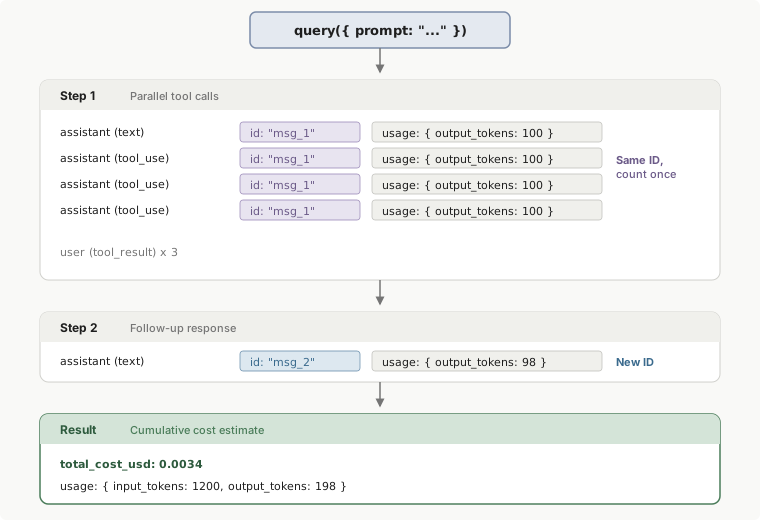
### Step 1: Each step produces assistant messages
When Claude responds, it sends one or more assistant messages. In TypeScript, each assistant message contains a nested `BetaMessage` (accessed via `message.message`) with an `id` and a [`usage`](../04-API-Reference/Other/api-messages-2dd213ca95.md) object with token counts (`input_tokens`, `output_tokens`). In Python, the `AssistantMessage` dataclass exposes the same data directly via `message.usage` and `message.message_id`. When Claude uses multiple tools in one turn, all messages in that turn share the same ID, so deduplicate by ID to avoid double-counting.
### Step 2: The result message provides the authoritative total
When the `query()` call completes, the SDK emits a result message with `total_cost_usd` and cumulative `usage`. This is available in both TypeScript ([`SDKResultMessage`](/en/agent-sdk/typescript#sdk-result-message)) and Python ([`ResultMessage`](/en/agent-sdk/python#result-message)). If you make multiple `query()` calls (for example, in a multi-turn session), each result only reflects the cost of that individual call. If you only need the total cost, you can ignore the per-step usage and read this single value.
## Get the total cost of a query
The result message ([TypeScript](/en/agent-sdk/typescript#sdk-result-message), [Python](/en/agent-sdk/python#result-message)) is the last message in every `query()` call. It includes `total_cost_usd`, the cumulative cost across all steps in that call. This works for both success and error results. If you use sessions to make multiple `query()` calls, each result only reflects the cost of that individual call.
The following examples iterate over the message stream from a `query()` call and print the total cost when the `result` message arrives:
### TypeScript
```typescript
import { query } from "@anthropic-ai/claude-agent-sdk";
for await (const message of query({ prompt: "Summarize this project" })) {
if (message.type === "result") {
console.log(`Total cost: $${message.total_cost_usd}`);
}
}
```
### Python
```python
from claude_agent_sdk import query, ResultMessage
import asyncio
async def main():
async for message in query(prompt="Summarize this project"):
if isinstance(message, ResultMessage):
print(f"Total cost: ${message.total_cost_usd or 0}")
asyncio.run(main())
```
## Track per-step and per-model usage
The examples in this section use TypeScript field names. In Python, the equivalent fields are [`AssistantMessage.usage`](/en/agent-sdk/python#assistant-message) and `AssistantMessage.message_id` for per-step usage, and [`ResultMessage.model_usage`](/en/agent-sdk/python#result-message) for per-model breakdowns.
### Track per-step usage
Each assistant message contains a nested `BetaMessage` (accessed via `message.message`) with an `id` and `usage` object with token counts. When Claude uses tools in parallel, multiple messages share the same `id` with identical usage data. Track which IDs you've already counted and skip duplicates to avoid inflated totals.
> **Warning:** Parallel tool calls produce multiple assistant messages whose nested `BetaMessage` shares the same `id` and identical usage. Always deduplicate by ID to get accurate per-step token counts.
The following example accumulates input and output tokens across all steps, counting each unique message ID only once:
```typescript
import { query } from "@anthropic-ai/claude-agent-sdk";
const seenIds = new Set<string>();
let totalInputTokens = 0;
let totalOutputTokens = 0;
for await (const message of query({ prompt: "Summarize this project" })) {
if (message.type === "assistant") {
const msgId = message.message.id;
// Parallel tool calls share the same ID, only count once
if (!seenIds.has(msgId)) {
seenIds.add(msgId);
totalInputTokens += message.message.usage.input_tokens;
totalOutputTokens += message.message.usage.output_tokens;
}
}
}
console.log(`Steps: ${seenIds.size}`);
console.log(`Input tokens: ${totalInputTokens}`);
console.log(`Output tokens: ${totalOutputTokens}`);
```
### Break down usage per model
The result message includes [`modelUsage`](/en/agent-sdk/typescript#model-usage), a map of model name to per-model token counts and cost. This is useful when you run multiple models (for example, Haiku for subagents and Opus for the main agent) and want to see where tokens are going.
The following example runs a query and prints the cost and token breakdown for each model used:
```typescript
import { query } from "@anthropic-ai/claude-agent-sdk";
for await (const message of query({ prompt: "Summarize this project" })) {
if (message.type !== "result") continue;
for (const [modelName, usage] of Object.entries(message.modelUsage)) {
console.log(`${modelName}: $${usage.costUSD.toFixed(4)}`);
console.log(` Input tokens: ${usage.inputTokens}`);
console.log(` Output tokens: ${usage.outputTokens}`);
console.log(` Cache read: ${usage.cacheReadInputTokens}`);
console.log(` Cache creation: ${usage.cacheCreationInputTokens}`);
}
}
```
## Accumulate costs across multiple calls
Each `query()` call returns its own `total_cost_usd`. The SDK does not provide a session-level total, so if your application makes multiple `query()` calls (for example, in a multi-turn session or across different users), accumulate the totals yourself.
The following examples run two `query()` calls sequentially, add each call's `total_cost_usd` to a running total, and print both the per-call and combined cost:
### TypeScript
```typescript
import { query } from "@anthropic-ai/claude-agent-sdk";
// Track cumulative cost across multiple query() calls
let totalSpend = 0;
const prompts = [
"Read the files in src/ and summarize the architecture",
"List all exported functions in src/auth.ts"
];
for (const prompt of prompts) {
for await (const message of query({ prompt })) {
if (message.type === "result") {
totalSpend += message.total_cost_usd;
console.log(`This call: $${message.total_cost_usd}`);
}
}
}
console.log(`Total spend: $${totalSpend.toFixed(4)}`);
```
### Python
```python
from claude_agent_sdk import query, ResultMessage
import asyncio
async def main():
# Track cumulative cost across multiple query() calls
total_spend = 0.0
prompts = [
"Read the files in src/ and summarize the architecture",
"List all exported functions in src/auth.ts",
]
for prompt in prompts:
async for message in query(prompt=prompt):
if isinstance(message, ResultMessage):
cost = message.total_cost_usd or 0
total_spend += cost
print(f"This call: ${cost}")
print(f"Total spend: ${total_spend:.4f}")
asyncio.run(main())
```
## Handle errors, caching, and token discrepancies
For accurate cost tracking, account for failed conversations, cache token pricing, and occasional reporting inconsistencies.
### Resolve output token discrepancies
In rare cases, you might observe different `output_tokens` values for messages with the same ID. When this occurs:
1. **Use the highest value:** the final message in a group typically contains the accurate total.
2. **Verify against total cost:** the `total_cost_usd` in the result message is authoritative.
3. **Report inconsistencies:** file issues at the [Claude Code GitHub repository](https://github.com/anthropics/claude-code/issues).
### Track costs on failed conversations
Both success and error result messages include `usage` and `total_cost_usd`. If a conversation fails mid-way, you still consumed tokens up to the point of failure. Always read cost data from the result message regardless of its `subtype`.
### Track cache tokens
The Agent SDK automatically uses [prompt caching](../10-Prompting-Guides/build-with-claude-prompt-caching.md) to reduce costs on repeated content. You do not need to configure caching yourself. The usage object includes two additional fields for cache tracking:
* `cache_creation_input_tokens`: tokens used to create new cache entries (charged at a higher rate than standard input tokens).
* `cache_read_input_tokens`: tokens read from existing cache entries (charged at a reduced rate).
Track these separately from `input_tokens` to understand caching savings. In TypeScript, these fields are typed on the [`Usage`](/en/agent-sdk/typescript#usage) object. In Python, they appear as keys in the [`ResultMessage.usage`](/en/agent-sdk/python#result-message) dict (for example, `message.usage.get("cache_read_input_tokens", 0)`).
## Related documentation
* [TypeScript SDK Reference](/en/agent-sdk/typescript) - Complete API documentation
* [SDK Overview](/en/agent-sdk/overview) - Getting started with the SDK
* [SDK Permissions](/en/agent-sdk/permissions) - Managing tool permissions